{"_id":"@4lolo/js-year-calendar","_rev":"3-a7d99fa2adf14dbb3872a03843fabb3c","name":"@4lolo/js-year-calendar","dist-tags":{"latest":"1.0.2"},"versions":{"1.0.0":{"name":"@4lolo/js-year-calendar","version":"1.0.0","description":"A fully customizable year calendar widget","main":"./dist/js-year-calendar.js","scripts":{"watch":"gulp watch","build":"gulp build","prepare":"npm run build && npm run test && npm run doc","test":"jest","doc":"typedoc src/ts/js-year-calendar.ts --out docs --mode file --target ES6 --excludePrivate --excludeProtected"},"pre-commit":["build","test"],"repository":{"type":"git","url":"git+https://github.com/year-calendar/js-year-calendar.git"},"keywords":["calendar","year","javascript","widget"],"author":{"name":"Paul-DS"},"license":"Apache-2.0","bugs":{"url":"https://github.com/year-calendar/js-year-calendar/issues"},"homepage":"https://year-calendar.github.io/","dependencies":{},"devDependencies":{"@babel/core":"^7.9.0","@babel/plugin-proposal-class-properties":"^7.8.3","@babel/plugin-transform-modules-umd":"^7.9.0","@babel/preset-env":"^7.9.0","@babel/preset-typescript":"^7.9.0","gulp":"^4.0.2","gulp-babel":"^8.0.0","gulp-clean-css":"^4.0.0","gulp-less":"^4.0.1","gulp-rename":"^1.4.0","gulp-typescript":"^5.0.1","gulp-uglify":"^3.0.1","jest":"^25.2.3","typedoc":"^0.17.3","typescript":"^3.8.3"},"jest":{"testMatch":["**/tests/*.[jt]s?(x)"],"collectCoverage":true},"directories":{"doc":"docs","test":"tests"},"gitHead":"627c76b555d564dc5e7bd3b586777655cf52d649","_id":"@4lolo/js-year-calendar@1.0.0","_nodeVersion":"14.5.0","_npmVersion":"6.14.5","dist":{"integrity":"sha512-APDtdBmC9KSZ9hasqKF8Dp96HxXFgekLgIDzZW1LNU4vECIYjBRB89Co2HJbPUxPHo5Aj/gMH8tqRDy80WMIGw==","shasum":"4ad3738dd6696918367295c08d4147bd879bd74c","tarball":"https://registry.npmjs.org/@4lolo/js-year-calendar/-/js-year-calendar-1.0.0.tgz","fileCount":128,"unpackedSize":1498013,"npm-signature":"-----BEGIN PGP SIGNATURE-----\r\nVersion: OpenPGP.js v3.0.13\r\nComment: https://openpgpjs.org\r\n\r\nwsFcBAEBCAAQBQJfv3lCCRA9TVsSAnZWagAAGSgQAIbbz2FnQ20dMo9Cc/qj\ndWhJ6aP6Bzc/2FnrKYAXPKRbxJfjhXTXjZ6aHfdH5sfbg+o//DMRlD0lahGg\nU1At75gH86bi3nZ9ogay6dkPjGj6xZM7KHocPIpW8wBcVxFnviSQOkWRL9CQ\nDeLS6CIje4saA+bEmsOia0mFfDJndQuv0N/lGIbFV9C4JZmOiWLGD4ud2fV9\n0OMJAMoKqdJIdDZnXla+ISXDIeJQ9P5ixjUOidvEMIajbTzA+u8Z0u5VquS7\nR3D7SRMeAeS95VoGzuTe8h3FeU+KWtcBmKNlE4UIwOTUEs6oa9n/v1w1wlpO\ncQqlfW2uHqPnydcYhCmAhQUv0+TK56NmAqXoz2MLOer/ye0hDGrKOmTtUsvn\nDNBizfia349ohWJaCjhqTLz8jx0rbOs1TDwi8iqGmJmpCMKF02wlx9skklO2\np52D/RI+J3taAkzHONM4QuvMN8MhyPiKA1LrH4LV9pLwNSucJTAEC8BM3Fg4\nonOIzermvgJjr6nNHobJDtBDr33o3ZLdVC/Dmm1Yfzek0I9lyKbVFKDBvBaW\nzKJcw56F9wmgS8r6ReHQxw8waMF8prtmkc2H5cUlcUHZOwSaoujLsQ0IyTiw\nYhl//h6lJjBW/A0NnwTh0J0V4MxjaAV+EEeMwSlLfIDuzmnUohuyNHRAdSHX\nKcf9\r\n=M9TR\r\n-----END PGP SIGNATURE-----\r\n","signatures":[{"keyid":"SHA256:jl3bwswu80PjjokCgh0o2w5c2U4LhQAE57gj9cz1kzA","sig":"MEYCIQCqo7EcZ0JXJc65IsMeQX7MWa/6ytLStJq6Ko0SVlTkGgIhAMSTwY8TC3/kI2BsoZOch/QA/gedUAwrgTLuayInarKX"}]},"_npmUser":{"name":"4lolo","email":"krzysztofwojcicki@gmail.com"},"maintainers":[{"name":"4lolo","email":"krzysztofwojcicki@gmail.com"}],"_npmOperationalInternal":{"host":"s3://npm-registry-packages","tmp":"tmp/js-year-calendar_1.0.0_1606383937856_0.7976065520089313"},"_hasShrinkwrap":false},"1.0.1":{"name":"@4lolo/js-year-calendar","version":"1.0.1","description":"A fully customizable year calendar widget","main":"./dist/js-year-calendar.js","scripts":{"watch":"gulp watch","build":"gulp build","prepare":"npm run build && npm run test && npm run doc","test":"jest","doc":"typedoc src/ts/js-year-calendar.ts --out docs --mode file --target ES6 --excludePrivate --excludeProtected"},"pre-commit":["build","test"],"repository":{"type":"git","url":"git+https://github.com/year-calendar/js-year-calendar.git"},"keywords":["calendar","year","javascript","widget"],"author":{"name":"Paul-DS"},"license":"Apache-2.0","bugs":{"url":"https://github.com/year-calendar/js-year-calendar/issues"},"homepage":"https://year-calendar.github.io/","dependencies":{},"devDependencies":{"@babel/core":"^7.9.0","@babel/plugin-proposal-class-properties":"^7.8.3","@babel/plugin-transform-modules-umd":"^7.9.0","@babel/preset-env":"^7.9.0","@babel/preset-typescript":"^7.9.0","gulp":"^4.0.2","gulp-babel":"^8.0.0","gulp-clean-css":"^4.0.0","gulp-less":"^4.0.1","gulp-rename":"^1.4.0","gulp-typescript":"^5.0.1","gulp-uglify":"^3.0.1","jest":"^25.2.3","typedoc":"^0.17.3","typescript":"^3.8.3"},"jest":{"testMatch":["**/tests/*.[jt]s?(x)"],"collectCoverage":true},"directories":{"doc":"docs","test":"tests"},"gitHead":"9fb5344f35560bbd2dea80d152fbe09e87c92754","_id":"@4lolo/js-year-calendar@1.0.1","_nodeVersion":"14.5.0","_npmVersion":"6.14.5","dist":{"integrity":"sha512-QlRNgst/ZOcvYUczPkZqqWBZsnRFZHiQOdV9OVoFZOR2J+djJ9N+t0zQgYBAdmGjh8f4gfc8G01qGJQWZx4r9g==","shasum":"905295dc23b265d7c410f62e8eda7b26fca0e1ef","tarball":"https://registry.npmjs.org/@4lolo/js-year-calendar/-/js-year-calendar-1.0.1.tgz","fileCount":135,"unpackedSize":1507085,"npm-signature":"-----BEGIN PGP SIGNATURE-----\r\nVersion: OpenPGP.js v3.0.13\r\nComment: https://openpgpjs.org\r\n\r\nwsFcBAEBCAAQBQJfv4VrCRA9TVsSAnZWagAA7zwQAKJVyDLmzKrOtQ0N0a0F\nZ9PbfPgQMurlCZF0pExtAz6P9wNaJ3BNvUcVRmp5Y+FqrbsN9EeRvqlSpJtP\n9VRhXC8+BlgwCKgSJVUHlolp9Jn20lA7sx6DYjErsP1ZitGolwNHbq+gQRZX\nqJAMNf5m17nyV4wA00g4fGy9PcSlk17O8GTa7FBhD+/B3kXdWZn/P1VEfb1r\nxRqaZ/el66LxjASefRSShwuTlhNM7TTgwfHXKETxEX9WPYJKjoatAFeJ5phT\neqahIXYWeL8uyidWGwLCmC4pXGMB8YDGUsWaWG9yC8dV6MiyAio61FL/3B4p\nn0CELwT56Mg/LqY8J4qWzTmJfykL9ipeQehtfo9a7ToSBCz7fehhgE5F+JzW\nzB67EOci7YuGiO4RIat2DwkWi7bd60xaDh087B/PULZyK51PM9RY2G46Vpz5\noJIe8hauaJVJ2VF+3K7K/skLmjm75m3p7guEc36gb4dpUtpIHkXS/b6/rsQr\n6FP4cKWsPDXmfacX7QmiV/JTpgBr9wYBWBRIZK9z1Z62M8rto2/H9Rb9CEjF\nWYUOGrTemXNGP1MtdSdRcJPAw1LJgCeuAcU1M0XFWu/jtxaPfXlX29Cry9gL\nDLBJ/+4gfvqo0XFqNqG7S/g1Ony/cwnDGag+04dS/LbIac2AkLdjdBU73EbX\nnq3V\r\n=le+G\r\n-----END PGP SIGNATURE-----\r\n","signatures":[{"keyid":"SHA256:jl3bwswu80PjjokCgh0o2w5c2U4LhQAE57gj9cz1kzA","sig":"MEQCIAwFhkKTRkKKXFtgDFiMiqRWIQZNFbuMg+g2S2awdwefAiBRcyPIGWlyj95UOc29fwgmYYaG70virYdWz5s6JKH1Mg=="}]},"_npmUser":{"name":"4lolo","email":"krzysztofwojcicki@gmail.com"},"maintainers":[{"name":"4lolo","email":"krzysztofwojcicki@gmail.com"}],"_npmOperationalInternal":{"host":"s3://npm-registry-packages","tmp":"tmp/js-year-calendar_1.0.1_1606387050793_0.9008335706260406"},"_hasShrinkwrap":false},"1.0.2":{"name":"@4lolo/js-year-calendar","version":"1.0.2","description":"A fully customizable year calendar widget","main":"./dist/js-year-calendar.js","scripts":{"watch":"gulp watch","build":"gulp build","prepare":"npm run build && npm run test && npm run doc","test":"jest","doc":"typedoc src/ts/js-year-calendar.ts --out docs --mode file --target ES6 --excludePrivate --excludeProtected"},"pre-commit":["build","test"],"repository":{"type":"git","url":"git+https://github.com/year-calendar/js-year-calendar.git"},"keywords":["calendar","year","javascript","widget"],"author":{"name":"Paul-DS"},"license":"Apache-2.0","bugs":{"url":"https://github.com/year-calendar/js-year-calendar/issues"},"homepage":"https://year-calendar.github.io/","dependencies":{},"devDependencies":{"@babel/core":"^7.9.0","@babel/plugin-proposal-class-properties":"^7.8.3","@babel/plugin-transform-modules-umd":"^7.9.0","@babel/preset-env":"^7.9.0","@babel/preset-typescript":"^7.9.0","gulp":"^4.0.2","gulp-babel":"^8.0.0","gulp-clean-css":"^4.0.0","gulp-less":"^4.0.1","gulp-rename":"^1.4.0","gulp-typescript":"^5.0.1","gulp-uglify":"^3.0.1","jest":"^25.2.3","typedoc":"^0.17.3","typescript":"^3.8.3"},"jest":{"testMatch":["**/tests/*.[jt]s?(x)"],"collectCoverage":true},"directories":{"doc":"docs","test":"tests"},"gitHead":"9fb5344f35560bbd2dea80d152fbe09e87c92754","_id":"@4lolo/js-year-calendar@1.0.2","_nodeVersion":"14.5.0","_npmVersion":"6.14.5","dist":{"integrity":"sha512-ZIJFFcq3ZP0bZ68JWCRMafsv+wTUniA9rsxe3BaZKmaTUMDNd5DwekZiJ7GtTD3iZbW+DgpUS5g6jCvi0iWSLQ==","shasum":"246830560014ed17a049193c4f449db433850950","tarball":"https://registry.npmjs.org/@4lolo/js-year-calendar/-/js-year-calendar-1.0.2.tgz","fileCount":135,"unpackedSize":1512643,"npm-signature":"-----BEGIN PGP SIGNATURE-----\r\nVersion: OpenPGP.js v3.0.13\r\nComment: https://openpgpjs.org\r\n\r\nwsFcBAEBCAAQBQJfv7B2CRA9TVsSAnZWagAAR44P/2LoSuWdILd4+ESv1Zk6\n3Qqv12XsMQXUbStvHmbgRes/q68yWWf6RM4H2ECIfKhe0LLR9P0aOHcEsBPa\nLOAZOYYEKAi9eYFMqSVuxS/fT7WSfKExbr8utAn3+3LRXaEDwYqbePEwEB4o\nvo2Tqjm5mrA5oRnFQas+4oYDhiAl9QqvcTBXZ7JHVT6KhThj39o6RSXqJjls\nackT+UaOTGFlT0WIGDyHwUdQNpsArR/bHToS7L9SDjuAkpZXwHicdMyVtbGH\n92ysdJ7mnAm4gIlKgAAR14J4Jj9CPY6siIahF8xr8o9E7NFbUZtIkMGlUCGH\nLps/aD6Pw8Veb8PSixalQBLORNLrP1ZXO8bo/ToPIlS+cF3N1mIP6UbZZ2e1\nal6lIrpybmtoXR+arSUEPFVoBWug259IqxrohhHxjZPYMM68XInxmfJJRphe\ncuh0kG1ByjkBWFbCdycfg5hMIM25kojO55C8o4/kW/klkJfAWOVXrQAsRFUm\ncVZPME7oP2vni1ZlavtSj7jZugDmpAYCHgdcK+HDMA+i41zZqQWXXGCphjTz\nBHD3dLSNSRVn4aSv/rLYJY2Rehy24GiDbbSf6hRFk3ArZ39P1aY6l0Xupnoe\nrMZB44c5CgHsgEPotBQX1sWf0ieTyfP4GMWFxaXdAFIpb0UrXrwGWP1I/yqg\nd1sB\r\n=XrkV\r\n-----END PGP SIGNATURE-----\r\n","signatures":[{"keyid":"SHA256:jl3bwswu80PjjokCgh0o2w5c2U4LhQAE57gj9cz1kzA","sig":"MEYCIQCuWKFwtv/O6yIJcb0dVDFhwq9u6c6qww1XbyzOhm0zaAIhALtHhW09uoqoC4/tWrmtfRnLxYAKlX43HdctCEUbD17U"}]},"_npmUser":{"name":"4lolo","email":"krzysztofwojcicki@gmail.com"},"maintainers":[{"name":"4lolo","email":"krzysztofwojcicki@gmail.com"}],"_npmOperationalInternal":{"host":"s3://npm-registry-packages","tmp":"tmp/js-year-calendar_1.0.2_1606398070047_0.40671941695634106"},"_hasShrinkwrap":false}},"time":{"created":"2020-11-26T09:45:37.814Z","1.0.0":"2020-11-26T09:45:38.116Z","modified":"2022-04-04T10:47:14.965Z","1.0.1":"2020-11-26T10:37:30.987Z","1.0.2":"2020-11-26T13:41:10.312Z"},"maintainers":[{"name":"4lolo","email":"krzysztofwojcicki@gmail.com"}],"description":"A fully customizable year calendar widget","homepage":"https://year-calendar.github.io/","keywords":["calendar","year","javascript","widget"],"repository":{"type":"git","url":"git+https://github.com/year-calendar/js-year-calendar.git"},"author":{"name":"Paul-DS"},"bugs":{"url":"https://github.com/year-calendar/js-year-calendar/issues"},"license":"Apache-2.0","readme":"# js-year-calendar\r\nA fully customizable year calendar widget\r\n\r\n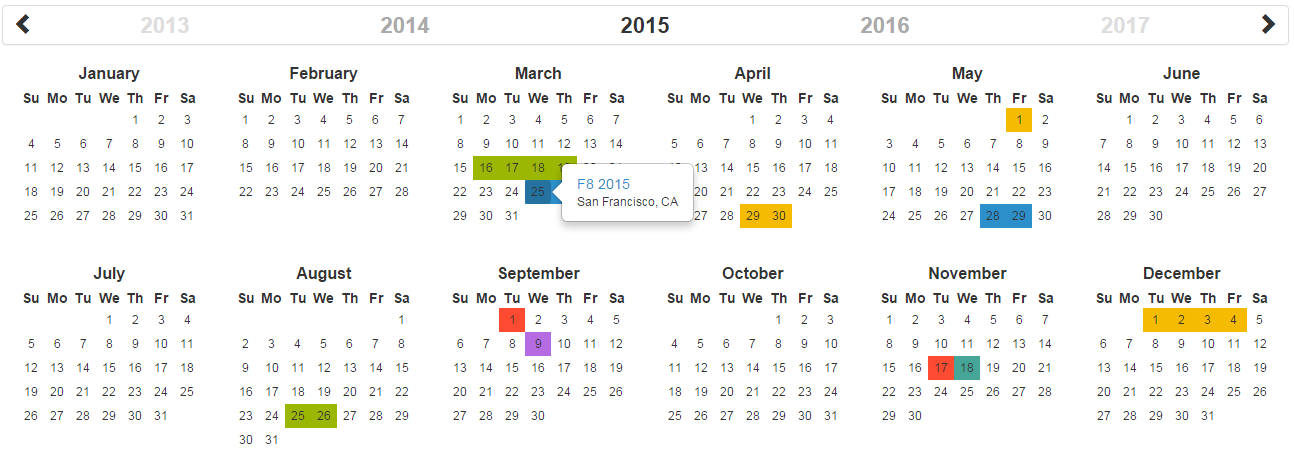\r\n\r\n[](https://circleci.com/gh/year-calendar/js-year-calendar/tree/master)\r\n[](https://codecov.io/gh/year-calendar/js-year-calendar)\r\n[](https://www.npmjs.com/package/js-year-calendar)\r\n\r\nThis library is also available for:\r\n\r\n[](https://github.com/year-calendar/rc-year-calendar) \r\n[](https://github.com/year-calendar/v-year-calendar)\r\n\r\n## Requirements\r\n\r\nThis plugin uses pure javascript. No library is required.\r\n\r\n## Installation\r\n\r\nYou can get the widget using the following methods:\r\n- From the [GitHub repository](https://github.com/year-calendar/js-year-calendar/releases)\r\n- From the Node package manager, using the following command: `npm install js-year-calendar`\r\n- From Yarn, using the following command: `yarn add js-year-calendar`\r\n- From the CDN, by adding the following script directly in your HTML page:\r\n\r\n``\r\n\r\nAND\r\n\r\n``\r\n\r\n## Initialization\r\n\r\nIf you're using javascript modules, don't forget to import the library:\r\n\r\n```\r\nimport Calendar from 'js-year-calendar';\r\nimport 'js-year-calendar/dist/js-year-calendar.css';\r\n```\r\n\r\n## Usage\r\n\r\nYou can create a calendar using the following javascript code :\r\n```\r\nnew Calendar('.calendar')\r\n```\r\n\r\nOr\r\n\r\n```\r\nnew Calendar(document.querySelector('.calendar'));\r\n```\r\n\r\nWhere `.calendar` is the selector of a `DIV` element that should contain your calendar.\r\n\r\nYou can also use the following HTML if you don't want to use javascript to initialize the calendar\r\n```\r\n\r\n```\r\nThe calendar will be automatically created when the page will finish loading\r\n\r\n## Using options\r\n\r\nYou can specify options to customize the calendar:\r\n```\r\nnew Calendar('.calendar', {\r\n style: 'background',\r\n minDate: new Date()\r\n})\r\n```\r\n\r\nYou can find the exhaustive list of options in the [documentation](https://year-calendar.github.io/js-year-calendar/documentation).\r\n\r\n## Language\r\n\r\nIf you want to use the calendar in a different language, you should import the locale file corresponding to the language you want to use, and then set the `language` prop of the calendar:\r\n\r\n```\r\nimport Calendar from 'js-year-calendar';\r\nimport 'js-year-calendar/locales/js-year-calendar.fr';\r\n```\r\n\r\nOR\r\n\r\n```\r\n\r\n\r\n```\r\n\r\nThen\r\n\r\n```\r\nnew Calendar('.calendar', {\r\n language: 'fr'\r\n})\r\n```\r\n\r\nThe list of available languages is available [here](https://github.com/year-calendar/js-year-calendar/tree/master/locales)\r\n\r\n## Updating calendar\r\n\r\nYou can update the calendar after being instantiated:\r\n```\r\nconst calendar = new Calendar('.calendar');\r\n\r\ncalendar.setStyle('background');\r\ncalendar.setMaxDate(new Date());\r\n```\r\n\r\nYou can find the exhaustive list of methods in the [documentation](https://year-calendar.github.io/js-year-calendar/documentation).\r\n\r\n## Events\r\n\r\nYou can bind events to the calendar at initialization\r\n```\r\nconst calendar = new Calendar('.calendar', {\r\n clickDay: function(e) {\r\n alert('Click on day ' + e.date.toString());\r\n }\r\n});\r\n```\r\n\r\nor later\r\n\r\n```\r\nnew Calendar('.calendar');\r\ndocument.querySelector('.calendar').addEventListener('clickDay', function(e) {\r\n alert('Click on day ' + e.date.toString());\r\n});\r\n```\r\n\r\nYou can find the exhaustive list of events in the [documentation](https://year-calendar.github.io/js-year-calendar/documentation).\r\n\r\n## Migrating from bootstrap-year-calendar\r\n\r\nThis widget is based on the [bootstrap-year-calendar](https://github.com/Paul-DS/bootstrap-year-calendar) widget.\r\nIf you were using this widget, these are the modifications to apply to successfully migrate your project:\r\n\r\n### Initialization\r\n\r\nThe project doesn't use jQuery anymore, so the initialization of the calendar will be using pure Javascript.\r\n\r\nThe old code:\r\n```\r\n$('.calendar').calendar({ /* Options */ })\r\n```\r\n\r\nWill be replaced by:\r\n```\r\nnew Calendar('.calendar', { /* Options */ });\r\n```\r\n\r\nOr \r\n\r\n```\r\nnew Calendar($('.calendar').get(0), { /* Options */ });\r\n// Use \".get(0)\" to get the DOM element from the jQuery element\r\n```\r\n\r\n### Get the calendar from the DOM element\r\n\r\nGiven that the widget doesn't rely on jQuery, it won't be possible to get the calendar instance from the DOM element anymore:\r\n```\r\n$('.calendar').data('calendar').set...();\r\n```\r\n\r\nYou will have to store the instance of the calendar by yourself:\r\n```\r\nconst calendar = new Calendar('.calendar');\r\n\r\n...\r\n\r\ncalendar.set...();\r\n```\r\n\r\n## What next\r\n\r\nCheck the [documentation](https://year-calendar.github.io/js-year-calendar/documentation) and [examples](https://year-calendar.github.io/rc-year-calendar/examples) pages to discover all the functionalities.","readmeFilename":"README.md"}