{"_id":"@abutkeev/webauthn","_rev":"1-cadcc85767e0689688c2663773b591a0","name":"@abutkeev/webauthn","dist-tags":{"latest":"1.2.8"},"versions":{"1.2.7":{"name":"@abutkeev/webauthn","version":"1.2.7","description":"A small wrapper around the webauthn protocol to make one's life easier.","main":"dist/cjs/index.js","types":"dist/cjs/index.d.ts","scripts":{"build":"tsc","test":"jest","dev":"http-server"},"repository":{"type":"git","url":"git+https://github.com/abutkeev/webauthn.git"},"keywords":["authentication","webauthn","passkeys","passwordless"],"author":{"name":"Arnaud Dagnelies"},"license":"MIT","bugs":{"url":"https://github.com/abutkeev/webauthn/issues"},"homepage":"https://webauthn.passwordless.id","devDependencies":{"@babel/preset-typescript":"^7.21.4","@types/jest":"^29.2.3","http-server":"^14.1.1","jest":"^29.3.1","jest-environment-jsdom":"^29.3.1","jest-ts-webcompat-resolver":"^1.0.0","ts-jest":"^29.0.3","typescript":"^4.8.3"},"gitHead":"829c793baaf60e2ca9e9f8806764f9ca4698133c","_id":"@abutkeev/webauthn@1.2.7","_nodeVersion":"18.16.1","_npmVersion":"9.5.1","dist":{"integrity":"sha512-cv3vdspKHnaDha6WuCH6FM8uipsIs+V6LIO7h08u9IUTTQT0mSMRmMOJ5gkdAirhbR0gq/gBc8yaMCQPIjEauA==","shasum":"fbd7005a1166a8bcc5da9d3636017c678889044e","tarball":"https://registry.npmjs.org/@abutkeev/webauthn/-/webauthn-1.2.7.tgz","fileCount":36,"unpackedSize":380999,"signatures":[{"keyid":"SHA256:jl3bwswu80PjjokCgh0o2w5c2U4LhQAE57gj9cz1kzA","sig":"MEUCIQDVX5rQrPUrtyHNmPKiQ3u5jso9rPnIZo90PlQBAdRsQwIgORFt7OZ4UyGA4EmYNdOyW+R8LH76a8Vx4R7F2grfbcg="}]},"_npmUser":{"name":"abutkeev","email":"abutkeev@abutkeev.ru"},"directories":{},"maintainers":[{"name":"abutkeev","email":"abutkeev@abutkeev.ru"}],"_npmOperationalInternal":{"host":"s3://npm-registry-packages","tmp":"tmp/webauthn_1.2.7_1695175113381_0.233762542439655"},"_hasShrinkwrap":false},"1.2.8":{"name":"@abutkeev/webauthn","version":"1.2.8","description":"A small wrapper around the webauthn protocol to make one's life easier.","main":"dist/cjs/index.js","types":"dist/cjs/index.d.ts","scripts":{"build":"tsc","test":"jest","dev":"http-server"},"repository":{"type":"git","url":"git+https://github.com/abutkeev/webauthn.git"},"keywords":["authentication","webauthn","passkeys","passwordless"],"author":{"name":"Arnaud Dagnelies"},"license":"MIT","bugs":{"url":"https://github.com/abutkeev/webauthn/issues"},"homepage":"https://webauthn.passwordless.id","devDependencies":{"@babel/preset-typescript":"^7.21.4","@types/jest":"^29.2.3","http-server":"^14.1.1","jest":"^29.3.1","jest-environment-jsdom":"^29.3.1","jest-ts-webcompat-resolver":"^1.0.0","ts-jest":"^29.0.3","typescript":"^4.8.3"},"gitHead":"2e1512dd791a489b7fb2931e93e73f9e0f337e0d","_id":"@abutkeev/webauthn@1.2.8","_nodeVersion":"18.16.1","_npmVersion":"9.5.1","dist":{"integrity":"sha512-n5lHUg71EPI9pGvJzbB748TCenV1BoiY6f3Z+f7OeICYgQDtP6wk2wnOkqmIJBoTw50PV9G00o374Dv3iciryQ==","shasum":"6ab2e442ac6248fa40ab0d420ef64ad7db02389f","tarball":"https://registry.npmjs.org/@abutkeev/webauthn/-/webauthn-1.2.8.tgz","fileCount":35,"unpackedSize":116278,"signatures":[{"keyid":"SHA256:jl3bwswu80PjjokCgh0o2w5c2U4LhQAE57gj9cz1kzA","sig":"MEQCIH+561u6wl5hrP/e7jxJZmRLwiaUwv3LgKXVKdLoIBmTAiAQOFC5aZc0gctrNMh3eY0aTfEE3Ce74hDVI5BiPszYJg=="}]},"_npmUser":{"name":"abutkeev","email":"abutkeev@abutkeev.ru"},"directories":{},"maintainers":[{"name":"abutkeev","email":"abutkeev@abutkeev.ru"}],"_npmOperationalInternal":{"host":"s3://npm-registry-packages","tmp":"tmp/webauthn_1.2.8_1695178894594_0.762771333345728"},"_hasShrinkwrap":false}},"time":{"created":"2023-09-20T01:58:33.207Z","1.2.7":"2023-09-20T01:58:33.636Z","modified":"2023-09-20T03:01:34.972Z","1.2.8":"2023-09-20T03:01:34.799Z"},"maintainers":[{"name":"abutkeev","email":"abutkeev@abutkeev.ru"}],"description":"A small wrapper around the webauthn protocol to make one's life easier.","homepage":"https://webauthn.passwordless.id","keywords":["authentication","webauthn","passkeys","passwordless"],"repository":{"type":"git","url":"git+https://github.com/abutkeev/webauthn.git"},"author":{"name":"Arnaud Dagnelies"},"bugs":{"url":"https://github.com/abutkeev/webauthn/issues"},"license":"MIT","readme":"Passwordless.ID / webauthn\n==========================\n\nA greatly simplified and opinionated wrapper to invoke the [webauthn protocol](https://w3c.github.io/webauthn/) more conveniently.\nIt is an [open source](https://github.com/passwordless-id/webauthn), minimalistik (11kb) and dependency-free library.\n\n \n\n> This library is used in [Passwordless.ID](https://passwordless.id), a free public identity provider based on WebAuthn.\n\nTry out the playground to see how this library works:\n\n- [Testing Playground](https://webauthn.passwordless.id/demos/playground.html)\n\n---\n\nOther demos with minial examples:\n\n- [Basic Demo](https://webauthn.passwordless.id/demos/basic.html)\n- [Minimal Example (CDN)](https://webauthn.passwordless.id/demos/example-cdn.html)\n- [Minimal Example (repository)](https://webauthn.passwordless.id/demos/example-raw.html)\n\nGitHub: https://github.com/passwordless-id/webauthn\n\n\nHow does the protocol work?\n---------------------------\n\nThis diagram shows how the webauthn protocol works, slightly simplified.\n\n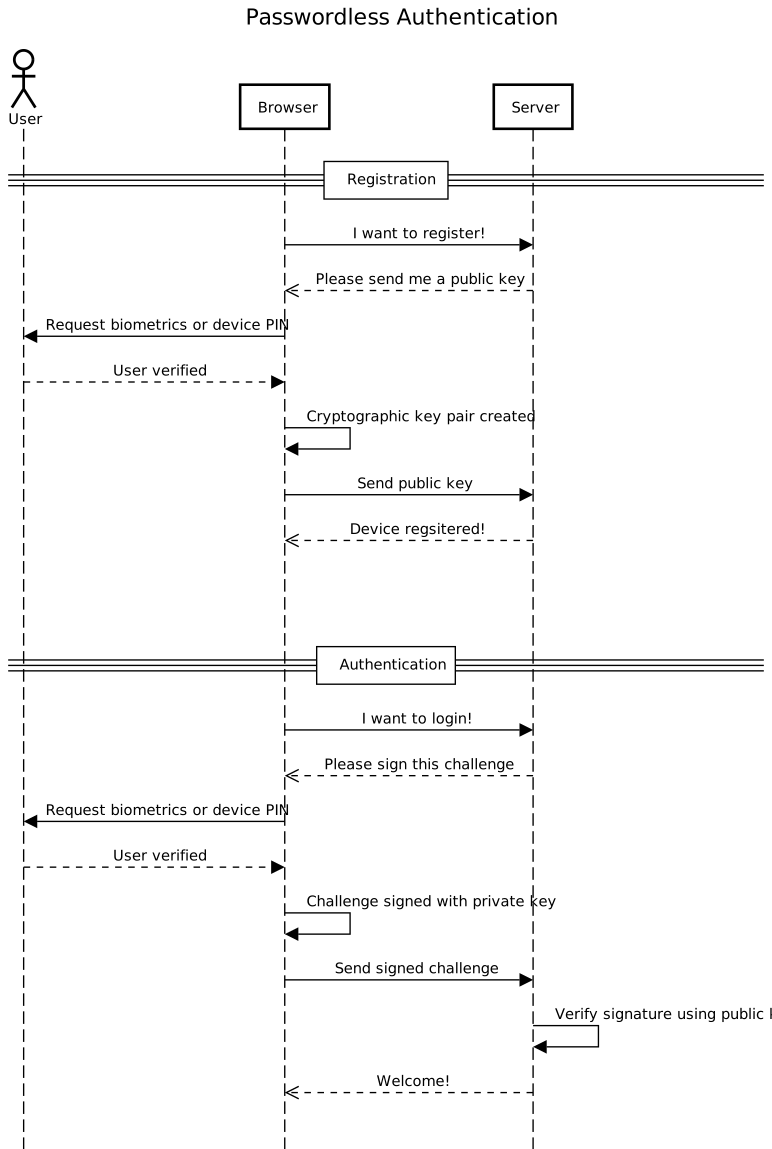\n\nFurther documentation about the protocol can be found in the webauthn guide at [Passwordless.ID](https://passwordless.id).\n\n\n\nInstallation / Usage\n--------------------\n\n### NPM\n\n```bash\nnpm install @passwordless-id/webauthn\n```\n\n```js\nimport * as webauthn from '@passwordless-id/webauthn'\n```\n\n### Browser\n\n```html\n\n```\n### Import\n\nThe `webauthn` module is basically a \"bundle\" composed of the following modules:\n\n- `client`: used for invoking webauthn in the browser\n- `server`: used for verifying responses in the server\n- `parsers`: used to parse part or all of the encoded data without verifications\n- `utils`: various encoding, decoding, challenge generator and other utils\n\nIt was designed that way so that you can import only the module(s) you need. That way, the size of your final js bundle is reduced even further. Importing all is dependency free and < 10kb anyway.\n\nSo you might for example `import { client } from '@passwordless-id/webauthn'` for browser side stuff and `import { server } from '@passwordless-id/webauthn'` for server side stuff.\n\n### Runs in...\n\n- In Chrome, Edge, Safari (*Firefox is still missing a [piece](https://github.com/passwordless-id/webauthn/issues/18)*)\n- NodeJS **19+** (because the `WebCrypto` is only available as `crypto` global starting from node 19!)\n- Cloudflare Workers\n- Probably in most recent browsers/servers\n\n\nUtilities\n---------\n\n```js\nimport { client } from '@passwordless-id/webauthn' \n\nclient.isAvailable()\n```\n\nReturns `true` or `false` depending on whether the Webauthn protocol is available on this platform/browser.\nParticularly linux and \"exotic\" web browsers might not have support yet.\n\n---\n\n```js\nawait client.isLocalAuthenticator()\n```\n\nThis promise returns `true` or `false` depending on whether the device itself can act as authenticator. Otherwise, a \"roaming\" authenticator like a smartphone or usb security key can be used. This information is mainly used for information messages and user guidance.\n\n\n\nRegistration\n------------\n\n### Overview\n\nThe registration process occurs in four steps:\n\n1. The browser requests a challenge from the server\n2. The browser triggers `client.register(...)` and sends the result to the server\n3. The server parses and verifies the registration payload\n4. The server stores the credential key of this device for the user account\n\nNote that unlike traditionnal authentication, the credential key is attached to the device. Therefore, it might make sense for a single user account to have multiple credential keys.\n\n\n### 1. Requesting challenge\n\nThe challenge is basically a [nonce](https://en.wikipedia.org/wiki/nonce) to avoid replay attacks.\n\n```\nconst challenge = /* request it from server */\n```\n\nRemember it on the server side during a certain amount of time and \"consume\" it once used.\n\n### 2. Trigger registration in browser\n\nExample call:\n\n```js\nimport { client } from '@passwordless-id/webauthn' \n\nconst challenge = \"a7c61ef9-dc23-4806-b486-2428938a547e\"\nconst registration = await client.register(\"Arnaud\", challenge, {\n authenticatorType: \"auto\",\n userVerification: \"required\",\n timeout: 60000,\n attestation: false,\n userHandle: \"recommended to set it to a random 64 bytes value\",\n debug: false\n})\n```\n\nParameters:\n\n- `username`: The desired username.\n- `challenge`: A server-side randomly generated string.\n- `options`: See [below](#options).\n\nThe `registration` object looks like this:\n\n```json\n{\n \"username\": \"Arnaud\",\n \"credential\": {\n \"id\": \"3924HhJdJMy_svnUowT8eoXrOOO6NLP8SK85q2RPxdU\",\n \"publicKey\": \"MFkwEwYHKoZIzj0CAQYIKoZIzj0DAQcDQgAEgyYqQmUAmDn9J7dR5xl-HlyAA0R2XV5sgQRnSGXbLt_xCrEdD1IVvvkyTmRD16y9p3C2O4PTZ0OF_ZYD2JgTVA==\",\n \"algorithm\": \"ES256\"\n },\n \"authenticatorData\": \"SZYN5YgOjGh0NBcPZHZgW4_krrmihjLHmVzzuoMdl2NFAAAAAAiYcFjK3EuBtuEw3lDcvpYAIN_duB4SXSTMv7L51KME_HqF6zjjujSz_EivOatkT8XVpQECAyYgASFYIIMmKkJlAJg5_Se3UecZfh5cgANEdl1ebIEEZ0hl2y7fIlgg8QqxHQ9SFb75Mk5kQ9esvadwtjuD02dDhf2WA9iYE1Q=\",\n \"clientData\": \"eyJ0eXBlIjoid2ViYXV0aG4uY3JlYXRlIiwiY2hhbGxlbmdlIjoiYTdjNjFlZjktZGMyMy00ODA2LWI0ODYtMjQyODkzOGE1NDdlIiwib3JpZ2luIjoiaHR0cDovL2xvY2FsaG9zdDo4MDgwIiwiY3Jvc3NPcmlnaW4iOmZhbHNlfQ==\"\n}\n```\n\nThen simply send this object as JSON to the server.\n\n### 3. Verify it server side\n\n\n```js\nimport { server } from '@passwordless-id/webauthn' \n\nconst expected = {\n challenge: \"a7c61ef9-dc23-4806-b486-2428938a547e\", // whatever was randomly generated by the server\n origin: \"http://localhost:8080\",\n}\nconst registrationParsed = await server.verifyRegistration(registration, expected)\n```\n\nEither this operation fails and throws an Error, or the verification is successful and returns the parsed registration.\nExample result:\n\n```json\n{\n \"username\": \"Arnaud\",\n \"credential\": {\n \"id\": \"3924HhJdJMy_svnUowT8eoXrOOO6NLP8SK85q2RPxdU\",\n \"publicKey\": \"MFkwEwYHKoZIzj0CAQYIKoZIzj0DAQcDQgAEgyYqQmUAmDn9J7dR5xl-HlyAA0R2XV5sgQRnSGXbLt_xCrEdD1IVvvkyTmRD16y9p3C2O4PTZ0OF_ZYD2JgTVA==\",\n \"algorithm\": \"ES256\"\n },\n \"authenticator\": {\n ...\n \"name\": \"Windows Hello Hardware Authenticator\"\n },\n ...\n}\n```\n\n> **NOTE:** Currently, the *attestation* which proves the exact model type of the authenticator is *not verified*. [Do I need attestation?](https://medium.com/webauthnworks/webauthn-fido2-demystifying-attestation-and-mds-efc3b3cb3651)\n\n### 4. Store the credential key\n\nThe credential key is the most important part and should be stored in a database for later since it will be used to verify the authentication signature.\n\n```json\n\"credential\": {\n \"id\": \"3924HhJdJMy_svnUowT8eoXrOOO6NLP8SK85q2RPxdU\",\n \"publicKey\": \"MFkwEwYHKoZIzj0CAQYIKoZIzj0DAQcDQgAEgyYqQmUAmDn9J7dR5xl-HlyAA0R2XV5sgQRnSGXbLt_xCrEdD1IVvvkyTmRD16y9p3C2O4PTZ0OF_ZYD2JgTVA==\",\n \"algorithm\": \"ES256\"\n},\n```\n\nPlease note that unlike traditional systems, a user might have multiple credential keys, one per device.\n\n\n\nAuthentication\n--------------\n\n### Overview\n\nThere are two kinds of authentications possible:\n\n- by providing a list of allowed credential IDs\n- by letting the platform offer a default UI to select the user and its credential\n\nBoth have their pros & cons (TODO: article).\n\nThe authentication procedure is similar to the procedure and divided in four steps.\n\n1. The browser requests a challenge from the server\n2. The browser triggers `client.authenticate(...)` and sends the result to the server\n3. The server loads the credential key used for authentication\n4. The server parses and verifies the authentication payload\n\n\n\n\n### 1. Requesting challenge\n\nThe challenge is basically a [nonce](https://en.wikipedia.org/wiki/nonce) to avoid replay attacks.\n\n```\nconst challenge = /* request it from server */\n```\n\nRemember it on the server side during a certain amount of time and \"consume\" it once used.\n\n### 2. Trigger authentication in browser\n\nExample call:\n\n```js\nimport { client } from '@passwordless-id/webauthn'\n\nconst challenge = \"56535b13-5d93-4194-a282-f234c1c24500\"\nconst authentication = await client.authenticate([\"3924HhJdJMy_svnUowT8eoXrOOO6NLP8SK85q2RPxdU\"], challenge, {\n \"authenticatorType\": \"auto\",\n \"userVerification\": \"required\",\n \"timeout\": 60000\n})\n```\n\nExample response:\n\n```json\n{\n \"credentialId\": \"3924HhJdJMy_svnUowT8eoXrOOO6NLP8SK85q2RPxdU\",\n \"authenticatorData\": \"SZYN5YgOjGh0NBcPZHZgW4_krrmihjLHmVzzuoMdl2MFAAAAAQ==\",\n \"clientData\": \"eyJ0eXBlIjoid2ViYXV0aG4uZ2V0IiwiY2hhbGxlbmdlIjoiNTY1MzViMTMtNWQ5My00MTk0LWEyODItZjIzNGMxYzI0NTAwIiwib3JpZ2luIjoiaHR0cDovL2xvY2FsaG9zdDo4MDgwIiwiY3Jvc3NPcmlnaW4iOmZhbHNlLCJvdGhlcl9rZXlzX2Nhbl9iZV9hZGRlZF9oZXJlIjoiZG8gbm90IGNvbXBhcmUgY2xpZW50RGF0YUpTT04gYWdhaW5zdCBhIHRlbXBsYXRlLiBTZWUgaHR0cHM6Ly9nb28uZ2wveWFiUGV4In0=\",\n \"signature\": \"MEUCIAqtFVRrn7q9HvJCAsOhE3oKJ-Hb4ISfjABu4lH70MKSAiEA666slmop_oCbmNZdc-QemTv2Rq4g_D7UvIhWT_vVp8M=\"\n}\n```\n\nParameters:\n\n- `credentialIds`: The list of credential IDs that can be used for signing.\n- `challenge`: A server-side randomly generated string, the base64url encoded version will be signed.\n- `options`: See [below](#options).\n\n\n### 3. In the server, load the credential key\n\n```js\nimport { server } from '@passwordless-id/webauthn' \n\nconst credentialKey = { // obtained from database by looking up `authentication.credentialId`\n id: \"3924HhJdJMy_svnUowT8eoXrOOO6NLP8SK85q2RPxdU\",\n publicKey: \"MFkwEwYHKoZIzj0CAQYIKoZIzj0DAQcDQgAEgyYqQmUAmDn9J7dR5xl-HlyAA0R2XV5sgQRnSGXbLt_xCrEdD1IVvvkyTmRD16y9p3C2O4PTZ0OF_ZYD2JgTVA==\",\n algorithm: \"ES256\"\n} as const\n\nconst expected = {\n challenge: \"56535b13-5d93-4194-a282-f234c1c24500\", // whatever was randomly generated by the server.\n origin: \"http://localhost:8080\",\n userVerified: true, // should be set if `userVerification` was set to `required` in the authentication options (default)\n counter: 0 // for better security, you should verify the authenticator \"usage\" counter increased since last time\n}\n```\n\n> On iOS/MacOS, the `counter` value for the first authentication will be 0, while on Android/Windows the `counter` will start with 1.\n> So using a counter value of `-1` seems best to cover the initial case. Please note that the specs do not mandate \"+1\" increases, it could theoretically increase by any amount.\n\nOften, it might also be more practical to use functions to verify challenge or origin. This is possible too:\n\n```js\nconst expected = {\n challenge: async (challenge) => { /* async call to DB for example */ return true },\n origin: (origin) => listOfAllowedOrigins.includes(origin),\n userVerified: true, // no function allowed here\n counter: 0 // no function allowed here\n}\n```\n\n### 4. Verify the authentication\n\n```js\nconst authenticationParsed = await server.verifyAuthentication(authentication, credentialKey, expected)\n```\n\nEither this operation fails and throws an Error, or the verification is successful and returns the parsed authentication payload.\n\nPlease note that this parsed result `authenticationParsed` has no real use. It is solely returned for the sake of completeness. The `verifyAuthentication` already verifies the payload, including the signature.\n\n\nRemarks\n-------\n\n### The `challenge` is critical\n\nThe challenge must be a random value.\nOtherwise, your implementation might become vulnerable to replay attacks. \n\n\n### There can be multiple credentials per user ID\n\nUnlike traditional authentication, you can have multiple public/private key pairs per user: one per device.\n\n\n### Authentication does *not* provide `username` out of the box\n\nOnly `credentialId` is provided during the authentication.\n\nSo either you maintain a mapping `credentialId -> username` in your database, or you add the `username` in your frontend to backend communication.\n\n\n### Let the platform choose the user\n\nYou can *not* specify any credential ids during authentication. In that case, the platform will pop-up a default dialog to let you pick a user and perform authentication. Of course, the look and feel is platform specific.\n\n\n### This library simplifies a few things by using sensible defaults\n\nUnlike the [WebAuthn protocol](https://w3c.github.io/webauthn/), some defaults are different:\n\n- The `timeout` is one minute by default.\n- If the device can act as authenticator itself, it is preferred instead of asking which authenticator type to use.\n- The `userVerification` is required by default.\n- The protocol \"Relying Party ID\" is always set to be the origin domain\n- The `username` is used for both the protocol level user \"name\" and \"displayName\"\n\n\nOptions\n-------\n\nThe following options are available for both `register` and `authenticate`.\n\n- `timeout`: Number of milliseconds the user has to respond to the biometric/PIN check. *(Default: 60000)*\n- `userVerification`: Whether to prompt for biometric/PIN check or not. *(Default: \"required\")*\n- `authenticatorType`: Which device to use as authenticator. Possible values:\n - `'auto'`: if the local device can be used as authenticator it will be preferred. Otherwise it will prompt for a roaming device. *(Default)*\n - `'local'`: use the local device (using TouchID, FaceID, Windows Hello or PIN)\n - `'roaming'`: use a roaming device (security key or connected phone)\n - `'both'`: prompt the user to choose between local or roaming device. The UI and user interaction in this case is platform specific.\n- `attestation`: (Only for registration) If enabled, the device attestation and clientData will be provided as base64 encoded binary data. Note that this is not available on some platforms. *(Default: false)*\n- `debug`: If enabled, parses the \"data\" objects and provide it in a \"debug\" properties.\n- `userHandle`: (Only for registration) The `userHandle` can be used to re-register credentials for an existing user, thus overriding the current the key pair and username for that `userHandle`. *The default here is based on a hash of the `username`, and thus has some security implications as described in [issue](https://github.com/passwordless-id/webauthn/issues/29). For optimal security and privacy, it is recommended to set the `userHandle` to a random 64 bytes value.*\n- `mediation`: (Only for authentication) See https://developer.mozilla.org/en-US/docs/Web/API/CredentialsContainer/get#mediation\n\n\nParsing data\n------------\n\nIf you want to parse the encoded registration, authentication or parts of it without verifying it, it is possible using the `parsers` module. This might be helpful when debugging.\n\n### Registration\n\n```js\nimport { parsers } from '@passwordless-id/webauthn'\n\nparsers.parseRegistration({\n \"username\": \"Arnaud\",\n \"credential\": {\n \"id\": \"3924HhJdJMy_svnUowT8eoXrOOO6NLP8SK85q2RPxdU\",\n \"publicKey\": \"MFkwEwYHKoZIzj0CAQYIKoZIzj0DAQcDQgAEgyYqQmUAmDn9J7dR5xl-HlyAA0R2XV5sgQRnSGXbLt_xCrEdD1IVvvkyTmRD16y9p3C2O4PTZ0OF_ZYD2JgTVA==\",\n \"algorithm\": \"ES256\"\n },\n \"authenticatorData\": \"SZYN5YgOjGh0NBcPZHZgW4_krrmihjLHmVzzuoMdl2NFAAAAAAiYcFjK3EuBtuEw3lDcvpYAIN_duB4SXSTMv7L51KME_HqF6zjjujSz_EivOatkT8XVpQECAyYgASFYIIMmKkJlAJg5_Se3UecZfh5cgANEdl1ebIEEZ0hl2y7fIlgg8QqxHQ9SFb75Mk5kQ9esvadwtjuD02dDhf2WA9iYE1Q=\",\n \"clientData\": \"eyJ0eXBlIjoid2ViYXV0aG4uY3JlYXRlIiwiY2hhbGxlbmdlIjoiYTdjNjFlZjktZGMyMy00ODA2LWI0ODYtMjQyODkzOGE1NDdlIiwib3JpZ2luIjoiaHR0cDovL2xvY2FsaG9zdDo4MDgwIiwiY3Jvc3NPcmlnaW4iOmZhbHNlfQ==\"\n })\n```\n\n\n```json\n{\n \"username\": \"Arnaud\",\n \"credential\": {\n \"id\": \"3924HhJdJMy_svnUowT8eoXrOOO6NLP8SK85q2RPxdU\",\n \"publicKey\": \"MFkwEwYHKoZIzj0CAQYIKoZIzj0DAQcDQgAEgyYqQmUAmDn9J7dR5xl-HlyAA0R2XV5sgQRnSGXbLt_xCrEdD1IVvvkyTmRD16y9p3C2O4PTZ0OF_ZYD2JgTVA==\",\n \"algorithm\": \"ES256\"\n },\n \"client\": {\n \"type\": \"webauthn.create\",\n \"challenge\": \"a7c61ef9-dc23-4806-b486-2428938a547e\",\n \"origin\": \"http://localhost:8080\",\n \"crossOrigin\": false\n },\n \"authenticator\": {\n \"rpIdHash\": \"SZYN5YgOjGh0NBcPZHZgW4_krrmihjLHmVzzuoMdl2M=\",\n \"flags\": {\n \"userPresent\": true,\n \"userVerified\": true,\n \"backupEligibility\": false,\n \"backupState\": false,\n \"attestedData\": true,\n \"extensionsIncluded\": false\n },\n \"counter\": 0,\n \"aaguid\": \"08987058-cadc-4b81-b6e1-30de50dcbe96\",\n \"name\": \"Windows Hello Hardware Authenticator\"\n },\n \"attestation\": null\n}\n```\n\n\n### Authentication\n\n```js\nimport { parsers } from '@passwordless-id/webauthn'\n\nparsers.parseAuthentication({\n \"credentialId\": \"3924HhJdJMy_svnUowT8eoXrOOO6NLP8SK85q2RPxdU\",\n \"authenticatorData\": \"SZYN5YgOjGh0NBcPZHZgW4_krrmihjLHmVzzuoMdl2MFAAAAAQ==\",\n \"clientData\": \"eyJ0eXBlIjoid2ViYXV0aG4uZ2V0IiwiY2hhbGxlbmdlIjoiNTY1MzViMTMtNWQ5My00MTk0LWEyODItZjIzNGMxYzI0NTAwIiwib3JpZ2luIjoiaHR0cDovL2xvY2FsaG9zdDo4MDgwIiwiY3Jvc3NPcmlnaW4iOmZhbHNlLCJvdGhlcl9rZXlzX2Nhbl9iZV9hZGRlZF9oZXJlIjoiZG8gbm90IGNvbXBhcmUgY2xpZW50RGF0YUpTT04gYWdhaW5zdCBhIHRlbXBsYXRlLiBTZWUgaHR0cHM6Ly9nb28uZ2wveWFiUGV4In0=\",\n \"signature\": \"MEUCIAqtFVRrn7q9HvJCAsOhE3oKJ-Hb4ISfjABu4lH70MKSAiEA666slmop_oCbmNZdc-QemTv2Rq4g_D7UvIhWT_vVp8M=\"\n })\n```\n\n```json\n{\n \"credentialId\": \"3924HhJdJMy_svnUowT8eoXrOOO6NLP8SK85q2RPxdU\",\n \"client\": {\n \"type\": \"webauthn.get\",\n \"challenge\": \"56535b13-5d93-4194-a282-f234c1c24500\",\n \"origin\": \"http://localhost:8080\",\n \"crossOrigin\": false,\n \"other_keys_can_be_added_here\": \"do not compare clientDataJSON against a template. See https://goo.gl/yabPex\"\n },\n \"authenticator\": {\n \"rpIdHash\": \"SZYN5YgOjGh0NBcPZHZgW4_krrmihjLHmVzzuoMdl2M=\",\n \"flags\": {\n \"userPresent\": true,\n \"userVerified\": true,\n \"backupEligibility\": false,\n \"backupState\": false,\n \"attestedData\": false,\n \"extensionsIncluded\": false\n },\n \"counter\": 1\n },\n \"signature\": \"MEUCIAqtFVRrn7q9HvJCAsOhE3oKJ-Hb4ISfjABu4lH70MKSAiEA666slmop_oCbmNZdc-QemTv2Rq4g_D7UvIhWT_vVp8M=\"\n}\n```\n\n### `clientData`\n\n```js\nimport { parsers } from '@passwordless-id/webauthn'\n\nparsers.parseClient(\"eyJ0eXBlIjoid2ViYXV0aG4uY3JlYXRlIiwiY2hhbGxlbmdlIjoiYTdjNjFlZjktZGMyMy00ODA2LWI0ODYtMjQyODkzOGE1NDdlIiwib3JpZ2luIjoiaHR0cDovL2xvY2FsaG9zdDo4MDgwIiwiY3Jvc3NPcmlnaW4iOmZhbHNlfQ==\")\n```\n\n```json\n{\n \"type\": \"webauthn.create\",\n \"challenge\": \"a7c61ef9-dc23-4806-b486-2428938a547e\",\n \"origin\": \"http://localhost:8080\",\n \"crossOrigin\": false\n }\n```\n\n\n\n### `authenticatorData`\n\n```js\nimport { parsers } from '@passwordless-id/webauthn'\n\nparsers.parseAuthenticator(\"SZYN5YgOjGh0NBcPZHZgW4_krrmihjLHmVzzuoMdl2NFAAAAAAiYcFjK3EuBtuEw3lDcvpYAIN_duB4SXSTMv7L51KME_HqF6zjjujSz_EivOatkT8XVpQECAyYgASFYIIMmKkJlAJg5_Se3UecZfh5cgANEdl1ebIEEZ0hl2y7fIlgg8QqxHQ9SFb75Mk5kQ9esvadwtjuD02dDhf2WA9iYE1Q=\")\n```\n\n```json\n{\n \"rpIdHash\": \"SZYN5YgOjGh0NBcPZHZgW4_krrmihjLHmVzzuoMdl2M=\",\n \"flags\": {\n \"userPresent\": true,\n \"userVerified\": true,\n \"backupEligibility\": false,\n \"backupState\": false,\n \"attestedData\": true,\n \"extensionsIncluded\": false\n },\n \"counter\": 0,\n \"aaguid\": \"08987058-cadc-4b81-b6e1-30de50dcbe96\",\n \"name\": \"Windows Hello Hardware Authenticator\"\n }\n```\n\nPlease note that `aaguid` and `name` are only available during registration.\n\n\n\nWhat is the difference between this and Passwordless.ID?\n--------------------------------------------------------\n\nThis library is a wrapper around the WebAuthn protocol.\nIt is the technical foundation for strong authentication.\nNo more, no less.\n\n[Passwordless.ID](https://passwordless.id) is a service. It provides is all the other things required for a complete authentication system:\n\n- multiple registered devices per account\n- user profile\n- e-mail verification (phone should come too at some point)\n- account recovery mechanisms\n- OAuth2/OpenID integration\n- ...\n\nThis WebAuthn library enables you to build a custom solution from scratch. In contrast, [Passwordless.ID](https://passwordless.id) enables you to use a \"Sign in with Passwordless.ID\" button, a bit like \"Sign in with Google/Microsoft/Apple\" but platform neutral, secure and without configuration.\n\n","readmeFilename":"README.md"}
\n\n> This library is used in [Passwordless.ID](https://passwordless.id), a free public identity provider based on WebAuthn.\n\nTry out the playground to see how this library works:\n\n- [Testing Playground](https://webauthn.passwordless.id/demos/playground.html)\n\n---\n\nOther demos with minial examples:\n\n- [Basic Demo](https://webauthn.passwordless.id/demos/basic.html)\n- [Minimal Example (CDN)](https://webauthn.passwordless.id/demos/example-cdn.html)\n- [Minimal Example (repository)](https://webauthn.passwordless.id/demos/example-raw.html)\n\nGitHub: https://github.com/passwordless-id/webauthn\n\n\nHow does the protocol work?\n---------------------------\n\nThis diagram shows how the webauthn protocol works, slightly simplified.\n\n\n\nFurther documentation about the protocol can be found in the webauthn guide at [Passwordless.ID](https://passwordless.id).\n\n\n\nInstallation / Usage\n--------------------\n\n### NPM\n\n```bash\nnpm install @passwordless-id/webauthn\n```\n\n```js\nimport * as webauthn from '@passwordless-id/webauthn'\n```\n\n### Browser\n\n```html\n\n```\n### Import\n\nThe `webauthn` module is basically a \"bundle\" composed of the following modules:\n\n- `client`: used for invoking webauthn in the browser\n- `server`: used for verifying responses in the server\n- `parsers`: used to parse part or all of the encoded data without verifications\n- `utils`: various encoding, decoding, challenge generator and other utils\n\nIt was designed that way so that you can import only the module(s) you need. That way, the size of your final js bundle is reduced even further. Importing all is dependency free and < 10kb anyway.\n\nSo you might for example `import { client } from '@passwordless-id/webauthn'` for browser side stuff and `import { server } from '@passwordless-id/webauthn'` for server side stuff.\n\n### Runs in...\n\n- In Chrome, Edge, Safari (*Firefox is still missing a [piece](https://github.com/passwordless-id/webauthn/issues/18)*)\n- NodeJS **19+** (because the `WebCrypto` is only available as `crypto` global starting from node 19!)\n- Cloudflare Workers\n- Probably in most recent browsers/servers\n\n\nUtilities\n---------\n\n```js\nimport { client } from '@passwordless-id/webauthn' \n\nclient.isAvailable()\n```\n\nReturns `true` or `false` depending on whether the Webauthn protocol is available on this platform/browser.\nParticularly linux and \"exotic\" web browsers might not have support yet.\n\n---\n\n```js\nawait client.isLocalAuthenticator()\n```\n\nThis promise returns `true` or `false` depending on whether the device itself can act as authenticator. Otherwise, a \"roaming\" authenticator like a smartphone or usb security key can be used. This information is mainly used for information messages and user guidance.\n\n\n\nRegistration\n------------\n\n### Overview\n\nThe registration process occurs in four steps:\n\n1. The browser requests a challenge from the server\n2. The browser triggers `client.register(...)` and sends the result to the server\n3. The server parses and verifies the registration payload\n4. The server stores the credential key of this device for the user account\n\nNote that unlike traditionnal authentication, the credential key is attached to the device. Therefore, it might make sense for a single user account to have multiple credential keys.\n\n\n### 1. Requesting challenge\n\nThe challenge is basically a [nonce](https://en.wikipedia.org/wiki/nonce) to avoid replay attacks.\n\n```\nconst challenge = /* request it from server */\n```\n\nRemember it on the server side during a certain amount of time and \"consume\" it once used.\n\n### 2. Trigger registration in browser\n\nExample call:\n\n```js\nimport { client } from '@passwordless-id/webauthn' \n\nconst challenge = \"a7c61ef9-dc23-4806-b486-2428938a547e\"\nconst registration = await client.register(\"Arnaud\", challenge, {\n authenticatorType: \"auto\",\n userVerification: \"required\",\n timeout: 60000,\n attestation: false,\n userHandle: \"recommended to set it to a random 64 bytes value\",\n debug: false\n})\n```\n\nParameters:\n\n- `username`: The desired username.\n- `challenge`: A server-side randomly generated string.\n- `options`: See [below](#options).\n\nThe `registration` object looks like this:\n\n```json\n{\n \"username\": \"Arnaud\",\n \"credential\": {\n \"id\": \"3924HhJdJMy_svnUowT8eoXrOOO6NLP8SK85q2RPxdU\",\n \"publicKey\": \"MFkwEwYHKoZIzj0CAQYIKoZIzj0DAQcDQgAEgyYqQmUAmDn9J7dR5xl-HlyAA0R2XV5sgQRnSGXbLt_xCrEdD1IVvvkyTmRD16y9p3C2O4PTZ0OF_ZYD2JgTVA==\",\n \"algorithm\": \"ES256\"\n },\n \"authenticatorData\": \"SZYN5YgOjGh0NBcPZHZgW4_krrmihjLHmVzzuoMdl2NFAAAAAAiYcFjK3EuBtuEw3lDcvpYAIN_duB4SXSTMv7L51KME_HqF6zjjujSz_EivOatkT8XVpQECAyYgASFYIIMmKkJlAJg5_Se3UecZfh5cgANEdl1ebIEEZ0hl2y7fIlgg8QqxHQ9SFb75Mk5kQ9esvadwtjuD02dDhf2WA9iYE1Q=\",\n \"clientData\": \"eyJ0eXBlIjoid2ViYXV0aG4uY3JlYXRlIiwiY2hhbGxlbmdlIjoiYTdjNjFlZjktZGMyMy00ODA2LWI0ODYtMjQyODkzOGE1NDdlIiwib3JpZ2luIjoiaHR0cDovL2xvY2FsaG9zdDo4MDgwIiwiY3Jvc3NPcmlnaW4iOmZhbHNlfQ==\"\n}\n```\n\nThen simply send this object as JSON to the server.\n\n### 3. Verify it server side\n\n\n```js\nimport { server } from '@passwordless-id/webauthn' \n\nconst expected = {\n challenge: \"a7c61ef9-dc23-4806-b486-2428938a547e\", // whatever was randomly generated by the server\n origin: \"http://localhost:8080\",\n}\nconst registrationParsed = await server.verifyRegistration(registration, expected)\n```\n\nEither this operation fails and throws an Error, or the verification is successful and returns the parsed registration.\nExample result:\n\n```json\n{\n \"username\": \"Arnaud\",\n \"credential\": {\n \"id\": \"3924HhJdJMy_svnUowT8eoXrOOO6NLP8SK85q2RPxdU\",\n \"publicKey\": \"MFkwEwYHKoZIzj0CAQYIKoZIzj0DAQcDQgAEgyYqQmUAmDn9J7dR5xl-HlyAA0R2XV5sgQRnSGXbLt_xCrEdD1IVvvkyTmRD16y9p3C2O4PTZ0OF_ZYD2JgTVA==\",\n \"algorithm\": \"ES256\"\n },\n \"authenticator\": {\n ...\n \"name\": \"Windows Hello Hardware Authenticator\"\n },\n ...\n}\n```\n\n> **NOTE:** Currently, the *attestation* which proves the exact model type of the authenticator is *not verified*. [Do I need attestation?](https://medium.com/webauthnworks/webauthn-fido2-demystifying-attestation-and-mds-efc3b3cb3651)\n\n### 4. Store the credential key\n\nThe credential key is the most important part and should be stored in a database for later since it will be used to verify the authentication signature.\n\n```json\n\"credential\": {\n \"id\": \"3924HhJdJMy_svnUowT8eoXrOOO6NLP8SK85q2RPxdU\",\n \"publicKey\": \"MFkwEwYHKoZIzj0CAQYIKoZIzj0DAQcDQgAEgyYqQmUAmDn9J7dR5xl-HlyAA0R2XV5sgQRnSGXbLt_xCrEdD1IVvvkyTmRD16y9p3C2O4PTZ0OF_ZYD2JgTVA==\",\n \"algorithm\": \"ES256\"\n},\n```\n\nPlease note that unlike traditional systems, a user might have multiple credential keys, one per device.\n\n\n\nAuthentication\n--------------\n\n### Overview\n\nThere are two kinds of authentications possible:\n\n- by providing a list of allowed credential IDs\n- by letting the platform offer a default UI to select the user and its credential\n\nBoth have their pros & cons (TODO: article).\n\nThe authentication procedure is similar to the procedure and divided in four steps.\n\n1. The browser requests a challenge from the server\n2. The browser triggers `client.authenticate(...)` and sends the result to the server\n3. The server loads the credential key used for authentication\n4. The server parses and verifies the authentication payload\n\n\n\n\n### 1. Requesting challenge\n\nThe challenge is basically a [nonce](https://en.wikipedia.org/wiki/nonce) to avoid replay attacks.\n\n```\nconst challenge = /* request it from server */\n```\n\nRemember it on the server side during a certain amount of time and \"consume\" it once used.\n\n### 2. Trigger authentication in browser\n\nExample call:\n\n```js\nimport { client } from '@passwordless-id/webauthn'\n\nconst challenge = \"56535b13-5d93-4194-a282-f234c1c24500\"\nconst authentication = await client.authenticate([\"3924HhJdJMy_svnUowT8eoXrOOO6NLP8SK85q2RPxdU\"], challenge, {\n \"authenticatorType\": \"auto\",\n \"userVerification\": \"required\",\n \"timeout\": 60000\n})\n```\n\nExample response:\n\n```json\n{\n \"credentialId\": \"3924HhJdJMy_svnUowT8eoXrOOO6NLP8SK85q2RPxdU\",\n \"authenticatorData\": \"SZYN5YgOjGh0NBcPZHZgW4_krrmihjLHmVzzuoMdl2MFAAAAAQ==\",\n \"clientData\": \"eyJ0eXBlIjoid2ViYXV0aG4uZ2V0IiwiY2hhbGxlbmdlIjoiNTY1MzViMTMtNWQ5My00MTk0LWEyODItZjIzNGMxYzI0NTAwIiwib3JpZ2luIjoiaHR0cDovL2xvY2FsaG9zdDo4MDgwIiwiY3Jvc3NPcmlnaW4iOmZhbHNlLCJvdGhlcl9rZXlzX2Nhbl9iZV9hZGRlZF9oZXJlIjoiZG8gbm90IGNvbXBhcmUgY2xpZW50RGF0YUpTT04gYWdhaW5zdCBhIHRlbXBsYXRlLiBTZWUgaHR0cHM6Ly9nb28uZ2wveWFiUGV4In0=\",\n \"signature\": \"MEUCIAqtFVRrn7q9HvJCAsOhE3oKJ-Hb4ISfjABu4lH70MKSAiEA666slmop_oCbmNZdc-QemTv2Rq4g_D7UvIhWT_vVp8M=\"\n}\n```\n\nParameters:\n\n- `credentialIds`: The list of credential IDs that can be used for signing.\n- `challenge`: A server-side randomly generated string, the base64url encoded version will be signed.\n- `options`: See [below](#options).\n\n\n### 3. In the server, load the credential key\n\n```js\nimport { server } from '@passwordless-id/webauthn' \n\nconst credentialKey = { // obtained from database by looking up `authentication.credentialId`\n id: \"3924HhJdJMy_svnUowT8eoXrOOO6NLP8SK85q2RPxdU\",\n publicKey: \"MFkwEwYHKoZIzj0CAQYIKoZIzj0DAQcDQgAEgyYqQmUAmDn9J7dR5xl-HlyAA0R2XV5sgQRnSGXbLt_xCrEdD1IVvvkyTmRD16y9p3C2O4PTZ0OF_ZYD2JgTVA==\",\n algorithm: \"ES256\"\n} as const\n\nconst expected = {\n challenge: \"56535b13-5d93-4194-a282-f234c1c24500\", // whatever was randomly generated by the server.\n origin: \"http://localhost:8080\",\n userVerified: true, // should be set if `userVerification` was set to `required` in the authentication options (default)\n counter: 0 // for better security, you should verify the authenticator \"usage\" counter increased since last time\n}\n```\n\n> On iOS/MacOS, the `counter` value for the first authentication will be 0, while on Android/Windows the `counter` will start with 1.\n> So using a counter value of `-1` seems best to cover the initial case. Please note that the specs do not mandate \"+1\" increases, it could theoretically increase by any amount.\n\nOften, it might also be more practical to use functions to verify challenge or origin. This is possible too:\n\n```js\nconst expected = {\n challenge: async (challenge) => { /* async call to DB for example */ return true },\n origin: (origin) => listOfAllowedOrigins.includes(origin),\n userVerified: true, // no function allowed here\n counter: 0 // no function allowed here\n}\n```\n\n### 4. Verify the authentication\n\n```js\nconst authenticationParsed = await server.verifyAuthentication(authentication, credentialKey, expected)\n```\n\nEither this operation fails and throws an Error, or the verification is successful and returns the parsed authentication payload.\n\nPlease note that this parsed result `authenticationParsed` has no real use. It is solely returned for the sake of completeness. The `verifyAuthentication` already verifies the payload, including the signature.\n\n\nRemarks\n-------\n\n### The `challenge` is critical\n\nThe challenge must be a random value.\nOtherwise, your implementation might become vulnerable to replay attacks. \n\n\n### There can be multiple credentials per user ID\n\nUnlike traditional authentication, you can have multiple public/private key pairs per user: one per device.\n\n\n### Authentication does *not* provide `username` out of the box\n\nOnly `credentialId` is provided during the authentication.\n\nSo either you maintain a mapping `credentialId -> username` in your database, or you add the `username` in your frontend to backend communication.\n\n\n### Let the platform choose the user\n\nYou can *not* specify any credential ids during authentication. In that case, the platform will pop-up a default dialog to let you pick a user and perform authentication. Of course, the look and feel is platform specific.\n\n\n### This library simplifies a few things by using sensible defaults\n\nUnlike the [WebAuthn protocol](https://w3c.github.io/webauthn/), some defaults are different:\n\n- The `timeout` is one minute by default.\n- If the device can act as authenticator itself, it is preferred instead of asking which authenticator type to use.\n- The `userVerification` is required by default.\n- The protocol \"Relying Party ID\" is always set to be the origin domain\n- The `username` is used for both the protocol level user \"name\" and \"displayName\"\n\n\nOptions\n-------\n\nThe following options are available for both `register` and `authenticate`.\n\n- `timeout`: Number of milliseconds the user has to respond to the biometric/PIN check. *(Default: 60000)*\n- `userVerification`: Whether to prompt for biometric/PIN check or not. *(Default: \"required\")*\n- `authenticatorType`: Which device to use as authenticator. Possible values:\n - `'auto'`: if the local device can be used as authenticator it will be preferred. Otherwise it will prompt for a roaming device. *(Default)*\n - `'local'`: use the local device (using TouchID, FaceID, Windows Hello or PIN)\n - `'roaming'`: use a roaming device (security key or connected phone)\n - `'both'`: prompt the user to choose between local or roaming device. The UI and user interaction in this case is platform specific.\n- `attestation`: (Only for registration) If enabled, the device attestation and clientData will be provided as base64 encoded binary data. Note that this is not available on some platforms. *(Default: false)*\n- `debug`: If enabled, parses the \"data\" objects and provide it in a \"debug\" properties.\n- `userHandle`: (Only for registration) The `userHandle` can be used to re-register credentials for an existing user, thus overriding the current the key pair and username for that `userHandle`. *The default here is based on a hash of the `username`, and thus has some security implications as described in [issue](https://github.com/passwordless-id/webauthn/issues/29). For optimal security and privacy, it is recommended to set the `userHandle` to a random 64 bytes value.*\n- `mediation`: (Only for authentication) See https://developer.mozilla.org/en-US/docs/Web/API/CredentialsContainer/get#mediation\n\n\nParsing data\n------------\n\nIf you want to parse the encoded registration, authentication or parts of it without verifying it, it is possible using the `parsers` module. This might be helpful when debugging.\n\n### Registration\n\n```js\nimport { parsers } from '@passwordless-id/webauthn'\n\nparsers.parseRegistration({\n \"username\": \"Arnaud\",\n \"credential\": {\n \"id\": \"3924HhJdJMy_svnUowT8eoXrOOO6NLP8SK85q2RPxdU\",\n \"publicKey\": \"MFkwEwYHKoZIzj0CAQYIKoZIzj0DAQcDQgAEgyYqQmUAmDn9J7dR5xl-HlyAA0R2XV5sgQRnSGXbLt_xCrEdD1IVvvkyTmRD16y9p3C2O4PTZ0OF_ZYD2JgTVA==\",\n \"algorithm\": \"ES256\"\n },\n \"authenticatorData\": \"SZYN5YgOjGh0NBcPZHZgW4_krrmihjLHmVzzuoMdl2NFAAAAAAiYcFjK3EuBtuEw3lDcvpYAIN_duB4SXSTMv7L51KME_HqF6zjjujSz_EivOatkT8XVpQECAyYgASFYIIMmKkJlAJg5_Se3UecZfh5cgANEdl1ebIEEZ0hl2y7fIlgg8QqxHQ9SFb75Mk5kQ9esvadwtjuD02dDhf2WA9iYE1Q=\",\n \"clientData\": \"eyJ0eXBlIjoid2ViYXV0aG4uY3JlYXRlIiwiY2hhbGxlbmdlIjoiYTdjNjFlZjktZGMyMy00ODA2LWI0ODYtMjQyODkzOGE1NDdlIiwib3JpZ2luIjoiaHR0cDovL2xvY2FsaG9zdDo4MDgwIiwiY3Jvc3NPcmlnaW4iOmZhbHNlfQ==\"\n })\n```\n\n\n```json\n{\n \"username\": \"Arnaud\",\n \"credential\": {\n \"id\": \"3924HhJdJMy_svnUowT8eoXrOOO6NLP8SK85q2RPxdU\",\n \"publicKey\": \"MFkwEwYHKoZIzj0CAQYIKoZIzj0DAQcDQgAEgyYqQmUAmDn9J7dR5xl-HlyAA0R2XV5sgQRnSGXbLt_xCrEdD1IVvvkyTmRD16y9p3C2O4PTZ0OF_ZYD2JgTVA==\",\n \"algorithm\": \"ES256\"\n },\n \"client\": {\n \"type\": \"webauthn.create\",\n \"challenge\": \"a7c61ef9-dc23-4806-b486-2428938a547e\",\n \"origin\": \"http://localhost:8080\",\n \"crossOrigin\": false\n },\n \"authenticator\": {\n \"rpIdHash\": \"SZYN5YgOjGh0NBcPZHZgW4_krrmihjLHmVzzuoMdl2M=\",\n \"flags\": {\n \"userPresent\": true,\n \"userVerified\": true,\n \"backupEligibility\": false,\n \"backupState\": false,\n \"attestedData\": true,\n \"extensionsIncluded\": false\n },\n \"counter\": 0,\n \"aaguid\": \"08987058-cadc-4b81-b6e1-30de50dcbe96\",\n \"name\": \"Windows Hello Hardware Authenticator\"\n },\n \"attestation\": null\n}\n```\n\n\n### Authentication\n\n```js\nimport { parsers } from '@passwordless-id/webauthn'\n\nparsers.parseAuthentication({\n \"credentialId\": \"3924HhJdJMy_svnUowT8eoXrOOO6NLP8SK85q2RPxdU\",\n \"authenticatorData\": \"SZYN5YgOjGh0NBcPZHZgW4_krrmihjLHmVzzuoMdl2MFAAAAAQ==\",\n \"clientData\": \"eyJ0eXBlIjoid2ViYXV0aG4uZ2V0IiwiY2hhbGxlbmdlIjoiNTY1MzViMTMtNWQ5My00MTk0LWEyODItZjIzNGMxYzI0NTAwIiwib3JpZ2luIjoiaHR0cDovL2xvY2FsaG9zdDo4MDgwIiwiY3Jvc3NPcmlnaW4iOmZhbHNlLCJvdGhlcl9rZXlzX2Nhbl9iZV9hZGRlZF9oZXJlIjoiZG8gbm90IGNvbXBhcmUgY2xpZW50RGF0YUpTT04gYWdhaW5zdCBhIHRlbXBsYXRlLiBTZWUgaHR0cHM6Ly9nb28uZ2wveWFiUGV4In0=\",\n \"signature\": \"MEUCIAqtFVRrn7q9HvJCAsOhE3oKJ-Hb4ISfjABu4lH70MKSAiEA666slmop_oCbmNZdc-QemTv2Rq4g_D7UvIhWT_vVp8M=\"\n })\n```\n\n```json\n{\n \"credentialId\": \"3924HhJdJMy_svnUowT8eoXrOOO6NLP8SK85q2RPxdU\",\n \"client\": {\n \"type\": \"webauthn.get\",\n \"challenge\": \"56535b13-5d93-4194-a282-f234c1c24500\",\n \"origin\": \"http://localhost:8080\",\n \"crossOrigin\": false,\n \"other_keys_can_be_added_here\": \"do not compare clientDataJSON against a template. See https://goo.gl/yabPex\"\n },\n \"authenticator\": {\n \"rpIdHash\": \"SZYN5YgOjGh0NBcPZHZgW4_krrmihjLHmVzzuoMdl2M=\",\n \"flags\": {\n \"userPresent\": true,\n \"userVerified\": true,\n \"backupEligibility\": false,\n \"backupState\": false,\n \"attestedData\": false,\n \"extensionsIncluded\": false\n },\n \"counter\": 1\n },\n \"signature\": \"MEUCIAqtFVRrn7q9HvJCAsOhE3oKJ-Hb4ISfjABu4lH70MKSAiEA666slmop_oCbmNZdc-QemTv2Rq4g_D7UvIhWT_vVp8M=\"\n}\n```\n\n### `clientData`\n\n```js\nimport { parsers } from '@passwordless-id/webauthn'\n\nparsers.parseClient(\"eyJ0eXBlIjoid2ViYXV0aG4uY3JlYXRlIiwiY2hhbGxlbmdlIjoiYTdjNjFlZjktZGMyMy00ODA2LWI0ODYtMjQyODkzOGE1NDdlIiwib3JpZ2luIjoiaHR0cDovL2xvY2FsaG9zdDo4MDgwIiwiY3Jvc3NPcmlnaW4iOmZhbHNlfQ==\")\n```\n\n```json\n{\n \"type\": \"webauthn.create\",\n \"challenge\": \"a7c61ef9-dc23-4806-b486-2428938a547e\",\n \"origin\": \"http://localhost:8080\",\n \"crossOrigin\": false\n }\n```\n\n\n\n### `authenticatorData`\n\n```js\nimport { parsers } from '@passwordless-id/webauthn'\n\nparsers.parseAuthenticator(\"SZYN5YgOjGh0NBcPZHZgW4_krrmihjLHmVzzuoMdl2NFAAAAAAiYcFjK3EuBtuEw3lDcvpYAIN_duB4SXSTMv7L51KME_HqF6zjjujSz_EivOatkT8XVpQECAyYgASFYIIMmKkJlAJg5_Se3UecZfh5cgANEdl1ebIEEZ0hl2y7fIlgg8QqxHQ9SFb75Mk5kQ9esvadwtjuD02dDhf2WA9iYE1Q=\")\n```\n\n```json\n{\n \"rpIdHash\": \"SZYN5YgOjGh0NBcPZHZgW4_krrmihjLHmVzzuoMdl2M=\",\n \"flags\": {\n \"userPresent\": true,\n \"userVerified\": true,\n \"backupEligibility\": false,\n \"backupState\": false,\n \"attestedData\": true,\n \"extensionsIncluded\": false\n },\n \"counter\": 0,\n \"aaguid\": \"08987058-cadc-4b81-b6e1-30de50dcbe96\",\n \"name\": \"Windows Hello Hardware Authenticator\"\n }\n```\n\nPlease note that `aaguid` and `name` are only available during registration.\n\n\n\nWhat is the difference between this and Passwordless.ID?\n--------------------------------------------------------\n\nThis library is a wrapper around the WebAuthn protocol.\nIt is the technical foundation for strong authentication.\nNo more, no less.\n\n[Passwordless.ID](https://passwordless.id) is a service. It provides is all the other things required for a complete authentication system:\n\n- multiple registered devices per account\n- user profile\n- e-mail verification (phone should come too at some point)\n- account recovery mechanisms\n- OAuth2/OpenID integration\n- ...\n\nThis WebAuthn library enables you to build a custom solution from scratch. In contrast, [Passwordless.ID](https://passwordless.id) enables you to use a \"Sign in with Passwordless.ID\" button, a bit like \"Sign in with Google/Microsoft/Apple\" but platform neutral, secure and without configuration.\n\n","readmeFilename":"README.md"}