{"_id":"@agus7fauzi/react-datetime-picker","name":"@agus7fauzi/react-datetime-picker","dist-tags":{"latest":"0.1.0"},"versions":{"0.1.0":{"name":"@agus7fauzi/react-datetime-picker","version":"0.1.0","license":"MIT","main":"dist/index.js","module":"dist/index.js","repository":{"type":"git","url":"git+https://github.com/agus7fauzi/react-datetime-picker.git"},"jest":{"collectCoverageFrom":["**/src/lib/utils/*.{js,jsx}","**/src/lib/date_picker/*.{js,jsx}","**/src/lib/calendar/*.{js,jsx}","!**/node_modules/**","!**/vendor/**","!**/cypress/**"]},"dependencies":{"moment":"^2.22.2","prop-types":"^15.6.2","react-bootstrap":"^0.31.3","react-dot-fragment":"^0.2.7","react-moment-proptypes":"^1.6.0"},"scripts":{"start":"react-scripts start","build-win":"set NODE_ENV=production && .\\node_modules\\.bin\\babel src\\lib --out-dir dist --copy-files --ignore __tests__,spec.js,test.js,__snapshots__","build":"rm -rf dist && NODE_ENV=production babel src/lib --out-dir dist --copy-files --ignore __tests__,spec.js,test.js,__snapshots__","test":"react-scripts test","cypress-open":"cypress open","cypress-run":"cypress run --record --key 70c7ef71-f9c5-4b64-8b2a-65b3dc1f70d7"},"browserslist":[">0.2%","not dead","not ie <= 11","not op_mini all"],"devDependencies":{"@babel/cli":"^7.1.5","@babel/core":"^7.1.6","@babel/preset-env":"^7.1.6","@babel/preset-react":"^7.0.0","babel-loader":"^8.1.0","cypress":"^3.4.1","enzyme":"^3.7.0","enzyme-adapter-react-15":"^1.1.1","eslint":"^6.6.0","eslint-config-airbnb":"17.1.0","eslint-config-airbnb-base":"13.1.0","eslint-config-prettier":"3.1.0","eslint-import-resolver-webpack":"0.10.1","eslint-plugin-import":"2.14.0","eslint-plugin-jsx-a11y":"6.1.2","eslint-plugin-prettier":"3.0.0","eslint-plugin-react":"^7.11.1","moment-timezone":"0.5.31","prettier":"1.14.3","react":"15.6.2","react-dom":"15.6.2","react-scripts":"^3.4.3","react-test-renderer":"^15.6.2"},"description":"[](https://circleci.com/gh/v0ltoz/react-datetimepicker)\r [](https://www.npmjs.com/package/react-advanced-dat","bugs":{"url":"https://github.com/agus7fauzi/react-datetime-picker/issues"},"homepage":"https://github.com/agus7fauzi/react-datetime-picker#readme","keywords":["react-datetime-picker","datetime-picker","datetime-range-picker","datetime","react-date-picker","date-picker","date-range-picker","date"],"author":{"name":"Agus Imam Fauzi","email":"agus7fauzi@gmail.com"},"gitHead":"ddf72267f93a9d87e36709d70a88db08ba708632","_id":"@agus7fauzi/react-datetime-picker@0.1.0","_nodeVersion":"18.14.0","_npmVersion":"9.3.1","dist":{"integrity":"sha512-D8LiHc7vzrlefzv/jFvpDcRwJulL3LP4eY3RlfbAKaIET87H4aHKum9DqXwBpteTXJYYe5pOJZQ3wbkqG0kKTw==","shasum":"9979a03e40587c01570f6b2f66a991011dbf7e54","tarball":"https://registry.npmjs.org/@agus7fauzi/react-datetime-picker/-/react-datetime-picker-0.1.0.tgz","fileCount":3,"unpackedSize":15959,"signatures":[{"keyid":"SHA256:jl3bwswu80PjjokCgh0o2w5c2U4LhQAE57gj9cz1kzA","sig":"MEQCIHLqn50ULQBl+dk9SQltU9lWxD+ceXnTk/7DGfOA3jPmAiBtMBG0+LZKr7xXMAEqx17cSOhFv5idXM5YAxGIHqSGTA=="}],"npm-signature":"-----BEGIN PGP SIGNATURE-----\r\nVersion: OpenPGP.js v4.10.10\r\nComment: https://openpgpjs.org\r\n\r\nwsFzBAEBCAAGBQJj+vnhACEJED1NWxICdlZqFiEECWMYAoorWMhJKdjhPU1b\r\nEgJ2Vmq/IxAAokTCf+3n5ZUOfPCQQIp/Vckfy6oJ6ZBXS9LPv+wXcC/wkZN5\r\nTXPMNoAKmL1L1SUfctCIUwRUDUlQJ6aQMgWR/LyCDISG/wSdrQ8Z0O5tGQVB\r\nuffkID0hTUr+Gn8TQGGbMFbver3AfQ/dyhS/2Z7oF4UZD0CwhDej28rGIVJl\r\nOx+P+gEOY6LFIIvgm3QzOYRDEhwA/TPmpT8Bzm7x2fj1PQUFI+E0d4I/T39e\r\n7pXMON7WEoeLMn4L6seS2ukxR+Yi40TvfA7Pm4QHn36veG8DvWwxkxmG3/WP\r\nnOeUIkPMlQLtbz7YzcUU4wrgszsB79wQr3kYSzGmX/KASw9C/7+6miU7hxaV\r\nwiOjyILGZGRNEXfXmScBiSCY1VO+d4mlUcznUixPCPZx5V7wouq4DTEl4lku\r\n4GymHfmg0cLK7CLTs9BrGnZ2E2x9coN7p4pn4Q9MvwdSYIHk31Qg7DRHSh4s\r\n2KBvtY1Ge/AJak0s3RK4gdRls+OrNMWExEbbVT2TluPrZQ82y3jDUknAsSNa\r\nFMhjA530p7SROIYUM2+wTxgJKNJWEAhXAsHUpyKsmlDYFZ9yldVq15C9tv3M\r\nCwRSPZc2Rkt8Iu4Otp+oqaOgXfyU3Z8XWYexq+uiebl+FpOn+6UfBC15stct\r\nzUHPhdho79HZA3xCD2xGDDLy/w884FFOGW0=\r\n=JeLY\r\n-----END PGP SIGNATURE-----\r\n"},"_npmUser":{"name":"agus7fauzi","email":"agus7fauzi@gmail.com"},"directories":{},"maintainers":[{"name":"agus7fauzi","email":"agus7fauzi@gmail.com"}],"_npmOperationalInternal":{"host":"s3://npm-registry-packages","tmp":"tmp/react-datetime-picker_0.1.0_1677392353566_0.10111462171282892"},"_hasShrinkwrap":false}},"time":{"created":"2023-02-26T06:19:13.516Z","0.1.0":"2023-02-26T06:19:13.727Z","modified":"2023-02-26T06:19:13.886Z"},"maintainers":[{"name":"agus7fauzi","email":"agus7fauzi@gmail.com"}],"description":"[](https://circleci.com/gh/v0ltoz/react-datetimepicker)\r [](https://www.npmjs.com/package/react-advanced-dat","homepage":"https://github.com/agus7fauzi/react-datetime-picker#readme","keywords":["react-datetime-picker","datetime-picker","datetime-range-picker","datetime","react-date-picker","date-picker","date-range-picker","date"],"repository":{"type":"git","url":"git+https://github.com/agus7fauzi/react-datetime-picker.git"},"author":{"name":"Agus Imam Fauzi","email":"agus7fauzi@gmail.com"},"bugs":{"url":"https://github.com/agus7fauzi/react-datetime-picker/issues"},"license":"MIT","readme":"# React Advanced Date Time Range Picker\r\n[](https://circleci.com/gh/v0ltoz/react-datetimepicker)\r\n[](https://www.npmjs.com/package/react-advanced-datetimerange-picker)\r\n[](https://codeclimate.com/github/v0ltoz/react-datetimepicker/maintainability)\r\n[](https://codeclimate.com/github/v0ltoz/react-datetimepicker/test_coverage)\r\n \r\n\r\nSee the working demo over at codesandbox.io\r\n\r\n \r\nReact 15 Demo\r\n \r\nhttps://codesandbox.io/s/zxoo178m03?fontsize=14&module=%2Fsrc%2FApp.js\r\n \r\n \r\nReact 16 Demo\r\n \r\nhttps://codesandbox.io/s/v6z8l7nr8y?fontsize=14&module=%2Fsrc%2FApp.js\r\n\r\nThis is a fully rewritten, keyboard friendly implementation of a date time range picker. It has been designed for selecting date ranges and does not currently include a single date picker.\r\n\r\nIt has been designed currently to work with React Version 15\r\n\r\n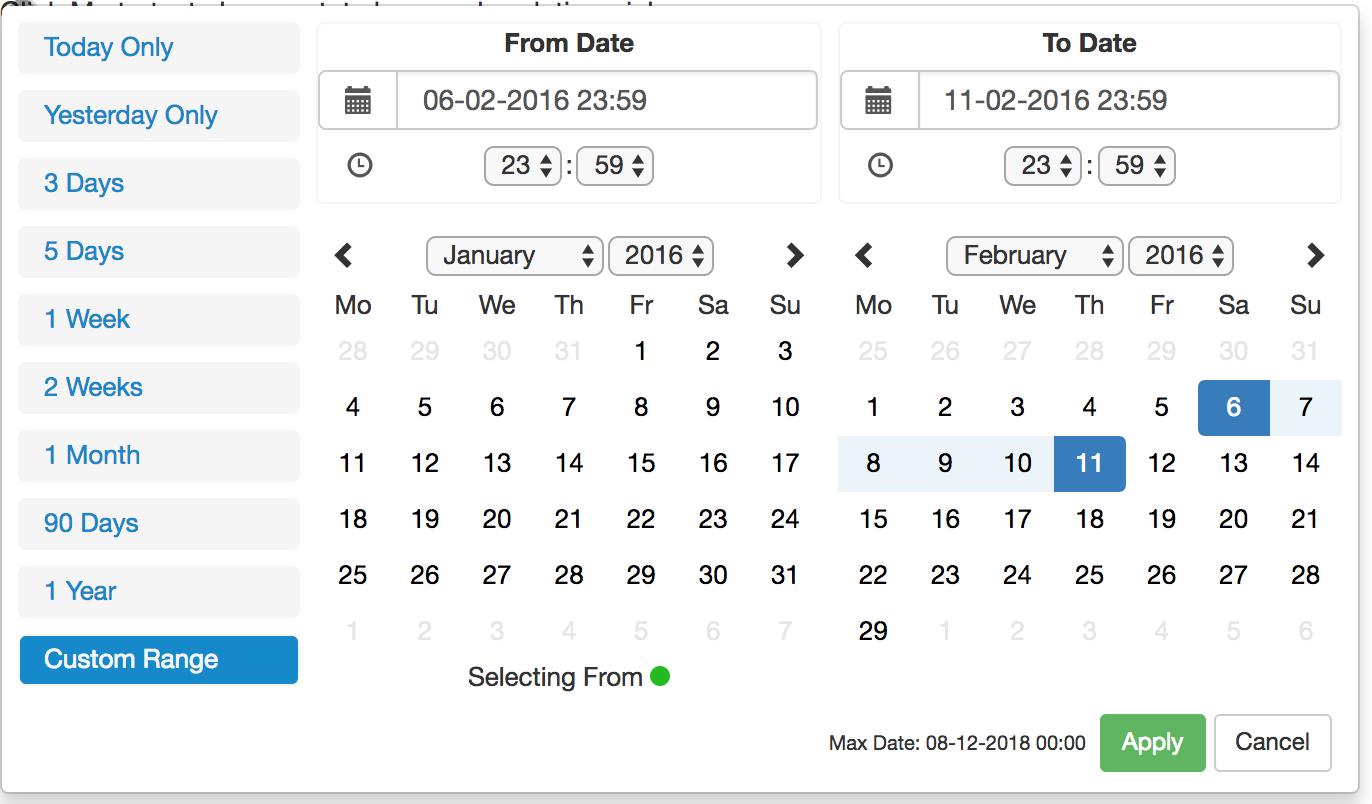\r\n\r\n\r\nThe current version is compatible with Firefox 34+ and Chrome 40+ (May work but not widely tests on earlier versions)\r\n\r\n## Version 1.0.1 Release (30-06-19) -- Major Change\r\n\r\nWith the release of this version comes a major change to the default vanilla behaviour of the date time picker. Default behaviour is now \r\nnon smart mode. Smart mode must be enabled via the use of the smart mode property. Also by default smart mode will be optimised for forward \r\nsearching. Use pastSearchFriendly to optimise for past searching.\r\n\r\n## Setup\r\nRun the following command:\r\n```bash\r\nnpm install react-advanced-datetimerange-picker\r\n```\r\n\r\n## Requirements\r\n\r\nThis component is best used alongside bootstrap e.g. the below line of code in index.html\r\n```js\r\n\r\n```\r\n## General Info\r\n\r\nThis project is based upon dangrossman daterangepicker (https://github.com/dangrossman/daterangepicker)\r\n\r\nThe project has been rewritten in React, this is not a JQuery wrap around. \r\n\r\nIt is based off of the V2 UI with some slight adjustments and added keyboard accessibility such as Keyboard arrow key navigation and Tab navigation. \r\n\r\n## Properties Required\r\n\r\n**ranges** {React.Object} \r\nObject of ranges that will be you default ranges. Example:\r\n```js\r\nlet ranges = {\r\n \"Today Only\": [moment(start), moment(end)],\r\n \"Yesterday Only\": [moment(start).subtract(1, \"days\"), moment(end).subtract(1, \"days\")],\r\n \"3 Days\": [moment(start).subtract(3, \"days\"), moment(end)]\r\n }\r\n```\r\n**start (Required)** {Moment Object} \r\nInitial Start Date that will be selected, should be a moment object\r\n\r\n**end (Required)** {Moment Object} \r\nInitial End Date that will be selected, should be a moment object\r\n\r\n**local (Required)** {Object} \r\nDefines a local format for date labels to be shown as. Can also set Sunday to be first day or Monday. Local object accepts format and sunday first params. \r\n\r\n--> format: moment display format \r\n--> sundayFirst: True Sunday the first day of the week. False, Monday first day of the week. \r\n--> From release version 1.0.7+: days, months, fromDate, toDate, selectingFrom, selectingTo, MaxDate, close, apply, cancel \r\n\r\n```js\r\nlet local = {\r\n \"format\":\"DD-MM-YYYY HH:mm\",\r\n \"sundayFirst\" : false,\r\n days: ['Mo', 'Tu', 'We', 'Th', 'Fr', 'Sa', 'So'],\r\n months: [\r\n 'January',\r\n 'February',\r\n 'March',\r\n 'April',\r\n 'May',\r\n 'June',\r\n 'July',\r\n 'August',\r\n 'September',\r\n 'October',\r\n 'November',\r\n 'December',],\r\n fromDate: 'From Date',\r\n toDate: 'To Date',\r\n selectingFrom: 'Selecting From',\r\n selectingTo: 'Selecting To',\r\n maxDate: 'Max Date',\r\n close: 'Close',\r\n apply: 'Apply',\r\n cancel: 'Cancel'\r\n}\r\n```\r\n\r\n**applyCallback (Required)** {React.func} \r\nFunction which is called when the apply button is clicked/pressed. Takes two params, that start date and the end date.\r\n\r\n```js\r\nfunc applyCallback(startDate, endDate){\r\n ... \r\n}\r\n```\r\n\r\n**maxDate (optional)** {Moment Object} \r\nMaximum date that can be selected. \r\n\r\n**rangeCallback (optional)** {React.func} \r\n```js\r\nfunc rangeCallback(index, value) {\r\n ...\r\n}\r\n```\r\n\r\n**autoApply (optional)** {bool} \r\nWhen set there will only be one button in the bottom right to close the screen. \r\nWhenever a button is clicked in the date picker the apply callback\r\nfunction will be called for you.\r\n\r\n**descendingYears (optional)** {bool} \r\nWhen set the years will be displayed in descending order on the picker instead of ascending order.\r\n\r\n**years (optional)** {array} \r\nyears={[2010, 2020]}\r\nTakes an array where the first value is the start year and the second values is the end year. This will \r\nupdate the dropdown years to only show these years. \r\n WARNING: This does not affect the ability to type in years in the text box and go beyond the values set here.\r\n\r\n**smartMode (optional)** {bool} \r\nThe date time picker will switch the month on the RHS when two dates in the same month are selected. Can be used in \r\nconjunction with pastSearchFriendly to switch the month on the LHS when the two dates are from the same month.\r\n\r\n\r\n**pastSearchFriendly (optional)** {bool} \r\nRequires: Smart Mode enabled\r\n \r\nChanges the mode of the date time picker to be optimised for past searches.\r\nWhere possible the start and end time will be shown on the RHS \r\nwhen the month and year are equal. This allows for the previous month to be \r\nshown on the LHS to allow easier backwards searching. \r\n \r\nThis setting is false by default meaning that the LHS is used when dates are selected in the same month & year \r\n\r\n**style (optional)** {Object} \r\nAllows custom styling of some of the elements of the date time picker. The following can be added:\r\n```js\r\n{\r\n fromDot: {backgroundColor: 'rgb(100, 0, 34)'},\r\n toDot: {backgroundColor: 'rgb(0, 135, 255)'},\r\n fromDate: {color: 'rgb(0, 255, 100)', backgroundColor: 'rgb(255, 100, 100)'},\r\n toDate: {backgroundColor: 'rgb(40, 90, 75)'},\r\n betweenDates: {color: 'rgb(200, 0, 34)', backgroundColor: 'rgb(200, 150, 100)'},\r\n hoverCell: {color: 'rgb(200, 0, 34)'},\r\n customRangeButtons: {backgroundColor: 'rgb(40, 90, 75)'},\r\n customRangeSelected: {backgroundColor: 'rgb(100, 90, 200)'},\r\n standaloneLayout:{display:'flex', maxWidth:'fit-content'}\r\n}\r\n```\r\n\r\n**darkMode (optional)** {bool} \r\nChanges the DateTimePicker to be in Dark Mode, default is Light Mode\r\n\r\n**noMobileMode (optional)** {bool} \r\nRelease Version: 1.0.6+ \r\nWhen set the mobile/condense breakpoint will be ignored meaning the component will stay\r\nin full screen mode all the time.\r\n\r\n**forceMobileMode (optional)** {bool} \r\nRelease Version: 1.0.9+ \r\nWhen set the mobile/condense breakpoint will be ignored meaning the component will stay\r\nin condensed mode all the time.\r\n\r\n**twelveHoursClock (optional)** {bool} \r\nRelease Version: 1.0.13+ \r\nWhen set the picker time values will be in 12 hour mode not 24 hour mode\r\n\r\n**standaloneMode (optional)** {bool} \r\nRelease Version: 1.0.9+ (BETA) \r\nWhen set the picker will be open by default and follow the styling given. This config option\r\nrequires the below config styling to also be present in order\r\nto style the div\r\n\r\n``` js\r\nstyle={{\r\n standaloneLayout:{display:'flex', maxWidth:'fit-content'}\r\n}}\r\n```\r\n\r\n**leftMode (optional)** {bool} \r\nRelease Version: 1.0.6+ (BETA) \r\nWhen set and changed the picker will open to the left (right to left) instead of the default which is to open to the right (left to right)\r\n\r\n**centerMode (optional)** {bool} \r\nRelease Version: 1.0.14+ (BETA) \r\nTo allow flexibility, center mode has been added where leftMode or default is not enough.\r\n\r\n## Getting Started\r\n\r\n```js\r\nimport React from 'react';\r\nimport DateTimeRangeContainer from 'react-advanced-datetimerange-picker'\r\nimport {FormControl} from 'react-bootstrap'\r\nimport moment from \"moment\"\r\n\r\nclass Wrapper extends React.Component {\r\n\r\n constructor(props){\r\n super(props);\r\n let now = new Date();\r\n let start = moment(new Date(now.getFullYear(), now.getMonth(), now.getDate(), 0,0,0,0));\r\n let end = moment(start).add(1, \"days\").subtract(1, \"seconds\");\r\n this.state = {\r\n start : start,\r\n end : end\r\n }\r\n\r\n this.applyCallback = this.applyCallback.bind(this);\r\n }\r\n\r\n applyCallback(startDate, endDate){\r\n this.setState({\r\n start: startDate,\r\n end : endDate\r\n }\r\n )\r\n }\r\n\r\n render(){\r\n let now = new Date();\r\n let start = moment(new Date(now.getFullYear(), now.getMonth(), now.getDate(), 0,0,0,0));\r\n let end = moment(start).add(1, \"days\").subtract(1, \"seconds\");\r\n let ranges = {\r\n \"Today Only\": [moment(start), moment(end)],\r\n \"Yesterday Only\": [moment(start).subtract(1, \"days\"), moment(end).subtract(1, \"days\")],\r\n \"3 Days\": [moment(start).subtract(3, \"days\"), moment(end)]\r\n }\r\n let local = {\r\n \"format\":\"DD-MM-YYYY HH:mm\",\r\n \"sundayFirst\" : false\r\n }\r\n let maxDate = moment(start).add(24, \"hour\")\r\n return(\r\n
\r\n \r\n \r\n \r\n
\r\n );\r\n }\r\n}\r\n```\r\n\r\n\r\n## Available Scripts\r\n\r\nIn the project directory, you can run:\r\n\r\n### `npm start`\r\n\r\nRuns the app in the development mode. \r\nOpen [http://localhost:3000](http://localhost:3000) to view it in the browser.\r\n\r\nThe page will reload if you make edits. \r\nYou will also see any lint errors in the console.\r\n\r\n### `npm test`\r\n\r\nLaunches the test runner in the interactive watch mode. \r\nSee the section about [running tests](https://facebook.github.io/create-react-app/docs/running-tests) for more information.\r\n\r\n### `npm run build`\r\n\r\nBuilds the app for production to the `build` folder. \r\nIt correctly bundles React in production mode and optimizes the build for the best performance.\r\n\r\n### npm test -- --coverage\r\n\r\nGets test coverage when running tests to see how much of the code is covered by your tests.","readmeFilename":"README.md"}