{"_id":"@akylas/nativescript-inapp-purchase","_rev":"4-dd5d8c6eb827b54de46c464839049e0b","name":"@akylas/nativescript-inapp-purchase","dist-tags":{"latest":"0.0.5"},"versions":{"0.0.2":{"name":"@akylas/nativescript-inapp-purchase","version":"0.0.2","keywords":["NativeScript","JavaScript","Android","iOS","universal","link","deeplink","vue.js","preview|https://raw.githubusercontent.com/nativescript-community/inapp-purchase/master/images/demo-ios.gif|iOS Demo","preview|https://raw.githubusercontent.com/nativescript-community/inapp-purchase/master/images/demo-android.gif|Android Demo"],"author":{"name":"Dragos Sebestin"},"license":"Apache-2.0","_id":"@akylas/nativescript-inapp-purchase@0.0.2","maintainers":[{"name":"farfromrefuge","email":"martin.guillon@akylas.fr"}],"bugs":{"url":"https://github.com/nativescript-community/inapp-purchase/issues"},"dist":{"shasum":"095f3a678d1bad1a65fd45c62a0436cf6fb13e25","tarball":"https://registry.npmjs.org/@akylas/nativescript-inapp-purchase/-/nativescript-inapp-purchase-0.0.2.tgz","fileCount":47,"integrity":"sha512-Ug164vtRQpcPK23X6eZkQ3Bd07s4ibPAi5B+uZG5khfWYXJ1wLD7shXOV7lMuPLs4BPs4pzc8OUnvM9q5eURFQ==","signatures":[{"sig":"MEUCIQC4hnmqvgCu1XAiDR7EEzwGmNYMLheJZ6970hBk3P/A3gIgbRa0fC5JZLHjuTNtTrtNjjLTr1knkwTvR7fBbE7H9V4=","keyid":"SHA256:jl3bwswu80PjjokCgh0o2w5c2U4LhQAE57gj9cz1kzA"}],"unpackedSize":299693},"main":"./index","gitHead":"26b89d7289ec78a3fd7d0625bd2b3660382cf48a","scripts":{"tsc":"../../node_modules/.bin/cpy '**/*.d.ts' '../../packages/inapp-purchase' --parents --cwd=../../src/inapp-purchase && ../../node_modules/.bin/tsc -skipLibCheck -d","build":"npm run tsc && npm run readme","clean":"../../node_modules/.bin/rimraf ./*.d.ts ./*.js ./*.js.map","readme":"../../node_modules/.bin/readme generate -c ../../tools/readme/blueprint.json"},"typings":"./index-common.d.ts","_npmUser":{"name":"farfromrefuge","email":"martin.guillon@akylas.fr"},"repository":{"url":"https://github.com/nativescript-community/inapp-purchase","type":"git"},"_npmVersion":"lerna/3.10.1/node@v20.9.0+x64 (darwin)","description":"Universal links (IOS) and App Links (Android) support for NativeScript.","directories":{},"_nodeVersion":"20.9.0","nativescript":{"platforms":{"ios":"6.0.0","android":"6.0.0"}},"_hasShrinkwrap":false,"_npmOperationalInternal":{"tmp":"tmp/nativescript-inapp-purchase_0.0.2_1736170687486_0.30852370659966155","host":"s3://npm-registry-packages-npm-production"}},"0.0.3":{"name":"@akylas/nativescript-inapp-purchase","version":"0.0.3","keywords":["NativeScript","JavaScript","Android","iOS","universal","link","deeplink","vue.js","preview|https://raw.githubusercontent.com/nativescript-community/inapp-purchase/master/images/demo-ios.gif|iOS Demo","preview|https://raw.githubusercontent.com/nativescript-community/inapp-purchase/master/images/demo-android.gif|Android Demo"],"author":{"name":"Dragos Sebestin"},"license":"Apache-2.0","_id":"@akylas/nativescript-inapp-purchase@0.0.3","maintainers":[{"name":"farfromrefuge","email":"martin.guillon@akylas.fr"}],"bugs":{"url":"https://github.com/nativescript-community/inapp-purchase/issues"},"dist":{"shasum":"bfdbf7575b059215695792c8c7729d29b28dda8e","tarball":"https://registry.npmjs.org/@akylas/nativescript-inapp-purchase/-/nativescript-inapp-purchase-0.0.3.tgz","fileCount":48,"integrity":"sha512-4wGPbFg7icaa8eGprvGJ8bKpKWt1LKeKWHsIVsOxYFCWWIY38kG+udoYpu4SwGVfbh1q7knPEzia6gCKkx114w==","signatures":[{"sig":"MEUCIDrMSTT2JKPn9vWnI9+ppL9yXBIzDzOf8gh+ijzZRyJxAiEA8cIiNRsW4M6zJF/eGkr4gGToME5PJ0S8W7F4JYCMKDQ=","keyid":"SHA256:jl3bwswu80PjjokCgh0o2w5c2U4LhQAE57gj9cz1kzA"}],"unpackedSize":300154},"main":"./index","gitHead":"f4706a6e01bee26871445a5788cfd6bd667e042a","scripts":{"tsc":"../../node_modules/.bin/cpy '**/*.d.ts' '../../packages/inapp-purchase' --parents --cwd=../../src/inapp-purchase && ../../node_modules/.bin/tsc -skipLibCheck -d","build":"npm run tsc && npm run readme","clean":"../../node_modules/.bin/rimraf ./*.d.ts ./*.js ./*.js.map","readme":"../../node_modules/.bin/readme generate -c ../../tools/readme/blueprint.json"},"typings":"./index-common.d.ts","_npmUser":{"name":"farfromrefuge","email":"martin.guillon@akylas.fr"},"repository":{"url":"https://github.com/nativescript-community/inapp-purchase","type":"git"},"_npmVersion":"lerna/3.10.1/node@v20.9.0+x64 (darwin)","description":"Universal links (IOS) and App Links (Android) support for NativeScript.","directories":{},"_nodeVersion":"20.9.0","nativescript":{"platforms":{"ios":"6.0.0","android":"6.0.0"}},"_hasShrinkwrap":false,"_npmOperationalInternal":{"tmp":"tmp/nativescript-inapp-purchase_0.0.3_1736172280670_0.8093295192307246","host":"s3://npm-registry-packages-npm-production"}},"0.0.4":{"name":"@akylas/nativescript-inapp-purchase","version":"0.0.4","keywords":["NativeScript","JavaScript","Android","iOS","universal","link","deeplink","vue.js","preview|https://raw.githubusercontent.com/nativescript-community/inapp-purchase/master/images/demo-ios.gif|iOS Demo","preview|https://raw.githubusercontent.com/nativescript-community/inapp-purchase/master/images/demo-android.gif|Android Demo"],"author":{"name":"Dragos Sebestin"},"license":"Apache-2.0","_id":"@akylas/nativescript-inapp-purchase@0.0.4","maintainers":[{"name":"farfromrefuge","email":"martin.guillon@akylas.fr"}],"bugs":{"url":"https://github.com/nativescript-community/inapp-purchase/issues"},"dist":{"shasum":"e81f3230b6dd76723a227cc7a03124056950c0c8","tarball":"https://registry.npmjs.org/@akylas/nativescript-inapp-purchase/-/nativescript-inapp-purchase-0.0.4.tgz","fileCount":48,"integrity":"sha512-CiYuUvJ08Wepoxra7wlrKh6+aCNHAf2AgIQhex7xq0O07uA5pP5W5coQsJb3hJcWTvfo6Rd/GwhjwPDv1pZM4g==","signatures":[{"sig":"MEUCIQDWWQ4a8Ji8UUfQrgyp9K2CoMHViGoLRj6PcHD9l2Z+TAIgS6Yx/G4lakNtQ7kFZnkZUG81r+fV1cGPojyBAEuzwZE=","keyid":"SHA256:jl3bwswu80PjjokCgh0o2w5c2U4LhQAE57gj9cz1kzA"}],"unpackedSize":300402},"main":"./index","gitHead":"6fb9000e46f7e30fb21b1b7bef6336184fef1f4b","scripts":{"tsc":"../../node_modules/.bin/cpy '**/*.d.ts' '../../packages/inapp-purchase' --parents --cwd=../../src/inapp-purchase && ../../node_modules/.bin/tsc -skipLibCheck -d","build":"npm run tsc && npm run readme","clean":"../../node_modules/.bin/rimraf ./*.d.ts ./*.js ./*.js.map","readme":"../../node_modules/.bin/readme generate -c ../../tools/readme/blueprint.json"},"typings":"./index.d.ts","_npmUser":{"name":"farfromrefuge","email":"martin.guillon@akylas.fr"},"repository":{"url":"https://github.com/nativescript-community/inapp-purchase","type":"git"},"_npmVersion":"lerna/3.10.1/node@v22.12.0+x64 (linux)","description":"Universal links (IOS) and App Links (Android) support for NativeScript.","directories":{},"_nodeVersion":"22.12.0","nativescript":{"platforms":{"ios":"6.0.0","android":"6.0.0"}},"_hasShrinkwrap":false,"_npmOperationalInternal":{"tmp":"tmp/nativescript-inapp-purchase_0.0.4_1736239791626_0.08112052343363851","host":"s3://npm-registry-packages-npm-production"}},"0.0.5":{"name":"@akylas/nativescript-inapp-purchase","version":"0.0.5","description":"Universal links (IOS) and App Links (Android) support for NativeScript.","main":"./index","typings":"./index.d.ts","scripts":{"build":"npm run tsc && npm run readme","readme":"readme generate -c ../../tools/readme/blueprint.json","tsc":"cpy '**/*.d.ts' '../../packages/inapp-purchase' --parents --cwd=../../src/inapp-purchase && tsc --build","clean":"bin/rimraf ./*.d.ts ./*.js ./*.js.map ./*.tsbuildinfo ./*.mjs ./*.mjs.map ./angular ./svelte ./vue* ./react","build.all":"npm run build"},"nativescript":{"platforms":{"android":"6.0.0","ios":"6.0.0"}},"keywords":["NativeScript","JavaScript","Android","iOS","universal","link","deeplink","vue.js","preview|https://raw.githubusercontent.com/nativescript-community/inapp-purchase/master/images/demo-ios.gif|iOS Demo","preview|https://raw.githubusercontent.com/nativescript-community/inapp-purchase/master/images/demo-android.gif|Android Demo"],"author":{"name":"Dragos Sebestin"},"bugs":{"url":"https://github.com/nativescript-community/inapp-purchase/issues"},"repository":{"type":"git","url":"git+https://github.com/nativescript-community/inapp-purchase.git"},"license":"Apache-2.0","gitHead":"d685ea31c7819f16d19c1ed1f7fef49a30516535","_id":"@akylas/nativescript-inapp-purchase@0.0.5","homepage":"https://github.com/nativescript-community/inapp-purchase#readme","_nodeVersion":"24.18.0","_npmVersion":"lerna/4.11.5/node@v24.18.0+x64 (linux)","dist":{"integrity":"sha512-ZrU4Kh4WluajU5z5T+5oz6rKyR8JpgdTFcpH6NxqeMfLMCMJcXMs4MsGMsuN9i60zkc4z2+mCQYj+neR1Yfzow==","shasum":"17fc21b20f58b041d46f627079bc6cba8026d216","tarball":"https://registry.npmjs.org/@akylas/nativescript-inapp-purchase/-/nativescript-inapp-purchase-0.0.5.tgz","fileCount":50,"unpackedSize":581714,"signatures":[{"keyid":"SHA256:DhQ8wR5APBvFHLF/+Tc+AYvPOdTpcIDqOhxsBHRwC7U","sig":"MEUCIAF4mZ7W+S1sbRxNb/5mEa1eqNAKwIlW5la9BA7pxYJfAiEAp7wMhd4lmY1/RB/tcEbORGeo0BczoV/n2ZaJ+lpNZDo="}]},"_npmUser":{"name":"farfromrefuge","email":"martin.guillon@akylas.fr"},"directories":{},"maintainers":[{"name":"farfromrefuge","email":"martin.guillon@akylas.fr"}],"_npmOperationalInternal":{"host":"s3://npm-registry-packages-npm-production","tmp":"tmp/nativescript-inapp-purchase_0.0.5_1784720664530_0.010099177433146478"},"_hasShrinkwrap":false}},"time":{"created":"2025-01-06T13:38:07.339Z","modified":"2026-07-22T11:44:24.905Z","0.0.2":"2025-01-06T13:38:07.637Z","0.0.3":"2025-01-06T14:04:40.867Z","0.0.4":"2025-01-07T08:49:51.790Z","0.0.5":"2026-07-22T11:44:24.700Z"},"bugs":{"url":"https://github.com/nativescript-community/inapp-purchase/issues"},"author":{"name":"Dragos Sebestin"},"license":"Apache-2.0","keywords":["NativeScript","JavaScript","Android","iOS","universal","link","deeplink","vue.js","preview|https://raw.githubusercontent.com/nativescript-community/inapp-purchase/master/images/demo-ios.gif|iOS Demo","preview|https://raw.githubusercontent.com/nativescript-community/inapp-purchase/master/images/demo-android.gif|Android Demo"],"repository":{"type":"git","url":"git+https://github.com/nativescript-community/inapp-purchase.git"},"description":"Universal links (IOS) and App Links (Android) support for NativeScript.","maintainers":[{"name":"farfromrefuge","email":"martin.guillon@akylas.fr"}],"readme":"\n\n
@akylas/nativescript-inapp-purchase
\n
\n\t\t\r\n\n\t
\n\n
\n Universal links (IOS) and App Links (Android) support for NativeScript.\n \n
\n\n \n\n\n\n\r\n[](#prerequisites)\r\n\r\n## Prerequisites\n\nBefore you get started, review the following prerequisites:\n\n### iOS prerequisites\n\nTo offer in app purchases for your iOS app. You will need to create items for the app on [AppStoreConnect.Apple.Com](https://appstoreconnect.apple.com).\n\n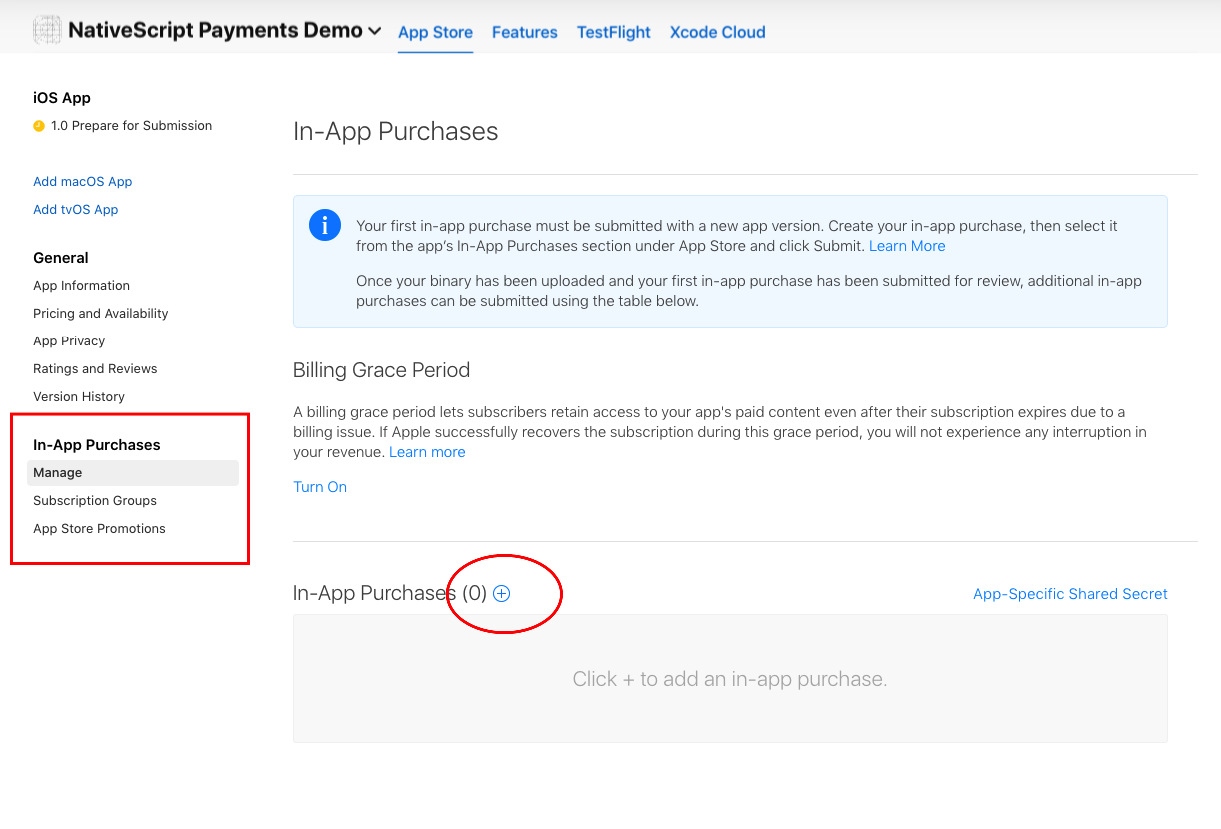\n\nOn the form to create the in app purchase item, the `Product ID` is the value you will use to fetch your items for the user to purchase in your app.\n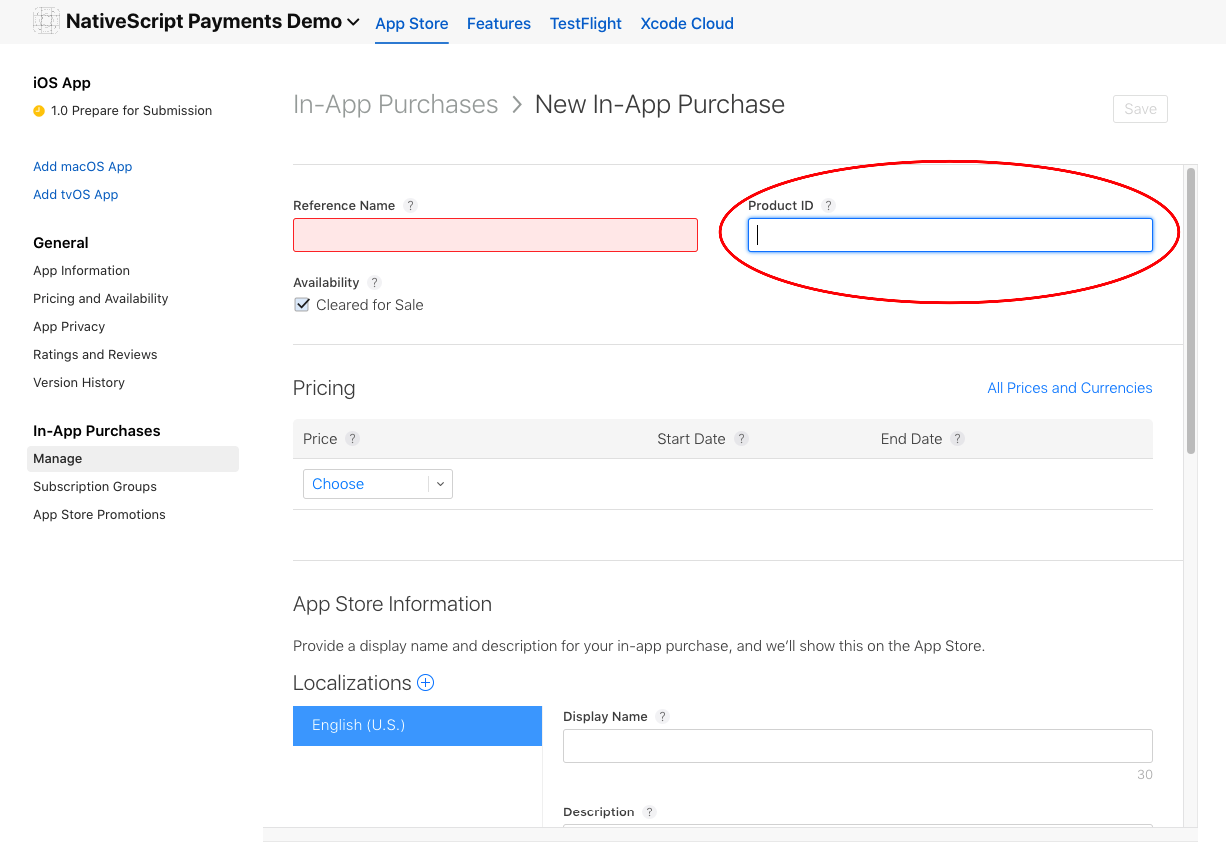\n\nOnce you complete creating an item you will see a list of all items for the app listed on the AppStore Connect.\n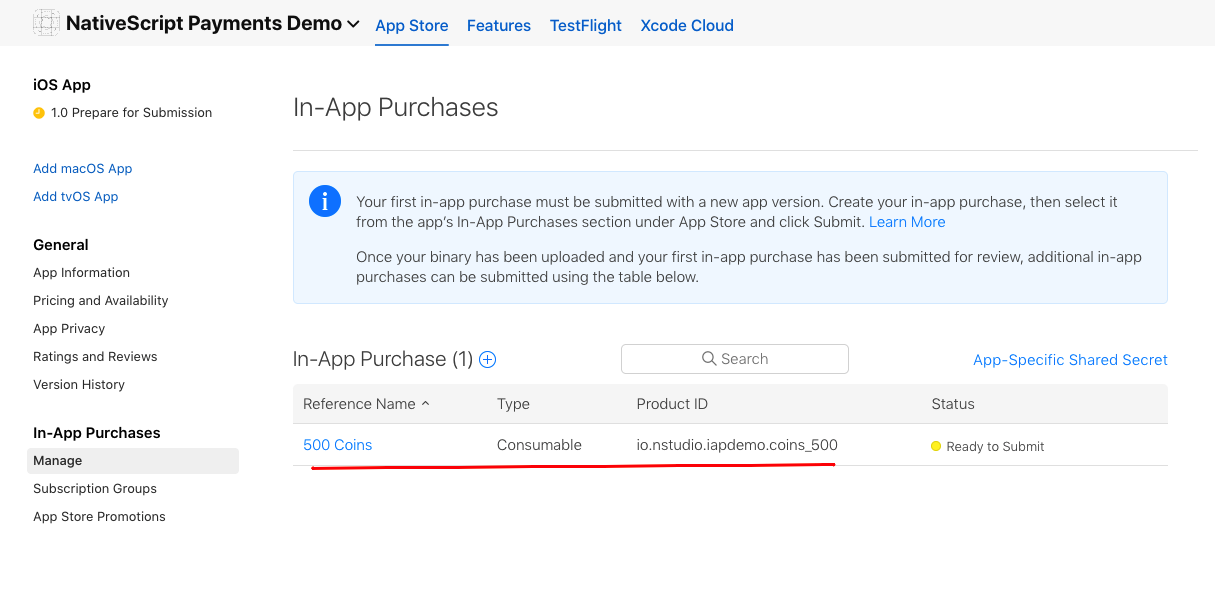\n\nTo test iOS purchases fully, you will need a real iOS device. You will also need a [test user in the sandbox environment](https://appstoreconnect.apple.com/access/testers) on your appstore account.\n\n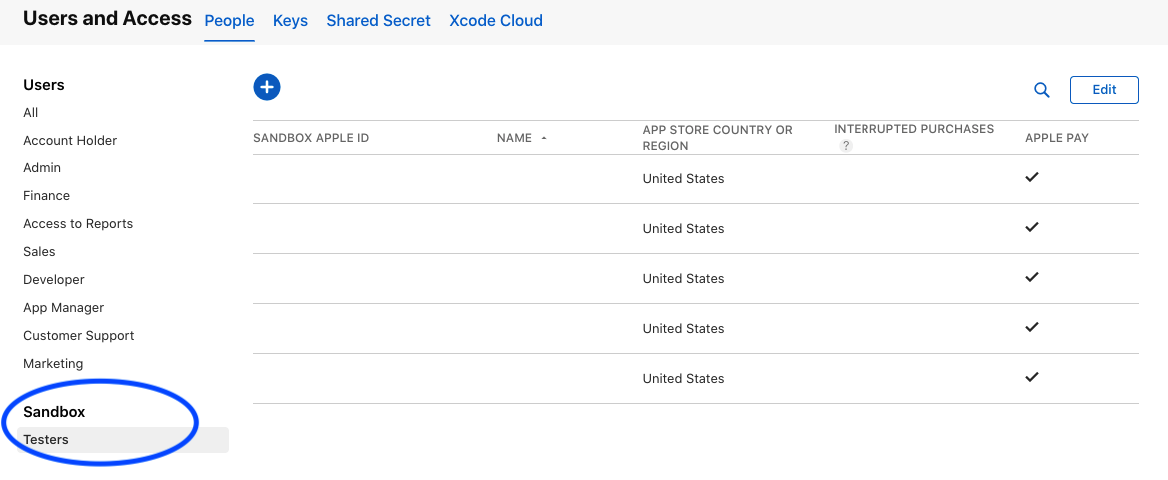\n\n### Android prerequisites\n\n1. To offer in-app purchases for your Android app, you will need to upload at least ONE apk/aab to the [Google Play Console](https://play.google.com).\n\n2. Create in-app products on the console.\n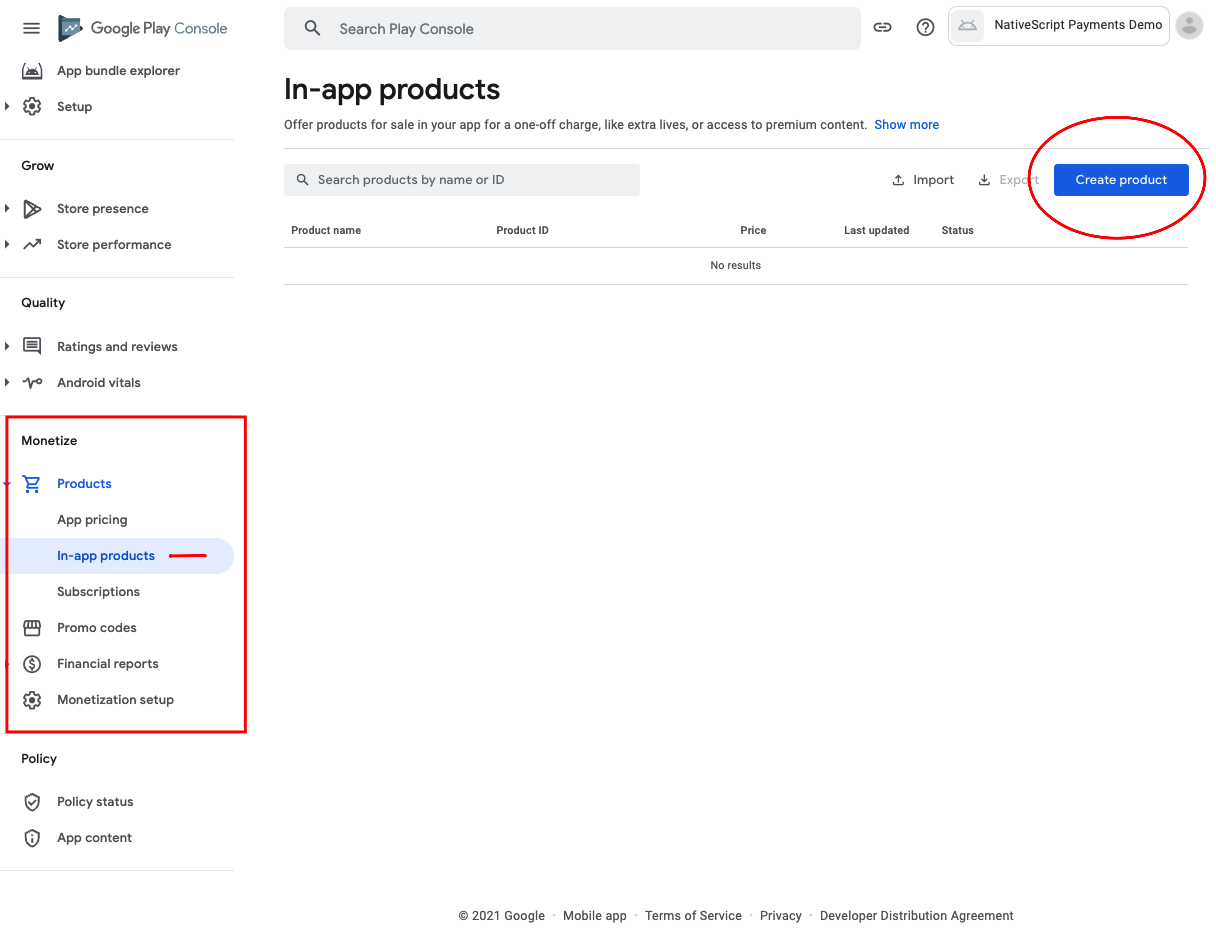\n\nOn the form to create your product, the `Product ID` is the value you will use to fetch your products for the user to purchase.\n\n#### Important note about Google items\n\n- Google does not like numeric values in the ID field. It seems to ignore the Sku when querying for your items and only returns one item instead of multiple values if the IDs contain numeric values.\n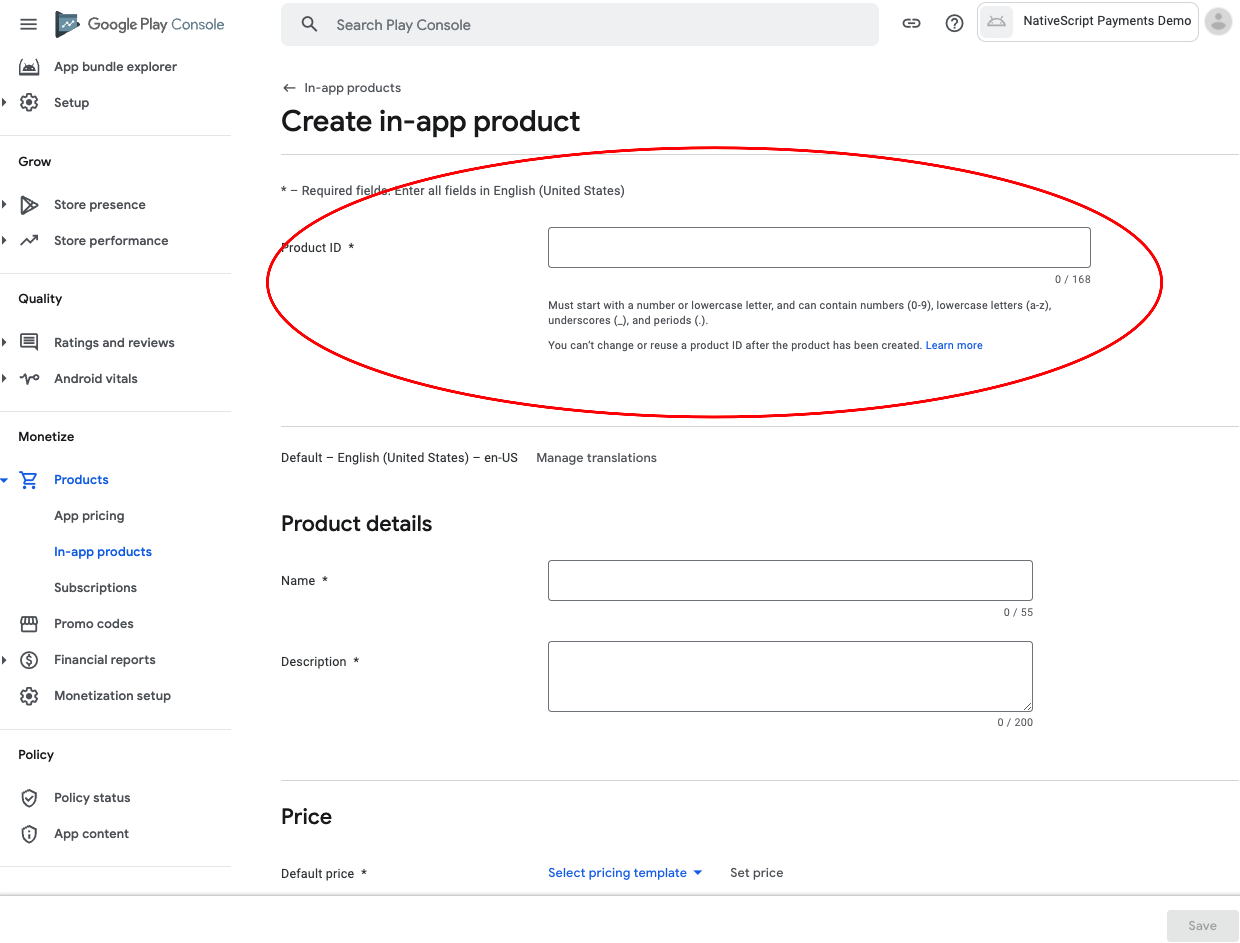\n\n- Google in app products will not work until Google has reviewed the app. They will appear in the list of products, but the API will error trying to purchase them. The title of the item when you call `fetchItems(['your.product.id']) should be suffixed with (in review) or something similar when returned at this point. You will not be able to finish the purchase flow until the review period has passed.\n\n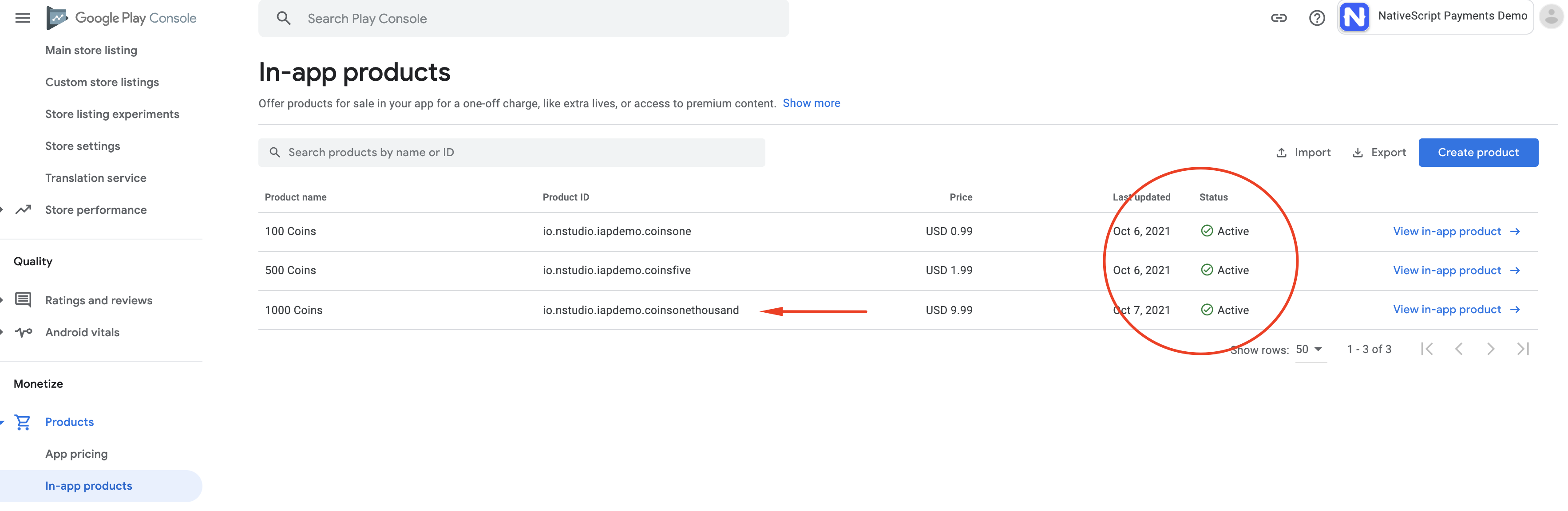\n\nTo test Android purchases completely, you should use a real device with Google Play setup and logged into an account. You can use [test accounts\nfor Google Play Billing](https://developer.android.com/google/play/billing/test) for the work flow. This will allow you to test the app in development properly. For more info: https://support.google.com/googleplay/android-developer/answer/6062777\n\n\n### Usage\n\nBelow is the standard flow of the plugin's methods calls:\n\n```typescript\nimport { BuyItemOptions, Item as InAppItem, InAppPurchase, PaymentEvent } from '@akylas/nativescript-inapp-purchase/index';\n\nconst inAppPurchase = new InAppPurchase()\ninAppPurchase.init();\ninappPurchase.on(PaymentEvent.EventName, (event: PaymentEvent.IEvent) => {...\n\n// fetchItems(['item.id', ...]) will query the store for the items requested.\n// Handle these items inside the PaymentEvent.Context.RETRIEVING_ITEMS event.\ninappPurchase.fetchItems(['item.id']);\n\n// buyItem('item.id') will start the purchase flow on Android & iOS.\n// Next handle the PaymentEvent.Context.PROCESSING_ORDER for SUCCESS or FAILURE.\n// If SUCCESS then you can call the last method to the `finalizeOrder(payload)` method.\ninappPurchase.buyItem('item.id');\n\n// finalizeOrder(payload) will complete the purchase flow.\n// The payload argument here is provided in the PaymentEvent.Context.PROCESSING_ORDER - SUCCESS event (see below example for detailed usage).\ninappPurchase.finalizeOrder(payload)\n\n// at this point you would process the order with your backend given the receiptToken from the purchase flow\n```\n\n### In-App Purchase example\n\n```typescript\nimport { BuyItemOptions, Item as InAppItem, InAppPurchase, PaymentEvent } from '@akylas/nativescript-inapp-purchase/index';\nconst inAppPurchase = new InAppPurchase()\nexport class SomeViewModel {\n private item: Item;\n\n pageLoaded() {\n\n // Subscribe to the RxJS Observable\n // You do not have to handle all of the events\n // RETRIEVING_ITEMS && PROCESSING_ORDER are the ones you'll want to use to handle the purchase flow\n inAppPurchase.on((event: PaymentEvent.Type) => {\n switch (event.context) {\n case PaymentEvent.Context.CONNECTING_STORE:\n console.log('Store Status: ' + event.result);\n if (event.result === PaymentEvent.Result.SUCCESS) {\n const canPay = inAppPurchase.canMakePayments();\n if (canPay) {\n // pass in your product IDs here that you want to query for\n inAppPurchase.fetchItems(['io.nstudio.iapdemo.coinsfive', 'io.nstudio.iapdemo.coinsone', 'io.nstudio.iapdemo.coinsonethousand']);\n }\n }\n break;\n case PaymentEvent.Context.RETRIEVING_ITEMS:\n if (event.result === PaymentEvent.Result.SUCCESS) {\n // if you passed multiple items you will need to handle accordingly for your app\n this.item = event.payload;\n }\n break;\n case PaymentEvent.Context.PROCESSING_ORDER:\n if (event.result === PaymentEvent.Result.FAILURE) {\n console.log(`🛑 Payment Failure - ${event.payload.description} 🛑`);\n // handle the failure of the purchase\n } else if (event.result === PaymentEvent.Result.SUCCESS) {\n // handle the successful purchase\n console.log('🟢 Payment Success 🟢');\n console.log(`Order Date: ${event.payload.orderDate}`);\n console.log(`Receipt Token: ${event.payload.receiptToken}`);\n inAppPurchase.finalizeOrder(event.payload);\n }\n break;\n case PaymentEvent.Context.FINALIZING_ORDER:\n if (event.result === PaymentEvent.Result.SUCCESS) {\n console.log('Order Finalized');\n }\n break;\n case PaymentEvent.Context.RESTORING_ORDERS:\n console.log(event);\n break;\n default:\n console.log(`Invalid EventContext: ${event}`);\n break;\n }\n });\n\n // This initializes the internal payment system for the plugin\n inAppPurchase.init();\n }\n\n buttonTap() {\n const opts: BuyItemOptions = {\n android: {\n },\n ios: {\n quantity: 1,\n simulatesAskToBuyInSandbox: true,\n },\n };\n\n // This method will kick off the platform purchase flow\n // We are passing the item and an optional object with some configuration\n inAppPurchase.buyItem(this.item, opts);\n }\n}\n```\n\n\r\n[](#api)\r\n\r\n## API\n\n- `init()` Sets up the internal system of the plugin.\n\n\n| Method | Description\n|:-------|:-----------\n| `fetchItems(itemIds: Array)` | Queries the store for the items requested. You should handle these items inside the `PaymentEvent.Context.RETRIEVING_ITEMS` event. |\n| `buyItem(item: Item, options?: BuyItemOptions)` | Starts the purchase flow on Android & iOS and emits `PaymentEvent.Context.PROCESSING_ORDER` with `SUCCESS` or `FAILURE`. If SUCCESS then you can call the last method to the `finalizeOrder(payload)`. |\n| `fetchSubscriptions(itemIds: Array)` | Queries the store for the subscriptions offered by the app. You should handle these subscriptions inside the `PaymentEvent.Context.RETRIEVING_ITEMS` event. |\n| `startSubscription(item: Item, userData?: string)` | `Android only`. Lanches the billing flow by presenting the Google Store subscription UI interface. |\n| `restoreOrders(skuType?: string)` | Returns the purchase made by the user for each product. You call this method to install purchases on additional devices or restore purchases for an application that the user deleted and reinstalled. |\n| `canMakePayments()` | Returns `true` or `false` indicating whether the billing service is available and is setup successfully. |\n| `tearDown()` | Closes the connection to the billing service to free up resources. |\n\n\n\r\n[](#demos-and-development)\r\n\r\n## Demos and Development\n\n\n### Repo Setup\n\nThe repo uses submodules. If you did not clone with ` --recursive` then you need to call\n```\ngit submodule update --init\n```\n\nThe package manager used to install and link dependencies must be `pnpm` or `yarn`. `npm` wont work.\n\nTo develop and test:\nif you use `yarn` then run `yarn`\nif you use `pnpm` then run `pnpm i`\n\n**Interactive Menu:**\n\nTo start the interactive menu, run `npm start` (or `yarn start` or `pnpm start`). This will list all of the commonly used scripts.\n\n### Build\n\n```bash\nnpm run build.all\n```\nWARNING: it seems `yarn build.all` wont always work (not finding binaries in `node_modules/.bin`) which is why the doc explicitly uses `npm run`\n\n### Demos\n\n```bash\nnpm run demo.[ng|react|svelte|vue].[ios|android]\n\nnpm run demo.svelte.ios # Example\n```\n\nDemo setup is a bit special in the sense that if you want to modify/add demos you dont work directly in `demo-[ng|react|svelte|vue]`\nInstead you work in `demo-snippets/[ng|react|svelte|vue]`\nYou can start from the `install.ts` of each flavor to see how to register new demos \n\n\r\n[](#contributing)\r\n\r\n## Contributing\n\n### Update repo \n\nYou can update the repo files quite easily\n\nFirst update the submodules\n\n```bash\nnpm run update\n```\n\nThen commit the changes\nThen update common files\n\n```bash\nnpm run sync\n```\nThen you can run `yarn|pnpm`, commit changed files if any\n\n### Update readme \n```bash\nnpm run readme\n```\n\n### Update doc \n```bash\nnpm run doc\n```\n\n### Publish\n\nThe publishing is completely handled by `lerna` (you can add `-- --bump major` to force a major release)\nSimply run \n```shell\nnpm run publish\n```\n\n### modifying submodules\n\nThe repo uses https:// for submodules which means you won't be able to push directly into the submodules.\nOne easy solution is t modify `~/.gitconfig` and add\n```\n[url \"ssh://git@github.com/\"]\n\tpushInsteadOf = https://github.com/\n```\n\n\r\n[](#questions)\r\n\r\n## Questions\n\nIf you have any questions/issues/comments please feel free to create an issue or start a conversation in the [NativeScript Community Discord](https://nativescript.org/discord).","readmeFilename":"README.md","homepage":"https://github.com/nativescript-community/inapp-purchase#readme"}
 \r\n
\r\n \n\t
\n\t