{"_id":"@amacierzynski/twx-monaco-editor","name":"@amacierzynski/twx-monaco-editor","dist-tags":{"latest":"1.25.0"},"versions":{"1.25.0":{"name":"@amacierzynski/twx-monaco-editor","packageName":"MonacoScriptEditor","version":"1.25.0","description":"Replaces the out of the box code editor in the old composer with a new one.","author":{"name":"placatus@iqnox.com, macierzynski.adam@gmail.com"},"minimumThingWorxVersion":"6.0.0","homepage":"https://github.com/amacierzynski/MonacoEditorTWX","autoUpdate":{"giteaURL":"https://api.github.com/repos/amacierzynski/MonacoEditorTWX/releases/latest"},"repository":{"type":"git","url":"git+https://github.com/amacierzynski/MonacoEditorTWX.git"},"publishConfig":{"access":"public","tag":"latest"},"scripts":{"test":"echo \"Error: no test specified\" && exit 1","build":"webpack --mode production","buildDev":"webpack --mode development","watch":"webpack --watch --mode development","server":"webpack serve","upload":"webpack --mode development --env upload","prepublishOnly":"rm -rf dist && mkdir dist && yarn run buildDev && mv zip/* dist && yarn run build && mv zip/* dist"},"license":"ISC","devDependencies":{"@babel/core":"^7.17.5","@babel/plugin-syntax-dynamic-import":"^7.2.0","@babel/preset-env":"^7.16.11","@semantic-release/changelog":"^6.0.1","@semantic-release/exec":"^6.0.3","@semantic-release/git":"^10.0.1","@semantic-release/github":"^8.0.2","@types/jquery":"^3.5.14","@types/node":"^17.0.21","@types/webpack-env":"^1.16.3","babel-loader":"^8.2.3","clean-webpack-plugin":"^4.0.0","copy-webpack-plugin":"^10.2.4","css-loader":"^6.7.1","cz-conventional-changelog":"^3.3.0","dotenv":"^16.0.0","got":"^11.8.2","request":"^2.88.0","source-map-loader":"^3.0.1","style-loader":"^3.3.1","terser-webpack-plugin":"^5.3.1","ts-loader":"^9.2.8","typescript":"^4.6.2","webpack":"^5.70.0","webpack-cli":"^4.9.2","webpack-dev-server":"^4.7.4","webpack-encoding-plugin":"^0.3.1","xml2js":"^0.4.22","zip-webpack-plugin":"^4.0.1"},"dependencies":{"@types/prettier":"^2.4.4","common-tags":"^1.8.2","monaco-editor":"^0.33.0","prettier":"^2.5.1","tingle.js":"^0.16.0","typescriptwebpacksupport":"^2.1.1"},"config":{"commitizen":{"path":"./node_modules/cz-conventional-changelog"}},"gitHead":"e8f1a500b36676c5db986343c92b041d79b44643","bugs":{"url":"https://github.com/amacierzynski/MonacoEditorTWX/issues"},"_id":"@amacierzynski/twx-monaco-editor@1.25.0","_nodeVersion":"18.14.2","_npmVersion":"9.5.0","dist":{"integrity":"sha512-qDK95MgoCBqkw+F9bzZzmLQJaRq1wWoGFZtzW3mCUbuXfP/1ujEnBzbh6561qjwfWMlrCkAXpljj2htb7EcALg==","shasum":"c67cf289b4c79c4bd26f52b70252cbb646616709","tarball":"https://registry.npmjs.org/@amacierzynski/twx-monaco-editor/-/twx-monaco-editor-1.25.0.tgz","fileCount":214,"unpackedSize":21195642,"signatures":[{"keyid":"SHA256:jl3bwswu80PjjokCgh0o2w5c2U4LhQAE57gj9cz1kzA","sig":"MEYCIQDJ7jN6BzKKKBTuqjSY9H+tr+K8gAciu0uQnM0WdZHEYQIhAKI2f7/ApWqF8SddADmlClM8DCzxjmxSGyTmFkQW/Rw9"}],"npm-signature":"-----BEGIN PGP SIGNATURE-----\r\nVersion: OpenPGP.js v4.10.10\r\nComment: https://openpgpjs.org\r\n\r\nwsFzBAEBCAAGBQJkUNatACEJED1NWxICdlZqFiEECWMYAoorWMhJKdjhPU1b\r\nEgJ2Vmp+8A//Tx4UwGjfUSzisBNAQGzKYQEb//ZmoK1GdemYO9PhnFFeQFJy\r\nHPSSzfSMdR7ET13NovTfACIFIaM97ZqVYnuGYykderU7RN+Rn2RtVjoWflCg\r\nyHeRt2UATPSpQwHicxUcaVxc69xLL3PhK7c43SK6hdu7LNgD1krnNUKWg//P\r\nuf1b0PFcbpp7xlT7Sla8L7z8kLg/iyM+/QXSx1mVT7ypQXtDu6Hdpxh55qAY\r\nix3uRdhEVDAls3yo4iQ4SSQ0+2vV3zLzp8pnhvm99iHBeYfvTsYjvzME4FNc\r\nLRUFEXOx912d1lXR6ani3Ezabuxe6bvaPrwWnraGsuFr9uOxc5oZPzkCsP/D\r\nCQ/pXlHatCSNT6Gs5YZb94T4RDExi1QW9RFKwgNpMzsgRgJSwq3BGOgSO4iW\r\n2eiXvna2nXw403qXI6f59kjbe3jZ3pv/IVEs0skcqO/jMc9ncxSvUKTWulei\r\nlnB3cz7nJyV0Fq6T2yLR56I1ZPLNl+MTv1rBVRhZdCcC05XDmFmuac4qyVCK\r\n0JZqrFP3XGfduYoXt1AWTqH44mdXAPgsj/pU1qhTwiU4820FfxLaXCY/we03\r\n/uKUMd88Mnj33+F5Y+iDwvUmC9lGTDa3C3fcroyEREHi9P9okrlxxYqzZ0n7\r\ntTmhJM5VERGAr11DAwXLna/GKQIliVZgEZk=\r\n=h/A/\r\n-----END PGP SIGNATURE-----\r\n"},"_npmUser":{"name":"amacierzynski","email":"macierzynski.adam@gmail.com"},"directories":{},"maintainers":[{"name":"amacierzynski","email":"macierzynski.adam@gmail.com"}],"_npmOperationalInternal":{"host":"s3://npm-registry-packages","tmp":"tmp/twx-monaco-editor_1.25.0_1683019437083_0.2553230364003116"},"_hasShrinkwrap":false}},"time":{"created":"2023-05-02T09:23:57.006Z","1.25.0":"2023-05-02T09:23:57.386Z","modified":"2023-05-02T09:23:57.667Z"},"maintainers":[{"name":"amacierzynski","email":"macierzynski.adam@gmail.com"}],"description":"Replaces the out of the box code editor in the old composer with a new one.","homepage":"https://github.com/amacierzynski/MonacoEditorTWX","repository":{"type":"git","url":"git+https://github.com/amacierzynski/MonacoEditorTWX.git"},"author":{"name":"placatus@iqnox.com, macierzynski.adam@gmail.com"},"bugs":{"url":"https://github.com/amacierzynski/MonacoEditorTWX/issues"},"license":"ISC","readme":"# ThingWorx Monaco Code Editor\r\n\r\nThe purpose of this project is to globally replace the script editor in ThingWorx Composer with a better one, offering a similar editing experience to [Visual Studio Code](https://code.visualstudio.com/) offering modern developer friendly tools like multiple cursors, autocompletion for ThingWorx entities, as well as the possibility to write ThingWorx services in TypeScript.\r\n\r\nThis project offers compatibility with both the **Old Composer** and the **New Composer** (starting with 8.4). Please refer to the installation guide for more information. A mashup builder widget is also available to display code in a mashup runtime.\r\n\r\n## Installation\r\n\r\nSetting up Monaco Editor for ThingWorx requires creating a browser user script that will \"inject\" the editor into all ThingWorx Composer environments. This installation option requires no extension import into the ThingWorx server, and will always use the latest version of the editor.\r\n\r\n1. Install a browser addon for creating userscripts. Depending on your browser of choice, you can use:\r\n * For Chrome/Edge or other Chromium based browsers: [TamperMonkey](https://chrome.google.com/webstore/detail/tampermonkey/dhdgffkkebhmkfjojejmpbldmpobfkfo) \r\n * For Firefox: [TamperMonkey](https://addons.mozilla.org/ro/firefox/addon/tampermonkey/)\r\n * For Safari: [Userscripts](https://apps.apple.com/us/app/userscripts/id1463298887?mt=12)\r\n\r\nIf your company policy disallows the use of browser extensions, please the refer to the [Alternative installation options](#alternative-installation-options).\r\n\r\n2. Install the _user script_: navigate to https://greasyfork.org/en/scripts/389994-thingworx-load-monaco-editor and click the Install button. Then confirm the installation.\r\n3. Monaco editor is now enabled for **ALL** ThingWorx environments you navigate to. To disable it, just disable the userscript from the addon dashboard.\r\n\r\nNotes:\r\n* The userscript above will always reference the latest released version of Monaco Editor.\r\n* In the New Composer (Thingworx 8.4 and later), all editors will be replaced with the Monaco editor, including the script editor, subscription editor, CSS editor, expression editor and other JSON/XML editors.\r\n* The last Monaco Editor extension that is compatible with the Old Composer (8.3 or earlier) is version [v1.16.1](https://github.com/ptc-iot-sharing/MonacoEditorTWX/releases/tag/v1.16.1). Import of the zip package is needed for this version.\r\n* If you want to also use the MonacoEditor widget, to display code during mashup runtime, you will need to import the ThingWorx extension listed under [**Releases**](https://github.com/ptc-iot-sharing/MonacoEditorTWX/releases). It should be the one named _MonacoScriptEditor-VERSION.zip_.\r\n\r\n### Removing\r\n\r\nTo disable the editor, just disable the _user script_ in the addon settings.\r\nTo remove the extension, just delete it using the Extension Management in Thingworx.\r\n\r\n### Upgrading\r\n\r\nThe user script linked above will automatically attept to use the latest released version. This means that you don't have to do anything to update. However, you can edit the _user script_ to force a particular version.\r\n\r\nAfter installing a new version of the widget, make sure you clear the browser cache. [Here](https://en.wikipedia.org/wiki/Wikipedia:Bypass_your_cache#Cache_clearing_and_disabling) is an example of how to do that.\r\n\r\n## Features\r\n### Basic code editor features\r\n\r\nAs it's based on the Visual Studio Code, most basic code editor features are inherited from there. See the [official page](https://code.visualstudio.com/docs/editor/codebasics) for a list of keyboard shortcuts, as well as detailed explanations of other features like:\r\n#### Multiple selections (multi-cursor)\r\n\r\nThe editor supports multiple cursors for fast simultaneous edits. You can add secondary cursors (rendered thinner) with `Alt+Click`. Each cursor operates independently based on the context it sits in. A common way to add more cursors is with `Ctrl+Alt+Down`/`⌥⌘↓` or `Ctrl+Alt+Up`/`⌥⌘↑` that insert cursors below or above.\r\n\r\n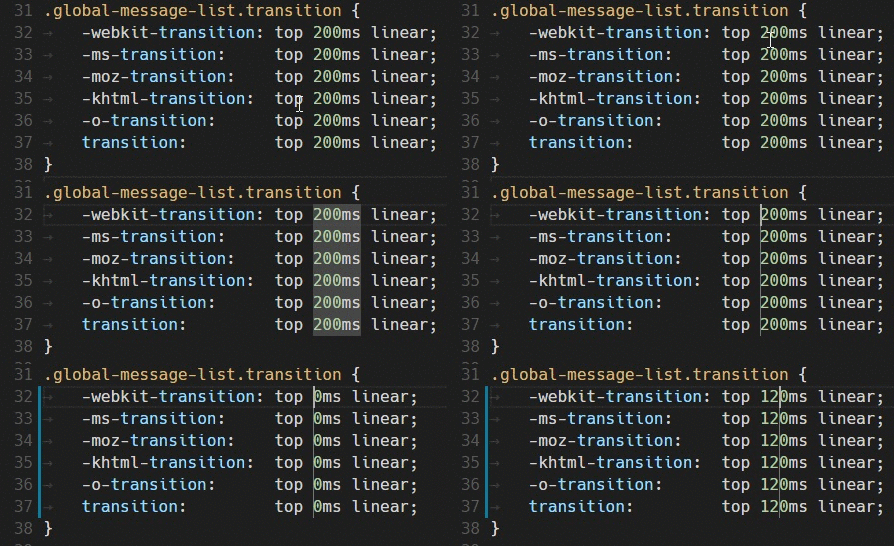\r\n\r\n`Ctrl+D` selects the word at the cursor, or the next occurrence of the current selection.\r\n\r\n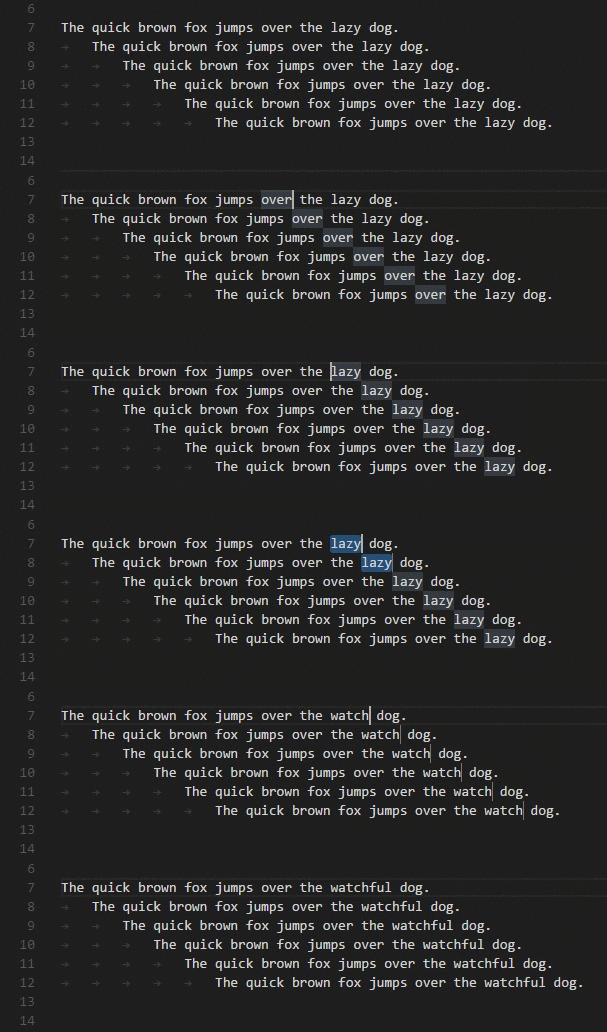\r\n\r\n> **Tip:** You can also add more cursors with `⇧⌘L`, which will add a selection at each occurrence of the current selected text.\r\n#### Column (box) selection\r\n\r\nHold `Shift` and `Alt` while dragging to do column selection:\r\n\r\n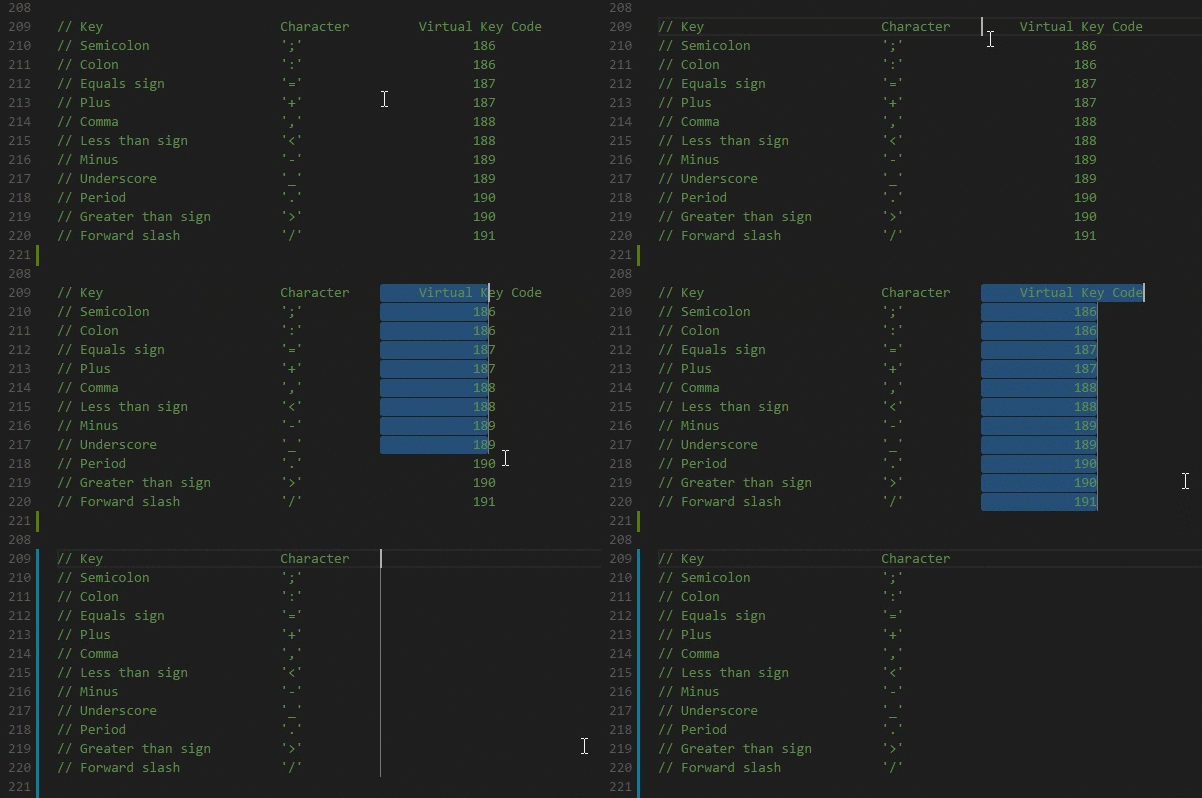\r\n#### Folding\r\n\r\nYou can fold regions of source code using the folding icons on the gutter between line numbers and line start. Move the mouse over the gutter to fold and unfold regions. The folding regions are evaluated based on the indentation of lines. A folding region starts when a line has a smaller indent than one or more following lines, and ends when there is a line with the same or smaller indent.\r\n\r\n### Code intelligence\r\n\r\nThe code editor offers a lot of features related to code intelligence: code completion, parameter info, quick info, and member lists. \r\n\r\nYou can trigger completions in any editor by typing ctrl + space or by typing a trigger character (such as the dot character (.) in JavaScript).\r\n\r\n#### Thingworx Completions\r\n\r\nThe editor offers optimized completions for all of the JavaScript functions, as well as the ThingWorx specific ones:\r\n\r\n\r\n\r\nThe script editor is fully aware of the context and all of the entities in the platform, allowing search and on demand generation of completions based on what the user has written.\r\n\r\n\r\n\r\nIn the case of services that return infotables, or infotable properties with known datashapes, it offers advanced completion for the datashape fields, including completion of methods on the value collection, as well as snippets to ease the work.\r\n\r\n\r\n\r\n\r\n### Keyboard Shortcuts\r\n\r\nThe following document showcases just some of keyboard shortcuts. Many more shortcuts exist, and can be viewed and accessed by pressing F1 to view the *Command Pallette*. You can also view the alternative shortcuts to use for MacOS or Linux.\r\n\r\n* Quick actions: Save ( ctrl + S), Cancel ( ctrl + Q), Test ( ctrl + Y), Save and Close ( ctrl + enter).\r\n\r\n* Diff editor: view changes since you started editing ( ctrl + K)\r\n \r\n\r\n* Config editor: Configure themes and all aspects of the editor, and viewing the changes in realtime ( ctrl + \\\\). Changes are then saved in the user profile.\r\n\r\n \r\n\r\n### Typescript support\r\n\r\nThe developer can also write ThingWorx services using [typescript](https://www.typescriptlang.org/), a typed superset of JavaScript that compiles to plain JavaScript. Whether you want to use all the features of typescript, or just the latest ECMAScript features, this allows you to write more concise and better code that is automatically transpiled to JavaScript. This feature does not rely on any serverside component. The editor automatically converts your code into JavaScript and that is what is being executed.\r\n\r\nIn the old composer, you can trigger this change similarly to how you would switch from JavaScript to SQL.\r\n\r\nIn the new composer, press F1, select _Switch to Typescript_. The reverse action is also available.\r\n\r\n> :warning: When opening a service written in Typescript in a ThingWorx composer where the MonacoEditor extension is not installed, the developer will see the transpiled JavaScript code. If changes are done to this code, the Typescript code is NOT updated.\r\n\r\n\r\n\r\n### Other Features\r\n* Thingworx snippets (iterate infotable, create infotable, iterate infotable fields)\r\n* In the new composer, the expression editor is also replaced with a proper editor\r\n\r\n## Alternative installation options\r\n\r\n### Local installation\r\n\r\nThis option requires access to the install of ThingWorx, and will enable MonacoEditor for all developers using a thingworx environment. However, when updating ThingWorx this change needs to be reapplied.\r\n\r\n 0. Import the ThingWorx extension listed under [**Releases**](https://github.com/ptc-iot-sharing/MonacoEditorTWX/releases). It should be the one named _MonacoScriptEditor-VERSION.zip_.\r\n 1. On the server hosting Thingworx, navigate to the tomcat folder, then to `apache-tomcat/webapps/Thingworx/Composer`. \r\n 2. Edit the file `index.html`.\r\n 3. After _line 9_, after the existing `\r\n ```\r\n\r\n## Reporting issues\r\n\r\nIssues and suggestions can be reported at [**Issues**](/ptc-iot-sharing/MonacoEditorTWX/issues). They will be resolved if there is time available.\r\n\r\n## Disclaimer\r\n\r\nThe **Monaco Editor for Thingworx is not official Thingworx product**. It is something developed to improve the life of a Thingworx developer and he needs to understand that it is **not supported** and any issues encountered are his own responsability.\r\n","readmeFilename":"README.md"}