{"_id":"@amaplex-software/analytics-google-tag-manager","_rev":"2-302f5330bf15dc1de7ec8e7321c76470","name":"@amaplex-software/analytics-google-tag-manager","dist-tags":{"latest":"0.5.4"},"versions":{"0.5.3":{"name":"@amaplex-software/analytics-google-tag-manager","version":"0.5.3","description":"Google tag manager plugin for 'analytics' module","projectMeta":{"provider":{"name":"Google Tag Manager","url":"https://tagmanager.google.com/"},"platforms":{"browser":"./src/browser.js"}},"keywords":["analytics","analytics-project","analytics-plugin","Gtm","Google tag manager","google-tag-manager"],"author":{"name":"David Wells"},"license":"MIT","scripts":{"docs":"node ../analytics-cli/bin/run docs","build":"node ../../scripts/build/index.js","watch":"node ../../scripts/build/_watch.js","release:patch":"npm version patch && npm publish","release:minor":"npm version minor && npm publish","release:major":"npm version major && npm publish","es":"../../node_modules/.bin/babel-node ./testBabel.js"},"main":"lib/analytics-plugin-google-tag-manager.cjs.js","globalName":"analyticsGtagManager","jsnext:main":"lib/analytics-plugin-google-tag-manager.es.js","module":"lib/analytics-plugin-google-tag-manager.es.js","browser":{"./lib/analytics-plugin-google-tag-manager.cjs.js":"./lib/analytics-plugin-google-tag-manager.browser.cjs.js","./lib/analytics-plugin-google-tag-manager.es.js":"./lib/analytics-plugin-google-tag-manager.browser.es.js"},"homepage":"https://github.com/DavidWells/analytics#readme","repository":{"type":"git","url":"git+https://github.com/DavidWells/analytics.git"},"devDependencies":{"@babel/core":"^7.2.2","@babel/preset-env":"^7.3.1"},"bugs":{"url":"https://github.com/DavidWells/analytics/issues"},"_id":"@amaplex-software/analytics-google-tag-manager@0.5.3","_nodeVersion":"14.17.1","_npmVersion":"6.14.13","dist":{"integrity":"sha512-S9UBqRRsrgxgvmseCbBWNk2NA/AIpxJbZGkYs6TIxpzWfDV4i1b2R4UYZjVP6lF/+x4hGzl8C2mKJwUS0n1SyQ==","shasum":"2db1666446c3b118d7e698ccb7d42859feadfc16","tarball":"https://registry.npmjs.org/@amaplex-software/analytics-google-tag-manager/-/analytics-google-tag-manager-0.5.3.tgz","fileCount":9,"unpackedSize":37586,"signatures":[{"keyid":"SHA256:jl3bwswu80PjjokCgh0o2w5c2U4LhQAE57gj9cz1kzA","sig":"MEYCIQDUDiqC4Oyx2Shy8AHKxyMuQl6y0PCtFVAWT80/TMGG2AIhAPa+M5BwYJyvFKBw7G+XjA+aqVdMd3wpUzTbXGDiGXoW"}],"npm-signature":"-----BEGIN PGP SIGNATURE-----\r\nVersion: OpenPGP.js v4.10.10\r\nComment: https://openpgpjs.org\r\n\r\nwsFzBAEBCAAGBQJjE0cLACEJED1NWxICdlZqFiEECWMYAoorWMhJKdjhPU1b\r\nEgJ2VmpRbRAAi6+M1e5zIj6U60FdL2b1kLLvE0bIQa5gVmpGbGwc+J/VqnBI\r\nJ2rwjRxtUEdfUeBGFqJd2/oe/l2EXKh9aQrnsS75LSACs1MxaEJ0RnAyZhFR\r\nD+VRRfjC/yNgXC0rGP1q8Npfk6V1GChVUIg4hhLfbG3HEVjJfBlaoW227pY6\r\nb3AGbuJjny6fqZVQIFoIpODk0gYlaLA65647xI+6lzFV6J04EJ/D0JoH28GI\r\nqmwHlX8mJeyVNbiBDozsHzkULqg4b8hNBEWb1NBshscrHaq2Up8nd5rhEjBI\r\nwhQolhfunZx5/UNn3pY9DH0mEiJZHz6wF7ErmNy7qki/jns2/H4hqRVnuR6h\r\nqruk0uG0WM4uVPBWbqLRaP5idZRn0FYqVgrfKzlsUmvm2sigk5ng1qkVBVKi\r\n9dEhmURVL3ioTmdNPT2YfVIvUldM+SOGRsiCEO+gqs/dO4+pvSJtoi+AH+ov\r\n0FV7UarrYn70LdI8FEqhGIk8ZeeAcHQ0w8Ap19KooOPh0VrDeazRiiE+QzNp\r\ndIKqBr/WLISVk63pU2+2mBOCF2Y3lb3KyGLqGmQKxlOFcqSFHkQO0lPSAEER\r\n2PGRlbQUVoCMrQR1gzBEmSypGlFvZZzA0ewKTAe+/ZhlVFwZlZH44lC56CmS\r\nocSokzcEd7mW+NwHpcEhc8yGZlQE4XDyczc=\r\n=RBBo\r\n-----END PGP SIGNATURE-----\r\n"},"_npmUser":{"name":"adrien-fery","email":"contact@adrien-fery.com"},"directories":{},"maintainers":[{"name":"adrien-fery","email":"contact@adrien-fery.com"},{"name":"grumpy-cat","email":"thomas.vasbinder@amanote.com"}],"_npmOperationalInternal":{"host":"s3://npm-registry-packages","tmp":"tmp/analytics-google-tag-manager_0.5.3_1662207754827_0.06774059476227667"},"_hasShrinkwrap":false},"0.5.4":{"name":"@amaplex-software/analytics-google-tag-manager","version":"0.5.4","description":"Google tag manager plugin for 'analytics' module","projectMeta":{"provider":{"name":"Google Tag Manager","url":"https://tagmanager.google.com/"},"platforms":{"browser":"./src/browser.js"}},"keywords":["analytics","analytics-project","analytics-plugin","Gtm","Google tag manager","google-tag-manager"],"author":{"name":"David Wells"},"license":"MIT","scripts":{"docs":"node ../analytics-cli/bin/run docs","build":"node ../../scripts/build/index.js","watch":"node ../../scripts/build/_watch.js","release:patch":"npm version patch && npm publish","release:minor":"npm version minor && npm publish","release:major":"npm version major && npm publish","es":"../../node_modules/.bin/babel-node ./testBabel.js"},"main":"lib/analytics-plugin-google-tag-manager.cjs.js","globalName":"analyticsGtagManager","jsnext:main":"lib/analytics-plugin-google-tag-manager.es.js","module":"lib/analytics-plugin-google-tag-manager.es.js","browser":{"./lib/analytics-plugin-google-tag-manager.cjs.js":"./lib/analytics-plugin-google-tag-manager.browser.cjs.js","./lib/analytics-plugin-google-tag-manager.es.js":"./lib/analytics-plugin-google-tag-manager.browser.es.js"},"homepage":"https://github.com/DavidWells/analytics#readme","repository":{"type":"git","url":"git+https://github.com/DavidWells/analytics.git"},"devDependencies":{"@babel/core":"^7.2.2","@babel/preset-env":"^7.3.1"},"bugs":{"url":"https://github.com/DavidWells/analytics/issues"},"_id":"@amaplex-software/analytics-google-tag-manager@0.5.4","_nodeVersion":"14.17.1","_npmVersion":"6.14.13","dist":{"integrity":"sha512-dEnol7BRcSkAFTdmdW6TjLr9Ew6JMymkKb5pC9tJzN5JCneXmjE42u0B0uvY6UtV5I+oift66KN3Jv512xjj6A==","shasum":"aef28e92c2ecbe3ec341030ec5dc13c0396fa508","tarball":"https://registry.npmjs.org/@amaplex-software/analytics-google-tag-manager/-/analytics-google-tag-manager-0.5.4.tgz","fileCount":11,"unpackedSize":46830,"signatures":[{"keyid":"SHA256:jl3bwswu80PjjokCgh0o2w5c2U4LhQAE57gj9cz1kzA","sig":"MEQCIA3fE5ZxlPXwRRRfUDThIfloKR+SEr/zduauZzyGQ1lFAiBq35WRjaBMWL2xG11itgwjZHtl5Gg8dR+gOWeTKWGIcg=="}],"npm-signature":"-----BEGIN PGP SIGNATURE-----\r\nVersion: OpenPGP.js v4.10.10\r\nComment: https://openpgpjs.org\r\n\r\nwsFzBAEBCAAGBQJjE0d0ACEJED1NWxICdlZqFiEECWMYAoorWMhJKdjhPU1b\r\nEgJ2VmoRmA//UjKInnccuLyeh35AfiK204tremjBU1yZ4r015nrM0LcAVNXw\r\nySjQQSksNvXY75o0R6gtXOk42DVuBPMdkvvPeLfKTOVWX0tsHb8DIW6UadVs\r\nNoQpWgAVY4MDeTDObY1VtJsfLQ88ZBK+R2Vtq3xT5FImhHjuNjMRtbQKB9Kq\r\nARVDj4Qu4COlBouAu/6/S8TYk6fbtydQDP7WKlT7lgFRywM3HmFm+3F8ys7l\r\nisf4aVi/+0BruOhHrOP3gZo8+YutFldWG0n0PcAFUHqoCtUnwRnnEE/WZ21j\r\nPHESEmdm8lgBuH382AoR+lldWHkiphvzAGKVAoKmQjdVph2/LcbSsVm9UnY2\r\n0OpHaKoXRt90IY+fRwMcPMeb1NatG+4hVGMqeff17wfhLvdVtXlymBhRQB4B\r\nbjK0MY00jTzfTaBfIwkaGtgtNGH6GZuVuwFtv/+F0be8Wjr3rHG8cf7jCMtr\r\n5Ew7V4QX94amko4WFytGyq78uV2OQvyBsrFo3OhTQCzh3rpByvojjsjKVevU\r\nyOlAx/nhRdRYbfR//243nVH132yJYO3iHNMHNd3hpWMwMl+KgEcQdfCtT47+\r\nyQQ3EeMWe+NELG4tvQsztQdjX3VzjDjDkwdlR1oZJi+51WjtEcEN7wiIkP9U\r\nN3QomnJJFyAWxLJZGpgFl8r6LOYGEQ5Bb3c=\r\n=qbaU\r\n-----END PGP SIGNATURE-----\r\n"},"_npmUser":{"name":"adrien-fery","email":"contact@adrien-fery.com"},"directories":{},"maintainers":[{"name":"adrien-fery","email":"contact@adrien-fery.com"},{"name":"grumpy-cat","email":"thomas.vasbinder@amanote.com"}],"_npmOperationalInternal":{"host":"s3://npm-registry-packages","tmp":"tmp/analytics-google-tag-manager_0.5.4_1662207860002_0.1853356382711091"},"_hasShrinkwrap":false}},"time":{"created":"2022-09-03T12:22:34.777Z","0.5.3":"2022-09-03T12:22:34.985Z","modified":"2024-05-14T19:58:34.432Z","0.5.4":"2022-09-03T12:24:20.242Z"},"maintainers":[{"email":"contact@adrien-fery.com","name":"adrien-fery"}],"description":"Google tag manager plugin for 'analytics' module","homepage":"https://github.com/DavidWells/analytics#readme","keywords":["analytics","analytics-project","analytics-plugin","Gtm","Google tag manager","google-tag-manager"],"repository":{"type":"git","url":"git+https://github.com/DavidWells/analytics.git"},"author":{"name":"David Wells"},"bugs":{"url":"https://github.com/DavidWells/analytics/issues"},"license":"MIT","readme":"\n# Google Tag Manager plugin for analytics\n\nIntegration with google tag manager for [analytics](https://www.npmjs.com/package/analytics)\n\nThis analytics plugin will load google tag manager into your application.\n\nFor more information [see the docs](https://getanalytics.io/plugins/google-tag-manager/).\n\n\n\nClick to expand\n\n- [Installation](#installation)\n- [How to use](#how-to-use)\n- [Platforms Supported](#platforms-supported)\n- [Browser usage](#browser-usage)\n - [Browser API](#browser-api)\n - [Configuration options for browser](#configuration-options-for-browser)\n- [Additional examples](#additional-examples)\n- [Configuring GTM](#configuring-gtm)\n- [Using multiple instances of GTM](#using-multiple-instances-of-gtm)\n- [Custom name for dataLayer-object](#custom-name-for-datalayer-object)\n- [Tracking if JS is disabled](#tracking-if-js-is-disabled)\n\n\n\n\n## Installation\n\nInstall `analytics` and `@analytics/google-tag-manager` packages\n\n```bash\nnpm install analytics\nnpm install @analytics/google-tag-manager\n```\n\n\n\n## How to use\n\nThe `@analytics/google-tag-manager` package works in [the browser](#browser-usage). To use, install the package, include in your project and initialize the plugin with [analytics](https://www.npmjs.com/package/analytics).\n\nBelow is an example of how to use the browser plugin.\n\n```js\nimport Analytics from 'analytics'\nimport googleTagManager from '@analytics/google-tag-manager'\n\nconst analytics = Analytics({\n app: 'awesome-app',\n plugins: [\n googleTagManager({\n containerId: 'GTM-123xyz'\n })\n ]\n})\n\n/* Track a page view */\nanalytics.page()\n\n/* Track a custom event */\nanalytics.track('cartCheckout', {\n item: 'pink socks',\n price: 20\n})\n\n```\n\nAfter initializing `analytics` with the `googleTagManager` plugin, data will be sent into Google Tag Manager whenever [analytics.page](https://getanalytics.io/api/#analyticspage), or [analytics.track](https://getanalytics.io/api/#analyticstrack) are called.\n\nSee [additional implementation examples](#additional-examples) for more details on using in your project.\n\n## Platforms Supported\n\nThe `@analytics/google-tag-manager` package works in [the browser](#browser-usage)\n\n## Browser usage\n\nThe Google Tag Manager client side browser plugin works with these analytic api methods:\n\n- **[analytics.page](https://getanalytics.io/api/#analyticspage)** - Sends page views into Google Tag Manager\n- **[analytics.track](https://getanalytics.io/api/#analyticstrack)** - Track custom events and send to Google Tag Manager\n\n### Browser API\n\n```js\nimport Analytics from 'analytics'\nimport googleTagManager from '@analytics/google-tag-manager'\n\nconst analytics = Analytics({\n app: 'awesome-app',\n plugins: [\n googleTagManager({\n containerId: 'GTM-123xyz'\n })\n ]\n})\n\n```\n\n### Configuration options for browser\n\n| Option | description |\n|:---------------------------|:-----------|\n| `containerId` **required** - string| The Container ID uniquely identifies the GTM Container. |\n| `dataLayerName` _optional_ - string| The optional name for dataLayer-object. Defaults to dataLayer. |\n| `customScriptSrc` _optional_ - string| Load Google Tag Manager script from a custom source |\n| `preview` _optional_ - string| The preview-mode environment |\n| `auth` _optional_ - string| The preview-mode authentication credentials |\n| `execution` _optional_ - string| The script execution mode |\n\n\n## Additional examples\n\nBelow are additional implementation examples.\n\n\n Using in HTML\n\n Below is an example of importing via the unpkg CDN. Please note this will pull in the latest version of the package.\n\n ```html\n \n \n \n Using @analytics/google-tag-manager in HTML\n \n \n \n \n \n ....\n \n \n\n ```\n\n\n\n\n Using in HTML via ES Modules\n\n Using `@analytics/google-tag-manager` in ESM modules.\n\n ```html\n \n \n \n Using @analytics/google-tag-manager in HTML via ESModules\n \n \n \n \n ....\n \n \n\n ```\n\n\n\n\n\n\n## Configuring GTM\n\nMake sure you have your google tags manager setup to fire on Page views.\n\nPlease see this example on wiring up [\"virtual page views\" in google tag manager](https://www.bounteous.com/insights/2018/03/30/single-page-applications-google-analytics/).\n\nIf you are using a SPA you want to listen to history changes as well.\n\n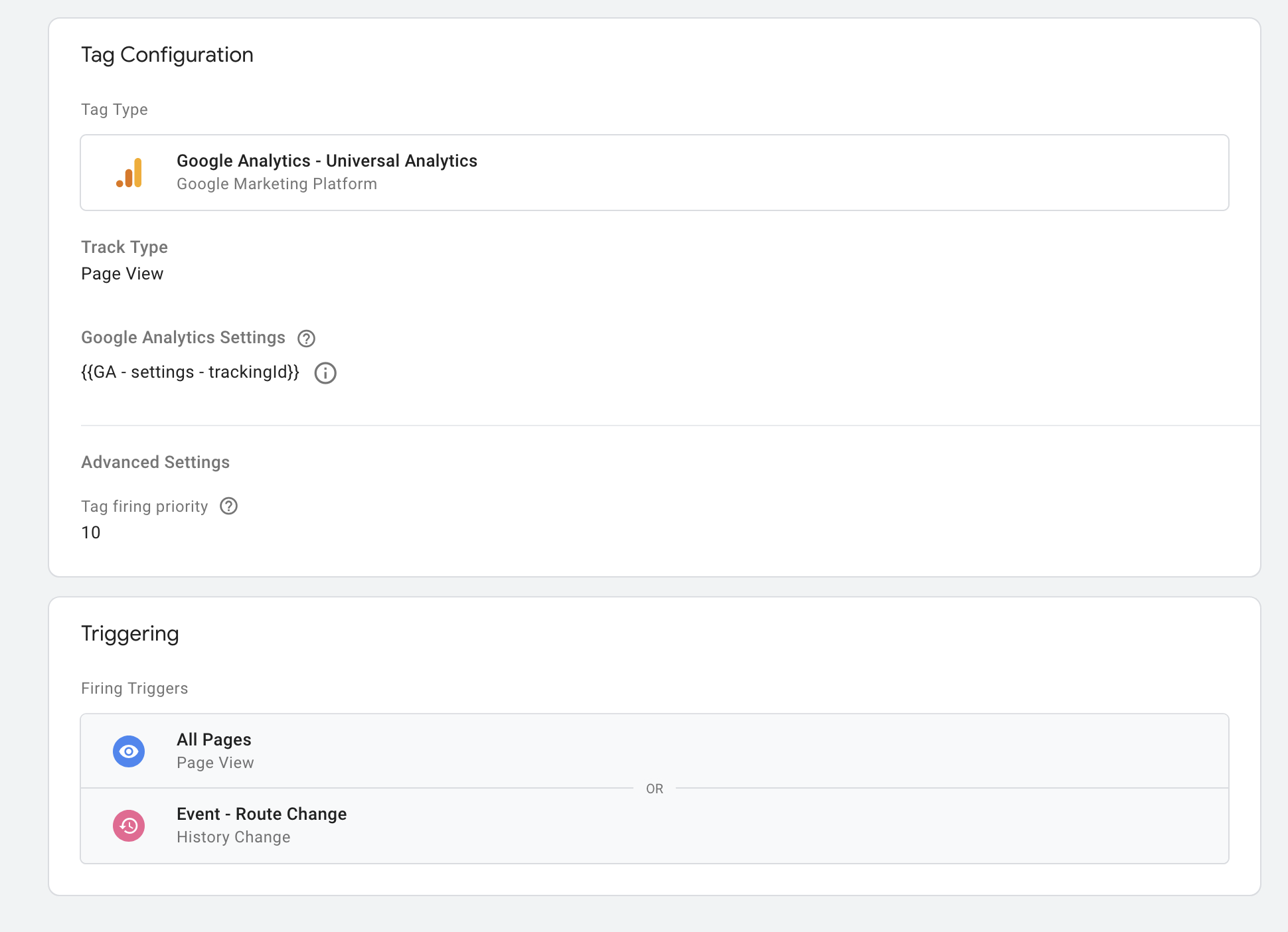\n\nSee the [full list of analytics provider plugins](https://getanalytics.io/plugins/) in the main repo.\n\n## Using multiple instances of GTM\n\nAs noted in the [GTM docs](https://developers.google.com/tag-manager/devguide#multiple-containers), it's possible to load multiple instances of google tag manager on the page. This method is [not exactly recommended](https://www.simoahava.com/gtm-tips/multiple-gtm-containers-on-the-page/) by analytics experts if you can avoid it by using a single container. But if you must! You can!\n\n```js\nimport Analytics from 'analytics'\nimport googleTagManager from '@analytics/google-tag-manager'\n\nconst GTMOne = googleTagManager({ containerId: 'GTM-123xyz' })\n// For instance 2, override the plugin 'name' and provide the 2nd GTM container ID\nconst GTMTwo = Object.assign({}, googleTagManager({ containerId: 'GTM-456abc'}), {\n name: 'google-tag-manager-two'\n})\n\n// Load up analytics\nconst analytics = Analytics({\n app: 'awesome-app',\n plugins: [\n GTMOne,\n GTMTwo\n ]\n})\n\n// Both instances will be loaded into the page\n```\n\nThis functionality has been [added](https://github.com/DavidWells/analytics/pull/30) by the wonderful [@zobzn](https://github.com/zobzn)!\n\n## Custom name for dataLayer-object\n\nThe dataLayer is by default set to window.dataLayer. This can be changed by setting dataLayerName in plugin configuration.\n\n```js\nimport Analytics from 'analytics'\nimport googleTagManager from '@analytics/google-tag-manager'\n\nconst analytics = Analytics({\n app: 'awesome-app',\n plugins: [\n googleTagManager({\n containerId: 'GTM-123xyz',\n dataLayerName: 'customDataLayer',\n })\n ]\n})\n// dataLayer is initialized to window.customDataLayer\n```\n\n## Tracking if JS is disabled\n\nThe [analytics library](https://github.com/DavidWells/analytics/) will load the Google Tag manager javascript onto the page. This will work for every web site visitor that has javascript enabled.\n\nFor the small number of people who might have javascript disabled you will want to add the following `