{"_rev":"2-039090a0bcdf776226375f4433accf25","time":{"created":"2024-11-06T10:03:50.678Z","modified":"2024-11-06T10:03:51.237Z","2.0.4":"2024-11-05T16:16:22.654Z","2.0.5":"2024-11-06T10:03:50.974Z"},"_id":"@amblines/react-table-filter","name":"@amblines/react-table-filter","dist-tags":{"latest":"2.0.5"},"versions":{"2.0.5":{"name":"@amblines/react-table-filter","version":"2.0.5","description":"> Module creates Excel like Column Filters for Table. The filter list contains all the unique items present in every column. See image below for example.","main":"lib/bundle.js","scripts":{"test":"echo \"Error: no test specified\" && exit 1","build":"webpack","watch":"webpack --watch","start:dev":"webpack-dev-server --content-base ./docs --inline --hot","build-example":"cd examples; ../node_modules/.bin/webpack","run-example":"cd examples; ../node_modules/.bin/webpack-dev-server --content-base ../docs --inline --hot --config webpack.config.js","release":"npm run build; npm publish","pretest":"eslint ./src","bundleanalyze":"analyze=true ./node_modules/.bin/webpack"},"repository":{"type":"git","url":"git+https://github.com/Amblines/react-table-filter.git"},"author":{"name":"cheekujha@gmail.com"},"license":"ISC","dependencies":{"prop-types":"^15.6.0"},"peerDependencies":{"react":"*","react-dom":"*"},"devDependencies":{"@babel/core":"^7.2.2","@babel/plugin-proposal-class-properties":"^7.5.5","@babel/preset-env":"^7.3.1","@babel/preset-react":"^7.0.0","babel-eslint":"^10.0.1","babel-loader":"^8.0.5","babel-plugin-transform-object-assign":"^6.22.0","chai":"^4.2.0","css-loader":"^3.2.0","enzyme":"^3.9.0","enzyme-adapter-react-16":"^1.12.1","eslint":"^5.12.1","eslint-config-google":"^0.11.0","eslint-plugin-babel":"^5.3.0","eslint-plugin-react":"^7.12.4","extract-text-webpack-plugin":"^4.0.0-beta.0","html-webpack-plugin":"^3.2.0","ignore-styles":"^5.0.1","jsdom":"^14.0.0","mocha":"^6.2.0","node-sass":"^4.14.1","sass-loader":"^6.0.6","style-loader":"^0.19.0","terser-webpack-plugin":"^1.2.1","webpack":"^4.29.0","webpack-bundle-analyzer":"^3.4.1","webpack-cli":"^3.2.1","webpack-dev-server":"^3.11.0"},"keywords":["react","reactjs","react-table","react-table-filter","tablefilter","react-component","react-filter-table"],"gitHead":"7d1026b85f204ab4a5b2ffb310c623475a731b8c","bugs":{"url":"https://github.com/Amblines/react-table-filter/issues"},"homepage":"https://github.com/Amblines/react-table-filter#readme","_id":"@amblines/react-table-filter@2.0.5","_nodeVersion":"14.21.3","_npmVersion":"6.14.18","dist":{"integrity":"sha512-1DTwePaZ9OrA07DKq+NWSN6cVIaRahV8przeVx17+RX60VF+3fGpWvU3+yKbf8ZLW/GXk4EBHWn8K+6jbH5y2A==","shasum":"bce50d2f0282931348c449b5b40691441983ebe7","tarball":"https://registry.npmjs.org/@amblines/react-table-filter/-/react-table-filter-2.0.5.tgz","fileCount":35,"unpackedSize":1017888,"signatures":[{"keyid":"SHA256:jl3bwswu80PjjokCgh0o2w5c2U4LhQAE57gj9cz1kzA","sig":"MEUCIEPECzUjeKhqQWSk4IW/GjXTJAVmHbf3dT5IzgjHfBcrAiEAx2+5wc8FRwA+HCdv5ogjaBPqqpBvmUGwjuD4w8jBdyY="}]},"_npmUser":{"name":"amblines","email":"pavgolovachev@gmail.com"},"directories":{},"maintainers":[{"name":"amblines","email":"pavgolovachev@gmail.com"}],"_npmOperationalInternal":{"host":"s3://npm-registry-packages","tmp":"tmp/react-table-filter_2.0.5_1730887430777_0.8119052565167135"},"_hasShrinkwrap":false}},"maintainers":[{"name":"amblines","email":"pavgolovachev@gmail.com"}],"description":"> Module creates Excel like Column Filters for Table. The filter list contains all the unique items present in every column. See image below for example.","homepage":"https://github.com/Amblines/react-table-filter#readme","keywords":["react","reactjs","react-table","react-table-filter","tablefilter","react-component","react-filter-table"],"repository":{"type":"git","url":"git+https://github.com/Amblines/react-table-filter.git"},"author":{"name":"cheekujha@gmail.com"},"bugs":{"url":"https://github.com/Amblines/react-table-filter/issues"},"license":"ISC","readme":"# react-table-filter\n\n> Module creates Excel like Column Filters for Table. The filter list contains all the unique items present in every column. See image below for example.\n\n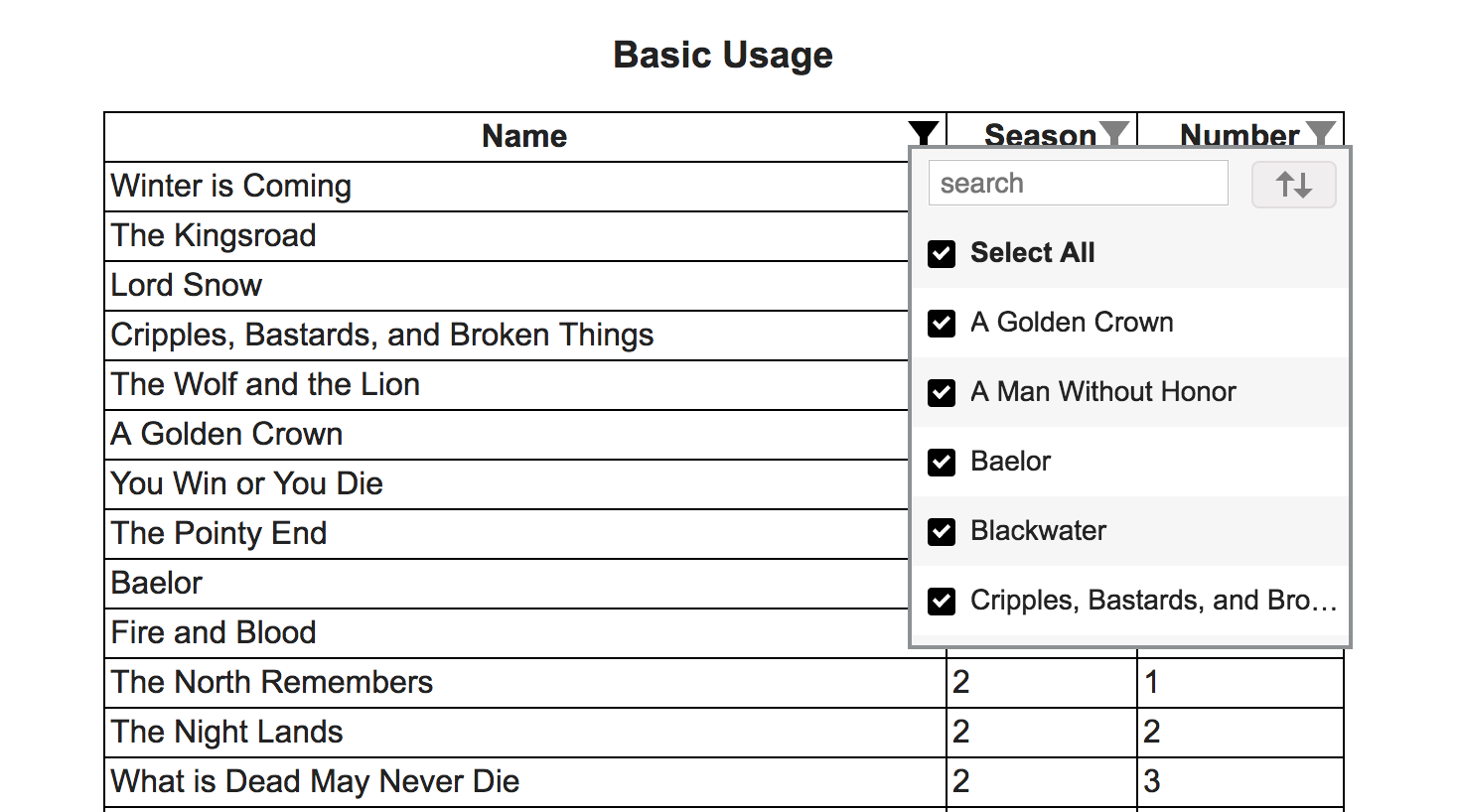\n\n## Demo\n\n[https://cheekujha.github.io/react-table-filter/](https://cheekujha.github.io/react-table-filter/)\n\n## Install\nYou need to have react and react-dom as dependencies in your project.\n\n1. With [npm](https://npmjs.org/) installed, run\n\n```\n$ npm install react-table-filter --save\n```\n\n2. At this point you can import react-table-filter and its styles in your application as follows:\n\n```js\nimport TableFilter from 'react-table-filter';\n\n// Be sure to include styles at some point, probably during your bootstraping\n// In JS\nimport react-table-filter/lib/styles.css;\n\n// In SCSS\n@import \"path-to-node_modules/react-table-filter/lib/styles.css\";\n\n// Or directly import css\n\n\n```\n\n## Usage\n\n1. Wrap header columns (th / td) with TableFilter as shown below.\n```\n\n
\n Name\n
\n
\n Season\n
\n
\n Number\n
\n\n```\nRequired Props on TableFilter\n\nrows - Initial Array of Items\n\nonFilterUpdate - Function called with updated filtered data when filters are added/removed. This function is used to show updated data by your application. Ex:\n\n```\nfilterUpdated = (newData, filterConfiguration) => {\n\t\tthis.setState({\n\t\t\t\"upddatedData\": newData\n\t\t});\n\t}\n```\n```\nArguments Detail:\nnewData - Filtered Data to be used to show on UI\nfilterConfiguration - Current filters configuration.\n```\n**filterConfiguration** can be saved and be passed as prop(initialFilters) to **TableFilter** to maintain filter state while initializing the component.(In case user navigates away and comes back etc.)\n\nRequired Props on th/td (Header columns)\n\nfilterkey - The key by which that column is to be filtered(key as present in rows data)\n\nOnly the Columns with \"filterkey\" prop present will be considered for filtering.\n\n## Reset Items after Initialization\n\nIf you want to reset Items after component mount. Make a reference to **TableFilter** node and call **reset** method as shown below.\n\n```\n {this.tableFilterNode = node;}>\n\nthis.tableFilterNode.reset(newData, resetFilters);\n```\n\n```\nArguments Detail:\nnewData - Data to reset\nresetFilters(Default: true) - Boolean tells component to maintain/reset existing filters\n```\n## API\n\n### Properties\n\n#### TableFilter\n\nName | Type | Default | Required | Description\n:--- | :--- | :------ | :------- | :----------\nrows | array | | true | Items for the Filter\nonFilterUpdate | function(updatedData, filterConfiguration) | | true | Function called with filtered data and updated filter configuration\nrowClass | string | | false | Any additional class to be added to table row contaning header columns\ninitialFilters | Array | | false | Initial Filter configuration to be applied. Configuration is received as second argument for **onFilterUpdate** function\nrowComponent | Component | Table Row Element | false | The columns headers will by default be placed inside Table Row Element. If **rowComponent** is passed it will be used. Any react component can be used.\n\n#### TableFilter Ref Methods\n\nName | Type | Description\n:--- | :--- | :----------\nreset | function(items, resetFilters=true) | Function called to reset items after component has been mounted. You can choose to either reset current filters or not.\n\n\n#### Cloumn Headers(td/th)\n\nName | Type | Default | Required | Description\n:--- | :--- | :------ | :------- | :----------\nfilterkey | string | | false | Key by which the Column should be filtered(Key as present in single Item)\nitemDisplayValueFunc | function(itemValue) | | false | Optional Function that returns the Value that is displayed in the filter list for each item(Default is the item value - Item[key])\nitemSortValueFunc | function(itemValue) | | false | Optional Function that returns the Value that is used while sorting (Default is the item value - Item[key])\nalignleft | string | \"false\" | false | Decides while side filter list should be aligned w.r.t Column. Allowed \"true\"/\"false\"\ncasesensitive | string | \"false\" | false | Case Sensitivity during sort. Allowed \"true\"/\"false\"\nshowsearch | string | \"true\" | false | Display/Hide the search input. Allowed \"true\"/\"false\"\n\n## License\n\nMIT\n","readmeFilename":"README.md"}