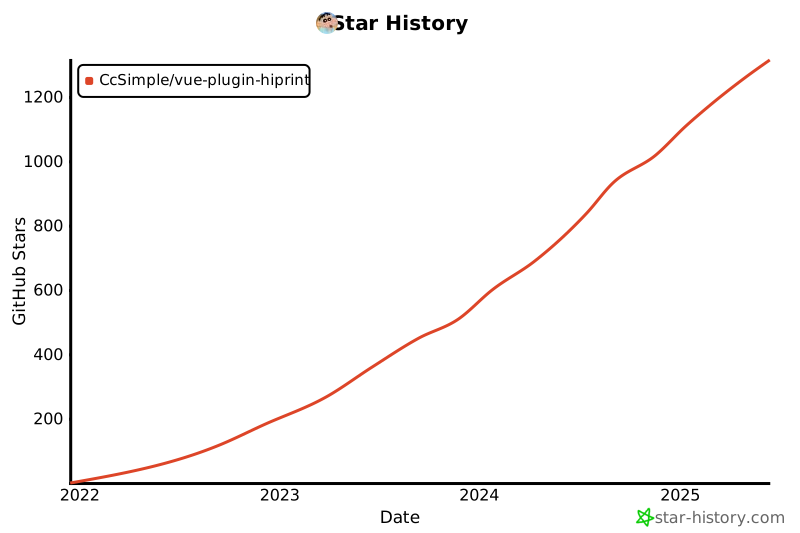
{"_id":"@anganing/vue-plugin-hiprint","name":"@anganing/vue-plugin-hiprint","dist-tags":{"latest":"0.0.61-beta5"},"versions":{"0.0.61-beta5":{"name":"@anganing/vue-plugin-hiprint","description":"hiprint for Vue2.x / Vue3.x 支持拖拽(分页(不分页)、表头表脚、样式设置、复制粘贴、缩放、撤销重做)生成打印模板、导出json模板数据、静默打印/获取MAC地址(借助客户端)","version":"0.0.61-beta5","author":{"name":"CcSimple"},"license":"MIT","main":"dist/vue-plugin-hiprint.js","private":false,"repository":{"type":"git","url":"git+https://github.com/CcSimple/vue-plugin-hiprint.git"},"bugs":{"url":"https://github.com/CcSimple/vue-plugin-hiprint/issues"},"keywords":["vue","hiprint","print"],"scripts":{"serve":"vue-cli-service serve","build-demo":"vue-cli-service build","build":"cross-env NODE_ENV=production webpack --progress","pub":"npm run build && npm --registry https://registry.npmjs.org/ publish --access public","up-version":"node ./scripts/change-version.js","pub-beta":"npm run build && npm --registry https://registry.npmjs.org/ publish --tag beta"},"engines":{"node":">=16"},"browserslist":["> 1%","last 2 versions","not ie <= 8"],"devDependencies":{"@vue/cli-plugin-babel":"~5.0.0","@vue/cli-service":"^4.5.15","ant-design-vue":"^1.7.8","babel-loader":"^8.1.0","bootstrap":"^3.3.7","concurrent-tasks":"^1.0.7","copy-webpack-plugin":"^5.1.2","core-js":"^3.6.5","cross-env":"^5.0.5","less-loader":"^6.1.1","uglifyjs-webpack-plugin":"^2.2.0","vue":"^2.5.11","vue-ls":"^4.0.0","vue-template-compiler":"^2.6.11","webpack-cli":"^4.9.1"},"dependencies":{"@claviska/jquery-minicolors":"^2.3.6","bwip-js":"^4.0.0","canvg":"^3.0.10","jquery":"^3.6.0","jsbarcode":"^3.11.5","jspdf":"^2.5.1","lodash":"^4.17.21","nzh":"^1.0.8","socket.io-client":"^4.5.1","dom-to-image-more":"3.7.2"},"_id":"@anganing/vue-plugin-hiprint@0.0.61-beta5","gitHead":"f1f9fd203e8128acc43ebf0504e92d8b90798fbc","homepage":"https://github.com/CcSimple/vue-plugin-hiprint#readme","_nodeVersion":"23.9.0","_npmVersion":"10.9.2","dist":{"integrity":"sha512-HcKC1MvChzfxBqElKvpaH0WZahlpHfCFO/uvC2/770po+yzKN0sl/Y3yNswCCNfFekqgtDWtQCdWD7P2VYLjqw==","shasum":"43b5fc0b4936585073e5b90053f33fa8ee8730fa","tarball":"https://registry.npmjs.org/@anganing/vue-plugin-hiprint/-/vue-plugin-hiprint-0.0.61-beta5.tgz","fileCount":6,"unpackedSize":983919,"signatures":[{"keyid":"SHA256:DhQ8wR5APBvFHLF/+Tc+AYvPOdTpcIDqOhxsBHRwC7U","sig":"MEUCIA67673cgY1iOgcWUwQNY0pJRakxtdcBC4qdYOtWNZV4AiEAoN5QYY5EZEhDdRSizmJfw+ZlXICvzSzzbgi+CN25c4A="}]},"_npmUser":{"name":"anganing","email":"1419054707@qq.com"},"directories":{},"maintainers":[{"name":"anganing","email":"1419054707@qq.com"}],"_npmOperationalInternal":{"host":"s3://npm-registry-packages-npm-production","tmp":"tmp/vue-plugin-hiprint_0.0.61-beta5_1771229643724_0.6276068339907306"},"_hasShrinkwrap":false}},"time":{"created":"2026-02-16T08:14:03.655Z","0.0.61-beta5":"2026-02-16T08:14:03.908Z","modified":"2026-02-16T08:14:04.093Z"},"maintainers":[{"name":"anganing","email":"1419054707@qq.com"}],"description":"hiprint for Vue2.x / Vue3.x 支持拖拽(分页(不分页)、表头表脚、样式设置、复制粘贴、缩放、撤销重做)生成打印模板、导出json模板数据、静默打印/获取MAC地址(借助客户端)","homepage":"https://github.com/CcSimple/vue-plugin-hiprint#readme","keywords":["vue","hiprint","print"],"repository":{"type":"git","url":"git+https://github.com/CcSimple/vue-plugin-hiprint.git"},"author":{"name":"CcSimple"},"bugs":{"url":"https://github.com/CcSimple/vue-plugin-hiprint/issues"},"license":"MIT","readme":"<div align=\"center\" style=\"margin-top: 10px\">\r\n  <a href=\"http://hiprint.io/\">\r\n    <img width=\"100\" height=\"100\" src=\"http://hiprint.io/Content/assets/hi.png\">\r\n  </a>\r\n  <a href=\"https://cn.vuejs.org/\">\r\n    <img width=\"100\" height=\"100\" src=\"https://v2.cn.vuejs.org/images/logo.svg\">\r\n  </a>\r\n</div>\r\n\r\n![image](https://badgen.net/packagephobia/publish/vue-plugin-hiprint)\r\n![image](https://badgen.net/npm/v/vue-plugin-hiprint)\r\n<a href=\"https://gitee.com/CcSimple/vue-plugin-hiprint\">\r\n<img src=\"https://gitee.com/CcSimple/vue-plugin-hiprint/badge/star.svg?theme=dark\" alt=\"Gitee star\">\r\n</a>\r\n<a href=\"https://gitee.com/CcSimple/vue-plugin-hiprint\">\r\n<img src=\"https://gitee.com/CcSimple/vue-plugin-hiprint/badge/fork.svg?theme=dark\" alt=\"Gitee fork\">\r\n</a>\r\n![image](https://badgen.net/github/stars/CcSimple/vue-plugin-hiprint)\r\n![image](https://badgen.net/github/forks/CcSimple/vue-plugin-hiprint)\r\n![image](https://badgen.net/npm/dw/vue-plugin-hiprint)\r\n![image](https://badgen.net/npm/dm/vue-plugin-hiprint)\r\n![image](https://badgen.net/npm/dy/vue-plugin-hiprint)\r\n\r\n## 关于此插件\r\n\r\nvue-plugin-hiprint (基于 [hiprint 2.5.4](http://hiprint.io/)) 当时只是为了方便 <span style=\"color: red\">我（并非 hiprint 原作者）</span> 在 vue 项目中引入使用，所以以此命名。\r\n\r\n此 <span style=\"color: red\">插件</span> 仅仅是一个 <span style=\"color: red\">JavaScript【工具库】</span> 而非 <span style=\"color: yellow\">Vue【组件库】</span>，所以它默认不包含 demo 中的那些组件页面（demo 代码可复制使用）。\r\n\r\n由于 hiprint 官网最后一次更新时间为 2019 年【hiprint 2.5.4 是 [LGPL](#关于lgpl协议) 协议】，后在诸多使用者及反馈下进行了许多优化调整。\r\n\r\n## vue-plugin-hiprint\r\n\r\n> [✨ 立即体验(Github 访问慢)](https://ccsimple.github.io/vue-plugin-hiprint/) <br/><br/> [✨ 国内访问(www.ibujian.cn)](https://www.ibujian.cn/) <br/><br/> [🌈 更新日志 (页面支持 Ctrl + F 搜索)](CHANGELOG.md) <br/><br/> [🐛 常见问题(入门必看!)](#常见问题) ⚠️⚠️ [📕 系列教程文章(入门必看!)](#文章链接) <br/><br/> [🚀 项目生态(打印客户端、node 服务端、uniapp)](#插件生态)\r\n\r\n> hiprint for Vue2.x / Vue3.x (基于 jQuery, 理论上其他框架可用。[react demo 分支](https://github.com/CcSimple/vue-plugin-hiprint/tree/react_demo))\r\n\r\n> **jQuery/uniapp (html/h5)** 项目 见下方 [jQuery/uniapp 项目使用](#jqueryuniapp-项目使用)\r\n\r\n> [!IMPORTANT]\r\n>\r\n> **注意事项**\r\n>\r\n> - NodeJs 需要 16.x 版本 (开发使用 16.18.1)\r\n> - <div style=\"color: red\">【vue-plugin-hiprint】与【hiprint.io官网】差异甚多,请忽混用!请忽混用!请忽混用!</div>\r\n> - <div style=\"color: orange\">请使用项目关联的打印客户端,或者自行修改打印客户端的源码,以适配本项目的模板!</div>\r\n> - 主分支是融合版本的最新代码,如果你不需要修改 hiprint 相关代码. 请使用 npm 包的方式安装.\r\n> - 使用直接客户端时,本地开发连接没问题,部署到线上出现跨域无法连接打印客户端问题:\r\n> - [线上跨域问题,请升级 https! 说明:https://www.cnblogs.com/daysme/p/15493523.html](https://www.cnblogs.com/daysme/p/15493523.html)\r\n> - 如需提交 PR 请前往 github 合并后可自动发布 npm 包并同步代码到 gitee\r\n> - vue-plugin-hiprint 包不包含 UI 界面,需要自行处理。如果想更快速引入请查看 [sv-print 组件库](https://www.ibujian.cn/svp/)\r\n\r\n## 文章链接\r\n\r\n2元快速入门: [一文彻底入门可视化打印 vue-plugin-hiprint](https://mp.weixin.qq.com/s/R8juiaQsLhMmyZebv55tUA)\r\n\r\n6元解锁云打印: [三端通用的云打印方案: uniapp + nodejs中转服务！(附源码)](https://mp.weixin.qq.com/s/3_zEsr6nIYAqKdDsKqhg7A)\r\n\r\n> 更多文章见公众号、小程序(文章,服务端预览,云打印)\r\n\r\n<table>\r\n    <tr>\r\n        <td><img height=\"160\" src=\"https://gitee.com/CcSimple/vue-plugin-hiprint/raw/main/res/ww.png\"/></td>\r\n        <td><img height=\"160\" src=\"https://gitee.com/CcSimple/vue-plugin-hiprint/raw/main/res/wmp.jpg\"/></td>\r\n    </tr>\r\n</table>\r\n\r\n## 安装使用\r\n\r\n```\r\nnpm install vue-plugin-hiprint\r\n```\r\n\r\n```html\r\n<!--【必须】在index.html 文件中添加打印所需样式(cdn可能不稳定):-->\r\n<link\r\n  rel=\"stylesheet\"\r\n  type=\"text/css\"\r\n  media=\"print\"\r\n  href=\"https://npmmirror.com/package/vue-plugin-hiprint/files/dist/print-lock.css\"\r\n/>\r\n<!-- OR -->\r\n<link\r\n  rel=\"stylesheet\"\r\n  type=\"text/css\"\r\n  media=\"print\"\r\n  href=\"https://cdn.jsdelivr.net/npm/vue-plugin-hiprint@latest/dist/print-lock.css\"\r\n/>\r\n<!-- 可以调整成 相对链接/自有链接, 【重要】名称需要一致 【print-lock.css】-->\r\n<link rel=\"stylesheet\" type=\"text/css\" media=\"print\" href=\"/print-lock.css\" />\r\n```\r\n\r\n## 项目截图\r\n\r\n<table>\r\n    <tr>\r\n        <td><img src=\"https://gitee.com/CcSimple/vue-plugin-hiprint/raw/main/res/img_0.png\"/></td>\r\n        <td><img src=\"https://gitee.com/CcSimple/vue-plugin-hiprint/raw/main/res/img_1.png\"/></td>\r\n    </tr>\r\n    <tr>\r\n        <td><img src=\"https://gitee.com/CcSimple/vue-plugin-hiprint/raw/main/res/img_2.png\"/></td>\r\n        <td><img src=\"https://gitee.com/CcSimple/vue-plugin-hiprint/raw/main/res/img_3.png\"/></td>\r\n    </tr>\r\n    <tr>\r\n        <td><img src=\"https://gitee.com/CcSimple/vue-plugin-hiprint/raw/main/res/gif00.gif\"/></td>\r\n        <td><img src=\"https://gitee.com/CcSimple/vue-plugin-hiprint/raw/main/res/gif01.gif\"/></td>\r\n    </tr>\r\n</table>\r\n\r\n## 拖拽设计使用(推荐)\r\n\r\n```javascript\r\nimport { hiprint, defaultElementTypeProvider } from \"vue-plugin-hiprint\";\r\n// 初始化可拖拽的元素\r\nhiprint.init({\r\n  providers: [new defaultElementTypeProvider()],\r\n});\r\n// $('.ep-draggable-item') 包含 tid, 与上边的 provider 中的 tid 对应 才能正常拖拽生成元素\r\nhiprint.PrintElementTypeManager.buildByHtml($(\".ep-draggable-item\"));\r\nhiprintTemplate = new hiprint.PrintTemplate({\r\n  template: {}, // 模板json\r\n  settingContainer: \"#PrintElementOptionSetting\", // 元素参数容器\r\n  paginationContainer: \".hiprint-printPagination\", // 多面板的容器， 实现多面板， 需要在添加一个 <div class=\"hiprint-printPagination\"/>\r\n  // ------- 下列是可选功能 -------\r\n  // ------- 下列是可选功能 -------\r\n  // ------- 下列是可选功能 -------\r\n  // 图片选择功能\r\n  onImageChooseClick: (target) => {\r\n    // 测试 3秒后修改图片地址值\r\n    setTimeout(() => {\r\n      // target.refresh(url,options,callback)\r\n      // callback(el, width, height) // 原元素,宽,高\r\n      // target.refresh(url,false,(el,width,height)=>{\r\n      //   el.options.width = width;\r\n      //   el.designTarget.css('width', width + \"pt\");\r\n      //   el.designTarget.children('.resize-panel').trigger($.Event('click'));\r\n      // })\r\n      target.refresh(\r\n        \"data:image/png;base64,iVBORw0KGgoAAAANSUhEUgAAAtAAAAIIAQMAAAB99EudAAAABlBMVEUmf8vG2O41LStnAAABD0lEQVR42u3XQQqCQBSAYcWFS4/QUTpaHa2jdISWLUJjjMpclJoPGvq+1WsYfiJCZ4oCAAAAAAAAAAAAAAAAAHin6pL9c6H/fOzHbRrP0tLS0tLS0tLS0tLS0tLS0tLS0tLS0tLS0tLS0u/SY9LS0tLS0tLS0tLS0n+edm+UlpaWlpaWlpaWlpaW/tl0Ndyzbno7/+tPTJdd1wal69dNa6abx+Lq6TSeYtK7BX/Diek0XULSZZrakPRtV0i6Hu/KIt30q4fM0pvBqvR9mvsQkZaW9gyJT+f5lsnzjR54xAk8mAUeJyMPwYFH98ALx5Jr0kRLLndT7b64UX9QR/0eAAAAAAAAAAAAAAAAAAD/4gpryzr/bja4QgAAAABJRU5ErkJggg==\",\r\n        {\r\n          // auto: true, // 根据图片宽高自动等比(宽>高?width:height)\r\n          // width: true, // 按宽调整高\r\n          // height: true, // 按高调整宽\r\n          real: true, // 根据图片实际尺寸调整(转pt)\r\n        }\r\n      );\r\n    }, 3000);\r\n    // target.getValue()\r\n    // target.refresh(url)\r\n  },\r\n  // 自定义可选字体\r\n  // 或者使用 hiprintTemplate.setFontList([])\r\n  // 或元素中 options.fontList: []\r\n  fontList: [\r\n    { title: \"微软雅黑\", value: \"Microsoft YaHei\" },\r\n    { title: \"黑体\", value: \"STHeitiSC-Light\" },\r\n    { title: \"思源黑体\", value: \"SourceHanSansCN-Normal\" },\r\n    { title: \"王羲之书法体\", value: \"王羲之书法体\" },\r\n    { title: \"宋体\", value: \"SimSun\" },\r\n    { title: \"华为楷体\", value: \"STKaiti\" },\r\n    { title: \"cursive\", value: \"cursive\" },\r\n  ],\r\n  dataMode: 1, // 1:getJson 其他：getJsonTid 默认1\r\n  history: true, // 是否需要 撤销重做功能\r\n  onDataChanged: (type, json) => {\r\n    // 模板发生改变回调\r\n    console.log(type); // 新增、移动、删除、修改(参数调整)、大小、旋转\r\n    console.log(json); // 返回 template\r\n  },\r\n  onUpdateError: (e) => {\r\n    // 更新失败回调\r\n    console.log(e);\r\n  },\r\n});\r\n// 设计器的容器\r\nhiprintTemplate.design(\"#hiprint-printTemplate\");\r\n```\r\n\r\n## 代码模式使用(不推荐)\r\n\r\n```javascript\r\nimport { hiprint, defaultElementTypeProvider } from \"vue-plugin-hiprint\";\r\n// 引入后使用示例\r\nhiprint.init();\r\n// 下列方法都是没有拖拽设计页面的, 相当于代码模式, 使用代码设计页面\r\nvar hiprintTemplate = new hiprint.PrintTemplate();\r\nvar panel = hiprintTemplate.addPrintPanel({\r\n  width: 100,\r\n  height: 130,\r\n  paperFooter: 340,\r\n  paperHeader: 10,\r\n});\r\n//文本\r\npanel.addPrintText({\r\n  options: {\r\n    width: 140,\r\n    height: 15,\r\n    top: 20,\r\n    left: 20,\r\n    title: \"hiprint插件手动添加text\",\r\n    textAlign: \"center\",\r\n  },\r\n});\r\n//条形码\r\npanel.addPrintText({\r\n  options: {\r\n    width: 140,\r\n    height: 35,\r\n    top: 40,\r\n    left: 20,\r\n    title: \"123456\",\r\n    textType: \"barcode\",\r\n  },\r\n});\r\n//二维码\r\npanel.addPrintText({\r\n  options: {\r\n    width: 35,\r\n    height: 35,\r\n    top: 40,\r\n    left: 165,\r\n    title: \"123456\",\r\n    textType: \"qrcode\",\r\n  },\r\n});\r\n//长文本\r\npanel.addPrintLongText({\r\n  options: {\r\n    width: 180,\r\n    height: 35,\r\n    top: 90,\r\n    left: 20,\r\n    title: \"长文本：hiprint是一个很好的webjs打印,浏览器在的地方他都可以运行\",\r\n  },\r\n});\r\n//打印\r\nhiprintTemplate.print({});\r\n```\r\n\r\n## vue/vue3 全局引入\r\n\r\n> 全局引入，方便在任何地方不引入直接调用打印\r\n\r\n```javascript\r\n// main.js中 引入安装\r\nimport { hiPrintPlugin } from \"vue-plugin-hiprint\";\r\nVue.use(hiPrintPlugin, \"$pluginName\"); // $pluginName 为自定义名称\r\nhiPrintPlugin.disAutoConnect();\r\n\r\n/// 提供的全局方法：\r\n\r\n// this.$pluginName == hiprint 全局对象\r\nlet hiprintTemplate = this.$pluginName.PrintTemplate({\r\n  template: {}, // 模板json [对象]\r\n});\r\nhiprintTemplate.print({name:'i不简'});\r\n\r\n/// provider 不能为null, 可以为 undefined  args: 同模板对应调用 print 方法\r\n\r\n// 1. 打印\r\nthis.$print(undefined, templateJson, ...args);\r\nthis.$print(provider, templateJson, ...args);\r\n// 2. 直接打印\r\nthis.print2(undefined, templateJson, ...args);\r\nthis.print2(provider, templateJson, ...args);\r\n```\r\n\r\n## jQuery/uniapp 项目使用\r\n\r\n> uniapp 需要嵌入到 web 浏览器中.(需要支持 window 全局对象环境)\r\n\r\n```html\r\n<!-- index.html -->\r\n<head>\r\n  <!-- 打印样式是必须的，你可以调整成自由链接， 注意 media=\"print\"  名称 print-lock.css -->\r\n  <link\r\n    rel=\"stylesheet\"\r\n    type=\"text/css\"\r\n    media=\"print\"\r\n    href=\"https://unpkg.com/vue-plugin-hiprint@latest/dist/print-lock.css\"\r\n  />\r\n  <!-- 下列使用的都是 unpkg提供的 稳定性未知, 建议下载自行处理  -->\r\n  <!-- jquery 必须 -->\r\n  <script src=\"https://unpkg.com/jquery@3.6.1/dist/jquery.js\"></script>\r\n  <!-- 条形码 -->\r\n  <script src=\"https://unpkg.com/jsbarcode@3.11.5/dist/JsBarcode.all.min.js\"></script>\r\n  <!-- 二维码、条形码 bwip-js -->\r\n  <script src=\"https://unpkg.com/bwip-js@4.5.1/dist/bwip-js.js\"></script>\r\n  <!-- 数字转大写 -->\r\n  <script src=\"https://unpkg.com/nzh@1.0.14/dist/nzh.min.js\"></script>\r\n  <!-- 颜色选择器 -->\r\n  <script src=\"https://unpkg.com/@claviska/jquery-minicolors@2.3.6/jquery.minicolors.min.js\"></script>\r\n  <!-- 直接打印(print2)需要 -->\r\n  <script src=\"https://unpkg.com/socket.io-client@4.5.1/dist/socket.io.min.js\"></script>\r\n  <!-- toPdf需要 -->\r\n  <script src=\"https://unpkg.com/canvg@3.0.10/lib/umd.js\"></script>\r\n  <script src=\"https://unpkg.com/jspdf@2.5.1/dist/jspdf.umd.min.js\"></script>\r\n  <script src=\"https://unpkg.com/html2canvas@1.4.1/dist/html2canvas.js\"></script>\r\n  <!-- vue-plugin-hiprint 😃 -->\r\n  <script src=\"https://unpkg.com/vue-plugin-hiprint@latest/dist/vue-plugin-hiprint.js\"></script>\r\n</head>\r\n<body>\r\n  <!-- 注意 defer -->\r\n  <script defer>\r\n    console.log(\"vue-plugin-hiprint\");\r\n    console.log(window[\"vue-plugin-hiprint\"]);\r\n    console.log(\"hiprint\");\r\n    // hiprint 以注入 全局\r\n    console.log(hiprint);\r\n    var autoConnect = window[\"vue-plugin-hiprint\"].autoConnect,\r\n      disAutoConnect = window[\"vue-plugin-hiprint\"].disAutoConnect,\r\n      defaultElementTypeProvider =\r\n        window[\"vue-plugin-hiprint\"].defaultElementTypeProvider;\r\n  </script>\r\n</body>\r\n```\r\n\r\n## 常见问题\r\n\r\n> 打印重叠 / 样式问题\r\n\r\n```javascript\r\n/**\r\n * 从 在index.html添加:\r\n * <link rel=\"stylesheet\" type=\"text/css\" media=\"print\" href=\"https://npmmirror.com/package/vue-plugin-hiprint/files/dist/print-lock.css\">\r\n * 或者\r\n * <link rel=\"stylesheet\" type=\"text/css\" media=\"print\" href=\"https://cdn.jsdelivr.net/npm/vue-plugin-hiprint@latest/dist/print-lock.css\">\r\n * 以处理打印所需css, 当然你也可以自行处理\r\n * 比如： index.html目录下放一个print-lock.css, 然后在index.html添加:\r\n * <link rel=\"stylesheet\" type=\"text/css\" media=\"print\" href=\"/print-lock.css\">\r\n */\r\n\r\n// 添加自定义样式\r\nhiprintTemplate.print(\r\n  this.printData,\r\n  {},\r\n  {\r\n    styleHandler: () => {\r\n      // 这里拼接成放html->head标签内的css/style\r\n      // 1.例如：使用hiprin官网的样式\r\n      let css =\r\n        '<link href=\"http://hiprint.io/Content/hiprint/css/print-lock.css\" media=\"print\" rel=\"stylesheet\">';\r\n      // 2.重写样式：所有文本红色\r\n      css += \"<style>.hiprint-printElement-text{color:red !important;}</style>\";\r\n      return css;\r\n    },\r\n  }\r\n);\r\n// 直接打印\r\nhiprintTemplate.print2(this.printData, {\r\n  styleHandler: () => {\r\n    // 这里拼接成放html->head标签内的css/style\r\n    // 1.例如：使用hiprin官网的样式\r\n    let css =\r\n      '<link href=\"http://hiprint.io/Content/hiprint/css/print-lock.css\" media=\"print\" rel=\"stylesheet\">';\r\n    // 2.重写样式：所有文本红色\r\n    css += \"<style>.hiprint-printElement-text{color:red !important;}</style>\";\r\n    return css;\r\n  },\r\n});\r\n```\r\n\r\n> 取消自动 socket 连接 / socket 连接报错问题\r\n\r\n```javascript\r\n/**\r\n * 取消自动连接\r\n */\r\n// 在main.js中设置\r\nimport { hiPrintPlugin } from \"vue-plugin-hiprint\";\r\nVue.use(hiPrintPlugin, \"$hiprint\", false);\r\n// hiPrintPlugin 同时提供了 disAutoConnect 方法\r\nhiPrintPlugin.disAutoConnect();\r\n// 在组件中使用 见： demo/design/index.vue\r\nimport { disAutoConnect, autoConnect, hiprint } from \"vue-plugin-hiprint\";\r\ndisAutoConnect();\r\n// 同时 export了 autoConnect，disAutoConnect 方法\r\n/**\r\n * 连接回调及打印\r\n */\r\nautoConnect((status, msg) => {\r\n  if (status) {\r\n    hiprintTemplate.print2(printData, {\r\n      printer: \"\",\r\n      title: \"hiprint测试打印\",\r\n    });\r\n  }\r\n});\r\n/**\r\n * socket连接报错？\r\n * 由于npm包更新到socket.io 3.x版本，官网提供的客户端，npm包是无法连接的\r\n * 请使用gitee提供的客户端, 同时gitee客户端可传更多的参数， 如是否打印颜色/打印份数/DPI等\r\n * 详情electron见：https://www.electronjs.org/zh/docs/latest/api/web-contents\r\n */\r\n```\r\n\r\n> print/print2 打印回调\r\n\r\n```javascript\r\n// 浏览器预览打印, 无法监听是否点击了 打印/取消 按钮\r\nhiprintTemplate.print(\r\n  this.printData,\r\n  {},\r\n  {\r\n    callback: () => {\r\n      console.log(\"浏览器打印窗口已打开\");\r\n    },\r\n  }\r\n);\r\n// 直接打印\r\n// 打印机名称: 通过 hiprintTemplate.getPrinterList() 获取 其中的 name\r\nhiprintTemplate.print2(printData, { printer: \"打印机名称\", title: \"打印标题\" });\r\nhiprintTemplate.on(\"printSuccess\", function (data) {\r\n  console.log(\"打印完成\");\r\n});\r\nhiprintTemplate.on(\"printError\", function (data) {\r\n  console.log(\"打印失败\");\r\n});\r\n```\r\n\r\n> 直接打印 地址端口 与 Token 设置\r\n\r\n```js\r\nhiprint.init({\r\n  host: \"http://localhost:17521\", // 可在此处设置连接地址与端口号\r\n  token: \"token\", // 可在此处设置连接 token 可缺省\r\n});\r\n```\r\n\r\n## i18n 设置 ^0.0.55-beta8\r\n\r\n原生为简体中文，英语、德语、西班牙语、法语、意大利语、日语、俄语、繁体中文皆为 AI 机翻，欢迎帮助 [订正](https://github.com/CcSimple/vue-plugin-hiprint/tree/main/src/i18n)。\r\n\r\n可在 init 时传入语言进行设置，默认为 `cn` 。\r\n\r\n```js\r\nhiprint.init({\r\n  lang: \"en\", // 设置语言 ['cn', 'en', 'de', 'es', 'fr', 'it', 'ja', 'ru', 'cn_tw']\r\n});\r\n```\r\n\r\n## 参与项目\r\n\r\n```console\r\ngit clone https://gitee.com/CcSimple/vue-plugin-hiprint.git\r\n\r\n// init\r\ncd vue-plugin-hiprint && npm i\r\n\r\n// 调试预览demo\r\nnpm run serve\r\n\r\n// 打包demo (打包后生成在 demo 目录)\r\nnpm run build-demo\r\n\r\n// 打包插件(vue-plugin-hiprint 插件资源)\r\nnpm run build\r\n```\r\n\r\n## demo 调试（显示打印 iframe）\r\n\r\n```javascript\r\n// 快速显示/隐藏 打印iframe  方便调试 ￣□￣｜｜\r\n// 在浏览器控制台输入：\r\n// 显示打印页面\r\n$(\"#app\").css(\"display\", \"none\");\r\n$(\"#hiwprint_iframe\").css(\"visibility\", \"visible\");\r\n$(\"#hiwprint_iframe\").css(\"width\", \"100%\");\r\n$(\"#hiwprint_iframe\").css(\"height\", \"251.09mm\"); // 这里替换个实际高度才能显示完\r\n// 显示vue页面\r\n$(\"#app\").css(\"display\", \"block\");\r\n$(\"#hiwprint_iframe\").css(\"visibility\", \"hidden\");\r\n```\r\n\r\n## 配套直接打印客户端[electron-hiprint](https://gitee.com/CcSimple/electron-hiprint)\r\n\r\n### [electron-hiprint api](./apiDoc.md)\r\n\r\n> 使用本项目,请使用如下样子的直接打印客户端\r\n\r\n支持 win、mac、linux 系统\r\n\r\n> [国内 Gitee 下载](https://gitee.com/CcSimple/electron-hiprint/releases) <br/><br/> [Github 下载](https://github.com/CcSimple/electron-hiprint/releases)\r\n\r\n![image](./res/tool.jpeg)\r\n\r\n### URLScheme `hiprint://`\r\n\r\n> 安装客户端时请 `以管理员身份运行` ，才能成功添加 URLScheme\r\n\r\n使用：浏览器地址栏输入 `hiprint://` 并回车\r\n\r\n![URLScheme](./res/URLScheme.png)\r\n\r\n```js\r\n// js\r\nwindow.open(\"hiprint://\");\r\n\r\n// element-ui\r\nthis.$alert(\r\n  `连接【${hiwebSocket.host}】失败！<br>请确保目标服务器已<a href=\"https://gitee.com/CcSimple/electron-hiprint/releases\" target=\"_blank\"> 下载 </a> 并 <a href=\"hiprint://\" target=\"_blank\"> 运行 </a> 打印服务！`,\r\n  \"客户端未连接\",\r\n  { dangerouslyUseHtmlString: true }\r\n);\r\n\r\n// ant-design\r\nthis.$error({\r\n  title: \"客户端未连接\",\r\n  content: (h) => (\r\n    <div>\r\n      连接【{hiwebSocket.host}】失败！\r\n      <br />\r\n      请确保目标服务器已\r\n      <a\r\n        href=\"https://gitee.com/CcSimple/electron-hiprint/releases\"\r\n        target=\"_blank\"\r\n      >\r\n        下载\r\n      </a>并<a href=\"hiprint://\" target=\"_blank\">\r\n        运行\r\n      </a>\r\n      打印服务！\r\n    </div>\r\n  ),\r\n});\r\n```\r\n\r\n## 使用 [中转服务 node-hiprint-transit](https://github.com/Xavier9896/node-hiprint-transit) 实现代理\r\n\r\n配套客户端打印一直存在跨域、无法连接局域网其余打印机、跨网段无法连接的问题，所以诞生了这个中转代理服务。在 `electron-hiprint` [v1.0.0.7](https://gitee.com/CcSimple/electron-hiprint/releases) 版本中添加了连接中转服务代理的设置，将会在 `electron-hiprint` 与 `node-hiprint-transit` 间建立通信，`vue-plugin-hiprint` 只需连接中转服务就能获取到所有连接中转服务的打印端信息，并且选择任意打印机进行打印。\r\n\r\n连接中转服务只需要修改 host， 添加 token\r\n\r\n```js\r\nimport { hiprint } from \"vue-plugin-hiprint\";\r\n\r\nhiprint.init({\r\n  host: \"https://v4.printjs.cn:17521\", // 此处输入服务启动后的地址\r\n  token: \"hiprint-17521\", // 用于鉴权的token，hiprint* （*可替换为[0-9a-zA-Z\\-_]字符）\r\n});\r\n\r\n// or\r\n\r\nhiwebSocket.setHost(\"https://printjs.cn:17521\", \"vue-plugin-hiprint\");\r\n```\r\n\r\n具体使用请转至 [node-hiprint-transit](https://github.com/Xavier9896/node-hiprint-transit)\r\n\r\n为此你需要作出这些改变：\r\n\r\n1. 你可以从 `hiwebSocket` 中获取到 `clients`、`printerList` ，里面都将包含 `client` 信息\r\n2. print2、ippRequest、ippRequest api options 中需要添加 `client` 指定客户端\r\n\r\n   eg:\r\n\r\n   ```js\r\n   var clientId = \"AlBaUCNs3AIMFPLZAAAh\";\r\n   var client = hiwebSocket.clients[clientId];\r\n   var printer = hiwebSocket.printerList[0];\r\n\r\n   hiprintTemplate.print2(printData, {\r\n     client: clientId,\r\n     printer: client.printerList[n].name,\r\n     title: \"hiprint测试打印\",\r\n   });\r\n\r\n   hiprintTemplate.print2(printData, {\r\n     client: printer.clientId,\r\n     printer: printer.name,\r\n     title: \"hiprint测试打印\",\r\n   });\r\n   ```\r\n\r\n   > 如果你不提供 client 中转服务将抛出一个 error\r\n\r\n## 插件生态\r\n\r\n| 项目名称                 | 项目地址                                                                                                                 | 下载地址                                                                | 描述                                                               |\r\n| ------------------------ | ------------------------------------------------------------------------------------------------------------------------ | ----------------------------------------------------------------------- | ------------------------------------------------------------------ |\r\n| vue-plugin-hiprint       | [github](https://github.com/CcSimple/vue-plugin-hiprint)、[gitee](https://gitee.com/CcSimple/vue-plugin-hiprint)         | [npm](https://www.npmjs.com/package/vue-plugin-hiprint)                 | 打印设计器                                                         |\r\n| electron-hiprint         | [github](https://github.com/CcSimple/electron-hiprint)、[gitee](https://gitee.com/CcSimple/electron-hiprint)             | [releases](https://github.com/CcSimple/electron-hiprint/releases)       | 直接打印客户端                                                     |\r\n| node-hiprint-transit     | [github](https://github.com/Xavier9896/node-hiprint-transit)、[gitee](https://gitee.com/Xavier9896/node-hiprint-transit) | [releases](https://github.com/Xavier9896/node-hiprint-transit/releases) | web 与客户端中转服务 Node 实现                                     |\r\n| hiprint-transporter-java | [github](https://github.com/LyingDoc/hiprint-transit-java)、[gitee](https://gitee.com/dut_cc/hiprint-transporter-java)   | -                                                                       | web 与客户端中转服务 Java 实现                                     |\r\n| hiprint-transit-java     | [github](https://github.com/weaponready/hiprint-transit-java)                                                            | -                                                                       | web 与客户端中转服务 Java 实现                                     |\r\n| uni-app-hiprint          | [github](https://github.com/Xavier9896/uni-app-hiprint)                                                                  | -                                                                       | uni-app 项目通过 webview 使用 vue-plugin-hiprint demo              |\r\n| node-hiprint-pdf         | [github](https://github.com/CcSimple/node-hiprint-pdf)                                                                   | -                                                                       | 提供通过 node 对 vue-plugin-hiprint 模板生成 矢量 pdf、image、html |\r\n\r\n\r\n> 带 * 项目为周边社区维护项目，更新迭代、兼容性、稳定性无法得到保证。\r\n\r\n## 交流群\r\n\r\n<table>\r\n    <tr>\r\n        <td><img height=\"180\" src=\"https://gitee.com/CcSimple/vue-plugin-hiprint/raw/main/res/group.png\"/></td>\r\n        <td><img height=\"180\" src=\"https://gitee.com/CcSimple/vue-plugin-hiprint/raw/main/res/wechat.png\"/></td>\r\n    </tr>\r\n</table>\r\n\r\n> 群人数已超过 200 请 '加我好友' 备注加群, 邀你进群\r\n\r\n## 捐赠支持, 或者请我喝杯咖啡 ☕️\r\n\r\n> 如果对您有帮助，请点击右上角 ⭐Star 关注或扫码捐赠，感谢支持开源！\r\n\r\n<table>\r\n    <tr>\r\n        <td><img height=\"180\" src=\"https://gitee.com/CcSimple/vue-plugin-hiprint/raw/main/res/zWechat.png\"/></td>\r\n        <td><img height=\"180\" src=\"https://gitee.com/CcSimple/vue-plugin-hiprint/raw/main/res/zAlipay.png\"/></td>\r\n    </tr>\r\n</table>\r\n\r\n本项目使用 <a href=\"https://jb.gg/OpenSourceSupport\"><img height=\"40\" width=\"100\" src=\"https://gitee.com/CcSimple/vue-plugin-hiprint/raw/main/res/WebStorm.svg\"/></a><a href=\"https://jb.gg/OpenSourceSupport\"><img width=\"50\" height=\"50\" src=\"https://gitee.com/CcSimple/vue-plugin-hiprint/raw/main/res/WebStorm_icon.svg\"/></a> 开发\r\n\r\n## Star History\r\n\r\n[![Star History Chart](https://api.star-history.com/svg?repos=CcSimple/vue-plugin-hiprint&type=Date)](https://star-history.com/#CcSimple/vue-plugin-hiprint&Date)\r\n\r\n## 分支说明\r\n\r\n> main： vue2.x + ant1.7.x 融合版 及 npm 包源代码\r\n\r\n> npm_demo： vue2.x + ant1.7.x + npm 包使用 示例\r\n\r\n> npm_demo_ele： vue2.x + ElementUi 2.x + npm 包使用 示例\r\n\r\n> npm_demo_v3： vue3.x + vite + npm 包(0.0.18)使用 示例\r\n\r\n## 关于如何融合处理\r\n\r\n> 自己融合请查看 vue.config.js 对比 hiprint.bundle.js\r\n\r\n> webpack.config.js，是 npm 打包需要处理的\r\n\r\n## 开源使用说明\r\n\r\n> npm 包是基于 hiprint 官网 2.5.4 版本基础做的调整及优化;<br/>\r\n> 本人对开源协议理解有限,如有侵权不合理的地方,请联系告知我;<br/>\r\n\r\nhiprint 开源协议如下:\r\n\r\n```\r\n/**\r\n * jQuery Hiprint 2.5.4\r\n *\r\n * Copyright (c) 2016-2021 www.hinnn.com. All rights reserved.\r\n *\r\n * Licensed under the LGPL or commercial licenses\r\n * To use it on other terms please contact us: hinnn.com@gmail.com\r\n *\r\n */\r\n```\r\n\r\n## 关于 LGPL 协议\r\n\r\n```\r\nLGPL是GPL的一个为主要为类库使用设计的开源协议。和GPL要求任何使用/修改/衍生之GPL类库的的软件必须采用GPL协议不同。\r\n\r\nLGPL允许商业软件通过类库引用(link)方式使用LGPL类库而不需要开源商业软件的代码。这使得采用LGPL协议的开源代码可以被商业软件作为类库引用并发布和销售。\r\n\r\n但是如果修改LGPL协议的代码或者衍生，则所有修改的代码，涉及修改部分的额外代码和衍生的代码都必须采用LGPL协议。\r\n\r\n因此LGPL协议的开源代码很适合作为第三方类库被商业软件引用，但不适合希望以LGPL协议代码为基础，通过修改和衍生的方式做二次开发的商业软件采用。\r\n\r\nGPL/LGPL都保障原作者的知识产权，避免有人利用开源代码复制并开发类似的产品。\r\n```\r\n","readmeFilename":"README.md","_rev":"1-fe0ca9658937b20e640545ab4136014c"}