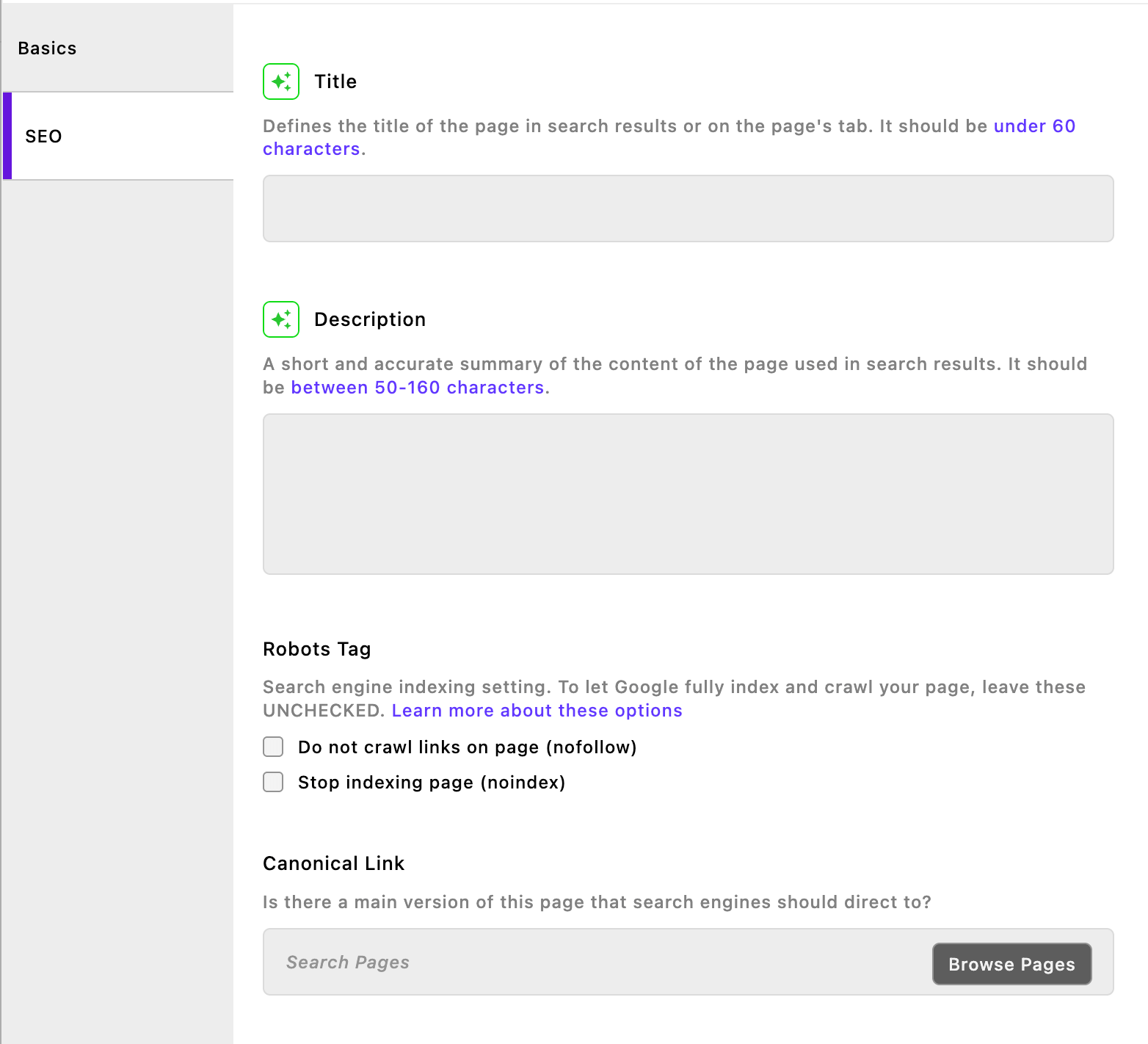
{"_id":"@apostrophecms/seo-stable","name":"@apostrophecms/seo-stable","dist-tags":{"latest":"1.4.3"},"versions":{"1.4.3":{"name":"@apostrophecms/seo-stable","version":"1.4.3","description":"SEO Tools for ApostropheCMS","main":"index.js","scripts":{"lint":"npm run eslint","eslint":"eslint .","pretest":"npm run lint","test":"nyc mocha test/unit-tests.js -t 5000 && nyc mocha test/functional-tests.js -t 30000"},"repository":{"type":"git","url":"git+https://github.com/apostrophecms/apostrophe.git","directory":"packages/seo"},"homepage":"https://github.com/apostrophecms/apostrophe/blob/main/packages/seo","author":{"name":"Apostrophe Technologies"},"license":"MIT","dependencies":{"lodash":"^4.18.1"},"devDependencies":{"@apostrophecms/blog":"workspace:^","@apostrophecms/seo":"workspace:*","apostrophe":"workspace:^","eslint":"^9.39.1","eslint-config-apostrophe":"workspace:^","mocha":"^11.7.5","nyc":"^17.1.0"},"gitHead":"b3e29f004f514041e1e389293ae67017c60d006e","_id":"@apostrophecms/seo-stable@1.4.3","bugs":{"url":"https://github.com/apostrophecms/apostrophe/issues"},"_nodeVersion":"24.10.0","_npmVersion":"11.6.1","dist":{"integrity":"sha512-+E05T/vC643m6GZgEPaDPEIHkMZP6PAppLGwZwcKaFexBpqWpLS4qNgEPsX485z9KkcCQYaYYzEi1X2vuwcBlA==","shasum":"f26e9ad2f27b204c05cb79e2b34eed14aa9fd89e","tarball":"https://registry.npmjs.org/@apostrophecms/seo-stable/-/seo-stable-1.4.3.tgz","fileCount":36,"unpackedSize":474377,"signatures":[{"keyid":"SHA256:DhQ8wR5APBvFHLF/+Tc+AYvPOdTpcIDqOhxsBHRwC7U","sig":"MEUCIHhAh90R1SJSqIrycX2BND57eoSYq6EALoeozNVqSuBrAiEAsmZVlHEljDDg0nkCKWorkJcSUhqy1S0zdDVU3y5ObXY="}]},"_npmUser":{"name":"boutell","email":"tom@apostrophecms.com"},"directories":{},"maintainers":[{"name":"alexgilbert","email":"alex@apostrophecms.com"},{"name":"boutell","email":"tom@apostrophecms.com"},{"name":"romanek","email":"stuart+npm@apostrophecms.com"},{"name":"bodonkey","email":"robert.means1969+apostrophecms@gmail.com"}],"_npmOperationalInternal":{"host":"s3://npm-registry-packages-npm-production","tmp":"tmp/seo-stable_1.4.3_1781112826122_0.28621244407554114"},"_hasShrinkwrap":false}},"time":{"created":"2026-06-10T17:33:45.976Z","1.4.3":"2026-06-10T17:33:46.270Z","modified":"2026-06-10T17:33:46.535Z"},"maintainers":[{"name":"alexgilbert","email":"alex@apostrophecms.com"},{"name":"boutell","email":"tom@apostrophecms.com"},{"name":"romanek","email":"stuart+npm@apostrophecms.com"},{"name":"bodonkey","email":"robert.means1969+apostrophecms@gmail.com"}],"description":"SEO Tools for ApostropheCMS","homepage":"https://github.com/apostrophecms/apostrophe/blob/main/packages/seo","repository":{"type":"git","url":"git+https://github.com/apostrophecms/apostrophe.git","directory":"packages/seo"},"author":{"name":"Apostrophe Technologies"},"bugs":{"url":"https://github.com/apostrophecms/apostrophe/issues"},"license":"MIT","readme":"<div align=\"center\">\n  <img src=\"https://raw.githubusercontent.com/apostrophecms/apostrophe/main/logo.svg\" alt=\"ApostropheCMS logo\" width=\"80\" height=\"80\">\n\n  <h1>SEO Tools for ApostropheCMS</h1>\n  <p>\n    <a aria-label=\"Apostrophe logo\" href=\"https://docs.apostrophecms.org\">\n      <img src=\"https://img.shields.io/badge/MADE%20FOR%20ApostropheCMS-000000.svg?style=for-the-badge&logo=Apostrophe&labelColor=6516dd\">\n    </a>\n    <a aria-label=\"Join the community on Discord\" href=\"http://chat.apostrophecms.org\">\n      <img alt=\"\" src=\"https://img.shields.io/discord/517772094482677790?color=5865f2&label=Join%20the%20Discord&logo=discord&logoColor=fff&labelColor=000&style=for-the-badge&logoWidth=20\">\n    </a>\n    <a aria-label=\"License\" href=\"https://github.com/apostrophecms/seo/blob/main/LICENSE.md\">\n      <img alt=\"\" src=\"https://img.shields.io/static/v1?style=for-the-badge&labelColor=000000&label=License&message=MIT&color=3DA639\">\n    </a>\n  </p>\n</div>\n\n**Ensure your content gets found by search engines and AI systems** with comprehensive SEO management for ApostropheCMS. Essential meta fields, Google Analytics integration, automated `robots.txt` and `llms.txt` generation — everything you need to boost your search rankings, control AI training usage, and drive organic traffic.\n<!-- omit in toc-->\n## Why ApostropheCMS SEO Tools?\n\n- **🎯 Complete SEO Control**: Essential meta fields for titles, descriptions, and canonical URLs\n- **📊 Analytics Ready**: Built-in Google Analytics, Tag Manager, and Site Verification integration\n- **🤖 Smart Automation**: Automatic robots.txt generation with granular control\n- **⚡ Performance Optimization**: Critical font preloading improves Core Web Vitals scores\n- **🔍 Search Engine Friendly**: Proper canonical linking prevents duplicate content issues\n- **📈 Marketing Team Ready**: Easy-to-use interface for non-technical content creators\n- **💰 E-commerce Ready**: Rich structured data for products, offers, and pricing\n- **🤖 AI-Ready**: Automatic llms.txt generation for AI policy transparency (proposed standard for forward-thinking SEO)\n\n<!-- omit in toc -->\n## Compatibility\n\nThis version requires the latest ApostropheCMS. When adding this module to an existing project, run `npm update` to ensure all ApostropheCMS modules are up-to-date.\n\n---\n\n## TL;DR: Quick Setup\n\n1. Install the module:\n\n   ```bash\n   npm install @apostrophecms/seo\n   ```\n2. Set your base URL (`APOS_BASE_URL`).\n3. Enable Google Analytics or Tag Manager in `@apostrophecms/global`.\n4. Optionally install `@apostrophecms/sitemap` for XML sitemap generation.\n5. Configure `robots.txt` and `llms.txt` via global settings.\n6. Choose schema types per page in the SEO tab.\n7. Validate your structured data using [Google’s Rich Results Test](https://search.google.com/test/rich-results).\n\n---\n\n## Table of Contents\n\n- [Why ApostropheCMS SEO Tools?](#why-apostrophecms-seo-tools)\n- [TL;DR: Quick Setup](#tldr-quick-setup)\n- [Table of Contents](#table-of-contents)\n- [Installation](#installation)\n- [Before You Start](#before-you-start)\n  - [✅ Works Immediately (No Setup Required)](#-works-immediately-no-setup-required)\n  - [⚙️ Requires Content Structure Setup](#️-requires-content-structure-setup)\n- [Core Features](#core-features)\n  - [Automatic SEO Fields](#automatic-seo-fields)\n  - [Google Analytics \\& Tag Manager](#google-analytics--tag-manager)\n  - [Automated Robots.txt](#automated-robotstxt)\n  - [AI Crawler Control (llms.txt)](#ai-crawler-control-llmstxt)\n  - [Sitemap Integration](#sitemap-integration)\n  - [Performance Optimization](#performance-optimization)\n- [Essential Configuration](#essential-configuration)\n  - [Setting the Base URL](#setting-the-base-url)\n  - [Google Analytics Integration](#google-analytics-integration)\n  - [Google Tag Manager Integration](#google-tag-manager-integration)\n  - [Google Site Verification](#google-site-verification)\n  - [Sitemap Installation](#sitemap-installation)\n- [Structured Data \\& Schema Types](#structured-data--schema-types)\n  - [How It Works](#how-it-works)\n  - [Choosing the Right Schema](#choosing-the-right-schema)\n  - [Quick Schema Selection Guide](#quick-schema-selection-guide)\n  - [Best Practices](#best-practices)\n- [AI \\& Search Strategy](#ai--search-strategy)\n  - [Understanding Crawler Types](#understanding-crawler-types)\n  - [Recommended Configuration for Most Sites](#recommended-configuration-for-most-sites)\n  - [For Maximum AI Visibility](#for-maximum-ai-visibility)\n  - [For Maximum Privacy/Protection](#for-maximum-privacyprotection)\n  - [Understanding robots.txt vs llms.txt](#understanding-robotstxt-vs-llmstxt)\n  - [Site Search Query Parameter](#site-search-query-parameter)\n- [Advanced Configuration](#advanced-configuration)\n  - [Disabling SEO Fields](#disabling-seo-fields)\n  - [Setting Default Schema Types](#setting-default-schema-types)\n  - [Canonical Link Configuration](#canonical-link-configuration)\n  - [Pagination Support](#pagination-support)\n  - [Custom 404 Tracking](#custom-404-tracking)\n  - [Paywalled Content](#paywalled-content)\n  - [Custom Field Mappings](#custom-field-mappings)\n- [Implementation Guidelines for Developers](#implementation-guidelines-for-developers)\n  - [Field Flexibility](#field-flexibility)\n  - [Flexible Field Formats](#flexible-field-formats)\n  - [Debug Mode](#debug-mode)\n  - [Featured Images](#featured-images)\n  - [Author Information](#author-information-1)\n  - [URL Requirements](#url-requirements)\n  - [Date Fields](#date-fields)\n  - [Listing Pages (Item List)](#listing-pages-item-list)\n  - [Summary: Key Document-Level Fields by Schema Type](#summary-key-document-level-fields-by-schema-type)\n  - [Schema Types That Require No Developer Fields](#schema-types-that-require-no-developer-fields)\n  - [Debugging Structured Data](#debugging-structured-data)\n- [Extending the SEO Module with Custom JSON-LD Schemas](#extending-the-seo-module-with-custom-json-ld-schemas)\n  - [1. Register a Custom Schema on `@apostrophecms/seo`](#1-register-a-custom-schema-on-apostrophecmsseo)\n  - [2. Add the Type to the Schema Dropdown (`@apostrophecms/seo-fields-doc-type`)](#2-add-the-type-to-the-schema-dropdown-apostrophecmsseo-fields-doc-type)\n  - [3. Add Fields on `@apostrophecms/doc-type`](#3-add-fields-on-apostrophecmsdoc-type)\n- [Performance Optimization](#performance-optimization-1)\n  - [Critical Font Preloading](#critical-font-preloading)\n- [1. Place Your Fonts in a Module’s `public/` Directory](#1-place-your-fonts-in-a-modules-public-directory)\n- [2. Configure the SEO Module to Preload Fonts](#2-configure-the-seo-module-to-preload-fonts)\n  - [Mobile Optimization](#mobile-optimization)\n- [Field Reference](#field-reference)\n- [🚀 Ready for AI-Powered SEO?](#-ready-for-ai-powered-seo)\n  - [✨ SEO Assistant Pro Features](#-seo-assistant-pro-features)\n- [🏢 Managing Multiple Sites?](#-managing-multiple-sites)\n  - [✨ Assembly Multisite Features](#-assembly-multisite-features)\n- [Roadmap](#roadmap)\n\n## Installation\n\n```bash\nnpm install @apostrophecms/seo\n```\n\nConfigure the module in your `app.js` file:\n\n```javascript\nimport apostrophe from 'apostrophe';\n\napostrophe({\n  root: import.meta,\n  shortName: 'my-project',\n  modules: {\n    '@apostrophecms/seo': {}\n  }\n});\n```\n\n**Important:** For proper SEO functionality, you must also configure your site's base URL. See the [Essential Configuration](#essential-configuration) section below.\n\n## Before You Start\n\nThis module provides SEO functionality at two levels:\n\n### ✅ Works Immediately (No Setup Required)\n\nThese features work out-of-the-box with any ApostropheCMS site:\n\n- **Essential meta tags**: Title, description, robots\n- **Analytics**: Google Analytics, Tag Manager, Site Verification\n- **Site control**: Automated robots.txt and llms.txt generation\n- **Basic structured data**: WebPage and CollectionPage schemas\n\n**You can start using these features right away** - just install the module and configure your global SEO settings.\n\n### ⚙️ Requires Content Structure Setup\n\nAdvanced structured data types need [fields with specific names](#summary-required-fields-by-schema-type) in your content types:\n\n- **Article, Review**: Work best with author information\n- **Product, HowTo**: Benefit from featured images for richer results\n- **Recipe**: **Requires** a featured image (Google requirement)\n- **VideoObject**: **Requires** thumbnail and upload date (Google requirement)\n- **JobPosting**: Complex schema with many required fields for Google for Jobs\n- **Event, LocalBusiness**: Need address/location fields\n- **FAQPage, QAPage**: Need question and answer content\n\n> [!IMPORTANT]\n> ### ⚠️ Important: Field Names Must Match Expected Names for Structured Data\n>\n> Some structured data types **require specific field names** so that the SEO module can automatically find the right values in your documents. If your content types use different field names, and you don’t configure them accordingly, your JSON-LD may be missing required properties and **fail validation in Google’s tools**.\n>\n> The module also supports **fallbacks and flexible formats** (e.g., string vs. relationship fields) for authors, images, descriptions, and dates.\n>\n> 👉 For the full list of supported field names, fallbacks, and recommended patterns, see **[Field Flexibility](#field-flexibility)**.\n>\n> You can also map existing field names to required field names using the [`seoFieldMappings`](#custom-field-mappings) option of the module.\n>\n> If you plan to rely heavily on structured data (especially for products, recipes, jobs, or video), it’s a good idea to:\n>\n> - Design your content types with these field names in mind, or\n> - Refactor existing types to match, before enabling those schema types in production.\n\n## Core Features\n\n### Automatic SEO Fields\n\n![The module adds an SEO tab to your editing modals](https://static.apostrophecms.com/apostrophecms/seo/images/seo-modal.png)\n\nThe module automatically adds an \"SEO\" tab to all page and piece editors containing:\n\n- **Title Tag**: Custom titles for search results (falls back to page title)\n- **Meta Description**: Compelling descriptions that appear in search results\n- **Robots Meta Tag**: Control search engine indexing and following behavior\n- **Canonical URLs**: Prevent duplicate content penalties\n- **Schema Type Selection**: Choose the appropriate structured data type for your content\n\n### Google Analytics & Tag Manager\n\nBuilt-in integration with Google Analytics, Google Tag Manager, and Google Site Verification. Simply enable the options you need and add your tracking IDs through the global configuration interface.\n\n**Supported integrations:**\n- Google Analytics (GA4) tracking\n- Google Tag Manager for advanced marketing campaigns\n- Google Site Verification for Search Console\n\nSee [Essential Configuration](#essential-configuration) below for setup instructions.\n\n### Automated Robots.txt\n\nThe module automatically provides a `/robots.txt` route with strategic control over both traditional search engines and AI crawlers. Configure through global settings with five control modes:\n\n**Available Modes:**\n\n1. **Allow All (Search + AI)** - Default open access for all crawlers\n2. **Allow Search, Block AI Training** - Maintains search rankings while protecting content from AI training by AI agents that choose to respect this standard\n3. **Selective AI Crawlers** - Granular control over individual AI crawlers that support this standard\n4. **Block All** - Prevents all indexing\n5. **Custom** - Write your own robots.txt content\n\n> ⚠️ Make sure that if you block all indexing during development, make sure to change the policy when you launch your final site.\n\n**Selective Mode Crawlers:**\nFor fine-grained control, use Selective mode to choose specific AI crawlers. These crawlers currently indicate they honor robots.txt directives.\n- **GPTBot** (OpenAI ChatGPT training)\n- **ChatGPT-User** (OpenAI real-time browsing)\n- **Google-Extended** (Google AI training)\n- **ClaudeBot** (Anthropic AI training)\n- **Claude-User** (Anthropic real-time browsing)\n- **PerplexityBot** (Perplexity AI)\n- **CCBot** (Common Crawl datasets)\n- **Applebot-Extended** (Apple Intelligence)\n- **FacebookBot** (Meta AI)\n- **anthropic-ai** (Anthropic general)\n\nTraditional search engines (Googlebot, Bingbot) are always allowed unless using \"Block All\" mode.\n\n> ### ⚠️ Important Note About Robots.txt Enforcement\n> The `robots.txt` standard is a **voluntary convention**, not a security mechanism.\n> While the crawlers listed here currently **state that they honor `robots.txt`**, real-world behavior can differ:\n>\n> - Some crawlers only respect `robots.txt` in certain contexts (e.g., indexing vs. real-time browsing).\n> - User-agent policies may change over time.\n> - New crawlers may appear that do not publicly disclose their behavior.\n>\n> ApostropheCMS provides fine-grained controls for compliant crawlers, but it **cannot guarantee enforcement** against bots that ignore `robots.txt` or do not implement the standard. We recommend periodically reviewing crawler policies to ensure ongoing compliance.\n\n\n**Technical Notes:**\n- A physical `robots.txt` file in your `public/` directory for a single-site project, or `sites/public` and `dashboard/public` directories for multisite will override these settings\n- All modes preserve traditional search engine access (except \"Block All\")\n- See [AI & Search Strategy](#ai--search-strategy) for detailed configuration guidance\n\n**Related:** This module also provides automated [llms.txt generation](#ai-crawler-control-llmstxt) for policy communication.\n\n> **Note:** A global `Disallow: /` in `robots.txt` may cause some AI crawlers to skip reading `llms.txt`, depending on their behavior, but the file remains publicly accessible.\n\n### AI Crawler Control (llms.txt)\n\nThe module automatically provides an `/llms.txt` route to communicate your AI usage policies. This is **complementary** to `robots.txt`:\n\n- **robots.txt**: Enforceable crawler access control (blocks/allows bots)\n- **llms.txt**: Informational policy declaration (informs AI systems about usage terms)\n\n> **⚠️ Important Note:** `llms.txt` is a proposed standard that is not yet widely adopted. As of this writing, most LLMs and AI systems do not respect or read `llms.txt` files. This feature is included for forward-thinking SEO strategies and may gain broader adoption in the future. For enforceable crawler control, rely on `robots.txt` settings.\n\n**Configuration options:**\n\n1. **Allow AI Crawling (Default)**: Generates a comprehensive `llms.txt` file that permits responsible AI crawling with site structure information\n\n2. **Disallow AI Training**: States content should NOT be used for AI training datasets but permits real-time search and retrieval with attribution\n\n3. **Custom Content**: Write your own `llms.txt` policies from scratch\n\n4. **Disabled**: Returns 404 for `/llms.txt` requests\n\n**Best Practice:** Combine both tools strategically:\n- Use **robots.txt** (Allow Search, Block AI Training mode) to technically enforce access\n- Use **llms.txt** (Disallow AI Training mode) to clearly communicate your policies\n- This dual approach provides both technical enforcement and clear policy communication\n\n**What's included in the generated file:**\n- Site name and description\n- AI training policy (based on your selection)\n- Organization information\n- Links to main pages with descriptions\n- Available content types\n- Technical details about structured data\n- Sitemap reference (if @apostrophecms/sitemap is installed)\n\n### Sitemap Integration\n\nWorks seamlessly with `@apostrophecms/sitemap` to generate XML sitemaps that help search engines discover and index your content. The sitemap is automatically referenced in the `/llms.txt` file for AI crawlers.\n\n### Performance Optimization\n\n**Critical Font Preloading** - Automatically preload critical fonts to improve Core Web Vitals scores and SEO performance:\n- Reduces Cumulative Layout Shift (CLS) by preventing font-loading jank\n- Improves Largest Contentful Paint (LCP) with faster font rendering\n- Optimizes First Contentful Paint (FCP) by eliminating render-blocking requests\n\nConfigure once in your `app.js` and the module handles the rest. See [Performance Optimization](#performance-optimization) for details.\n\n## Essential Configuration\n\n### Setting the Base URL\n\n**This step is required** for proper canonical link generation and SEO performance. If using [ApostropheCMS hosting](https://apostrophecms.com/hosting), this is set automatically.\n\n**Via environment variable (recommended):**\n```bash\nexport APOS_BASE_URL=https://yoursite.com\n```\n\n**Via configuration file:**\n```javascript\n// data/local.js\nexport default {\n  baseUrl: 'https://yoursite.com',\n  modules: {\n    // other module configuration\n  }\n};\n```\n\n**For multisite projects using ApostropheCMS Assembly:**\nThe base URL is automatically configured through the `baseUrlDomains` option. [Learn more about Assembly multisite hosting](https://apostrophecms.com/assembly).\n\n### Google Analytics Integration\n\nEnable Google Analytics tracking:\n\n```javascript\nimport apostrophe from 'apostrophe';\n\napostrophe({\n  root: import.meta,\n  shortName: 'my-project',\n  modules: {\n    '@apostrophecms/seo': {},\n    '@apostrophecms/global': {\n      options: {\n        seoGoogleAnalytics: true\n      }\n    }\n  }\n});\n```\n\nThis adds a field in the global configuration for your Google Analytics Measurement ID (e.g., `G-XXXXXXXXXX`).\n\n### Google Tag Manager Integration\n\nFor advanced tracking and marketing campaigns:\n\n```javascript\nimport apostrophe from 'apostrophe';\n\napostrophe({\n  root: import.meta,\n  shortName: 'my-project',\n  modules: {\n    '@apostrophecms/seo': {},\n    '@apostrophecms/global': {\n      options: {\n        seoGoogleTagManager: true\n      }\n    }\n  }\n});\n```\n\nAdd your GTM container ID (e.g., `GTM-XXXXXXX`) in the global configuration.\n\n### Google Site Verification\n\nVerify site ownership for Google Search Console:\n\n```javascript\nimport apostrophe from 'apostrophe';\n\napostrophe({\n  root: import.meta,\n  shortName: 'my-project',\n  modules: {\n    '@apostrophecms/seo': {},\n    '@apostrophecms/global': {\n      options: {\n        seoGoogleVerification: true\n      }\n    }\n  }\n});\n```\n\nEnter your verification meta tag content from Google Search Console in the global settings.\n\n### Sitemap Installation\n\n> [!TIP]\n> Installations of the sitemap module is optional, but highly recommended for better search rankings\n\nInstall the companion sitemap module for XML sitemap generation:\n\n```bash\nnpm install @apostrophecms/sitemap\n```\n\n```javascript\nimport apostrophe from 'apostrophe';\n\napostrophe({\n  root: import.meta,\n  shortName: 'my-project',\n  modules: {\n    '@apostrophecms/seo': {},\n    '@apostrophecms/sitemap': {}\n  }\n});\n```\n\n## Structured Data & Schema Types\n\nThis module generates rich structured data (JSON-LD) that helps search engines understand your content. All structured data is output in a single `<script type=\"application/ld+json\">` tag with a `@graph` array for optimal performance.\n\n### How It Works\n\nThe module automatically generates appropriate Schema.org markup based on the schema type you select in the SEO tab of your editor:\n\n- **Sitewide schemas**: WebSite and Organization data from your Global settings appear on every page\n- **Page-level schemas**: WebPage, CollectionPage, or your chosen primary entity type\n- **Primary entities**: Article, Product, Event, Person, LocalBusiness, and more for detail pages\n- **Item listings**: Automatic ItemList generation for index/listing pages\n\n### Choosing the Right Schema\n\nSelect the schema type in the SEO tab of any page or piece editor.\n\n\n### Quick Schema Selection Guide\nSee details for any schema below the table.\n\n| Content Type | Recommended Schema |\n|--------------|-------------------|\n| Standard pages | WebPage |\n| Blog index, Category pages | CollectionPage |\n| Blog posts, Articles | Article |\n| Product pages | Product |\n| Single offers, service packages | Offer |\n| Products with variants, tiered pricing | AggregateOffer |\n| Event listings | Event |\n| Author bios, Team pages | Person |\n| Business locations | LocalBusiness |\n| Job postings | JobPosting |\n| Help/Support pages | FAQPage |\n| Video pages | VideoObject |\n| Tutorials, Guides | HowTo |\n| Review articles | Review |\n| Recipes | Recipe |\n| Online courses | Course |\n\n\n#### **Web Page**\nUse for standard pages like About, Contact, or general information pages.\n\n**Best for:** About pages, contact pages, general information pages, landing pages\n\n---\n\n#### **Collection Page**\nUse for index and listing pages that display multiple items.\n\n**Required fields:**\n- Page title and description\n\n**Features:**\n- Automatically generates ItemList of visible items\n- Toggle \"Include ItemList in JSON-LD\" to control ItemList output\n\n**Best for:** Blog indexes, product catalogs, category pages, archives, search results\n\n---\n\n#### ItemList for Collection Pages\n\nCollection pages (listing pages) can optionally include an **ItemList** schema in JSON-LD.\nThis describes the items displayed on the page (articles, products, events, etc.) and can improve how search engines understand category, listing, or archive pages.\n\nYou can enable or disable this using the **“Include ItemList in JSON-LD”** toggle in the SEO tab.\n\n##### When you should enable ItemList\n- The page is a true index/list of items\n- Blog indexes, product category pages, news archives\n- You want richer structured data for list/search pages\n\n##### When you should NOT enable ItemList\n- The page mixes unrelated content types\n- The page is heavily personalized per user\n- The listing is extremely large (hundreds+ items)\n- The content shown changes frequently based on filters or user input\n- It’s not actually a listing page (e.g., About, Contact)\n\nItemList content is generated automatically based on the items displayed by the page’s piece-page-type query (no developer configuration required).\n\n---\n\n#### **Article**\nFor blog posts, news articles, and editorial content.\n\n**Required fields:**\n- Title (from `seoTitle` or document title)\n- Publication date\n\n**Recommended fields:**\n- Author\n- Featured image\n- Meta description\n\n**Best for:** Blog posts, news articles, editorial content, press releases\n\n---\n\n#### **Product**\nFor e-commerce product pages with pricing and availability.\n\n**Required fields:**\n- Product name\n- Price and currency\n\n**Optional fields:**\n- Brand, SKU, GTIN (barcode)\n- Product condition (new, used, refurbished)\n- Availability status\n- Aggregate rating and review count\n- Product description\n\n**Best for:** E-commerce product pages, marketplace listings, service offerings with pricing\n\n---\n\n#### **Offer**\nFor single-price items, services, or standalone offers.\n\n**Required fields:**\n- Offer name\n- Price and currency\n\n**Optional fields:**\n- Availability status (In Stock, Out of Stock, Pre-order, Discontinued, etc.)\n- Valid date ranges (validFrom, priceValidUntil)\n- Item condition (New, Used, Refurbished, Damaged)\n- Seller information (defaults to your Organization)\n- Offer URL\n- Shipping details (rate, destination, delivery time)\n\n**Best for:** \n- Individual service packages with fixed pricing\n- Event tickets\n- Subscription plans\n- One-time purchase offers\n- Limited-time deals\n\n**SEO Impact:** Enables rich snippets showing pricing, availability, and seller info directly in search results. Improves visibility for Google Merchant Center and Shopping listings.\n\n**Example use case:** A web design agency offering a \"Starter Website Package\" for $2,999 with a 30-day delivery time.\n\n---\n\n#### **Aggregate Offer**\nFor items with multiple price points, variants, or marketplace scenarios.\n\n**Required fields:**\n- Offer name\n- Low price and high price\n- Currency\n\n**Optional fields:**\n- Offer count (number of variants)\n- Individual offers array (each with name, price, availability, URL)\n- Common availability status\n- Seller information\n\n**Best for:**\n- Products with size/color/material variants\n- Marketplace listings from multiple sellers\n- Tiered service packages (Basic, Pro, Enterprise)\n- Hotel rooms with different rates\n- Course offerings at different price levels\n- Bulk pricing structures\n\n**SEO Impact:** Shows price ranges in search results, helping users understand pricing options before clicking. Essential for marketplaces and products with variants.\n\n**Example use case:** A SaaS product with Basic ($29/mo), Professional ($99/mo), and Enterprise ($299/mo) tiers.\n\n---\n\n#### **Event**\nFor concerts, webinars, conferences, and any scheduled events.\n\n**Required fields:**\n- Event name\n- Start date\n\n**Optional fields:**\n- End date\n- Location (name and address)\n- Event description\n\n**Best for:** Conferences, webinars, concerts, workshops, meetups, online events\n\n---\n\n#### **Person**\nFor author profiles, team member bios, and individual profiles.\n\n**Required fields:**\n- Person name\n\n**Optional fields:**\n- Job title\n- Organization/employer\n- Bio/description\n\n**Best for:** Author pages, team member profiles, speaker bios, personal websites\n\n---\n\n#### **Local Business**\nFor brick-and-mortar businesses with physical locations.\n\n**Required fields:**\n- Business name\n\n**Optional fields:**\n- Address (street, city, state, zip, country)\n- Phone number\n- Opening hours\n- Business description\n\n**Best for:** Restaurants, retail stores, service providers, medical offices, salons\n\n---\n\n#### **Job Posting**\nFor job listings and career pages. Essential for appearing in Google for Jobs.\n\n**Required fields:**\n- Job title\n- Expiration date\n- Hiring organization name (falls back to global organization)\n- Location (physical address or remote designation)\n\n**Optional fields:**\n- Employment type (full-time, part-time, contract, etc.)\n- Salary information (range or fixed amount)\n- Experience requirements (months of experience)\n- Education requirements\n- Skills, qualifications, responsibilities\n- Benefits\n- Industry and occupational category\n- Work hours\n- Direct apply toggle\n\n**Best for:** Job boards, careers pages, recruitment sites, staffing agencies\n\n**SEO impact:** Jobs appear in Google for Jobs search results with rich snippets showing salary, location, and employment type.\n\n---\n\n#### **FAQ Page**\nFor frequently asked questions pages.\n\n**Required fields:**\n- At least one question-and-answer pair\n\n**How to use:**\n1. Select **\"FAQ Page\"** as the schema type in the SEO tab.\n2. In the **FAQ Details** section, add each question and its corresponding answer.\n3. Each entry automatically generates structured data compliant with Google’s FAQPage schema.\n\n**Best for:** Help centers, knowledge bases, product FAQ pages\n\n**SEO impact:** Enables rich FAQ snippets in Google Search results, improving click-through rates.\n\n#### **QA Page**\nFor question and answer pages where a single question has one or more answers (like Stack Overflow, forums, or community Q&A).\n\n> [!TIP]\n> The `FAQ` schema is valuable for SEO and AEO, but Google no longer shows rich search fragments from this structured data unless you are a governmental or recognized health site.\n\n**Required fields:**\n- Question title\n\n**Optional fields:**\n- Question details/body text\n- Question author name\n- Question date posted\n- Question upvote count\n- **Accepted Answer**: The answer marked as correct/most helpful\n  - Answer text (required if providing accepted answer)\n  - Answer author\n  - Answer date\n  - Answer upvote count\n- **Other Answers**: Additional suggested answers\n  - Each with text, author, date, and upvote count\n\n**Best for:** Community forums, support forums, Q&A platforms, discussion boards, knowledge bases with user-contributed answers\n\n**Difference from FAQ:**\n- **FAQPage** is for curated, official FAQs written by your organization\n- **QAPage** is for community-driven Q&A with voting, multiple answers, and user attribution\n\n**SEO Impact:** Can appear in Google's Q&A rich results with voting counts, accepted answers highlighted, and author information. Helps establish expertise and community engagement.\n\n**Example use cases:**\n- Technical support forum: \"How do I reset my password?\" with 5 community answers\n- Programming Q&A: \"What's the difference between var and let in JavaScript?\" with accepted answer\n- Product support: Customer questions with manufacturer responses\n\n**Best practices:**\n- Always provide the accepted answer when one exists\n- Include upvote counts to signal answer quality\n- Add author names for credibility\n- Use for pages with single questions only (not question listings)\n\n**Note:** For question listing/index pages, use the `CollectionPage` schema instead.\n\n#### **Video Object**\nFor video content pages, including educational videos and tutorials.\n\n**Required fields:**\n- Video name\n\n**Optional fields:**\n- Video description\n- Upload date\n- Duration (ISO 8601 format: \"PT1M30S\" for 1 minute 30 seconds)\n- Thumbnail image (uses `_featuredImage` relationship if not specified)\n- Content URL (direct video file)\n- Embed URL (YouTube/Vimeo embed)\n\n**Educational video fields:**\nWhen \"Is Educational Video\" is checked, additional fields become available:\n- **Educational Use**: How the video is used (assignment, professional development, continuing education, vocational training)\n- **Learning Resource Type**: Type of educational content (lecture, tutorial, demonstration, presentation, exercise)\n\n**Best for:** Video landing pages, video galleries, tutorial videos, webinar recordings, online courses, training materials\n\n**SEO Impact:** Educational videos can appear in Google's learning-specific search features and video carousels with enhanced metadata.\n\n**Example use cases:**\n- Software tutorial: \"How to Use Photoshop Layers\" (learningResourceType: tutorial)\n- University lecture: \"Introduction to Calculus\" (educationalUse: assignment)\n- Professional training: \"Project Management Fundamentals\" (educationalUse: professional development)\n\n#### **How To**\nFor step-by-step guides and tutorials.\n\n**Required fields:**\n- Guide name\n- At least one step with name and instructions\n\n**Optional fields:**\n- Total time (ISO 8601 format: \"PT30M\" for 30 minutes)\n- Supply list (materials needed)\n- Tool list (tools required)\n- Step images\n- Guide description\n\n**Best for:** DIY tutorials, cooking instructions, repair guides, software walkthroughs\n\n**Example:** \"How to Change a Tire,\" \"How to Bake Sourdough Bread,\" \"How to Install WordPress\"\n\n---\n\n#### **Review**\nFor product reviews, service reviews, and editorial reviews.\n\n**Required fields:**\n- Item being reviewed (name)\n\n**Optional fields:**\n- Item type (Product, Book, Movie, Restaurant, Service)\n- Rating (1-5 scale)\n- Review body/text\n- Author name\n- Review date\n\n**Best for:** Product review pages, service reviews, book reviews, restaurant reviews\n\n---\n\n#### **Recipe**\nFor cooking recipes and food content.\n\n**Required fields:**\n- Recipe name\n- Ingredients list\n- Cooking instructions\n\n**Optional fields:**\n- Author\n- Prep time, cook time, total time (ISO 8601 format)\n- Yield (servings)\n- Recipe category (e.g., \"Dessert,\" \"Main Course\")\n- Cuisine type (e.g., \"Italian,\" \"Mexican\")\n- Nutrition information (calories, carbs, protein, fat)\n- Aggregate rating and review count\n- Recipe image\n\n**Best for:** Food blogs, cooking websites, restaurant recipe pages\n\n**Time format examples:**\n- \"PT30M\" = 30 minutes\n- \"PT1H\" = 1 hour\n- \"PT1H30M\" = 1 hour 30 minutes\n\n---\n\n#### **Course**\nFor online courses and training programs.\n\n**Required fields:**\n- Course name\n- Course description\n\n**Optional fields:**\n- Course provider (defaults to site organization)\n- Course code (e.g., \"CS101\")\n- Educational level (Beginner, Intermediate, Advanced)\n- Price and currency\n- Availability\n- Aggregate rating and review count\n\n**Best for:** Online learning platforms, training programs, educational institutions, certification courses\n\n---\n\n### Best Practices\n\n**Test your markup**: Use [Google's Rich Results Test](https://search.google.com/test/rich-results) to validate your structured data\n\n**For product catalogs:**\n- Use **Product** schema on individual product detail pages\n- Use **Offer** or **AggregateOffer** as the offer type within Product schema when appropriate\n- Use **CollectionPage** with ItemList on category/listing pages\n\n**For service businesses:**\n- Use **Offer** schema for individual service packages\n- Use **AggregateOffer** for tiered service offerings\n- Combine with **LocalBusiness** for location-based services\n\n**For marketplaces:**\n- Use **AggregateOffer** to show price ranges across sellers\n- Include individual offers array for each seller/variant\n- Ensure seller information is populated for trust signals\n\n**Pricing and Offers Tips:**\n- Always include availability status for accurate search results\n- Use priceValidUntil for time-limited offers\n- Include shipping information for physical products\n- Seller information automatically falls back to your global Organization settings\n\n---\n\n## AI & Search Strategy\n\nModern search and AI systems use different types of crawlers for different purposes. Understanding these differences helps you make informed decisions about your content's visibility and protection.\n\n### Understanding Crawler Types\n\n**Training Crawlers** (GPTBot, ClaudeBot, Google-Extended, CCBot):\n- Build AI training datasets from your content\n- Used to improve AI models\n- Your content may be synthesized into AI responses without attribution\n\n**Browsing Crawlers** (ChatGPT-User, Claude-User, PerplexityBot):\n- Serve real-time user queries\n- Typically provide attribution and links back to your site\n- Drive referral traffic\n\n**Traditional Search** (Googlebot, Bingbot):\n- Power traditional search engines\n- Include AI-enhanced features (Google AI Overview, Bing Chat)\n- Essential for search rankings and organic traffic\n\n### Recommended Configuration for Most Sites\n\nFor optimal search visibility while protecting intellectual property:\n\n**robots.txt Settings:**\n- Mode: **\"Allow Search, Block AI Training\"**\n\n**llms.txt Settings:**\n- Mode: **\"Disallow AI Training\"**\n\n**Why This Works:**\n- ✅ Traditional search engines continue normal indexing\n- ✅ AI Overview and AI-powered search features remain functional  \n- ✅ Real-time AI browsing for user queries still works\n- ✅ Your content drives referral traffic from AI systems\n- ❌ Your content is protected from AI training datasets\n- ❌ No contribution to training commercial AI models\n\n**Impact on Rankings:**\n- **No negative impact** on Google Search rankings (confirmed by Google)\n- Blocking Google-Extended does **not** affect Google Search\n- AI training crawler access is completely separate from search indexing\n\n### For Maximum AI Visibility\n\nIf you want your content widely used by AI systems for training and responses:\n\n**robots.txt Settings:**\n- Mode: **\"Allow All (Search + AI)\"**\n\n**llms.txt Settings:**\n- Mode: **\"Allow AI Crawling\"**\n\n**Use this when:**\n- You want maximum exposure in AI-generated content\n- Your business model benefits from AI-driven traffic\n- You're comfortable with your content training AI models\n- You want to contribute to open AI datasets\n\n### For Maximum Privacy/Protection\n\nIf you want to restrict most or all AI access:\n\n**robots.txt Settings:**\n- Mode: **\"Selective AI Crawlers\"**\n- Check only: ChatGPT-User, Claude-User (optional - allows real-time queries)\n- Or use **\"Block All\"** for complete restriction\n\n**llms.txt Settings:**\n- Mode: **\"Disabled\"**\n\n**Use this when:**\n- You have proprietary or competitive content\n- Legal/compliance restrictions on AI training\n- You want maximum control over content usage\n- Privacy is a primary concern\n\n### Understanding robots.txt vs llms.txt\n\nBoth tools work together but serve different purposes:\n\n| Feature | robots.txt | llms.txt |\n|---------|-----------|----------|\n| **Purpose** | Enforceable crawler access control | Policy communication & transparency |\n| **Technical** | Bots must respect (standard protocol) | Informational guidelines only |\n| **Adoption** | Universal web standard since 1994 | **Proposed standard, limited adoption** |\n| **Enforcement** | Technical blocking mechanism | **Voluntary compliance only** |\n| **Controls** | Which bots can crawl your site | How content may be used if crawled |\n| **Best for** | Technical access restrictions | Terms of use & AI transparency |\n| **Required?** | Yes (web standard since 1994) | Optional (emerging standard) |\n| **AI Support** | Most AI crawlers respect robots.txt | **Most AI systems do not read llms.txt** |\n| **Example** | \"Block GPTBot from accessing /api/*\" | \"Content may be used for search, not training\" |\n\n> **⚠️ Important:** While `llms.txt` represents forward-thinking SEO strategy, it should not be relied upon for actual crawler control. Use `robots.txt` for enforceable policies. The `llms.txt` file serves as a policy statement and may gain broader adoption over time.\n\n**Recommended approach:** Use both together:\n- **robots.txt** provides technical enforcement (works now)\n- **llms.txt** clearly communicates your policies (may work in the future)\n\n### Site Search Query Parameter\n\nConfigure the query parameter your site uses for internal search. This enables the `SearchAction` structured data in your site's WebSite schema.\n\n**Configuration:**\nSet this in your global SEO settings. Common values:\n- `q` (most common) - for URLs like `/search?q=query`\n- `search` - for URLs like `/search?search=query`\n- `query` - for URLs like `/search?query=query`\n- `s` (WordPress default) - for URLs like `/?s=query`\n\n**Example in global settings:**\n```json\n\"seoSearchQueryParam\": \"q\"\n```\n\n**SEO Impact:**\nThis creates a SearchAction schema that:\n- Helps search engines understand your site search\n- May enable a \"Search this site\" box in Google results\n- Improves your site's appearance as an authoritative source\n\n**Note:** This should match whatever parameter your actual search functionality uses. Check your site's search URL to determine the correct value.\n\n## Advanced Configuration\n\n### Disabling SEO Fields\n\nDisable SEO fields for specific page or piece types:\n\n```javascript\n// modules/my-piece-type/index.js\nexport default {\n  extend: '@apostrophecms/piece-type',\n  options: {\n    seoFields: false\n  }\n};\n```\n\nThe following modules disable SEO fields by default:\n- `@apostrophecms/global`\n- `@apostrophecms/user`\n- `@apostrophecms/image`\n- `@apostrophecms/image-tag`\n- `@apostrophecms/file`\n- `@apostrophecms/file-tag`\n\n\n### Setting Default Schema Types\n\nYou can configure a default schema type for any piece or page type using the `seoSchemaType` option. When set, this type will be pre-selected and locked for all content of that type.\n\n**Example configuration:**\n```javascript\n// modules/product/index.js\nexport default {\n  extend: '@apostrophecms/piece-type',\n  options: {\n    label: 'Product',\n    seoSchemaType: 'Product'  // Always use Product schema\n  }\n};\n```\n\n**Pre-configured defaults:**\n\nThe following ApostropheCMS extensions automatically set appropriate schema types:\n\n- **`@apostrophecms/blog`**: Defaults to `Article` schema for blog posts\n- **`@apostrophecms/event`**: Defaults to `Event` schema for events\n- The pages for each of these modules defaults the `CollectionPage` schema\n\nWhen a default is configured, the schema type selector becomes read-only in the editor UI, ensuring consistency across all content of that type. These can be overridden at project level.\n\n**When to use defaults:**\n\n- Content types with a clear, single schema purpose (products, events, recipes)\n- Ensuring editors can't accidentally select the wrong schema type\n- Maintaining consistency across large content collections\n- Integration with specific Schema.org requirements (e.g., job boards must use JobPosting)\n\n### Canonical Link Configuration\n\nConfigure canonical URL options for pieces by specifying which document types editors can reference:\n\n```javascript\n// modules/article/index.js\nexport default {\n  extend: '@apostrophecms/piece-type',\n  options: {\n    label: 'Article',\n    seoCanonicalTypes: [ '@apostrophecms/page', 'topic' ]\n  }\n};\n```\n\nThis allows editors to designate another page or piece as the canonical source for search engines, helping prevent duplicate content penalties.\n\n> **What are canonical links?** [As described on Moz.com](https://moz.com/learn/seo/canonicalization): \"A canonical tag tells search engines which version of a URL you want to appear in search results.\" This prevents problems when identical content appears on multiple URLs.\n\n### Pagination Support\n\nThe module **automatically** adds `rel=\"prev\"` and `rel=\"next\"` link tags for paginated content. No manual configuration required.\n\n**Automatic detection works for:**\n\n1. **Index pages** (piece-page-type listing pages):\n   - Uses ApostropheCMS's built-in `req.data.currentPage` and `req.data.totalPages`\n   - Automatically detects pagination from standard piece-page-type queries\n   - Page 1 gets clean URLs (no `?page=1` query string)\n\n2. **Show pages** (individual pieces with navigation):\n   - Uses `req.data.next` and `req.data.previous` when configured\n   - Works when you enable `next: true` and `previous: true` options on your piece-page-type\n\n**Example piece-page-type with next/previous:**\n```javascript\n// modules/article-page/index.js\nexport default {\n  extend: '@apostrophecms/piece-page-type',\n  options: {\n    // Enable automatic next/previous navigation\n    next: true,\n    previous: true\n  }\n};\n```\n\n**Manual override (backwards compatibility):**\n\nIf you need custom pagination logic, you can still manually set `req.data.pagination`:\n```javascript\n// In your route handler (only if you need custom behavior)\nmodule.exports = {\n  async index(req) {\n    req.data.pagination = {\n      currentPage: customPage,\n      totalPages: customTotal,\n      baseUrl: customBaseUrl\n    };\n    return {};\n  }\n};\n```\n\nThis helps search engines understand pagination relationships and prevents duplicate content issues.\n\n### Custom 404 Tracking\n\nTrack 404 errors in Google Analytics by adding this to your `notFound.html` template:\n\n```nunjucks\n{% block extraBody %}\n  {{ super() }}\n  {% include \"@apostrophecms/seo:404.html\" %}\n{% endblock %}\n```\n\nThis automatically sends 404 events when a tracking ID is configured, helping you identify broken links.\n\n\n### Paywalled Content\n\nIf you mark content as paywalled, your templates must use consistent CSS classes or IDs to wrap premium content. The module needs to know which HTML element contains the paywalled content.\n\n**How it works:**\n\n1. Add a wrapper element around your paywalled content in your template\n2. Configure the CSS selector in the SEO settings to match your wrapper\n\n**Example template implementation:**\n\n```nunjucks\n{# views/show.html #}\n<article>\n  <h1>{{ data.piece.title }}</h1>\n  \n  {# Free preview content #}\n  <div class=\"article-preview\">\n    {{ data.piece.excerpt }}\n  </div>\n  \n  {# Paywalled content - note the class name #}\n  <div class=\"paywall\">\n    {% if data.user %}\n      {# Show full content to subscribers #}\n      {{ data.piece.body }}\n    {% else %}\n      {# Show paywall message to non-subscribers #}\n      <div class=\"paywall-notice\">\n        <p>Subscribe to read more...</p>\n      </div>\n    {% endif %}\n  </div>\n</article>\n```\n\n**Common CSS selector patterns:**\n\n```css\n/* By class (most common) */\n.paywall\n.premium-content\n.members-only\n\n/* By ID */\n#paywalled-content\n\n/* By data attribute */\n[data-paywall=\"true\"]\n\n/* Multiple classes */\n.article-body.premium\n```\n\n**In the SEO settings**, set the \"Paywall CSS Selector\" field to match your implementation (e.g., `.paywall`).\n\n**Why this matters:** Google requires you to explicitly mark which parts of your page require payment. The CSS selector tells search engines exactly where the paywall boundary is, helping them show appropriate content previews without penalties.\n\n### Custom Field Mappings\n\nIf your project uses different field names than the SEO module's defaults, you can configure custom field mappings to avoid refactoring existing content types:\n\n```javascript\n// app.js\nmodules: {\n  '@apostrophecms/seo': {\n    options: {\n      seoFieldMappings: {\n        author: 'authorName',           // Use authorName instead of author/_author\n        image: 'heroImage',             // Use heroImage instead of _featuredImage\n        description: 'summary',         // Use summary instead of description/excerpt\n        publishedAt: 'publicationDate'  // Use publicationDate instead of publishedAt\n      }\n    }\n  }\n}\n```\n\nThe module checks your custom field names first, then falls back to standard field names if the custom field is empty. This works with all field formats (strings, relationships, objects, and attachments), making it ideal for migrating from another CMS or maintaining project-specific naming conventions. Enable debug mode (`APOS_SEO_DEBUG=1`) to see which fields are being used.\n\n> **Note:** Field mappings are global and apply to all content types. If different content types use different field names (e.g., articles use `authorName` but products use `createdBy`), use the `registerSchema()` method to create custom schema generators for those specific types instead.\n\n## Implementation Guidelines for Developers\n\nWhen using this SEO module, you have flexibility in how you structure your fields. The module supports multiple field formats through an intelligent fallback system. This section documents both the simple and advanced approaches you can take.\n\n### Field Flexibility\n\nThe SEO module provides flexible field formats to accommodate different project needs. Whether you're building a simple blog or a complex application, you can choose the field structure that works best for your use case.\n\n### Flexible Field Formats\n\n#### Author Information\n\nProvide author information in any of these formats:\n\n**Simple string field (easiest):**\n```javascript\nfields: {\n  add: {\n    author: {\n      type: 'string',\n      label: 'Author Name',\n      def: 'Editorial Team'\n    }\n  }\n}\n```\n\n**Author relationship (full featured):**\n```javascript\nfields: {\n  add: {\n    _author: {\n      type: 'relationship',\n      withType: 'author',\n      max: 1\n    }\n  }\n}\n```\n\n**Automatic fallback:** When neither is provided, the module falls back to the user that last updated (if available).\n\n---\n\n#### Images\n\nImages can be provided as:\n\n**Simple object (for external images):**\n```javascript\nfields: {\n  add: {\n    featuredImage: {\n      type: 'object',\n      fields: {\n        add: {\n          url: { type: 'url', required: true },\n          alt: { type: 'string' },\n          width: { type: 'integer' },\n          height: { type: 'integer' }\n        }\n      }\n    }\n  }\n}\n```\n\n**ApostropheCMS image relationship (for uploaded images):**\n```javascript\nfields: {\n  add: {\n    _featuredImage: {\n      type: 'relationship',\n      withType: '@apostrophecms/image',\n      max: 1\n    }\n  }\n}\n```\n\nThe module checks multiple field names: `_image`, `_featuredImage`, `attachment`, `featuredImage`, and `image`\n\n---\n\n#### Descriptions\n\nDescriptions are automatically sourced from the first available field:\n\n1. Schema-specific description (e.g., `product.description`)\n2. `seoDescription` (SEO-optimized content)\n3. `excerpt` (content preview)\n4. `description` (general description)\n\nThis means you don't need to duplicate content across multiple fields.\n\n---\n\n#### Publication Dates\n\nThe module accepts multiple date field names:\n\n- `publishedAt` (standard ApostropheCMS field)\n- `publicationDate`\n- `datePublished`\n- Automatically falls back to `createdAt` if none are provided\n```javascript\nfields: {\n  add: {\n    publicationDate: {\n      type: 'date',\n      label: 'Publication Date'\n    }\n  }\n}\n```\n\n---\n\n### Debug Mode\n\nEnable debug mode to see which fallback fields are being used:\n```bash\nexport APOS_SEO_DEBUG=1\nnpm run dev\n```\n\nYou'll see helpful log messages like:\n\n```bash\n[SEO] Author fallback used: document.author = \"John Doe\"\n[SEO] Image fallback used: document.featuredImage\n[SEO] Description fallback used: document.excerpt\n```\n---\n\n### Featured Images\n\nSeveral schema types rely on a `_featuredImage` relationship field being present on your document.\n\n**Schema types that use featured images:**\n- **Product** - Product image\n- **Recipe** - Recipe photo\n- **How To** - Guide illustration\n- **Video Object** - Video thumbnail (falls back to featured image)\n\n**Example implementation:**\n```javascript\n// modules/article/index.js\nexport default {\n  extend: '@apostrophecms/piece-type',\n  options: {\n    label: 'Article'\n  },\n  fields: {\n    add: {\n      _featuredImage: {\n        label: 'Featured Image',\n        type: 'relationship',\n        withType: '@apostrophecms/image',\n        max: 1,\n        required: true  // Make required if using Product or Recipe schemas\n      },\n    },\n    group: {\n      basics: {\n        fields: ['title', '_featuredImage']\n      }\n    }\n  }\n};\n```\n\n**Note:** The field name **must be** `_featuredImage` (with the leading underscore) for the SEO module to find it automatically.\n\n### Author Information\n\nFor **Article**, **Recipe**, and **Review** schemas, you can provide author information in multiple formats.\n\n- A simple string field named `author` in the SEO schema\n- A simple string field named `author` in the document schema\n- A `relationship` field named `_author` that points to an “author-like” piece-type\n  (for example: `author`, `person`, `staff-member`, etc.). The module reads the first relationship document’s `title` (preferred), then `name` to determine the author name.\n\n**Resolution order:**\n\n1. `schema.author` string (if present and non-empty)\n2. `document.author` string\n3. `_author` relationship: the first joined doc on `document._author`\n4. `updatedBy` user on the document: `title`, then `name`\n\nFor full details on how author fields are resolved and mapped into structured data\n(including fallbacks), see [Author Information](#author-information).\n\n### URL Requirements\n\nThe `_url` property is automatically provided by ApostropheCMS for:\n- All pages\n- Pieces displayed through piece-page-types\n\nNo configuration required - the SEO module uses these URLs automatically for structured data.\n\n### Date Fields\n\nSeveral schema types use date information. The module looks for these fields in priority order:\n\n1. **Publication dates:** `publishedAt`, then `createdAt`\n2. **Modification dates:** `updatedAt`, then `createdAt`\n\n**Best practice:** Add a `publishedAt` field to content types that use Article schema:\n\n```javascript\nfields: {\n  add: {\n    publishedAt: {\n      label: 'Publication Date',\n      type: 'date',\n      def: null\n    }\n  }\n}\n```\n\n### Listing Pages (Item List)\n\nFor **Collection Page** schema with Item List generation, the module automatically detects listing items from these request data properties:\n\n- `req.data.pieces`\n- `req.data.items`\n- `req.data._pieces`\n- `req.data.docs`\n\nEach item must have:\n- A URL: `_url` or `url` property\n- A title: `seoTitle` or `title` property\n\n**Standard piece-page-type index pages work automatically** without additional configuration.\n\n### Summary: Key Document-Level Fields by Schema Type\n\nMost schema types are driven primarily by their `seoJsonLd*` configuration fields  \n(e.g., `seoJsonLdArticle`, `seoJsonLdProduct`, `seoJsonLdRecipe`).  \nIn addition, the SEO module can **reuse** certain document-level fields (outside the\n`seoJsonLd*` objects) and, for some schema types, those fields are effectively\nrequired for rich results.\n\nThe table below only lists **document-level fields** you may want to add to your\npiece/page schemas. Fields that live *inside* the `seoJsonLd*` blocks (such as\n`review.reviewRating`, `course.provider`, `job.baseSalary`, etc.) are documented\nwith each schema and are not repeated here.\n\n| Schema Type | Suggested Document-level fields | Requirement level |\n|------------------|------------------------------------------------------------------------------|-------------------|\n| **Article** | **Author** → `author` (string) or `_author` (relationship)<br>**Dates** → `publishedAt` (or other mapped published date), `updatedAt` | Recommended for rich Article results (author + published date are strongly recommended) |\n| **Product** | **Primary image** → `_featuredImage` (relationship), or a mapped image field used by the image fallback helper | Strongly recommended – module logs a debug warning if missing; many product rich results expect an image |\n| **Recipe** | **Primary image** → `_featuredImage` (relationship) or mapped image field (resolved via image fallback helper)<br>**Author** → `author` or `_author`<br>**Dates** → `publishedAt` (or mapped) | Image is **required by the module** (no JSON-LD is emitted without one); author + published date are recommended for rich Recipe results |\n| **VideoObject** | **Thumbnail fallback** → `_featuredImage` relationship (used if `seoJsonLdVideo._thumbnail` is missing)<br>**Dates** → `publishedAt` / `createdAt` (upload date fallback) | Thumbnail and upload date are **treated as required** by the module; `_featuredImage` is a practical requirement if you don’t always set `_thumbnail` |\n| **HowTo** | **Top-level image** → `_featuredImage` relationship or mapped image field (via image fallback helper) | Optional in code but **strongly recommended** for rich HowTo results; step images are configured inside `seoJsonLdHowTo.steps` |\n| **Review** | **Author** → `author` or `_author`<br>**Date** → `publishedAt` (or mapped) | Recommended – author and date are important for Review rich results |\n\n> **Images and rich results:**\n> The module enforces images for **Recipe** and **VideoObject** (no schema is output\n> if none can be resolved). For **Product** and **HowTo**, images are not strictly\n> required in code, but search engines commonly treat them as required for rich\n> results. In practice, you should treat a `_featuredImage` relationship (or a\n> custom-mapped image field) as required for those schema types.\n\n\n### Schema Types That Require No Developer Fields\n\nThe following schema types do not depend on project-level fields. They are generated entirely from the SEO UI and built-in ApostropheCMS fields (title, URL, SEO tab configuration):\n\n- **WebPage** – basic page metadata\n- **CollectionPage** – ItemList is autogenerated from `req.data.pieces` / `items`\n- **FAQPage** – uses fields in the `seoJsonLdFAQPage` UI group\n- **QAPage** – uses fields in the `seoJsonLdQAPage` UI group\n\n### Debugging Structured Data\n\nSet the environment variable `APOS_SEO_DEBUG=1` to print JSON-LD generation diagnostics to your server logs during development. When enabled, any errors or malformed data encountered during schema generation will be logged to your server console along with the offending data payload.\nThis is particularly useful when testing new schema types or diagnosing missing fields in custom templates.\n\n**Important:** Not all schema types show rich results in Google Search Console's URL Inspection Tool. The following schemas are valid and will be indexed, but may not appear in the rich results preview:\n\n- **HowTo** - Valid schema, but not shown in URL Inspection Tool\n- **QAPage** - Valid schema, but not shown in URL Inspection Tool\n- **Learning Video** - Extension of VideoObject, shown as standard Video\n\nUse the [Rich Results Test](https://search.google.com/test/rich-results) and [Schema Markup Validator](https://validator.schema.org/) for comprehensive testing of all schema types.\n\n## Extending the SEO Module with Custom JSON-LD Schemas\n\nYou can add custom Schema.org types to the SEO module without modifying this package. At a high level, you will:\n\n1. **Register** a new JSON-LD schema type on `@apostrophecms/seo`.\n2. **Expose** that type in the schema type dropdown via `@apostrophecms/seo-fields-doc-type`.\n3. **Add** the fields that power your schema on `@apostrophecms/doc-type`.\n\nApostrophe automatically merges project-level modules with the same name as core/pro modules, so you only need the right folder structure.\n\n---\n\n### 1. Register a Custom Schema on `@apostrophecms/seo`\n\nCreate a project-level module to register your custom Schema.org type. In this example, we’ll add a `Book` schema.\n\n```js\n// modules/@apostrophecms/seo/index.js\nexport default {\n  init(self) {\n    self.registerSchema('Book', (data) => {\n      const { piece, page } = data;\n      const doc = piece || page;\n      const book = doc?.seoJsonLdBook;\n\n      // Require a document and a title to emit the schema\n      if (!doc || !book || !book.title?.trim()) {\n        return null;\n      }\n\n      const schema = {\n        '@type': 'Book',\n        name: book.title\n      };\n\n      // URL / @id\n      if (doc._url) {\n        schema['@id'] = doc._url;\n        schema.url = doc._url;\n      }\n\n      // Author\n      if (book.author?.trim()) {\n        schema.author = {\n          '@type': 'Person',\n          name: book.author\n        };\n      }\n\n      // ISBN\n      if (book.isbn?.trim()) {\n        schema.isbn = book.isbn;\n      }\n\n      return schema;\n    });\n  }\n};\n```\n\nThe handler receives the same `data` object used to render SEO tags (`page`, `piece`, `global`, `req`, etc.). Return a JSON-LD object or `null` to skip output.\n\n---\n\n### 2. Add the Type to the Schema Dropdown (`@apostrophecms/seo-fields-doc-type`)\n\nNext, make the new type available in the schema type selector. Use `extendMethods` on the `@apostrophecms/seo-fields-doc-type` module.\n\n```js\n// modules/@apostrophecms/seo-fields-doc-type/index.js\nexport default {\n  extendMethods(self) {\n    return {\n      getSchemaTypeChoices(_super) {\n        return function () {\n          const baseChoices = _super();\n\n          return [\n            ...baseChoices,\n            {\n              label: 'Book',\n              value: 'Book'\n            }\n          ];\n        };\n      }\n    };\n  }\n};\n```\n\nThis appends a `Book` option to the existing schema type choices. When editors select **Book** in the SEO tab, you can show Book-specific fields.\n\n---\n\n### 3. Add Fields on `@apostrophecms/doc-type`\n\nFinally, define the fields that power the `Book` schema on `@apostrophecms/doc-type`. These fields will be available to all page and piece types.\n\n```js\n// modules/@apostrophecms/doc-type/index.js\nexport default {\n  fields(self, options) {\n    return {\n      add: {\n        seoJsonLdBook: {\n          label: 'Book Details',\n          type: 'object',\n          help: 'Structured data fields for the Book schema.',\n          if: {\n            // Only show when the JSON-LD schema type is `Book`\n            seoJsonLdType: 'Book'\n          },\n          fields: {\n            add: {\n              title: {\n                label: 'Book Title',\n                type: 'string',\n                required: true\n              },\n              author: {\n                label: 'Author',\n                type: 'string'\n              },\n              isbn: {\n                label: 'ISBN',\n                type: 'string'\n              }\n            }\n          }\n        }\n      },\n      group: {\n        seo: {\n          // Add our field to the existing SEO group\n          fields: [ 'seoJsonLdBook' ]\n        }\n      }\n    };\n  }\n};\n```\n\nWith these three pieces in place:\n\n* Editors can select **Book** as a JSON-LD type in the SEO tab.\n* A Book-specific fieldset appears when that type is selected.\n* The SEO module outputs a valid `Book` JSON-LD object (including `isbn`) based on those fields.\n\n## Performance Optimization\n\n### Critical Font Preloading\n\nPreload critical fonts to improve Core Web Vitals scores and SEO performance. Font loading directly impacts:\n- **Cumulative Layout Shift (CLS)**: Prevents layout shift when custom fonts load\n- **Largest Contentful Paint (LCP)**: Faster font loading improves render time\n- **First Contentful Paint (FCP)**: Reduces render-blocking font requests\n\n## 1. Place Your Fonts in a Module’s `public/` Directory\n\nFor cloud deployments (UploadFS → S3, GCS, etc.), fonts **must be stored inside a module**, for example:\n\n```\nmodules/my-fonts/public/fonts/inter-variable.woff2\nmodules/my-fonts/public/fonts/geist-mono.woff\n```\n\nApostrophe uploads assets only from module `public/` directories. These files become available at URLs like:\n\n```\n/modules/my-fonts/fonts/inter-variable.woff2\n```\n\n---\n## 2. Configure the SEO Module to Preload Fonts\nConfigure critical fonts as a developer-level option in your `app.js`:\n```javascript\nimport apostrophe from 'apostrophe';\n\napostrophe({\n  root: import.meta,\n  shortName: 'my-project',\n  modules: {\n    '@apostrophecms/seo': {\n      options: {\n        criticalFonts: [\n          {\n            url: '/modules/my-fonts/fonts/inter-variable.woff2',\n            type: 'font/woff2'  // Optional, defaults to 'font/woff2'\n          },\n          {\n            url: 'https://cdn.yoursite.com/fonts/geist-mono.woff',\n            type: 'font/woff'\n          }\n        ]\n      }\n    }\n  }\n});\n```\n\nThe module automatically generates `<link rel=\"preload\">` tags for each configured font.\n**Important:** Font preloading is complementary to your existing CSS - it doesn't replace it. You must still include your `@font-face` rules:\n\n```css\n/* Your existing CSS - keep this! */\n@font-face {\n  font-family: 'Inter';\n  src: url('/modules/my-fonts/fonts/inter-variable.woff2') format('woff2');\n  font-display: swap;\n}\n```\n**How it works:**\n- **Without preload**: Browser parses HTML → parses CSS → discovers font → starts download (delayed)\n- **With preload**: Browser starts downloading font immediately → when CSS loads, font is already ready\n\n\nThe `crossorigin` attribute is automatically added for absolute URLs (CDN/external fonts) and omitted for relative URLs (self-hosted fonts).\n\n**Where to store fonts:**\n\n1. **Simple single-server deployments**: Place font files in `modules/my-fonts/public/fonts/` and reference them as `/modules/my-fonts/fonts/filename.woff2`\n   - No CORS configuration needed for same-origin fonts\n   - Works in both local and cloud/UploadFS deployments\n   - Example: `{ url: '/modules/my-fonts/fonts/inter.woff2' }`\n\n2. **CDN/S3**: Use full URLs with proper CORS headers configured on your CDN\n   - Better caching and global performance\n   - Requires CORS: `Access-Control-Allow-Origin: *`\n   - Example: `{ url: 'https://cdn.yoursite.com/fonts/inter.woff2' }`\n\n3. **Self-host Google Fonts instead of using their CDN**:\n   - Google's CDN uses hashed URLs that make preloading impossible\n   - Download Google Fonts and self-host them to enable preloading\n   - Tools: [google-webfonts-helper](https://gwfh.mranftl.com/fonts) or [Google Fonts Helper](https://fonts.google.com/knowledge/using_type/self_hosting_web_fonts)\n   - Once self-hosted, preload them like any other font\n\n**Advanced options:**\n```javascript\ncriticalFonts: [\n  {\n    url: '/fonts/local.woff2'\n    // No crossorigin (relative URL)\n  },\n  {\n    url: 'https://cdn.example.com/font.woff2'\n    // Automatic crossorigin=\"anonymous\" (absolute URL)\n  },\n  {\n    url: 'https://cdn.example.com/font.woff2',\n    crossorigin: false  // Explicitly disable crossorigin if needed\n  },\n  {\n    url: 'https://private-cdn.example.com/font.woff2',\n    crossorigin: 'use-credentials'  // For authenticated CDN requests\n  }\n]\n```\n\n**Best practices:**\n- Only preload fonts used above the fold (typically 1-2 fonts maximum)\n- Use `woff2` format for best compression (supported by all modern browsers)\n- Ensure font files are actually available at the specified URLs before deployment\n- Test with Google PageSpeed Insights to verify Core Web Vitals improvements\n- Keep your existing `@font-face` CSS - preloading enhances it, doesn't replace it\n\n\n**Example project structure:**\n```\nmy-project/\n├── public/\n│   └── fonts/\n│       ├── inter-variable.woff2\n│       └── headings.woff2\n└── modules/\n    └── asset/\n        └── ui/\n            └── src/\n                └── index.scss  # Reference fonts here with @font-face\n```\n\n### Mobile Optimization\n\nThe module automatically includes:\n- Viewport meta tag for responsive design\n- Optional theme-color meta tag for PWA compatibility\n#### Theme Color for Mobile Browsers\nSet a theme color for mobile browsers. Supports:\n- **Single color mode** (one color for all)\n- **Light/Dark mode** variants\n\nExample configuration:\n```json\n{\n  \"mode\": \"lightDark\",\n  \"light\": \"#ffffff\",\n  \"dark\": \"#121212\"\n}\n```\n\n## Field Reference\n\n|Name |Description  | Module Affected | Module Option |\n--- | --- | --- | ---\n|`seoTitle`|Title attribute for search results|`@apostrophecms/doc-type`|_Enabled by default_|\n|`seoDescription`|Description for search results|`@apostrophecms/doc-type`|_Enabled by default_|\n|`seoRobots`|Robots indexing behavior|`@apostrophecms/doc-type`|_Enabled by default_|\n|`_seoCanonical`|[Canonical URL](https://moz.com/learn/seo/canonicalization) reference|`@apostrophecms/page-type`|_Enabled by default_|\n|`seoGoogleTagManager`|Google Tag Manager Container ID|`@apostrophecms/global`|`seoGoogleTagManager: true`|\n|`seoGoogleTrackingId`|Google Analytics Measurement ID|`@apostrophecms/global`|`seoGoogleAnalytics: true`|\n|`seoGoogleVerificationId`|Google Site Verification ID|`@apostrophecms/global`|`seoGoogleVerification: true`|\n|`seoJsonLdType`|Schema.org type for this document|`@apostrophecms/doc-type`|_Enabled by default_|\n|`seoJsonLdProduct`|Product schema fields|`@apostrophecms/doc-type`|Shown when `seoJsonLdType: 'Product'`|\n|`seoJsonLdOffer`|Offer schema fields (price, availability, seller, shipping)|`@apostrophecms/doc-type`|Shown when `seoJsonLdType: 'Offer'`|\n|`seoJsonLdAggregateOffer`|AggregateOffer schema fields (price range, variants)|`@apostrophecms/doc-type`|Shown when `seoJsonLdType: 'AggregateOffer'`|\n|`seoJsonLdEvent`|Event schema fields|`@apostrophecm","readmeFilename":"README.md","_rev":"1-ce24e52acf6d680ce5ea1271bc10c5d1"}