{"_id":"@arthur_noh/react-native-nmap","_rev":"5-da5d9432bebae86808ceb5f10ca6eee3","name":"@arthur_noh/react-native-nmap","dist-tags":{"latest":"0.0.71"},"versions":{"0.0.67":{"name":"@arthur_noh/react-native-nmap","version":"0.0.67","keywords":["react-native","navermap"],"author":{"name":"QuadFlask"},"license":"MIT","_id":"@arthur_noh/react-native-nmap@0.0.67","maintainers":[{"name":"arthur_noh","email":"dkagod97@gmail.com"}],"homepage":"https://github.com/quadflask/react-native-naver-map","bugs":{"url":"https://github.com/quadflask/react-native-naver-map/issues"},"dist":{"shasum":"f4ecc0c2d38fe33b5dd7117bc2347013bcc688f9","tarball":"https://registry.npmjs.org/@arthur_noh/react-native-nmap/-/react-native-nmap-0.0.67.tgz","fileCount":210,"integrity":"sha512-lBjp6OkDNntl3qtadw6odjLRgsXXIAtJgmwqGyvCHbvcw6QNq63ZhGhoNbNYNvciRTuSEIkIhtWHlpAURLycPA==","signatures":[{"sig":"MEQCID6RIrefvGeKjDOhOor243a83mtPcJOZVzavM92VLwY9AiAMY2ewbuKS5yYt8rQ1BFIBarsNKHrV2t5i4Mh7LiTXzg==","keyid":"SHA256:jl3bwswu80PjjokCgh0o2w5c2U4LhQAE57gj9cz1kzA"}],"unpackedSize":987980},"jest":{"preset":"react-native"},"main":"index.js","types":"./index.d.ts","gitHead":"3b18069606d98c4e5b00f3bcefba64ebf79bbf50","scripts":{"lint":"eslint .","test":"jest","build":"tsc -p ./tsconfig.json","start":"react-native start","deploy":"npm version patch; npm run build; npm publish","build:examplets":"tsc -p ./tsconfig.json --outDir ./example/map/"},"_npmUser":{"name":"arthur_noh","email":"dkagod97@gmail.com"},"repository":{"url":"git+https://github.com/quadflask/react-native-naver-map.git","type":"git"},"_npmVersion":"10.2.4","description":"react-native bridge for naver map","directories":{},"_nodeVersion":"18.19.1","_hasShrinkwrap":false,"devDependencies":{"jest":"^24.9.0","react":"16.8.6","eslint":"^6.3.0","babel-jest":"^24.9.0","typescript":"^3.8.3","@babel/core":"^7.6.0","@types/react":"^16.8.15","react-native":"0.60.5","@babel/runtime":"^7.6.0","@types/react-native":"^0.57.51","react-test-renderer":"16.8.6","metro-react-native-babel-preset":"^0.56.0","@react-native-community/eslint-config":"^0.0.5"},"peerDependencies":{"react":"16.8.6","react-native":"0.60.5"},"_npmOperationalInternal":{"tmp":"tmp/react-native-nmap_0.0.67_1729215118858_0.47633504233111035","host":"s3://npm-registry-packages"}},"0.0.68":{"name":"@arthur_noh/react-native-nmap","version":"0.0.68","keywords":["react-native","navermap"],"author":{"name":"QuadFlask"},"license":"MIT","_id":"@arthur_noh/react-native-nmap@0.0.68","maintainers":[{"name":"arthur_noh","email":"dkagod97@gmail.com"}],"homepage":"https://github.com/Arthur-Noh/react-native-naver-map","bugs":{"url":"https://github.com/Arthur-Noh/react-native-naver-map/issues"},"dist":{"shasum":"151e4fdd97194a5cd5ee4b35c8dede4570032c57","tarball":"https://registry.npmjs.org/@arthur_noh/react-native-nmap/-/react-native-nmap-0.0.68.tgz","fileCount":210,"integrity":"sha512-/W7p4yl6LpBxGrtnd6oUoZ4HJihLOHs+2cx/SgiX+Y4u9fLrUmjmn2dL+Yjnm6jtvc2SJ9VxBgsjiPULWDviog==","signatures":[{"sig":"MEUCIC9MKf3CQoyRxr30AR524xHa5fwK8FUw1KCq98ERbU78AiEAzK2WLjw5TBNF+FpQIbMDl1rK0y+L4BCRkDs1MF5QRYU=","keyid":"SHA256:jl3bwswu80PjjokCgh0o2w5c2U4LhQAE57gj9cz1kzA"}],"unpackedSize":987982},"jest":{"preset":"react-native"},"main":"index.js","types":"./index.d.ts","gitHead":"3b18069606d98c4e5b00f3bcefba64ebf79bbf50","scripts":{"lint":"eslint .","test":"jest","build":"tsc -p ./tsconfig.json","start":"react-native start","deploy":"npm version patch; npm run build; npm publish","build:examplets":"tsc -p ./tsconfig.json --outDir ./example/map/"},"_npmUser":{"name":"arthur_noh","email":"dkagod97@gmail.com"},"repository":{"url":"git+https://github.com/Arthur-Noh/react-native-naver-map.git","type":"git"},"_npmVersion":"10.2.4","description":"react-native bridge for naver map","directories":{},"_nodeVersion":"18.19.1","_hasShrinkwrap":false,"devDependencies":{"jest":"^24.9.0","react":"16.8.6","eslint":"^6.3.0","babel-jest":"^24.9.0","typescript":"^3.8.3","@babel/core":"^7.6.0","@types/react":"^16.8.15","react-native":"0.60.5","@babel/runtime":"^7.6.0","@types/react-native":"^0.57.51","react-test-renderer":"16.8.6","metro-react-native-babel-preset":"^0.56.0","@react-native-community/eslint-config":"^0.0.5"},"peerDependencies":{"react":"16.8.6","react-native":"0.60.5"},"_npmOperationalInternal":{"tmp":"tmp/react-native-nmap_0.0.68_1729215206491_0.30907618351400235","host":"s3://npm-registry-packages"}},"0.0.69":{"name":"@arthur_noh/react-native-nmap","version":"0.0.69","keywords":["react-native","navermap"],"author":{"name":"Arthur-Noh"},"license":"MIT","_id":"@arthur_noh/react-native-nmap@0.0.69","maintainers":[{"name":"arthur_noh","email":"dkagod97@gmail.com"}],"homepage":"https://github.com/Arthur-Noh/react-native-naver-map","bugs":{"url":"https://github.com/Arthur-Noh/react-native-naver-map/issues"},"dist":{"shasum":"02dd29c5a43d45e501e17aa6e277f1188cc0070d","tarball":"https://registry.npmjs.org/@arthur_noh/react-native-nmap/-/react-native-nmap-0.0.69.tgz","fileCount":210,"integrity":"sha512-yGjhRzZOGNvZ60fmT07n97mu6vj4dSPW2Zsg6r5wuSlhw1pAGsznJetSuH1GDBm8mQ73ZcfJkEpKbnhokQyXMg==","signatures":[{"sig":"MEUCIH4EsR08LY48qT5T5QhpbuqHsn4m+YI2ClMMmyeG7iroAiEAyYo84muLn9QO42sU3gOuVqZnqiMOFNfT72IzKv7hmtA=","keyid":"SHA256:jl3bwswu80PjjokCgh0o2w5c2U4LhQAE57gj9cz1kzA"}],"unpackedSize":987983},"jest":{"preset":"react-native"},"main":"index.js","types":"./index.d.ts","gitHead":"1ea8618ffaf0bcd5cd36700dd97319a90f838784","scripts":{"lint":"eslint .","test":"jest","build":"tsc -p ./tsconfig.json","start":"react-native start","deploy":"npm version patch; npm run build; npm publish","build:examplets":"tsc -p ./tsconfig.json --outDir ./example/map/"},"_npmUser":{"name":"arthur_noh","email":"dkagod97@gmail.com"},"repository":{"url":"git+https://github.com/Arthur-Noh/react-native-naver-map.git","type":"git"},"_npmVersion":"10.2.4","description":"react-native bridge for naver map","directories":{},"_nodeVersion":"18.19.1","_hasShrinkwrap":false,"devDependencies":{"jest":"^24.9.0","react":"16.8.6","eslint":"^6.3.0","babel-jest":"^24.9.0","typescript":"^3.8.3","@babel/core":"^7.6.0","@types/react":"^16.8.15","react-native":"0.60.5","@babel/runtime":"^7.6.0","@types/react-native":"^0.57.51","react-test-renderer":"16.8.6","metro-react-native-babel-preset":"^0.56.0","@react-native-community/eslint-config":"^0.0.5"},"peerDependencies":{"react":"16.8.6","react-native":"0.60.5"},"_npmOperationalInternal":{"tmp":"tmp/react-native-nmap_0.0.69_1729216165652_0.1050949764639022","host":"s3://npm-registry-packages"}},"0.0.70":{"name":"@arthur_noh/react-native-nmap","version":"0.0.70","keywords":["react-native","navermap"],"author":{"name":"Arthur-Noh"},"license":"MIT","_id":"@arthur_noh/react-native-nmap@0.0.70","maintainers":[{"name":"arthur_noh","email":"dkagod97@gmail.com"}],"homepage":"https://github.com/Arthur-Noh/react-native-naver-map","bugs":{"url":"https://github.com/Arthur-Noh/react-native-naver-map/issues"},"dist":{"shasum":"2b9fef4db75a33c37dda9cc9c0ae17b4e077960e","tarball":"https://registry.npmjs.org/@arthur_noh/react-native-nmap/-/react-native-nmap-0.0.70.tgz","fileCount":210,"integrity":"sha512-ORUl5A90F7uXklQinM1SDlHHIu+Ud1ugQ/y6jSaDpHHD2+DeO0s5ISKUOEF654YVW06fzQhd8ynaBCDrR46m9Q==","signatures":[{"sig":"MEUCIHo5fPn/JFSWEiB18glOU54zsx5n9f104EAtQ65u7p8sAiEAvXNcKcApjAxPJMGmitAXcgnsmzLt1F+kPIt7dVblEV4=","keyid":"SHA256:DhQ8wR5APBvFHLF/+Tc+AYvPOdTpcIDqOhxsBHRwC7U"}],"unpackedSize":987982},"jest":{"preset":"react-native"},"main":"index.js","types":"./index.d.ts","gitHead":"3cd0131c64278d095d8ca5ee35926a8fe20ea975","scripts":{"lint":"eslint .","test":"jest","build":"tsc -p ./tsconfig.json","start":"react-native start","deploy":"npm version patch; npm run build; npm publish","build:examplets":"tsc -p ./tsconfig.json --outDir ./example/map/"},"_npmUser":{"name":"arthur_noh","email":"dkagod97@gmail.com"},"repository":{"url":"git+https://github.com/Arthur-Noh/react-native-naver-map.git","type":"git"},"_npmVersion":"10.2.4","description":"react-native bridge for naver map","directories":{},"_nodeVersion":"18.19.1","_hasShrinkwrap":false,"devDependencies":{"jest":"^24.9.0","react":"16.8.6","eslint":"^6.3.0","babel-jest":"^24.9.0","typescript":"^3.8.3","@babel/core":"^7.6.0","@types/react":"^16.8.15","react-native":"0.60.5","@babel/runtime":"^7.6.0","@types/react-native":"^0.57.51","react-test-renderer":"16.8.6","metro-react-native-babel-preset":"^0.56.0","@react-native-community/eslint-config":"^0.0.5"},"peerDependencies":{"react":"16.8.6","react-native":"0.60.5"},"_npmOperationalInternal":{"tmp":"tmp/react-native-nmap_0.0.70_1747903711140_0.037615089955212566","host":"s3://npm-registry-packages-npm-production"}},"0.0.71":{"name":"@arthur_noh/react-native-nmap","version":"0.0.71","description":"react-native bridge for naver map","main":"index.js","author":{"name":"Arthur-Noh"},"license":"MIT","homepage":"https://github.com/Arthur-Noh/react-native-naver-map","scripts":{"start":"react-native start","test":"jest","lint":"eslint .","build:examplets":"tsc -p ./tsconfig.json --outDir ./example/map/","build":"tsc -p ./tsconfig.json","deploy":"npm version patch; npm run build; npm publish"},"repository":{"type":"git","url":"git+https://github.com/Arthur-Noh/react-native-naver-map.git"},"keywords":["react-native","navermap"],"peerDependencies":{"react":"16.8.6","react-native":"0.60.5"},"devDependencies":{"@types/react":"^16.8.15","@types/react-native":"^0.57.51","@babel/core":"^7.6.0","@babel/runtime":"^7.6.0","@react-native-community/eslint-config":"^0.0.5","react":"16.8.6","react-native":"0.60.5","babel-jest":"^24.9.0","eslint":"^6.3.0","jest":"^24.9.0","metro-react-native-babel-preset":"^0.56.0","react-test-renderer":"16.8.6","typescript":"^3.8.3"},"jest":{"preset":"react-native"},"_id":"@arthur_noh/react-native-nmap@0.0.71","gitHead":"485ea13a668cfb5898e599191ea064fb793861d8","types":"./index.d.ts","bugs":{"url":"https://github.com/Arthur-Noh/react-native-naver-map/issues"},"_nodeVersion":"18.19.1","_npmVersion":"10.2.4","dist":{"integrity":"sha512-lqfFRnHHmoPNHLNyfsUDbKVH0mtjQY9YdDQhCzxfpYQ+ioZ8ka6sl6EhLpdk7o/jKOrlIYrAgWDd/7uDnmELwQ==","shasum":"8a669b2549658e2ecdf15cdf53f60f04b085e936","tarball":"https://registry.npmjs.org/@arthur_noh/react-native-nmap/-/react-native-nmap-0.0.71.tgz","fileCount":210,"unpackedSize":987981,"signatures":[{"keyid":"SHA256:DhQ8wR5APBvFHLF/+Tc+AYvPOdTpcIDqOhxsBHRwC7U","sig":"MEYCIQDOA9c24ifCA24kF405Gic0ykS20FS2eM3E2CUm1pnEtwIhAJ4peOWOKYaLS1bSRMFR4K5CSujGWaL096zQOUofGODT"}]},"_npmUser":{"name":"arthur_noh","email":"dkagod97@gmail.com"},"directories":{},"maintainers":[{"name":"arthur_noh","email":"dkagod97@gmail.com"}],"_npmOperationalInternal":{"host":"s3://npm-registry-packages-npm-production","tmp":"tmp/react-native-nmap_0.0.71_1747958339751_0.32123591658857586"},"_hasShrinkwrap":false}},"time":{"created":"2024-10-18T01:31:58.729Z","modified":"2025-05-22T23:59:00.266Z","0.0.67":"2024-10-18T01:31:59.240Z","0.0.68":"2024-10-18T01:33:26.744Z","0.0.69":"2024-10-18T01:49:26.014Z","0.0.70":"2025-05-22T08:48:31.388Z","0.0.71":"2025-05-22T23:59:00.096Z"},"bugs":{"url":"https://github.com/Arthur-Noh/react-native-naver-map/issues"},"author":{"name":"Arthur-Noh"},"license":"MIT","homepage":"https://github.com/Arthur-Noh/react-native-naver-map","keywords":["react-native","navermap"],"repository":{"type":"git","url":"git+https://github.com/Arthur-Noh/react-native-naver-map.git"},"description":"react-native bridge for naver map","maintainers":[{"name":"arthur_noh","email":"dkagod97@gmail.com"}],"readme":"react-native-naver-map [](https://badge.fury.io/js/react-native-nmap)\n-----\n\n네이버맵의 리액트 네이티브 브릿지 마개조 해적판입니다.\n\n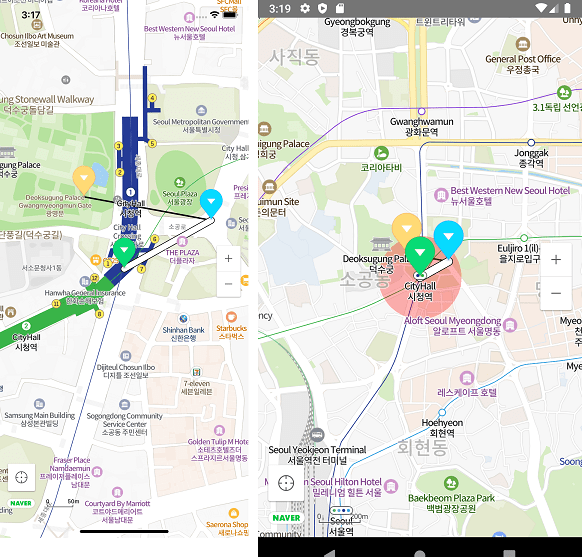\n\n\n## 설치\n\n```\nnpm install react-native-nmap --save;\n```\n\n- **React Native 0.60+**\n\n```bash\n$ cd ios/ && pod install\n```\n\n- **React Native <= 0.59**\n\n```bash\n$ react-native link react-native-nmap\n$ cd ios/ && pod install\n```\n\n> ios의 경우 `git-lfs` 설치가 필요합니다. [참고](https://github.com/navermaps/ios-map-sdk#%EB%8C%80%EC%9A%A9%EB%9F%89-%ED%8C%8C%EC%9D%BC%EC%9D%84-%EB%B0%9B%EA%B8%B0-%EC%9C%84%ED%95%B4-git-lfs-%EC%84%A4%EC%B9%98%EA%B0%80-%ED%95%84%EC%9A%94%ED%95%A9%EB%8B%88%EB%8B%A4)\n\n\n### 안드로이드 추가 설정\n\n[네이버 맵 안드로이드 SDK 문서](https://navermaps.github.io/android-map-sdk/guide-ko/1.html)를 따라 API키와 레포지터리 경로를 추가합니다\n\n`/android/build.gradle` 파일에 아래와 같이 레포지터리를 추가합니다\n\n> ⚠️ Bintray 지원 중단에 의해 jfrog로 수정되었습니다\n\n```\nallprojects {\n repositories {\n google()\n jcenter()\n // 네이버 지도 저장소\n maven {\n url 'https://naver.jfrog.io/artifactory/maven/'\n }\n }\n}\n```\n\n`/android/app/src/AndroidManifest.xml`에 아래와 같이 추가하고 발급받은 클라이언트 아이디로 바꿔줍니다.\n```xml\n\n \n \n \n\n```\n\n### IOS 추가 설정\n\n[네이버 맵 IOS SDK 문서](https://navermaps.github.io/ios-map-sdk/guide-ko/1.html)를 따라 API키와 레포지터리 경로를 추가합니다.\n\n`info.plist`에 아래와 같이 발급받은 클라이언트 아이디를 추가해줍니다.\n\n\n\n```xml\n\n\n\n\n...\n NMFClientId\n YOUR_CLIENT_ID_HERE\n...\n\n\n```\n\n## 예제\n\n> [example/App.js](https://github.com/QuadFlask/react-native-naver-map/blob/master/example/App.js) \n\n```tsx\nimport NaverMapView, {Circle, Marker, Path, Polyline, Polygon} from \"react-native-nmap\";\n\nfunction MyMap() {\n const P0 = {latitude: 37.564362, longitude: 126.977011};\n const P1 = {latitude: 37.565051, longitude: 126.978567};\n const P2 = {latitude: 37.565383, longitude: 126.976292};\n\n return console.warn('onTouch', JSON.stringify(e.nativeEvent))}\n onCameraChange={e => console.warn('onCameraChange', JSON.stringify(e))}\n onMapClick={e => console.warn('onMapClick', JSON.stringify(e))}>\n console.warn('onClick! p0')}/>\n console.warn('onClick! p1')}/>\n console.warn('onClick! p2')}/>\n console.warn('onClick! path')} width={10}/>\n console.warn('onClick! polyline')}/>\n console.warn('onClick! circle')}/>\n console.warn('onClick! polygon')}/>\n \n}\n```\n\n\n## 컴포넌트\n\n타입스크립트 타입 정의가 포함되어 있어 타입스크립트 사용을 추천합니다.\n\n### 기본 타입\n\n```ts\nexport interface Coord {\n latitude: number;\n longitude: number;\n}\nexport interface Region extends Coord {\n latitudeDelta: number;\n longitudeDelta: number;\n}\nexport interface Rect {\n left?: number;\n top?: number;\n right?: number;\n bottom?: number;\n}\n```\n\n### `NaverMapView`\n```ts\ninterface NaverMapViewProps {\n center?: Coord & {\n zoom?: number;\n tilt?: number;\n bearing?: number;\n };\n tilt?: number;\n bearing?: number;\n mapPadding?: Rect;\n logoMargin?: Rect;\n logoGravity?: Gravity;\n onInitialized?: Function;\n onCameraChange?: (event: {\n latitude: number;\n longitude: number;\n zoom: number;\n contentsRegion: [Coord, Coord, Coord, Coord, Coord]; // https://navermaps.github.io/android-map-sdk/reference/com/naver/maps/map/NaverMap.html#getContentRegion()\n coveringRegion: [Coord, Coord, Coord, Coord, Coord];\n }) => void;\n onMapClick?: (event: {\n x: number;\n y: number;\n latitude: number;\n longitude: number;\n }) => void;\n onTouch?: () => void;\n showsMyLocationButton?: boolean;\n compass?: boolean;\n scaleBar?: boolean;\n zoomControl?: boolean;\n mapType?: MapType;\n minZoomLevel?: number;\n maxZoomLevel?: number;\n buildingHeight?: number;\n nightMode?: boolean;\n scrollGesturesEnabled?: boolean;\n zoomGesturesEnabled?: boolean;\n tiltGesturesEnabled?: boolean;\n rotateGesturesEnabled?: boolean;\n stopGesturesEnabled?: boolean;\n useTextureView?: boolean; // android only\n}\n/// component method\nanimateToCoordinate: (coord: Coord) => void;\nanimateToTwoCoordinates: (c1: Coord, c2: Coord) => void;\nanimateToCoordinates: (coords: Coord[], bounds?: {\n top: number;\n bottom: number;\n left: number;\n right: number;\n}) => void;\nanimateToRegion: (region: Region) => void;\nsetLocationTrackingMode: (mode: number) => void;\nsetLayerGroupEnabled: (group: LayerGroup, enabled: boolean) => void;\nshowsMyLocationButton: (show: boolean) => void;\nhandleOnCameraChange: (event: React.SyntheticEvent<{}, {\n latitude: number;\n longitude: number;\n zoom: number;\n}>) => void;\nhandleOnMapClick: (event: React.SyntheticEvent<{}, {\n x: number;\n y: number;\n latitude: number;\n longitude: number;\n}>) => void;\n```\n\n### `Marker`\n```ts\ninterface MarkerProps {\n coordinate: Coord\n anchor?: { x: number, y: number }\n pinColor?: string\n alpha?: number\n rotation?: number\n flat?: boolean\n image?: ImageSourcePropType\n onClick?: () => void\n width?: number\n height?: number\n angle?: number\n hidden?: boolean\n zIndex?: number\n iconPerspectiveEnabled?: boolean\n isHideCollidedSymbols?: boolean\n isHideCollidedMarkers?: boolean\n isHideCollidedCaptions?: boolean;\n isForceShowIcon?: boolean;\n caption?: {\n text?: string;\n align?: Align;\n textSize?: number;\n color?: string;\n haloColor?: string;\n offset?: number;\n requestedWidth?: number;\n minZoom?: number;\n maxZoom?: number;\n };\n subCaption?: {\n text?: string;\n textSize?: number;\n color?: number;\n haloColor?: number;\n requestedWidth?: number;\n minZoom?: number;\n maxZoom?: number;\n };\n}\n```\n> 안드로이드 플랫폼에서 마커내 커스텀 뷰를 지원합니다. `0.0.57`\n> ```js\n> \n> \n> \n> width: 32, height: 32,\n> backgroundColor: 'rgba(0,0,0,0.2)', resizeMode: 'stretch',\n> borderWidth: 2, borderColor: 'black'}} fadeDuration={0}/>\n> Image\n> \n> \n> image background\n> \n> \n> \n> ```\n\n### `Polyline`\n```ts\ninterface PolylineProps {\n coordinates: Coord[]\n strokeWidth?: number\n strokeColor?: string\n onClick?: () => void\n}\n```\n\n### `Path`\n```ts\ninterface PathProps {\n coordinates: Coord[]\n width?: number\n color?: string\n outlineWidth?: number\n passedColor?: string\n outlineColor?: string\n passedOutlineColor?: string\n pattern?: ImageSourcePropType\n patternInterval?: number\n onClick?: () => void\n}\n```\n\n### `Circle`\n```ts\nexport interface CircleProps {\n coordinate: Coord[]\n radius?: number;\n color?: string;\n outlineWidth?: number;\n outlineColor?: string;\n zIndex?: number;\n onClick?: () => void\n}\n```\n\n### `Polygon`\n```ts\nexport interface PolygonProps {\n coordinate: Coord[]\n outlineWidth?: number;\n outlineColor?: string\n color?: string;\n holes?: Coord[][];\n onClick?: () => void\n}\n```\n\n### `LayerGroup`\n```ts\nexport declare enum LayerGroup {\n LAYER_GROUP_BUILDING = \"building\",\n LAYER_GROUP_TRANSIT = \"transit\",\n LAYER_GROUP_BICYCLE = \"bike\",\n LAYER_GROUP_TRAFFIC = \"ctt\",\n LAYER_GROUP_CADASTRAL = \"landparcel\",\n LAYER_GROUP_MOUNTAIN = \"mountain\"\n}\n```\n\n## 참고\n\n- *react-navigation*의 스택 스크린 사용시 안드로이드에서 맵뷰가 겹쳐 보이는 현상이 있을 경우 `useTextureView` 옵션을 추가해 주세요. [#27](https://github.com/QuadFlask/react-native-naver-map/issues/27)\n\n- 안드로이드에서 `ScrollView` 내부에 추가할 경우 `scrollGesturesEnabled`를 이용해 맵 스크롤을 제어할 수 있습니다. [#62](https://github.com/QuadFlask/react-native-naver-map/issues/62)\n\n- 마커 클러스터링에 필요한 지도 컨텐츠 영역은 `onCameraChange` 이벤트를 통해 얻을 수 있습니다. [#64](https://github.com/QuadFlask/react-native-naver-map/issues/64)\n","readmeFilename":"README.md"}