{"_id":"@asasugar-use/custom-json2excel","_rev":"3-d7a29e9238f7133709bab61d58413601","name":"@asasugar-use/custom-json2excel","dist-tags":{"latest":"3.1.9"},"versions":{"3.1.6":{"name":"@asasugar-use/custom-json2excel","version":"3.1.6","keywords":["csv","xls","json","excel","json2excel"],"author":{"name":"@asasugar-use"},"license":"ISC","_id":"@asasugar-use/custom-json2excel@3.1.6","maintainers":[{"name":"asasugar_","email":"xxj95719@gmail.com"}],"homepage":"https://github.com/asasugar/custom-json2excel#readme","bugs":{"url":"https://github.com/asasugar/custom-json2excel/issues"},"dist":{"shasum":"7e57f012f6a4959818436f01c1ac429565ce58db","tarball":"https://registry.npmjs.org/@asasugar-use/custom-json2excel/-/custom-json2excel-3.1.6.tgz","fileCount":17,"integrity":"sha512-ekoY5nnzJAp8jEzFx/b1ceGosvlq3OmrT12GkqdZloC6HhdHv3ccQ9fpC3bh6KC/YZdNu3ZZGhUx4tJi+c+VVw==","signatures":[{"sig":"MEQCIAeBKc9UyI5gVEOx4w8OXWp6wSwkufRnz6k+zTXChoHOAiBTuGEiY2nWNYk7Prj/9PqaKFeXNijrsWSWI6N8bpcv5Q==","keyid":"SHA256:jl3bwswu80PjjokCgh0o2w5c2U4LhQAE57gj9cz1kzA"}],"unpackedSize":48376,"npm-signature":"-----BEGIN PGP SIGNATURE-----\r\nVersion: OpenPGP.js v4.10.10\r\nComment: https://openpgpjs.org\r\n\r\nwsFzBAEBCAAGBQJjjwjJACEJED1NWxICdlZqFiEECWMYAoorWMhJKdjhPU1b\r\nEgJ2Vmo6kBAAkR+0jdsmDa1mQ61hm14NFpy1E/J5pw9vlM319au9yTyLUE0Y\r\ntUugl67oGR/YW5QqwqK6VdTl5YV1WweVePyl2bplDCfyBS6UINE8DZe2OzU9\r\njJWxxK9Xs3iGDek16oSnQEpFlOzHADBCVxx8i00+BesHWJ5QLZZRaukb01+N\r\nrNod0jL4ZHiqzMSU6TONZAEyQmF+ltSV5UyhJjj7T0zAp4cLahwmulcJVXj6\r\nWbY586o6OC1mwUq45jhww3iPE/vV+dn4nZs1jx24Si5RHUR9AfzWeNob2Egr\r\nI3sybFUqdSe55+n2MRcV2a33/1FsImFvOY6HGNVQbSvuokpGYbHXIYaV78sn\r\nrmpe53JXNhQcLX44ygc9edjEYYsGMGjIpWrTuCLj/9WG1P9Wlo9gsAXSDyLg\r\nFrL+GePHEi3HjdAlXgJkk30OcgbRFR8C4Vco4KLk9E6G2yoFVwvZRO0e3X5b\r\nPJZcd3uXz2r3e+uJa8eWEQUwtPygIzikJgyrCJlcZpF7APUeDXHYINaBNiFk\r\nMwfy4WWD2JyU8+7jxHUlJDzdyrWY3PKZY1R3fNu5IKq/2Cfcm9YhepLeQN2K\r\nP6NkEUoKKDYyL5pMJ/+Pd9W3jfVYIZQm36X07nJQcWRfVZojNUIPl3V6KzJm\r\nCmWKsIXqMSI11KOE53I1thxIcHCl8X65P8c=\r\n=1J7+\r\n-----END PGP SIGNATURE-----\r\n"},"main":"dist/index.cjs.js","types":"dist/types/index.d.ts","module":"dist/index.esm.js","browser":"dist/index.umd.js","gitHead":"3a358b0a9b382ba66679c0d101726e48d3cc2fb5","scripts":{"dev":"rollup -c --watch","build":"rollup -c","prepublish":"yarn build"},"_npmUser":{"name":"asasugar_","email":"xxj95719@gmail.com"},"repository":{"url":"git+https://github.com/asasugar/custom-json2excel.git","type":"git"},"_npmVersion":"6.14.5","description":"✌传入json,可自定义表格标题名称和列数、头部名称、过滤列和绑定生成开始与成功的回调函数","directories":{},"_nodeVersion":"16.15.0","_hasShrinkwrap":false,"devDependencies":{"rollup":"^2.66.1","typescript":"^4.5.5","rollup-plugin-uglify":"^6.0.4","@rollup/plugin-commonjs":"^21.0.3","rollup-plugin-typescript2":"^0.31.1","@rollup/plugin-node-resolve":"^13.2.0"},"_npmOperationalInternal":{"tmp":"tmp/custom-json2excel_3.1.6_1670318281535_0.05228653542147943","host":"s3://npm-registry-packages"}},"3.1.7":{"name":"@asasugar-use/custom-json2excel","version":"3.1.7","keywords":["csv","xls","json","excel","json2excel"],"author":{"name":"@asasugar-use"},"license":"ISC","_id":"@asasugar-use/custom-json2excel@3.1.7","maintainers":[{"name":"asasugar_","email":"xxj95719@gmail.com"}],"homepage":"https://github.com/asasugar/custom-json2excel#readme","bugs":{"url":"https://github.com/asasugar/custom-json2excel/issues"},"dist":{"shasum":"291748c2f955b823e9fed2bb395629dd6ad14197","tarball":"https://registry.npmjs.org/@asasugar-use/custom-json2excel/-/custom-json2excel-3.1.7.tgz","fileCount":17,"integrity":"sha512-QKeYKYAJL32FVJmftm525CUeE3OcJ8SVk3kFgVJmMPuxPdvklUf6+aJUcg76I+GFFlWJrqWcTVf9444IehzjfQ==","signatures":[{"sig":"MEYCIQCWxVZzWMX+RPMkDwkc+8WfNIZiJM1AFZ1WN+wznVFVSgIhAMXX/zUDHS1xClYreipYP8FpO6S/XM+bdmkRdJlceqeA","keyid":"SHA256:jl3bwswu80PjjokCgh0o2w5c2U4LhQAE57gj9cz1kzA"}],"unpackedSize":48560,"npm-signature":"-----BEGIN PGP SIGNATURE-----\r\nVersion: OpenPGP.js v4.10.10\r\nComment: https://openpgpjs.org\r\n\r\nwsFzBAEBCAAGBQJjjw1tACEJED1NWxICdlZqFiEECWMYAoorWMhJKdjhPU1b\r\nEgJ2Vmor/A//cnEVJ//HAKtNBKGjfFJDSHlxTNku/e7XPkM5KfQR7vh/tn/y\r\nmBh/M7MQqeYsorz5vlyyN10NQUyXQ1w1Wjdyn6a+xCmlKEKJDezKcxnHIPAz\r\nsB4o3ffR7UeaWA1iIt0ljCZX1+hPbvYg3/bRQfsb4xEEJ28OonZmTv+nLMOK\r\n9p8v2YyO3oHXMv80WkBVLwy8O98s26erpJ2/B+Bgrcxub0VuyIkG/5ezNbi3\r\n2mS8XaDXKbZOcZwpGc17t2ZibWMxaEV1PK7rwYPNqFXbPOX0axuCChLFDLvY\r\nTQpnE7N9BB5DTHlx42fWqNdrMuC5glWhKKSOpMwBQqeJfvmBF9xdLS7OJ8dH\r\njibedG06T318Yv+zCGwgRoTT6l7WeB3F4i7uxoFkULpI4iU5rFShaGLW0kHY\r\nxU4SN+twRVn2e3BZjL7PT219+8WqPgThKrKBKF+eSPljjDFCYdo8rB/KzZK2\r\nId5H65DeRExHsTLRn3ELyK2xiQreCn+x3rovsb0vdnn1q8kUG4IoMjfwLtBt\r\nL0viCAox768brmNpNljEofIw2yj4WnFw2zIhiDgzqiKNWShv/fbJUfYyZArU\r\nBduZi5HCgCZzY30b+xLynki+vC5kLHKIp5ZgHQGDF7pT6P2On8mugTN7XNKp\r\nzaNOVtBrcHllTW1NQkVRA99DH9FDAOUHCR8=\r\n=HQ9p\r\n-----END PGP SIGNATURE-----\r\n"},"main":"dist/index.cjs.js","types":"dist/types/index.d.ts","module":"dist/index.esm.js","browser":"dist/index.umd.js","gitHead":"3fb9c8d50adf0c30d8816a5dfca67ebec677102e","scripts":{"dev":"rollup -c --watch","build":"rollup -c","prepublish":"yarn build"},"_npmUser":{"name":"asasugar_","email":"xxj95719@gmail.com"},"repository":{"url":"git+https://github.com/asasugar/custom-json2excel.git","type":"git"},"_npmVersion":"6.14.5","description":"✌传入json,可自定义表格标题名称和列数、头部名称、过滤列和绑定生成开始与成功的回调函数","directories":{},"_nodeVersion":"16.15.0","_hasShrinkwrap":false,"devDependencies":{"rollup":"^2.66.1","typescript":"^4.5.5","rollup-plugin-uglify":"^6.0.4","@rollup/plugin-commonjs":"^21.0.3","rollup-plugin-typescript2":"^0.31.1","@rollup/plugin-node-resolve":"^13.2.0"},"_npmOperationalInternal":{"tmp":"tmp/custom-json2excel_3.1.7_1670319469675_0.648499813985032","host":"s3://npm-registry-packages"}},"3.1.8":{"name":"@asasugar-use/custom-json2excel","version":"3.1.8","keywords":["csv","xls","json","excel","json2excel"],"author":{"name":"@asasugar-use"},"license":"ISC","_id":"@asasugar-use/custom-json2excel@3.1.8","maintainers":[{"name":"asasugar_","email":"xxj95719@gmail.com"}],"homepage":"https://github.com/asasugar/custom-json2excel#readme","bugs":{"url":"https://github.com/asasugar/custom-json2excel/issues"},"dist":{"shasum":"b80088484b4ccbffd09858a258fca6fc3655cb02","tarball":"https://registry.npmjs.org/@asasugar-use/custom-json2excel/-/custom-json2excel-3.1.8.tgz","fileCount":14,"integrity":"sha512-aZAUM8opaO4N0Cuu7kmTvDAF+a6NbknvAoCnZQX91xvMCNz40UZo/ZRe4cuBNUVmRYj7BbKmZkoRDh11XY3PDw==","signatures":[{"sig":"MEUCIQCJ1mnfGjohKOLbelGHbnAEWEs8KThdWc3h9piOoeApMQIgTtjdjfkIYRDXMHb2CENMi4B3fwHenz8IQbIgqfgvGXU=","keyid":"SHA256:jl3bwswu80PjjokCgh0o2w5c2U4LhQAE57gj9cz1kzA"}],"unpackedSize":440677},"main":"lib/index.cjs.js","types":"lib/types/index.d.ts","module":"lib/index.esm.js","browser":"lib/index.umd.js","gitHead":"f34344182b3f0d0033dcd227521c008fdf4d7a4d","scripts":{"dev":"rslib build --watch","build":"rslib build","prepublish":"pnpm build"},"_npmUser":{"name":"asasugar_","email":"xxj95719@gmail.com"},"repository":{"url":"git+https://github.com/asasugar/custom-json2excel.git","type":"git"},"_npmVersion":"10.7.0","description":"✌传入json,可自定义表格标题名称和列数、头部名称、过滤列和绑定生成开始与成功的回调函数","directories":{},"_nodeVersion":"18.20.3","dependencies":{"xlsx":"^0.18.5","papaparse":"^5.5.0"},"_hasShrinkwrap":false,"devDependencies":{"typescript":"^5.7.3","@rslib/core":"^0.3.1","@types/node":"^22.10.5","@types/papaparse":"^5.3.15"},"_npmOperationalInternal":{"tmp":"tmp/custom-json2excel_3.1.8_1736738126610_0.607379244510895","host":"s3://npm-registry-packages-npm-production"}},"3.1.9":{"name":"@asasugar-use/custom-json2excel","version":"3.1.9","description":"✌传入json,可自定义表格标题名称和列数、头部名称、过滤列和绑定生成开始与成功的回调函数","main":"lib/index.cjs.js","module":"lib/index.esm.js","browser":"lib/index.umd.js","types":"lib/types/index.d.ts","scripts":{"dev":"rslib build --watch","build":"rslib build","prepublish":"pnpm build"},"repository":{"type":"git","url":"git+https://github.com/asasugar/custom-json2excel.git"},"author":{"name":"@asasugar-use"},"license":"ISC","bugs":{"url":"https://github.com/asasugar/custom-json2excel/issues"},"homepage":"https://github.com/asasugar/custom-json2excel#readme","keywords":["csv","xls","xls","xlsx","json","excel","json2excel","JsonToExcel","excelToJson"],"devDependencies":{"@rslib/core":"^0.3.1","@types/node":"^22.10.5","@types/papaparse":"^5.3.15","typescript":"^5.7.3"},"dependencies":{"xlsx":"^0.18.5","papaparse":"^5.5.0"},"gitHead":"e02093ff7a0d5e409c772bfbd0af1b0148e2f1b3","_id":"@asasugar-use/custom-json2excel@3.1.9","_nodeVersion":"16.17.0","_npmVersion":"8.15.0","dist":{"integrity":"sha512-+t/ijNoRXe0YSIT94toGkNJ8a0Gv4ptlabsyoIibAC4p1Uqaqa4e4NpynxSSnVVtHGl0N8GPSPAB/haNFmJYfg==","shasum":"579b3b0da1b88440fc04424489decffdfe7d7b53","tarball":"https://registry.npmjs.org/@asasugar-use/custom-json2excel/-/custom-json2excel-3.1.9.tgz","fileCount":14,"unpackedSize":441949,"signatures":[{"keyid":"SHA256:jl3bwswu80PjjokCgh0o2w5c2U4LhQAE57gj9cz1kzA","sig":"MEUCIQDd3mukGbJz7x5F7AHoxJmA43QMBKthrA23+VwVwAbKwwIgYBJNf3lq4vQNUyxx1RZAl5yi/4YE8khT1nS6zKoHJz0="}]},"_npmUser":{"name":"asasugar_","email":"xxj95719@gmail.com"},"directories":{},"maintainers":[{"name":"asasugar_","email":"xxj95719@gmail.com"}],"_npmOperationalInternal":{"host":"s3://npm-registry-packages-npm-production","tmp":"tmp/custom-json2excel_3.1.9_1736753254838_0.20644799603688857"},"_hasShrinkwrap":false}},"time":{"created":"2022-12-06T09:18:01.461Z","modified":"2025-01-13T07:27:35.230Z","3.1.6":"2022-12-06T09:18:01.765Z","3.1.7":"2022-12-06T09:37:49.842Z","3.1.8":"2025-01-13T03:15:26.852Z","3.1.9":"2025-01-13T07:27:35.051Z"},"bugs":{"url":"https://github.com/asasugar/custom-json2excel/issues"},"author":{"name":"@asasugar-use"},"license":"ISC","homepage":"https://github.com/asasugar/custom-json2excel#readme","keywords":["csv","xls","xls","xlsx","json","excel","json2excel","JsonToExcel","excelToJson"],"repository":{"type":"git","url":"git+https://github.com/asasugar/custom-json2excel.git"},"description":"✌传入json,可自定义表格标题名称和列数、头部名称、过滤列和绑定生成开始与成功的回调函数","maintainers":[{"name":"asasugar_","email":"xxj95719@gmail.com"}],"readme":"# @asasugar-use/custom-json2excel\n\n## npm 账号切换新账号了,重新发包,包名更新@asasugar-use/custom-json2excel\n\n## 更新内容\n\n### 3.1.9\n\n- 默认导出 `Json2excel` 类调整为具名导出 `JsonToExcel` 类和 `excelToJson` 方法\n- 更新 `example` ,react 示例和 html 示例\n\n### 3.1.8\n\n- 新增 `sheetToJson` 方法,支持导入 excel 输出json功能\n- 使用 `rslib` 重构打包,增加注释\n- 更新 `example` ,react 示例和 html 示例\n\n### 3.1.7\n\n- 更新包名@asasugar-use/custom-json2excel 和文档\n\n### v3.1.6\n\n- 修复 0 开头的字符转化为 excel 被过滤的问题[#19](https://github.com/asasugar/custom-json2excel/issues/19)\n\n### v3.1.5\n\n- 修复打包后的兼容问题\n- 修复 keyMap 问题\n\n### v3.1.4\n\n- 新增 `scope` 参数\n- 新增 `onError` 回调函数\n- bug 修复\n\n### v3.1.3\n\n- 重构 ts 代码,分别导出 cjs, esm, umd 模块包\n\n### v3.1.2\n\n- [修复导出数据重复为最后一项的 bug](https://github.com/asasugar/custom-json2excel/issues/14)\n\n### v3.1.1\n\n- 修复 ie 下载问题\n\n- 修复未指定 kepMap 导致的 filters 失效问题\n\n- 增加了`orderedKey`字段,可指定列顺序\n\n## Plugin setup\n\n```\nyarn add @asasugar-use/custom-json2excel\nor\nnpm install @asasugar-use/custom-json2excel\nor\npnpm add @asasugar-use/custom-json2excel\n```\n\n## How to use?\n\n### 方法一\n\n> (示例: example/react/src/router/antd-layout.tsx)\n\n1、直接转化 json:\n\n```js\nimport { JsonToExcel } from '@asasugar-use/custom-json2excel';\nconst data = [\n {\n name: '哈哈',\n age: 1,\n sex: '男',\n companyName: '公司1',\n companyAddress: '公司地址1',\n },\n {\n name: '呵呵',\n age: 2,\n sex: '女',\n companyName: '公司2',\n companyAddress: '公司地址2',\n },\n {\n name: '嘻嘻',\n age: 3,\n sex: '男',\n companyName: '公司3',\n companyAddress: '公司地址3',\n },\n {\n name: '啦啦',\n age: 4,\n sex: '女',\n companyName: '公司4',\n companyAddress: '公司地址4',\n },\n];\nconst json2excel = new JsonToExcel({ data });\njson2excel.generate();\n```\n\n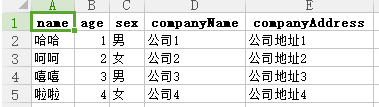\n\n2、自定义头部无需过滤字段时的使用方式:\n\n```js\nimport { JsonToExcel } from '@asasugar-use/custom-json2excel';\nconst data = [\n {\n name: '哈哈',\n age: 1,\n sex: '男',\n companyName: '公司1',\n companyAddress: '公司地址1',\n },\n {\n name: '呵呵',\n age: 2,\n sex: '女',\n companyName: '公司2',\n companyAddress: '公司地址2',\n },\n {\n name: '嘻嘻',\n age: 3,\n sex: '男',\n companyName: '公司3',\n companyAddress: '公司地址3',\n },\n {\n name: '啦啦',\n age: 4,\n sex: '女',\n companyName: '公司4',\n companyAddress: '公司地址4',\n },\n];\nconst keyMap = {\n name: '姓名',\n age: '年龄',\n sex: '性别',\n companyName: '公司名称',\n companyAddress: '公司地址',\n};\nconst json2excel = new JsonToExcel({ data, keyMap });\njson2excel.generate();\n```\n\n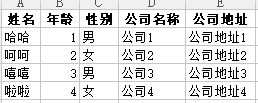\n\n3、需要按照字段顺序返回表格列时的使用方式:\n\n```js\nimport { JsonToExcel } from '@asasugar-use/custom-json2excel';\nconst data = [\n {\n name: '哈哈',\n age: 1,\n sex: '男',\n companyName: '公司1',\n companyAddress: '公司地址1',\n },\n {\n name: '呵呵',\n age: 2,\n sex: '女',\n companyName: '公司2',\n companyAddress: '公司地址2',\n },\n {\n name: '嘻嘻',\n age: 3,\n sex: '男',\n companyName: '公司3',\n companyAddress: '公司地址3',\n },\n {\n name: '啦啦',\n age: 4,\n sex: '女',\n companyName: '公司4',\n companyAddress: '公司地址4',\n },\n];\nconst keyMap = {\n name: '姓名',\n age: '年龄',\n sex: '性别',\n companyName: '公司名称',\n companyAddress: '公司地址',\n};\nconst orderedKey = ['sex', 'companyName', 'name'];\nconst json2excel = new JsonToExcel({ data, keyMap, orderedKey });\njson2excel.generate();\n\n// data会转化成=>\n[\n {\n 性别: '男',\n 公司名称: '公司1',\n 姓名: '哈哈',\n },\n {\n 性别: '女',\n 公司名称: '公司2',\n 姓名: '呵呵',\n },\n {\n 性别: '男',\n 公司名称: '公司3',\n 姓名: '嘻嘻',\n },\n {\n 性别: '女',\n 公司名称: '公司4',\n 姓名: '啦啦',\n },\n];\n```\n\n4、需要过滤字段时的使用方式:\n\n```js\nimport { JsonToExcel } from '@asasugar-use/custom-json2excel';\nconst data = [\n {\n name: '哈哈',\n age: 1,\n sex: '男',\n companyName: '公司1',\n companyAddress: '公司地址1',\n },\n {\n name: '呵呵',\n age: 2,\n sex: '女',\n companyName: '公司2',\n companyAddress: '公司地址2',\n },\n {\n name: '嘻嘻',\n age: 3,\n sex: '男',\n companyName: '公司3',\n companyAddress: '公司地址3',\n },\n {\n name: '啦啦',\n age: 4,\n sex: '女',\n companyName: '公司4',\n companyAddress: '公司地址4',\n },\n];\nconst keyMap = {\n name: '姓名',\n age: '年龄',\n sex: '性别',\n companyName: '公司名称',\n companyAddress: '公司地址',\n};\nconst filters = ['sex'];\nconst json2excel = new JsonToExcel({ data, keyMap, filters });\njson2excel.generate();\n```\n\n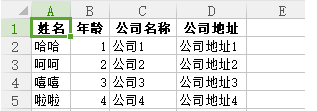\n\n5、需要表格标题时的使用方式:\n\n```js\nimport { JsonToExcel } from '@asasugar-use/custom-json2excel';\nconst data = [\n {\n name: '哈哈',\n age: 1,\n sex: '男',\n companyName: '公司1',\n companyAddress: '公司地址1',\n },\n {\n name: '呵呵',\n age: 2,\n sex: '女',\n companyName: '公司2',\n companyAddress: '公司地址2',\n },\n {\n name: '嘻嘻',\n age: 3,\n sex: '男',\n companyName: '公司3',\n companyAddress: '公司地址3',\n },\n {\n name: '啦啦',\n age: 4,\n sex: '女',\n companyName: '公司4',\n companyAddress: '公司地址4',\n },\n];\nconst keyMap = {\n name: '姓名',\n age: '年龄',\n sex: '性别',\n companyName: '公司名称',\n companyAddress: '公司地址',\n};\nconst filters = ['sex'];\nconst title = [\n { name: '个人信息', colspan: 3 },\n { name: '公司信息', colspan: 2 },\n];\nconst json2excel = new JsonToExcel({ data, keyMap, filters, title });\njson2excel.generate();\n```\n\n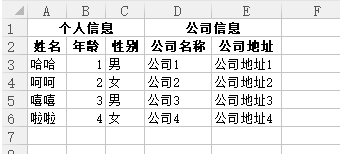\n\n6、绑定回调函数的使用方式:\n\n```js\nimport { JsonToExcel } from '@asasugar-use/custom-json2excel';\nconst data = [\n {\n name: '哈哈',\n age: 1,\n sex: '男',\n companyName: '公司1',\n companyAddress: '公司地址1',\n },\n {\n name: '呵呵',\n age: 2,\n sex: '女',\n companyName: '公司2',\n companyAddress: '公司地址2',\n },\n {\n name: '嘻嘻',\n age: 3,\n sex: '男',\n companyName: '公司3',\n companyAddress: '公司地址3',\n },\n {\n name: '啦啦',\n age: 4,\n sex: '女',\n companyName: '公司4',\n companyAddress: '公司地址4',\n },\n];\nconst keyMap = {\n name: '姓名',\n age: '年龄',\n sex: '性别',\n companyName: '公司名称',\n companyAddress: '公司地址',\n};\nconst filters = ['sex'];\nconst title = [\n { name: '个人信息', colspan: 3 },\n { name: '公司信息', colspan: 2 },\n];\nconst json2excel = new JsonToExcel({\n data,\n keyMap,\n filters,\n title,\n onStart: () => {\n console.log('开始');\n },\n onSuccess: () => {\n console.log('成功');\n },\n onError: (err) => {\n console.log(err);\n },\n});\njson2excel.generate();\n```\n\n7、scope 使用:\n\n```js\nimport { JsonToExcel } from '@asasugar-use/custom-json2excel';\nconst data = [\n {\n name: '哈哈',\n age: 1,\n sex: '男',\n companyName: '公司1',\n companyAddress: '公司地址1',\n love: {\n study: {\n book: '语文',\n },\n },\n v: {\n key: 1,\n },\n },\n {\n name: '呵呵',\n age: 2,\n sex: '女',\n companyName: '公司2',\n companyAddress: '公司地址2',\n love: {\n study: {\n book: '数学',\n },\n },\n v: {\n key: 2,\n },\n },\n {\n name: '嘻嘻',\n age: 3,\n sex: '男',\n companyName: '公司3',\n companyAddress: '公司地址3',\n love: {\n study: {\n book: '英语',\n },\n },\n v: {\n key: 3,\n },\n },\n {\n name: '啦啦',\n age: 4,\n sex: '女',\n companyName: '公司4',\n companyAddress: '公司地址4',\n love: {\n study: {\n book: '化学',\n },\n },\n v: {\n key: 4,\n },\n },\n];\n\nconst scope = {\n love: { study: 'book' },\n v: 'key',\n};\nconst json2excel = new JsonToExcel({ data, scope });\njson2excel.generate();\n```\n\n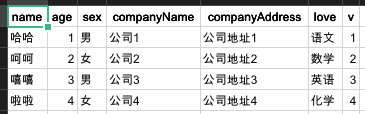\n\n### 方法二\n\n> (示例: example/html/index.html)\n\n1、下载 `dist` 文件夹 `index.umd.js`;\n\n2、`script` 标签引入:\n\n\n\n3、`index.html` 中使用:\n\n```html\nconst data = [ ... ]; const json2excel = new CustomJson2excel.default({ data, keyMap });\njson2excel.generate();\n```\n\n## 导入 Excel 生成 json 数据\n\n`Antd` 例子:\n\n```tsx\nimport { excelToJson } from '@asasugar-use/custom-json2excel';\n\nconst handleImport = async (e: { file: UploadFile; }) => {\nconst rawFile = e?.file?.originFileObj;\n\nif (!rawFile) return;\n const json = await excelToJson(rawFile);\n console.log('%c [ e ]-73', 'font-size:13px; background:pink; color:#bf2c9f;', json);\n};\n\nreturn (\n \n \n \n)\n```\n\n## Props type\n\n| Prop | Type | Defaults | Required | Description |\n| :--------- | :----------- | :------- | :------- | :----------------------------------------------------------------- |\n| data | Array | [] | ✓ | 转化成表格初始 json 数据 |\n| orderedKey | Array | [] | × | 按照 key 顺序返回列,不在数组中的字段将自动过滤,优先级大于 `filters` |\n| filters | Array | [] | × | 需要过滤的字段数组,适用于需过滤的数据较少 |\n| keyMap | Object | {} | × | keyMap 映射表,用于自定义表格列名称 |\n| name | String | excel | × | excel 表格名称 |\n| title | Array | [] | × | 表格标题名称 {name:String,colspan:Number} name:名称, colspan:列数 |\n| footer | Array | [] | × | 表格最后一列名称,参数同 title |\n| type | String | xls | × | 生成的表格类型,可选值(xls、csv) |\n| scope | Object/String | | × | 渲染的数据层级较深时扁平化处理 |\n| onStart | Function | | × | 生成 Excel 前的回调函数 |\n| onSuccess | Function | | × | 生成 Excel 成功的回调函数 |\n| onError | Function | | × | 生成 Excel 失败的回调函数 |\n","readmeFilename":"README.md"}