{"_id":"@cognistreamer/lerna-windows-compat","_rev":"3-3d0e13e2038fd07eca131b192d91196e","name":"@cognistreamer/lerna-windows-compat","description":"Tool for managing JavaScript projects with multiple packages","dist-tags":{"latest":"2.0.0-beta.38"},"versions":{"2.0.0-beta.38":{"name":"@cognistreamer/lerna-windows-compat","version":"2.0.0-beta.38","description":"Tool for managing JavaScript projects with multiple packages","main":"lib/index.js","scripts":{"build":"babel src -d lib","coverage":"nyc --reporter=lcov npm run test","dev":"babel -w src -d lib","lint":"eslint src test","fix":"eslint src test --fix","test":"mocha -t 20000","ci":"npm run lint && cross-env DEBUG_CALLS=true npm run test","prepublish":"npm run build"},"repository":{"type":"git","url":"git+https://github.com/lerna/lerna.git"},"author":{"name":"Sebastian McKenzie","email":"sebmck@gmail.com"},"license":"MIT","bugs":{"url":"https://github.com/lerna/lerna/issues"},"homepage":"https://lernajs.io/","dependencies":{"async":"^1.5.0","chalk":"^1.1.1","cmd-shim":"^2.0.2","columnify":"^1.5.4","command-join":"^2.0.0","cross-spawn":"^4.0.0","glob":"^7.0.6","inquirer":"^3.0.1","lodash":"^4.17.4","meow":"^3.7.0","minimatch":"^3.0.0","mkdirp":"^0.5.1","normalize-path":"^2.0.1","object-assign-sorted":"^2.0.1","path-exists":"^2.1.0","progress":"^1.1.8","read-cmd-shim":"^1.0.1","rimraf":"^2.4.4","semver":"^5.1.0","signal-exit":"^3.0.2"},"bin":{"lerna":"./bin/lerna.js"},"devDependencies":{"babel-cli":"^6.7.5","babel-eslint":"^6.0.2","babel-plugin-add-module-exports":"^0.2.1","babel-plugin-transform-decorators-legacy":"^1.3.4","babel-preset-es2015":"^6.6.0","babel-register":"^6.7.2","cross-env":"^3.1.4","eslint":"^2.3.0","eslint-config-babel":"^1.0.1","eslint-plugin-babel":"^3.3.0","eslint-plugin-flow-vars":"^0.5.0","fs-extra":"^0.30.0","mocha":"^2.4.5","normalize-newline":"^2.1.0","nyc":"^10.1.2"},"engines":{"node":">= 4"},"directories":{"test":"test"},"gitHead":"faf3f1e00e49a105f4e01f1ca3c12dc75aa73682","_id":"@cognistreamer/lerna-windows-compat@2.0.0-beta.38","_shasum":"e2cae64ef57424dca1c61f11f568e9465892dabb","_from":".","_npmVersion":"4.3.0","_nodeVersion":"7.3.0","_npmUser":{"name":"cognistreamer","email":"licenses@cognistreamer.com"},"dist":{"shasum":"e2cae64ef57424dca1c61f11f568e9465892dabb","tarball":"https://registry.npmjs.org/@cognistreamer/lerna-windows-compat/-/lerna-windows-compat-2.0.0-beta.38.tgz","integrity":"sha512-kjp7JlLFfo0ujs7mreCNaMwnq+6elv8Xri58aryXkzfefrHSadH4nr8POsBht6lykU1LHO8o64Jby3HE66q1Lg==","signatures":[{"keyid":"SHA256:jl3bwswu80PjjokCgh0o2w5c2U4LhQAE57gj9cz1kzA","sig":"MEQCIH+3LNMh85YNFSeIIERTICjNiDT4AGA7XkkP+hcIV41vAiAihyEuc9UupLacnOBaidodYJy5+NPRV4bTQXnLp1498A=="}]},"maintainers":[{"name":"cognistreamer","email":"licenses@cognistreamer.com"}],"_npmOperationalInternal":{"host":"packages-12-west.internal.npmjs.com","tmp":"tmp/lerna-windows-compat-2.0.0-beta.38.tgz_1488807308227_0.32069361326284707"}}},"readme":"
\r\n \r\n
\r\n\r\n
\r\n A tool for managing JavaScript projects with multiple packages.\r\n
\r\n\r\n
\r\n \r\n \r\n \r\n \r\n
\r\n\r\n- [About](#about)\r\n- [Getting Started](#getting-started)\r\n- [How It Works](#how-it-works)\r\n- [Commands](#commands)\r\n- [Misc](#misc)\r\n - [Lerna.json](#lernajson)\r\n - [Flags](#flags)\r\n\r\n## About\r\n\r\nSplitting up large codebases into separate independently versioned packages\r\nis extremely useful for code sharing. However, making changes across many\r\nrepositories is *messy* and difficult to track, and testing across repositories\r\ngets complicated really fast.\r\n\r\nTo solve these (and many other) problems, some projects will organize their\r\ncodebases into multi-package repositories (sometimes called [monorepos](https://github.com/babel/babel/blob/master/doc/design/monorepo.md)). Projects like [Babel](https://github.com/babel/babel/tree/master/packages), [React](https://github.com/facebook/react/tree/master/packages), [Angular](https://github.com/angular/angular/tree/master/modules),\r\n[Ember](https://github.com/emberjs/ember.js/tree/master/packages), [Meteor](https://github.com/meteor/meteor/tree/devel/packages), [Jest](https://github.com/facebook/jest/tree/master/packages), and many others develop all of their packages within a\r\nsingle repository.\r\n\r\n**Lerna is a tool that optimizes the workflow around managing multi-package\r\nrepositories with git and npm.**\r\n\r\n### What does a Lerna repo look like?\r\n\r\nThere's actually very little to it. You have a file system that looks like this:\r\n\r\n```\r\nmy-lerna-repo/\r\n package.json\r\n packages/\r\n package-1/\r\n package.json\r\n package-2/\r\n package.json\r\n```\r\n\r\n### What can Lerna do?\r\n\r\nThe two primary commands in Lerna are `lerna bootstrap` and `lerna publish`.\r\n\r\n`bootstrap` will link dependencies in the repo together.\r\n`publish` will help publish any updated packages.\r\n\r\n## Getting Started\r\n\r\n> The instructions below are for Lerna 2.x which is currently in beta.\r\n> We recommend using it instead of 1.x for a new Lerna project. Check the [wiki](https://github.com/lerna/lerna/wiki/1.x-Docs) if you need to see the 1.x README.\r\n\r\nLet's start by installing Lerna globally with [npm](https://www.npmjs.com/).\r\n\r\n```sh\r\n$ npm install --global lerna\r\n```\r\n\r\nNext we'll create a new [git](https://git-scm.com/) repository:\r\n\r\n```sh\r\n$ git init lerna-repo\r\n$ cd lerna-repo\r\n```\r\n\r\nAnd now let's turn it into a Lerna repo:\r\n\r\n```sh\r\n$ lerna init\r\n```\r\n\r\nYour repository should now look like this:\r\n\r\n```\r\nlerna-repo/\r\n packages/\r\n package.json\r\n lerna.json\r\n```\r\n\r\nThis will create a `lerna.json` configuration file as well as a `packages` folder.\r\n\r\n## How It Works\r\n\r\nLerna allows you to manage your project using one of two modes: Fixed or Independent.\r\n\r\n### Fixed/Locked mode (default)\r\n\r\nFixed mode Lerna projects operate on a single version line. The version is kept in the `lerna.json` file at the root of your project under the `version` key. When you run `lerna publish`, if a module has been updated since the last time a release was made, it will be updated to the new version you're releasing. This means that you only publish a new version of a package when you need to.\r\n\r\nThis is the mode that [Babel](https://github.com/babel/babel) is currently using. Use this if you want to automatically tie all package versions together. One issue with this approach is that a major change in any package will result in all packages having a new major version.\r\n\r\n### Independent mode (`--independent`)\r\n\r\nIndependent mode Lerna projects allows maintainers to increment package versions independently of each other. Each time you publish, you will get a prompt for each package that has changed to specify if it's a patch, minor, major or custom change.\r\n\r\nIndependent mode allows you to more specifically update versions for each package and makes sense for a group of components. Combining this mode with something like [semantic-release](https://github.com/semantic-release/semantic-release) would make it less painful. (There is work on this already at [atlassian/lerna-semantic-release](https://github.com/atlassian/lerna-semantic-release)).\r\n\r\n> The `version` key in `lerna.json` is ignored in independent mode.\r\n\r\n## Frequently asked questions\r\n\r\nSee [FAQ.md](FAQ.md).\r\n\r\n## Commands\r\n\r\n### init\r\n\r\n```sh\r\n$ lerna init\r\n```\r\n\r\nCreate a new Lerna repo or upgrade an existing repo to the current version of Lerna.\r\n\r\n> Lerna assumes the repo has already been initialized with `git init`.\r\n\r\nWhen run, this command will:\r\n\r\n1. Add `lerna` as a [`devDependency`](https://docs.npmjs.com/files/package.json#devdependencies) in `package.json` if it doesn't already exist.\r\n2. Create a `lerna.json` config file to store the `version` number.\r\n\r\nExample output on a new git repo:\r\n\r\n```sh\r\n> lerna init\r\n$ Lerna v2.0.0-beta.31\r\n$ Creating packages directory.\r\n$ Updating package.json.\r\n$ Creating lerna.json.\r\n$ Successfully created Lerna files\r\n```\r\n\r\n#### --independent, -i\r\n\r\n```sh\r\n$ lerna init --independent\r\n```\r\n\r\nThis flag tells Lerna to use independent versioning mode.\r\n\r\n### bootstrap\r\n\r\n```sh\r\n$ lerna bootstrap\r\n```\r\n\r\nBootstrap the packages in the current Lerna repo.\r\nInstalls all of their dependencies and links any cross-dependencies.\r\n\r\nWhen run, this command will:\r\n\r\n1. `npm install` all external dependencies of each package.\r\n2. Symlink together all Lerna `packages` that are dependencies of each other.\r\n3. `npm prepublish` all bootstrapped packages.\r\n\r\n`lerna bootstrap` respects the `--ignore`, `--scope` and `--include-filtered-dependencies` flags (see [Flags](#flags)).\r\n\r\n#### How `bootstrap` works\r\n\r\nLet's use `babel` as an example.\r\n\r\n- `babel-generator` and `source-map` (among others) are dependencies of `babel-core`.\r\n- `babel-core`'s [`package.json`](https://github.com/babel/babel/blob/13c961d29d76ccd38b1fc61333a874072e9a8d6a/packages/babel-core/package.json#L28-L47) lists both these packages as keys in `dependencies`, as shown below.\r\n\r\n```js\r\n// babel-core package.json\r\n{\r\n \"name\": \"babel-core\",\r\n ...\r\n \"dependencies\": {\r\n ...\r\n \"babel-generator\": \"^6.9.0\",\r\n ...\r\n \"source-map\": \"^0.5.0\"\r\n }\r\n}\r\n```\r\n\r\n- Lerna checks if each dependency is also part of the Lerna repo.\r\n - In this example, `babel-generator` is a dependency, while `source-map` is not.\r\n - `source-map` is `npm install`ed like normal.\r\n- `packages/babel-core/node_modules/babel-generator` symlinks to `packages/babel-generator`\r\n- This allows nested directory imports\r\n\r\n**Note:** Circular dependencies result in circular symlinks which *may* impact your editor/IDE.\r\n\r\n[Webstorm](https://www.jetbrains.com/webstorm/) locks up when circular symlinks are present. To prevent this, add `node_modules` to the list of ignored files and folders in `Preferences | Editor | File Types | Ignored files and folders`.\r\n\r\n### publish\r\n\r\n```sh\r\n$ lerna publish\r\n```\r\n\r\nPublish packages in the current Lerna project. When run, this command does the following:\r\n\r\nCreates a new release of the packages that have been updated.\r\nPrompts for a new version.\r\nCreates a new git commit/tag in the process of publishing to npm.\r\n\r\nMore specifically, this command will:\r\n\r\n1. Publish each module in `packages` that has been updated since the last version to npm with the [dist-tag](https://docs.npmjs.com/cli/dist-tag) `lerna-temp`.\r\n 1. Run the equivalent of `lerna updated` to determine which packages need to be published.\r\n 2. If necessary, increment the `version` key in `lerna.json`.\r\n 3. Update the `package.json` of all updated packages to their new versions.\r\n 4. Update all dependencies of the updated packages with the new versions, specified with a [caret (^)](https://docs.npmjs.com/files/package.json#dependencies).\r\n 5. Create a new git commit and tag for the new version.\r\n 6. Publish updated packages to npm.\r\n2. Once all packages have been published, remove the `lerna-temp` tags and add the tags to `latest`.\r\n\r\n> A temporary dist-tag is used at the start to prevent the case where only some of the packages are published; this can cause issues for users installing a package that only has some updated packages.\r\n\r\n> Lerna won't publish packages which are marked as private (`\"private\": true` in the `package.json`).\r\n\r\n#### --exact\r\n\r\n```sh\r\n$ lerna publish --exact\r\n```\r\n\r\nWhen run with this flag, `publish` will specify updated dependencies in updated packages exactly (with no punctuation), instead of as semver compatible (with a `^`).\r\n\r\nFor more information, see the package.json [dependencies](https://docs.npmjs.com/files/package.json#dependencies) documentation.\r\n\r\n#### --npm-tag [tagname]\r\n\r\n```sh\r\n$ lerna publish --npm-tag=next\r\n```\r\n\r\nWhen run with this flag, `publish` will publish to npm with the given npm [dist-tag](https://docs.npmjs.com/cli/dist-tag) (defaults to `latest`).\r\n\r\nThis option can be used to publish a [`prerelease`](http://carrot.is/coding/npm_prerelease) or `beta` version.\r\n\r\n> Note: the `latest` tag is the one that is used when a user runs `npm install my-package`.\r\n> To install a different tag, a user can run `npm install my-package@prerelease`.\r\n\r\n#### --canary, -c\r\n\r\n```sh\r\n$ lerna publish --canary\r\n```\r\n\r\nWhen run with this flag, `publish` publishes packages in a more granular way (per commit). Before publishing to npm, it creates the new `version` tag by taking the current `version` and appending the current git sha (ex: `1.0.0-alpha.81e3b443`).\r\n\r\n> The intended use case for this flag is a per commit level release or nightly release.\r\n\r\n#### --git-remote [remote]\r\n\r\n```sh\r\n$ lerna publish --git-remote upstream\r\n```\r\n\r\nWhen run with this flag, `publish` will push the git changes to the specified remote instead of `origin`.\r\n\r\n#### --skip-git\r\n\r\n```sh\r\n$ lerna publish --skip-git\r\n```\r\n\r\nWhen run with this flag, `publish` will publish to npm without running any of the git commands.\r\n\r\n> Only publish to npm; skip committing, tagging, and pushing git changes (this only affects publish).\r\n\r\n#### --skip-npm\r\n\r\n```sh\r\n$ lerna publish --skip-npm\r\n```\r\n\r\nWhen run with this flag, `publish` will update all `package.json` package\r\nversions and dependency versions, but it will not actually publish the\r\npackages to npm.\r\n\r\n> This was useful as a workaround for an [npm\r\nissue](https://github.com/npm/registry/issues/42) which has since been fixed. When publishing with\r\nREADME changes, use `--skip-npm` and do the final `npm publish` by hand for\r\neach package.\r\n\r\nThis flag can be combined with `--skip-git` to _just_ update versions and\r\ndependencies, without committing, tagging, pushing or publishing.\r\n\r\n> Only update versions and dependencies; don't actually publish (this only affects publish).\r\n\r\n#### --force-publish [packages]\r\n\r\n```sh\r\n$ lerna publish --force-publish=package-2,package-4\r\n# force publish all packages\r\n$ lerna publish --force-publish=*\r\n```\r\n\r\nWhen run with this flag, `publish` will force publish the specified packages (comma-separated) or all packages using `*`.\r\n\r\n> This will skip the `lerna updated` check for changed packages and forces a package that didn't have a `git diff` change to be updated.\r\n\r\n#### --yes\r\n\r\n```sh\r\n$ lerna publish --canary --yes\r\n# skips `Are you sure you want to publish the above changes?`\r\n```\r\n\r\nWhen run with this flag, `publish` will skip all confirmation prompts.\r\nUseful in [Continuous integration (CI)](https://en.wikipedia.org/wiki/Continuous_integration) to automatically answer the publish confirmation prompt.\r\n\r\n#### --repo-version\r\n\r\n```sh\r\n$ lerna publish --repo-version 1.0.1\r\n# applies version and skips `Select a new version for...` prompt\r\n```\r\n\r\nWhen run with this flag, `publish` will skip the version selection prompt and use the specified version.\r\nUseful for bypassing the user input prompt if you already know which version to publish.\r\n\r\n#### --message, -m [msg]\r\n\r\n```sh\r\n$ lerna publish -m \"chore: Publish\"\r\n```\r\n\r\nWhen run with this flag, `publish` will use the provided message when committing the version updates\r\nfor publication. Useful for integrating lerna into projects that expect commit messages to adhere\r\nto certain guidelines, such as projects which use [commitizen](https://github.com/commitizen/cz-cli) and/or [semantic-release](https://github.com/semantic-release/semantic-release).\r\n\r\n### updated\r\n\r\n```sh\r\n$ lerna updated\r\n```\r\n\r\nCheck which `packages` have changed since the last release (the last git tag).\r\n\r\nLerna determines the last git tag created and runs `git diff --name-only v6.8.1` to get all files changed since that tag. It then returns an array of packages that have an updated file.\r\n\r\n\r\n**Note that configuration for the `publish` command _also_ affects the\r\n`updated` command. For example `config.publish.ignore`**\r\n\r\n### clean\r\n\r\n```sh\r\n$ lerna clean\r\n```\r\n\r\nRemove the `node_modules` directory from all packages.\r\n\r\n`lerna clean` respects the `--ignore`, `--scope`, and `--yes` flags (see [Flags](#flags)).\r\n\r\n### diff\r\n\r\n```sh\r\n$ lerna diff [package?]\r\n\r\n$ lerna diff\r\n# diff a specific package\r\n$ lerna diff package-name\r\n```\r\n\r\nDiff all packages or a single package since the last release.\r\n\r\n> Similar to `lerna updated`. This command runs `git diff`.\r\n\r\n### ls\r\n\r\n```sh\r\n$ lerna ls\r\n```\r\n\r\nList all of the public packages in the current Lerna repo.\r\n\r\n`lerna ls` respects the `--ignore` and `--scope` flags (see [Flags](#flags)).\r\n\r\n### run\r\n\r\n```sh\r\n$ lerna run [script] # runs npm run my-script in all packages that have it\r\n$ lerna run test\r\n$ lerna run build\r\n```\r\n\r\nRun an [npm script](https://docs.npmjs.com/misc/scripts) in each package that contains that script.\r\n\r\n`lerna run` respects the `--concurrency`, `--scope` and `ignore` flags (see [Flags](#flags)).\r\n\r\n```sh\r\n$ lerna run --scope my-component test\r\n```\r\n\r\n### exec\r\n\r\n```sh\r\n$ lerna exec -- [command] # runs the command in all packages\r\n$ lerna exec -- rm -rf ./node_modules\r\n$ lerna exec -- protractor conf.js\r\n```\r\n\r\nRun an arbitrary command in each package.\r\n\r\n`lerna exec` respects the `--concurrency`, `--scope` and `--ignore` flags (see [Flags](#flags)).\r\n\r\n```sh\r\n$ lerna exec --scope my-component -- ls -la\r\n```\r\n\r\n> Hint: The commands are spawned in parallel, using the concurrency given.\r\n> The output is piped through, so not deterministic.\r\n> If you want to run the command in one package after another, use it like this:\r\n\r\n```sh\r\n$ lerna exec --concurrency 1 -- ls -la\r\n```\r\n\r\n### import\r\n\r\n```sh\r\n$ lerna import \r\n```\r\n\r\nImport the package at ``, with commit history,\r\ninto `packages/`. Original commit authors, dates and messages\r\nare preserved. Commits are applied to the current branch.\r\n\r\nThis is useful for gathering pre-existing standalone packages into a Lerna\r\nrepo. Each commit is modified to make changes relative to the package\r\ndirectory. So, for example, the commit that added `package.json` will\r\ninstead add `packages//package.json`.\r\n\r\n## Misc\r\n\r\nLerna will log to a `lerna-debug.log` file (same as `npm-debug.log`) when it encounters an error running a command.\r\n\r\nLerna also has support for [scoped packages](https://docs.npmjs.com/misc/scope).\r\n\r\nRunning `lerna` without arguments will show all commands/options.\r\n\r\n### lerna.json\r\n\r\n```js\r\n{\r\n \"lerna\": \"2.0.0-beta.31\",\r\n \"version\": \"1.1.3\",\r\n \"commands\": {\r\n \"publish\": {\r\n \"ignore\": [\r\n \"ignored-file\",\r\n \"*.md\"\r\n ]\r\n },\r\n \"bootstrap\": {\r\n \"ignore\": \"component-*\"\r\n }\r\n },\r\n \"packages\": [\"packages/*\"]\r\n}\r\n```\r\n\r\n- `lerna`: the current version of Lerna being used.\r\n- `version`: the current version of the repository.\r\n- `commands.publish.ignore`: an array of globs that won't be included in `lerna updated/publish`. Use this to prevent publishing a new version unnecessarily for changes, such as fixing a `README.md` typo.\r\n- `commands.bootstrap.ignore`: an array of globs that won't be bootstrapped when running the `lerna bootstrap` command.\r\n- `commands.bootstrap.scope`: an array of globs that restricts which packages will be bootstrapped when running the `lerna bootstrap` command.\r\n- `packages`: Array of globs to use as package locations.\r\n\r\n\r\n### Common `devDependencies`\r\n\r\nMost `devDependencies` can be pulled up to the root of a Lerna repo.\r\n\r\nThis has a few benefits:\r\n\r\n- All packages use the same version of a given dependency\r\n- Can keep dependencies at the root up-to-date with an automated tool such as [GreenKeeper](https://greenkeeper.io/)\r\n- Dependency installation time is reduced\r\n- Less storage is needed\r\n\r\nNote that `devDependencies` providing \"binary\" executables that are used by\r\nnpm scripts still need to be installed directly in each package where they're\r\nused.\r\n\r\nFor example the `nsp` dependency is necessary in this case for `lerna run nsp`\r\n(and `npm run nsp` within the package's directory) to work correctly:\r\n\r\n```json\r\n\r\n{\r\n \"scripts\": {\r\n \"nsp\": \"nsp\"\r\n },\r\n \"devDependencies\": {\r\n \"nsp\": \"^2.3.3\"\r\n }\r\n}\r\n```\r\n\r\n### Flags\r\n\r\nOptions to Lerna can come from configuration (`lerna.json`) or on the command\r\nline. Additionally options in config can live at the top level or may be\r\napplied to specific commands.\r\n\r\nExample:\r\n\r\n```json\r\n{\r\n \"lerna\": \"x.x.x\",\r\n \"version\": \"1.2.0\",\r\n \"exampleOption\": \"foo\",\r\n \"command\": {\r\n \"init\": {\r\n \"exampleOption\": \"bar\",\r\n }\r\n },\r\n}\r\n```\r\n\r\nIn this case `exampleOption` will be \"foo\" for all commands except `init`,\r\nwhere it will be \"bar\". In all cases it may be overridden to \"baz\" on the\r\ncommand-line with `--example-option=baz`.\r\n\r\n#### --concurrency\r\n\r\nHow many threads to use when Lerna parallelizes the tasks (defaults to `4`)\r\n\r\n```sh\r\n$ lerna publish --concurrency 1\r\n```\r\n\r\n#### --scope [glob]\r\n\r\nScopes a command to a subset of packages.\r\n\r\n```sh\r\n$ lerna exec --scope my-component -- ls -la\r\n```\r\n\r\n```sh\r\n$ lerna run --scope toolbar-* test\r\n```\r\n\r\n#### --ignore [glob]\r\n\r\nExcludes a subset of packages when running a command.\r\n\r\n```sh\r\n$ lerna bootstrap --ignore component-*\r\n```\r\n\r\nThe `ignore` flag, when used with the `bootstrap` command, can also be set in `lerna.json` under the `commands.bootstrap` key. The command-line flag will take precendence over this option.\r\n\r\n**Example**\r\n\r\n```javascript\r\n{\r\n \"lerna\": \"2.0.0-beta.31\",\r\n \"version\": \"0.0.0\",\r\n \"commands\": {\r\n \"bootstrap\": {\r\n \"ignore\": \"component-*\"\r\n }\r\n }\r\n}\r\n```\r\n\r\n> Hint: The glob is matched against the package name defined in `package.json`,\r\n> not the directory name the package lives in.\r\n\r\n#### --include-filtered-dependencies\r\n\r\nUsed in combination with any command that accepts `--scope` (`bootstrap`, `clean`, `ls`, `run`, `exec`). Ensures that all dependencies (and dev dependencies) of any scoped packages (either through `--scope` or `--ignore`) are operated on as well.\r\n\r\n> Note: This will override the `--scope` and `--ignore` flags.\r\n> > i.e. A package matched by the `--ignore` flag will still be bootstrapped if it is depended on by another package that is being bootstrapped.\r\n\r\nThis is useful for situations where you want to \"set up\" a single package that relies on other packages being set up.\r\n\r\n```sh\r\n$ lerna bootstrap --scope my-component --include-filtered-dependencies\r\n# my-component and all of its dependencies will be bootstrapped\r\n```\r\n\r\n```sh\r\n$ lerna bootstrap --scope \"package-*\" --ignore \"package-util-*\" --include-filtered-dependencies\r\n# all package-util's will be ignored unless they are depended upon by a\r\n# package matched by \"package-*\"\r\n```\r\n\r\n#### --only-explicit-updates\r\n\r\nOnly will bump versions for packages that have been updated explicitly rather than cross-dependencies.\r\n\r\n> This may not make sense for a major version bump since other packages that depend on the updated packages wouldn't be updated.\r\n\r\n```sh\r\n$ lerna updated --only-explicit-updates\r\n$ lerna publish --only-explicit-updates\r\n```\r\n\r\nEx: in Babel, `babel-types` is depended upon by all packages in the monorepo (over 100). However, Babel uses `^` for most of its dependencies so it isn't necessary to bump the versions of all packages if only `babel-types` is updated. This option allows only the packages that have been explicitly updated to make a new version.\r\n\r\n#### --loglevel [silent|error|warn|success|info|verbose|silly]\r\n\r\nWhat level of logs to report. On failure, all logs are written to lerna-debug.log in the current working directory.\r\n\r\nAny logs of a higher level than the setting are shown. The default is \"info\".\r\n\r\n#### --no-sort\r\n\r\nBy default, all tasks execute on packages in topologically sorted order as to respect the dependency relationships of the packages in question. Cycles are broken on a best-effort basis in a way not guaranteed to be consistent across Lerna invocations.\r\n\r\nTopological sorting can cause concurrency bottlenecks if there are a small number of packages with many dependents or if some packages take a disproportionately long time to execute. The `--no-sort` option disables sorting, instead executing tasks in an arbitrary order with maximum concurrency.\r\n\r\nThis option can also help if you run multiple \"watch\" commands. Since `lerna run` will execute commands in topologically sorted order, it can end up waiting for a command before moving on. This will block execution when you run \"watch\" commands, since they typically never end. An example of a \"watch\" command is [running `babel` with the `--watch` CLI flag](https://babeljs.io/docs/usage/cli/#babel-compile-files).\r\n\r\n#### --hoist [glob]\r\n\r\nInstall external dependencies matching `glob` at the repo root so they're\r\navailable to all packages. Any binaries from these dependencies will be\r\nlinked into dependent package `node_modules/.bin/` directories so they're\r\navailable for npm scripts. If the option is present but no `glob` is given\r\nthe default is `**` (hoist everything). This option only affects the\r\n`bootstrap` command.\r\n\r\n```sh\r\n$ lerna bootstrap --hoist\r\n```\r\n\r\nNote: If packages depend on different _versions_ of an external dependency,\r\nthe most commonly used version will be hoisted, and a warning will be emitted.\r\n\r\n#### --nohoist [glob]\r\n\r\nDo _not_ install external dependencies matching `glob` at the repo root. This\r\ncan be used to opt out of hoisting for certain dependencies.\r\n\r\n```sh\r\n$ lerna bootstrap --hoist --nohoist=babel-*\r\n```\r\n\r\n#### --npm-client [client]\r\n\r\nInstall external dependencies using `[client] install`. Must be an executable\r\nthat knows how to install npm dependencies.\r\n\r\n```sh\r\n$ lerna bootstrap --npm-client=yarn\r\n```\r\n\r\nMay also be configured in `lerna.json`:\r\n\r\n```js\r\n{\r\n ...\r\n \"npmClient\": \"yarn\"\r\n}\r\n```\r\n\r\n#### --stream\r\n\r\nStream output from child processes immediately, prefixed with the originating\r\npackage name. This can be useful for long-running processes such as \"watch\"\r\nbuilds. This allows output from different packages to be interleaved.\r\n\r\n```sh\r\n$ lerna run watch --stream\r\n```\r\n\r\n#### --registry [registry]\r\n\r\nWhen run with this flag, forwarded npm commands will use the specified registry for your package(s).\r\n\r\nThis is useful if you do not want to explicitly set up your registry\r\nconfiguration in all of your package.json files individually when e.g. using\r\nprivate registries.\r\n\r\n#### --skip-temp-tag\r\n\r\nWhen activated, this flag will alter the default publish process by not creating\r\na temporary tag and handling the process accordingly. Instead it will immediately\r\npublish with the proper dist-tag as [npm it self would](https://docs.npmjs.com/cli/dist-tag).\r\n\r\n### Wizard\r\n\r\nIf you prefer some guidance for cli (in case you're about to start using lerna or introducing it to a new team), you might like [lerna-wizard](https://github.com/szarouski/lerna-wizard). It will lead you through a series of well-defined steps:\r\n\r\n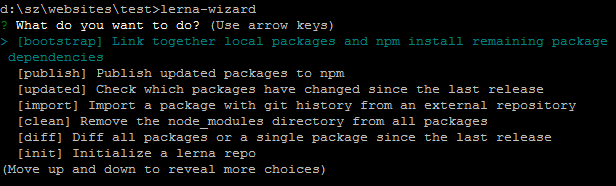\r\n","maintainers":[{"email":"npm@cognistreamer.com","name":"cognistreamer"}],"time":{"modified":"2022-06-12T16:21:25.325Z","created":"2017-03-06T13:35:10.548Z","2.0.0-beta.38":"2017-03-06T13:35:10.548Z"},"homepage":"https://lernajs.io/","repository":{"type":"git","url":"git+https://github.com/lerna/lerna.git"},"author":{"name":"Sebastian McKenzie","email":"sebmck@gmail.com"},"bugs":{"url":"https://github.com/lerna/lerna/issues"},"license":"MIT","readmeFilename":"README.md"}
 \r\n
\r\n \r\n
\r\n  \r\n
\r\n  \r\n
\r\n  \r\n
\r\n