{"_id":"@duynhanf/js-year-calendar","name":"@duynhanf/js-year-calendar","dist-tags":{"latest":"2.0.0"},"versions":{"2.0.0":{"name":"@duynhanf/js-year-calendar","version":"2.0.0","description":"A fully customizable year calendar widget","main":"./dist/js-year-calendar.js","scripts":{"watch":"gulp watch","build":"gulp build","prepare":"npm run build && npm run test && npm run doc","test":"jest","doc":"typedoc src/ts"},"pre-commit":["build","test"],"repository":{"type":"git","url":"git+https://github.com/year-calendar/js-year-calendar.git"},"keywords":["calendar","year","javascript","widget"],"author":{"name":"Paul-DS"},"license":"Apache-2.0","bugs":{"url":"https://github.com/year-calendar/js-year-calendar/issues"},"homepage":"https://year-calendar.github.io/","devDependencies":{"@babel/core":"^7.15.0","@babel/plugin-proposal-class-properties":"^7.14.5","@babel/plugin-transform-modules-umd":"^7.14.5","@babel/preset-env":"^7.15.0","@babel/preset-typescript":"^7.15.0","gulp":"^4.0.2","gulp-babel":"^8.0.0","gulp-clean-css":"^4.3.0","gulp-less":"^5.0.0","gulp-rename":"^2.0.0","gulp-typescript":"^5.0.1","gulp-uglify":"^3.0.2","jest":"^27.0.6","typedoc":"^0.19.2","typescript":"^4.0.8"},"jest":{"testMatch":["**/tests/*.[jt]s?(x)"],"collectCoverage":true,"testEnvironment":"jsdom"},"types":"./dist/js-year-calendar.d.ts","gitHead":"446cf94bc944d5a807c33512ebdfa6dffe0d30ba","_id":"@duynhanf/js-year-calendar@2.0.0","_nodeVersion":"16.15.1","_npmVersion":"8.11.0","dist":{"integrity":"sha512-J0Rjd/txYX+SzeUDbdLBX3+4O2thqMUlNIkbaQspA2PQip4zT4g/rjizSdX979swiuCBFUNucMijF+qE7ERvjQ==","shasum":"0b734ae29f031b8f555ffbe41263d408e3e4c0b6","tarball":"https://registry.npmjs.org/@duynhanf/js-year-calendar/-/js-year-calendar-2.0.0.tgz","fileCount":46,"unpackedSize":192264,"signatures":[{"keyid":"SHA256:jl3bwswu80PjjokCgh0o2w5c2U4LhQAE57gj9cz1kzA","sig":"MEUCIQCy5ezT5RBkn+pOD5erYtBtN07c0ssZAHxNgsfy4g1SXgIgGVpHCZtAndQKSLGFpWMhiTj+sr25/44YRaERg9ek/9c="}],"npm-signature":"-----BEGIN PGP SIGNATURE-----\r\nVersion: OpenPGP.js v4.10.10\r\nComment: https://openpgpjs.org\r\n\r\nwsFzBAEBCAAGBQJi39KaACEJED1NWxICdlZqFiEECWMYAoorWMhJKdjhPU1b\r\nEgJ2VmouyhAAnUhyGHTzBSvyigMyni2SvZP48RzLICKEAnLpcMRX/pjLwUxh\r\nDngi+Z9+W1WMveYdYU9AvWQkc1XcpIxfFScZ4+3aT0ifKHnoDD7/Eup2Rltu\r\n8aB2Mnvz0vXr1FEmvwRczthbxVHr3cagJdWdQNYsHibHREdG4MRrX/T6nmHg\r\n9r2IlCBD2Z/dS7v8KyxPxGm/jnCbZdL1CjX0u87Buui7mOtjeBfu8SU9WwS9\r\nF7uHWrXVGotEzfRQ8mcpJa9kcmrsJAz4mI4wXJuk+yq4CDJOSs/P6oIHS33H\r\ninCf04zo5C0vPSQorukTcOfKaclUnK2CmlOuv4NxlWXU1GkUffMwuYNQvQEL\r\n2PXpS3jPo2uFFkU/yEWboQ/3kwAnkjvGtTugWyfet7lw48eBnCfNYRTnTU26\r\n7DVtffFOgzwKx2VHKhzVqaJnGI036e7qA2ccckSItFAWHIlPvxlAa+g7MjgK\r\nBdAXLbc90v6h4P1S2K4IEHsxA3zVWSGmVRQttUWJM5eMOK1zGz/NdoqUrQ6B\r\nvgnQwOQznBAmy/eztZxxu6mx+N3c0xNfijqVEkKSYqWgV96agugedHwz65Yu\r\nozLXqVCVlkbefDM7nhg6fhlMqcpu7zsV9OpdXy5t8hruMaovDPduXdk1CI+j\r\nVKuyhO6vOAjH4rW4cJbOrKGRknqUXt8tDEY=\r\n=larP\r\n-----END PGP SIGNATURE-----\r\n"},"_npmUser":{"name":"duynhanf","email":"duynhanf@gmail.com"},"directories":{},"maintainers":[{"name":"duynhanf","email":"duynhanf@gmail.com"}],"_npmOperationalInternal":{"host":"s3://npm-registry-packages","tmp":"tmp/js-year-calendar_2.0.0_1658835610233_0.9448198885984938"},"_hasShrinkwrap":false}},"time":{"created":"2022-07-26T11:40:10.170Z","2.0.0":"2022-07-26T11:40:10.383Z","modified":"2022-07-26T11:40:10.518Z"},"maintainers":[{"name":"duynhanf","email":"duynhanf@gmail.com"}],"description":"A fully customizable year calendar widget","homepage":"https://year-calendar.github.io/","keywords":["calendar","year","javascript","widget"],"repository":{"type":"git","url":"git+https://github.com/year-calendar/js-year-calendar.git"},"author":{"name":"Paul-DS"},"bugs":{"url":"https://github.com/year-calendar/js-year-calendar/issues"},"license":"Apache-2.0","readme":"# js-year-calendar\nA fully customizable year calendar widget\n\n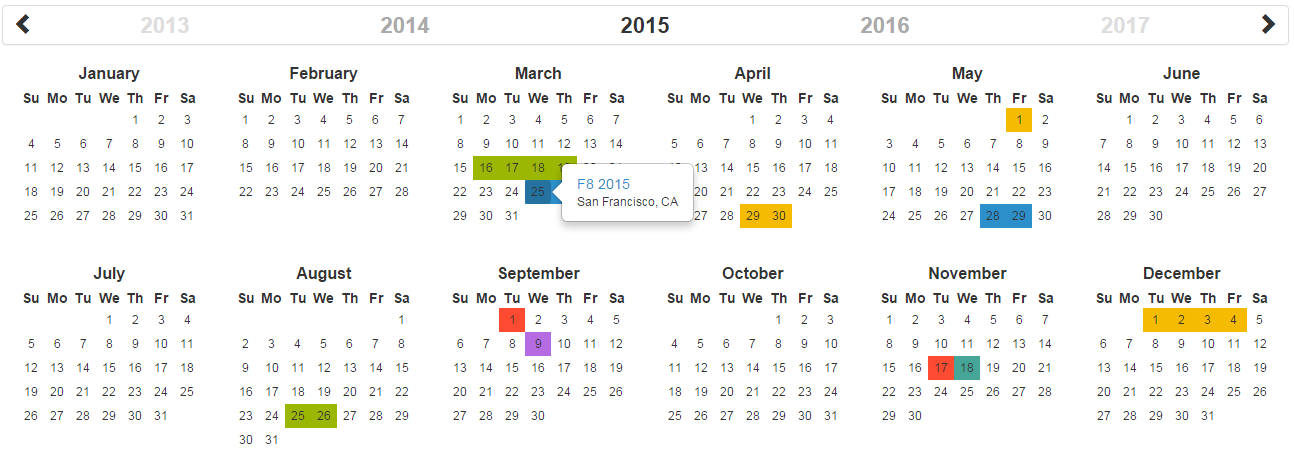\n\n[](https://circleci.com/gh/year-calendar/js-year-calendar/tree/master)\n[](https://codecov.io/gh/year-calendar/js-year-calendar)\n[](https://www.npmjs.com/package/js-year-calendar)\n\nThis library is also available for:\n\n[](https://github.com/year-calendar/rc-year-calendar) \n[](https://github.com/year-calendar/v-year-calendar)\n\n## Requirements\n\nThis plugin uses pure javascript. No library is required.\n\n## Installation\n\nYou can get the widget using the following methods:\n- From the [GitHub repository](https://github.com/year-calendar/js-year-calendar/releases)\n- From the Node package manager, using the following command: `npm install js-year-calendar`\n- From Yarn, using the following command: `yarn add js-year-calendar`\n- From the CDN, by adding the following script directly in your HTML page:\n\n``\n\nAND\n\n``\n\n## Initialization\n\nIf you're using javascript modules, don't forget to import the library:\n\n```\nimport Calendar from 'js-year-calendar';\nimport 'js-year-calendar/dist/js-year-calendar.css';\n```\n\n## Usage\n\nYou can create a calendar using the following javascript code :\n```\nnew Calendar('.calendar')\n```\n\nOr\n\n```\nnew Calendar(document.querySelector('.calendar'));\n```\n\nWhere `.calendar` is the selector of a `DIV` element that should contain your calendar.\n\nYou can also use the following HTML if you don't want to use javascript to initialize the calendar\n```\n\n```\nThe calendar will be automatically created when the page will finish loading\n\n## Using options\n\nYou can specify options to customize the calendar:\n```\nnew Calendar('.calendar', {\n style: 'background',\n minDate: new Date()\n})\n```\n\nYou can find the exhaustive list of options in the [documentation](https://year-calendar.github.io/js-year-calendar/documentation).\n\n## Language\n\nIf you want to use the calendar in a different language, you should import the locale file corresponding to the language you want to use, and then set the `language` prop of the calendar:\n\n```\nimport Calendar from 'js-year-calendar';\nimport 'js-year-calendar/locales/js-year-calendar.fr';\n```\n\nOR\n\n```\n\n\n```\n\nThen\n\n```\nnew Calendar('.calendar', {\n language: 'fr'\n})\n```\n\nThe list of available languages is available [here](https://github.com/year-calendar/js-year-calendar/tree/master/locales)\n\n## Updating calendar\n\nYou can update the calendar after being instantiated:\n```\nconst calendar = new Calendar('.calendar');\n\ncalendar.setStyle('background');\ncalendar.setMaxDate(new Date());\n```\n\nYou can find the exhaustive list of methods in the [documentation](https://year-calendar.github.io/js-year-calendar/documentation).\n\n## Events\n\nYou can bind events to the calendar at initialization\n```\nconst calendar = new Calendar('.calendar', {\n clickDay: function(e) {\n alert('Click on day ' + e.date.toString());\n }\n});\n```\n\nor later\n\n```\nnew Calendar('.calendar');\ndocument.querySelector('.calendar').addEventListener('clickDay', function(e) {\n alert('Click on day ' + e.date.toString());\n});\n```\n\nYou can find the exhaustive list of events in the [documentation](https://year-calendar.github.io/js-year-calendar/documentation).\n\n## Migrating v1.x to v2.x\n\nIf you are using the dataSource option as a function (callback or promise), the first parameter has changed:\n```\nnew Calendar('#calendar', {\n dataSource: (year) => {\n console.log(year);\n }\n}\n```\nbecomes\n```\nnew Calendar('#calendar', {\n dataSource: (period) => {\n console.log(period.year);\n }\n}\n```\n\nFor more details, check [this PR](https://github.com/year-calendar/js-year-calendar/pull/32)\n\n## Migrating from bootstrap-year-calendar\n\nThis widget is based on the [bootstrap-year-calendar](https://github.com/Paul-DS/bootstrap-year-calendar) widget.\nIf you were using this widget, these are the modifications to apply to successfully migrate your project:\n\n### Initialization\n\nThe project doesn't use jQuery anymore, so the initialization of the calendar will be using pure Javascript.\n\nThe old code:\n```\n$('.calendar').calendar({ /* Options */ })\n```\n\nWill be replaced by:\n```\nnew Calendar('.calendar', { /* Options */ });\n```\n\nOr \n\n```\nnew Calendar($('.calendar').get(0), { /* Options */ });\n// Use \".get(0)\" to get the DOM element from the jQuery element\n```\n\n### Get the calendar from the DOM element\n\nGiven that the widget doesn't rely on jQuery, it won't be possible to get the calendar instance from the DOM element anymore:\n```\n$('.calendar').data('calendar').set...();\n```\n\nYou will have to store the instance of the calendar by yourself:\n```\nconst calendar = new Calendar('.calendar');\n\n...\n\ncalendar.set...();\n```\n\n## What next\n\nCheck the [documentation](https://year-calendar.github.io/js-year-calendar/documentation) and [examples](https://year-calendar.github.io/rc-year-calendar/examples) pages to discover all the functionalities.","readmeFilename":"README.md"}