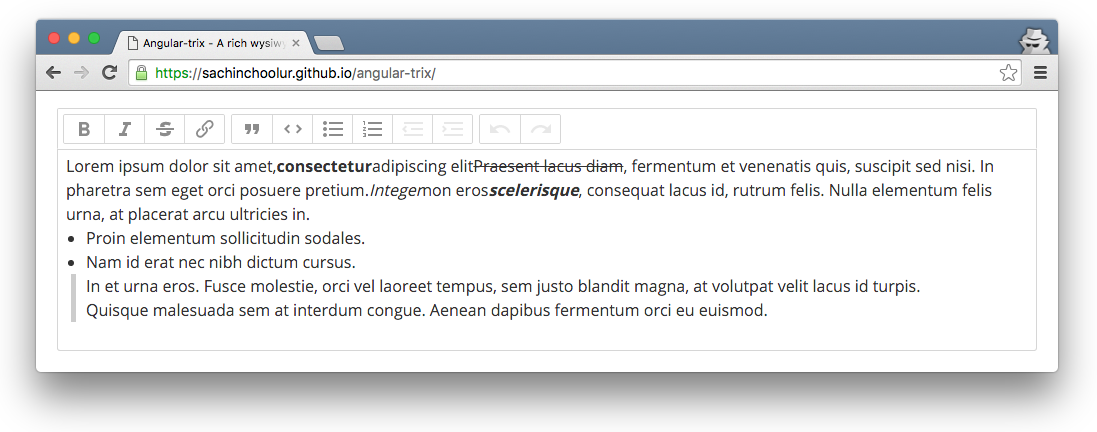
{"_id":"angular-trix","_rev":"4-181da7687273ed9e63181847d0f4420a","name":"angular-trix","description":"A rich wysiwyg text editor directive for angularjs.","dist-tags":{"latest":"1.0.2"},"versions":{"1.0.0":{"name":"angular-trix","version":"1.0.0","description":"A rich wysiwyg text editor directive for angularjs.","keywords":["angular-trix","wysiwyg-editor","text-editor","directive","angularjs"],"homepage":"https://github.com/sachinchoolur/angular-trix","bugs":{"url":"https://github.com/sachinchoolur/angular-trix/issues","email":"sachi77n@gmail.com"},"author":{"name":"Sachin","email":"sachi77n@gmail.com","url":"https://github.com/sachinchoolur"},"repository":{"type":"git","url":"git+ssh://git@github.com/sachinchoolur/angular-trix.git"},"main":"dist/angular-trix.js","license":"MIT","scripts":{"test":"grunt"},"devDependencies":{"grunt":"^0.4.5","grunt-contrib-clean":"^0.6.0","grunt-contrib-concat":"^0.5.0","grunt-contrib-connect":"^0.9.0","grunt-contrib-jshint":"^0.10.0","grunt-contrib-qunit":"^0.5.1","grunt-contrib-uglify":"^0.7.0","grunt-contrib-watch":"^0.6.1","jshint-stylish":"^1.0.0","load-grunt-tasks":"^2.0.0","time-grunt":"^1.0.0"},"gitHead":"b7eeab33e727fb629c3e747dbf45698a936082fb","_id":"angular-trix@1.0.0","_shasum":"b2bd1737a6a0f5598a89d420cdec44961f08fdf3","_from":".","_npmVersion":"2.14.7","_nodeVersion":"4.2.1","_npmUser":{"name":"sachinchoolur","email":"sachi77n@gmail.com"},"maintainers":[{"name":"sachinchoolur","email":"sachi77n@gmail.com"}],"dist":{"shasum":"b2bd1737a6a0f5598a89d420cdec44961f08fdf3","tarball":"https://registry.npmjs.org/angular-trix/-/angular-trix-1.0.0.tgz","integrity":"sha512-Kz9YQ1LZ6OlEseX8+hDBGWaQ4zztMKgVqGMFcBn8Tj4cIqoN/RTrcP0Nx6+PVFEioTBGorSmQrw5XZ42tHymiw==","signatures":[{"keyid":"SHA256:jl3bwswu80PjjokCgh0o2w5c2U4LhQAE57gj9cz1kzA","sig":"MEUCIByLehrwpEBITc3gE9jujZKxGVwOPSWfnLAlPVH2630CAiEA3QTxHlaV7JVA8NhXO7rLMm8AYVvJv6/MzAZo4EAz2oQ="}]}},"1.0.2":{"name":"angular-trix","version":"1.0.2","description":"A rich wysiwyg text editor directive for angularjs.","keywords":["angular-trix","wysiwyg-editor","text-editor","directive","angularjs"],"homepage":"https://github.com/sachinchoolur/angular-trix","bugs":{"url":"https://github.com/sachinchoolur/angular-trix/issues","email":"sachi77n@gmail.com"},"author":{"name":"Sachin","email":"sachi77n@gmail.com","url":"https://github.com/sachinchoolur"},"repository":{"type":"git","url":"git+ssh://git@github.com/sachinchoolur/angular-trix.git"},"main":"dist/angular-trix.js","license":"MIT","scripts":{"test":"grunt"},"dependencies":{"trix":"latest","angular":">=1.2.0"},"devDependencies":{"grunt":"^0.4.5","grunt-contrib-clean":"^0.6.0","grunt-contrib-concat":"^0.5.0","grunt-contrib-connect":"^0.9.0","grunt-contrib-jshint":"^0.10.0","grunt-contrib-qunit":"^0.5.1","grunt-contrib-uglify":"^0.7.0","grunt-contrib-watch":"^0.6.1","jshint-stylish":"^1.0.0","load-grunt-tasks":"^2.0.0","time-grunt":"^1.0.0"},"gitHead":"3eee4444e2b9b9505ae299d888c7e2363b1c9e3c","_id":"angular-trix@1.0.2","_shasum":"81959aad5a8d1b3b01410238f8f3635b5ff043c7","_from":".","_npmVersion":"3.3.12","_nodeVersion":"5.3.0","_npmUser":{"name":"sachinchoolur","email":"sachi77n@gmail.com"},"maintainers":[{"name":"sachinchoolur","email":"sachi77n@gmail.com"}],"dist":{"shasum":"81959aad5a8d1b3b01410238f8f3635b5ff043c7","tarball":"https://registry.npmjs.org/angular-trix/-/angular-trix-1.0.2.tgz","integrity":"sha512-y6OUSc9uLSN2AEqApSx+OmT3Weta5sDSYRVz3xJztfOEsTisJ3CCMAEIv7P7tPZCVvJ9lyMPG6t3B/rqxfyW/g==","signatures":[{"keyid":"SHA256:jl3bwswu80PjjokCgh0o2w5c2U4LhQAE57gj9cz1kzA","sig":"MEUCIA+ERARaspJFAdxweLTRrh/bRk6yDjclFcaVZHj7WvfpAiEAiaF6cOVomdVcYQyiQt+PFulxtkFL6AKio/4uIuNSZHk="}]}}},"readme":"![license](https://img.shields.io/npm/l/angular-trix.svg)\r\n![travis](https://travis-ci.org/sachinchoolur/angular-trix.svg?branch=master)\r\n![bower](https://img.shields.io/bower/v/angular-trix.svg)\r\n![npm](https://img.shields.io/npm/v/angular-trix.svg)\r\n\r\n# angular-trix\r\n##### A rich wysiwyg text editor directive for angularjs.\r\n\r\n> Angularjs directive for [trix editor](https://github.com/basecamp/trix/)\r\n\r\n![angular-trix](https://raw.githubusercontent.com/sachinchoolur/angular-trix/master/src/angular-trix.png)\r\nDemo\r\n---\r\n[Angular-trix demo](http://sachinchoolur.github.io/angular-trix/). [Plunker demo](http://plnkr.co/edit/hSzwlzUmRQoUtZJke2C4?p=preview) \r\n\r\n## Install\r\n\r\nYou can get it on npm.\r\n\r\n```\r\nnpm install angular-trix --save\r\n```\r\n\r\nOr bower, too.\r\n\r\n```\r\nbower install angular-trix --save\r\n```\r\n\r\nIf you're not into package management, just [download a ZIP](https://github.com/sachinchoolur/angular-trix/archive/master.zip) file.\r\n\r\n## Setup\r\n\r\n#### First, include angularjs, trix.js and trix.css into your document. \r\n\r\n```html\r\n<link rel=\"stylesheet\" type=\"text/css\" href=\"https://cdnjs.cloudflare.com/ajax/libs/trix/0.9.2/trix.css\">\r\n\r\n<script src=\"//ajax.googleapis.com/ajax/libs/angularjs/1.4.8/angular.min.js\"></script>\r\n<script src=\"//cdnjs.cloudflare.com/ajax/libs/trix/0.9.2/trix.js\"></script>\r\n```\r\ntrix.css includes default styles for the Trix toolbar, editor, and attachments. Skip this file if you prefer to define these styles yourself.\r\n\r\nTo use your own polyfills, or to target only browsers that support all of the required standards, include trix-core.js instead.\r\n\r\n####  Then Include angular-trix.js. \r\n\r\n```html\r\n<script src=\"dist/angular-trix.min.js\"></script>\r\n```\r\nAdd `angularTrix` dependency to your module\r\n```javascript\r\nvar myApp = angular.module('app', ['angularTrix']);\r\n```\r\n\r\n#### Create trix-editor\r\nPlace an empty `<trix-editor></trix-editor>` tag on the page. Trix will automatically insert a separate `<trix-toolbar>` before the editor.\r\n\r\nLike an HTML `<textarea>`, `<trix-editor>` accepts autofocus and placeholder attributes. Unlike a `<textarea>`, `<trix-editor>` automatically expands vertically to fit its contents.\r\n\r\n#### Finally, add `angular-trix` directive and ng-model to the `<trix-editor></trix-editor>`.\r\n\r\n\r\n```html\r\n<trix-editor angular-trix ng-model=\"foo\"></trix-editor>\r\n```\r\n\r\n## Styling Formatted Content\r\n\r\nTo ensure what you see when you edit is what you see when you save, use a CSS class name to scope styles for Trix formatted content. Apply this class name to your `<trix-editor>` element, and to a containing element when you render stored Trix content for display in your application.\r\n\r\n```html\r\n<trix-editor angular-trix ng-model=\"foo\" class=\"trix-content\"></trix-editor>\r\n```\r\n\r\nThe default `trix.css` file includes styles for basic formatted content—including bulleted and numbered lists, code blocks, and block quotes—under the class name `trix-content`. We encourage you to use these styles as a starting point by copying them into your application’s CSS with a different class name.\r\n\r\n## Observing Editor Changes\r\n\r\nThe `<trix-editor>` element emits several events which you can use to observe and respond to changes in editor state.\r\n\r\n* `trix-initialize` fires when the `<trix-editor>` element is attached to the DOM and its `editor` object is ready for use.\r\n\r\n* `trix-change` fires whenever the editor’s contents have changed.\r\n\r\n* `trix-selection-change` fires any time the selected range changes in the editor.\r\n\r\n* `trix-focus` and `trix-blur` fire when the editor gains or loses focus, respectively.\r\n\r\n* `trix-file-accept` fires when a file is dropped or inserted into the editor. You can access the DOM `File` object through the `file` property on the event.\r\n\r\n* `trix-attachment-add` fires after an attachment is added to the document. You can access the Trix attachment object through the `attachment` property on the event. If the `attachment` object has a `file` property, you should store this file remotely and set the attachment’s URL attribute.\r\n\r\n* `trix-attachment-remove` fires when an attachment is removed from the document. You can access the Trix attachment object through the `attachment` property on the event. You may wish to use this event to clean up remotely stored files.\r\n\r\nYou can use the following attributes to listen the trix events and implement your custom logic. You can access trix event and editor instance parameters in controller.\r\n* `trix-initialize`\r\n* `trix-change `\r\n* `trix-selection-change `\r\n* `trix-focus `\r\n* `trix-blur` \r\n* `trix-file-accept` \r\n* `trix-attachment-add `\r\n* `trix-attachment-remove`\r\n\r\n```html\r\n<trix-editor ng-model=\"trix\" angular-trix trix-initialize=\"trixInitialize(e, editor);\" trix-change=\"trixChange(e, editor);\" trix-selection-change=\"trixSelectionChange(e, editor);\" trix-focus=\"trixFocus(e, editor);\" trix-blur=\"trixBlur(e, editor);\" trix-file-accept=\"trixFileAccept(e, editor);\" trix-attachment-add=\"trixAttachmentAdd(e, editor);\" trix-attachment-remove=\"trixAttachmentRemove(e, editor);\"></trix-editor>\r\n```\r\n\r\n```js\r\n// You can still access the trix event\r\nvar events = ['trixInitialize', 'trixChange', 'trixSelectionChange', 'trixFocus', 'trixBlur', 'trixFileAccept', 'trixAttachmentAdd', 'trixAttachmentRemove'];\r\n\r\nfor (var i = 0; i < events.length; i++) {\r\n    $scope[events[i]] = function(e, editor) {\r\n        console.info('Event type:', e.type);\r\n    }\r\n};\r\n\r\n```\r\n\r\nFor a live demonstration, open this [site](https://sachinchoolur.github.io/angular-trix/) and just your console :)\r\n\r\n## Storing Attached Files\r\n\r\nTrix automatically accepts files dragged or pasted into an editor and inserts them as attachments in the document. Each attachment is considered _pending_ until you store it remotely and provide Trix with a permanent URL.\r\n\r\nTo store attachments, listen for the `trix-attachment-add` event. Upload the attached files with XMLHttpRequest yourself and set the attachment’s URL attribute upon completion. See the [Plunker](http://plnkr.co/edit/hSzwlzUmRQoUtZJke2C4?p=preview) for detailed information.\r\n\r\nIf you don’t want to accept dropped or pasted files,  add`prevent-trix-file-accept = \"true\"` attribute to the trix editor.\r\n\r\n# Editing Text Programmatically\r\n\r\nYou can manipulate a Trix editor programmatically through the `Trix.Editor` interface, available on each `<trix-editor>` element through its `editor` property.  You can access editor property in controller via trix event parameter.\r\n```html\r\n<trix-editor angular-trix ng-model=\"foo\" trix-initialize=\"trixInitialize(e, editor);\"></trix-editor>\r\n```\r\n```js\r\n// Controller \r\n// @e trix event\r\n// @editor Trix.Editor instance\r\n$scope.trixInitialize = function(e, editor) {}\r\n```\r\n\r\n## Understanding the Document Model\r\n\r\nThe formatted content of a Trix editor is known as a _document_, and is represented as an instance of the `Trix.Document` class. To get the editor’s current document, use the `editor.getDocument` method.\r\n\r\n```js\r\n$scope.trixInitialize = function(e, editor) {\r\n\teditor.getDocument()  // is a Trix.Document instance\r\n}\r\n```\r\n\r\nYou can convert a document to an unformatted JavaScript string with the `document.toString` method.\r\n\r\n```js\r\n$scope.trixInitialize = function(e, editor) {\r\n\tvar document = editor.getDocument()\r\n\tdocument.toString()  // is a JavaScript string\r\n}\r\n```\r\n## Getting and Setting the Selection\r\n\r\nTrix documents are structured as sequences of individually addressable characters. The index of one character in a document is called a _position_, and a start and end position together make up a _range_.\r\n\r\nTo get the editor’s current selection, use the `editor.getSelectedRange` method, which returns a two-element array containing the start and end positions.\r\n\r\n```js\r\n$scope.trixInitialize = function(e, editor) {\r\n\teditor.getSelectedRange()  // [0, 0]\r\n}\r\n```\r\n\r\nYou can set the editor’s current selection by passing a range array to the `editor.setSelectedRange` method.\r\n\r\n```js\r\n$scope.trixInitialize = function(e, editor) {\r\n\t// Select the first character in the document\r\n\teditor.setSelectedRange([0, 1])\r\n}\r\n```\r\n\r\n### Collapsed Selections\r\n\r\nWhen the start and end positions of a range are equal, the range is said to be _collapsed_. In the editor, a collapsed selection appears as a blinking cursor rather than a highlighted span of text.\r\n\r\nFor convenience, the following calls to `setSelectedRange` are equivalent when working with collapsed selections:\r\n\r\n```js\r\n$scope.trixInitialize = function(e, editor) {\r\n\teditor.setSelectedRange(1)\r\n\teditor.setSelectedRange([1])\r\n\teditor.setSelectedRange([1, 1])\r\n}\r\n```\r\n\r\n### Directional Movement\r\n\r\nTo programmatically move the cursor or selection through the document, call the `editor.moveCursorInDirection` or `editor.expandSelectionInDirection` methods with a _direction_ argument. The direction can be either `\"forward\"` or `\"backward\"`.\r\n\r\n```js\r\n$scope.trixInitialize = function(e, editor) {\r\n\t// Move the cursor backward one character\r\n\teditor.moveCursorInDirection(\"backward\")\r\n\t\r\n\t// Expand the end of the selection forward by one character\r\n\teditor.expandSelectionInDirection(\"forward\")\r\n}\r\n```\r\n### Converting Positions to Pixel Offsets\r\n\r\nSometimes you need to know the _x_ and _y_ coordinates of a character at a given position in the editor. For example, you might want to absolutely position a pop-up menu element below the editor’s cursor.\r\n\r\nCall the `editor.getClientRectAtPosition` method with a position argument to get a [`DOMRect`](https://drafts.fxtf.org/geometry/#DOMRect) instance representing the left and top offsets, width, and height of the character at the given position.\r\n\r\n```js\r\n$scope.trixInitialize = function(e, editor) {\r\n\tvar rect = editor.getClientRectAtPosition(0)\r\n\t[rect.left, rect.top]  // [17, 49]\r\n}\r\n```\r\n## Inserting and Deleting Text\r\n\r\nThe editor interface provides methods for inserting, replacing, and deleting text at the current selection.\r\n\r\nTo insert or replace text, begin by setting the selected range, then call one of the insertion methods below. Trix will first remove any selected text, then insert the new text at the start position of the selected range.\r\n\r\n### Inserting Plain Text\r\n\r\nTo insert unformatted text into the document, call the `editor.insertString` method.\r\n\r\n```js\r\n$scope.trixInitialize = function(e, editor) {\r\n\r\n\t// Insert “Hello” at the beginning of the document\r\n\teditor.setSelectedRange([0, 0])\r\n\teditor.insertString(\"Hello\")\r\n}\r\n```\r\n\r\n### Inserting HTML\r\n\r\nTo insert HTML into the document, call the `editor.insertHTML` method. Trix will first convert the HTML into its internal document model. During this conversion, any formatting that cannot be represented in a Trix document will be lost.\r\n\r\n```js\r\n$scope.trixInitialize = function(e, editor) {\r\n\r\n\t// Insert a bold “Hello” at the beginning of the document\r\n\teditor.setSelectedRange([0, 0])\r\n\teditor.insertHTML(\"<strong>Hello</strong>\")\r\n}\r\n```\r\n\r\n### Inserting a File\r\n\r\nTo insert a DOM [`File`](http://www.w3.org/TR/FileAPI/#file) object into the document, call the `editor.insertFile` method. Trix will insert a pending attachment for the file as if you had dragged and dropped it onto the editor.\r\n\r\n```js\r\n$scope.trixInitialize = function(e, editor) {\r\n\r\n\t// Insert the selected file from the first file input element\r\n\tvar file = document.querySelector(\"input[type=file]\").file\r\n\teditor.insertFile(file)\r\n}\r\n```\r\n\r\n### Inserting a Line Break\r\n\r\nTo insert a line break, call the `editor.insertLineBreak` method, which is functionally equivalent to pressing the return key.\r\n\r\n```js\r\n$scope.trixInitialize = function(e, editor) {\r\n\r\n\t// Insert “Hello\\n”\r\n\teditor.insertString(\"Hello\")\r\n\teditor.insertLineBreak()\r\n}\r\n```\r\n\r\n### Deleting Text\r\n\r\nIf the current selection is collapsed, you can simulate deleting text before or after the cursor with the `editor.deleteInDirection` method.\r\n\r\n```js\r\n$scope.trixInitialize = function(e, editor) {\r\n\r\n\t// “Backspace” the first character in the document\r\n\teditor.setSelectedRange([1, 1])\r\n\teditor.deleteInDirection(\"backward\")\r\n\t\r\n\t// Delete the second character in the document\r\n\teditor.setSelectedRange([1, 1])\r\n\teditor.deleteInDirection(\"forward\")\r\n}\r\n```\r\n\r\nTo delete a range of text, first set the selected range, then call `editor.deleteInDirection` with either direction as the argument.\r\n\r\n```js\r\n$scope.trixInitialize = function(e, editor) {\r\n\r\n\t// Delete the first five characters\r\n\teditor.setSelectedRange([0, 4])\r\n\teditor.deleteInDirection(\"forward\")\r\n}\r\n```\r\n\r\n## Working With Attributes and Indentation\r\n\r\nTrix represents formatting as sets of _attributes_ applied across ranges of a document.\r\n\r\nBy default, Trix supports the inline attributes `bold`, `italic`, `href`, and `strike`, and the block-level attributes `quote`, `code`, `bullet`, and `number`.\r\n\r\n### Applying Formatting\r\n\r\nTo apply formatting to the current selection, use the `editor.activateAttribute` method.\r\n\r\n```js\r\n$scope.trixInitialize = function(e, editor) {\r\n\teditor.insertString(\"Hello\")\r\n\teditor.setSelectedRange([0, 5])\r\n\teditor.activateAttribute(\"bold\")\r\n}\r\n```\r\n\r\nTo set the `href` attribute, pass a URL as the second argument to `editor.activateAttribute`.\r\n\r\n```js\r\n$scope.trixInitialize = function(e, editor) {\r\n\teditor.insertString(\"Trix\")\r\n\teditor.setSelectedRange([0, 4])\r\n\teditor.activateAttribute(\"href\", \"http://trix-editor.org/\")\r\n}\r\n```\r\n\r\n### Removing Formatting\r\n\r\nUse the `editor.deactivateAttribute` method to remove formatting from a selection.\r\n\r\n```js\r\n$scope.trixInitialize = function(e, editor) {\r\n\teditor.setSelectedRange([2, 4])\r\n\teditor.deactivateAttribute(\"bold\")\r\n}\r\n```\r\n\r\n### Formatting With a Collapsed Selection\r\n\r\nIf you activate or deactivate attributes when the selection is collapsed, your formatting changes will apply to the text inserted by any subsequent calls to `editor.insertString`.\r\n\r\n```js\r\n$scope.trixInitialize = function(e, editor) {\r\n\teditor.activateAttribute(\"italic\")\r\n\teditor.insertString(\"This is italic\")\r\n}\r\n```\r\n\r\n### Adjusting the Indentation Level\r\n\r\nTo adjust the indentation level of block-level attributes, call the `editor.increaseIndentationLevel` and `editor.decreaseIndentationLevel` methods.\r\n\r\n```js\r\n$scope.trixInitialize = function(e, editor) {\r\n\teditor.activateAttribute(\"quote\")\r\n\teditor.increaseIndentationLevel()\r\n\teditor.decreaseIndentationLevel()\r\n}\r\n```\r\n\r\n## Using Undo and Redo\r\n\r\nTrix editors support unlimited undo and redo. Successive typing and formatting changes are consolidated together at five-second intervals; all other input changes are recorded individually in undo history.\r\n\r\nCall the `editor.undo` and `editor.redo` methods to perform an undo or redo operation.\r\n\r\n```js\r\n$scope.trixInitialize = function(e, editor) {\r\n\teditor.undo()\r\n\teditor.redo()\r\n}\r\n```\r\n\r\nChanges you make through the editor interface will not automatically record undo entries. You can save your own undo entries by calling the `editor.recordUndoEntry` method with a description argument.\r\n\r\n```js\r\n$scope.trixInitialize = function(e, editor) {\r\n\teditor.insertString(\"Hello\")\r\n\teditor.recordUndoEntry(\"Insert Text\")\r\n}\r\n```\r\n\r\n## License\r\n\r\nMIT License\r\n","maintainers":[{"name":"sachinchoolur","email":"sachi77n@gmail.com"}],"time":{"modified":"2022-06-13T02:58:49.859Z","created":"2015-12-09T15:06:04.035Z","1.0.0":"2015-12-09T15:06:04.035Z","1.0.2":"2015-12-21T15:40:49.169Z"},"homepage":"https://github.com/sachinchoolur/angular-trix","keywords":["angular-trix","wysiwyg-editor","text-editor","directive","angularjs"],"repository":{"type":"git","url":"git+ssh://git@github.com/sachinchoolur/angular-trix.git"},"author":{"name":"Sachin","email":"sachi77n@gmail.com","url":"https://github.com/sachinchoolur"},"bugs":{"url":"https://github.com/sachinchoolur/angular-trix/issues","email":"sachi77n@gmail.com"},"license":"MIT","readmeFilename":"README.md"}