{"_id":"bootstrap-calendar","_rev":"8-7fffa53ab555f47b3fe662fcf2bb1b40","name":"bootstrap-calendar","description":"Bootstrap full view calendar","dist-tags":{"latest":"0.2.4"},"versions":{"0.2.4":{"name":"bootstrap-calendar","version":"0.2.4","description":"Bootstrap full view calendar","main":"./js/calendar.js","scripts":{"test":""},"repository":{"type":"git","url":"git+https://github.com/Serhioromano/bootstrap-calendar.git"},"keywords":["calendar"],"author":{"name":"Sergey Romanov"},"license":"BSD","gitHead":"fc46075a07e08b1796f959c6562d851acce00751","devDependencies":{"grunt":"~0.4.1","grunt-contrib-less":"~0.7.0","grunt-contrib-uglify":"~0.2.0","bower":"~0.8.5"},"bugs":{"url":"https://github.com/Serhioromano/bootstrap-calendar/issues"},"homepage":"https://github.com/Serhioromano/bootstrap-calendar#readme","_id":"bootstrap-calendar@0.2.4","_shasum":"4af891a0f20fdf03a86f2ebfbf867f3dc92cee6e","_from":".","_npmVersion":"3.3.12","_nodeVersion":"5.1.0","_npmUser":{"name":"gerryfudd","email":"davehasen@gmail.com"},"dist":{"shasum":"4af891a0f20fdf03a86f2ebfbf867f3dc92cee6e","tarball":"https://registry.npmjs.org/bootstrap-calendar/-/bootstrap-calendar-0.2.4.tgz","integrity":"sha512-rI2LOtq+bY79rbquQuD9LqAYYjvqS7nWmXmslUCO1f5Av4V33kNrv8pZn+peQH2WFM6TwvL7r3qeSLhsA4PWHA==","signatures":[{"keyid":"SHA256:jl3bwswu80PjjokCgh0o2w5c2U4LhQAE57gj9cz1kzA","sig":"MEUCIQCDF4nmtT7YngzU/cXgIFzSv5Z1KGb0t0ZxFXH5f31iBQIgXUQzvw1SRGaXym6a9DXDIcTSNPwMBeM1iaq0OQ8lfyQ="}]},"maintainers":[{"name":"gerryfudd","email":"davehasen@gmail.com"}],"_npmOperationalInternal":{"host":"packages-12-west.internal.npmjs.com","tmp":"tmp/bootstrap-calendar-0.2.4.tgz_1459184025505_0.8628596516791731"}}},"readme":"Bootstrap Calendar\n===\n\nA Full view calendar based on Twitter Bootstrap. Please try the [demo](http://bootstrap-calendar.azurewebsites.net).\n\n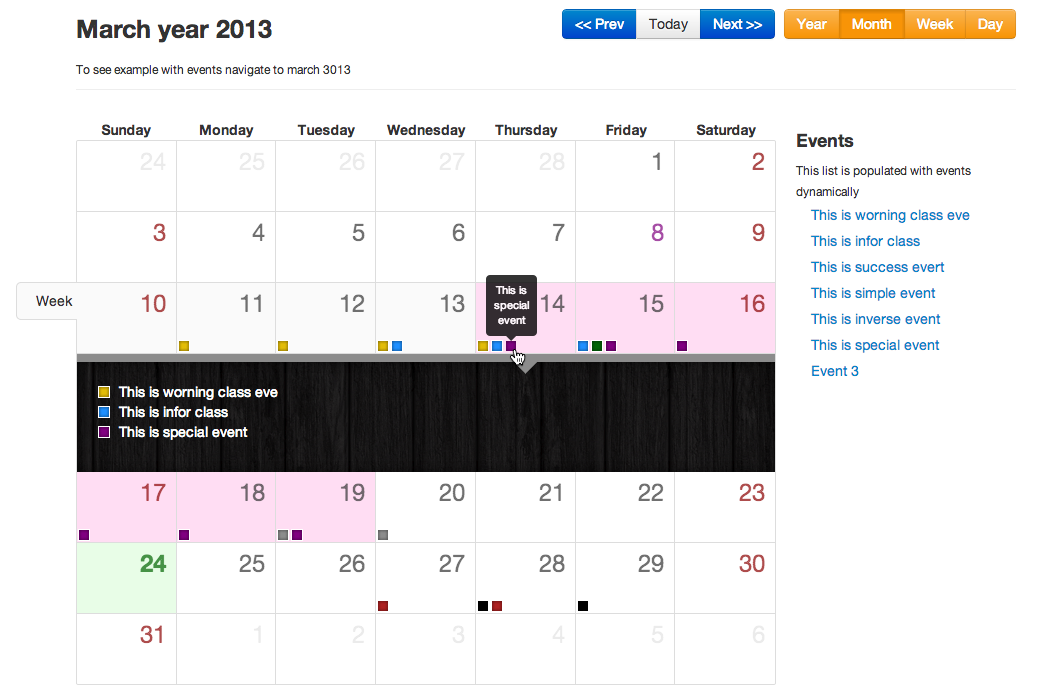\n\n### Why?\n\nWhy did I start this project? Well, I believe there are no good full view calendar's out there with native Bootstrap support. In fact I could not find even one. A different UI and UX concept approach is also used.\n\n\n### Features\n\n- **Reusable** - there is no UI in this calendar. All buttons to switch view or load events are done separately. You will end up with your own uniquie calendar design.\n- **Template based** - all view like **year**, **month**, **week** or **day** are based on templates. You can easily change how it looks or style it or even add new custom view.\n- **LESS** - easy adjust and style your calendar with less variables file.\n- **AJAX** - It uses AJAX to feed calendar with events. You provide URL and just return by this URL `JSON` list of events.\n- **i18n** - language files are connected separately. You can easily translate the calendar into your own language. Holidays are also diplayed on the calendar according to your language\n\n## How to use\n\n### Install\n\nYou can install it with [bower](http://bower.io/) package manager.\n\n\t$ bower install bootstrap-calendar\n\nBower will automatically install all dependencies. Then by running\n\n\t$ bower list --path\n\nYou will see list of the files you need to include to your document.\n\n### Quick setup\nYou will need to include the bootstrap css and calendar css. Here is the minimum setup.\n\n\t\n\t\n\t\n\t\tMinimum Setup\n\t\t\n\t\t\n\t\n\t\n\n\t\t\n\n\t\t\n\t\t\n\t\t\n\t\t\n\t\n\t\n\nBootstrap Calendar depends on [jQuery](http://jquery.com/) and [underscore.js](http://underscorejs.org/) is used as a template engine.\nFor the calendar you only have to include the `calendar.css` and `calendar.js` files.\nIf you want to localize your Calendar, it's enough to add this line before including calendar.js:\n\n\t\n\nWhere xx-XX is the language code. When you initializing the calendar, you have to specify this language code:\n\n\t\n\n\n\n\n## Feed with events\n\nTo feed the calendar with events you should use `events_source` parameter. It may be a function, array or URL. In all cases you have to set it with valid events array.\n\nSee [events.json.php](https://github.com/Serhioromano/bootstrap-calendar/blob/master/events.json.php) file for more details.\n\n`start` and `end` contain dates when event starts (inclusive) and ends (exclusive) in Unix timestamp. Classes are `event-important`, `event-success`, `event-warning`, `event-info`, `event-inverse` and `event-special`. This wil change the color of your event indicators.\n\n### Feed URL\n\n\tvar calendar = $('#calendar').calendar({events_source: '/api/events.php'});\n\nIt will send two parameters by `GET` named `from` and `to`, which will tell you what period is required. You have to return it in JSON structure like this\n\n\t{\n\t\t\"success\": 1,\n\t\t\"result\": [\n\t\t\t{\n\t\t\t\t\"id\": 293,\n\t\t\t\t\"title\": \"Event 1\",\n\t\t\t\t\"url\": \"http://example.com\",\n\t\t\t\t\"class\": \"event-important\",\n\t\t\t\t\"start\": 12039485678000, // Milliseconds\n\t\t\t\t\"end\": 1234576967000 // Milliseconds\n\t\t\t},\n\t\t\t...\n\t\t]\n\t}\n\n### Feed array\n\nYou can set events list array directly to `events_source` parameter.\n\n\tvar calendar = $('#calendar').calendar({\n\t events_source: [\n {\n \"id\": 293,\n \"title\": \"Event 1\",\n \"url\": \"http://example.com\",\n \"class\": \"event-important\",\n \"start\": 12039485678000, // Milliseconds\n \"end\": 1234576967000 // Milliseconds\n },\n ...\n ]});\n\n\n### Feed function\n\nOr you can use function. You have to return array of events.\n\n\tvar calendar = $('#calendar').calendar({events_source: function(){\n\t return [\n {\n \"id\": 293,\n \"title\": \"Event 1\",\n \"url\": \"http://example.com\",\n \"class\": \"event-important\",\n \"start\": 12039485678000, // Milliseconds\n \"end\": 1234576967000 // Milliseconds\n },\n ...\n ];\n\t}});\n\n\n### PHP example\n\nNote that `start` and `end` dates are in milliseconds, thus you need to divide it by 1000 to get seconds. PHP example.\n\n $start = date('Y-m-d h:i:s', ($_GET['start'] / 1000));\n\nIf you have an error you can return\n\n\t{\n\t\t\"success\": 0,\n\t\t\"error\": \"error message here\"\n\t}\n\nHere is the example of PHP script.\n\n```php\nquote(date('Y-m-d', $start)), $db->quote(date('Y-m-d', $end)));\n\n$out = array();\nforeach($db->query($sql) as $row) {\n $out[] = array(\n 'id' => $row->id,\n 'title' => $row->name,\n 'url' => Helper::url($row->id),\n 'start' => strtotime($row->datetime) . '000',\n 'end' => strtotime($row->datetime_end) .'000'\n );\n}\n\necho json_encode(array('success' => 1, 'result' => $out));\nexit;\n```\n\nAnother example of PHP script (without connecting with the Database).\n\n```php\n $i,\n\t\t'title' => 'Event name '.$i,\n\t\t'url' => Helper::url($id),\n\t\t'class' => 'event-important',\n\t\t'start' => strtotime($data).'000'\n\t);\n}\n \necho json_encode(array('success' => 1, 'result' => $out));\nexit;\n?>\n```\n\n## Usage warning.\n\nYou cannot use the calendar from a local file. \nThe following error will be displayed :\nFailed to load resource: Origin null is not allowed by Access-Control-Allow-Origin. \n\nUsing Ajax with local resources (file:///), is not permited. You will need to deploy this to the web instead.\n\n## Modal popup\n\nYou can enable a bootstrap modal popup to show when clicking an event instead of redirecting to event.url. \nTo enable boostrap modal, first add the modal html to your page and provide boostrap-calendar with the ID:\n\n
\n
\n \n
Event
\n
\n
\n
\n \n
\n\nand then set:\n\n\tmodal: \"#events-modal\"\n\nThis will enable the modal, and populate it with an iframe with the contents of event.url .\n\nFor Bootstrap v3, use\n\n
\n
\n
\n
\n \n
Event
\n
\n
\n
\n \n
\n
\n
\n\n### Modal content source\n\nThere are three options for populating the contents of the modal, controlled by the `modal_type` option:\n- **iframe** (default) - populates modal with iframe, iframe.src set to event.url\n- **ajax** - gets html from event.url, this is useful when you just have a snippet of html and want to take advantage of styles in the calendar page\n- **template** - will render a template (example in tmpls/modal.html) that gets the `event` and a reference to the `calendar` object.\n\n### Modal title\n\nThe modal title can be customized by defining the `modal_title` option as a function. This function will receive the event as its only parameter. For example, this could be used to set the title of the modal to the title of the event:\n\n\tmodal_title: function(event) { return event.title }\n\nA calendar set up to use modals would look like this:\n\n\t$(\"#calendar\").calendar({modal : \"#events-modal\", modal_type : \"ajax\", modal_title : function (e) { return e.title }})\n\n","maintainers":[{"name":"gerryfudd","email":"davehasen@gmail.com"}],"time":{"modified":"2022-06-13T04:56:51.916Z","created":"2016-03-28T16:53:45.902Z","0.2.4":"2016-03-28T16:53:45.902Z"},"homepage":"https://github.com/Serhioromano/bootstrap-calendar#readme","keywords":["calendar"],"repository":{"type":"git","url":"git+https://github.com/Serhioromano/bootstrap-calendar.git"},"author":{"name":"Sergey Romanov"},"bugs":{"url":"https://github.com/Serhioromano/bootstrap-calendar/issues"},"license":"BSD","readmeFilename":"README.md","users":{"christophior":true,"filipve":true,"apwn":true,"woaksdl14":true,"zhnoah":true}}