{"bin":{"mdx-deck":"cli.js"},"bugs":{"url":"https://github.com/jxnblk/mdx-deck/issues"},"dist":{"shasum":"51de39f09095a895c16d2be88e64c0a9efa81e67","tarball":"https://registry.npmjs.org/mdx-deck/-/mdx-deck-4.0.0-alpha.1.tgz","fileCount":7,"integrity":"sha512-9sd2n+FEcdcP0K6XGZDLHWCHWQGVoSQWLB022udDujpC8Ii/aAurfSMtZzoxUhlYh31mm+nNXPsdCuJfNX/zTQ==","signatures":[{"sig":"MEQCIC6J9PwEyKGdknfyvurLzAIHWK0Jd3geAIJNsYe2pOXOAiBCHCkSo/W1J8nmOlfgnBjrnXdSrWXno3xmoReyYBcQUA==","keyid":"SHA256:jl3bwswu80PjjokCgh0o2w5c2U4LhQAE57gj9cz1kzA"}],"unpackedSize":13371,"npm-signature":"-----BEGIN PGP SIGNATURE-----\r\nVersion: OpenPGP.js v3.0.4\r\nComment: https://openpgpjs.org\r\n\r\nwsFcBAEBCAAQBQJeNw0VCRA9TVsSAnZWagAAUscP/37c2LYj7Duht9CAoWTc\n25pAKTl6XdUpZ1E43E1Mz4xOX5waR0ordC0Ubb12Y6VwfPgQ6aUpRvFYWcdH\n/oPuWYPxKqVnaNTKvGtRO7+YfuHZS2ANHkpMjgZP2Nfpt9ygMJ5bwTxlDSHG\nfmJ6m8tWT6wNah1HUCmsDTFxF1JpTAgq1KuYTUWQupred6+ASyIK1ixFrav7\nlQQN9l4bHoyNeiPrAGk/HEj/v0QlNhiY0PpXQTZJqNr3rj1LR+YBBVXYbALR\n0oi82chXvS8SSruEko1AtNznDCth3wcKeTzgyc8WjwN/11dGIJgKDkpd9Bqq\n2XRndnDlmOCeXfJpfHTU4EbobfBK8Q9P5ywfszPlR3EAOgHMYrhyqdlEGJDc\nbLRJbZzIIweyYEJmGK5sw3w8m0IuuK3Math6VprU3/AI9EscfsykKZJ811dW\nfnenJocKage5vW3z4SgG0gXGkVzhT4ZEbqF+QDHak3MfEhxVqBOsbiUf1PFa\nOKh6I5kM+O412q3/abHNLFmGXGioOsRbDiqrT4fjN7cydJ+mCHznbVQfAVj6\nQc7DDVulwWHQcCEJEoT7h1dOoBKKtToeLQfUPcnswu3bY7TFIZbCm5t6Lcav\niIT6iw2jyTcKTiDM5CHzS33YdOAlq4uOxOBMaepLtMyre5QHLkN8jOI9QooD\nAA87\r\n=jTMT\r\n-----END PGP SIGNATURE-----\r\n"},"main":"index.js","name":"mdx-deck","author":{"name":"Brent Jackson"},"readme":"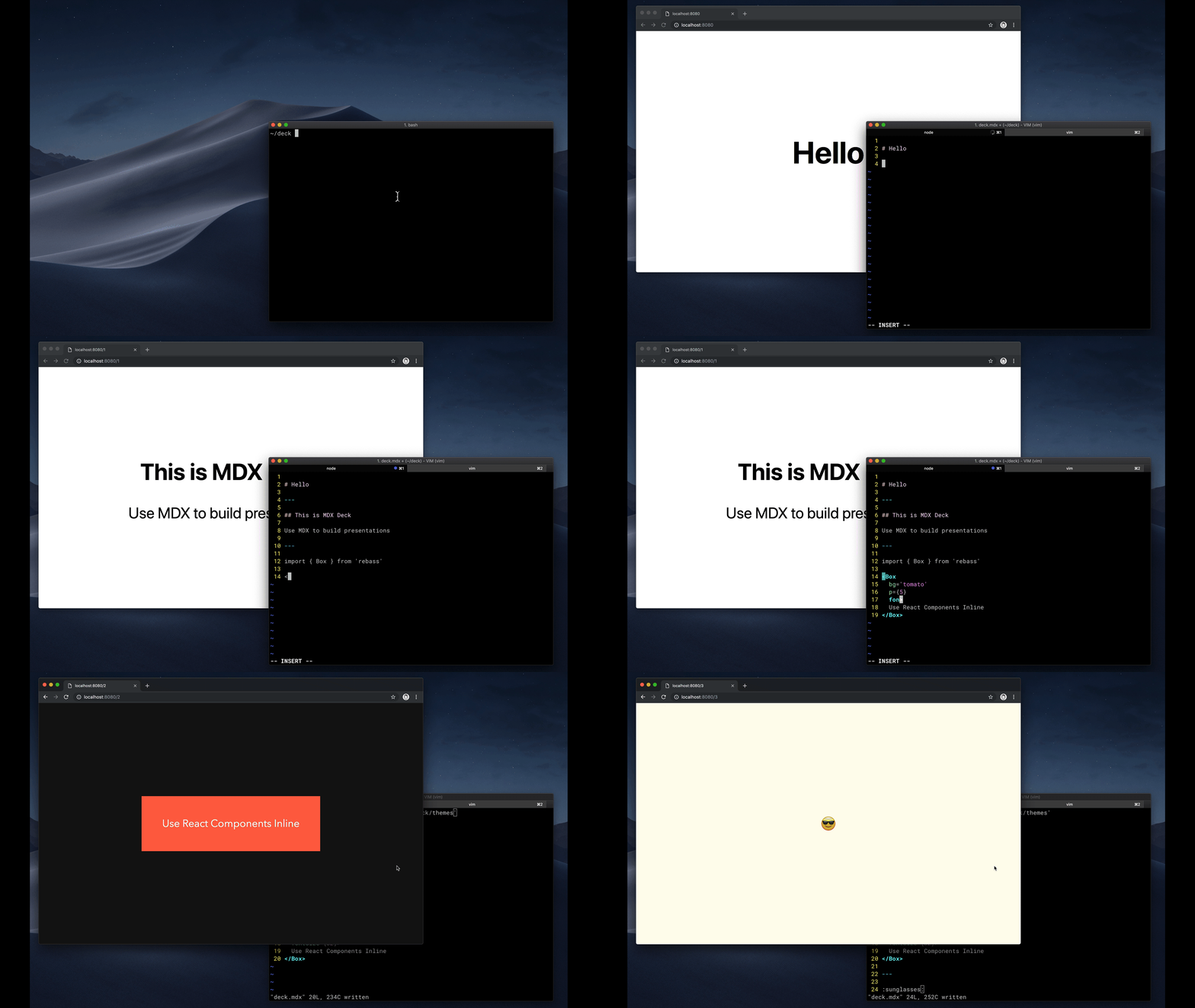\n\n# MDX Deck  \n\nAward-winning React [MDX][]-based presentation decks\n\n[![Build Status][badge]][travis]\n[![Version][]][npm]\n[![Downloads][]][npm]\n\n[badge]: https://flat.badgen.net/travis/jxnblk/mdx-deck\n[travis]: https://travis-ci.org/jxnblk/mdx-deck\n[version]: https://flat.badgen.net/npm/v/mdx-deck\n[downloads]: https://flat.badgen.net/npm/dm/mdx-deck\n[npm]: https://npmjs.com/package/mdx-deck\n\n- :memo: Write presentations in markdown\n- :atom_symbol: Import and use [React components](#imports)\n- :nail_care: Customizable [themes](#theming) and components\n- :zero: Zero-config CLI\n- :tipping_hand_woman: [Presenter mode](#presenter-mode)\n- :notebook: [Speaker notes](#speaker-notes)\n\n[View demo](https://mdx-deck.jxnblk.com)\n\n- [Getting Started](#getting-started)\n- [Using MDX](#using-mdx)\n- [Theming](#theming)\n- [Components](#components)\n- [Layouts](#layouts)\n- [Presenter Mode](#presenter-mode)\n- [Keyboard Shortcuts](#keyboard-shortcuts)\n- [CLI Options](#cli-options)\n- [Videos & Articles](#videos-articles)\n- [Examples](#examples)\n\n## Getting Started\n\n```sh\nnpm i -D mdx-deck\n```\n\nCreate an [MDX][] file and separate each slide with `---`.\n\n````mdx\n\n# Hello\n\n---\n\n## This is my deck\n\n---\n\n## The End\n\n````\n\nAdd a run script to your `package.json` with the MDX Deck CLI\npointing to the `.mdx` file to start the development server:\n\n```json\n\"scripts\": {\n \"start\": \"mdx-deck deck.mdx\"\n}\n```\n\nStart the development server:\n\n```sh\nnpm start\n```\n\nUse the left and right arrow keys to navigate through the presentation.\n\n## Using MDX\n\nMDX uses Markdown syntax and can render React components inline with JSX.\n\n### Imports\n\nTo import components, use ES import syntax separated with empty lines between any markdown or JSX syntax.\n\n```mdx\nimport { Box } from 'theme-ui'\n\nHello\n```\n\nRead more about MDX syntax in the [MDX Docs][mdx].\n\n## Theming\n\n\n\nMDX Deck uses [Theme UI][] and [Emotion][] for styling, making practically any part of the presentation themeable.\nIt also includes several built-in themes to change the look and feel of the presentation.\n\n- See the list of available [Themes](docs/themes.md)\n- Read more about theming in the [Theming docs](docs/theming.md).\n\n## Components\n\nMDX Deck includes built-in components to help with creating presentations,\na `Notes` component for adding speaker notes,\na `Head` component for the document head,\n`Header` and `Footer` components for persistent header and footer content,\nand a `Steps` component for adding multiple intermediate steps in a single slide.\n\nRead more in the [Components](docs/components.md) docs.\n\n### Third-Party Components\n\nThese optional libraries are intended for use with MDX Deck.\n\n- [CodeSurfer][]: React component for scrolling, zooming and highlighting code.\n- [mdx-code][]: Runnable code playgrounds for MDX Deck.\n- [mdx-deck-live-code][]: Live React and JS coding in slides.\n\n_Note: please check with version compatibility when using these libraries._\n\n[codesurfer]: https://github.com/pomber/code-surfer\n[mdx-code]: https://github.com/pranaygp/mdx-code\n[mdx-deck-live-code]: https://github.com/JReinhold/mdx-deck-live-code\n\n## Layouts\n\nEach slide can include a custom layout around its content,\nwhich can be used as a *template* for visually differentiating slides.\n\n```js\n// example Layout.js\nimport React from 'react'\n\nexport default ({ children }) => (\n \n {children}\n \n)\n```\n\n```mdx\nimport Layout from './Layout'\n\n# No Layout\n\n---\n\n\n\n# Custom Layout\n\n\n```\n\nThe layout component will wrap the MDX elements within that slide,\nwhich means you can add custom layout styles\nor style child elements with CSS-in-JS.\n\n## Presenter Mode\n\nPress `Option + P` to toggle *Presenter Mode*,\nwhich will show a preview of the next slide, a timer, and speaker notes.\n\n\n\nThe presentation can be opened in two separate windows at the same time,\nand it will stay in sync with the other window.\n\n## Keyboard Shortcuts\n\n| Key | Description |\n| ----------- | -------------------------------------------- |\n| Left Arrow, Page Up, Shift + Space | Go to previous slide (or step in [Steps][]) |\n| Right Arrow, Page Down, Space | Go to next slide (or step in [Steps][]) |\n| Option + P | Toggle [Presenter Mode](#presenter-mode) |\n| Option + O | Toggle Overview Mode\n| Option + G | Toggle Grid Mode\n\n[steps]: docs/components.md#steps\n\n## CLI Options\n\n```\n-p --port Dev server port\n-h --host Host the dev server listens to\n--no-open Prevent from opening in default browser\n```\n\n## Videos & Articles\n\n- [Egghead Tutorial][egghead] by [Andrew Del Prete](https://github.com/andrewdelprete).\n- [mdx-deck: slide decks powered by markdown and react][kcd-medium] by [Kent C. Dodds][]\n- [Make Fast & Beautiful Presentations with MDX-Deck][hw-video] by [Harry Wolff][] ([Demo][hw-demo])\n- [What is MDX][kcd-video] by [Kent C. Dodds][]\n- [Build a Custom Provider Component for MDX-Deck][ks-egghead] by [Kyle Shevlin][]\n\n[egghead]: https://egghead.io/lessons/react-build-a-slide-deck-with-mdx-deck-using-markdown-react\n[kent c. dodds]: https://mobile.twitter.com/kentcdodds\n[kcd-video]: http://youtu.be/d2sQiI5NFAM?a\n[kcd-medium]: https://blog.kentcdodds.com/mdx-deck-slide-decks-powered-by-markdown-and-react-bfc6d6af20da\n[hw-video]: https://www.youtube.com/watch?v=LvP2EqCiQMg&feature=youtu.be\n[hw-demo]: https://github.com/hswolff/mdx-deck-demo\n[harry wolff]: https://mobile.twitter.com/hswolff\n[ks-egghead]: https://egghead.io/lessons/javascript-build-a-custom-provider-component-for-mdx-deck\n[kyle shevlin]: https://twitter.com/kyleshevlin\n\n\n## Examples\n\nSee how others have used MDX Deck for their presentations.\n\n- [Design Systems & React][design-systems-react] by [Diana Mounter](https://mobile.twitter.com/broccolini)\n- [Bringing Brazil to the Cloud, Now][brazil-now] by [Guillermo Rauch](https://mobile.twitter.com/rauchg/)\n- [Simplify React][simplify-react] by [Kent C. Dodds](https://mobile.twitter.com/kentcdodds)\n- [I Got 99 Problems but GraphQL Ain't One][99-problems] by [Sara Vieira](https://mobile.twitter.com/NikkitaFTW)\n- [Stop de #divFest][stop-div-fest] by [Sara Vieira](https://mobile.twitter.com/NikkitaFTW)\n- [MDX, authors and richer JAMstack content][mdx-talk] by [Josh Dzielak](https://mobile.twitter.com/dzello)\n- [Components as Data: A Cross Platform GraphQL Powered Component API][components-as-data] by [Luke Herrington](https://mobile.twitter.com/lukeherrington)\n\n### Usage Examples\n\nThe following examples will open in CodeSandbox.\n\n- [Basic Example](https://codesandbox.io/s/github/jxnblk/mdx-deck/tree/master/examples/basic)\n- [Syntax Highlighting](https://codesandbox.io/s/github/jxnblk/mdx-deck/tree/master/examples/syntax-highlighting)\n- [Steps](https://codesandbox.io/s/github/jxnblk/mdx-deck/tree/master/examples/steps)\n- [Head](https://codesandbox.io/s/github/jxnblk/mdx-deck/tree/master/examples/head)\n- [Header & Footer](https://codesandbox.io/s/github/jxnblk/mdx-deck/tree/master/example/header-footer)\n\n---\n\n### Related\n\n- [MDX][]\n- [Gatsby][]\n- [Theme UI][]\n- [Emotion][]\n- [Spectacle][]\n\n[MIT License](LICENSE.md)\n\n[mdx]: https://mdxjs.com/\n[gatsby]: https://gatsbyjs.org\n[spectacle]: https://github.com/FormidableLabs/spectacle\n[emotion]: https://emotion.sh\n[theme ui]: https://theme-ui.com\n\n\n[design-systems-react]: https://github-ds.now.sh/#0\n[brazil-now]: https://braziljs.now.sh\n[simplify-react]: https://simply-react.netlify.com/#0\n[99-problems]: https://99-problems-graphql-aint-one.now.sh/#0\n[stop-div-fest]: https://stop-div-fest.now.sh/\n[mdx-talk]: https://mdx-talk.developermode.com/\n[components-as-data]: https://componentsasdata.lukeherrington.com\n\n","gitHead":"41db111d64d8ddc4f564ce8ca0b0479e7149e9a6","license":"MIT","scripts":{"help":"./cli.js","build":"./cli.js build hello.mdx","start":"./cli.js hello.mdx"},"_npmUser":{"name":"jxnblk","email":"jxnblk@gmail.com"},"homepage":"https://github.com/jxnblk/mdx-deck#readme","keywords":[],"repository":{"url":"git+https://github.com/jxnblk/mdx-deck.git","type":"git"},"_npmVersion":"lerna/3.20.2/node@v12.14.1+x64 (linux)","description":"MDX-based presentation decks","directories":{},"maintainers":[{"name":"jxnblk","email":"jxnblk@gmail.com"}],"_nodeVersion":"12.14.1","dependencies":{"meow":"^6.0.0","chalk":"^3.0.0","execa":"^4.0.0","react":"^16.8.6","gatsby":"^2.13.24","initit":"^1.0.0-2","fs-extra":"^8.1.0","react-dom":"^16.8.6","@mdx-deck/themes":"^4.0.0-alpha.1","@mdx-deck/gatsby-plugin":"^4.0.0-alpha.1","gatsby-plugin-compile-es6-packages":"^2.0.0"},"_hasShrinkwrap":false,"readmeFilename":"README.md","_npmOperationalInternal":{"tmp":"tmp/mdx-deck_4.0.0-alpha.1_1580666133532_0.12137199196010129","host":"s3://npm-registry-packages"},"_id":"mdx-deck@4.0.0-alpha.1","version":"4.0.0-alpha.1"}
\n\nAward-winning React [MDX][]-based presentation decks\n\n[![Build Status][badge]][travis]\n[![Version][]][npm]\n[![Downloads][]][npm]\n\n[badge]: https://flat.badgen.net/travis/jxnblk/mdx-deck\n[travis]: https://travis-ci.org/jxnblk/mdx-deck\n[version]: https://flat.badgen.net/npm/v/mdx-deck\n[downloads]: https://flat.badgen.net/npm/dm/mdx-deck\n[npm]: https://npmjs.com/package/mdx-deck\n\n- :memo: Write presentations in markdown\n- :atom_symbol: Import and use [React components](#imports)\n- :nail_care: Customizable [themes](#theming) and components\n- :zero: Zero-config CLI\n- :tipping_hand_woman: [Presenter mode](#presenter-mode)\n- :notebook: [Speaker notes](#speaker-notes)\n\n[View demo](https://mdx-deck.jxnblk.com)\n\n- [Getting Started](#getting-started)\n- [Using MDX](#using-mdx)\n- [Theming](#theming)\n- [Components](#components)\n- [Layouts](#layouts)\n- [Presenter Mode](#presenter-mode)\n- [Keyboard Shortcuts](#keyboard-shortcuts)\n- [CLI Options](#cli-options)\n- [Videos & Articles](#videos-articles)\n- [Examples](#examples)\n\n## Getting Started\n\n```sh\nnpm i -D mdx-deck\n```\n\nCreate an [MDX][] file and separate each slide with `---`.\n\n````mdx\n\n# Hello\n\n---\n\n## This is my deck\n\n---\n\n## The End\n\n````\n\nAdd a run script to your `package.json` with the MDX Deck CLI\npointing to the `.mdx` file to start the development server:\n\n```json\n\"scripts\": {\n \"start\": \"mdx-deck deck.mdx\"\n}\n```\n\nStart the development server:\n\n```sh\nnpm start\n```\n\nUse the left and right arrow keys to navigate through the presentation.\n\n## Using MDX\n\nMDX uses Markdown syntax and can render React components inline with JSX.\n\n### Imports\n\nTo import components, use ES import syntax separated with empty lines between any markdown or JSX syntax.\n\n```mdx\nimport { Box } from 'theme-ui'\n\nHello\n```\n\nRead more about MDX syntax in the [MDX Docs][mdx].\n\n## Theming\n\n\n\nMDX Deck uses [Theme UI][] and [Emotion][] for styling, making practically any part of the presentation themeable.\nIt also includes several built-in themes to change the look and feel of the presentation.\n\n- See the list of available [Themes](docs/themes.md)\n- Read more about theming in the [Theming docs](docs/theming.md).\n\n## Components\n\nMDX Deck includes built-in components to help with creating presentations,\na `Notes` component for adding speaker notes,\na `Head` component for the document head,\n`Header` and `Footer` components for persistent header and footer content,\nand a `Steps` component for adding multiple intermediate steps in a single slide.\n\nRead more in the [Components](docs/components.md) docs.\n\n### Third-Party Components\n\nThese optional libraries are intended for use with MDX Deck.\n\n- [CodeSurfer][]: React component for scrolling, zooming and highlighting code.\n- [mdx-code][]: Runnable code playgrounds for MDX Deck.\n- [mdx-deck-live-code][]: Live React and JS coding in slides.\n\n_Note: please check with version compatibility when using these libraries._\n\n[codesurfer]: https://github.com/pomber/code-surfer\n[mdx-code]: https://github.com/pranaygp/mdx-code\n[mdx-deck-live-code]: https://github.com/JReinhold/mdx-deck-live-code\n\n## Layouts\n\nEach slide can include a custom layout around its content,\nwhich can be used as a *template* for visually differentiating slides.\n\n```js\n// example Layout.js\nimport React from 'react'\n\nexport default ({ children }) => (\n \n {children}\n \n)\n```\n\n```mdx\nimport Layout from './Layout'\n\n# No Layout\n\n---\n\n\n\n# Custom Layout\n\n\n```\n\nThe layout component will wrap the MDX elements within that slide,\nwhich means you can add custom layout styles\nor style child elements with CSS-in-JS.\n\n## Presenter Mode\n\nPress `Option + P` to toggle *Presenter Mode*,\nwhich will show a preview of the next slide, a timer, and speaker notes.\n\n\n\nThe presentation can be opened in two separate windows at the same time,\nand it will stay in sync with the other window.\n\n## Keyboard Shortcuts\n\n| Key | Description |\n| ----------- | -------------------------------------------- |\n| Left Arrow, Page Up, Shift + Space | Go to previous slide (or step in [Steps][]) |\n| Right Arrow, Page Down, Space | Go to next slide (or step in [Steps][]) |\n| Option + P | Toggle [Presenter Mode](#presenter-mode) |\n| Option + O | Toggle Overview Mode\n| Option + G | Toggle Grid Mode\n\n[steps]: docs/components.md#steps\n\n## CLI Options\n\n```\n-p --port Dev server port\n-h --host Host the dev server listens to\n--no-open Prevent from opening in default browser\n```\n\n## Videos & Articles\n\n- [Egghead Tutorial][egghead] by [Andrew Del Prete](https://github.com/andrewdelprete).\n- [mdx-deck: slide decks powered by markdown and react][kcd-medium] by [Kent C. Dodds][]\n- [Make Fast & Beautiful Presentations with MDX-Deck][hw-video] by [Harry Wolff][] ([Demo][hw-demo])\n- [What is MDX][kcd-video] by [Kent C. Dodds][]\n- [Build a Custom Provider Component for MDX-Deck][ks-egghead] by [Kyle Shevlin][]\n\n[egghead]: https://egghead.io/lessons/react-build-a-slide-deck-with-mdx-deck-using-markdown-react\n[kent c. dodds]: https://mobile.twitter.com/kentcdodds\n[kcd-video]: http://youtu.be/d2sQiI5NFAM?a\n[kcd-medium]: https://blog.kentcdodds.com/mdx-deck-slide-decks-powered-by-markdown-and-react-bfc6d6af20da\n[hw-video]: https://www.youtube.com/watch?v=LvP2EqCiQMg&feature=youtu.be\n[hw-demo]: https://github.com/hswolff/mdx-deck-demo\n[harry wolff]: https://mobile.twitter.com/hswolff\n[ks-egghead]: https://egghead.io/lessons/javascript-build-a-custom-provider-component-for-mdx-deck\n[kyle shevlin]: https://twitter.com/kyleshevlin\n\n\n## Examples\n\nSee how others have used MDX Deck for their presentations.\n\n- [Design Systems & React][design-systems-react] by [Diana Mounter](https://mobile.twitter.com/broccolini)\n- [Bringing Brazil to the Cloud, Now][brazil-now] by [Guillermo Rauch](https://mobile.twitter.com/rauchg/)\n- [Simplify React][simplify-react] by [Kent C. Dodds](https://mobile.twitter.com/kentcdodds)\n- [I Got 99 Problems but GraphQL Ain't One][99-problems] by [Sara Vieira](https://mobile.twitter.com/NikkitaFTW)\n- [Stop de #divFest][stop-div-fest] by [Sara Vieira](https://mobile.twitter.com/NikkitaFTW)\n- [MDX, authors and richer JAMstack content][mdx-talk] by [Josh Dzielak](https://mobile.twitter.com/dzello)\n- [Components as Data: A Cross Platform GraphQL Powered Component API][components-as-data] by [Luke Herrington](https://mobile.twitter.com/lukeherrington)\n\n### Usage Examples\n\nThe following examples will open in CodeSandbox.\n\n- [Basic Example](https://codesandbox.io/s/github/jxnblk/mdx-deck/tree/master/examples/basic)\n- [Syntax Highlighting](https://codesandbox.io/s/github/jxnblk/mdx-deck/tree/master/examples/syntax-highlighting)\n- [Steps](https://codesandbox.io/s/github/jxnblk/mdx-deck/tree/master/examples/steps)\n- [Head](https://codesandbox.io/s/github/jxnblk/mdx-deck/tree/master/examples/head)\n- [Header & Footer](https://codesandbox.io/s/github/jxnblk/mdx-deck/tree/master/example/header-footer)\n\n---\n\n### Related\n\n- [MDX][]\n- [Gatsby][]\n- [Theme UI][]\n- [Emotion][]\n- [Spectacle][]\n\n[MIT License](LICENSE.md)\n\n[mdx]: https://mdxjs.com/\n[gatsby]: https://gatsbyjs.org\n[spectacle]: https://github.com/FormidableLabs/spectacle\n[emotion]: https://emotion.sh\n[theme ui]: https://theme-ui.com\n\n\n[design-systems-react]: https://github-ds.now.sh/#0\n[brazil-now]: https://braziljs.now.sh\n[simplify-react]: https://simply-react.netlify.com/#0\n[99-problems]: https://99-problems-graphql-aint-one.now.sh/#0\n[stop-div-fest]: https://stop-div-fest.now.sh/\n[mdx-talk]: https://mdx-talk.developermode.com/\n[components-as-data]: https://componentsasdata.lukeherrington.com\n\n","gitHead":"41db111d64d8ddc4f564ce8ca0b0479e7149e9a6","license":"MIT","scripts":{"help":"./cli.js","build":"./cli.js build hello.mdx","start":"./cli.js hello.mdx"},"_npmUser":{"name":"jxnblk","email":"jxnblk@gmail.com"},"homepage":"https://github.com/jxnblk/mdx-deck#readme","keywords":[],"repository":{"url":"git+https://github.com/jxnblk/mdx-deck.git","type":"git"},"_npmVersion":"lerna/3.20.2/node@v12.14.1+x64 (linux)","description":"MDX-based presentation decks","directories":{},"maintainers":[{"name":"jxnblk","email":"jxnblk@gmail.com"}],"_nodeVersion":"12.14.1","dependencies":{"meow":"^6.0.0","chalk":"^3.0.0","execa":"^4.0.0","react":"^16.8.6","gatsby":"^2.13.24","initit":"^1.0.0-2","fs-extra":"^8.1.0","react-dom":"^16.8.6","@mdx-deck/themes":"^4.0.0-alpha.1","@mdx-deck/gatsby-plugin":"^4.0.0-alpha.1","gatsby-plugin-compile-es6-packages":"^2.0.0"},"_hasShrinkwrap":false,"readmeFilename":"README.md","_npmOperationalInternal":{"tmp":"tmp/mdx-deck_4.0.0-alpha.1_1580666133532_0.12137199196010129","host":"s3://npm-registry-packages"},"_id":"mdx-deck@4.0.0-alpha.1","version":"4.0.0-alpha.1"} \n
\n  \n
\n  \n
\n