{"_id":"tradingview-desktop-mcp","_rev":"6-b030d8a2507285f5d5ab73109709b56d","name":"tradingview-desktop-mcp","dist-tags":{"latest":"0.1.4"},"versions":{"0.0.0-stage":{"name":"tradingview-desktop-mcp","version":"0.0.0-stage","_id":"tradingview-desktop-mcp@0.0.0-stage","stub":true,"maintainers":[{"name":"rizky_cahya","email":"moch.rizky.cahya@gmail.com"}],"dist":{"shasum":"0111025fcc714e279dc0a0c95dc21c0a9999bb16","tarball":"https://registry.npmjs.org/tradingview-desktop-mcp/-/tradingview-desktop-mcp-0.0.0-stage.tgz","fileCount":2,"integrity":"sha512-o2673QGEi9NW7p/S/o491yZO/klJtYLUwheadYmKDuHZ9C/MXScXSiLzppqizh4nF/a1JhDKer2UjyEyq5vT5w==","signatures":[{"sig":"MEUCIFhw+DFS695msTA+XeuUCh5JPM2NNddncwAoDiG/Us9AAiEA817nK4RZSHaJdd/QJfIAXnEy56qcgrmxhVA4SYTwo4o=","keyid":"SHA256:DhQ8wR5APBvFHLF/+Tc+AYvPOdTpcIDqOhxsBHRwC7U"}],"unpackedSize":345},"_npmUser":{"name":"rizky_cahya","email":"moch.rizky.cahya@gmail.com"},"description":"Temporary package placeholder for staged publishing","directories":{}},"0.1.0":{"name":"tradingview-desktop-mcp","version":"0.1.0","keywords":["mcp","model-context-protocol","tradingview","trading","charting","claude","cursor","ai","chrome-devtools-protocol"],"author":{"url":"https://github.com/Mochamad-Rizky","name":"Mochamad Rizky"},"license":"MIT","_id":"tradingview-desktop-mcp@0.1.0","maintainers":[{"name":"rizky_cahya","email":"moch.rizky.cahya@gmail.com"}],"homepage":"https://github.com/Mochamad-Rizky/tradingview-mcp#readme","bugs":{"url":"https://github.com/Mochamad-Rizky/tradingview-mcp/issues"},"bin":{"tradingview-desktop-mcp":"dist/cli.js"},"dist":{"shasum":"22ab9b0c0528710026d2e6de7ab6522e4daf5d70","tarball":"https://registry.npmjs.org/tradingview-desktop-mcp/-/tradingview-desktop-mcp-0.1.0.tgz","fileCount":11,"integrity":"sha512-YTRBwOp6dJYu5dDmduUdJBs6JPFRwTJJ2z6K+f7wcOKa/2etQTBhd3NUIgaAMF6trIHPXjASWOTnxn/bNaLQfQ==","signatures":[{"sig":"MEUCIC935OsmG4ZSQ86El6LXiCVxeF3kso4MdkHjH40EjM2ZAiEA49WPERxzLXAVl5MQluSAV1035ILIfTarQbkAwoe6xus=","keyid":"SHA256:DhQ8wR5APBvFHLF/+Tc+AYvPOdTpcIDqOhxsBHRwC7U"},{"sig":"MEQCIFPoqietT3GiE6laQPXZEb8vqLQAf2jKCjepY+TJVFMWAiAkfNwRFICFFmPaI4+11x1Txjx6QvJRNzzHmwbgnLleig==","keyid":"SHA256:DhQ8wR5APBvFHLF/+Tc+AYvPOdTpcIDqOhxsBHRwC7U"}],"attestations":{"url":"https://registry.npmjs.org/-/npm/v1/attestations/tradingview-desktop-mcp@0.1.0","provenance":{"predicateType":"https://slsa.dev/provenance/v1"}},"unpackedSize":1458247},"type":"module","_from":"file:/home/runner/work/_temp/package/tradingview-desktop-mcp-0.1.0.tgz","types":"./dist/index.d.ts","engines":{"node":">=20.19"},"exports":{".":{"types":"./dist/index.d.ts","import":"./dist/index.js"}},"scripts":{"test":"vitest run --project unit --project integration","build":"tsup && node scripts/copy-dashboard.mjs","re:probe":"tsx scripts/re/probe.ts","test:e2e":"vitest run --project e2e","re:record":"tsx scripts/re/record-fixtures.ts","test:unit":"vitest run --project unit","typecheck":"tsc --noEmit","docs:tools":"tsx scripts/docs/tools.ts","docs:clients":"tsx scripts/docs/clients.ts","docs:examples":"tsx scripts/docs/examples.ts","test:coverage":"vitest run --project unit --project integration --coverage","test:integration":"vitest run --project integration"},"_npmUser":{"name":"rizky_cahya","email":"moch.rizky.cahya@gmail.com"},"_resolved":"/home/runner/work/_temp/package/tradingview-desktop-mcp-0.1.0.tgz","_integrity":"sha512-YTRBwOp6dJYu5dDmduUdJBs6JPFRwTJJ2z6K+f7wcOKa/2etQTBhd3NUIgaAMF6trIHPXjASWOTnxn/bNaLQfQ==","repository":{"url":"git+https://github.com/Mochamad-Rizky/tradingview-mcp.git","type":"git","directory":"packages/server"},"_npmVersion":"11.19.0","description":"MCP server that controls the TradingView Desktop app over the Chrome DevTools Protocol","directories":{},"_nodeVersion":"24.21.0","dependencies":{"zod":"^4.6.7","pino":"^10.4.0","picocolors":"^1.1.1","devtools-protocol":"^0.0.1721318","chrome-remote-interface":"^0.34.0","@modelcontextprotocol/sdk":"^1.32.1"},"publishConfig":{"access":"public","provenance":true},"_hasShrinkwrap":false,"devDependencies":{"ws":"^8.22.0","tsx":"^4.23.15","tsup":"^9.0.0","vite":"^8.3.4","vitest":"^5.0.5","@types/ws":"^8.18.2","typescript":"~6.0.3","@types/node":"^20.19.0","@vitest/coverage-v8":"^5.0.5","@types/chrome-remote-interface":"^0.34.0"},"_npmOperationalInternal":{"tmp":"tmp/tradingview-desktop-mcp_0.1.0_1792888823091_0.568751454838125","host":"s3://npm-registry-packages-npm-production"}},"0.1.1":{"name":"tradingview-desktop-mcp","version":"0.1.1","keywords":["mcp","model-context-protocol","tradingview","trading","charting","claude","cursor","ai","chrome-devtools-protocol"],"author":{"url":"https://github.com/Mochamad-Rizky","name":"Mochamad Rizky"},"license":"MIT","_id":"tradingview-desktop-mcp@0.1.1","maintainers":[{"name":"rizky_cahya","email":"moch.rizky.cahya@gmail.com"}],"homepage":"https://github.com/Mochamad-Rizky/tradingview-desktop-mcp#readme","bugs":{"url":"https://github.com/Mochamad-Rizky/tradingview-desktop-mcp/issues"},"bin":{"tradingview-desktop-mcp":"dist/cli.js"},"dist":{"shasum":"a521da5c2599462269c268be44af80dd07314319","tarball":"https://registry.npmjs.org/tradingview-desktop-mcp/-/tradingview-desktop-mcp-0.1.1.tgz","fileCount":11,"integrity":"sha512-XznCKwnM5ANKSIJ9TGm10v5yhp8rUa4/zqOCf4IwdRzoqYQ1Eni8mHYYKvQrgUBHASs0aD35mswuvz115MlDug==","signatures":[{"sig":"MEYCIQDT6h/05WezhLPEs913FmCkquQrDnbd4xScHMtjvyOZ8wIhAINfpQaFXhrSmpCKPjvChwV2t28MeLjNdYLYU7cHKN37","keyid":"SHA256:DhQ8wR5APBvFHLF/+Tc+AYvPOdTpcIDqOhxsBHRwC7U"},{"sig":"MEUCIQD3WJ0ySXOqXgA6ZZT0AIE/IVWu6tOHS8zr7xPNqv5VlAIgb/cc3GwJK+iuUu5m41FV91DNVyrtvE4FkpwbPt3dJCQ=","keyid":"SHA256:DhQ8wR5APBvFHLF/+Tc+AYvPOdTpcIDqOhxsBHRwC7U"}],"attestations":{"url":"https://registry.npmjs.org/-/npm/v1/attestations/tradingview-desktop-mcp@0.1.1","provenance":{"predicateType":"https://slsa.dev/provenance/v1"}},"unpackedSize":1461666},"type":"module","_from":"file:/home/runner/work/_temp/package/tradingview-desktop-mcp-0.1.1.tgz","types":"./dist/index.d.ts","engines":{"node":">=20.19"},"exports":{".":{"types":"./dist/index.d.ts","import":"./dist/index.js"}},"scripts":{"test":"vitest run --project unit --project integration","build":"tsup && node scripts/copy-dashboard.mjs","re:probe":"tsx scripts/re/probe.ts","test:e2e":"vitest run --project e2e","re:record":"tsx scripts/re/record-fixtures.ts","test:unit":"vitest run --project unit","typecheck":"tsc --noEmit","docs:tools":"tsx scripts/docs/tools.ts","docs:clients":"tsx scripts/docs/clients.ts","docs:examples":"tsx scripts/docs/examples.ts","test:coverage":"vitest run --project unit --project integration --coverage","test:integration":"vitest run --project integration"},"_npmUser":{"name":"GitHub Actions","email":"npm-oidc-no-reply@github.com","trustedPublisher":{"id":"github","oidcConfigId":"4c9fa360-e276-4534-aa92-ca3b10655542"}},"_resolved":"/home/runner/work/_temp/package/tradingview-desktop-mcp-0.1.1.tgz","_integrity":"sha512-XznCKwnM5ANKSIJ9TGm10v5yhp8rUa4/zqOCf4IwdRzoqYQ1Eni8mHYYKvQrgUBHASs0aD35mswuvz115MlDug==","repository":{"url":"git+https://github.com/Mochamad-Rizky/tradingview-desktop-mcp.git","type":"git","directory":"packages/server"},"_npmVersion":"11.19.0","description":"MCP server that controls the TradingView Desktop app over the Chrome DevTools Protocol","directories":{},"_nodeVersion":"24.21.0","dependencies":{"zod":"^4.6.7","pino":"^10.4.0","picocolors":"^1.1.1","devtools-protocol":"^0.0.1721318","chrome-remote-interface":"^0.34.0","@modelcontextprotocol/sdk":"^1.32.1"},"publishConfig":{"access":"public","provenance":true},"_hasShrinkwrap":false,"devDependencies":{"ws":"^8.22.0","tsx":"^4.23.15","tsup":"^9.0.0","vite":"^8.3.4","vitest":"^5.0.5","@types/ws":"^8.18.2","typescript":"~6.0.3","@types/node":"^20.19.0","@vitest/coverage-v8":"^5.0.5","@types/chrome-remote-interface":"^0.34.0"},"_npmOperationalInternal":{"tmp":"tmp/tradingview-desktop-mcp_0.1.1_1792908092916_0.9625388434624624","host":"s3://npm-registry-packages-npm-production"}},"0.1.2":{"name":"tradingview-desktop-mcp","version":"0.1.2","keywords":["mcp","model-context-protocol","tradingview","trading","charting","claude","cursor","ai","chrome-devtools-protocol"],"author":{"url":"https://github.com/Mochamad-Rizky","name":"Mochamad Rizky"},"license":"MIT","_id":"tradingview-desktop-mcp@0.1.2","maintainers":[{"name":"rizky_cahya","email":"moch.rizky.cahya@gmail.com"}],"homepage":"https://github.com/Mochamad-Rizky/tradingview-desktop-mcp#readme","bugs":{"url":"https://github.com/Mochamad-Rizky/tradingview-desktop-mcp/issues"},"bin":{"tradingview-desktop-mcp":"dist/cli.js"},"dist":{"shasum":"722d2908e7e278c2cf17c8db18e8f5a6ef67457f","tarball":"https://registry.npmjs.org/tradingview-desktop-mcp/-/tradingview-desktop-mcp-0.1.2.tgz","fileCount":11,"integrity":"sha512-FDlBTZ1OOCz6TLCe6Pv0uIMU9rMtibej1tGh3xEVcRUWUBmKlbHeTkOnxMWznOk6GqUoLOhM22qbXzo1H2F8sg==","signatures":[{"sig":"MEUCIQC2Bi8JzBgD3ihLP0CNj2NvuDBmZfFE7PPH1vW/6sKXeQIgIMMqLpiBGEFmbQa/uplYXI9YFk1N+iFku3ONR1e9ghw=","keyid":"SHA256:DhQ8wR5APBvFHLF/+Tc+AYvPOdTpcIDqOhxsBHRwC7U"},{"sig":"MEYCIQCuSYPtNeq6IzhA6t4v/2C8wsOgFG8NlwY+kQewcTi53QIhAMyVu88We5OwUQ70h8GAz7Xf1FTsHgSmpuJLa1w8YBFL","keyid":"SHA256:DhQ8wR5APBvFHLF/+Tc+AYvPOdTpcIDqOhxsBHRwC7U"}],"attestations":{"url":"https://registry.npmjs.org/-/npm/v1/attestations/tradingview-desktop-mcp@0.1.2","provenance":{"predicateType":"https://slsa.dev/provenance/v1"}},"unpackedSize":1461942},"type":"module","_from":"file:/home/runner/work/_temp/package/tradingview-desktop-mcp-0.1.2.tgz","types":"./dist/index.d.ts","engines":{"node":">=20.19"},"exports":{".":{"types":"./dist/index.d.ts","import":"./dist/index.js"}},"scripts":{"test":"vitest run --project unit --project integration","build":"tsup && node scripts/copy-dashboard.mjs","re:probe":"tsx scripts/re/probe.ts","test:e2e":"vitest run --project e2e","re:record":"tsx scripts/re/record-fixtures.ts","test:unit":"vitest run --project unit","typecheck":"tsc --noEmit","docs:tools":"tsx scripts/docs/tools.ts","docs:clients":"tsx scripts/docs/clients.ts","docs:examples":"tsx scripts/docs/examples.ts","test:coverage":"vitest run --project unit --project integration --coverage","test:integration":"vitest run --project integration"},"_npmUser":{"name":"GitHub Actions","email":"npm-oidc-no-reply@github.com","trustedPublisher":{"id":"github","oidcConfigId":"4c9fa360-e276-4534-aa92-ca3b10655542"}},"_resolved":"/home/runner/work/_temp/package/tradingview-desktop-mcp-0.1.2.tgz","_integrity":"sha512-FDlBTZ1OOCz6TLCe6Pv0uIMU9rMtibej1tGh3xEVcRUWUBmKlbHeTkOnxMWznOk6GqUoLOhM22qbXzo1H2F8sg==","repository":{"url":"git+https://github.com/Mochamad-Rizky/tradingview-desktop-mcp.git","type":"git","directory":"packages/server"},"_npmVersion":"11.19.0","description":"MCP server that controls the TradingView Desktop app over the Chrome DevTools Protocol","directories":{},"_nodeVersion":"24.21.0","dependencies":{"zod":"^4.6.7","pino":"^10.4.0","picocolors":"^1.1.1","devtools-protocol":"^0.0.1721318","chrome-remote-interface":"^0.34.0","@modelcontextprotocol/sdk":"^1.32.1"},"publishConfig":{"access":"public","provenance":true},"_hasShrinkwrap":false,"devDependencies":{"ws":"^8.22.0","tsx":"^4.23.15","tsup":"^9.0.0","vite":"^8.3.4","vitest":"^5.0.5","@types/ws":"^8.18.2","typescript":"~6.0.3","@types/node":"^20.19.0","@vitest/coverage-v8":"^5.0.5","@types/chrome-remote-interface":"^0.34.0"},"_npmOperationalInternal":{"tmp":"tmp/tradingview-desktop-mcp_0.1.2_1792911110422_0.1952752181394506","host":"s3://npm-registry-packages-npm-production"}},"0.1.3":{"name":"tradingview-desktop-mcp","version":"0.1.3","keywords":["mcp","model-context-protocol","tradingview","trading","charting","claude","cursor","ai","chrome-devtools-protocol"],"author":{"url":"https://github.com/Mochamad-Rizky","name":"Mochamad Rizky"},"license":"MIT","_id":"tradingview-desktop-mcp@0.1.3","maintainers":[{"name":"rizky_cahya","email":"moch.rizky.cahya@gmail.com"}],"homepage":"https://github.com/Mochamad-Rizky/tradingview-desktop-mcp#readme","bugs":{"url":"https://github.com/Mochamad-Rizky/tradingview-desktop-mcp/issues"},"bin":{"tradingview-desktop-mcp":"dist/cli.js"},"dist":{"shasum":"e96d0f76877dc6b1d941c195e4f896aa1285a4b2","tarball":"https://registry.npmjs.org/tradingview-desktop-mcp/-/tradingview-desktop-mcp-0.1.3.tgz","fileCount":11,"integrity":"sha512-fGu8bsYepsw76y1VYe6YcnqQiYXdpNzqnIkJInIznvwGHvslIKHAx+HrZOiFzefvX1ESc/WSNL/ZMjZ4FSPjTg==","signatures":[{"sig":"MEUCIQClkBQZlc4CvyIHiQkkdt6XFNa0itSJAo8P7OygDykgCwIgfKqFVUVBmTNMMJW0mLVo5hr2LR37hywh5CYlpd72UZY=","keyid":"SHA256:DhQ8wR5APBvFHLF/+Tc+AYvPOdTpcIDqOhxsBHRwC7U"},{"sig":"MEYCIQDfxFYpx10+phjs+ghbugy9KPHHXM2bBuTx8w8e6RoLWAIhAJAp5hgxdsYj2GZnytQwA/8MfA+usXVQ+DiqoSndxfvH","keyid":"SHA256:DhQ8wR5APBvFHLF/+Tc+AYvPOdTpcIDqOhxsBHRwC7U"}],"attestations":{"url":"https://registry.npmjs.org/-/npm/v1/attestations/tradingview-desktop-mcp@0.1.3","provenance":{"predicateType":"https://slsa.dev/provenance/v1"}},"unpackedSize":1463371},"type":"module","_from":"file:/home/runner/work/_temp/package/tradingview-desktop-mcp-0.1.3.tgz","types":"./dist/index.d.ts","engines":{"node":">=20.19"},"exports":{".":{"types":"./dist/index.d.ts","import":"./dist/index.js"}},"scripts":{"test":"vitest run --project unit --project integration","build":"tsup && node scripts/copy-dashboard.mjs","re:probe":"tsx scripts/re/probe.ts","test:e2e":"vitest run --project e2e","re:record":"tsx scripts/re/record-fixtures.ts","test:unit":"vitest run --project unit","typecheck":"tsc --noEmit","docs:tools":"tsx scripts/docs/tools.ts","docs:clients":"tsx scripts/docs/clients.ts","docs:examples":"tsx scripts/docs/examples.ts","test:coverage":"vitest run --project unit --project integration --coverage","test:integration":"vitest run --project integration"},"_npmUser":{"name":"GitHub Actions","email":"npm-oidc-no-reply@github.com","trustedPublisher":{"id":"github","oidcConfigId":"4c9fa360-e276-4534-aa92-ca3b10655542"}},"_resolved":"/home/runner/work/_temp/package/tradingview-desktop-mcp-0.1.3.tgz","_integrity":"sha512-fGu8bsYepsw76y1VYe6YcnqQiYXdpNzqnIkJInIznvwGHvslIKHAx+HrZOiFzefvX1ESc/WSNL/ZMjZ4FSPjTg==","repository":{"url":"git+https://github.com/Mochamad-Rizky/tradingview-desktop-mcp.git","type":"git","directory":"packages/server"},"_npmVersion":"11.19.0","description":"MCP server that controls the TradingView Desktop app over the Chrome DevTools Protocol","directories":{},"_nodeVersion":"24.21.0","dependencies":{"zod":"^4.6.7","pino":"^10.4.0","picocolors":"^1.1.1","devtools-protocol":"^0.0.1721318","chrome-remote-interface":"^0.34.0","@modelcontextprotocol/sdk":"^1.32.1"},"publishConfig":{"access":"public","provenance":true},"_hasShrinkwrap":false,"devDependencies":{"ws":"^8.22.0","tsx":"^4.23.15","tsup":"^9.0.0","vite":"^8.3.4","vitest":"^5.0.5","@types/ws":"^8.18.2","typescript":"~6.0.3","@types/node":"^20.19.0","@vitest/coverage-v8":"^5.0.5","@types/chrome-remote-interface":"^0.34.0"},"_npmOperationalInternal":{"tmp":"tmp/tradingview-desktop-mcp_0.1.3_1792922234115_0.2501093091970281","host":"s3://npm-registry-packages-npm-production"}},"0.1.4":{"_id":"tradingview-desktop-mcp@0.1.4","bin":{"tradingview-desktop-mcp":"dist/cli.js"},"bugs":{"url":"https://github.com/Mochamad-Rizky/tradingview-desktop-mcp/issues"},"dist":{"shasum":"2dcd942b9908234e4d2bfe773c15eed57297b848","tarball":"https://registry.npmjs.org/tradingview-desktop-mcp/-/tradingview-desktop-mcp-0.1.4.tgz","fileCount":11,"integrity":"sha512-PSlg2lhabRDjZf24qVlSIAREQnTr4He8Sm/p20x8h5OZ3Oa7GXIL13hgFS6gg1XdfThwzCEnBAJ7VaxdEHIOvA==","signatures":[{"sig":"MEYCIQD/0RxDZhL6bJ5B1Fybl4Hofbqmchh0IvjQjk954NhxrAIhALjrY+wDCGEXF6Y0o3CfK1seEiqZaxkIVdMxdEmMD3ND","keyid":"SHA256:DhQ8wR5APBvFHLF/+Tc+AYvPOdTpcIDqOhxsBHRwC7U"},{"keyid":"SHA256:DhQ8wR5APBvFHLF/+Tc+AYvPOdTpcIDqOhxsBHRwC7U","sig":"MEYCIQCnHqv01TdBlPLTMKI5jxP3N6fvkGJOrlFnTPSKTLT3vQIhAIWWxoBbg/5sY11BI/bOIqNbjzY24WuDYwus0W3JGFqR"}],"attestations":{"url":"https://registry.npmjs.org/-/npm/v1/attestations/tradingview-desktop-mcp@0.1.4","provenance":{"predicateType":"https://slsa.dev/provenance/v1"}},"unpackedSize":1466461},"name":"tradingview-desktop-mcp","type":"module","_from":"file:/home/runner/work/_temp/package/tradingview-desktop-mcp-0.1.4.tgz","types":"./dist/index.d.ts","author":{"url":"https://github.com/Mochamad-Rizky","name":"Mochamad Rizky"},"engines":{"node":">=20.19"},"exports":{".":{"types":"./dist/index.d.ts","import":"./dist/index.js"}},"license":"MIT","scripts":{"test":"vitest run --project unit --project integration","build":"tsup && node scripts/copy-dashboard.mjs","re:probe":"tsx scripts/re/probe.ts","test:e2e":"vitest run --project e2e","re:record":"tsx scripts/re/record-fixtures.ts","test:unit":"vitest run --project unit","typecheck":"tsc --noEmit","docs:tools":"tsx scripts/docs/tools.ts","docs:clients":"tsx scripts/docs/clients.ts","docs:examples":"tsx scripts/docs/examples.ts","test:coverage":"vitest run --project unit --project integration --coverage","test:integration":"vitest run --project integration"},"version":"0.1.4","_npmUser":{"name":"GitHub Actions","email":"npm-oidc-no-reply@github.com","trustedPublisher":{"id":"github","oidcConfigId":"4c9fa360-e276-4534-aa92-ca3b10655542"}},"homepage":"https://github.com/Mochamad-Rizky/tradingview-desktop-mcp#readme","keywords":["mcp","model-context-protocol","tradingview","trading","charting","claude","cursor","ai","chrome-devtools-protocol"],"_resolved":"/home/runner/work/_temp/package/tradingview-desktop-mcp-0.1.4.tgz","_integrity":"sha512-PSlg2lhabRDjZf24qVlSIAREQnTr4He8Sm/p20x8h5OZ3Oa7GXIL13hgFS6gg1XdfThwzCEnBAJ7VaxdEHIOvA==","repository":{"url":"git+https://github.com/Mochamad-Rizky/tradingview-desktop-mcp.git","type":"git","directory":"packages/server"},"_npmVersion":"11.19.1","description":"MCP server that controls the TradingView Desktop app over the Chrome DevTools Protocol","directories":{},"maintainers":[{"name":"rizky_cahya","email":"moch.rizky.cahya@gmail.com"}],"_nodeVersion":"24.22.1","dependencies":{"zod":"^4.6.7","pino":"^10.4.0","picocolors":"^1.1.1","devtools-protocol":"^0.0.1721318","chrome-remote-interface":"^0.34.0","@modelcontextprotocol/sdk":"^1.32.1"},"publishConfig":{"access":"public","provenance":true},"_hasShrinkwrap":false,"devDependencies":{"ws":"^8.22.0","tsx":"^4.23.15","tsup":"^9.0.0","vite":"^8.3.4","vitest":"^5.0.5","@types/ws":"^8.18.2","typescript":"~6.0.3","@types/node":"^20.19.0","@vitest/coverage-v8":"^5.0.5","@types/chrome-remote-interface":"^0.34.0"},"_npmOperationalInternal":{"host":"s3://npm-registry-packages-npm-production","tmp":"tmp/tradingview-desktop-mcp_0.1.4_1793517524358_0.5138690403143524"}}},"time":{"created":"2026-10-25T00:39:26.603Z","modified":"2026-11-01T07:18:44.794Z","0.0.0-stage":"2026-10-25T00:39:26.603Z","0.1.0":"2026-10-25T00:40:23.184Z","0.1.1":"2026-10-25T06:01:33.017Z","0.1.2":"2026-10-25T06:51:50.515Z","0.1.3":"2026-10-25T09:57:14.240Z","0.1.4":"2026-11-01T07:18:44.488Z"},"bugs":{"url":"https://github.com/Mochamad-Rizky/tradingview-desktop-mcp/issues"},"author":{"url":"https://github.com/Mochamad-Rizky","name":"Mochamad Rizky"},"license":"MIT","homepage":"https://github.com/Mochamad-Rizky/tradingview-desktop-mcp#readme","keywords":["mcp","model-context-protocol","tradingview","trading","charting","claude","cursor","ai","chrome-devtools-protocol"],"repository":{"url":"git+https://github.com/Mochamad-Rizky/tradingview-desktop-mcp.git","type":"git","directory":"packages/server"},"description":"MCP server that controls the TradingView Desktop app over the Chrome DevTools Protocol","maintainers":[{"name":"rizky_cahya","email":"moch.rizky.cahya@gmail.com"}],"readme":"# tradingview-desktop-mcp\n\n**English** · [简体中文](https://github.com/Mochamad-Rizky/tradingview-desktop-mcp/blob/main/docs/i18n/README.zh-CN.md) · [繁體中文](https://github.com/Mochamad-Rizky/tradingview-desktop-mcp/blob/main/docs/i18n/README.zh-TW.md) · [日本語](https://github.com/Mochamad-Rizky/tradingview-desktop-mcp/blob/main/docs/i18n/README.ja.md) · [한국어](https://github.com/Mochamad-Rizky/tradingview-desktop-mcp/blob/main/docs/i18n/README.ko.md) · [Türkçe](https://github.com/Mochamad-Rizky/tradingview-desktop-mcp/blob/main/docs/i18n/README.tr.md) · [Русский](https://github.com/Mochamad-Rizky/tradingview-desktop-mcp/blob/main/docs/i18n/README.ru.md) · [Tiếng Việt](https://github.com/Mochamad-Rizky/tradingview-desktop-mcp/blob/main/docs/i18n/README.vi.md) · [ไทย](https://github.com/Mochamad-Rizky/tradingview-desktop-mcp/blob/main/docs/i18n/README.th.md) · [Deutsch](https://github.com/Mochamad-Rizky/tradingview-desktop-mcp/blob/main/docs/i18n/README.de.md) · [Español](https://github.com/Mochamad-Rizky/tradingview-desktop-mcp/blob/main/docs/i18n/README.es.md) · [Français](https://github.com/Mochamad-Rizky/tradingview-desktop-mcp/blob/main/docs/i18n/README.fr.md) · [Українська](https://github.com/Mochamad-Rizky/tradingview-desktop-mcp/blob/main/docs/i18n/README.uk.md) · [Polski](https://github.com/Mochamad-Rizky/tradingview-desktop-mcp/blob/main/docs/i18n/README.pl.md) · [Português (Brasil)](https://github.com/Mochamad-Rizky/tradingview-desktop-mcp/blob/main/docs/i18n/README.pt-BR.md) · [العربية](https://github.com/Mochamad-Rizky/tradingview-desktop-mcp/blob/main/docs/i18n/README.ar.md) · [فارسی](https://github.com/Mochamad-Rizky/tradingview-desktop-mcp/blob/main/docs/i18n/README.fa.md) · [Bahasa Indonesia](https://github.com/Mochamad-Rizky/tradingview-desktop-mcp/blob/main/docs/i18n/README.id.md) · [Italiano](https://github.com/Mochamad-Rizky/tradingview-desktop-mcp/blob/main/docs/i18n/README.it.md) · [Ελληνικά](https://github.com/Mochamad-Rizky/tradingview-desktop-mcp/blob/main/docs/i18n/README.el.md) · [മലയാളം](https://github.com/Mochamad-Rizky/tradingview-desktop-mcp/blob/main/docs/i18n/README.ml.md) · [Roman Urdu](https://github.com/Mochamad-Rizky/tradingview-desktop-mcp/blob/main/docs/i18n/README.ur-Latn.md) · [Română](https://github.com/Mochamad-Rizky/tradingview-desktop-mcp/blob/main/docs/i18n/README.ro.md)\n\n[](https://www.npmjs.com/package/tradingview-desktop-mcp)\n[](https://github.com/Mochamad-Rizky/tradingview-desktop-mcp/actions/workflows/ci.yml)\n[](https://codecov.io/gh/Mochamad-Rizky/tradingview-desktop-mcp)\n[](https://github.com/Mochamad-Rizky/tradingview-desktop-mcp/blob/main/LICENSE)\n\n
\n\nAn [MCP](https://modelcontextprotocol.io) server that lets AI assistants read and control the\nTradingView Desktop app on your own machine. It drives the app you are already logged in to over the\nChrome DevTools Protocol, through the debug port the app opens when it starts with\n`--remote-debugging-port`. It only automates the local app: it does not log in for you, get around\nplan limits, or call TradingView's servers.\n\n> **Status: pre-1.0.** Tool names and options may change before 1.0. Install the package from npm,\n> as below, or run the server [from source](#quick-start-from-source). It has been tried on macOS;\n> Windows and Linux are best effort.\n\nThe server offers app tools (launch, health, discovery, interface state, plan limits, reconnect),\nchart tools (state, symbol, timeframe, chart type, visible range, scrolling), market data tools\n(bars, quotes, symbol info and search), indicator tools (list, search, add, remove, inputs,\nvisibility, values), Pine Script tools (the editor and saved scripts, compile, smart compile with\nrule-based fixes, offline analysis, the console, and the lines, labels, boxes and tables that\nscripts draw), Strategy Tester tools (results, trades, equity), drawing, alert and watchlist tools,\nlayout, multi-chart and tab tools, bar replay, screenshots, low-level interface tools (click, hover,\ntype, keys, scroll, find, panels, fullscreen, and JavaScript in the chart page when you allow it)\nand `batch_run`, which runs several tools in one call. It also offers resources (the app health,\nthe chart state and bars, the Pine source and the last compile result, the strategy report, the\nactive watchlist), each along with the tool it shares its data with, and five prompts for common\njobs. A web dashboard shows the calls live and runs tools by hand (see [Dashboard](#dashboard)).\n\nContents: [Install by asking your AI app](#install-by-asking-your-ai-app), [Install](#install),\n[Connect your AI app](#connect-your-ai-app), [Remote clients and tunnels](#remote-clients-and-tunnels),\n[Quick start from source](#quick-start-from-source), [Use it](#use-it),\n[Troubleshooting](#troubleshooting), [Dashboard](#dashboard), [Contributing](#contributing).\n\n## Install by asking your AI app\n\nYou do not have to type any commands yourself. If your AI app can run commands on your computer,\nas Claude Code, Cursor, VS Code, Windsurf, Gemini CLI and Codex CLI can, it can do the setup for\nyou. First:\n\n1. Install [TradingView Desktop](https://www.tradingview.com/desktop/) and log in.\n2. Install [Node.js](https://nodejs.org) (the LTS version), if you do not have it yet.\n\nThen copy this prompt, paste it into your AI app and send it:\n\n```text\nInstall the TradingView MCP server for me. It is the npm package tradingview-desktop-mcp\n(https://github.com/Mochamad-Rizky/tradingview-desktop-mcp). Follow these steps and explain each one\nto me in simple words:\n\n1. Check that Node.js 20.19 or newer is installed. If it is not, stop and tell me how to install it.\n2. Run \"npx -y tradingview-desktop-mcp config \", with being the app you are\n running in (claude-code, cursor, vscode, windsurf, gemini-cli or codex-cli). Do what it prints\n to add the server to my configuration, and keep any other servers that are already there.\n3. Start TradingView with \"npx -y tradingview-desktop-mcp launch\". If it says TradingView is\n already running without the debug port, ask me first, and only when I agree run it again\n with --restart, because that closes TradingView and I may lose unsaved changes.\n4. Run \"npx -y tradingview-desktop-mcp doctor\" and tell me whether all checks pass. If the\n chart check fails, tell me to bring the chart tab to the front in TradingView.\n5. Tell me whether I have to restart you, or open a new chat, before the TradingView tools show up.\n```\n\nWhen it is done, restart the app or open a new chat if it told you to, and ask \"Check that\nTradingView is connected.\" Then try the [prompts below](#try-these-prompts).\n\nUsing Claude Desktop? It cannot run commands, but Claude Code, Cursor and the other apps above can\nset it up for you: add \"Set it up for Claude Desktop (config claude-desktop), not for this app.\" to\nthe end of the prompt. ChatGPT and the OpenAI API need a tunnel, which you set up by hand (see\n[Remote clients and tunnels](#remote-clients-and-tunnels)). If the assistant gets stuck, follow the\nsteps below yourself.\n\n## Install\n\nYou need:\n\n- TradingView Desktop, installed and logged in.\n- Node.js 20.19 or newer, which provides `npx`.\n\nNothing else is installed: the clients below start the server with `npx -y tradingview-desktop-mcp`,\nwhich fetches the package on first use. Start TradingView with its debug port. The `launch` command\nfinds the app and starts it that way:\n\n```sh\nnpx -y tradingview-desktop-mcp launch\n```\n\nTradingView allows only one instance. If it is already running without the debug port, `launch`\nstops and says so; `launch --restart` quits it politely and starts it again with the port, and\nTradingView may ask you to save changes first. Check that the server can reach the app:\n\n```sh\nnpx -y tradingview-desktop-mcp doctor\n```\n\n`doctor` fails its chart check while the chart tab is in the background, behind the New tab page or\nanother tab without a chart, so bring the chart tab to the front.\n`npx -y tradingview-desktop-mcp --help` lists the options, and [.env.example](https://github.com/Mochamad-Rizky/tradingview-desktop-mcp/blob/main/.env.example) the\nenvironment variables.\n\n## Connect your AI app\n\n`config ` prints the configuration snippet of a client and says where it goes. Each tutorial\nbelow holds the same snippet, the steps for that app and what to do when it does not work.\n\n| Client | Print the snippet |\n| ------------------------------------------------ | ------------------------------------------------------ |\n| [Claude Desktop](https://github.com/Mochamad-Rizky/tradingview-desktop-mcp/blob/main/docs/clients/claude-desktop.md) | `npx -y tradingview-desktop-mcp config claude-desktop` |\n| [Claude Code](https://github.com/Mochamad-Rizky/tradingview-desktop-mcp/blob/main/docs/clients/claude-code.md) | `npx -y tradingview-desktop-mcp config claude-code` |\n| [Cursor](https://github.com/Mochamad-Rizky/tradingview-desktop-mcp/blob/main/docs/clients/cursor.md) | `npx -y tradingview-desktop-mcp config cursor` |\n| [VS Code](https://github.com/Mochamad-Rizky/tradingview-desktop-mcp/blob/main/docs/clients/vscode.md) | `npx -y tradingview-desktop-mcp config vscode` |\n| [Windsurf](https://github.com/Mochamad-Rizky/tradingview-desktop-mcp/blob/main/docs/clients/windsurf.md) | `npx -y tradingview-desktop-mcp config windsurf` |\n| [Gemini CLI](https://github.com/Mochamad-Rizky/tradingview-desktop-mcp/blob/main/docs/clients/gemini-cli.md) | `npx -y tradingview-desktop-mcp config gemini-cli` |\n| [Codex CLI](https://github.com/Mochamad-Rizky/tradingview-desktop-mcp/blob/main/docs/clients/codex-cli.md) | `npx -y tradingview-desktop-mcp config codex-cli` |\n| [ChatGPT](https://github.com/Mochamad-Rizky/tradingview-desktop-mcp/blob/main/docs/clients/chatgpt.md) | `npx -y tradingview-desktop-mcp config chatgpt` |\n| [OpenAI API](https://github.com/Mochamad-Rizky/tradingview-desktop-mcp/blob/main/docs/clients/openai-api.md) | `npx -y tradingview-desktop-mcp config openai-api` |\n\nThe default transport is stdio, where stdout carries only MCP messages and logs go to stderr. The\nfirst seven clients start the server themselves. On Windows, a client that cannot start `npx`\ndirectly needs the `cmd /c npx` form, which `config` prints when it runs on Windows (or with\n`--platform win32`). `--profile` passes a [tool profile](#tool-profiles) on to the server.\n\n### Remote clients and tunnels\n\nChatGPT and the OpenAI API cannot start a program on your computer. They reach the server at a\npublic HTTPS address, so you run it over HTTP and put a tunnel in front of it. That puts a server\nthat can control your logged-in TradingView on the internet: use `--profile readonly`, a strong\ntoken (`TV_MCP_AUTH_TOKEN`), the public host of the tunnel in `--allowed-hosts`\n(`TV_MCP_ALLOWED_HOSTS`), and `--no-dashboard`, so that the files of the dashboard are not served\nthrough the tunnel. The tutorials for [ChatGPT](https://github.com/Mochamad-Rizky/tradingview-desktop-mcp/blob/main/docs/clients/chatgpt.md) and the\n[OpenAI API](https://github.com/Mochamad-Rizky/tradingview-desktop-mcp/blob/main/docs/clients/openai-api.md) walk through it, and\n[SECURITY.md](https://github.com/Mochamad-Rizky/tradingview-desktop-mcp/blob/main/SECURITY.md#tunnels-and-remote-clients) lists what a read-only token can still reach.\n\n## Quick start from source\n\nTo run a checkout instead of the published package, you need Node.js 24 to build the server\n(`nvm use` reads `.nvmrc`) and [pnpm](https://pnpm.io), whose version `package.json` pins. The built\nserver runs on Node.js 20.19 or newer.\n\n```sh\ngit clone https://github.com/Mochamad-Rizky/tradingview-desktop-mcp.git\ncd tradingview-desktop-mcp\npnpm install && pnpm build\nnode packages/server/dist/cli.js launch\nnode packages/server/dist/cli.js doctor\n```\n\n`node packages/server/dist/cli.js config --local` prints the snippet of a client for this\ncheckout, with `node` and the absolute path of `cli.js` in place of `npx`. For a client with a JSON\nconfiguration, the entry looks like this:\n\n```json\n{\n \"mcpServers\": {\n \"tradingview\": {\n \"command\": \"node\",\n \"args\": [\"/absolute/path/to/tradingview-desktop-mcp/packages/server/dist/cli.js\"]\n }\n }\n}\n```\n\nThere is also an HTTP transport (`--transport http`); read [SECURITY.md](https://github.com/Mochamad-Rizky/tradingview-desktop-mcp/blob/main/SECURITY.md) before you use\nit.\n\n## Use it\n\nConnect an MCP client as described above, with TradingView running with its debug port, and ask for\nwhat you want in plain words. The assistant picks the tools and calls them, so you do not need to\nknow their names. The [tool reference](https://github.com/Mochamad-Rizky/tradingview-desktop-mcp/blob/main/docs/tools.md) lists every tool with its inputs and the\nprofiles it belongs to.\n\n### Try these prompts\n\nEach prompt below is one of the examples in [docs/examples.md](https://github.com/Mochamad-Rizky/tradingview-desktop-mcp/blob/main/docs/examples.md), which shows the\ntool calls the assistant makes and the results, with lists longer than three items cut, the\nduration of each call (`durationMs`) left out and a screenshot named in a note instead of shown.\nThe excerpts are lines of those results, and `…` marks where lines of other parts of a result are\nleft out. The values are synthetic: they come from a fake TradingView app with a made-up\nNASDAQ:AAPL chart, so nothing is market data and nothing comes from an account; the results have\nthe shape the server gives them, though the Strategy Tester report behind the backtest example has\nnot been read from the real app yet.\n\n**\"What am I looking at on my chart? Tell me the symbol, the timeframe and which indicators are on\nit.\"** The assistant reads the chart with `chart_get_state`\n([details](https://github.com/Mochamad-Rizky/tradingview-desktop-mcp/blob/main/docs/examples.md#1-read-the-chart)):\n\n```json\n\"symbol\": \"NASDAQ:AAPL\",\n\"resolution\": \"1D\",\n\"chartTypeName\": \"candles\",\n```\n\n**\"Show me the last 3 daily candles.\"** It reads the bars with `data_get_ohlcv`\n([details](https://github.com/Mochamad-Rizky/tradingview-desktop-mcp/blob/main/docs/examples.md#3-read-the-last-candles)):\n\n```json\n\"timeIso\": \"2024-10-27T00:00:00Z\",\n\"open\": 103.58,\n\"close\": 103.42,\n```\n\n**\"Add the MACD to my chart.\"** On a chart that holds as many indicators as the plan allows,\n`indicator_add` adds nothing and reports the limit, and removing one of your indicators to make room\nneeds your confirmation ([details](https://github.com/Mochamad-Rizky/tradingview-desktop-mcp/blob/main/docs/examples.md#5-add-an-indicator-to-a-full-chart)):\n\n```json\n\"code\": \"PLAN_LIMIT\",\n\"message\": \"The chart holds as many indicators as the plan allows (2)\",\n```\n\n**\"Write a Pine Script indicator that plots a 9-bar and a 21-bar moving average of the close, and\ncheck that it compiles.\"** It puts the script in the Pine Editor with `pine_new` and compiles it with\n`pine_compile` ([details](https://github.com/Mochamad-Rizky/tradingview-desktop-mcp/blob/main/docs/examples.md#6-write-and-compile-a-pine-script)):\n\n```json\n\"success\": true,\n\"errors\": [],\n\"warnings\": [],\n```\n\n**\"The script in my Pine Editor will not compile. Can you fix it?\"** `pine_smart_compile` compiles\nthe script, applies rule-based fixes for the errors it knows, such as Pine v4 names in a v6 script,\nand compiles again, without changing the editor\n([details](https://github.com/Mochamad-Rizky/tradingview-desktop-mcp/blob/main/docs/examples.md#7-fix-a-pine-script-with-smart-compile)):\n\n```json\n\"message\": \"Could not find function or function reference 'study'\",\n…\n\"applied\": [\"Replace study( with indicator(\", \"Replace rsi( with ta.rsi(\"]\n…\n\"writtenBack\": false\n```\n\n**\"How did the strategy on my chart do in the backtest?\"** It reads the Strategy Tester with\n`strategy_get_results` and `strategy_get_trades`\n([details](https://github.com/Mochamad-Rizky/tradingview-desktop-mcp/blob/main/docs/examples.md#8-read-backtest-results)):\n\n```json\n\"netProfit\": 155,\n\"totalTrades\": 3,\n\"percentProfitable\": 66.67,\n\"profitFactor\": 4.1,\n```\n\n**\"Draw a support line at 102.80 on my chart.\"** It draws a horizontal line with `drawing_create`,\nand `drawing_list` shows it next to your own drawings, marked as drawn by this session\n([details](https://github.com/Mochamad-Rizky/tradingview-desktop-mcp/blob/main/docs/examples.md#9-draw-a-support-line)):\n\n```json\n\"id\": \"DRW001\",\n\"shape\": \"horizontal_line\",\n\"text\": \"Support\",\n\"createdByServer\": true\n```\n\n**\"Alert me when Apple crosses 110.\"** `alert_create` sets a price alert in your TradingView account\n([details](https://github.com/Mochamad-Rizky/tradingview-desktop-mcp/blob/main/docs/examples.md#10-create-a-price-alert)). When the plan already holds as many alerts\nas it allows, it creates nothing and reports the limit, and `alert_list` shows the alerts that fill\nit ([details](https://github.com/Mochamad-Rizky/tradingview-desktop-mcp/blob/main/docs/examples.md#11-create-an-alert-when-the-plan-is-full)):\n\n```json\n\"symbol\": \"NASDAQ:AAPL\",\n\"condition\": \"crossing\",\n\"price\": 110,\n\"expirationIso\": \"2024-11-26T00:00:00Z\"\n```\n\n**\"Add these symbols to my watchlist: NYSE:IBM, FX:EURUSD, NASDAQ:MSFT and NASDAQ:MSTF.\"**\n`watchlist_add_bulk` checks each symbol with the symbol search of TradingView, adds the new ones and\nsays why it skipped the others ([details](https://github.com/Mochamad-Rizky/tradingview-desktop-mcp/blob/main/docs/examples.md#12-add-symbols-to-a-watchlist)):\n\n```json\n\"added\": [\"NYSE:IBM\", \"FX:EURUSD\"],\n…\n{ \"symbol\": \"NASDAQ:MSFT\", \"reason\": \"already_listed\" },\n{ \"symbol\": \"NASDAQ:MSTF\", \"reason\": \"unknown\" }\n```\n\n**\"Let me practice on a bar replay of my chart from 2024-06-03: step five bars forward, tell me\nwhere we are, then end the replay.\"** It starts bar replay with `replay_start`, steps with\n`replay_step`, reads where replay is with `replay_status` and leaves it with `replay_stop`. Nothing\nis traded: no tool places orders ([details](https://github.com/Mochamad-Rizky/tradingview-desktop-mcp/blob/main/docs/examples.md#13-practice-with-bar-replay)):\n\n```json\n\"dateIso\": \"2024-06-07T00:00:00Z\",\n\"stepped\": 5,\n…\n\"position\": null,\n\"realizedPL\": null\n```\n\n**\"Take a screenshot of my chart.\"** `screenshot_capture` hands the picture to the assistant as an\nimage, along with its size, and writes nothing to disk\n([details](https://github.com/Mochamad-Rizky/tradingview-desktop-mcp/blob/main/docs/examples.md#14-take-a-screenshot)):\n\n```json\n\"data\": { \"target\": \"chart\", \"format\": \"jpeg\", \"width\": 1180, \"height\": 640, \"bytes\": 3100 },\n\"meta\": { \"via\": \"cdp\", \"warnings\": [] }\n```\n\nThe server also offers five prompts of its own, which a client that supports MCP prompts lists for\nyou to pick: `analyze_current_chart`, `multi_timeframe_review`, `write_and_backtest_strategy`,\n`debug_pine_script` and `replay_practice_session`. Each one tells the assistant which tools to\ncall, in which order, and what to report back. `replay_practice_session` runs a practice session on\nbar replay: the assistant steps through the past bar by bar, asks you at each step whether you\nwould go long, go short or stay flat, keeps a journal of these hypothetical trades at prices it\nreads from the chart, and works out their profit or loss. It checks first whether a replay of yours\nis running, and asks you what to do with one before it changes anything; at the end it stops the\nreplay it started, and never one of yours.\n\n### Safety\n\nThe tools that change your chart, your scripts or your account are careful with what is already\nyours. Replacing unsaved text in the Pine Editor (other than an unsaved edit this session of the\nserver made there itself), saving a new version of a script that this session did not create, and\nremoving an indicator that was already on your chart all need `confirm: true`, which the assistant\nshould pass only after you agree. So does removing a drawing, alert, watchlist symbol or tab that\nthis session did not create, add or open, removing every drawing of a chart, switching away from a\nlayout with unsaved changes, and changing to a multi-chart layout with fewer charts than the tab\nshows, whose next save would drop the others. A plan limit, such as the number of indicators on a\nchart, of saved scripts, of alerts or of the charts of a layout, is checked before anything is\nadded and reported as a `PLAN_LIMIT` error with the limit; when the limit cannot be read on your\nTradingView build, the tool does nothing and says so. The server does not work around a limit. The\ntools check first what would make TradingView open its upgrade dialog, or another dialog of its\nown, and refuse instead, but a few prompts remain that these checks cannot foresee:\n`layout_switch` can meet an upgrade prompt for a saved multi-chart layout on a plan with fewer\ncharts, for a layout the server of TradingView refuses as beyond the limit, and for one that the\nlist TradingView keeps for itself marks over the limit while `layout_list` does not; `layout_new`\ncan meet a message of TradingView when it refuses the new layout after the checks; and `tab_close` can meet the \"Close tab?\" dialog for a page that takes longer than TradingView waits to\nsay whether its layout has unsaved changes, or that reports a recording in progress. The low-level\n`ui_*` tools click and type what you ask for, so they can open dialogs of TradingView by design. It\ndeletes and renames no script.\n\nNo tool places orders: bar replay is for practice, and the assistant keeps any practice trades in\nthe conversation. Screenshots go to the client as images, and the server writes none to disk.\n`ui_evaluate`, which runs JavaScript in the chart page, is off unless you start the server with\n`--allow-eval` (`TV_MCP_ALLOW_EVAL=true`).\n\n### Tool profiles\n\nBy default the server offers all its 83 tools (`--profile full`). Some clients accept only a limited\nnumber of tools (Cursor warns above 40). For them, `--profile core` offers a reduced set of 40\nessential tools, and `--profile readonly` offers only the 37 tools that read. `--tools` takes name\npatterns such as `chart_*,data_*` and narrows the profile further: a tool must be in the profile\nand match a pattern, so `--profile core --tools 'pine_*'` still leaves out `pine_open` and\n`pine_save`, which are not core tools; with the default profile, `--tools` alone picks the tools.\nSome descriptions and hints name tools that `core` leaves out, such as `pine_open` and `pine_save`,\nwhich the assistant cannot call under `core`. The resources follow the tools: each one is offered\nonly with the tool it shares its data with, such as `tradingview://pine/source` with\n`pine_get_source`, so `--tools 'chart_*'` offers the chart state and nothing of the Pine Editor.\n\nThe [tool reference](https://github.com/Mochamad-Rizky/tradingview-desktop-mcp/blob/main/docs/tools.md) lists every tool with its inputs and the profiles it belongs to.\n\n## Troubleshooting\n\n[docs/troubleshooting.md](https://github.com/Mochamad-Rizky/tradingview-desktop-mcp/blob/main/docs/troubleshooting.md) explains each error code and what to do when\nTradingView is not found, the debug port is busy, a client does not show the tools or a tunnel\nrefuses a request. `npx -y tradingview-desktop-mcp doctor` is the first thing to run.\n\n## Dashboard\n\nThe server comes with a web dashboard for watching what your assistant does and for trying a tool\nby hand. It needs no extra install: the published package carries it, and `pnpm build` builds it into the\nserver of a checkout.\n\n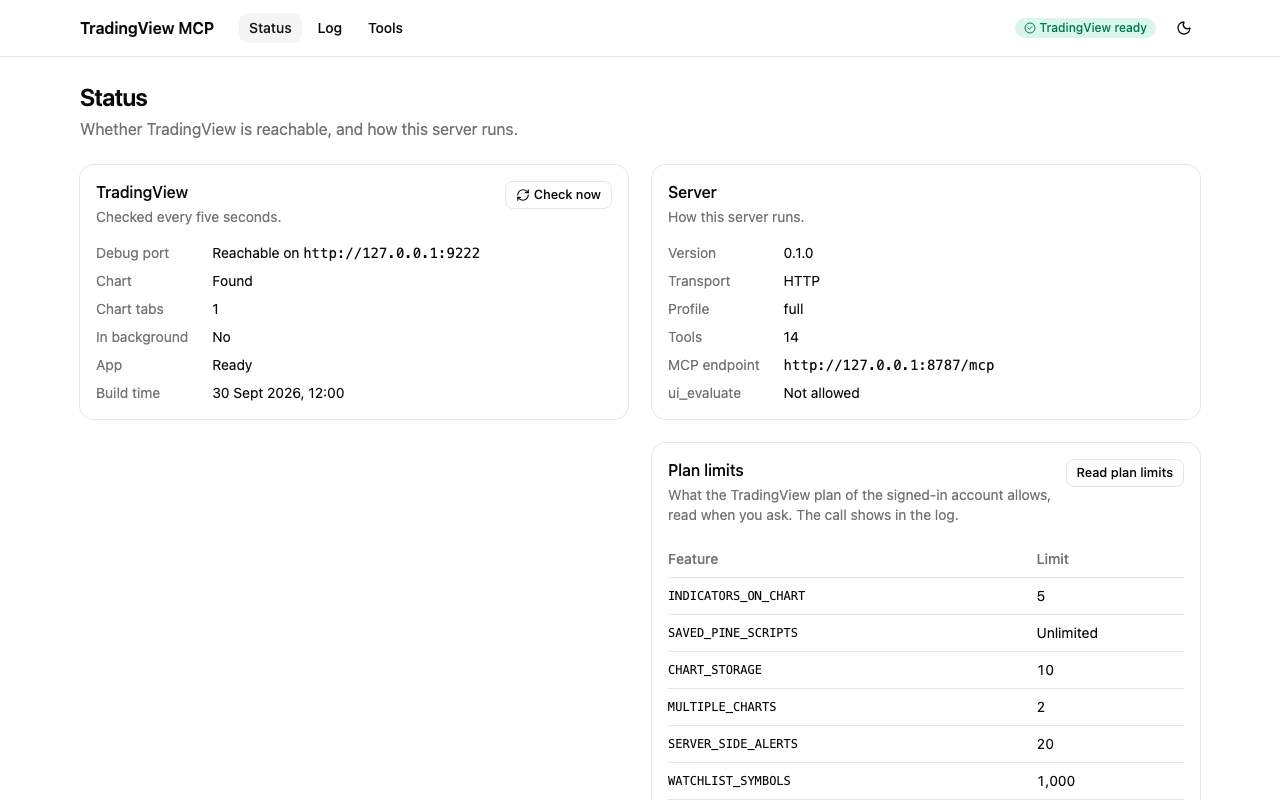\n\n### Open it\n\n- **HTTP transport:** start the server with a token and open `http://127.0.0.1:8787/`. The dashboard\n is on by default in this mode; `--no-dashboard` (`TV_MCP_DASHBOARD=false`) turns it off.\n\n ```sh\n TV_MCP_AUTH_TOKEN=\"$(openssl rand -hex 32)\" npx -y tradingview-desktop-mcp --transport http\n ```\n\n From a checkout, run `node packages/server/dist/cli.js --transport http` instead.\n\n- **Next to stdio:** an MCP client that starts the server over stdio can have a dashboard too. Add\n `--dashboard` (`TV_MCP_DASHBOARD=true`) and `TV_MCP_AUTH_TOKEN` to its configuration. The dashboard\n listens on its own address, `127.0.0.1:8787` unless you set `--host` and `--port`, and serves no\n `/mcp`. Without the token, or when the port is taken, the dashboard stays off and the server\n logs a warning, but the MCP server runs on. The calls the client makes show up in the live log.\n\nThe server prints the address of the dashboard on stderr when it starts. It never prints the token.\n\n### The token\n\nThe page asks for the token (`TV_MCP_AUTH_TOKEN`) before it shows anything. Paste it in, or open\n`http://127.0.0.1:8787/#token=` once: the page reads the token from the fragment and removes\nit from the address, and the fragment is never sent to the server. The page keeps the token in\n`sessionStorage`, so it is gone when you close the tab, and it sends the token only as\n`Authorization: Bearer `, never in a URL. When the server restarts with another token, the page\nasks again. See [SECURITY.md](https://github.com/Mochamad-Rizky/tradingview-desktop-mcp/blob/main/SECURITY.md#the-dashboard).\n\n### What it shows\n\n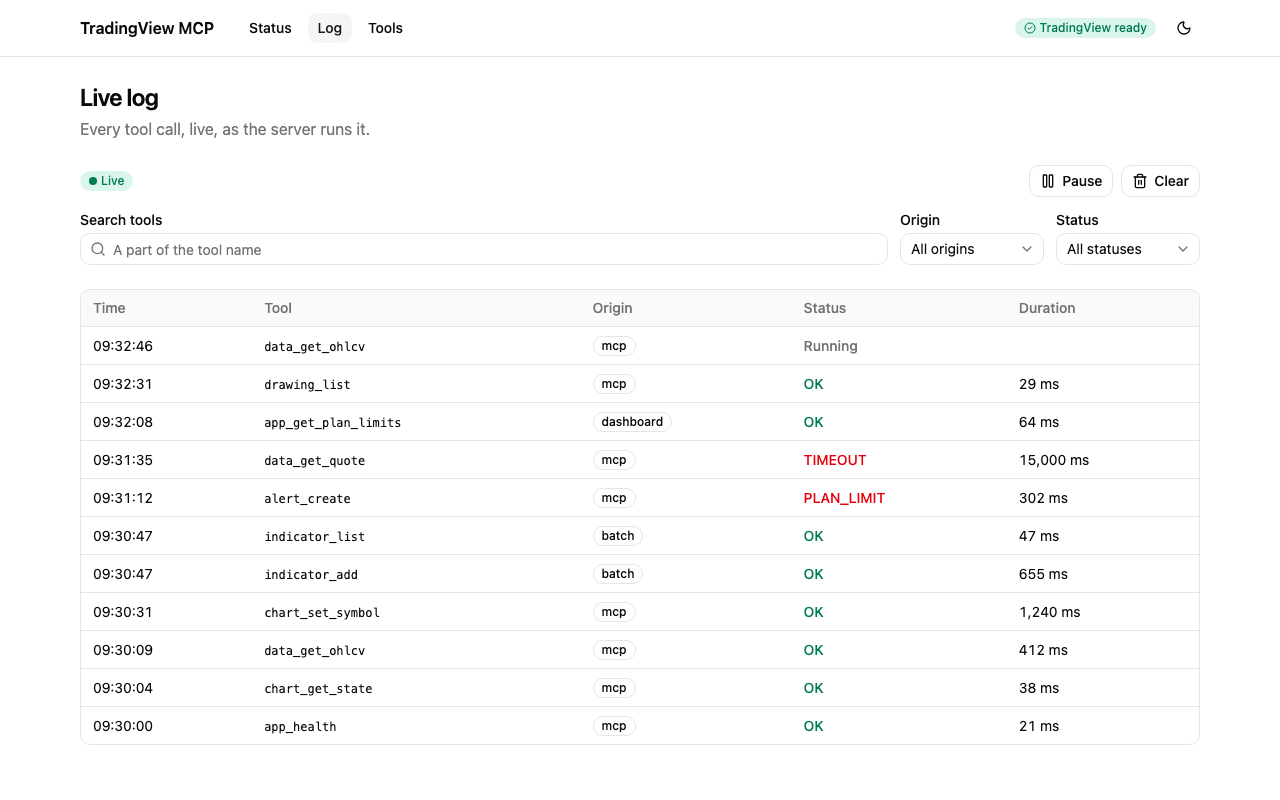\n\n- **Status** shows whether TradingView is reachable (and how to start it when it is not), how the\n server runs, the plan limits and the latest calls.\n- **Log** streams every tool call the server runs, whether an MCP client or the dashboard made\n it, with a filter by tool name, pause, clear and the details of each call. After a dropped\n connection it says \"Reconnecting…\" and picks up where it stopped. Each open tab of the dashboard\n keeps one event stream to the server, and a browser allows about six connections to one host, so\n with many dashboard tabs open a new one can wait for a free connection: close the tabs you do not\n use.\n- **Tools** lists the tools the server offers, with their inputs, and runs one by hand. The result\n is shown as it came back, with long JSON collapsed behind \"Show all\" and images as images.\n\n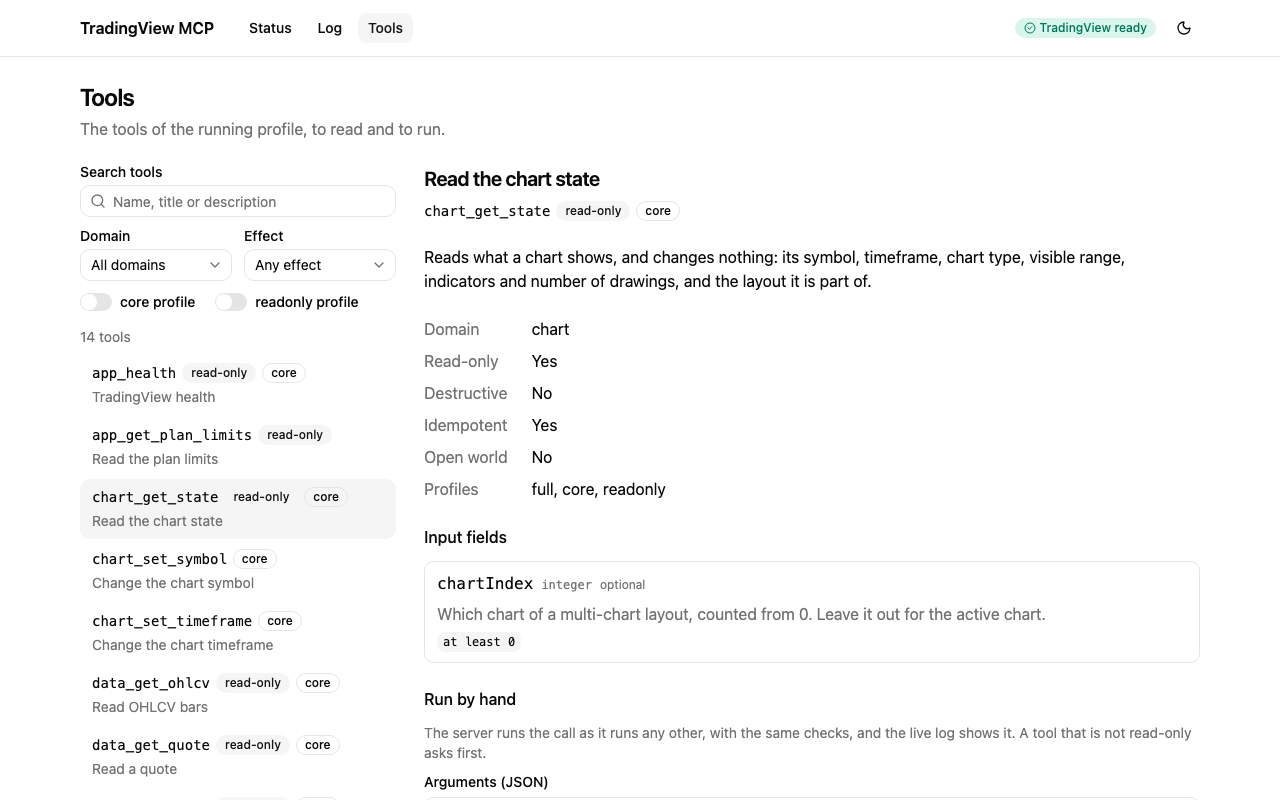\n\nA run from the dashboard is a real tool call. It goes through the same registry as an MCP call, so\nthe same schemas, profile, `confirm` rules and plan limit checks apply, and it appears in the log.\nThe dashboard asks you to confirm before it runs any tool that is not read-only.\n\n### The API\n\nThe page talks to the server through a small API, which you can also call with `curl` and the\ntoken. Every route needs `Authorization: Bearer `, and the server checks `Host` and `Origin`\nas it does for `/mcp`.\n\n| Route | What it does |\n| ------------------------ | ----------------------------------------------------------------------- |\n| `GET /api/info` | Version, transport, profile, tool count and start time |\n| `GET /api/health` | The health report: whether TradingView is reachable |\n| `GET /api/tools` | The tools on offer, with their schemas and annotations |\n| `POST /api/tools/` | Runs a tool with `{\"arguments\": {...}}`, as the origin `dashboard` |\n| `GET /api/events` | Server-sent events of the tool calls; `?limit=` sets how many to replay |\n\nThe files of the page itself, at `/`, need no token and hold no data.\n\n## Contributing\n\nSee [CONTRIBUTING.md](https://github.com/Mochamad-Rizky/tradingview-desktop-mcp/blob/main/CONTRIBUTING.md) for the local setup, the test levels, the commit\nconventions and how a release is made, and [docs/testing.md](https://github.com/Mochamad-Rizky/tradingview-desktop-mcp/blob/main/docs/testing.md) for the testing guide. To report a\nvulnerability, follow [SECURITY.md](https://github.com/Mochamad-Rizky/tradingview-desktop-mcp/blob/main/SECURITY.md).\n\n## Disclaimer\n\nThis project is not affiliated with, endorsed by, or sponsored by TradingView, Inc. TradingView is a\ntrademark of its owner. Nothing here is financial advice. The tools change what the app shows and\nmay reach its controls, so you are responsible for what you automate and for following TradingView's\nterms of use.\n\n## License\n\nReleased under the [MIT license](https://github.com/Mochamad-Rizky/tradingview-desktop-mcp/blob/main/LICENSE).\n","readmeFilename":"README.md"}
 \n
 \n