{"_id":"vuejs-clipper","_rev":"54-80865f255be9249631d84a5925876f7a","name":"vuejs-clipper","dist-tags":{"latest":"4.1.0","beta":"3.0.0-beta.0"},"versions":{"0.1.0":{"name":"vuejs-clipper","version":"0.1.0","main":"./dist/vuejs-clipper.umd.js","module":"./src/clipper.js","scripts":{"build":"vue-cli-service build --target lib --name vuejs-clipper ./src/clipper.js","lint":"vue-cli-service lint"},"dependencies":{"vue-rx":"^6.0.1","rxjs":"^6.3.2"},"devDependencies":{"@vue/cli-plugin-babel":"^3.0.0","@vue/cli-plugin-eslint":"^3.0.0","@vue/cli-plugin-unit-mocha":"^3.0.0","@vue/cli-service":"^3.0.0","@vue/test-utils":"^1.0.0-beta.20","chai":"^4.1.2","node-sass":"^4.9.0","sass-loader":"^7.0.1","vue-template-compiler":"^2.5.17"},"eslintConfig":{"root":true,"env":{"node":true},"extends":["plugin:vue/essential","eslint:recommended"],"rules":{},"parserOptions":{"parser":"babel-eslint"}},"postcss":{"plugins":{"autoprefixer":{}}},"browserslist":["> 1%","last 2 versions","not ie <= 8"],"gitHead":"50e48902354880494db782d164e1c5a7dcc06b34","description":"* Vue.js image clipping components using [vue-rx](https://github.com/vuejs/vue-rx).\r * Add image clipping components to your vue application in nothing flat.\r * Touch devices supported and fully responsive.","_id":"vuejs-clipper@0.1.0","_npmVersion":"5.6.0","_nodeVersion":"8.11.3","_npmUser":{"name":"timtnlee","email":"timtnlee1995@gmail.com"},"dist":{"integrity":"sha512-GdyQUsXXi9TRcTwM2Eqs/B+vbzwKm763imgmBuRt8xzmaODOs6wsRC1EU3Z0rwZgFXmv/2MhX0y7PvacuvQl4g==","shasum":"233d2f9eaa0d1d3e847db255ac59671663e05138","tarball":"https://registry.npmjs.org/vuejs-clipper/-/vuejs-clipper-0.1.0.tgz","fileCount":19,"unpackedSize":435757,"npm-signature":"-----BEGIN PGP SIGNATURE-----\r\nVersion: OpenPGP.js v3.0.4\r\nComment: https://openpgpjs.org\r\n\r\nwsFcBAEBCAAQBQJbnjQNCRA9TVsSAnZWagAAADAP/1HG/rLSWAIsq0Bao5zT\nGJkof3HQWnUvl34eZVh6mpWwZ8eVDzyou/3qCb5jw2MBxaWSVxqqgdCPPWI3\n49pSUxsmi3g0W79Opy7GR/0xIaDuPMA+qUkxgAOyrpUZ53KWHRo/odlQlwBu\nJAtgWGijrdgvxoAwrBMPytjAuv/ME8Ktg3B2ZQM/uVHTT2Gjqyg8U5fP9QvQ\nhYXssbt+aiqB0voxzFHj1rPJn0VU9pxyJxBp7rvDFMInpB+HP20GK5bhC54l\nrjEvyJJuRiahxCoCFzc3CXIBQefPmsfDX+Us1DD3hmzWA3M+G0CGE3MkAD+z\n9wkJm07qxYy0pBneuF5IjV/tbF5B4qBKkSTuqXPJ8gjNge0hlH2QYgZyS+hg\n4NrNdtywjIqZwOM61OuimHCNK4sbasDxtnG9bU2YEh7XnC1OT+dlV52ZGzzL\n7sMoo/fTHMp6H6m8mjADcggUZjl//ZC+lQJgyL9SYtgmWpJPzA5YuoJ+LHNq\n+ltQF26dypMMQxxtdYqh+v+SPmTfiJLuUlrtsis3S+UmUjJzepJ8QtxRxKWW\npqHmuYrEbNnrbdar/e5g39nEokVR/Un5VF4OvhzYCYabhrPSOFvFWW0E4lnb\ntJPpiifhGvIkb04oUBDCul5ksfaqzTu0jIyDimG1YykYxQZd992XjoARHFcM\nkHbb\r\n=+Izk\r\n-----END PGP SIGNATURE-----\r\n","signatures":[{"keyid":"SHA256:jl3bwswu80PjjokCgh0o2w5c2U4LhQAE57gj9cz1kzA","sig":"MEUCIC4w/j+cTfdCuxqe8nG6c9e7/9PVs8S8/jz3m7xfD8otAiEA468WGYcC/UEMlM/u9aRkvWOu1E583FDUG4srERdE+Lk="}]},"maintainers":[{"name":"timtnlee","email":"timtnlee1995@gmail.com"}],"directories":{},"_npmOperationalInternal":{"host":"s3://npm-registry-packages","tmp":"tmp/vuejs-clipper_0.1.0_1537094668635_0.20569343027159626"},"_hasShrinkwrap":false},"0.1.1":{"name":"vuejs-clipper","version":"0.1.1","main":"./dist/vuejs-clipper.umd.js","module":"./src/clipper.js","scripts":{"build":"vue-cli-service build --target lib --name vuejs-clipper ./src/clipper.js","lint":"vue-cli-service lint"},"license":"MIT","dependencies":{"vue-rx":"^6.0.1","rxjs":"^6.3.2"},"devDependencies":{"@vue/cli-plugin-babel":"^3.0.0","@vue/cli-plugin-eslint":"^3.0.0","@vue/cli-plugin-unit-mocha":"^3.0.0","@vue/cli-service":"^3.0.0","@vue/test-utils":"^1.0.0-beta.20","chai":"^4.1.2","node-sass":"^4.9.0","sass-loader":"^7.0.1","vue-template-compiler":"^2.5.17"},"eslintConfig":{"root":true,"env":{"node":true},"extends":["plugin:vue/essential","eslint:recommended"],"rules":{},"parserOptions":{"parser":"babel-eslint"}},"postcss":{"plugins":{"autoprefixer":{}}},"browserslist":["> 1%","last 2 versions","not ie <= 8"],"gitHead":"2cff8ce2ac5130e3d9919d168fad2a4d6f58b259","description":"[](https://travis-ci.org/timtnleeProject/vuejs-clipper#)","_id":"vuejs-clipper@0.1.1","_npmVersion":"5.6.0","_nodeVersion":"8.11.3","_npmUser":{"name":"timtnlee","email":"timtnlee1995@gmail.com"},"dist":{"integrity":"sha512-ok/1iLh8G/94nUor4gXOFNqCrXkHQJItLmYNlHBFu3xVgBHeN2OyILoEtw+iU/Tbzp+3fTgV8rW4D+Wk/vbutQ==","shasum":"92a8b41a1486038f28bf838aca453ff80dd5524d","tarball":"https://registry.npmjs.org/vuejs-clipper/-/vuejs-clipper-0.1.1.tgz","fileCount":19,"unpackedSize":427477,"npm-signature":"-----BEGIN PGP SIGNATURE-----\r\nVersion: OpenPGP.js v3.0.4\r\nComment: https://openpgpjs.org\r\n\r\nwsFcBAEBCAAQBQJbnjweCRA9TVsSAnZWagAAcngP/0oCC10xuPca/wgPkBS6\nOeouC4TnYJnywiSO3K9fHllDbWELH6B6jR+WWyvOxcd5VAQgF2sosn1P1V7g\nzgnOjfOAHzbXAZtt2cmtFjj+TrNeEPU/DAuPAubYu+d5CGRuexVWv/TfmfV1\nqGjlYOSu62wapecKajzU5nNxGPBp9CUpW3jzJDkyqf/VVOoML+zAtu6Mxa/I\nRkZrKtiqZQW2LCMMEQJP1TvpZt5d03LS63QlpUleYboqVhxuEfvtCh7/bPzS\ntO0QjMX4dsyq176yTfr1+vgoH0j0GCxsHes65cuKQfsP6BUb/61/tIAnFt23\noH7BqzVx1Sdo/nI0a7J0moWN7KD2ZXF9GVv0WjbmAwqYbAyPpWT7nsSZTKhd\npKlSMs7p1K1RwPx80edMn5B6xIM7YHwI1J7vTGFbK1GAEBY1/mHnnx7z9ISS\nC6TPLfoLbP/hv7sd3GXNm+31il1g1cCbHLY8hlupgRoq/gNXl7mFPhku9x5h\nSAaY9fTOSTJxnFCciqKUQ8UeogNdMYg46ft1iKz74YlY4pZNP5BISO3wwfvS\n++Wpue1POoDTe2PChNFpw54jESdF+ExRjloATwZelYolbof5hwipRE8bjmwS\nNH8FEDOX+MWYIkbMqBCfvGwESd9G0CLSJ11O9v0dVeAwEQ5TlZclJwQmE2Js\nFGeC\r\n=qZ0w\r\n-----END PGP SIGNATURE-----\r\n","signatures":[{"keyid":"SHA256:jl3bwswu80PjjokCgh0o2w5c2U4LhQAE57gj9cz1kzA","sig":"MEUCIQCdlx3UrExByHeTFieZFvlU0jon+RQucstY4e4zszxr/gIgS1hebYG6PsLPQXNYR3/R4pcL69PrCPIXgLqzPM8E9v0="}]},"maintainers":[{"name":"timtnlee","email":"timtnlee1995@gmail.com"}],"directories":{},"_npmOperationalInternal":{"host":"s3://npm-registry-packages","tmp":"tmp/vuejs-clipper_0.1.1_1537096733459_0.18366756731455913"},"_hasShrinkwrap":false},"0.2.0":{"name":"vuejs-clipper","version":"0.2.0","main":"./dist/vuejs-clipper.umd.js","module":"./src/clipper.js","scripts":{"build":"vue-cli-service build --target lib --name vuejs-clipper ./src/clipper.js","lint":"vue-cli-service lint"},"keywords":["vue","image","clip","crop","clipper","cropper"],"license":"MIT","dependencies":{"vue-rx":"^6.0.1","rxjs":"^6.3.2"},"devDependencies":{"@vue/cli-plugin-babel":"^3.0.0","@vue/cli-plugin-eslint":"^3.0.0","@vue/cli-plugin-unit-mocha":"^3.0.0","@vue/cli-service":"^3.0.0","@vue/test-utils":"^1.0.0-beta.20","chai":"^4.1.2","node-sass":"^4.9.0","sass-loader":"^7.0.1","vue-template-compiler":"^2.5.17","webpack-bundle-analyzer":"^3.0.2"},"eslintConfig":{"root":true,"env":{"node":true},"extends":["plugin:vue/essential","eslint:recommended"],"rules":{},"parserOptions":{"parser":"babel-eslint"}},"postcss":{"plugins":{"autoprefixer":{}}},"browserslist":["> 1%","last 2 versions","not ie <= 8"],"gitHead":"7a2f0eaa491e38a54ed9f8de80518d44ec8c331c","description":"Vue.js image clipping components using vue-rx.","_id":"vuejs-clipper@0.2.0","_npmVersion":"5.6.0","_nodeVersion":"8.11.3","_npmUser":{"name":"timtnlee","email":"timtnlee1995@gmail.com"},"dist":{"integrity":"sha512-nm0hm21YFHdhbGBbh3vLcnpAK5eZvPAWxzBB3M5T9IQGEako5FnlvM9I4+Ian2tZngNDFobq71pgxVcW01XR0A==","shasum":"23c9ce07afc2a9dfca1d446675845b45ff65b8ba","tarball":"https://registry.npmjs.org/vuejs-clipper/-/vuejs-clipper-0.2.0.tgz","fileCount":20,"unpackedSize":437891,"npm-signature":"-----BEGIN PGP SIGNATURE-----\r\nVersion: OpenPGP.js v3.0.4\r\nComment: https://openpgpjs.org\r\n\r\nwsFcBAEBCAAQBQJboL/2CRA9TVsSAnZWagAAWSYP/RWpvrQekymZtLnK24eD\n9sRtWL2qB/lnN6JNtmGV9k66lsLyFIIcP1/tVH/tlP/wqOpHBhw5TKnU+QT6\nwy08BuWN3mBqofYTy98rrkodcKr9H2wfuvS+QbbSr46Ohs/znSi+hq/0Bn22\nxZeq+b6mgDZROL6gkMdRAK/xC5a9IMY0D+BJBoFfz39aD0DRsqKNiDploiAE\nAhpvw/YO36JRoyU+SOK3E5cmgN20HzgpN/tNji9qQfgYgQ9w4FBR/80hwLcM\njDCZzthFeE+88ZhjBcekPn2KjYuaKbOW4AqMJd4DcKWg/VgesMEygM/6c9Na\na4vgU5qblhvvTKOXKQZ2bfRwrHeFVtl7337LzjtvqQPIUFBSmtmkbfXeFQat\nzAXRMYmPozsQsm0zfDdjbPN8Akil7nOGHcF0M05i3x2jXs93ziiGDwIiWy8c\nI+zGftaN0RL/Ly3f/oL7bWp65zfMtEyS0olifPFezn8vacSnQ7EaCRzs/Jv/\n5limvCeSqljUs/gqxb/0ZnlAwhGiCQJZ/mfjlolhbSdYrJcY9ZzCyPkMvalb\naInR64rftAgYCy/ve25sjzzVRhDCbWElknAcFCfJzJXORkajjd0+dq4PCZjM\no7vjO6M3NGTnow+6I5kX30CGDxFI8y4TxdzXXk8xX5qjNKOgpzQdZW1f2mPf\n7QVm\r\n=LFNJ\r\n-----END PGP SIGNATURE-----\r\n","signatures":[{"keyid":"SHA256:jl3bwswu80PjjokCgh0o2w5c2U4LhQAE57gj9cz1kzA","sig":"MEUCIBz3H0HcIRWWjL9hx5KU2VcSQ9ftRK/l83SXdrX7VnrcAiEA6HyKwFO15kGMJ6PV2V2o38i0DR0mfeeEvzydDCXpzaU="}]},"maintainers":[{"name":"timtnlee","email":"timtnlee1995@gmail.com"}],"directories":{},"_npmOperationalInternal":{"host":"s3://npm-registry-packages","tmp":"tmp/vuejs-clipper_0.2.0_1537261557352_0.3625534364618146"},"_hasShrinkwrap":false},"0.2.1":{"name":"vuejs-clipper","version":"0.2.1","main":"./dist/vuejs-clipper.umd.js","module":"./src/clipper.js","scripts":{"build":"vue-cli-service build --target lib --name vuejs-clipper ./src/clipper.js","lint":"vue-cli-service lint"},"keywords":["vue","image","clip","crop","clipper","cropper"],"license":"MIT","dependencies":{"vue-rx":"^6.0.1","rxjs":"^6.3.2"},"devDependencies":{"@vue/cli-plugin-babel":"^3.0.0","@vue/cli-plugin-eslint":"^3.0.0","@vue/cli-plugin-unit-mocha":"^3.0.0","@vue/cli-service":"^3.0.0","@vue/test-utils":"^1.0.0-beta.20","chai":"^4.1.2","node-sass":"^4.9.0","sass-loader":"^7.0.1","vue-template-compiler":"^2.5.17","webpack-bundle-analyzer":"^3.0.2"},"eslintConfig":{"root":true,"env":{"node":true},"extends":["plugin:vue/essential","eslint:recommended"],"rules":{},"parserOptions":{"parser":"babel-eslint"}},"postcss":{"plugins":{"autoprefixer":{}}},"browserslist":["> 1%","last 2 versions","not ie <= 8"],"gitHead":"8ea2bd40b82af6a148aaef6a0d365818dee2b789","description":"Vue.js image clipping components using vue-rx.","_id":"vuejs-clipper@0.2.1","_npmVersion":"5.6.0","_nodeVersion":"8.11.3","_npmUser":{"name":"timtnlee","email":"timtnlee1995@gmail.com"},"dist":{"integrity":"sha512-Ti8d2RnLQptlAn8M6eUqk/hhReOmUaV3bmGAbJRpWnt6GmZKFgsGT6vXTN8usq+PekHay+lJfx75FBwuH94+cw==","shasum":"f8bd2f840d8a98c5e229b7aa39f3e59fab3ac5a4","tarball":"https://registry.npmjs.org/vuejs-clipper/-/vuejs-clipper-0.2.1.tgz","fileCount":20,"unpackedSize":440719,"npm-signature":"-----BEGIN PGP SIGNATURE-----\r\nVersion: OpenPGP.js v3.0.4\r\nComment: https://openpgpjs.org\r\n\r\nwsFcBAEBCAAQBQJboMI+CRA9TVsSAnZWagAAtKcP/iFuMtd/PRyh82B8rdB9\ncQDkNQdRQZvV8L2xWcUTaNLvpZiM9c+hUaNJMdaGi3gGI1ywLzOvOojdRT39\nNuzfQdD/0qNQxPv0lDnjUfM6hc+liL9Zc3RFoCKhISiRphF59ZFZwrDEdmc3\nwfBvkLHrGds7iPjROtCQXI9g8OJj7WaBjyQ1yTsIG8oYHzphKL3jCIjGRAdX\nre6FYIcWctXFRZjnjj7ZHbNiRUrASy5erdTWe/+CtKPJK50y70j4N9OPuFkB\n4bnwuHomCDVh0m8m4pUdjcio2xZ4z2tiZjM8tW6qZn8QChH4STFRe6GivE17\nxPHSCMNKTPHOCWJjdfssLUU7b0IveVI0GiW8s9Tu6WRSk0iw1dJuWis0q49Z\nGgENOh0ULogPPvUyUPpl92r/K5rhYyEjHejbwzCM8FB4NTuYvZgKw4973sNQ\nDE9SH7wFITOsvtOCO7+SS3WkeHAevDGx2yZcoqjUL5O7E0TX8ST81oStoiE6\nSaVLShiqtP+xvHVPDocVQEQ7/j4sYxXQUZKSkyW4/uVwyZ0X50gg3H99Fj5h\n2B+JiFf/t8ChDQgsigSjrkA8PpX3fF9v/pBlMNySZCTdfArjtxs5rYTbTDoZ\n/oCv0tZML299LjidhwPKi0m1XK6tVoIp4Tannp+pAZwFXJYcq5UFUlbagaIy\nZoEX\r\n=HXdu\r\n-----END PGP SIGNATURE-----\r\n","signatures":[{"keyid":"SHA256:jl3bwswu80PjjokCgh0o2w5c2U4LhQAE57gj9cz1kzA","sig":"MEUCIHwIwK294bCQeIZ1l0uiZhv+qdd04WHq3Ef3oBDgpixsAiEAvlZG6IJkW9t+AXEei/ZOspCAjxPCfc6Ze4QThPOa6I8="}]},"maintainers":[{"name":"timtnlee","email":"timtnlee1995@gmail.com"}],"directories":{},"_npmOperationalInternal":{"host":"s3://npm-registry-packages","tmp":"tmp/vuejs-clipper_0.2.1_1537262142313_0.8802103150465082"},"_hasShrinkwrap":false},"0.2.2":{"name":"vuejs-clipper","version":"0.2.2","main":"./dist/vuejs-clipper.umd.js","module":"./src/clipper.js","scripts":{"build":"vue-cli-service build --target lib --name vuejs-clipper ./src/clipper.js","lint":"vue-cli-service lint"},"keywords":["vue","image","clip","crop","clipper","cropper"],"license":"MIT","dependencies":{"vue-rx":"^6.0.1","rxjs":"^6.3.2"},"devDependencies":{"@vue/cli-plugin-babel":"^3.0.0","@vue/cli-plugin-eslint":"^3.0.0","@vue/cli-plugin-unit-mocha":"^3.0.0","@vue/cli-service":"^3.0.0","@vue/test-utils":"^1.0.0-beta.20","chai":"^4.1.2","node-sass":"^4.9.0","sass-loader":"^7.0.1","vue-template-compiler":"^2.5.17","webpack-bundle-analyzer":"^3.0.2"},"eslintConfig":{"root":true,"env":{"node":true},"extends":["plugin:vue/essential","eslint:recommended"],"rules":{},"parserOptions":{"parser":"babel-eslint"}},"postcss":{"plugins":{"autoprefixer":{}}},"browserslist":["> 1%","last 2 versions","not ie <= 8"],"gitHead":"6d311b53b8db73e6beb99b38080d2174be5d7178","description":"Vue.js image clipping components using vue-rx.","_id":"vuejs-clipper@0.2.2","_npmVersion":"5.6.0","_nodeVersion":"8.11.3","_npmUser":{"name":"timtnlee","email":"timtnlee1995@gmail.com"},"dist":{"integrity":"sha512-tJavOKo5c2nQAsA36SyZQvr/cHz6jIlw1USx/O1fze6nunerFhvBNXu2L74IXNWy1qDwzLwQhZTd+JavH4sq6A==","shasum":"d57fabe3447b24f7a4c41027e418ac9d0329d61f","tarball":"https://registry.npmjs.org/vuejs-clipper/-/vuejs-clipper-0.2.2.tgz","fileCount":20,"unpackedSize":440783,"npm-signature":"-----BEGIN PGP SIGNATURE-----\r\nVersion: OpenPGP.js v3.0.4\r\nComment: https://openpgpjs.org\r\n\r\nwsFcBAEBCAAQBQJboMmuCRA9TVsSAnZWagAABKoQAInX0Y7tYeJGlNVLw4Qb\n1RWndZIZU8HosN4r/REkL6Bpb9HJNlzptwzPMFgGa/c0qRUyHmHkTN4Cp8YB\n9Zpi5ejcRQldOZNCsDzl0kd213ckj/BrtFlf3/tP2H4Sqc/DgaRCiIF6uxQD\nT116+KjhX+5O5ytphhuKjYfDFldNpFqDD/xkmK1WdSWw3E9SgnjikdU5EC/1\nR6ypmOsEHyQHC8nCeuy/71r4n3OK2mpJtk0anX8mbGKl2YVoppJdgR10wj4R\npULWYrhLfWJARqjFM+QUqXcRX6aXH/trZbLUoiPEAEAKgIElSsIDMim+Rz0L\nBroFgHkzHhEUXQspu1AjL90mkKNA8ARHwo7bRJOutCe0zYlIKluYtRtLsaM4\n85FeTILzoQjE88V7K9X/GtKUi5Ixc3ZlEXRh9r79wBS8EnJlBl1hckqsVUCZ\nnWVkPPKtnt6ePNRRMNxL2CDl7v/7hUPanQAH850RRctyXK5/ZVKeqqRdfDhP\n4N8q/6hs/FmGdNSAtRp20w/7llbulWm0JMgzuUioHCW12kS5/l7ksK30aZ/g\nVSl/XFqzoxE8kjdiDnDh/LpetR/xu9dcq0zzMWZd/0mcOC+vz26xYL0rtGOj\nOD5aSRQj9YbalkJPGd/Lmxn9fkjNnfxu821hbLbYxo8MpcQYkgFlVeEM50gN\ntTi6\r\n=yEz5\r\n-----END PGP SIGNATURE-----\r\n","signatures":[{"keyid":"SHA256:jl3bwswu80PjjokCgh0o2w5c2U4LhQAE57gj9cz1kzA","sig":"MEQCIFFAOH3hC+k/yZJhaLxu3+PfyG5FkKoOAif8wh3Qn5+GAiAmuW9noCJZ71soWHnJ1lYLgaBnbROFbOeuZ+DiKt2DUg=="}]},"maintainers":[{"name":"timtnlee","email":"timtnlee1995@gmail.com"}],"directories":{},"_npmOperationalInternal":{"host":"s3://npm-registry-packages","tmp":"tmp/vuejs-clipper_0.2.2_1537264045221_0.4195878307287444"},"_hasShrinkwrap":false},"0.2.3":{"name":"vuejs-clipper","version":"0.2.3","author":{"name":"timtnlee"},"homepage":"https://timtnleeproject.github.io/vuejs-clipper/","license":"MIT","repository":{"type":"git","url":"git+https://github.com/timtnleeProject/vuejs-clipper.git"},"bugs":{"url":"https://github.com/timtnleeProject/vuejs-clipper/issues"},"keywords":["vue","image","clip","crop","clipper","cropper"],"main":"./dist/vuejs-clipper.umd.js","module":"./src/clipper.js","scripts":{"build":"vue-cli-service build --target lib --name vuejs-clipper ./src/clipper.js","lint":"vue-cli-service lint"},"dependencies":{"rxjs":"^6.3.2","vue-rx":"^6.0.1"},"devDependencies":{"@vue/cli-plugin-babel":"^3.0.3","@vue/cli-plugin-eslint":"^3.0.3","@vue/cli-plugin-unit-mocha":"^3.0.3","@vue/cli-service":"^3.0.3","@vue/test-utils":"^1.0.0-beta.20","chai":"^4.1.2","node-sass":"^4.9.0","sass-loader":"^7.0.1","vue-template-compiler":"^2.5.17","webpack-bundle-analyzer":"^3.0.2"},"eslintConfig":{"root":true,"env":{"node":true},"extends":["plugin:vue/essential","eslint:recommended"],"rules":{},"parserOptions":{"parser":"babel-eslint"}},"postcss":{"plugins":{"autoprefixer":{}}},"browserslist":["> 1%","last 2 versions","not ie <= 8"],"gitHead":"5dba5e8a95b41eccdb92930a32fab5998d804ba6","description":"Vue.js image clipping components using vue-rx.","_id":"vuejs-clipper@0.2.3","_npmVersion":"5.6.0","_nodeVersion":"8.11.3","_npmUser":{"name":"timtnlee","email":"timtnlee1995@gmail.com"},"dist":{"integrity":"sha512-J3JFtCSVryS8B39QnehA5me/v+UBH9KCDt+WKfdTuZFogdgNGO30L12m4x+X9SfW5Uv8180+smNAy5xnptrg3Q==","shasum":"30b7c89a99557fc7b354ae1e2f1ff7a271d31cb1","tarball":"https://registry.npmjs.org/vuejs-clipper/-/vuejs-clipper-0.2.3.tgz","fileCount":20,"unpackedSize":441079,"npm-signature":"-----BEGIN PGP SIGNATURE-----\r\nVersion: OpenPGP.js v3.0.4\r\nComment: https://openpgpjs.org\r\n\r\nwsFcBAEBCAAQBQJbpcRTCRA9TVsSAnZWagAAqMIP/0F83d+vzhOkop6nHrCA\n9ZA5UykZQOAMTAWzHU7NVvqu+kEe2mx2IOayzGGDj51O8xYdBCkxQWuRUbYl\nw3kMeBUYoMjMUZW1+/KtsEWISnPNP87j6CNV3RnPb9jz6TDzhs4HKI0etGod\nU6HNUUns4tYLL6aHt2Yb+47sWQAIxivYitnH3Fg3fJhndhfB8gN2QqlC6wJt\nZzIhxXCbA6p3qMibBfVAHnY2OI+nZZbsrH+MMIYMVVtbFCW69+c/9XinUv2I\nyZ1VigiGIWXDOMo1AW+W84EYO5avN4FJWCDuC/eiaR0/w0TatXbJ1Ea3yYIG\nAmW0lmeuZMip7pLGDxCurCnESNQnpPa1sDJdpfPM6MSfXaGWDH6oIu5t5FHx\n0aspKV9nLq71IDpm/p7GK0Z0wAzd1IFMBjWvgikbSwDDeTngZniKax0PFBM2\n/Dsar0PsKfYp8gimg21pH8+Fm7NX4ayXXlwBIK1H43+w/IzIHGR6SRnYexe0\nddZ7iETc/xfZtomPcV5P/KHr81SF37eo6HthdFxGwOTly+5YK3pfA6DuiVlO\nnRNqwaLuzYg92kofrX2/yiSqZkImoNk+fnqWzNTfE7KcfxOkNBF8hs4uoWv2\n/rsknhFch8w8exeJDTtG49IKs+KWcH6Ta7tU1JGoT4tX4g+w8hJ2DJEeVRNw\n0+O7\r\n=yymn\r\n-----END PGP SIGNATURE-----\r\n","signatures":[{"keyid":"SHA256:jl3bwswu80PjjokCgh0o2w5c2U4LhQAE57gj9cz1kzA","sig":"MEYCIQD+P/iz9FA/NIv4eKVyET8wOke/DWkqN+xcxtg5/u1NCAIhAKqBIDicAdpvWBsRCQ8F8cQqM0fd5SwLfNBWVdmy6FWI"}]},"maintainers":[{"name":"timtnlee","email":"timtnlee1995@gmail.com"}],"directories":{},"_npmOperationalInternal":{"host":"s3://npm-registry-packages","tmp":"tmp/vuejs-clipper_0.2.3_1537590354709_0.32520208344429613"},"_hasShrinkwrap":false},"0.2.4":{"name":"vuejs-clipper","version":"0.2.4","author":{"name":"timtnlee"},"homepage":"https://timtnleeproject.github.io/vuejs-clipper/","license":"MIT","repository":{"type":"git","url":"git+https://github.com/timtnleeProject/vuejs-clipper.git"},"bugs":{"url":"https://github.com/timtnleeProject/vuejs-clipper/issues"},"keywords":["vue","image","clip","crop","clipper","cropper"],"main":"dist/vuejs-clipper.umd.js","module":"src/clipper.js","scripts":{"build":"vue-cli-service build --target lib --name vuejs-clipper src/clipper.js","lint":"vue-cli-service lint"},"dependencies":{"rxjs":"^6.3.2","vue-rx":"^6.0.1"},"devDependencies":{"@vue/cli-plugin-babel":"^3.0.3","@vue/cli-plugin-eslint":"^3.0.3","@vue/cli-plugin-unit-mocha":"^3.0.3","@vue/cli-service":"^3.0.3","@vue/test-utils":"^1.0.0-beta.20","chai":"^4.1.2","node-sass":"^4.9.0","sass-loader":"^7.0.1","vue-template-compiler":"^2.5.17","webpack-bundle-analyzer":"^3.0.2"},"eslintConfig":{"root":true,"env":{"node":true},"extends":["plugin:vue/essential","eslint:recommended"],"rules":{},"parserOptions":{"parser":"babel-eslint"}},"postcss":{"plugins":{"autoprefixer":{}}},"browserslist":["> 1%","last 2 versions","not ie <= 8"],"gitHead":"6ecc4876acb1ddba218a9112d8f610df463c2789","description":"Vue.js image clipping components using vue-rx.","_id":"vuejs-clipper@0.2.4","_npmVersion":"5.6.0","_nodeVersion":"8.11.3","_npmUser":{"name":"timtnlee","email":"timtnlee1995@gmail.com"},"dist":{"integrity":"sha512-Shr77Sog9CgXWk+LRSyKuANhZW9szYRaIpmXnehnVjFwIzwUZzwsqoRJDadP/TYYRtGOBybtslgNl+lQ7m7M+w==","shasum":"c5a9d9dd948a576da60e1c70a82e1188b610f674","tarball":"https://registry.npmjs.org/vuejs-clipper/-/vuejs-clipper-0.2.4.tgz","fileCount":20,"unpackedSize":449658,"npm-signature":"-----BEGIN PGP SIGNATURE-----\r\nVersion: OpenPGP.js v3.0.4\r\nComment: https://openpgpjs.org\r\n\r\nwsFcBAEBCAAQBQJbsccQCRA9TVsSAnZWagAATlUP/1fSuBIwOxoMg6wCIl90\n57UNQymrv2HuBxFpVFpHHW9MtlBwOyNJ9I6fGAXVyhIWwVavOITxAeDQLyC9\nISA2gnz6md+jRI6Dc/wbu1W7oZzWq02Mdsg9zhuoK/1CEC036SnMynzSQV+w\nIRxVJ8VBTyhn8NO/Q0cNKWJGng22ORb33SMpYjgNYE1cc7kJKgAgN27hAxTU\ncT34dptLSvFUPVw1bVrGN2KR6IhpA2pS88lL/R98H0dFiwmc3am87q12loQK\nbqCarosAF1vVY5oR3DVfDUYKxgZWkfQO2EPiEuMGE/9czmHATJp8QO0foXTS\nn+rmpB/+U3KCFYBw6aCfCOiUJx6gDqKbzjieVEJVyekrDIPBoulAzila5WEl\nEn/y8M0aVPDSMtjxFKYhhtHgpTRNVbMyMEzQS63qMwXY3Zse0ZyU6Y9ekY97\nqzI7cgo9D3YhVFdq+b3VMLqZq9ilsa0pu7QpxELqhQ3mcuBxxAb2kPK0gtEE\nXRLdwnUTdPBlKU88Evl3dMTOH7rFPo3l9uEKRb+I0WCMyucaz7+VKsdC8+Nj\nsL5e1g7p4H0c54ihpTFk7Ff8Gjyo4Qv4Ju6l0gXMn9SBz1lOxxKnluO+02WV\njxFWiBuaiG/QtrfI3vzne9M/ufVOvIS4st8a+2doAAPYl8hDZR5PaAmbg28+\n9mZM\r\n=ZOFf\r\n-----END PGP SIGNATURE-----\r\n","signatures":[{"keyid":"SHA256:jl3bwswu80PjjokCgh0o2w5c2U4LhQAE57gj9cz1kzA","sig":"MEUCIFAlRinJStpvnXpy9EN/zYbLyPmZszuY74jdtNnqg4NdAiEA5FEQe1Cd5hUUYxEIMyCGnIMLYYnf7pZDNwaDT6jb5CY="}]},"maintainers":[{"name":"timtnlee","email":"timtnlee1995@gmail.com"}],"directories":{},"_npmOperationalInternal":{"host":"s3://npm-registry-packages","tmp":"tmp/vuejs-clipper_0.2.4_1538377487725_0.08076553851658796"},"_hasShrinkwrap":false},"0.2.5":{"name":"vuejs-clipper","version":"0.2.5","author":{"name":"timtnlee"},"homepage":"https://timtnleeproject.github.io/vuejs-clipper/","license":"MIT","repository":{"type":"git","url":"git+https://github.com/timtnleeProject/vuejs-clipper.git"},"bugs":{"url":"https://github.com/timtnleeProject/vuejs-clipper/issues"},"keywords":["vue","image","clip","crop","clipper","cropper"],"main":"dist/vuejs-clipper.umd.js","module":"src/clipper.js","scripts":{"build":"vue-cli-service build --target lib --name vuejs-clipper src/clipper.js","lint":"vue-cli-service lint"},"dependencies":{"rxjs":"^6.3.2","vue-rx":"^6.0.1"},"devDependencies":{"@vue/cli-plugin-babel":"^3.0.3","@vue/cli-plugin-eslint":"^3.0.3","@vue/cli-plugin-unit-mocha":"^3.0.3","@vue/cli-service":"^3.0.3","@vue/test-utils":"^1.0.0-beta.20","chai":"^4.1.2","node-sass":"^4.9.0","sass-loader":"^7.0.1","vue-template-compiler":"^2.5.17","webpack-bundle-analyzer":"^3.0.2"},"eslintConfig":{"root":true,"env":{"node":true},"extends":["plugin:vue/essential","eslint:recommended"],"rules":{},"parserOptions":{"parser":"babel-eslint"}},"postcss":{"plugins":{"autoprefixer":{}}},"browserslist":["> 1%","last 2 versions","not ie <= 8"],"gitHead":"495701ea95aa78c036a9fb97a57346e5c4cccc43","description":"Vue.js image clipping components using vue-rx.","_id":"vuejs-clipper@0.2.5","_npmVersion":"5.6.0","_nodeVersion":"8.11.3","_npmUser":{"name":"timtnlee","email":"timtnlee1995@gmail.com"},"dist":{"integrity":"sha512-qHINI2XYmWSzU2mjMsmDAwrQCLR4GfSAVzrwV5kJo7xhs4Auk7cp50CCxZEnqgiunZRmKJS4xwosQagZ3aLG5A==","shasum":"3496299cad23c822cf3841026cf2e527a27bc591","tarball":"https://registry.npmjs.org/vuejs-clipper/-/vuejs-clipper-0.2.5.tgz","fileCount":20,"unpackedSize":450417,"npm-signature":"-----BEGIN PGP SIGNATURE-----\r\nVersion: OpenPGP.js v3.0.4\r\nComment: https://openpgpjs.org\r\n\r\nwsFcBAEBCAAQBQJbtdoXCRA9TVsSAnZWagAA4VAP/3tnFCsvbYESrHVX2aXK\nRG87WiE7GzFgevBzaARMkHoZCIA/U871fHrDCK/CqfQVgKgGfyP5mWzmi234\n4h1MZxy1UDHBDV+HqOjtM3yaMqe52zTayeMA3IMKyOk0oFg32ZpmCDZ1LTC2\naJ9u4Fm/W4QNX+5Cqs49SOqWJbnxzLLanUUQNFP7d885JJSw+ibK8CieaK2O\nqQARtJHkywF/OM5Mi3/Fg7pTJz7gO/77uMvhBaE/iZhI3XFxvYiGditvC53G\nW0innpbA4bhxg1cGqLU//0/uDFgR1miaZPCODNu/w5vIbgCq/FBgIj2mrb/O\nIcTpZLzILeLg6p1yAM0dDDaKW//r2vQ+ziyqQhqTw1YMfVkHQyE7RI9aAlUW\ndCIfnsstvB0/9zq3O4cLGPJRJDv0Z9s8rzotJn2LIDBc2Yg6B9M8y9Z+81vG\nkqrh3hVjl7DYI2Q7izf0kVA8KNO/0s2Ku+UMkWztmgX1zNmFkdPb9/oW7V3c\n+OZ58a0TdqpOQmJMW7lAIpFk1lNdkfhGn6e5RxyKoJA68RmYFJVHoDrIq3rN\nfTqwf1IABQBopdmBIu0PRrSq50E4EWNzcfnzO28OFq7Igb4OnWRxbkER4QZu\n5B3JCTuH1nwVEF6t7jOMubsUSeHygjfmaXbJPBJS1v6TOjVC8MzJAEydJ0hF\noWm+\r\n=4VQ2\r\n-----END PGP SIGNATURE-----\r\n","signatures":[{"keyid":"SHA256:jl3bwswu80PjjokCgh0o2w5c2U4LhQAE57gj9cz1kzA","sig":"MEYCIQC33tEp/ktysBDTyd69PsssatXqE6Tmwfq2krrhWT85XQIhAMfQpyeuCnHn9UVLaPOZ9pDVZq1Q4oqUpVSXUQJ71AZW"}]},"maintainers":[{"name":"timtnlee","email":"timtnlee1995@gmail.com"}],"directories":{},"_npmOperationalInternal":{"host":"s3://npm-registry-packages","tmp":"tmp/vuejs-clipper_0.2.5_1538644502296_0.35863527454644717"},"_hasShrinkwrap":false},"0.2.6":{"name":"vuejs-clipper","version":"0.2.6","author":{"name":"timtnlee"},"homepage":"https://timtnleeproject.github.io/vuejs-clipper/","license":"MIT","repository":{"type":"git","url":"git+https://github.com/timtnleeProject/vuejs-clipper.git"},"bugs":{"url":"https://github.com/timtnleeProject/vuejs-clipper/issues"},"keywords":["vue","image","clip","crop","clipper","cropper"],"main":"dist/vuejs-clipper.umd.js","module":"src/clipper.js","scripts":{"build":"vue-cli-service build --target lib --name vuejs-clipper src/clipper.js","lint":"vue-cli-service lint"},"dependencies":{"rxjs":"^6.3.2","vue-rx":"^6.0.1"},"devDependencies":{"@vue/cli-plugin-babel":"^3.0.3","@vue/cli-plugin-eslint":"^3.0.3","@vue/cli-plugin-unit-mocha":"^3.0.3","@vue/cli-service":"^3.0.3","@vue/test-utils":"^1.0.0-beta.20","chai":"^4.1.2","node-sass":"^4.9.0","sass-loader":"^7.0.1","vue-template-compiler":"^2.5.17","webpack-bundle-analyzer":"^3.0.2"},"eslintConfig":{"root":true,"env":{"node":true},"extends":["plugin:vue/essential","eslint:recommended"],"rules":{},"parserOptions":{"parser":"babel-eslint"}},"postcss":{"plugins":{"autoprefixer":{}}},"browserslist":["> 1%","last 2 versions","not ie <= 8"],"gitHead":"e58eb41b08cd307b692033719cd24d27c96e4a07","description":"Vue.js image clipping components using vue-rx.","_id":"vuejs-clipper@0.2.6","_npmVersion":"5.6.0","_nodeVersion":"8.11.3","_npmUser":{"name":"timtnlee","email":"timtnlee1995@gmail.com"},"dist":{"integrity":"sha512-qYFTHO60JPqWsPo7kjMERAIE74rz7NZOsIvdGtgrJs1jugE9YCUPyQpSnAGvuQ2HQbf+Yv1yWZkBpi7o5bn28w==","shasum":"7d7bc583e138241ac4e85dbc34a46828961d9747","tarball":"https://registry.npmjs.org/vuejs-clipper/-/vuejs-clipper-0.2.6.tgz","fileCount":20,"unpackedSize":450846,"npm-signature":"-----BEGIN PGP SIGNATURE-----\r\nVersion: OpenPGP.js v3.0.4\r\nComment: https://openpgpjs.org\r\n\r\nwsFcBAEBCAAQBQJbyD2MCRA9TVsSAnZWagAATwwP+wabNJLpT6pEygg7sCcz\nrNIxiyxLw0Ewoj8xyqiAFzYZPJtNGbeHcG/AuTR3492AhchlioHbf9jgE5UF\ntFq1l6Lp23He92B++BmHcJBKepF+pfBGPDYisdGIaebwVLq8ZLGi5eiXzD8h\nHS0tilywUq2ES6PehbsdUdv3rCHW5zsnenaF2OcYSgzUIqW07eU7rJYqCI2I\nrvjz5flTXrEB4jQ92D+NF2c+zZ/2o8LuTTlnM2GpS4OZCmTfBOHsCV4z14l5\ncfbR4blJ2ChJ3cifEizJmtJFc40mEpji8Lqxul7Q6+3L9WAB95rEPgRILGVT\nnzKvDsLJs6ttTFuWJ2+LZhZJHqpxDnY/rAwquad1SLLvSX4Ki3DsUNoBJ1tl\nH3IYMPBgOzx8WSv8mAXMvr54IM/Lhegj2v3vyXKoMSKvmgUbQ2NQJd/9PHVn\nR+1vDlkLfCinabvgqqWwDYXHqzIawHmre2GrBk0qJgS6+NlVWjz0QTgl6Lgc\nEES9prWSPs/U0j0h7rBZMUfAmmuOa3IqCuSETCtpUwRdA/4bVGiajOVpExDx\n+eziytVEMozFsZ6CkXSD4yKT/i+30yuGRe1EvKhpY+2BpdYnoptSeq0AmUbn\nSPmK2JyOoqO0anvzOZj45UJEh0E2F8X9aMFigJG9kIgfvNcGoqwqXkT4Y9bq\ngxU9\r\n=mIxC\r\n-----END PGP SIGNATURE-----\r\n","signatures":[{"keyid":"SHA256:jl3bwswu80PjjokCgh0o2w5c2U4LhQAE57gj9cz1kzA","sig":"MEYCIQCLpQ3mGOAuEpFIWJAV/uQgYOkHq6Rr1W1XJ7H0P4A7uAIhAKVD2aN/p2dzjYi/GVz2qjjBGCL3dKUJrbtp39EzmFjI"}]},"maintainers":[{"name":"timtnlee","email":"timtnlee1995@gmail.com"}],"directories":{},"_npmOperationalInternal":{"host":"s3://npm-registry-packages","tmp":"tmp/vuejs-clipper_0.2.6_1539849611387_0.9259445517437006"},"_hasShrinkwrap":false},"0.2.7":{"name":"vuejs-clipper","version":"0.2.7","author":{"name":"timtnlee"},"homepage":"https://timtnleeproject.github.io/vuejs-clipper/","license":"MIT","repository":{"type":"git","url":"git+https://github.com/timtnleeProject/vuejs-clipper.git"},"bugs":{"url":"https://github.com/timtnleeProject/vuejs-clipper/issues"},"keywords":["vue","image","clip","crop","clipper","cropper"],"main":"dist/vuejs-clipper.umd.js","module":"src/clipper.js","scripts":{"build":"vue-cli-service build --target lib --name vuejs-clipper src/clipper.js","lint":"vue-cli-service lint"},"dependencies":{"rxjs":"^6.3.2","vue-rx":"^6.0.1"},"devDependencies":{"@vue/cli-plugin-babel":"^3.0.3","@vue/cli-plugin-eslint":"^3.0.3","@vue/cli-plugin-unit-mocha":"^3.0.3","@vue/cli-service":"^3.0.3","@vue/test-utils":"^1.0.0-beta.20","chai":"^4.1.2","node-sass":"^4.9.0","sass-loader":"^7.0.1","vue-template-compiler":"^2.5.17","webpack-bundle-analyzer":"^3.0.2"},"eslintConfig":{"root":true,"env":{"node":true},"extends":["plugin:vue/essential","eslint:recommended"],"rules":{"indent":["warn",2]},"parserOptions":{"parser":"babel-eslint"}},"postcss":{"plugins":{"autoprefixer":{}}},"browserslist":["> 1%","last 2 versions","not ie <= 8"],"gitHead":"4f921766fa519247e0a39cd71ba72b544c925e65","description":"Vue.js image clipping components using vue-rx.","_id":"vuejs-clipper@0.2.7","_npmVersion":"5.6.0","_nodeVersion":"8.11.3","_npmUser":{"name":"timtnlee","email":"timtnlee1995@gmail.com"},"dist":{"integrity":"sha512-I9krczrzyNIMq+GW3wXqkwAp8+yPr5oQdQArztEzvgYda4dvcDLPIJIJVGcEIhddvlrDZR68ObKTKmrNPKgc8g==","shasum":"1d12ab2ea980f488096fccc9ab7ff4f38b5b6ebe","tarball":"https://registry.npmjs.org/vuejs-clipper/-/vuejs-clipper-0.2.7.tgz","fileCount":20,"unpackedSize":441055,"npm-signature":"-----BEGIN PGP SIGNATURE-----\r\nVersion: OpenPGP.js v3.0.4\r\nComment: https://openpgpjs.org\r\n\r\nwsFcBAEBCAAQBQJbyEgLCRA9TVsSAnZWagAAi+4QAIzHKGo2Zdck1ZQxdRpv\nMaZeB0+p2Bl2WclzHc5NpfP1jLyrpFo4OoTsPEAHMFBopQXhDAZa59zqf4pQ\nKwxqwn/Tiu2xvBEipX3f2b4KOx7vntsFAMN3HdpRrsqW6KaX4l+uHDSxAm6i\n+OmtWrOMvnTesewhitEKYD6GLh5pNe/5KDGVTQet5K2H18cQjJwNmMlN8I/D\n0PGOOEU96yuznhzYz125i5HqwH/kDS8qjdybpegE6HYtevJ282Dch6/GEW7h\nOIWZVN8tb2p8Zb1S7fAh3+bAGdVVW0EWOLTuur5yegzMOeBgy9+Cc58WQXdA\n3JUojtoGYC+4tPLD19tw36A16mv/DY2uedGlqk2ALIV1CZnoMKVNLsMPma2S\nzjTQis6wc9zz8/ykBjgdZZckwx6oeJ8F2w0dXmEARccxEPGzz0fJvuKgof42\nMdP4OzEQX71T1o3bt7k+VybTU8buBR7/HZztyOFfxDxHfcVvZcyfhlNIFQZ/\nGhOuvK2hPI1XzqlmtMCmJQvQwQGoqJLlwUP0Kjl/ALAtbk1elWzVEc+2WrRg\nd77R0LxKa5gGfqEE+3t5HxIAKNVkzt7I+b7wb5E7lFKPcq/9m1COlb7Lrw/t\n9gPSPoxFw8cYKogZFfH/ae5Ct4eJvDDGgSdkgudvLzqzPurnK2Ihvpvwof/X\nlgdf\r\n=9pjj\r\n-----END PGP SIGNATURE-----\r\n","signatures":[{"keyid":"SHA256:jl3bwswu80PjjokCgh0o2w5c2U4LhQAE57gj9cz1kzA","sig":"MEYCIQD186QGXhTMwDuHNBkZ0s0CTHCzDhEjtxvUgOr6NpWYcAIhAMwPr0OVYT2k5i0BnlFHKtjbNG4sQR5FECAMtnUxtw0R"}]},"maintainers":[{"name":"timtnlee","email":"timtnlee1995@gmail.com"}],"directories":{},"_npmOperationalInternal":{"host":"s3://npm-registry-packages","tmp":"tmp/vuejs-clipper_0.2.7_1539852298908_0.7905300887189746"},"_hasShrinkwrap":false},"0.2.8":{"name":"vuejs-clipper","version":"0.2.8","author":{"name":"timtnlee"},"homepage":"https://timtnleeproject.github.io/vuejs-clipper/","license":"MIT","repository":{"type":"git","url":"git+https://github.com/timtnleeProject/vuejs-clipper.git"},"bugs":{"url":"https://github.com/timtnleeProject/vuejs-clipper/issues"},"keywords":["vue","image","clip","crop","clipper","cropper"],"main":"dist/vuejs-clipper.umd.js","module":"src/clipper.js","scripts":{"build":"vue-cli-service build --target lib --name vuejs-clipper src/clipper.js","lint":"vue-cli-service lint"},"dependencies":{"exif-js":"^2.3.0","rxjs":"^6.3.2","vue-rx":"^6.0.1"},"devDependencies":{"@vue/cli-plugin-babel":"^3.0.3","@vue/cli-plugin-eslint":"^3.0.3","@vue/cli-plugin-unit-mocha":"^3.0.3","@vue/cli-service":"^3.0.3","@vue/test-utils":"^1.0.0-beta.20","chai":"^4.1.2","node-sass":"^4.9.0","sass-loader":"^7.0.1","vue-template-compiler":"^2.5.17","webpack-bundle-analyzer":"^3.0.2","webpack-dev-server":">=3.1.11"},"eslintConfig":{"root":true,"env":{"node":true},"extends":["plugin:vue/essential","eslint:recommended"],"rules":{"indent":["error",2]},"parserOptions":{"parser":"babel-eslint"}},"postcss":{"plugins":{"autoprefixer":{}}},"browserslist":["> 1%","last 2 versions","not ie <= 8"],"gitHead":"8fd0c4410981ed7f6c5bdcf1cc55fe4e745af8f5","description":"Vue.js image clipping components using Vue-Rx.","_id":"vuejs-clipper@0.2.8","_npmVersion":"5.6.0","_nodeVersion":"8.11.3","_npmUser":{"name":"timtnlee","email":"litingen1995@gmail.com"},"dist":{"integrity":"sha512-ECznpqHE35cU/imlrQohl6A/vNwylLEIDoQUp+/VjPhAkDhoUCjRWSjGn9pbW3WQm6D5D73SiQa8HMc9LrmNKw==","shasum":"2cb30d8bbc8dea4451254566f99cf6acd30cee46","tarball":"https://registry.npmjs.org/vuejs-clipper/-/vuejs-clipper-0.2.8.tgz","fileCount":20,"unpackedSize":550984,"npm-signature":"-----BEGIN PGP SIGNATURE-----\r\nVersion: OpenPGP.js v3.0.4\r\nComment: https://openpgpjs.org\r\n\r\nwsFcBAEBCAAQBQJcbmuYCRA9TVsSAnZWagAAjLkP/0OCvbi2lroWQyDHlTrN\nhpuDe3Z3geLNYJPrSCoVuxyqJAV63+k53kGIKMfHdb+SCvYWjHB3LosBWKOM\nQCV4OVn8H/gFpgxxvbKHpZgLcno1beoHVdr/X2JYlGVLu4ZrSRqj9DwwuzB7\nOtkGsoa0Q+sAQU4QWvz+W4oUqIqjW2a9WIIw4qtipyj1DQpW/b+JbeR8isAW\nlO/yC7mkuYNEilGlO5d3qIg2MV+EWUYpv8oNuSwMZMldKbllxx6JmPZPVM4F\n9wd6AW4YoPw73aiD5BGwnkO7yyYWCJ6hdPqA8qoqDqmq8KfSUsj9ZDON3JMq\n+OzAHz0ivnA1tXOzcePQR/z6KOcHPK+sLMs9kwfkTCjUlvkjg4zuO9GUCZOu\nSgwoMMhJpsZNEeTiux3T4Qxe8e2nY2LMKTsuCOsvspUcy+1MuIG0dxdhIOoB\nH3MPuao2S5eAKyQR5oLLIprwO7+dH2eOVILtOi9BzZzUForYBVKaxvp3E0Ci\ngOsj8FaNVuqEoDc/C8BxbbOoInui7ZSg5pNX6el538MF29zcRMySHKoXEAc6\nxRWD2rT+uxVACNQP9C8CY1mJXQ422oUfnvl8/Mc7Jjk8/V25oRqcIJbuDs12\ncgPA1aiDffcscQwafBh7tC02c6Ai1Rkd+iWRI0cQwK8zPa3+5QRYdgGD87+0\njdSz\r\n=zeHT\r\n-----END PGP SIGNATURE-----\r\n","signatures":[{"keyid":"SHA256:jl3bwswu80PjjokCgh0o2w5c2U4LhQAE57gj9cz1kzA","sig":"MEUCIQCzlj7ln9Ne20wiIa5QoDLj8sv0Q1A1ji++ZjvXHymOKgIgWLlMA5VpnJvdyntocIBUoJ7ou5SdIwgBXLshqlozfcU="}]},"maintainers":[{"name":"timtnlee","email":"timtnlee1995@gmail.com"}],"directories":{},"_npmOperationalInternal":{"host":"s3://npm-registry-packages","tmp":"tmp/vuejs-clipper_0.2.8_1550740375376_0.24110187788584914"},"_hasShrinkwrap":false},"0.2.9":{"name":"vuejs-clipper","version":"0.2.9","author":{"name":"timtnlee"},"homepage":"https://timtnleeproject.github.io/vuejs-clipper/","license":"MIT","repository":{"type":"git","url":"git+https://github.com/timtnleeProject/vuejs-clipper.git"},"bugs":{"url":"https://github.com/timtnleeProject/vuejs-clipper/issues"},"keywords":["vue","image","clip","crop","clipper","cropper"],"main":"dist/vuejs-clipper.umd.js","module":"src/clipper.js","scripts":{"build":"vue-cli-service build --target lib --name vuejs-clipper src/clipper.js","lint":"vue-cli-service lint"},"dependencies":{"exif-js":"^2.3.0","rxjs":"^6.3.2","vue-rx":"^6.0.1"},"devDependencies":{"@vue/cli-plugin-babel":"^3.0.3","@vue/cli-plugin-eslint":"^3.0.3","@vue/cli-plugin-unit-mocha":"^3.0.3","@vue/cli-service":"^3.0.3","@vue/test-utils":"^1.0.0-beta.20","chai":"^4.1.2","node-sass":"^4.9.0","sass-loader":"^7.0.1","vue-template-compiler":"^2.5.17","webpack-bundle-analyzer":"^3.0.2","webpack-dev-server":">=3.1.11"},"eslintConfig":{"root":true,"env":{"node":true},"extends":["plugin:vue/essential","eslint:recommended"],"rules":{"indent":["error",2]},"parserOptions":{"parser":"babel-eslint"}},"postcss":{"plugins":{"autoprefixer":{}}},"browserslist":["> 1%","last 2 versions","not ie <= 8"],"gitHead":"7e050d11e72cb8ced182c1443e7dddc63ee4f4a3","description":"Vue.js image clipping components using Vue-Rx.","_id":"vuejs-clipper@0.2.9","_npmVersion":"5.6.0","_nodeVersion":"8.11.3","_npmUser":{"name":"timtnlee","email":"litingen1995@gmail.com"},"dist":{"integrity":"sha512-M6245Kz7d2moxjQ8LdPfghCUNbr0xk4+IVdE5yqeQQG7dQq7msWrzzL8bhbChqorZYZPAzcOHFcEIe403YrXLg==","shasum":"b25ba657a081dc5c6d01f2e73e9067d924798de7","tarball":"https://registry.npmjs.org/vuejs-clipper/-/vuejs-clipper-0.2.9.tgz","fileCount":20,"unpackedSize":561087,"npm-signature":"-----BEGIN PGP SIGNATURE-----\r\nVersion: OpenPGP.js v3.0.4\r\nComment: https://openpgpjs.org\r\n\r\nwsFcBAEBCAAQBQJccNqkCRA9TVsSAnZWagAA5MMP/j7VxZeOEtr23ZNOXgQS\nV6x1DIFvLDS4e4hmGR63nDuYu6ipoZOJa58yZBxmlPWHooQ4O3ULo7WPuMnA\n0sLPL0qRCWkf6+XGhk82YGE/lBKg1479JCSjEIhyw4bPkT65ty+KLIfLu15u\nL+9dXY47A3814JgziwoeLFlrkNk/Kg5d1W085bC8o+WOfV6+n9WdQX3s7m3W\nqGfkvlZ3o46sasfjBmTQkFNOcp9s+qbBlff90Kiop2Dhje4oj+TCVfD6adMa\n0YtHkbaHx568D3lXt2g5nOVlwZsjYbmzOtEFD6YJprBK7krfHdJmtLM65qJ6\nJeMMJgBDXbihOefrY43lqg+FXmAYoiGvCDVOJUx5r0fQhAmb/AJgyIn8bIfm\n++2Prr+lsVstGx8ZmftgPFcw174UX1/3ZbsturE8+Rv5M58Tg2vUy66dGzzn\n8txzlEfidOLelNRnrqpj1JMQ6wPwa5P7ebrD8F+m3yDqCT5E/mWaTGLOJGgq\nPEhnE7MDyHN4R04sXSD4tZhsOytLOTsmee9p//Kri1SUH7E+spfvKq7iHaQ0\nUMIejSGjVtV6Xj6PNEVXn/3SQPiK/tQkQhCLVJR+FwkDSbGlbMtD7EURQQna\nLies4/fsw0ERLBTAwNDA2CUz8rJvZbvzILm15FTVu1IbQvEzJhMl2vrDXJyW\ncD4s\r\n=Zcqf\r\n-----END PGP SIGNATURE-----\r\n","signatures":[{"keyid":"SHA256:jl3bwswu80PjjokCgh0o2w5c2U4LhQAE57gj9cz1kzA","sig":"MEQCID7wxtkYP2xtejH9YfIl4K1Dh6122tgm+KmPY0256lKFAiAPqHBc5vE/EfxSNSllEyE73lRDZYjBACpcw+6jU3pAWA=="}]},"maintainers":[{"name":"timtnlee","email":"timtnlee1995@gmail.com"}],"directories":{},"_npmOperationalInternal":{"host":"s3://npm-registry-packages","tmp":"tmp/vuejs-clipper_0.2.9_1550899875508_0.9237189474844945"},"_hasShrinkwrap":false},"0.2.10":{"name":"vuejs-clipper","version":"0.2.10","author":{"name":"timtnlee"},"homepage":"https://timtnleeproject.github.io/vuejs-clipper/","license":"MIT","repository":{"type":"git","url":"git+https://github.com/timtnleeProject/vuejs-clipper.git"},"bugs":{"url":"https://github.com/timtnleeProject/vuejs-clipper/issues"},"keywords":["vue","image","clip","crop","clipper","cropper"],"main":"dist/vuejs-clipper.umd.js","module":"src/clipper.js","scripts":{"build":"vue-cli-service build --target lib --name vuejs-clipper src/clipper.js","lint":"vue-cli-service lint"},"dependencies":{"exif-js":"^2.3.0","rxjs":"^6.3.2","vue-rx":"^6.0.1"},"devDependencies":{"@vue/cli-plugin-babel":"^3.0.3","@vue/cli-plugin-eslint":"^3.0.3","@vue/cli-plugin-unit-mocha":"^3.0.3","@vue/cli-service":"^3.0.3","@vue/test-utils":"^1.0.0-beta.20","chai":"^4.1.2","node-sass":"^4.9.0","sass-loader":"^7.0.1","vue-template-compiler":"^2.5.17","webpack-bundle-analyzer":"^3.0.2","webpack-dev-server":">=3.1.11"},"eslintConfig":{"root":true,"env":{"node":true},"extends":["plugin:vue/essential","eslint:recommended"],"rules":{"indent":["error",2]},"parserOptions":{"parser":"babel-eslint"}},"postcss":{"plugins":{"autoprefixer":{}}},"browserslist":["> 1%","last 2 versions","not ie <= 8"],"gitHead":"3c5946795fd933b31c3f02a494de515771ed869c","description":"Vue.js image clipping components using Vue-Rx.","_id":"vuejs-clipper@0.2.10","_npmVersion":"6.4.1","_nodeVersion":"10.15.3","_npmUser":{"name":"timtnlee","email":"litingen1995@gmail.com"},"dist":{"integrity":"sha512-V7fLD6kq2ptfuUN+SZatSX6SJioRFmZTySWDZQ+K+uK+SgYUslbUPuV1oSILFTELetZZl2O/9at3AJ5Qn9BS8w==","shasum":"0755fbfa0121a9f906bc4752adfdcf5cd84bfbbb","tarball":"https://registry.npmjs.org/vuejs-clipper/-/vuejs-clipper-0.2.10.tgz","fileCount":20,"unpackedSize":550589,"npm-signature":"-----BEGIN PGP SIGNATURE-----\r\nVersion: OpenPGP.js v3.0.4\r\nComment: https://openpgpjs.org\r\n\r\nwsFcBAEBCAAQBQJcnBsTCRA9TVsSAnZWagAAdUoP/3caYNlPJ/ff2tjXM44d\nYXIVfylwrXRz3eFOosGdCdHdBBIer+KkGXyn8DFlHusgqVL4R66MRA42SYoq\nXBuS6eynkmoUv3a9ox7Li670ewfRyyw+gNDMqX1wG71TNp6CSJ6J75MugNxt\ny5Mi3YQpKIZmIL2w7cLVXefBtQspGJzzb1uRMPWLTDxcIr9UL+H3zya5TGI9\nBb2yN82ttpb5kKyIU6Kr1ZHzd29hxb9t7fUzbbdLr4NFoB0gFMb/aR9acEkN\nAkxVlnY9uMX7jYAcKUJIswM/H0Zz2LXpUBr7Aw8V0OxUOg4dtRxQ3b3kUxzl\nJIn6RwneQYF7zr7Z0LMzfaLSsveE/cFOl4dUL0kBOCIZ42EX07ksIzMaIaBq\nb7kloWlwqkOxBV2BO62j85jUL82OT7CGt2pLxdjGLcxvAadV4TKqC9NbKAzf\nrtDI1puCrRTGRy7KyDTikkVu8zzWM8Q72ZbJ0lJn98j7YoV/gU2KO9/+mS7b\nmG+v9Mrr/L6nt/A8rxI23PQi5cQno/CFexlEvd+VNcwUlhq3k0y/jgSQ9y5Z\nEfmwsGomvtPi5QtJXHkI/m3r+ikNIuANyNGTj8r06T/KefEzNp8nnGKcJcHQ\nFcZB+QhC6/bZxNbrVH63RTJKRrBOJ63rqBr3iAmQyxK5y8HVhEjm2JbYw1KD\nB7Zz\r\n=+apa\r\n-----END PGP SIGNATURE-----\r\n","signatures":[{"keyid":"SHA256:jl3bwswu80PjjokCgh0o2w5c2U4LhQAE57gj9cz1kzA","sig":"MEUCIQClfKYMPhKRS1UxDIcTyZKn4m4A2MBc+Wj/iVi7DuLd7gIgHgG3rrsRQpDQMZWb/t/WLZFBvxvz7GkDgF/n1ZO+Leg="}]},"maintainers":[{"name":"timtnlee","email":"timtnlee1995@gmail.com"}],"directories":{},"_npmOperationalInternal":{"host":"s3://npm-registry-packages","tmp":"tmp/vuejs-clipper_0.2.10_1553734418953_0.9854071499217978"},"_hasShrinkwrap":false},"0.2.11":{"name":"vuejs-clipper","version":"0.2.11","author":{"name":"timtnlee"},"homepage":"https://timtnleeproject.github.io/vuejs-clipper/","license":"MIT","repository":{"type":"git","url":"git+https://github.com/timtnleeProject/vuejs-clipper.git"},"bugs":{"url":"https://github.com/timtnleeProject/vuejs-clipper/issues"},"keywords":["vue","image","clip","crop","clipper","cropper"],"main":"dist/vuejs-clipper.umd.js","module":"src/clipper.js","scripts":{"build":"vue-cli-service build --target lib --name vuejs-clipper src/clipper.js","lint":"vue-cli-service lint"},"dependencies":{"exif-js":"^2.3.0","rxjs":"^6.3.2","vue-rx":"^6.0.1"},"devDependencies":{"@vue/cli-plugin-babel":"^3.0.3","@vue/cli-plugin-eslint":"^3.0.3","@vue/cli-plugin-unit-mocha":"^3.0.3","@vue/cli-service":"^3.0.3","@vue/test-utils":"^1.0.0-beta.20","chai":"^4.1.2","node-sass":"^4.9.0","sass-loader":"^7.0.1","vue-template-compiler":"^2.5.17","webpack-bundle-analyzer":"^3.0.2","webpack-dev-server":">=3.1.11"},"eslintConfig":{"root":true,"env":{"node":true},"extends":["plugin:vue/essential","eslint:recommended"],"rules":{"indent":["error",2]},"parserOptions":{"parser":"babel-eslint"}},"postcss":{"plugins":{"autoprefixer":{}}},"browserslist":["> 1%","last 2 versions","not ie <= 8"],"gitHead":"e2e982ac5abbfb898b62ce42443ce9696fb4ad80","description":"Vue.js image clipping components using Vue-Rx.","_id":"vuejs-clipper@0.2.11","_npmVersion":"6.4.1","_nodeVersion":"10.15.3","_npmUser":{"name":"timtnlee","email":"litingen1995@gmail.com"},"dist":{"integrity":"sha512-x/gZwlEqigm7fnJjVMZcbYc/FoRhoJX0PAx17/rvwTiwNU9pVVmYXJKmEeAWK3WlMSl3oSg/YP59sf/gAReAzg==","shasum":"f9b2fe583447e98279b62a45e8868dd3b587bb45","tarball":"https://registry.npmjs.org/vuejs-clipper/-/vuejs-clipper-0.2.11.tgz","fileCount":20,"unpackedSize":552341,"npm-signature":"-----BEGIN PGP SIGNATURE-----\r\nVersion: OpenPGP.js v3.0.4\r\nComment: https://openpgpjs.org\r\n\r\nwsFcBAEBCAAQBQJcvSWICRA9TVsSAnZWagAAkAUP/3LtC9T/CEEwQMilIcAb\nZxoCst6KKQxwZne4zbnQdd/y6QRsUl7fcZLMb5z2l5/CK3QrTMzuzS52vMhK\nURDzCg8li7lB+4vatqwkkJAZNZNBJMPDyIZefqxIDOolxFE83GirnWDZIa/P\n78mWkuP8YC6trt66CoiKexHhbhd1BawkLOapNkIC3GaiemLkcQjBUYgP58tJ\n9i6ME5VTfULbrkZaazv+XfBoQKJ2p2DsLFI6nC1FSx0pX3bOMsT/+I0+i8HO\n5qsTykNrv7dQtn8ezTnnANNHIpApwyivwN2ABqhW8vOkiWxnBNPrjDQpXcYB\nMn2y+d4ISmuA/ZCZ9VwTmR02vU3nuLqohu0vIn6QqwoIpgQl+UB3kbMzO2l8\n68SleIzIirNaZGvxj22GYoztTQBM9+Nb2TxHfkAK+Ond4OeY3tk1/SUCiZv4\n0BPhKs5excB4pf9GVF/Kb01u8o5jhlkXeFs6ZZzGw4dRJJdZLa1WoLbraJyA\nxRY506tDVnJE2qZUmPO2EfIym2UDV401nAgYUcHt9skGNOY1zyPJbIxim2Mv\nilzFze/GGIuvrdxrNiX4TIGjyAztmN1+9LnNUvyb6Ztd6+DCGX5u27TZMd6v\nvZdqRI3XYEjmykVlKiAzCt3GdxMBepjV22LtAB0n6qKH7n6kRcR/SFRnoUv3\ncaSh\r\n=GiJw\r\n-----END PGP SIGNATURE-----\r\n","signatures":[{"keyid":"SHA256:jl3bwswu80PjjokCgh0o2w5c2U4LhQAE57gj9cz1kzA","sig":"MEYCIQDj6+mRk2X6qOXiSQ3/DfDseKbPA6r7xa/x/oZ0fzYgsAIhAPcnDejCB9T05YQqiffC8abK5QcnFRGcZ6diVBT8Nk+6"}]},"maintainers":[{"name":"timtnlee","email":"timtnlee1995@gmail.com"}],"directories":{},"_npmOperationalInternal":{"host":"s3://npm-registry-packages","tmp":"tmp/vuejs-clipper_0.2.11_1555899783653_0.8088611025808856"},"_hasShrinkwrap":false},"0.2.12":{"name":"vuejs-clipper","version":"0.2.12","author":{"name":"timtnlee"},"homepage":"https://timtnleeproject.github.io/vuejs-clipper/","license":"MIT","repository":{"type":"git","url":"git+https://github.com/timtnleeProject/vuejs-clipper.git"},"bugs":{"url":"https://github.com/timtnleeProject/vuejs-clipper/issues"},"keywords":["vue","image","clip","crop","clipper","cropper"],"main":"dist/vuejs-clipper.umd.js","module":"src/clipper.js","scripts":{"build":"vue-cli-service build --target lib --name vuejs-clipper src/clipper.js","lint":"vue-cli-service lint"},"dependencies":{"exif-js":"^2.3.0","rxjs":"^6.3.2","vue-rx":"^6.0.1"},"devDependencies":{"@vue/cli-plugin-babel":"^3.0.3","@vue/cli-plugin-eslint":"^3.0.3","@vue/cli-plugin-unit-mocha":"^3.0.3","@vue/cli-service":"^3.6.0","@vue/test-utils":"^1.0.0-beta.20","chai":"^4.1.2","eslint":"^5.16.0","eslint-config-standard":"^12.0.0","eslint-plugin-import":"^2.17.2","eslint-plugin-node":"^8.0.1","eslint-plugin-promise":"^4.1.1","eslint-plugin-standard":"^4.0.0","eslint-plugin-vue":"^5.2.2","node-sass":"^4.9.0","sass-loader":"^7.0.1","vue-template-compiler":"^2.5.17","webpack-bundle-analyzer":"^3.3.2","webpack-dev-server":">=3.1.11"},"eslintConfig":{"root":true,"env":{"node":true},"extends":["standard","plugin:vue/recommended"],"rules":{},"parserOptions":{"parser":"babel-eslint"}},"postcss":{"plugins":{"autoprefixer":{}}},"browserslist":["> 1%","last 2 versions","not ie <= 8"],"gitHead":"e5cf60bbd0c25f87bcf543dee380137a454d4380","description":"Vue.js image clipping components using Vue-Rx.","_id":"vuejs-clipper@0.2.12","_nodeVersion":"10.15.3","_npmVersion":"6.9.0","dist":{"integrity":"sha512-mLoxoTzMDeCyGGLODT90aIhi1WDZ1NcbPG6v4bNltEXftzcdiL027hsXVUeITok6N3xDzk6ecocib75Qrzl55w==","shasum":"f12591e7bb9de8d2777044d811e9484ace778b03","tarball":"https://registry.npmjs.org/vuejs-clipper/-/vuejs-clipper-0.2.12.tgz","fileCount":20,"unpackedSize":553104,"npm-signature":"-----BEGIN PGP SIGNATURE-----\r\nVersion: OpenPGP.js v3.0.4\r\nComment: https://openpgpjs.org\r\n\r\nwsFcBAEBCAAQBQJcwl/ACRA9TVsSAnZWagAAfE8P+wbnq0B21YYqv1QIsV/5\nREnGke5TORBFdupQWyeGPBIOwAWfbzyxMcL52OcP1jxzS+daA9sCV7KPx9Ai\ngsZwgYu4GjW5YYZ9A2/i0GJUTNjzLCk/c0Ade6SzPtXLyPa0dJJfUOAsKrD/\nUvJx7cCmZX1jPiMKPD6GcpsQYe98f/RSW1pN0qQlNipCuD5fZ+lh+qrGVR/j\necO6AgP0rFzpB8iiGxDzbsTXKrM0Ydo9KZkI7v3Qw/5L6IOhZXTcoN3VL2sp\n6G6r4VbjFY0Kj7ba4GbkpXwVo1zWLHv2ZcrLKyOue3TW7Mdt9kqzHzsKUOHn\nLyDV2FY7OMZb9JKLKrjgUmDuP4oJybzWynru4U9hmZffpuDDHo2FP5sM4i4Y\nAYHYPI+b9oVNLYR9pnf26iUI+cUml4t/7HU2oDiaopzDGWLhpm67FDaVJ83A\nB3ciUqYHXvKcq1h1rY0o7/bN1ZEW9eTjd+s18uhyjVFp9INpwLoNL6kOAFbw\ngKVObTEisNbcY2kU/VdWuzyCNuK9qIP4pUoz2itXUitqVK075JGEFNhntU1y\n0iPLx0RPamm9kFjkvKfdZEvyFkv7KrAVhC97LllnCiA3e5dCZw1NEITGQIn5\nCFOJJfh2GASswXQYkOR6n8kMj+D48mWReJsC+M0JEHLOBbirVoaoWArlPNzG\ngRT6\r\n=ZxJE\r\n-----END PGP SIGNATURE-----\r\n","signatures":[{"keyid":"SHA256:jl3bwswu80PjjokCgh0o2w5c2U4LhQAE57gj9cz1kzA","sig":"MEUCIQCVgRssVqPb4pqQGQnNpGwGHZ64FKWbzVhRmaNy4qisMQIgYDYRX84YzJa4v47SJgCfE3497Aw+nvtoHTuNTqyOyAU="}]},"maintainers":[{"name":"timtnlee","email":"timtnlee1995@gmail.com"}],"_npmUser":{"name":"timtnlee","email":"litingen1995@gmail.com"},"directories":{},"_npmOperationalInternal":{"host":"s3://npm-registry-packages","tmp":"tmp/vuejs-clipper_0.2.12_1556242367746_0.7718448266471127"},"_hasShrinkwrap":false},"0.2.12-beta.0":{"name":"vuejs-clipper","version":"0.2.12-beta.0","author":{"name":"timtnlee"},"homepage":"https://timtnleeproject.github.io/vuejs-clipper/","license":"MIT","repository":{"type":"git","url":"git+https://github.com/timtnleeProject/vuejs-clipper.git"},"bugs":{"url":"https://github.com/timtnleeProject/vuejs-clipper/issues"},"keywords":["vue","image","clip","crop","clipper","cropper"],"main":"dist/vuejs-clipper.umd.js","module":"src/clipper.js","scripts":{"build":"vue-cli-service build --target lib --name vuejs-clipper src/clipper.js","lint":"vue-cli-service lint"},"dependencies":{"exif-js":"^2.3.0","rxjs":"^6.3.2","vue-rx":"^6.0.1"},"devDependencies":{"@vue/cli-plugin-babel":"^3.0.3","@vue/cli-plugin-eslint":"^3.0.3","@vue/cli-plugin-unit-mocha":"^3.0.3","@vue/cli-service":"^3.6.0","@vue/test-utils":"^1.0.0-beta.20","chai":"^4.1.2","eslint":"^5.16.0","eslint-config-standard":"^12.0.0","eslint-plugin-import":"^2.17.2","eslint-plugin-node":"^8.0.1","eslint-plugin-promise":"^4.1.1","eslint-plugin-standard":"^4.0.0","eslint-plugin-vue":"^5.2.2","node-sass":"^4.12.0","sass-loader":"^7.0.1","vue-template-compiler":"^2.5.17","webpack-bundle-analyzer":"^3.3.2","webpack-dev-server":">=3.1.11"},"eslintConfig":{"root":true,"env":{"node":true},"extends":["standard","plugin:vue/recommended"],"rules":{},"parserOptions":{"parser":"babel-eslint"}},"postcss":{"plugins":{"autoprefixer":{}}},"browserslist":["> 1%","last 2 versions","not ie <= 8"],"gitHead":"a5a9445c118ccc3032c1d306f202bd877d73fdb1","readme":"# vuejs-clipper\r\n\r\nVue.js image clipping components using Vue-Rx.\r\n\r\n[](https://www.npmjs.com/package/vuejs-clipper)\r\n[](https://travis-ci.org/timtnleeProject/vuejs-clipper#)\r\n\r\n* Add image clipping components to your Vue application in nothing flat.\r\n* Touch devices supported and fully responsive.\r\n\r\n## Demo\r\n\r\n* [live demo & examples](https://timtnleeproject.github.io/vuejs-clipper)\r\n* [try it on codepen](https://codepen.io/timtnlee/pen/vzzqRM)\r\n\r\n## Table of Contents\r\n\r\n* [Notice](#notice)\r\n* [Installation](#installation)\r\n* [Components](#components)\r\n* [Changelog](#changelog)\r\n\r\n## Notice\r\n\r\nBefore using the plugin & components, here's something you should know :\r\n\r\n* It's based on **vue-rx**.\r\n* Use vuejs-clipper plugin also add **vue-rx** plugin to vue.\r\n* Components are responsive base on **width** instead of height.\r\n* You can clip your own images (local uploaded images or images served on your site), but you cannot clip a cross-origin image.\r\n* Components' **input** is an image URL, **output** is a canvas element, they only help you clip images to canvas, you need to handle other things like *transform file input to image URL* or *transform output canvas to image* by yourself.\r\n\r\n## Installation\r\n\r\n### NPM & ESM\r\n\r\ninstall vuejs-clipper\r\n\r\n```bash\r\n$npm install vuejs-clipper --save\r\n```\r\n\r\nneed sass-loader, if you haven't installed :\r\n\r\n```bash\r\n$npm install -D sass-loader node-sass\r\n```\r\n\r\n#### (1) use vuejs-clipper plugin\r\n\r\nUse vuejs-clipper plugin also add **vue-rx** plugin to Vue.\r\n\r\nBy default it will register **all components** to Vue global scope.\r\n\r\n```javascript\r\nimport Vue from 'vue'\r\nimport VuejsClipper from 'vuejs-clipper'\r\n// install\r\nVue.use(VuejsClipper)\r\n```\r\n\r\nregister some components to global with default component name\r\n\r\n```javascript\r\nVue.use(VuejsClipper ,{\r\n components: {\r\n clipperBasic: true,\r\n clipperPreview: true\r\n }\r\n})\r\n```\r\n\r\nwith customized component name\r\n\r\n```javascript\r\nVue.use(VuejsClipper ,{\r\n components: {\r\n clipperBasic: 'image-clipper-basic',\r\n clipperPreview: 'my-preview'\r\n }\r\n})\r\n```\r\n\r\nnot register any components, but with some plugin options\r\n\r\n```javascript\r\nVue.use(VuejsClipper ,{\r\n components: null,\r\n parentPropName: 'myCustomerName'\r\n /*\r\n parentPropName:\r\n Add property to Vue instance to store `clipper-preview` list.\r\n You can change the property name\r\n default: '_imgPreviewLists'\r\n */\r\n})\r\n```\r\n\r\n#### (2) separately import components\r\n\r\ninstall vue-rx and it's peer dependency rxjs\r\n\r\n```bash\r\n$npm install --save vue-rx rx-js\r\n```\r\n\r\nuse vue-rx\r\n\r\n```javascript\r\nimport Vue from 'vue'\r\nimport VueRx from 'vue-rx'\r\n// install vue-rx\r\nVue.use(VueRx)\r\n```\r\n\r\nthen import in your components (SFC)\r\n\r\n```javascript\r\nimport { clipperBasic, clipperPreview } from 'vuejs-clipper'\r\n\r\nexport default {\r\n components: {\r\n clipperBasic,\r\n clipperPreview\r\n }\r\n}\r\n```\r\n\r\n### Script\r\n\r\nInclude vuejs-clipper umd script after Vue.js.\r\n\r\n```html\r\n\r\n\r\n\r\n```\r\n\r\n### Use in html/template\r\n\r\n```html\r\n\r\n```\r\n\r\n## Components\r\n\r\n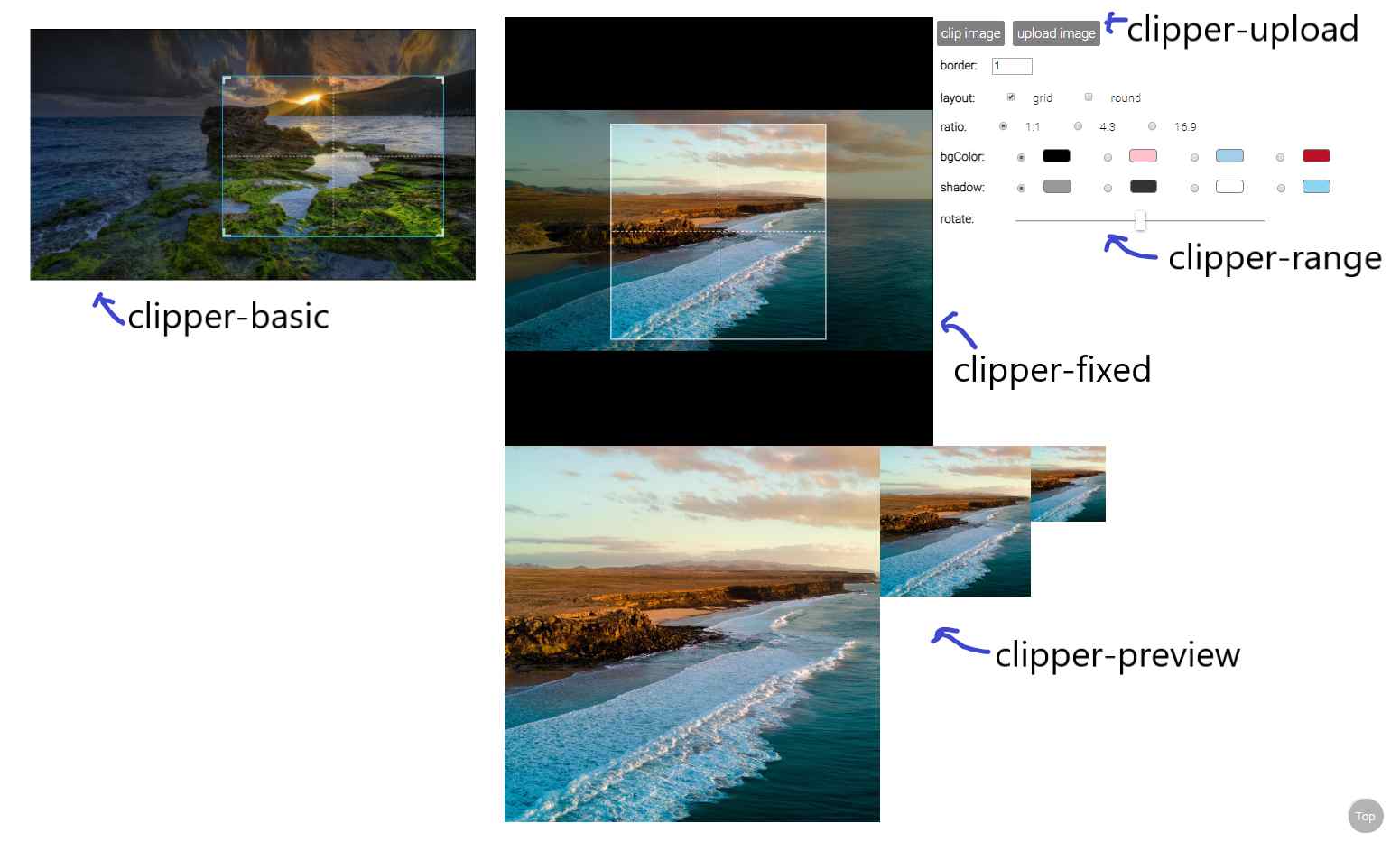\r\n\r\n* [clipperBasic](#clipper-basic)\r\n* [clipperFixed](#clipper-fixed)\r\n* [clipperPreview](#clipper-preview)\r\n* [clipperUpload](#clipper-upload)\r\n* [clipperRange](#clipper-range)\r\n\r\nSee detail [examples](https://timtnleeproject.github.io/vuejs-clipper/#/examples).\r\n\r\n### clipper-basic\r\n\r\nan image clipping component\r\n\r\n```javascript\r\nimport { clipperBasic } from 'vuejs-clipper'\r\n```\r\n\r\n* Props\r\n\r\n|Prop|Type|default|description|\r\n|--------|-------:|------:|:-----|\r\n| src | string| | image src |\r\n| preview| string | | matches `clipper-preview`'s name to show preview image.|\r\n| border | number| 1 | border width |\r\n| outline| number | 6 | outlines near by the border to help user zooming. |\r\n| corner | boolean| true | show corner layout |\r\n| grid | boolean| true | show grid layout|\r\n| ratio | number | | ratio of clipping area (width/height). ex: `1`, `4/3` .|\r\n| mode | 'normal'/'switch' | 'normal' | if ratio is set, this prop will affect how clipping area zoom.|\r\n|bg-color |string | 'white' | background color|\r\n|shadow|string|'rgba(0,0,0,0.4)'|shadow color|\r\n|rotate | number | 0 | rotate degree |\r\n|scale | number | 1 | transform scale |\r\n|touch-create| boolean | true | enable/disable create new clipping area on touch device |\r\n\r\n* Methods\r\n\r\n| method | argument | return| description |\r\n|-|-|-|-|\r\n| clip | | canvas element |get clipping canvas element|\r\n\r\nset ref to use component methods\r\n\r\n```html\r\n\r\n```\r\n\r\nin your Vue instance methods\r\n\r\n```javascript\r\nconst canvas = this.$refs.clipper.clip()\r\n```\r\n\r\n* Event\r\n\r\n|event|parameters|description|\r\n|-|-|-|\r\n|load|$event|image onload|\r\n|error|$error|image onerror|\r\n\r\nusage :\r\n\r\n```html\r\n\r\n```\r\n\r\n* Data\r\n\r\n|data |type | default|description|\r\n|-|-|-|-|\r\n|imgRatio|number|NaN|upload image's ratio (image naturalWidth/natrualHeight). Default value is NaN, after the load event the value will be set.|\r\n|zoomTL$|object||clipping area's position(%), can be top/bottom and left/right.|\r\n|zoomWH$|object||clipping area's width and height(%)|\r\n\r\nusage :\r\n\r\n```javascript\r\nthis.$refs.clipper.imgRatio\r\nthis.$refs.clipper.zoomWH$.width\r\n```\r\n\r\n* Slot\r\n\r\n|slot|description|\r\n|-|-|\r\n|placeholder|if no `src` provided, show placeholder|\r\n\r\n```html\r\n\r\n
No image
\r\n\r\n```\r\n\r\n* rxjs Subject\r\n\r\n|subject|description|\r\n|-|-|\r\n|setTL$|Set the position of the zooming area.|\r\n|setWH$|Set the width and height of the zooming area.|\r\n|onChange$|Subject that subscribe to zooming, moving and rotating subjects.|\r\n\r\nusage:\r\n\r\n```javascript\r\nthis.$refs.clipper.setTL$.next({ left: 0, top: 0 }) // percentage 0%\r\nthis.$refs.clipper.setTL$.next({ right: 0, bottom: 10 })\r\nthis.$refs.clipper.setWH$.next({ width: 100, height: 100 }) // percentage 100%\r\n\r\nthis.$refs.cliiper.onChange$.subscribe(() => {\r\n // This happens whenever zooming, moving and rotating occur.\r\n})\r\n```\r\n\r\n### clipper-fixed\r\n\r\nan image clipping component\r\n\r\n```javascript\r\nimport { clipperFixed } from 'vuejs-clipper'\r\n```\r\n\r\n* Props\r\n\r\n| Prop | Type |default|description |\r\n|:--------|-------:|------:|:-----|\r\n| src | string| | image src |\r\n| preview| string | | matches `clipper-preview`'s name to show preview image.|\r\n| ratio | number | 1 | ratio of clipping area (width/height). ex: `1`, `4/3` .|\r\n| zoom-rate| number | 0.04 | zooming faster if this value is larger|\r\n|min-scale | number| 0.1 | minimum transform scale |\r\n| border | number| 1 | border width |\r\n|border-color|string|'white'|border color|\r\n| grid | boolean| true | show grid layout|\r\n| round | boolean | false | Use a round clipping area, this only effect the component layout, clipping results are still rectangular. |\r\n| bg-color |string | 'white' | background color|\r\n|shadow|string|'rgba(0,0,0,0.4)'|shadow color|\r\n|rotate | number | 0 | rotate degree |\r\n\r\n* Method\r\n\r\n| method | argument | return| description |\r\n|-|-|-|-|\r\n| clip | | canvas element |get clipping canvas element|\r\n\r\n* Event\r\n\r\n|event|parameters|description|\r\n|-|-|-|\r\n|load|$event|image onload|\r\n|error|$error|image onerror|\r\n\r\n* Data\r\n\r\n|data |type | default|description|\r\n|-|-|-|-|\r\n|imgRatio|number|NaN|upload image's ratio (image naturalWidth/natrualHeight). Default value is NaN, after the load event the value will be set.|\r\n|bgTL$|object||image's translate(X,Y)|\r\n|bgWH$|number||image's scaling|\r\n\r\n* Slot\r\n\r\n|slot|description|\r\n|-|-|\r\n|placeholder|if no `src` provided, show placeholder|\r\n\r\n* rxjs Subject\r\n\r\n|subject|description|\r\n|-|-|\r\n|setTL$|Set the top and left of the image.|\r\n|setWH$|Set the sizing(scaling) of the image.|\r\n|onChange$|Subject that subscribe to zooming, moving and rotating subjects.|\r\n\r\nusage:\r\n\r\n```javascript\r\nthis.$refs.clipper.setTL$.next({ left: 50, top: 50 }) // percentage 0%\r\nthis.$refs.clipper.setWH$.next(0.6) // transform scale(0.6)\r\n\r\nthis.$refs.cliiper.onChange$.subscribe(() => {\r\n // This happens whenever zooming, moving and rotating occur.\r\n})\r\n```\r\n\r\n### clipper-preview\r\n\r\npreview clipping result\r\n\r\n```javascript\r\nimport { clipperPreview } from 'vuejs-clipper'\r\n```\r\n\r\n* Props\r\n\r\n| Prop | Type |default|description |\r\n|--------|-------:|------:|:-----|\r\n| name | string | | name that matches clipper component's preview property |\r\n\r\n* Slot\r\n\r\n|slot|description|\r\n|-|-|\r\n|placeholder|if no `src` provided, show placeholder|\r\n\r\n### clipper-range\r\n\r\na simple input range component\r\n\r\n```javascript\r\nimport { clipperRange } from 'vuejs-clipper'\r\n```\r\n\r\nuse `v-model` binding data with `clipper-range`\r\n\r\n* Props\r\n\r\n| Prop|Type|default|description |\r\n|--------|-------:|------:|:-----|\r\n| max | number | 10 | maximum value of range |\r\n| min | number | 0 | minimum value of range |\r\n\r\n### clipper-upload\r\n\r\na new component in 0.2.0\r\n\r\nan upload button that transform image files to URL\r\n\r\n```javascript\r\nimport { clipperUpload } from 'vuejs-clipper'\r\n```\r\n\r\nuse `v-model` binding data with `clipper-upload`\r\n\r\n* Props\r\n\r\n| Prop|Type|default|description |\r\n|-|-:|-:|:-|\r\n|check|boolean|true|Check if upload file is an image. If set to `true`, when upload files that are not images, it will do nothing, so you will not get an error event on clipping component.|\r\n|accept|string|'*'|Bind `accept` attribute to file input tag.|\r\n|exif|boolean|true|Transform EXIF image to correct orientation when uploading.|\r\n\r\n## Changelog\r\n\r\n* 0.2.12\r\n * Fixed [issue #13][issue13]\r\n* 0.2.11\r\n * Expose rxjs subjects that can [set position and layout of the movable area](https://timtnleeproject.github.io/vuejs-clipper/#/examples/set-layout).\r\n* 0.2.10\r\n * Use passive event listener on wheel event ([issue #8][issue8]).\r\n* 0.2.9\r\n * New prop `border-color` for `clipper-fixed`\r\n * Fixed [issue #4][issue4]\r\n* 0.2.8\r\n * New prop `accept` for clipper-upload ([issue #1][issue1])\r\n * Add EXIF image transformation feature to clipper-upload ([issue #2][issue2])\r\n\r\n[issue1]:https://github.com/timtnleeProject/vuejs-clipper/issues/1\r\n[issue2]:https://github.com/timtnleeProject/vuejs-clipper/issues/2\r\n[issue4]:https://github.com/timtnleeProject/vuejs-clipper/issues/4\r\n[issue8]:https://github.com/timtnleeProject/vuejs-clipper/issues/8\r\n[issue13]:https://github.com/timtnleeProject/vuejs-clipper/issues/13","readmeFilename":"README.md","description":"Vue.js image clipping components using Vue-Rx.","_id":"vuejs-clipper@0.2.12-beta.0","_nodeVersion":"10.15.3","_npmVersion":"6.9.0","dist":{"integrity":"sha512-U3uBtshG1FP8+wmt5ZROZMAjd7pgMIoaz/G8D3VsMkwE5K4HmTaeBiQ8ZN4gTGJGbjBaVmlJJy7j3CFK90FRvQ==","shasum":"7cc5742ff83b9c4437402936f1001989e94c99ce","tarball":"https://registry.npmjs.org/vuejs-clipper/-/vuejs-clipper-0.2.12-beta.0.tgz","fileCount":20,"unpackedSize":553733,"npm-signature":"-----BEGIN PGP SIGNATURE-----\r\nVersion: OpenPGP.js v3.0.4\r\nComment: https://openpgpjs.org\r\n\r\nwsFcBAEBCAAQBQJc0m+qCRA9TVsSAnZWagAAg1kQAJ6Kc130WdX/QYwlSOm9\n3hfUSGtVHMaA2HZVOpohgo1fk1QxqFRBuhHAqQ+cEZEBxvJPlgX5EzOl2VZb\n5DLi/HkqX0Pqo4C/tT7b39serOrfocPbDMVuj2ZgmM3a3BcpuY00PgfKfObW\nVSyhw6MNetxmOkeRvrpWryXxBEsjWjymsBbQd7qJRPcPwOYhxdvCT9zdnaeP\nCOuwOmsgJu0MdWwy9d/5Zo6Sf79hgO3NQ6wQnjpwlex9a7wYjCEjton+d8Yg\nYCHbEWFTR135qtOVsTA0yiEdxpXgN2ekuBnWGe2UlXr2sYrk2DHcSVZLtffr\ndMGA1abF5P7leDBk7a7+fC/O+6jgB+MxzprCohTZpQh5KZ6/6TaDymvqpxpn\ngM2adcQoJM6SIeyPxNCY7HVn980LesdbusGDNdoA4MYaYuc/oWgfQk5b7W3i\nUjipFBTbbrr5nQGJ+i7C+pvh9fDAkdUIQUZMHtoWPIvqcb1tkmaRHX26p3n7\nkXXFQBNks7CCyNtzAuzHzVGd9E5fHfyVbaIOO6sAlCZXANca1sVybqo5ncaH\nAWACMVvgzWpQWYCjVgeTNBpgbdwIVoXtIvqwtBY4LpkSWrQ/MApvfmeT2fw9\nS0c/kKu1BhDtpoGhwhEgJc2dllWIl6he2QYpJllcjPhKPGY8r+0HZIKNHXKg\n62j/\r\n=B3tB\r\n-----END PGP SIGNATURE-----\r\n","signatures":[{"keyid":"SHA256:jl3bwswu80PjjokCgh0o2w5c2U4LhQAE57gj9cz1kzA","sig":"MEYCIQDwrtTax0d6xy9GReUZ/7iyslA/DohVpz0PYth2NjkH+wIhAOK/MOMkxnJVuAknLNVlrgc0XQ+GFMRCQM3lRvxnZm0C"}]},"maintainers":[{"name":"timtnlee","email":"timtnlee1995@gmail.com"}],"_npmUser":{"name":"timtnlee","email":"litingen1995@gmail.com"},"directories":{},"_npmOperationalInternal":{"host":"s3://npm-registry-packages","tmp":"tmp/vuejs-clipper_0.2.12-beta.0_1557295017363_0.14940497957404064"},"_hasShrinkwrap":false},"0.2.12-beta.1":{"name":"vuejs-clipper","version":"0.2.12-beta.1","author":{"name":"timtnlee"},"homepage":"https://timtnleeproject.github.io/vuejs-clipper/","license":"MIT","repository":{"type":"git","url":"git+https://github.com/timtnleeProject/vuejs-clipper.git"},"bugs":{"url":"https://github.com/timtnleeProject/vuejs-clipper/issues"},"keywords":["vue","image","clip","crop","clipper","cropper"],"main":"dist/vuejs-clipper.umd.js","module":"src/clipper.js","scripts":{"build":"vue-cli-service build --target lib --name vuejs-clipper src/clipper.js","lint":"vue-cli-service lint"},"dependencies":{"exif-js":"^2.3.0","rxjs":"^6.3.2","vue-rx":"^6.0.1"},"devDependencies":{"@vue/cli-plugin-babel":"^3.0.3","@vue/cli-plugin-eslint":"^3.0.3","@vue/cli-plugin-unit-mocha":"^3.0.3","@vue/cli-service":"^3.6.0","@vue/test-utils":"^1.0.0-beta.20","chai":"^4.1.2","eslint":"^5.16.0","eslint-config-standard":"^12.0.0","eslint-plugin-import":"^2.17.2","eslint-plugin-node":"^8.0.1","eslint-plugin-promise":"^4.1.1","eslint-plugin-standard":"^4.0.0","eslint-plugin-vue":"^5.2.2","node-sass":"^4.12.0","sass-loader":"^7.0.1","vue-template-compiler":"^2.5.17","webpack-bundle-analyzer":"^3.3.2","webpack-dev-server":">=3.1.11"},"eslintConfig":{"root":true,"env":{"node":true},"extends":["standard","plugin:vue/recommended"],"rules":{},"parserOptions":{"parser":"babel-eslint"}},"postcss":{"plugins":{"autoprefixer":{}}},"browserslist":["> 1%","last 2 versions","not ie <= 8"],"gitHead":"54c1e1f74889f7ab7f125d49a365856e2bfbc05a","readme":"# vuejs-clipper\r\n\r\nVue.js image clipping components using Vue-Rx.\r\n\r\n[](https://www.npmjs.com/package/vuejs-clipper)\r\n[](https://travis-ci.org/timtnleeProject/vuejs-clipper#)\r\n\r\n* Add image clipping components to your Vue application in nothing flat.\r\n* Touch devices supported and fully responsive.\r\n\r\n## Demo\r\n\r\n* [live demo & examples](https://timtnleeproject.github.io/vuejs-clipper)\r\n* [try it on codepen](https://codepen.io/timtnlee/pen/vzzqRM)\r\n\r\n## Table of Contents\r\n\r\n* [Notice](#notice)\r\n* [Installation](#installation)\r\n* [Components](#components)\r\n* [Changelog](#changelog)\r\n\r\n## Notice\r\n\r\nBefore using the plugin & components, here's something you should know :\r\n\r\n* It's based on **vue-rx**.\r\n* Use vuejs-clipper plugin also add **vue-rx** plugin to vue.\r\n* Components are responsive base on **width** instead of height.\r\n* You can clip your own images (local uploaded images or images served on your site), but you cannot clip a cross-origin image.\r\n* Components' **input** is an image URL, **output** is a canvas element, they only help you clip images to canvas, you need to handle other things like *transform file input to image URL* or *transform output canvas to image* by yourself.\r\n\r\n## Installation\r\n\r\n### NPM & ESM\r\n\r\ninstall vuejs-clipper\r\n\r\n```bash\r\n$npm install vuejs-clipper --save\r\n```\r\n\r\nneed sass-loader, if you haven't installed :\r\n\r\n```bash\r\n$npm install -D sass-loader node-sass\r\n```\r\n\r\n#### (1) use vuejs-clipper plugin\r\n\r\nUse vuejs-clipper plugin also add **vue-rx** plugin to Vue.\r\n\r\nBy default it will register **all components** to Vue global scope.\r\n\r\n```javascript\r\nimport Vue from 'vue'\r\nimport VuejsClipper from 'vuejs-clipper'\r\n// install\r\nVue.use(VuejsClipper)\r\n```\r\n\r\nregister some components to global with default component name\r\n\r\n```javascript\r\nVue.use(VuejsClipper ,{\r\n components: {\r\n clipperBasic: true,\r\n clipperPreview: true\r\n }\r\n})\r\n```\r\n\r\nwith customized component name\r\n\r\n```javascript\r\nVue.use(VuejsClipper ,{\r\n components: {\r\n clipperBasic: 'image-clipper-basic',\r\n clipperPreview: 'my-preview'\r\n }\r\n})\r\n```\r\n\r\nnot register any components, but with some plugin options\r\n\r\n```javascript\r\nVue.use(VuejsClipper ,{\r\n components: null,\r\n parentPropName: 'myCustomerName'\r\n /*\r\n parentPropName:\r\n Add property to Vue instance to store `clipper-preview` list.\r\n You can change the property name\r\n default: '_imgPreviewLists'\r\n */\r\n})\r\n```\r\n\r\n#### (2) separately import components\r\n\r\ninstall vue-rx and it's peer dependency rxjs\r\n\r\n```bash\r\n$npm install --save vue-rx rx-js\r\n```\r\n\r\nuse vue-rx\r\n\r\n```javascript\r\nimport Vue from 'vue'\r\nimport VueRx from 'vue-rx'\r\n// install vue-rx\r\nVue.use(VueRx)\r\n```\r\n\r\nthen import in your components (SFC)\r\n\r\n```javascript\r\nimport { clipperBasic, clipperPreview } from 'vuejs-clipper'\r\n\r\nexport default {\r\n components: {\r\n clipperBasic,\r\n clipperPreview\r\n }\r\n}\r\n```\r\n\r\n### Script\r\n\r\nInclude vuejs-clipper umd script after Vue.js.\r\n\r\n```html\r\n\r\n\r\n\r\n```\r\n\r\n### Use in html/template\r\n\r\n```html\r\n\r\n```\r\n\r\n## Components\r\n\r\n\r\n\r\n* [clipperBasic](#clipper-basic)\r\n* [clipperFixed](#clipper-fixed)\r\n* [clipperPreview](#clipper-preview)\r\n* [clipperUpload](#clipper-upload)\r\n* [clipperRange](#clipper-range)\r\n\r\nSee detail [examples](https://timtnleeproject.github.io/vuejs-clipper/#/examples).\r\n\r\n### clipper-basic\r\n\r\nan image clipping component\r\n\r\n```javascript\r\nimport { clipperBasic } from 'vuejs-clipper'\r\n```\r\n\r\n* Props\r\n\r\n|Prop|Type|default|description|\r\n|--------|-------:|------:|:-----|\r\n| src | string| | image src |\r\n| preview| string | | matches `clipper-preview`'s name to show preview image.|\r\n| border | number| 1 | border width |\r\n| outline| number | 6 | outlines near by the border to help user zooming. |\r\n| corner | boolean| true | show corner layout |\r\n| grid | boolean| true | show grid layout|\r\n| ratio | number | | ratio of clipping area (width/height). ex: `1`, `4/3` .|\r\n| mode | 'normal'/'switch' | 'normal' | if ratio is set, this prop will affect how clipping area zoom.|\r\n|bg-color |string | 'white' | background color|\r\n|shadow|string|'rgba(0,0,0,0.4)'|shadow color|\r\n|rotate | number | 0 | rotate degree |\r\n|scale | number | 1 | transform scale |\r\n|touch-create| boolean | true | enable/disable create new clipping area on touch device |\r\n\r\n* Methods\r\n\r\n| method | argument | return| description |\r\n|-|-|-|-|\r\n| clip | | canvas element |get clipping canvas element|\r\n\r\nset ref to use component methods\r\n\r\n```html\r\n\r\n```\r\n\r\nin your Vue instance methods\r\n\r\n```javascript\r\nconst canvas = this.$refs.clipper.clip()\r\n```\r\n\r\n* Event\r\n\r\n|event|parameters|description|\r\n|-|-|-|\r\n|load|$event|image onload|\r\n|error|$error|image onerror|\r\n\r\nusage :\r\n\r\n```html\r\n\r\n```\r\n\r\n* Data\r\n\r\n|data |type | default|description|\r\n|-|-|-|-|\r\n|imgRatio|number|NaN|upload image's ratio (image naturalWidth/natrualHeight). Default value is NaN, after the load event the value will be set.|\r\n|zoomTL$|object||clipping area's position(%), can be top/bottom and left/right.|\r\n|zoomWH$|object||clipping area's width and height(%)|\r\n\r\nusage :\r\n\r\n```javascript\r\nthis.$refs.clipper.imgRatio\r\nthis.$refs.clipper.zoomWH$.width\r\n```\r\n\r\n* Slot\r\n\r\n|slot|description|\r\n|-|-|\r\n|placeholder|if no `src` provided, show placeholder|\r\n\r\n```html\r\n\r\n
No image
\r\n\r\n```\r\n\r\n* rxjs Subject\r\n\r\n|subject|description|\r\n|-|-|\r\n|setTL$|Set the position of the zooming area.|\r\n|setWH$|Set the width and height of the zooming area.|\r\n|onChange$|Subject that subscribe to zooming, moving and rotating subjects.|\r\n\r\nusage:\r\n\r\n```javascript\r\nthis.$refs.clipper.setTL$.next({ left: 0, top: 0 }) // percentage 0%\r\nthis.$refs.clipper.setTL$.next({ right: 0, bottom: 10 })\r\nthis.$refs.clipper.setWH$.next({ width: 100, height: 100 }) // percentage 100%\r\n\r\nthis.$refs.cliiper.onChange$.subscribe(() => {\r\n // This happens whenever zooming, moving and rotating occur.\r\n})\r\n```\r\n\r\n### clipper-fixed\r\n\r\nan image clipping component\r\n\r\n```javascript\r\nimport { clipperFixed } from 'vuejs-clipper'\r\n```\r\n\r\n* Props\r\n\r\n| Prop | Type |default|description |\r\n|:--------|-------:|------:|:-----|\r\n| src | string| | image src |\r\n| preview| string | | matches `clipper-preview`'s name to show preview image.|\r\n| ratio | number | 1 | ratio of clipping area (width/height). ex: `1`, `4/3` .|\r\n| zoom-rate| number | 0.04 | zooming faster if this value is larger|\r\n|min-scale | number| 0.1 | minimum transform scale |\r\n| border | number| 1 | border width |\r\n|border-color|string|'white'|border color|\r\n| grid | boolean| true | show grid layout|\r\n| round | boolean | false | Use a round clipping area, this only effect the component layout, clipping results are still rectangular. |\r\n| bg-color |string | 'white' | background color|\r\n|shadow|string|'rgba(0,0,0,0.4)'|shadow color|\r\n|rotate | number | 0 | rotate degree |\r\n\r\n* Method\r\n\r\n| method | argument | return| description |\r\n|-|-|-|-|\r\n| clip | | canvas element |get clipping canvas element|\r\n\r\n* Event\r\n\r\n|event|parameters|description|\r\n|-|-|-|\r\n|load|$event|image onload|\r\n|error|$error|image onerror|\r\n\r\n* Data\r\n\r\n|data |type | default|description|\r\n|-|-|-|-|\r\n|imgRatio|number|NaN|upload image's ratio (image naturalWidth/natrualHeight). Default value is NaN, after the load event the value will be set.|\r\n|bgTL$|object||image's translate(X,Y)|\r\n|bgWH$|number||image's scaling|\r\n\r\n* Slot\r\n\r\n|slot|description|\r\n|-|-|\r\n|placeholder|if no `src` provided, show placeholder|\r\n\r\n* rxjs Subject\r\n\r\n|subject|description|\r\n|-|-|\r\n|setTL$|Set the top and left of the image.|\r\n|setWH$|Set the sizing(scaling) of the image.|\r\n|onChange$|Subject that subscribe to zooming, moving and rotating subjects.|\r\n\r\nusage:\r\n\r\n```javascript\r\nthis.$refs.clipper.setTL$.next({ left: 50, top: 50 }) // percentage 0%\r\nthis.$refs.clipper.setWH$.next(0.6) // transform scale(0.6)\r\n\r\nthis.$refs.cliiper.onChange$.subscribe(() => {\r\n // This happens whenever zooming, moving and rotating occur.\r\n})\r\n```\r\n\r\n### clipper-preview\r\n\r\npreview clipping result\r\n\r\n```javascript\r\nimport { clipperPreview } from 'vuejs-clipper'\r\n```\r\n\r\n* Props\r\n\r\n| Prop | Type |default|description |\r\n|--------|-------:|------:|:-----|\r\n| name | string | | name that matches clipper component's preview property |\r\n\r\n* Slot\r\n\r\n|slot|description|\r\n|-|-|\r\n|placeholder|if no `src` provided, show placeholder|\r\n\r\n### clipper-range\r\n\r\na simple input range component\r\n\r\n```javascript\r\nimport { clipperRange } from 'vuejs-clipper'\r\n```\r\n\r\nuse `v-model` binding data with `clipper-range`\r\n\r\n* Props\r\n\r\n| Prop|Type|default|description |\r\n|--------|-------:|------:|:-----|\r\n| max | number | 10 | maximum value of range |\r\n| min | number | 0 | minimum value of range |\r\n\r\n### clipper-upload\r\n\r\na new component in 0.2.0\r\n\r\nan upload button that transform image files to URL\r\n\r\n```javascript\r\nimport { clipperUpload } from 'vuejs-clipper'\r\n```\r\n\r\nuse `v-model` binding data with `clipper-upload`\r\n\r\n* Props\r\n\r\n| Prop|Type|default|description |\r\n|-|-:|-:|:-|\r\n|check|boolean|true|Check if upload file is an image. If set to `true`, when upload files that are not images, it will do nothing, so you will not get an error event on clipping component.|\r\n|accept|string|'*'|Bind `accept` attribute to file input tag.|\r\n|exif|boolean|true|Transform EXIF image to correct orientation when uploading.|\r\n\r\n## Changelog\r\n\r\n* 0.2.12\r\n * Fixed [issue #13][issue13]\r\n* 0.2.11\r\n * Expose rxjs subjects that can [set position and layout of the movable area](https://timtnleeproject.github.io/vuejs-clipper/#/examples/set-layout).\r\n* 0.2.10\r\n * Use passive event listener on wheel event ([issue #8][issue8]).\r\n* 0.2.9\r\n * New prop `border-color` for `clipper-fixed`\r\n * Fixed [issue #4][issue4]\r\n* 0.2.8\r\n * New prop `accept` for clipper-upload ([issue #1][issue1])\r\n * Add EXIF image transformation feature to clipper-upload ([issue #2][issue2])\r\n\r\n[issue1]:https://github.com/timtnleeProject/vuejs-clipper/issues/1\r\n[issue2]:https://github.com/timtnleeProject/vuejs-clipper/issues/2\r\n[issue4]:https://github.com/timtnleeProject/vuejs-clipper/issues/4\r\n[issue8]:https://github.com/timtnleeProject/vuejs-clipper/issues/8\r\n[issue13]:https://github.com/timtnleeProject/vuejs-clipper/issues/13","readmeFilename":"README.md","description":"Vue.js image clipping components using Vue-Rx.","_id":"vuejs-clipper@0.2.12-beta.1","_nodeVersion":"10.15.3","_npmVersion":"6.9.0","dist":{"integrity":"sha512-bM+AHnOp7yhMGPktL3zHnKRU4MdX4nlsZlGe8CsXwE2PWrAUJXXHGrwKuEqWZR+hR0x5sYM7b2a2ymi/3+6rWg==","shasum":"83ae92fe4083e1ab5cca27056b8fc0e139c9833a","tarball":"https://registry.npmjs.org/vuejs-clipper/-/vuejs-clipper-0.2.12-beta.1.tgz","fileCount":20,"unpackedSize":554056,"npm-signature":"-----BEGIN PGP SIGNATURE-----\r\nVersion: OpenPGP.js v3.0.4\r\nComment: https://openpgpjs.org\r\n\r\nwsFcBAEBCAAQBQJc0nEzCRA9TVsSAnZWagAAOHwQAIOoeOf+/OTsgi/QUWe5\nGhJhnOKD+RrYamfRld/aMaigbg9zAsKbHQRgJR+NMcTNX5rpK3w9RTrjcn+X\nMw68GYyqqs8gWgr1ZQnZgMG/OKbED+khhhU1Bz2wY5Xfv09A6vhSsljhbrJM\nubRtRII+PP7DsBOhplJBkQTXR+GyH/kZzrj4AbvxtTwl2y7i1q/mwilBswRh\niNEaF5rCapDY/cpjfwtdrYH7D5MgZTGCVdqv3i6ormIplvU1g2JKEUboom1g\nD0xMXfIjQMVMVdSYsZwk/WOnwRT6En8OFplVs9m2K/04QEkO39DfsxFbDA/c\nBbygOIwoRH/7mKHdM1v9Op8lwCruIJnCITFdJog0CfYtTlZdKQKo0OlSZKwq\nd3DgyhfhmrBEh7KIV9sgeIuO8zCxbB0JgN+66q2R+eN1J1vcXDHCxSSM+wLg\nT2Vfau//MpCjgPV3qtyfcjdNerkldqwFMqvilLKn8OsnJ9h1LMpHMM+Orl4k\njwbaLqjNmp3EuJuaxKvzaIQY8ozfGOBQokJFMeGmmuDcwExH8+83N9Dzw++G\ndMv4MM/WFmUgK+a/07n4RzE9TCw01SRNie1cd8iHooigexwJG7YAyyc3T8pH\n0/62MRK3C+jQIq5wcGFK6iLCYsV0LUcYkwqOdqtGnlhEZwBQLXbINI2m2oHG\ndw5L\r\n=7oQp\r\n-----END PGP SIGNATURE-----\r\n","signatures":[{"keyid":"SHA256:jl3bwswu80PjjokCgh0o2w5c2U4LhQAE57gj9cz1kzA","sig":"MEYCIQC1AFr6yR9fAr4MVjheea9IbXapBxGEY6v/JqySMSyHEAIhANLiWcscg6kgD3MDOBab9oh19Nk688JuUo6ECvsY4AVX"}]},"maintainers":[{"name":"timtnlee","email":"timtnlee1995@gmail.com"}],"_npmUser":{"name":"timtnlee","email":"litingen1995@gmail.com"},"directories":{},"_npmOperationalInternal":{"host":"s3://npm-registry-packages","tmp":"tmp/vuejs-clipper_0.2.12-beta.1_1557295410994_0.1564363522797012"},"_hasShrinkwrap":false},"0.2.13":{"name":"vuejs-clipper","version":"0.2.13","author":{"name":"timtnlee","email":"litingen1995@gmail.com"},"homepage":"https://timtnleeproject.github.io/vuejs-clipper/","license":"MIT","repository":{"type":"git","url":"git+https://github.com/timtnleeProject/vuejs-clipper.git"},"bugs":{"url":"https://github.com/timtnleeProject/vuejs-clipper/issues"},"keywords":["vue","image","clip","crop","clipper","cropper"],"main":"dist/vuejs-clipper.umd.js","module":"src/clipper.js","scripts":{"build":"vue-cli-service build --target lib --name vuejs-clipper src/clipper.js","lint":"vue-cli-service lint"},"dependencies":{"exif-js":"^2.3.0","rxjs":"^6.3.2","vue-rx":"^6.0.1"},"devDependencies":{"@vue/cli-plugin-babel":"^3.0.3","@vue/cli-plugin-eslint":"^3.0.3","@vue/cli-plugin-unit-mocha":"^3.0.3","@vue/cli-service":"^3.6.0","@vue/test-utils":"^1.0.0-beta.20","chai":"^4.1.2","eslint":"^5.16.0","eslint-config-standard":"^12.0.0","eslint-plugin-import":"^2.17.2","eslint-plugin-node":"^8.0.1","eslint-plugin-promise":"^4.1.1","eslint-plugin-standard":"^4.0.0","eslint-plugin-vue":"^5.2.2","node-sass":"^4.12.0","sass-loader":"^7.0.1","vue-template-compiler":"^2.5.17","webpack-bundle-analyzer":"^3.3.2","webpack-dev-server":">=3.1.11"},"eslintConfig":{"root":true,"env":{"node":true},"extends":["standard","plugin:vue/recommended"],"rules":{},"parserOptions":{"parser":"babel-eslint"}},"postcss":{"plugins":{"autoprefixer":{}}},"browserslist":["> 1%","last 2 versions","not ie <= 8"],"gitHead":"9ffa323aed754ed39049198a3809ff5902de0ff7","description":"Vue.js image clipping components using Vue-Rx.","_id":"vuejs-clipper@0.2.13","_nodeVersion":"10.15.3","_npmVersion":"6.9.0","dist":{"integrity":"sha512-6Rp1+dP9XQTnFHmg8NhrGSNteSHKZ8YDnQiBFhJPoVNDSQIPjnjWNt37bqP2EuAElMoPHB+kLE+DQ7h+jjG/uQ==","shasum":"52bf507bdf2ab04766f69fd8a09501dc28261c69","tarball":"https://registry.npmjs.org/vuejs-clipper/-/vuejs-clipper-0.2.13.tgz","fileCount":20,"unpackedSize":553850,"npm-signature":"-----BEGIN PGP SIGNATURE-----\r\nVersion: OpenPGP.js v3.0.4\r\nComment: https://openpgpjs.org\r\n\r\nwsFcBAEBCAAQBQJc3Lf4CRA9TVsSAnZWagAATEoP/jJrwO6is25i+ur2X72u\nx65iaoIKgPvbVSQ8q3qSswudaavOp+T0jOsoTionN1wdvHLparb31CJFjhJ+\n/4Qc20c0GZA8uZ6WjfksQjUcXIskptl5gxsnPyOD6Cl5OEoRQhkhZ4/WIqhf\nFxkS6xmzQSuF2wkyQAz/k3Jb5q9eSEP+FsLQNt5pp5bcI+qBdIMhoLOvIxmc\nMFJgXhBI2fECi+mrspNOl9D16Fqm9sK4WTxtUofSpRy+hFKtcFebiGMNOjjN\n69VS3QaZ+P4Ds2cYftJnfTYfa+bv+dqjZ6s40aZZtv72SClZYmz/1uyyn4aw\nWtrECKSXOwYizO7IxlfUM3WVDqFOva9jP4SxsmPJsI/VHYQKUpPfgKHWL9q4\nb2g/uPxghLCRFffupfBWsQo4i/uup7WlLY40wSTvWgmcbSHrPWYr+Q9QLQZu\niwjJ1RnFje3Wb7nd2L8bTvTERXfrVv5PHJUUSDgFuaXbbdys0AZkSGjQrdu+\n6syMqCQCjqzNmYk6ioWRDiPPP13DD8zZTIFjPcvwB6Kf7mvBAszcdCNoV6bo\nMd4cxIpvwCi7ZzIktvVU1oN/azOl/9eVAarIJUuLtiLQ0wyDBWkrIlHqcqIp\nbYrs+08Ahu5rrp8Fm4qp2+cigtJTNxIJYHSjmPZG+ojwemzLnq7rmwl9dAso\n1PB/\r\n=GnJ9\r\n-----END PGP SIGNATURE-----\r\n","signatures":[{"keyid":"SHA256:jl3bwswu80PjjokCgh0o2w5c2U4LhQAE57gj9cz1kzA","sig":"MEUCIDWK8XxAaoe5ATIN4eg4mN1ygD0RraoMKEZuSKKTqGsjAiEA/665JuVt5dMsn3yz1Lt9JNu0Ox9M3iAOjznhu3fHHKk="}]},"maintainers":[{"name":"timtnlee","email":"timtnlee1995@gmail.com"}],"_npmUser":{"name":"timtnlee","email":"litingen1995@gmail.com"},"directories":{},"_npmOperationalInternal":{"host":"s3://npm-registry-packages","tmp":"tmp/vuejs-clipper_0.2.13_1557968887802_0.18642037093639074"},"_hasShrinkwrap":false},"0.2.13-beta.0":{"name":"vuejs-clipper","version":"0.2.13-beta.0","author":{"name":"timtnlee","email":"litingen1995@gmail.com"},"homepage":"https://timtnleeproject.github.io/vuejs-clipper/","license":"MIT","repository":{"type":"git","url":"git+https://github.com/timtnleeProject/vuejs-clipper.git"},"bugs":{"url":"https://github.com/timtnleeProject/vuejs-clipper/issues"},"keywords":["vue","image","clip","crop","clipper","cropper"],"main":"dist/vuejs-clipper.umd.js","module":"src/clipper.js","scripts":{"build":"vue-cli-service build --target lib --name vuejs-clipper src/clipper.js","lint":"vue-cli-service lint"},"dependencies":{"exif-js":"^2.3.0","rxjs":"^6.5.2","vue-rx":"^6.0.1"},"devDependencies":{"@vue/cli-plugin-babel":"^3.7.0","@vue/cli-plugin-eslint":"^3.7.0","@vue/cli-plugin-unit-mocha":"^3.7.0","@vue/cli-service":"^3.7.0","@vue/test-utils":"^1.0.0-beta.20","chai":"^4.1.2","eslint":"^5.16.0","eslint-config-standard":"^12.0.0","eslint-plugin-import":"^2.17.2","eslint-plugin-node":"^8.0.1","eslint-plugin-promise":"^4.1.1","eslint-plugin-standard":"^4.0.0","eslint-plugin-vue":"^5.2.2","node-sass":"^4.12.0","sass-loader":"^7.0.1","vue-template-compiler":"^2.6.10","webpack-bundle-analyzer":"^3.3.2","webpack-dev-server":"^3.3.1"},"eslintConfig":{"root":true,"env":{"node":true},"extends":["standard","plugin:vue/recommended"],"rules":{},"parserOptions":{"parser":"babel-eslint"}},"postcss":{"plugins":{"autoprefixer":{}}},"browserslist":["> 1%","last 2 versions","not ie <= 8"],"gitHead":"cde78cb8d227bda64d506bcfcf1197fd43dbdddc","readme":"# vuejs-clipper\r\n\r\nVue.js image clipping components using Vue-Rx.\r\n\r\n[](https://www.npmjs.com/package/vuejs-clipper)\r\n[](https://travis-ci.org/timtnleeProject/vuejs-clipper#)\r\n\r\n* Add image clipping components to your Vue application in nothing flat.\r\n* Touch devices supported and fully responsive.\r\n\r\n## Demo\r\n\r\n* [live demo & examples](https://timtnleeproject.github.io/vuejs-clipper)\r\n* [try it on codepen](https://codepen.io/timtnlee/pen/vzzqRM)\r\n\r\n## Table of Contents\r\n\r\n* [Notice](#notice)\r\n* [Installation](#installation)\r\n* [Components](#components)\r\n* [Changelog](#changelog)\r\n\r\n## Notice\r\n\r\nBefore using the plugin & components, here's something you should know :\r\n\r\n* It's based on **vue-rx**.\r\n* Use vuejs-clipper plugin also add **vue-rx** plugin to vue.\r\n* Components are responsive base on **width** instead of height.\r\n* You can clip your own images (local uploaded images or images served on your site), but you cannot clip a cross-origin image.\r\n* Components' **input** is an image URL, **output** is a canvas element, they only help you clip images to canvas, you need to handle other things like *transform file input to image URL* or *transform output canvas to image* by yourself.\r\n\r\n## Installation\r\n\r\n### NPM & ESM\r\n\r\ninstall vuejs-clipper\r\n\r\n```bash\r\n$npm install vuejs-clipper --save\r\n```\r\n\r\nneed sass-loader, if you haven't installed :\r\n\r\n```bash\r\n$npm install -D sass-loader node-sass\r\n```\r\n\r\n#### (1) use vuejs-clipper plugin\r\n\r\nUse vuejs-clipper plugin also add **vue-rx** plugin to Vue.\r\n\r\nBy default it will register **all components** to Vue global scope.\r\n\r\n```javascript\r\nimport Vue from 'vue'\r\nimport VuejsClipper from 'vuejs-clipper'\r\n// install\r\nVue.use(VuejsClipper)\r\n```\r\n\r\nregister some components to global with default component name\r\n\r\n```javascript\r\nVue.use(VuejsClipper ,{\r\n components: {\r\n clipperBasic: true,\r\n clipperPreview: true\r\n }\r\n})\r\n```\r\n\r\nwith customized component name\r\n\r\n```javascript\r\nVue.use(VuejsClipper ,{\r\n components: {\r\n clipperBasic: 'image-clipper-basic',\r\n clipperPreview: 'my-preview'\r\n }\r\n})\r\n```\r\n\r\nnot register any components, but with some plugin options\r\n\r\n```javascript\r\nVue.use(VuejsClipper ,{\r\n components: null,\r\n parentPropName: 'myCustomerName'\r\n /*\r\n parentPropName:\r\n Add property to Vue instance to store `clipper-preview` list.\r\n You can change the property name\r\n default: '_imgPreviewLists'\r\n */\r\n})\r\n```\r\n\r\n#### (2) separately import components\r\n\r\ninstall vue-rx and it's peer dependency rxjs\r\n\r\n```bash\r\n$npm install --save vue-rx rx-js\r\n```\r\n\r\nuse vue-rx\r\n\r\n```javascript\r\nimport Vue from 'vue'\r\nimport VueRx from 'vue-rx'\r\n// install vue-rx\r\nVue.use(VueRx)\r\n```\r\n\r\nthen import in your components (SFC)\r\n\r\n```javascript\r\nimport { clipperBasic, clipperPreview } from 'vuejs-clipper'\r\n\r\nexport default {\r\n components: {\r\n clipperBasic,\r\n clipperPreview\r\n }\r\n}\r\n```\r\n\r\n### Script\r\n\r\nInclude vuejs-clipper umd script after Vue.js.\r\n\r\n```html\r\n\r\n\r\n\r\n```\r\n\r\n### Use in html/template\r\n\r\n```html\r\n\r\n```\r\n\r\n## Components\r\n\r\n\r\n\r\n* [clipperBasic](#clipper-basic)\r\n* [clipperFixed](#clipper-fixed)\r\n* [clipperPreview](#clipper-preview)\r\n* [clipperUpload](#clipper-upload)\r\n* [clipperRange](#clipper-range)\r\n\r\nSee detail [examples](https://timtnleeproject.github.io/vuejs-clipper/#/examples).\r\n\r\n### clipper-basic\r\n\r\nan image clipping component\r\n\r\n```javascript\r\nimport { clipperBasic } from 'vuejs-clipper'\r\n```\r\n\r\n* Props\r\n\r\n|Prop|Type|default|description|\r\n|--------|-------:|------:|:-----|\r\n| src | string| | image src |\r\n| preview| string | | matches `clipper-preview`'s name to show preview image.|\r\n| border | number| 1 | border width |\r\n| outline| number | 6 | outlines near by the border to help user zooming. |\r\n| corner | boolean| true | show corner layout |\r\n| grid | boolean| true | show grid layout|\r\n| ratio | number | | ratio of clipping area (width/height). ex: `1`, `4/3` .|\r\n| mode | 'normal'/'switch' | 'normal' | if ratio is set, this prop will affect how clipping area zoom.|\r\n|bg-color |string | 'white' | background color|\r\n|shadow|string|'rgba(0,0,0,0.4)'|shadow color|\r\n|rotate | number | 0 | rotate degree |\r\n|scale | number | 1 | transform scale |\r\n|touch-create| boolean | true | enable/disable create new clipping area on touch device |\r\n\r\n* Methods\r\n\r\n| method | argument | return| description |\r\n|-|-|-|-|\r\n| clip | | canvas element |get clipping canvas element|\r\n|getDrawPos||`{pos, translate}`: positions and trnasformation|get result canvas information|\r\n\r\nset ref to use component methods\r\n\r\n```html\r\n\r\n```\r\n\r\nin your Vue instance methods\r\n\r\n```javascript\r\nconst canvas = this.$refs.clipper.clip()\r\n```\r\n\r\n* Event\r\n\r\n|event|parameters|description|\r\n|-|-|-|\r\n|load|$event|image onload|\r\n|error|$error|image onerror|\r\n\r\nusage :\r\n\r\n```html\r\n\r\n```\r\n\r\n* Data\r\n\r\n|data |type | default|description|\r\n|-|-|-|-|\r\n|imgRatio|number|NaN|upload image's ratio (image naturalWidth/natrualHeight). Default value is NaN, after the load event the value will be set.|\r\n|zoomTL$|object||clipping area's position(%), can be top/bottom and left/right.|\r\n|zoomWH$|object||clipping area's width and height(%)|\r\n\r\nusage :\r\n\r\n```javascript\r\nthis.$refs.clipper.imgRatio\r\nthis.$refs.clipper.zoomWH$.width\r\n```\r\n\r\n* Slot\r\n\r\n|slot|description|\r\n|-|-|\r\n|placeholder|if no `src` provided, show placeholder|\r\n\r\n```html\r\n\r\n
No image
\r\n\r\n```\r\n\r\n* rxjs Subject\r\n\r\n|subject|description|\r\n|-|-|\r\n|setTL$|Set the position of the zooming area.|\r\n|setWH$|Set the width and height of the zooming area.|\r\n|onChange$|Subject that subscribe to zooming, moving and rotating subjects.|\r\n\r\nusage:\r\n\r\n```javascript\r\nthis.$refs.clipper.setTL$.next({ left: 0, top: 0 }) // percentage 0%\r\nthis.$refs.clipper.setTL$.next({ right: 0, bottom: 10 })\r\nthis.$refs.clipper.setWH$.next({ width: 100, height: 100 }) // percentage 100%\r\n\r\nthis.$refs.cliiper.onChange$.subscribe(() => {\r\n // This happens whenever zooming, moving and rotating occur.\r\n})\r\n```\r\n\r\n### clipper-fixed\r\n\r\nan image clipping component\r\n\r\n```javascript\r\nimport { clipperFixed } from 'vuejs-clipper'\r\n```\r\n\r\n* Props\r\n\r\n| Prop | Type |default|description |\r\n|:--------|-------:|------:|:-----|\r\n| src | string| | image src |\r\n| preview| string | | matches `clipper-preview`'s name to show preview image.|\r\n| ratio | number | 1 | ratio of clipping area (width/height). ex: `1`, `4/3` .|\r\n| zoom-rate| number | 0.04 | zooming faster if this value is larger|\r\n|min-scale | number| 0.1 | minimum transform scale |\r\n| border | number| 1 | border width |\r\n|border-color|string|'white'|border color|\r\n| grid | boolean| true | show grid layout|\r\n| round | boolean | false | Use a round clipping area, this only effect the component layout, clipping results are still rectangular. |\r\n| bg-color |string | 'white' | background color|\r\n|shadow|string|'rgba(0,0,0,0.4)'|shadow color|\r\n|rotate | number | 0 | rotate degree |\r\n\r\n* Method\r\n\r\n| method | argument | return| description |\r\n|-|-|-|-|\r\n| clip | | canvas element |get clipping canvas element|\r\n|getDrawPos||`{pos, translate}`: positions and trnasformation|get result canvas information|\r\n\r\n* Event\r\n\r\n|event|parameters|description|\r\n|-|-|-|\r\n|load|$event|image onload|\r\n|error|$error|image onerror|\r\n\r\n* Data\r\n\r\n|data |type | default|description|\r\n|-|-|-|-|\r\n|imgRatio|number|NaN|upload image's ratio (image naturalWidth/natrualHeight). Default value is NaN, after the load event the value will be set.|\r\n|bgTL$|object||image's translate(X,Y)|\r\n|bgWH$|number||image's scaling|\r\n\r\n* Slot\r\n\r\n|slot|description|\r\n|-|-|\r\n|placeholder|if no `src` provided, show placeholder|\r\n\r\n* rxjs Subject\r\n\r\n|subject|description|\r\n|-|-|\r\n|setTL$|Set the top and left of the image.|\r\n|setWH$|Set the sizing(scaling) of the image.|\r\n|onChange$|Subject that subscribe to zooming, moving and rotating subjects.|\r\n\r\nusage:\r\n\r\n```javascript\r\nthis.$refs.clipper.setTL$.next({ left: 50, top: 50 }) // percentage 0%\r\nthis.$refs.clipper.setWH$.next(0.6) // transform scale(0.6)\r\n\r\nthis.$refs.cliiper.onChange$.subscribe(() => {\r\n // This happens whenever zooming, moving and rotating occur.\r\n})\r\n```\r\n\r\n### clipper-preview\r\n\r\npreview clipping result\r\n\r\n```javascript\r\nimport { clipperPreview } from 'vuejs-clipper'\r\n```\r\n\r\n* Props\r\n\r\n| Prop | Type |default|description |\r\n|--------|-------:|------:|:-----|\r\n| name | string | | name that matches clipper component's preview property |\r\n\r\n* Slot\r\n\r\n|slot|description|\r\n|-|-|\r\n|placeholder|if no `src` provided, show placeholder|\r\n\r\n### clipper-range\r\n\r\na simple input range component\r\n\r\n```javascript\r\nimport { clipperRange } from 'vuejs-clipper'\r\n```\r\n\r\nuse `v-model` binding data with `clipper-range`\r\n\r\n* Props\r\n\r\n| Prop|Type|default|description |\r\n|--------|-------:|------:|:-----|\r\n| max | number | 10 | maximum value of range |\r\n| min | number | 0 | minimum value of range |\r\n\r\n### clipper-upload\r\n\r\na new component in 0.2.0\r\n\r\nan upload button that transform image files to URL\r\n\r\n```javascript\r\nimport { clipperUpload } from 'vuejs-clipper'\r\n```\r\n\r\nuse `v-model` binding data with `clipper-upload`\r\n\r\n* Props\r\n\r\n| Prop|Type|default|description |\r\n|-|-:|-:|:-|\r\n|check|boolean|true|Check if upload file is an image. If set to `true`, when upload files that are not images, it will do nothing, so you will not get an error event on clipping component.|\r\n|accept|string|'*'|Bind `accept` attribute to file input tag.|\r\n|exif|boolean|true|Transform EXIF image to correct orientation when uploading.|\r\n\r\n## Changelog\r\n\r\n* 0.2.13\r\n * Decrease css specificity\r\n* 0.2.12\r\n * Fixed [issue #13][issue13]\r\n* 0.2.11\r\n * Expose rxjs subjects that can [set position and layout of the movable area](https://timtnleeproject.github.io/vuejs-clipper/#/examples/set-layout).\r\n* 0.2.10\r\n * Use passive event listener on wheel event ([issue #8][issue8]).\r\n* 0.2.9\r\n * New prop `border-color` for `clipper-fixed`\r\n * Fixed [issue #4][issue4]\r\n* 0.2.8\r\n * New prop `accept` for clipper-upload ([issue #1][issue1])\r\n * Add EXIF image transformation feature to clipper-upload ([issue #2][issue2])\r\n\r\n[issue1]:https://github.com/timtnleeProject/vuejs-clipper/issues/1\r\n[issue2]:https://github.com/timtnleeProject/vuejs-clipper/issues/2\r\n[issue4]:https://github.com/timtnleeProject/vuejs-clipper/issues/4\r\n[issue8]:https://github.com/timtnleeProject/vuejs-clipper/issues/8\r\n[issue13]:https://github.com/timtnleeProject/vuejs-clipper/issues/13","readmeFilename":"README.md","description":"Vue.js image clipping components using Vue-Rx.","_id":"vuejs-clipper@0.2.13-beta.0","_nodeVersion":"10.15.3","_npmVersion":"6.9.0","dist":{"integrity":"sha512-q3be2D3ulorfqdslmeCe/ToowILhal1sfwAhrAbF5J2fhqUWP3pKYeH0FLP/iRbaaXQexbX4X0SUFB0RCFGvvg==","shasum":"0c2ea4d521d8a31cc17464bd4fb330e929b013ec","tarball":"https://registry.npmjs.org/vuejs-clipper/-/vuejs-clipper-0.2.13-beta.0.tgz","fileCount":20,"unpackedSize":534838,"npm-signature":"-----BEGIN PGP SIGNATURE-----\r\nVersion: OpenPGP.js v3.0.4\r\nComment: https://openpgpjs.org\r\n\r\nwsFcBAEBCAAQBQJc5LdrCRA9TVsSAnZWagAA4qYP+wc2EzYsYo+ZcNYHBYRk\n5nIvVzAqY6mH0FwY8M3fE8dWxmilRn8Kj23+EQPZvfkFLIvRJdHcEgXHffpZ\nHN1iO/BgI1rWaiG3IvB8467wDBe+JY8lXAOf1Zigl5piS9cmsLnm8CmZ3/cK\naW/s9cj3l5UmPHQy1hxT4w6WbThkLYmgBg5aSYPbYbZgN3Z2glNhK/8yEyd9\nMnWrdBcqHA2rnR3nodlG20ibmKpzPaTo9pZJ3psum4DFqjTdHHI4P1+UeLSX\nv79TbQVjpkC9n93kHRzssNwzwUoDzQiQNfjw7/AVPY3dfE2bq2IxzrZysq1j\na1uNfR9KteuQLUf14g6iviXVqV53woW7ibJDR+rNyxTRGiqvGrUK9JMHmoWI\nMKd6POIiKihvIKDFoWv3/4wqOyIGDIQTvvp4DyR2QK2Op8v47LHroNyUDFHS\nEuChJvXyYypYjVp05/v/Rgs9g2YCZ5D6yWjUKJSAjQlMfmmgko4dlbVmEr6/\nFVu8nXHx//l+YY8sd5eNHuobAhtONlQTwBUMXeDwmpOvMzJyof9NQpyarLA0\na7pnyUIvfXDiX2U6ka4+8rua9zGMRqjVKcFG8EDXOii5RZ688uBu95vrJZH7\nJPphzl3cBlIBiwhN3gJvVIQRNCzxBFs5r9Fa/6ACZ951JfAOf+ZQSCxkN85V\njxQ/\r\n=O8gJ\r\n-----END PGP SIGNATURE-----\r\n","signatures":[{"keyid":"SHA256:jl3bwswu80PjjokCgh0o2w5c2U4LhQAE57gj9cz1kzA","sig":"MEYCIQDV7GThc8hx7NyxYffhFFj4niG2vk3QMvsy0FKCbNZRNgIhANjIRHRIbgyFv7fUxGls5pOGi4TSvlHh8lYIZAqOEYm1"}]},"maintainers":[{"name":"timtnlee","email":"timtnlee1995@gmail.com"}],"_npmUser":{"name":"timtnlee","email":"litingen1995@gmail.com"},"directories":{},"_npmOperationalInternal":{"host":"s3://npm-registry-packages","tmp":"tmp/vuejs-clipper_0.2.13-beta.0_1558493035078_0.36858710093133906"},"_hasShrinkwrap":false},"0.2.13-beta.1":{"name":"vuejs-clipper","version":"0.2.13-beta.1","author":{"name":"timtnlee","email":"litingen1995@gmail.com"},"homepage":"https://timtnleeproject.github.io/vuejs-clipper/","license":"MIT","repository":{"type":"git","url":"git+https://github.com/timtnleeProject/vuejs-clipper.git"},"bugs":{"url":"https://github.com/timtnleeProject/vuejs-clipper/issues"},"keywords":["vue","image","clip","crop","clipper","cropper"],"main":"dist/vuejs-clipper.umd.js","module":"src/clipper.js","scripts":{"build":"vue-cli-service build --target lib --name vuejs-clipper src/clipper.js","lint":"vue-cli-service lint"},"dependencies":{"exif-js":"^2.3.0","rxjs":"^6.5.2","vue-rx":"^6.0.1"},"devDependencies":{"@vue/cli-plugin-babel":"^3.7.0","@vue/cli-plugin-eslint":"^3.7.0","@vue/cli-plugin-unit-mocha":"^3.7.0","@vue/cli-service":"^3.7.0","@vue/test-utils":"^1.0.0-beta.20","chai":"^4.1.2","eslint":"^5.16.0","eslint-config-standard":"^12.0.0","eslint-plugin-import":"^2.17.2","eslint-plugin-node":"^8.0.1","eslint-plugin-promise":"^4.1.1","eslint-plugin-standard":"^4.0.0","eslint-plugin-vue":"^5.2.2","node-sass":"^4.12.0","sass-loader":"^7.0.1","vue-template-compiler":"^2.6.10","webpack-bundle-analyzer":"^3.3.2","webpack-dev-server":"^3.3.1"},"eslintConfig":{"root":true,"env":{"node":true},"extends":["standard","plugin:vue/recommended"],"rules":{},"parserOptions":{"parser":"babel-eslint"}},"postcss":{"plugins":{"autoprefixer":{}}},"browserslist":["> 1%","last 2 versions","not ie <= 8"],"gitHead":"50eeb76dce75045f93e754a0142a9998fce0a1ea","readme":"# vuejs-clipper\r\n\r\nVue.js image clipping components using Vue-Rx.\r\n\r\n[](https://www.npmjs.com/package/vuejs-clipper)\r\n[](https://travis-ci.org/timtnleeProject/vuejs-clipper#)\r\n\r\n* Add image clipping components to your Vue application in nothing flat.\r\n* Touch devices supported and fully responsive.\r\n\r\n## Demo\r\n\r\n* [live demo & examples](https://timtnleeproject.github.io/vuejs-clipper)\r\n* [try it on codepen](https://codepen.io/timtnlee/pen/vzzqRM)\r\n\r\n## Table of Contents\r\n\r\n* [Notice](#notice)\r\n* [Installation](#installation)\r\n* [Components](#components)\r\n* [Changelog](#changelog)\r\n\r\n## Notice\r\n\r\nBefore using the plugin & components, here's something you should know :\r\n\r\n* It's based on **vue-rx**.\r\n* Use vuejs-clipper plugin also add **vue-rx** plugin to vue.\r\n* Components are responsive base on **width** instead of height.\r\n* You can clip your own images (local uploaded images or images served on your site), but you cannot clip a cross-origin image.\r\n* Components' **input** is an image URL, **output** is a canvas element, they only help you clip images to canvas, you need to handle other things like *transform file input to image URL* or *transform output canvas to image* by yourself.\r\n\r\n## Installation\r\n\r\n### NPM & ESM\r\n\r\ninstall vuejs-clipper\r\n\r\n```bash\r\n$npm install vuejs-clipper --save\r\n```\r\n\r\nneed sass-loader, if you haven't installed :\r\n\r\n```bash\r\n$npm install -D sass-loader node-sass\r\n```\r\n\r\n#### (1) use vuejs-clipper plugin\r\n\r\nUse vuejs-clipper plugin also add **vue-rx** plugin to Vue.\r\n\r\nBy default it will register **all components** to Vue global scope.\r\n\r\n```javascript\r\nimport Vue from 'vue'\r\nimport VuejsClipper from 'vuejs-clipper'\r\n// install\r\nVue.use(VuejsClipper)\r\n```\r\n\r\nregister some components to global with default component name\r\n\r\n```javascript\r\nVue.use(VuejsClipper ,{\r\n components: {\r\n clipperBasic: true,\r\n clipperPreview: true\r\n }\r\n})\r\n```\r\n\r\nwith customized component name\r\n\r\n```javascript\r\nVue.use(VuejsClipper ,{\r\n components: {\r\n clipperBasic: 'image-clipper-basic',\r\n clipperPreview: 'my-preview'\r\n }\r\n})\r\n```\r\n\r\nnot register any components, but with some plugin options\r\n\r\n```javascript\r\nVue.use(VuejsClipper ,{\r\n components: null,\r\n parentPropName: 'myCustomerName'\r\n /*\r\n parentPropName:\r\n Add property to Vue instance to store `clipper-preview` list.\r\n You can change the property name\r\n default: '_imgPreviewLists'\r\n */\r\n})\r\n```\r\n\r\n#### (2) separately import components\r\n\r\ninstall vue-rx and it's peer dependency rxjs\r\n\r\n```bash\r\n$npm install --save vue-rx rx-js\r\n```\r\n\r\nuse vue-rx\r\n\r\n```javascript\r\nimport Vue from 'vue'\r\nimport VueRx from 'vue-rx'\r\n// install vue-rx\r\nVue.use(VueRx)\r\n```\r\n\r\nthen import in your components (SFC)\r\n\r\n```javascript\r\nimport { clipperBasic, clipperPreview } from 'vuejs-clipper'\r\n\r\nexport default {\r\n components: {\r\n clipperBasic,\r\n clipperPreview\r\n }\r\n}\r\n```\r\n\r\n### Script\r\n\r\nInclude vuejs-clipper umd script after Vue.js.\r\n\r\n```html\r\n\r\n\r\n\r\n```\r\n\r\n### Use in html/template\r\n\r\n```html\r\n\r\n```\r\n\r\n## Components\r\n\r\n\r\n\r\n* [clipperBasic](#clipper-basic)\r\n* [clipperFixed](#clipper-fixed)\r\n* [clipperPreview](#clipper-preview)\r\n* [clipperUpload](#clipper-upload)\r\n* [clipperRange](#clipper-range)\r\n\r\nSee detail [examples](https://timtnleeproject.github.io/vuejs-clipper/#/examples).\r\n\r\n### clipper-basic\r\n\r\nan image clipping component\r\n\r\n```javascript\r\nimport { clipperBasic } from 'vuejs-clipper'\r\n```\r\n\r\n* Props\r\n\r\n|Prop|Type|default|description|\r\n|--------|-------:|------:|:-----|\r\n| src | string| | image src |\r\n| preview| string | | matches `clipper-preview`'s name to show preview image.|\r\n| border | number| 1 | border width |\r\n| outline| number | 6 | outlines near by the border to help user zooming. |\r\n| corner | boolean| true | show corner layout |\r\n| grid | boolean| true | show grid layout|\r\n| ratio | number | | ratio of clipping area (width/height). ex: `1`, `4/3` .|\r\n| mode | 'normal'/'switch' | 'normal' | if ratio is set, this prop will affect how clipping area zoom.|\r\n|bg-color |string | 'white' | background color|\r\n|shadow|string|'rgba(0,0,0,0.4)'|shadow color|\r\n|rotate | number | 0 | rotate degree |\r\n|scale | number | 1 | transform scale |\r\n|touch-create| boolean | true | enable/disable create new clipping area on touch device |\r\n\r\n* Methods\r\n\r\n| method | argument | return| description |\r\n|-|-|-|-|\r\n| clip | | canvas element |get clipping canvas element|\r\n|getDrawPos||`{pos, translate}`: positions and trnasformation|get result canvas information|\r\n\r\nset ref to use component methods\r\n\r\n```html\r\n\r\n```\r\n\r\nin your Vue instance methods\r\n\r\n```javascript\r\nconst canvas = this.$refs.clipper.clip()\r\n```\r\n\r\n* Event\r\n\r\n|event|parameters|description|\r\n|-|-|-|\r\n|load|$event|image onload|\r\n|error|$error|image onerror|\r\n\r\nusage :\r\n\r\n```html\r\n\r\n```\r\n\r\n* Data\r\n\r\n|data |type | default|description|\r\n|-|-|-|-|\r\n|imgRatio|number|NaN|upload image's ratio (image naturalWidth/natrualHeight). Default value is NaN, after the load event the value will be set.|\r\n|zoomTL$|object||clipping area's position(%), can be top/bottom and left/right.|\r\n|zoomWH$|object||clipping area's width and height(%)|\r\n\r\nusage :\r\n\r\n```javascript\r\nthis.$refs.clipper.imgRatio\r\nthis.$refs.clipper.zoomWH$.width\r\n```\r\n\r\n* Slot\r\n\r\n|slot|description|\r\n|-|-|\r\n|placeholder|if no `src` provided, show placeholder|\r\n\r\n```html\r\n\r\n
No image
\r\n\r\n```\r\n\r\n* rxjs Subject\r\n\r\n|subject|description|\r\n|-|-|\r\n|setTL$|Set the position of the zooming area.|\r\n|setWH$|Set the width and height of the zooming area.|\r\n|onChange$|Subject that subscribe to zooming, moving and rotating subjects.|\r\n\r\nusage:\r\n\r\n```javascript\r\nthis.$refs.clipper.setTL$.next({ left: 0, top: 0 }) // percentage 0%\r\nthis.$refs.clipper.setTL$.next({ right: 0, bottom: 10 })\r\nthis.$refs.clipper.setWH$.next({ width: 100, height: 100 }) // percentage 100%\r\n\r\nthis.$refs.cliiper.onChange$.subscribe(() => {\r\n // This happens whenever zooming, moving and rotating occur.\r\n})\r\n```\r\n\r\n### clipper-fixed\r\n\r\nan image clipping component\r\n\r\n```javascript\r\nimport { clipperFixed } from 'vuejs-clipper'\r\n```\r\n\r\n* Props\r\n\r\n| Prop | Type |default|description |\r\n|:--------|-------:|------:|:-----|\r\n| src | string| | image src |\r\n| preview| string | | matches `clipper-preview`'s name to show preview image.|\r\n| ratio | number | 1 | ratio of clipping area (width/height). ex: `1`, `4/3` .|\r\n| zoom-rate| number | 0.04 | zooming faster if this value is larger|\r\n|min-scale | number| 0.1 | minimum transform scale |\r\n| border | number| 1 | border width |\r\n|border-color|string|'white'|border color|\r\n| grid | boolean| true | show grid layout|\r\n| round | boolean | false | Use a round clipping area, this only effect the component layout, clipping results are still rectangular. |\r\n| bg-color |string | 'white' | background color|\r\n|shadow|string|'rgba(0,0,0,0.4)'|shadow color|\r\n|rotate | number | 0 | rotate degree |\r\n\r\n* Method\r\n\r\n| method | argument | return| description |\r\n|-|-|-|-|\r\n| clip | | canvas element |get clipping canvas element|\r\n|getDrawPos||`{pos, translate}`: positions and trnasformation|get result canvas information|\r\n\r\n* Event\r\n\r\n|event|parameters|description|\r\n|-|-|-|\r\n|load|$event|image onload|\r\n|error|$error|image onerror|\r\n\r\n* Data\r\n\r\n|data |type | default|description|\r\n|-|-|-|-|\r\n|imgRatio|number|NaN|upload image's ratio (image naturalWidth/natrualHeight). Default value is NaN, after the load event the value will be set.|\r\n|bgTL$|object||image's translate(X,Y)|\r\n|bgWH$|number||image's scaling|\r\n\r\n* Slot\r\n\r\n|slot|description|\r\n|-|-|\r\n|placeholder|if no `src` provided, show placeholder|\r\n\r\n* rxjs Subject\r\n\r\n|subject|description|\r\n|-|-|\r\n|setTL$|Set the top and left of the image.|\r\n|setWH$|Set the sizing(scaling) of the image.|\r\n|onChange$|Subject that subscribe to zooming, moving and rotating subjects.|\r\n\r\nusage:\r\n\r\n```javascript\r\nthis.$refs.clipper.setTL$.next({ left: 50, top: 50 }) // percentage 0%\r\nthis.$refs.clipper.setWH$.next(0.6) // transform scale(0.6)\r\n\r\nthis.$refs.cliiper.onChange$.subscribe(() => {\r\n // This happens whenever zooming, moving and rotating occur.\r\n})\r\n```\r\n\r\n### clipper-preview\r\n\r\npreview clipping result\r\n\r\n```javascript\r\nimport { clipperPreview } from 'vuejs-clipper'\r\n```\r\n\r\n* Props\r\n\r\n| Prop | Type |default|description |\r\n|--------|-------:|------:|:-----|\r\n| name | string | | name that matches clipper component's preview property |\r\n\r\n* Slot\r\n\r\n|slot|description|\r\n|-|-|\r\n|placeholder|if no `src` provided, show placeholder|\r\n\r\n### clipper-range\r\n\r\na simple input range component\r\n\r\n```javascript\r\nimport { clipperRange } from 'vuejs-clipper'\r\n```\r\n\r\nuse `v-model` binding data with `clipper-range`\r\n\r\n* Props\r\n\r\n| Prop|Type|default|description |\r\n|--------|-------:|------:|:-----|\r\n| max | number | 10 | maximum value of range |\r\n| min | number | 0 | minimum value of range |\r\n\r\n### clipper-upload\r\n\r\na new component in 0.2.0\r\n\r\nan upload button that transform image files to URL\r\n\r\n```javascript\r\nimport { clipperUpload } from 'vuejs-clipper'\r\n```\r\n\r\nuse `v-model` binding data with `clipper-upload`\r\n\r\n* Props\r\n\r\n| Prop|Type|default|description |\r\n|-|-:|-:|:-|\r\n|check|boolean|true|Check if upload file is an image. If set to `true`, when upload files that are not images, it will do nothing, so you will not get an error event on clipping component.|\r\n|accept|string|'*'|Bind `accept` attribute to file input tag.|\r\n|exif|boolean|true|Transform EXIF image to correct orientation when uploading.|\r\n\r\n## Changelog\r\n\r\n* 0.2.13\r\n * Decrease css specificity\r\n* 0.2.12\r\n * Fixed [issue #13][issue13]\r\n* 0.2.11\r\n * Expose rxjs subjects that can [set position and layout of the movable area](https://timtnleeproject.github.io/vuejs-clipper/#/examples/set-layout).\r\n* 0.2.10\r\n * Use passive event listener on wheel event ([issue #8][issue8]).\r\n* 0.2.9\r\n * New prop `border-color` for `clipper-fixed`\r\n * Fixed [issue #4][issue4]\r\n* 0.2.8\r\n * New prop `accept` for clipper-upload ([issue #1][issue1])\r\n * Add EXIF image transformation feature to clipper-upload ([issue #2][issue2])\r\n\r\n[issue1]:https://github.com/timtnleeProject/vuejs-clipper/issues/1\r\n[issue2]:https://github.com/timtnleeProject/vuejs-clipper/issues/2\r\n[issue4]:https://github.com/timtnleeProject/vuejs-clipper/issues/4\r\n[issue8]:https://github.com/timtnleeProject/vuejs-clipper/issues/8\r\n[issue13]:https://github.com/timtnleeProject/vuejs-clipper/issues/13","readmeFilename":"README.md","description":"Vue.js image clipping components using Vue-Rx.","_id":"vuejs-clipper@0.2.13-beta.1","_nodeVersion":"10.15.3","_npmVersion":"6.9.0","dist":{"integrity":"sha512-ef9TS02/+GqGyjgUHOReQFDMfXsSe//frWt7/AdKszcAcruTb8g/d9mqFc4P/1y7+pn0pECgcmzjMWoeBN+WaA==","shasum":"8666a522f47c87d9ec13b785a8c16b12262d14a0","tarball":"https://registry.npmjs.org/vuejs-clipper/-/vuejs-clipper-0.2.13-beta.1.tgz","fileCount":20,"unpackedSize":535008,"npm-signature":"-----BEGIN PGP SIGNATURE-----\r\nVersion: OpenPGP.js v3.0.4\r\nComment: https://openpgpjs.org\r\n\r\nwsFcBAEBCAAQBQJc5L2KCRA9TVsSAnZWagAAyCsP/jIE+JhRbUbUo82Gxw+W\nEoGnB1Hxq8+Sm7d5RDVZj44R/RysJoYuRcSi2vlHmMHGHFIkvg84wlb/FZMl\nyh6zVysK7cL8r6JPxuE5htFZAwTr2uHzpG0rkKyQYZxxOjLezT6RSspBmcJX\nf7kUtDzUDxZIkjBttfOB28xD8SNWOWJjbMnK5F5vO3HRqiVJRmBl5yb/9ciq\noAmhR4pEG3TbkJQ1regJkbjyADDF8NtPqwW8H15H3QQYrWOwHl6/gFNJP6Dx\noyehPv0ytHwbbAdlE58geWM7/XrYokiQVLa7J7rj3sJIRAx52ihrq9yVyq/8\nZw/dlD0T32r9W5q66Rq5qkRsZM7Ua8yiFZLx7VYA/iKQuXhK7UxvjD4Ls4eq\n8CtO1hN1BO+rOM0R/9hTg+08pSb0p7PIAFihaYfnww5TTrBW4k359NgJH1hK\nIadPXhvWyfy++/fRdKRk1wAHGkq52LeOcAcuAn59ckBt/EPePB1aCI7dIW2X\nK86JljlBDuFasHxwc10Y3u2bQDLEmQHpUrgfKZ7uTEfKB5pWLkIpIf9QJt73\ny01jG1ppDAVjgzeJXcFdNJlVSI32X0hcRRZvdR4qnQaoSBnhAXm/IzOu5i+Y\nRMaQHI+cgqXiNwm7jC3YrVWQtR1FxN5Q4cUEQleTm+40WR59bXszMaLOwauf\nB+Qn\r\n=dbmW\r\n-----END PGP SIGNATURE-----\r\n","signatures":[{"keyid":"SHA256:jl3bwswu80PjjokCgh0o2w5c2U4LhQAE57gj9cz1kzA","sig":"MEQCIBExYXa9N0Xqo1ETycpe0XWNfh9kGCF+quEvxmrOP/l0AiBZeRDKAXUWuNJvtLe94K5Zqco3BfBk4jsv5xqARnMQPQ=="}]},"maintainers":[{"name":"timtnlee","email":"timtnlee1995@gmail.com"}],"_npmUser":{"name":"timtnlee","email":"litingen1995@gmail.com"},"directories":{},"_npmOperationalInternal":{"host":"s3://npm-registry-packages","tmp":"tmp/vuejs-clipper_0.2.13-beta.1_1558494601960_0.4147184340834156"},"_hasShrinkwrap":false},"1.0.0":{"name":"vuejs-clipper","version":"1.0.0","author":{"name":"timtnlee","email":"litingen1995@gmail.com"},"homepage":"https://timtnleeproject.github.io/vuejs-clipper/","license":"MIT","repository":{"type":"git","url":"git+https://github.com/timtnleeProject/vuejs-clipper.git"},"bugs":{"url":"https://github.com/timtnleeProject/vuejs-clipper/issues"},"keywords":["vue","image","clip","crop","clipper","cropper"],"main":"dist/vuejs-clipper.umd.js","module":"src/clipper.js","scripts":{"build":"vue-cli-service build --target lib --name vuejs-clipper src/clipper.js","lint":"vue-cli-service lint"},"dependencies":{"exif-js":"^2.3.0","rxjs":"^6.5.2","vue-rx":"^6.0.1"},"devDependencies":{"@vue/cli-plugin-babel":"^3.7.0","@vue/cli-plugin-eslint":"^3.7.0","@vue/cli-plugin-unit-mocha":"^3.7.0","@vue/cli-service":"^3.7.0","@vue/test-utils":"^1.0.0-beta.20","chai":"^4.1.2","eslint":"^5.16.0","eslint-config-standard":"^12.0.0","eslint-plugin-import":"^2.17.2","eslint-plugin-node":"^8.0.1","eslint-plugin-promise":"^4.1.1","eslint-plugin-standard":"^4.0.0","eslint-plugin-vue":"^5.2.2","node-sass":"^4.12.0","sass-loader":"^7.0.1","vue-template-compiler":"^2.6.10","webpack-bundle-analyzer":"^3.3.2","webpack-dev-server":"^3.3.1"},"eslintConfig":{"root":true,"env":{"node":true},"extends":["standard","plugin:vue/recommended"],"rules":{},"parserOptions":{"parser":"babel-eslint"}},"postcss":{"plugins":{"autoprefixer":{}}},"browserslist":["> 1%","last 2 versions","not ie <= 8"],"gitHead":"1f2dbc331f201f01526e08b23d7aff76a5028e9b","description":"Vue.js image clipping components using Vue-Rx.","_id":"vuejs-clipper@1.0.0","_nodeVersion":"10.15.3","_npmVersion":"6.9.0","dist":{"integrity":"sha512-Hr1WMKJfYpr49b9QVHDDX6wDK2FQx4xoR3nZc6tTXNa0gFDBQEUGAKNNFMFQj2bJZSe4NmMJRVZ0lj/sE9kjKg==","shasum":"e69dfc9510d16b2c6a30b56bbc9d7f864a78442f","tarball":"https://registry.npmjs.org/vuejs-clipper/-/vuejs-clipper-1.0.0.tgz","fileCount":22,"unpackedSize":536056,"npm-signature":"-----BEGIN PGP SIGNATURE-----\r\nVersion: OpenPGP.js v3.0.4\r\nComment: https://openpgpjs.org\r\n\r\nwsFcBAEBCAAQBQJc6z0ECRA9TVsSAnZWagAAyHIP/RtV0QwpCIttaQaVtLU1\nBTXcAq0df2euDMdOmtvF+Iv0sTrg6stUtNdbMltHnGCMPQd7iLyo1OzW8/EV\nqBsEt2/ZVJGO2RacsQ0jBCyUas0KtU0PgAvxV7OMH2ZR8lI8h9x/a8iHK+9Z\nGfu4bJyOaQlPLRojQqh8oJ3ZMkgGJhKgDkxAafWXoLztXUPA+JUbNWQxqIBz\nemD/MHpy9SP17gzPhLMUrMGKpTFJFAEuEeYOPz8OPFliI2XwqdNy7GxNGRvD\ny0C0WANjbTUV6cuSDBzep5eTD+y4BHsFBcyi+svMCLCS6yqua0s0hce6meQI\niexFAL6aQtCWnQBtqsvejfmNbRd0LjUkw88hO7IGp3yw/ITTD5m7DJIrXque\nLDKK44oLzQKlp+cXq/6eirgWek3R3+Qc6bzHl1LxcUWgwdQXbBopH4B461hh\nuLSnpVN3aOaZdt5bXu0S+oEmysAeMQAGaZB9/4/jrmENwtzJpdUbDYR+H+nz\nVQhd7Y9odnUAnjcByAIe2TOusRj1zNloaeLa3bczKkhtMQ7oxz54AeIw6xFr\nqcD+jb8fnGPSlaBeltdkqVP095AGjQvlZDXh4MaxwzAAulMc3bgo7EtgHaVb\nfm7g3et5g58noi21ap7HXhlsdnZOZbctVMTzqxBs3L8+2wkwqWNuAycwa3wT\nzwTM\r\n=Udhw\r\n-----END PGP SIGNATURE-----\r\n","signatures":[{"keyid":"SHA256:jl3bwswu80PjjokCgh0o2w5c2U4LhQAE57gj9cz1kzA","sig":"MEQCIG+kge76+HfzY+xlGM/JKO+4Nwp8vRU0ubPbciNrXh/UAiAcnVKKGTp22yYBpm4disMFeSvFk0n9Y6ZmViczza8PDg=="}]},"maintainers":[{"name":"timtnlee","email":"timtnlee1995@gmail.com"}],"_npmUser":{"name":"timtnlee","email":"litingen1995@gmail.com"},"directories":{},"_npmOperationalInternal":{"host":"s3://npm-registry-packages","tmp":"tmp/vuejs-clipper_1.0.0_1558920451644_0.5632011229417409"},"_hasShrinkwrap":false},"1.0.0-beta.0":{"name":"vuejs-clipper","version":"1.0.0-beta.0","author":{"name":"timtnlee","email":"litingen1995@gmail.com"},"homepage":"https://timtnleeproject.github.io/vuejs-clipper/","license":"MIT","repository":{"type":"git","url":"git+https://github.com/timtnleeProject/vuejs-clipper.git"},"bugs":{"url":"https://github.com/timtnleeProject/vuejs-clipper/issues"},"keywords":["vue","image","clip","crop","clipper","cropper"],"main":"dist/vuejs-clipper.umd.js","module":"src/clipper.js","scripts":{"build":"vue-cli-service build --target lib --name vuejs-clipper src/clipper.js","lint":"vue-cli-service lint"},"dependencies":{"exif-js":"^2.3.0","rxjs":"^6.5.2","vue-rx":"^6.0.1"},"devDependencies":{"@vue/cli-plugin-babel":"^3.7.0","@vue/cli-plugin-eslint":"^3.7.0","@vue/cli-plugin-unit-mocha":"^3.7.0","@vue/cli-service":"^3.7.0","@vue/test-utils":"^1.0.0-beta.20","chai":"^4.1.2","eslint":"^5.16.0","eslint-config-standard":"^12.0.0","eslint-plugin-import":"^2.17.2","eslint-plugin-node":"^8.0.1","eslint-plugin-promise":"^4.1.1","eslint-plugin-standard":"^4.0.0","eslint-plugin-vue":"^5.2.2","node-sass":"^4.12.0","sass-loader":"^7.0.1","vue-template-compiler":"^2.6.10","webpack-bundle-analyzer":"^3.3.2","webpack-dev-server":"^3.3.1"},"eslintConfig":{"root":true,"env":{"node":true},"extends":["standard","plugin:vue/recommended"],"rules":{},"parserOptions":{"parser":"babel-eslint"}},"postcss":{"plugins":{"autoprefixer":{}}},"browserslist":["> 1%","last 2 versions","not ie <= 8"],"gitHead":"0b9f92e03b7bbe72c2628da686b584a529a2e373","readme":"# vuejs-clipper\r\n\r\nVue.js image clipping components using Vue-Rx.\r\n\r\n[](https://www.npmjs.com/package/vuejs-clipper)\r\n[](https://travis-ci.org/timtnleeProject/vuejs-clipper#)\r\n\r\n* Add image clipping components to your Vue application in nothing flat.\r\n* Touch devices supported and fully responsive.\r\n\r\n## Demo\r\n\r\nYou can find the source code of examples under `examples` branch.\r\n\r\n* [live demo & examples](https://timtnleeproject.github.io/vuejs-clipper)\r\n* [try it on codepen](https://codepen.io/timtnlee/pen/vzzqRM)\r\n\r\n## Table of Contents\r\n\r\n* [Notice](#notice)\r\n* [Installation](#installation)\r\n* [Components](#components)\r\n* [Changelog](#changelog)\r\n\r\n## Notice\r\n\r\n**Before using the plugin & components, here's something you should know :**\r\n\r\n* It's based on **vue-rx**.\r\n* Use vuejs-clipper plugin also add **vue-rx** plugin to vue.\r\n* Components are responsive base on **width** instead of height.\r\n* You can clip your own images (local uploaded images or images served on your site), but you cannot clip a cross-origin image.\r\n* Components' **input** is an image URL, **output** is a canvas element, they only help you clip images to canvas, you need to handle other things like *transform file input to image URL* or *transform output canvas to image* by yourself.\r\n\r\n## Installation\r\n\r\n### NPM & ESM\r\n\r\ninstall vuejs-clipper\r\n\r\n```bash\r\n$npm install vuejs-clipper --save\r\n```\r\n\r\nneed sass-loader, if you haven't installed :\r\n\r\n```bash\r\n$npm install -D sass-loader node-sass\r\n```\r\n\r\n#### (1) use vuejs-clipper plugin\r\n\r\nUse vuejs-clipper plugin also add **vue-rx** plugin to Vue.\r\n\r\nBy default it will register **all components** to Vue global scope.\r\n\r\n```javascript\r\nimport Vue from 'vue'\r\nimport VuejsClipper from 'vuejs-clipper'\r\n// install\r\nVue.use(VuejsClipper)\r\n```\r\n\r\nregister some components to global with default component name\r\n\r\n```javascript\r\nVue.use(VuejsClipper ,{\r\n components: {\r\n clipperBasic: true,\r\n clipperPreview: true\r\n }\r\n})\r\n```\r\n\r\nwith customized component name\r\n\r\n```javascript\r\nVue.use(VuejsClipper ,{\r\n components: {\r\n clipperBasic: 'image-clipper-basic',\r\n clipperPreview: 'my-preview'\r\n }\r\n})\r\n```\r\n\r\nnot register any components, but with some plugin options\r\n\r\n```javascript\r\nVue.use(VuejsClipper ,{\r\n components: null,\r\n parentPropName: 'myCustomerName'\r\n /*\r\n parentPropName:\r\n Add property to Vue instance to store `clipper-preview` list.\r\n You can change the property name\r\n default: '_imgPreviewLists'\r\n */\r\n})\r\n```\r\n\r\n#### (2) separately import components\r\n\r\ninstall vue-rx and it's peer dependency rxjs\r\n\r\n```bash\r\n$npm install --save vue-rx rx-js\r\n```\r\n\r\nuse vue-rx\r\n\r\n```javascript\r\nimport Vue from 'vue'\r\nimport VueRx from 'vue-rx'\r\n// install vue-rx\r\nVue.use(VueRx)\r\n```\r\n\r\nthen import in your components (SFC)\r\n\r\n```javascript\r\nimport { clipperBasic, clipperPreview } from 'vuejs-clipper'\r\n\r\nexport default {\r\n components: {\r\n clipperBasic,\r\n clipperPreview\r\n }\r\n}\r\n```\r\n\r\n### Script\r\n\r\nInclude vuejs-clipper umd script after Vue.js.\r\n\r\n```html\r\n\r\n\r\n\r\n```\r\n\r\n### Use in html/template\r\n\r\n```html\r\n\r\n```\r\n\r\n## Components\r\n\r\n\r\n\r\n* [clipperBasic](#clipper-basic)\r\n* [clipperFixed](#clipper-fixed)\r\n* [clipperPreview](#clipper-preview)\r\n* [clipperUpload](#clipper-upload)\r\n* [clipperRange](#clipper-range)\r\n\r\nSee detail [examples](https://timtnleeproject.github.io/vuejs-clipper/#/examples).\r\n\r\n### clipper-basic\r\n\r\nan image clipping component\r\n\r\n```javascript\r\nimport { clipperBasic } from 'vuejs-clipper'\r\n```\r\n\r\n* Props\r\n\r\n|Prop|Type|default|description|\r\n|--------|-------:|------:|:-----|\r\n| src | string| | image src |\r\n| preview| string | | matches `clipper-preview`'s name to show preview image.|\r\n| border | number| 1 | border width |\r\n| outline| number | 6 | outlines near by the border to help user zooming. |\r\n| corner | boolean| true | show corner layout |\r\n| grid | boolean| true | show grid layout|\r\n| ratio | number | | ratio of clipping area (width/height). ex: `1`, `4/3` .|\r\n| mode | 'normal'/'switch' | 'normal' | if ratio is set, this prop will affect how clipping area zoom.|\r\n|bg-color |string | 'white' | background color|\r\n|shadow|string|'rgba(0,0,0,0.4)'|shadow color|\r\n|rotate | number | 0 | rotate degree |\r\n|scale | number | 1 | transform scale |\r\n|minWidth|number|1|minimum width(%) of clipping box related to clipping component's width|\r\n|minHeight|number|1|minimum height(%) of clipping box related to clipping component's height|\r\n|touch-create| boolean | true | enable/disable create new clipping area on touch device |\r\n\r\n* Methods\r\n\r\n| method | argument | return| description |\r\n|-|-|-|-|\r\n| clip | | canvas element |get clipping canvas element|\r\n|getDrawPos||`{pos, translate}`: positions and trnasformation|get result canvas information|\r\n\r\nset ref to use component methods\r\n\r\n```html\r\n\r\n```\r\n\r\nin your Vue instance methods\r\n\r\n```javascript\r\nconst canvas = this.$refs.clipper.clip()\r\n```\r\n\r\n* Event\r\n\r\n|event|parameters|description|\r\n|-|-|-|\r\n|load|$event|image onload|\r\n|error|$error|image onerror|\r\n\r\nusage :\r\n\r\n```html\r\n\r\n```\r\n\r\n* Data\r\n\r\n|data |type | default|description|\r\n|-|-|-|-|\r\n|imgRatio|number|NaN|upload image's ratio (image naturalWidth/natrualHeight). Default value is NaN, after the load event the value will be set.|\r\n|zoomTL$|object||clipping area's position(%), can be top/bottom and left/right.|\r\n|zoomWH$|object||clipping area's width and height(%)|\r\n\r\nusage :\r\n\r\n```javascript\r\nthis.$refs.clipper.imgRatio\r\nthis.$refs.clipper.zoomWH$.width\r\n```\r\n\r\n* Slot\r\n\r\n|slot|description|\r\n|-|-|\r\n|placeholder|if no `src` provided, show placeholder|\r\n\r\n```html\r\n\r\n
No image
\r\n\r\n```\r\n\r\n* rxjs Subject\r\n\r\n|subject|description|\r\n|-|-|\r\n|setTL$|Set the position of the zooming area.|\r\n|setWH$|Set the width and height of the zooming area.|\r\n|onChange$|Subject that subscribe to zooming, moving and rotating subjects.|\r\n\r\nusage:\r\n\r\n```javascript\r\nthis.$refs.clipper.setTL$.next({ left: 0, top: 0 }) // percentage 0%\r\nthis.$refs.clipper.setTL$.next({ right: 0, bottom: 10 })\r\nthis.$refs.clipper.setWH$.next({ width: 100, height: 100 }) // percentage 100%\r\n\r\nthis.$refs.cliiper.onChange$.subscribe(() => {\r\n // This happens whenever zooming, moving and rotating occur.\r\n})\r\n```\r\n\r\n### clipper-fixed\r\n\r\nan image clipping component\r\n\r\n```javascript\r\nimport { clipperFixed } from 'vuejs-clipper'\r\n```\r\n\r\n* Props\r\n\r\n| Prop | Type |default|description |\r\n|:--------|-------:|------:|:-----|\r\n| src | string| | image src |\r\n| preview| string | | matches `clipper-preview`'s name to show preview image.|\r\n| ratio | number | 1 | ratio of clipping area (width/height). ex: `1`, `4/3` .|\r\n| zoom-rate| number | 0.04 | zooming faster if this value is larger|\r\n|min-scale | number| 0.1 | minimum transform scale |\r\n| border | number| 1 | border width |\r\n|border-color|string|'white'|border color|\r\n| grid | boolean| true | show grid layout|\r\n| round | boolean | false | Use a round clipping area, this only effect the component layout, clipping results are still rectangular. |\r\n| bg-color |string | 'white' | background color|\r\n|shadow|string|'rgba(0,0,0,0.4)'|shadow color|\r\n|rotate | number | 0 | rotate degree |\r\n\r\n* Method\r\n\r\n| method | argument | return| description |\r\n|-|-|-|-|\r\n| clip | | canvas element |get clipping canvas element|\r\n|getDrawPos||`{pos, translate}`: positions and trnasformation|get result canvas information|\r\n\r\n* Event\r\n\r\n|event|parameters|description|\r\n|-|-|-|\r\n|load|$event|image onload|\r\n|error|$error|image onerror|\r\n\r\n* Data\r\n\r\n|data |type | default|description|\r\n|-|-|-|-|\r\n|imgRatio|number|NaN|upload image's ratio (image naturalWidth/natrualHeight). Default value is NaN, after the load event the value will be set.|\r\n|bgTL$|object||image's translate(X,Y)|\r\n|bgWH$|number||image's scaling|\r\n\r\n* Slot\r\n\r\n|slot|description|\r\n|-|-|\r\n|placeholder|if no `src` provided, show placeholder|\r\n\r\n* rxjs Subject\r\n\r\n|subject|description|\r\n|-|-|\r\n|setTL$|Set the top and left of the image.|\r\n|setWH$|Set the sizing(scaling) of the image.|\r\n|onChange$|Subject that subscribe to zooming, moving and rotating subjects.|\r\n\r\nusage:\r\n\r\n```javascript\r\nthis.$refs.clipper.setTL$.next({ left: 50, top: 50 }) // percentage 0%\r\nthis.$refs.clipper.setWH$.next(0.6) // transform scale(0.6)\r\n\r\nthis.$refs.cliiper.onChange$.subscribe(() => {\r\n // This happens whenever zooming, moving and rotating occur.\r\n})\r\n```\r\n\r\n### clipper-preview\r\n\r\npreview clipping result\r\n\r\n```javascript\r\nimport { clipperPreview } from 'vuejs-clipper'\r\n```\r\n\r\n* Props\r\n\r\n| Prop | Type |default|description |\r\n|--------|-------:|------:|:-----|\r\n| name | string | | name that matches clipper component's preview property |\r\n\r\n* Slot\r\n\r\n|slot|description|\r\n|-|-|\r\n|placeholder|if no `src` provided, show placeholder|\r\n\r\n### clipper-range\r\n\r\na simple input range component\r\n\r\n```javascript\r\nimport { clipperRange } from 'vuejs-clipper'\r\n```\r\n\r\nuse `v-model` binding data with `clipper-range`\r\n\r\n* Props\r\n\r\n| Prop|Type|default|description |\r\n|--------|-------:|------:|:-----|\r\n| max | number | 10 | maximum value of range |\r\n| min | number | 0 | minimum value of range |\r\n\r\n### clipper-upload\r\n\r\na new component in 0.2.0\r\n\r\nan upload button that transform image files to URL\r\n\r\n```javascript\r\nimport { clipperUpload } from 'vuejs-clipper'\r\n```\r\n\r\nuse `v-model` binding data with `clipper-upload`\r\n\r\n* Props\r\n\r\n| Prop|Type|default|description |\r\n|-|-:|-:|:-|\r\n|check|boolean|true|Check if upload file is an image. If set to `true`, when upload files that are not images, it will do nothing, so you will not get an error event on clipping component.|\r\n|accept|string|'*'|Bind `accept` attribute to file input tag.|\r\n|exif|boolean|true|Transform EXIF image to correct orientation when uploading.|\r\n\r\n## Changelog\r\n\r\n* 1.0.0\r\n * Change the `clipper-basic` design, it will judge layout depends on the ratio.\r\n * Production version.\r\n* 0.2.13\r\n * Decrease css specificity\r\n* 0.2.12\r\n * Fixed [issue #13][issue13]\r\n* 0.2.11\r\n * Expose rxjs subjects that can [set position and layout of the movable area](https://timtnleeproject.github.io/vuejs-clipper/#/examples/set-layout).\r\n* 0.2.10\r\n * Use passive event listener on wheel event ([issue #8][issue8]).\r\n* 0.2.9\r\n * New prop `border-color` for `clipper-fixed`\r\n * Fixed [issue #4][issue4]\r\n* 0.2.8\r\n * New prop `accept` for `clipper-upload` ([issue #1][issue1])\r\n * Add EXIF image transformation feature to clipper-upload ([issue #2][issue2])\r\n\r\n[issue1]:https://github.com/timtnleeProject/vuejs-clipper/issues/1\r\n[issue2]:https://github.com/timtnleeProject/vuejs-clipper/issues/2\r\n[issue4]:https://github.com/timtnleeProject/vuejs-clipper/issues/4\r\n[issue8]:https://github.com/timtnleeProject/vuejs-clipper/issues/8\r\n[issue13]:https://github.com/timtnleeProject/vuejs-clipper/issues/13","readmeFilename":"README.md","description":"Vue.js image clipping components using Vue-Rx.","_id":"vuejs-clipper@1.0.0-beta.0","_nodeVersion":"10.15.3","_npmVersion":"6.9.0","dist":{"integrity":"sha512-MmdgOYZDSPRYjnkZ3EU4nVL9r71/ypKZzqQofXcm1D2aYS6UoqyzYZ17NIbJJQpUD4bcuwy4/BWiDnHnygr/ew==","shasum":"06a253d370b5b8d8807e10306f2d061b1fc3aeb9","tarball":"https://registry.npmjs.org/vuejs-clipper/-/vuejs-clipper-1.0.0-beta.0.tgz","fileCount":23,"unpackedSize":538332,"npm-signature":"-----BEGIN PGP SIGNATURE-----\r\nVersion: OpenPGP.js v3.0.4\r\nComment: https://openpgpjs.org\r\n\r\nwsFcBAEBCAAQBQJdAwp0CRA9TVsSAnZWagAAOIMP/jBtn4xLJilw3MQFw+p2\npKnHkp3IxesCk1A+v1sxoTxxonB8eqZ/r7vCdwbF0rifMjCAKmfchQwx7VWK\nmFg7VS+mMVgPba3riAN6DGfg18r1+rzXn2Aa4FUp7hP6wpMlqbo5vOuJD2Lf\new9zsZBGmr6ISlVNX6xr1Ma3P4AMrg5mDD4D9YPq3uFdiW+26QnaPlE3s0iL\njNsNN3/pLLXogF7vVDeYQthKe/+HeCrTtpK8ZgSCLPTA4UDdSpxPqjDmP3z+\nnnqr5QzhW4YlTnSblxQFZ+jEwzXVxyfnECS89j7nWBpz15LAgP7/0ONfA+fU\nLwAjh/Qx4E0aVS4rYXzlHfe+mPGipmHYpnoIK/gvEOiH2NMUWgLXDexpQbhG\nsRh3YkvviMn7E5/q11JDRz57Uw5W99Yrq+qZ3mSLIlLIzxZyiud7WVU28W0V\nAFT+k+YfqFOkUnNWnn5l+YcohJFAgwpMPy3xfxHIfN8IkKCeKfyOXAqytOpf\n4zDakzVpMv5o7Oax6UjVG2wQLB1YBnVPyh+4wRG3CmolJab01aijoNYHuP8Y\nzsvNKMEAuS/6UHiQxaYMZq6R5s6J+dYf+XYnMJ8r15EADlxzD33etNc+jL1B\nsoY8AZgbBa2dnpH+Q4uonuKnXLU0hyzq8BYV9KVpFSvZUncHfMCVyyJbSsDp\nfTha\r\n=GMs6\r\n-----END PGP SIGNATURE-----\r\n","signatures":[{"keyid":"SHA256:jl3bwswu80PjjokCgh0o2w5c2U4LhQAE57gj9cz1kzA","sig":"MEUCICkyfD2ZMdxIOoY9GyahEqKqJ6BzL7rnKTRFCwSpKrRoAiEAzcP+l2p+3cCtYUPw2rIWOw1rr6Ow23AgRJZOpXN0VEo="}]},"maintainers":[{"name":"timtnlee","email":"timtnlee1995@gmail.com"}],"_npmUser":{"name":"timtnlee","email":"litingen1995@gmail.com"},"directories":{},"_npmOperationalInternal":{"host":"s3://npm-registry-packages","tmp":"tmp/vuejs-clipper_1.0.0-beta.0_1560480371937_0.6907394679986911"},"_hasShrinkwrap":false},"1.0.1":{"name":"vuejs-clipper","version":"1.0.1","author":{"name":"timtnlee","email":"litingen1995@gmail.com"},"homepage":"https://timtnleeproject.github.io/vuejs-clipper/","license":"MIT","repository":{"type":"git","url":"git+https://github.com/timtnleeProject/vuejs-clipper.git"},"bugs":{"url":"https://github.com/timtnleeProject/vuejs-clipper/issues"},"keywords":["vue","image","clip","crop","clipper","cropper"],"main":"dist/vuejs-clipper.umd.js","module":"src/clipper.js","scripts":{"build":"vue-cli-service build --target lib --name vuejs-clipper src/clipper.js","lint":"vue-cli-service lint"},"dependencies":{"exif-js":"^2.3.0","rxjs":"^6.5.2","vue-rx":"^6.0.1"},"devDependencies":{"@vue/cli-plugin-babel":"^3.7.0","@vue/cli-plugin-eslint":"^3.7.0","@vue/cli-plugin-unit-mocha":"^3.7.0","@vue/cli-service":"^3.7.0","@vue/test-utils":"^1.0.0-beta.20","chai":"^4.1.2","eslint":"^5.16.0","eslint-config-standard":"^12.0.0","eslint-plugin-import":"^2.17.2","eslint-plugin-node":"^8.0.1","eslint-plugin-promise":"^4.1.1","eslint-plugin-standard":"^4.0.0","eslint-plugin-vue":"^5.2.2","node-sass":"^4.12.0","sass-loader":"^7.0.1","vue-template-compiler":"^2.6.10","webpack-bundle-analyzer":"^3.3.2","webpack-dev-server":"^3.3.1"},"eslintConfig":{"root":true,"env":{"node":true},"extends":["standard","plugin:vue/recommended"],"rules":{},"parserOptions":{"parser":"babel-eslint"}},"postcss":{"plugins":{"autoprefixer":{}}},"browserslist":["> 1%","last 2 versions","not ie <= 8"],"gitHead":"14b533288a479040c7b99921160d142db59b8f9d","description":"Vue.js image clipping components using Vue-Rx.","_id":"vuejs-clipper@1.0.1","_nodeVersion":"10.15.3","_npmVersion":"6.9.0","dist":{"integrity":"sha512-Zs2i4Shg3xhZpNT31V9E/SjqG2FRlO9OakwC6PNSdpLjL+0PrgrNA30AGNLX6x2GlJqYn7PQifQs1sTmUcgi+A==","shasum":"0b311868bfe3f0b904e1ebcb6580ea01ffbb1e1d","tarball":"https://registry.npmjs.org/vuejs-clipper/-/vuejs-clipper-1.0.1.tgz","fileCount":23,"unpackedSize":551902,"npm-signature":"-----BEGIN PGP SIGNATURE-----\r\nVersion: OpenPGP.js v3.0.4\r\nComment: https://openpgpjs.org\r\n\r\nwsFcBAEBCAAQBQJdBub+CRA9TVsSAnZWagAAK84P/ipWcQ5QGNVP1jul5XsI\nNx1CDf0gEXhGqnizNzv0A995qg5DIoD7p+JtHhZkTryPybcwAUPULG5dDjb9\n6wq+DH8c24ko/8BMcZdkxG1Mu5naiOw3Yz8E7Sku8SvEoU5KZfnU2M/k7rrh\nrSVEB4MXw4b5wAFBiWdTPPqBE58DqRJsUPBMs6GyNyUqs4xbMmkh0OCQPIvd\nLO0pQGcDZNGq6DGsLNWaEYwrr4TpLCh0WIPptIj9SE6akLrSDkapVFTt6EoU\nJkY4CrtB/2KZsvMW7Fm9mgyMC9baJy+4gZOZj1xyfOhlWN4Rxpi0Zt6XW4M3\ntAc0VEWi9FzVNFUlJC72xWL3oHA8y0aazO8zdTR1U3WEolt75GoQCyx3DSSG\ntyaiy0RGUidpDQmKfQgzaTDSVI56wc/q3MseMOOkgzPPmAp6Hf+8Rvxed1Qp\nrxHvqBFeezV4hHs7A3GOO3kiyyIXQObFpSfa6btf/8WTAcGLxMwvjaZ60/t0\nmQLUYiOO4uzT2GV7Lrt+4A25d9d57NO8FSNMIFRZduB6SwJYT6QpBWkc/w5y\n3RpmfU2QSxqgrszsWxbM9ld1Y+VtUWyHQDnkOZvqAkMex4RUhtogpu3lVhga\nIHq/Obub1rxS5TQ7PFFI5qyff0K/xXIcRtfrAFVXYaz07X5CCF4Mb5kvu+Bm\npyLH\r\n=cM8S\r\n-----END PGP SIGNATURE-----\r\n","signatures":[{"keyid":"SHA256:jl3bwswu80PjjokCgh0o2w5c2U4LhQAE57gj9cz1kzA","sig":"MEYCIQCK6+uTR3jMKiww8bMIeJnFz2pTF4SU8uwCQnCYylHOLwIhAKv/+xYH/ij3451KlEg9qZNAUPGC6+PmV5W8phq+73Yz"}]},"maintainers":[{"name":"timtnlee","email":"timtnlee1995@gmail.com"}],"_npmUser":{"name":"timtnlee","email":"litingen1995@gmail.com"},"directories":{},"_npmOperationalInternal":{"host":"s3://npm-registry-packages","tmp":"tmp/vuejs-clipper_1.0.1_1560733437916_0.620860220634925"},"_hasShrinkwrap":false},"1.1.0":{"name":"vuejs-clipper","version":"1.1.0","author":{"name":"timtnlee","email":"litingen1995@gmail.com"},"homepage":"https://timtnleeproject.github.io/vuejs-clipper/","license":"MIT","repository":{"type":"git","url":"git+https://github.com/timtnleeProject/vuejs-clipper.git"},"bugs":{"url":"https://github.com/timtnleeProject/vuejs-clipper/issues"},"keywords":["vue","image","clip","crop","clipper","cropper"],"main":"dist/vuejs-clipper.umd.js","module":"src/clipper.js","scripts":{"build":"vue-cli-service build --target lib --name vuejs-clipper src/clipper.js","lint":"vue-cli-service lint","test":"vue-cli-service test:unit"},"dependencies":{"exif-js":"^2.3.0","rxjs":"^6.5.2","vue-rx":"^6.0.1"},"devDependencies":{"@vue/cli-plugin-babel":"^3.7.0","@vue/cli-plugin-eslint":"^3.7.0","@vue/cli-plugin-unit-mocha":"^3.7.0","@vue/cli-service":"^3.7.0","@vue/test-utils":"^1.0.0-beta.20","chai":"^4.1.2","eslint":"^5.16.0","eslint-config-standard":"^12.0.0","eslint-plugin-import":"^2.17.2","eslint-plugin-node":"^8.0.1","eslint-plugin-promise":"^4.1.1","eslint-plugin-standard":"^4.0.0","eslint-plugin-vue":"^5.2.2","node-sass":"^4.12.0","sass-loader":"^7.0.1","vue-template-compiler":"^2.6.10","webpack-bundle-analyzer":"^3.3.2","webpack-dev-server":"^3.3.1"},"eslintConfig":{"root":true,"env":{"node":true},"extends":["standard","plugin:vue/recommended"],"rules":{},"parserOptions":{"parser":"babel-eslint"}},"postcss":{"plugins":{"autoprefixer":{}}},"browserslist":["> 1%","last 2 versions","not ie <= 8"],"gitHead":"f8a2ca984a7894cdf872d72ce534ad246a4b235c","description":"Vue.js image clipping components using Vue-Rx.","_id":"vuejs-clipper@1.1.0","_nodeVersion":"10.15.3","_npmVersion":"6.9.0","dist":{"integrity":"sha512-zcIN7GtD1JTUy2VOz2jpnhJ1okQVyjXyWvnwDG0/BjT9bx1PmtyLdjQ69gsWbhWMseoKJ7Xyj7U9Q/Mkk92Jxg==","shasum":"f2983364bae1dfbdead6cd27ce69743228e3f588","tarball":"https://registry.npmjs.org/vuejs-clipper/-/vuejs-clipper-1.1.0.tgz","fileCount":23,"unpackedSize":541507,"npm-signature":"-----BEGIN PGP SIGNATURE-----\r\nVersion: OpenPGP.js v3.0.4\r\nComment: https://openpgpjs.org\r\n\r\nwsFcBAEBCAAQBQJdCf3XCRA9TVsSAnZWagAAx94P/3Kmr/XcCsRuDg9zcOY3\nOydbJQHqL/GsdQLPb5U0+bq0kJeMTd/0VD/qXcaANec2OgIqyAbL/oBs6oxy\nMzwdV1R+Ibwm8fmeb3xGqfUDAtjG74WvcKzqTAisE+j7eIdQ/jtSOzySlkSK\nxYInz3YsQ4TpWjnN/RNcPKecVi/N3MBkfYilyDp5S6aophzMLh/bmITvONEj\nYex6hLfPgShzggZ8uV4gH43Oi9cv8QjOup5Vnj2tJVMgyRep1tSlxqne8ZXK\nUddFm8xs3s9h/Sr5X1uHhaVLg0S7LKOkJA+moMWR6Q2Gjpy//I8yUJVa0bkS\ntdlHrhN3c4zx22dbOykdrWXywnSgzkR9B24i9C2AkpPhRUsYjVIla85mT9e9\nYGrD57RBZu/ae19qRfH0H+6HP+DQXM3f1uJJFlwq7zER1VeVIfAvwe6Khg+t\n+0ecHIZKzyXFVNM2LcDDSm/ViMKh5duYTQg3DJpi/b11LluiWyKQZuAUHDqY\nDtd+2F+tPBMIDYIctkj8ACd+Bh1NWeAMdvvO4R7+ilstIJkMvGlvOiy6kVLa\niOKgmOeo+PfTvrFACJ+p3GOinc5LXgaHXCRPqYo9OOIGx3MfudiY9q7m1C1F\nPQdeWboHHehAO4EppdmT7PFn/aKBWboyhfcSMqBklG0+SdsyDhYe/hnMA5D4\nQm+u\r\n=lX1g\r\n-----END PGP SIGNATURE-----\r\n","signatures":[{"keyid":"SHA256:jl3bwswu80PjjokCgh0o2w5c2U4LhQAE57gj9cz1kzA","sig":"MEUCICbcw0XIEWOVbWbJyGQ+ZVcrRU22r2Byf9vaLg8MyeODAiEAneTpPsA+oL+vt5x4IneObYI0syXOSwi6Y74DaQ0c8vI="}]},"maintainers":[{"name":"timtnlee","email":"timtnlee1995@gmail.com"}],"_npmUser":{"name":"timtnlee","email":"litingen1995@gmail.com"},"directories":{},"_npmOperationalInternal":{"host":"s3://npm-registry-packages","tmp":"tmp/vuejs-clipper_1.1.0_1560935894533_0.248817975524656"},"_hasShrinkwrap":false},"1.1.0-beta.0":{"name":"vuejs-clipper","version":"1.1.0-beta.0","author":{"name":"timtnlee","email":"litingen1995@gmail.com"},"homepage":"https://timtnleeproject.github.io/vuejs-clipper/","license":"MIT","repository":{"type":"git","url":"git+https://github.com/timtnleeProject/vuejs-clipper.git"},"bugs":{"url":"https://github.com/timtnleeProject/vuejs-clipper/issues"},"keywords":["vue","image","clip","crop","clipper","cropper"],"main":"src/clipper.js","module":"src/clipper.js","scripts":{"build":"vue-cli-service build --target lib --name vuejs-clipper src/clipper.js","lint":"vue-cli-service lint","test":"vue-cli-service test:unit"},"dependencies":{"exif-js":"^2.3.0","rxjs":"^6.5.2","vue-rx":"^6.0.1"},"devDependencies":{"@vue/cli-plugin-babel":"^3.7.0","@vue/cli-plugin-eslint":"^3.7.0","@vue/cli-plugin-unit-mocha":"^3.7.0","@vue/cli-service":"^3.7.0","@vue/test-utils":"^1.0.0-beta.20","chai":"^4.1.2","eslint":"^5.16.0","eslint-config-standard":"^12.0.0","eslint-plugin-import":"^2.17.2","eslint-plugin-node":"^8.0.1","eslint-plugin-promise":"^4.1.1","eslint-plugin-standard":"^4.0.0","eslint-plugin-vue":"^5.2.2","node-sass":"^4.12.0","sass-loader":"^7.0.1","vue-template-compiler":"^2.6.10","webpack-bundle-analyzer":"^3.3.2","webpack-dev-server":"^3.3.1"},"eslintConfig":{"root":true,"env":{"node":true},"extends":["standard","plugin:vue/recommended"],"rules":{},"parserOptions":{"parser":"babel-eslint"}},"postcss":{"plugins":{"autoprefixer":{}}},"browserslist":["> 1%","last 2 versions","not ie <= 8"],"gitHead":"83567351f2845b30547162c12342582ac78b4ef1","readme":"# vuejs-clipper\r\n\r\nVue.js image clipping components using Vue-Rx.\r\n\r\n[](https://www.npmjs.com/package/vuejs-clipper)\r\n[](https://travis-ci.org/timtnleeProject/vuejs-clipper#)\r\n\r\n* Add image clipping components to your Vue application in nothing flat.\r\n* Touch devices supported and fully responsive.\r\n\r\n## Demo/Document\r\n\r\nYou can find the source code of examples under `examples` branch.\r\n\r\n* [live demo & examples](https://timtnleeproject.github.io/vuejs-clipper)\r\n* [try it on codepen](https://codepen.io/timtnlee/pen/vzzqRM)\r\n* [README](https://github.com/timtnleeProject/vuejs-clipper#vuejs-clipper)\r\n* [vuejs-clipper wiki](https://github.com/timtnleeProject/vuejs-clipper/wiki)\r\n\r\n## Table of Contents\r\n\r\n* [Notice](#notice)\r\n* [Installation](#installation)\r\n* [Components](#components)\r\n* [Changelog](#changelog)\r\n\r\n## Notice\r\n\r\n**Before using the plugin & components, here's something you should know :**\r\n\r\n* It's based on **vue-rx**.\r\n* Use vuejs-clipper plugin also add **vue-rx** plugin to vue.\r\n* Components are responsive base on **width** instead of height.\r\n* You can clip your own images (local uploaded images or images served on your site), but you cannot clip a cross-origin image.\r\n* Components' **input** is an image URL, **output** is a canvas element, they only help you clip images to canvas, you need to handle other things like *transform file input to image URL* or *transform output canvas to image* by yourself.\r\n\r\n## Installation\r\n\r\n### NPM & ESM\r\n\r\ninstall vuejs-clipper\r\n\r\n```bash\r\n$npm install vuejs-clipper --save\r\n```\r\n\r\nneed sass-loader, if you haven't installed :\r\n\r\n```bash\r\n$npm install -D sass-loader node-sass\r\n```\r\n\r\n#### (1) use vuejs-clipper plugin\r\n\r\nUse vuejs-clipper plugin also add **vue-rx** plugin to Vue.\r\n\r\nBy default it will register **all components** to Vue global scope.\r\n\r\n```javascript\r\nimport Vue from 'vue'\r\nimport VuejsClipper from 'vuejs-clipper'\r\n// install\r\nVue.use(VuejsClipper)\r\n```\r\n\r\nregister some components to global with default component name\r\n\r\n```javascript\r\nVue.use(VuejsClipper ,{\r\n components: {\r\n clipperBasic: true,\r\n clipperPreview: true\r\n }\r\n})\r\n```\r\n\r\nwith customized component name\r\n\r\n```javascript\r\nVue.use(VuejsClipper ,{\r\n components: {\r\n clipperBasic: 'image-clipper-basic',\r\n clipperPreview: 'my-preview'\r\n }\r\n})\r\n```\r\n\r\nnot register any components, but with some plugin options\r\n\r\n```javascript\r\nVue.use(VuejsClipper ,{\r\n components: null,\r\n parentPropName: 'myCustomerName'\r\n /*\r\n parentPropName:\r\n Add property to Vue instance to store `clipper-preview` list.\r\n You can change the property name\r\n default: '_imgPreviewLists'\r\n */\r\n})\r\n```\r\n\r\n#### (2) separately import components\r\n\r\ninstall vue-rx and it's peer dependency rxjs\r\n\r\n```bash\r\n$npm install --save vue-rx rx-js\r\n```\r\n\r\nuse vue-rx\r\n\r\n```javascript\r\nimport Vue from 'vue'\r\nimport VueRx from 'vue-rx'\r\n// install vue-rx\r\nVue.use(VueRx)\r\n```\r\n\r\nthen import in your components (SFC)\r\n\r\n```javascript\r\nimport { clipperBasic, clipperPreview } from 'vuejs-clipper'\r\n\r\nexport default {\r\n components: {\r\n clipperBasic,\r\n clipperPreview\r\n }\r\n}\r\n```\r\n\r\n### Script\r\n\r\nInclude vuejs-clipper umd script after Vue.js.\r\n\r\n```html\r\n\r\n\r\n\r\n```\r\n\r\n### Use in html/template\r\n\r\n```html\r\n\r\n```\r\n\r\n## Components\r\n\r\n\r\n\r\n* [clipperBasic](#clipper-basic)\r\n* [clipperFixed](#clipper-fixed)\r\n* [clipperPreview](#clipper-preview)\r\n* [clipperUpload](#clipper-upload)\r\n* [clipperRange](#clipper-range)\r\n\r\nSee detail [examples](https://timtnleeproject.github.io/vuejs-clipper/#/examples).\r\n\r\n### clipper-basic\r\n\r\nan image clipping component\r\n\r\n```javascript\r\nimport { clipperBasic } from 'vuejs-clipper'\r\n```\r\n\r\n* Props\r\n\r\n|Prop|Type|default|description|\r\n|--------|-------:|------:|:-----|\r\n| src | string| | image src |\r\n| preview| string | | matches `clipper-preview`'s name to show preview image.|\r\n| border | number| 1 | border width |\r\n| outline| number | 6 | outlines near by the border to help user zooming. |\r\n| corner | boolean| true | show corner layout |\r\n| grid | boolean| true | show grid layout|\r\n| ratio | number | | ratio of clipping area (width/height). ex: `1`, `4/3` .|\r\n| wrapRatio | number | NaN |ratio of clipping container (width/height). ex: `1`, `4/3` .|\r\n| mode | 'normal'/'switch' | 'normal' | if ratio is set, this prop will affect how clipping area zoom.|\r\n|bg-color |string | 'white' | background color|\r\n|shadow|string|'rgba(0,0,0,0.4)'|shadow color|\r\n|rotate | number | 0 | rotate degree |\r\n|scale | number | 1 | transform scale |\r\n|minWidth|number|1|minimum width(%) of clipping box related to clipping component's width|\r\n|minHeight|number|1|minimum height(%) of clipping box related to clipping component's height.|\r\n|initWidth|number|50|clipping area's width(%) when the image loaded.|\r\n|initHeight|number|50|clipping area's height(%) when the image loaded.|\r\n|touch-create| boolean | true | enable/disable create new clipping area on touch device |\r\n\r\nFor more detail about the layout settings, pleases see [Component layout in depth](https://github.com/timtnleeProject/vuejs-clipper/wiki/Component-layout-in-depth).\r\n\r\n* Methods\r\n\r\n| method | argument | return| description |\r\n|-|-|-|-|\r\n| clip | | canvas element |get clipping canvas element|\r\n|getDrawPos||`{pos, translate}`: positions and trnasformation|get result canvas information|\r\n\r\nset ref to use component methods\r\n\r\n```html\r\n\r\n```\r\n\r\nin your Vue instance methods\r\n\r\n```javascript\r\nconst canvas = this.$refs.clipper.clip()\r\n```\r\n\r\n* Event\r\n\r\n|event|parameters|description|\r\n|-|-|-|\r\n|load|$event|image onload|\r\n|error|$error|image onerror|\r\n\r\nusage :\r\n\r\n```html\r\n\r\n```\r\n\r\n* Data\r\n\r\n|data |type | default|description|\r\n|-|-|-|-|\r\n|imgRatio|number|NaN|upload image's ratio (image naturalWidth/natrualHeight). Default value is NaN, after the load event the value will be set.|\r\n|zoomTL$|object||clipping area's position(%), can be top/bottom and left/right.|\r\n|zoomWH$|object||clipping area's width and height(%)|\r\n\r\nusage :\r\n\r\n```javascript\r\nthis.$refs.clipper.imgRatio\r\nthis.$refs.clipper.zoomWH$.width\r\n```\r\n\r\n* Slot\r\n\r\n|slot|description|\r\n|-|-|\r\n|placeholder|if no `src` provided, show placeholder|\r\n\r\n```html\r\n\r\n
No image
\r\n\r\n```\r\n\r\n* rxjs Subject\r\n\r\n|subject|description|\r\n|-|-|\r\n|setTL$|Set the position of the zooming area.|\r\n|setWH$|Set the width and height of the zooming area.|\r\n|onChange$|Subject that subscribe to zooming, moving and rotating subjects.|\r\n\r\nusage:\r\n\r\n```javascript\r\nthis.$refs.clipper.setTL$.next({ left: 0, top: 0 }) // percentage 0%\r\nthis.$refs.clipper.setTL$.next({ right: 0, bottom: 10 })\r\nthis.$refs.clipper.setWH$.next({ width: 100, height: 100 }) // percentage 100%\r\n\r\nthis.$refs.clipper.onChange$.subscribe(() => {\r\n // This happens whenever zooming, moving and rotating occur.\r\n})\r\n```\r\n\r\n### clipper-fixed\r\n\r\nan image clipping component\r\n\r\n```javascript\r\nimport { clipperFixed } from 'vuejs-clipper'\r\n```\r\n\r\n* Props\r\n\r\n| Prop | Type |default|description |\r\n|:--------|-------:|------:|:-----|\r\n| src | string| | image src |\r\n| preview| string | | matches `clipper-preview`'s name to show preview image.|\r\n| ratio | number | 1 | ratio of clipping area (width/height). ex: `1`, `4/3` .|\r\n| zoom-rate| number | 0.04 | zooming faster if this value is larger|\r\n|min-scale | number| 0.1 | minimum transform scale |\r\n| border | number| 1 | border width |\r\n|border-color|string|'white'|border color|\r\n| grid | boolean| true | show grid layout|\r\n| round | boolean | false | Use a round clipping area, this only effect the component layout, clipping results are still rectangular. |\r\n| bg-color |string | 'white' | background color|\r\n|shadow|string|'rgba(0,0,0,0.4)'|shadow color|\r\n|rotate | number | 0 | rotate degree |\r\n\r\n* Method\r\n\r\n| method | argument | return| description |\r\n|-|-|-|-|\r\n| clip | | canvas element |get clipping canvas element|\r\n|getDrawPos||`{pos, translate}`: positions and trnasformation|get result canvas information|\r\n\r\n* Event\r\n\r\n|event|parameters|description|\r\n|-|-|-|\r\n|load|$event|image onload|\r\n|error|$error|image onerror|\r\n\r\n* Data\r\n\r\n|data |type | default|description|\r\n|-|-|-|-|\r\n|imgRatio|number|NaN|upload image's ratio (image naturalWidth/natrualHeight). Default value is NaN, after the load event the value will be set.|\r\n|bgTL$|object||image's translate(X,Y)|\r\n|bgWH$|number||image's scaling|\r\n\r\n* Slot\r\n\r\n|slot|description|\r\n|-|-|\r\n|placeholder|if no `src` provided, show placeholder|\r\n\r\n* rxjs Subject\r\n\r\n|subject|description|\r\n|-|-|\r\n|setTL$|Set the top and left of the image.|\r\n|setWH$|Set the sizing(scaling) of the image.|\r\n|onChange$|Subject that subscribe to zooming, moving and rotating subjects.|\r\n\r\nusage:\r\n\r\n```javascript\r\nthis.$refs.clipper.setTL$.next({ left: 50, top: 50 }) // percentage 0%\r\nthis.$refs.clipper.setWH$.next(0.6) // transform scale(0.6)\r\n\r\nthis.$refs.clipper.onChange$.subscribe(() => {\r\n // This happens whenever zooming, moving and rotating occur.\r\n})\r\n```\r\n\r\n### clipper-preview\r\n\r\npreview clipping result\r\n\r\n```javascript\r\nimport { clipperPreview } from 'vuejs-clipper'\r\n```\r\n\r\n* Props\r\n\r\n| Prop | Type |default|description |\r\n|--------|-------:|------:|:-----|\r\n| name | string | | name that matches clipper component's preview property |\r\n\r\n* Slot\r\n\r\n|slot|description|\r\n|-|-|\r\n|placeholder|if no `src` provided, show placeholder|\r\n\r\n### clipper-range\r\n\r\na simple input range component\r\n\r\n```javascript\r\nimport { clipperRange } from 'vuejs-clipper'\r\n```\r\n\r\nuse `v-model` binding data with `clipper-range`\r\n\r\n* Props\r\n\r\n| Prop|Type|default|description |\r\n|--------|-------:|------:|:-----|\r\n| max | number | 10 | maximum value of range |\r\n| min | number | 0 | minimum value of range |\r\n\r\n### clipper-upload\r\n\r\na new component in 0.2.0\r\n\r\nan upload button that transform image files to URL\r\n\r\n```javascript\r\nimport { clipperUpload } from 'vuejs-clipper'\r\n```\r\n\r\nuse `v-model` binding data with `clipper-upload`\r\n\r\n* Props\r\n\r\n| Prop|Type|default|description |\r\n|-|-:|-:|:-|\r\n|check|boolean|true|Check if upload file is an image. If set to `true`, when upload files that are not images, it will do nothing, so you will not get an error event on clipping component.|\r\n|accept|string|'*'|Bind `accept` attribute to file input tag.|\r\n|exif|boolean|true|Transform EXIF image to correct orientation when uploading.|\r\n\r\n## Changelog\r\n\r\n* 1.1.1\r\n * Update build scripts.\r\n* 1.1.0\r\n * Fixed `clipper-basic` props `ratio` and `wrapRatio` behaviors, now `ratio` will not affect clipper's layout since there's `wrapRatio` to control the layout.\r\n* 1.0.1\r\n * Fixed `clipper-fixed` loading images overflow.\r\n * Add `wrapRatio`, `initWidth` and `initHeight` props to `clipper-basic`\r\n* 1.0.0\r\n * Change the `clipper-basic` design, it will judge layout depends on the ratio.\r\n * Production version.\r\n* 0.2.13\r\n * Decrease css specificity\r\n* 0.2.12\r\n * Fixed [issue #13][issue13]\r\n* 0.2.11\r\n * Expose rxjs subjects that can [set position and layout of the movable area](https://timtnleeproject.github.io/vuejs-clipper/#/examples/set-layout).\r\n* 0.2.10\r\n * Use passive event listener on wheel event ([issue #8][issue8]).\r\n* 0.2.9\r\n * New prop `border-color` for `clipper-fixed`\r\n * Fixed [issue #4][issue4]\r\n* 0.2.8\r\n * New prop `accept` for `clipper-upload` ([issue #1][issue1])\r\n * Add EXIF image transformation feature to clipper-upload ([issue #2][issue2])\r\n\r\n[issue1]:https://github.com/timtnleeProject/vuejs-clipper/issues/1\r\n[issue2]:https://github.com/timtnleeProject/vuejs-clipper/issues/2\r\n[issue4]:https://github.com/timtnleeProject/vuejs-clipper/issues/4\r\n[issue8]:https://github.com/timtnleeProject/vuejs-clipper/issues/8\r\n[issue13]:https://github.com/timtnleeProject/vuejs-clipper/issues/13","readmeFilename":"README.md","description":"Vue.js image clipping components using Vue-Rx.","_id":"vuejs-clipper@1.1.0-beta.0","_nodeVersion":"10.15.3","_npmVersion":"6.9.0","dist":{"integrity":"sha512-q5jokGbOED2DUZQjPzOObX4MVIhkOuzIlt4Y+mJu/Bp9LWPYwnLyZOxKFWLw9LIUm7XbMH0ZRIZugxYYSShbvA==","shasum":"95deaa06f95e601af42ad4181f70b707a2fd9cc8","tarball":"https://registry.npmjs.org/vuejs-clipper/-/vuejs-clipper-1.1.0-beta.0.tgz","fileCount":24,"unpackedSize":541808,"npm-signature":"-----BEGIN PGP SIGNATURE-----\r\nVersion: OpenPGP.js v3.0.4\r\nComment: https://openpgpjs.org\r\n\r\nwsFcBAEBCAAQBQJdEYKCCRA9TVsSAnZWagAAjEQP/RjpIEuNrMLSBgNVrCE/\n3XR6voMDPb9IZQ5UoRwZJiQZ+1G/ylf6O3rcusrySEVMiuuolHhOVD6EpmZm\nxAPwrPchC8swruzDvF9yDL/jP0ffpXq6mdx6w7yzeNdE3fehhxCl6pQIQ83H\nubwxwLHkMtN9YN9d/amBouvv1bFSptzYG4JKtw6YptAbFEzMV5RaeeTMCVku\nYPCePMSkImrW7Hm0jxvrPVV2941Sg9YC0QmheSWxq+paR3ibF+P8oOt5GCxr\n1qKep50SijlUXF5ZsKXA/XFSDJaVpJvuuJyJqJGjxLpOxIyhhxGkC9ySHf4Z\norzvJ1ZSc8F5DFSmlViTAem2seq9u5SJZBcTuPabE3+Of5vOSSmIJnKs89RM\nVG2cxEsYVoYZVQAj5L75UMvl+sRHb9TpMCgxguJ8mXzfbk5NODs1JX3XUIWU\nhOi2yQuPqzn7qpCXFeGLiouiegZoo4URulyEI8bC8FZ/Hvb6LDnG1svfwiuJ\nyokKtI/g/kjs5Pqr9/L2XMs2IycE/AyEB3qIOCVxdLoAfuUyXTK4stU6Ynjy\nHlZSflLmPwpUZzAmv8HIuVVEIuxs9z8CQIu/8xG8MK2xg1ifgFiYBbnU5OSM\nR3jcozJUMKKbnaYoPPdH82XvyDwJ576Q0mIHl/G35m+nC1Hg7aE6vM3jdClZ\n62Pq\r\n=/oVt\r\n-----END PGP SIGNATURE-----\r\n","signatures":[{"keyid":"SHA256:jl3bwswu80PjjokCgh0o2w5c2U4LhQAE57gj9cz1kzA","sig":"MEUCIQCdZEsMNWp92SlJK6ol0xEEuCibua7RpRpUzCggNJ83CgIgPNp8uIKg+C/JGWbCO9TsIPvljwpWot8B8688Hr5y77w="}]},"maintainers":[{"name":"timtnlee","email":"timtnlee1995@gmail.com"}],"_npmUser":{"name":"timtnlee","email":"litingen1995@gmail.com"},"directories":{},"_npmOperationalInternal":{"host":"s3://npm-registry-packages","tmp":"tmp/vuejs-clipper_1.1.0-beta.0_1561428609639_0.5393060684925435"},"_hasShrinkwrap":false},"1.1.0-beta.1":{"name":"vuejs-clipper","version":"1.1.0-beta.1","author":{"name":"timtnlee","email":"litingen1995@gmail.com"},"homepage":"https://timtnleeproject.github.io/vuejs-clipper/","license":"MIT","repository":{"type":"git","url":"git+https://github.com/timtnleeProject/vuejs-clipper.git"},"bugs":{"url":"https://github.com/timtnleeProject/vuejs-clipper/issues"},"keywords":["vue","image","clip","crop","clipper","cropper"],"main":"src/clipper.js","module":"src/clipper.js","scripts":{"build":"vue-cli-service build --target lib --name vuejs-clipper src/clipper.js","lint":"vue-cli-service lint","test":"vue-cli-service test:unit"},"dependencies":{"exif-js":"^2.3.0","rxjs":"^6.5.2","vue-rx":"^6.0.1"},"devDependencies":{"@vue/cli-plugin-babel":"^3.7.0","@vue/cli-plugin-eslint":"^3.7.0","@vue/cli-plugin-unit-mocha":"^3.7.0","@vue/cli-service":"^3.7.0","@vue/test-utils":"^1.0.0-beta.20","chai":"^4.1.2","eslint":"^5.16.0","eslint-config-standard":"^12.0.0","eslint-plugin-import":"^2.17.2","eslint-plugin-node":"^8.0.1","eslint-plugin-promise":"^4.1.1","eslint-plugin-standard":"^4.0.0","eslint-plugin-vue":"^5.2.2","node-sass":"^4.12.0","sass-loader":"^7.0.1","vue-template-compiler":"^2.6.10","webpack-bundle-analyzer":"^3.3.2","webpack-dev-server":"^3.3.1"},"eslintConfig":{"root":true,"env":{"node":true},"extends":["standard","plugin:vue/recommended"],"rules":{},"parserOptions":{"parser":"babel-eslint"}},"postcss":{"plugins":{"autoprefixer":{}}},"browserslist":["> 1%","last 2 versions","not ie <= 8"],"gitHead":"76213130d2e693521edb9a059a4bb44b03efca77","readme":"# vuejs-clipper\r\n\r\nVue.js image clipping components using Vue-Rx.\r\n\r\n[](https://www.npmjs.com/package/vuejs-clipper)\r\n[](https://travis-ci.org/timtnleeProject/vuejs-clipper#)\r\n\r\n* Add image clipping components to your Vue application in nothing flat.\r\n* Touch devices supported and fully responsive.\r\n\r\n## Demo/Document\r\n\r\nYou can find the source code of examples under `examples` branch.\r\n\r\n* [live demo & examples](https://timtnleeproject.github.io/vuejs-clipper)\r\n* [try it on codepen](https://codepen.io/timtnlee/pen/vzzqRM)\r\n* [README](https://github.com/timtnleeProject/vuejs-clipper#vuejs-clipper)\r\n* [vuejs-clipper wiki](https://github.com/timtnleeProject/vuejs-clipper/wiki)\r\n\r\n## Table of Contents\r\n\r\n* [Notice](#notice)\r\n* [Installation](#installation)\r\n* [Components](#components)\r\n* [Changelog](#changelog)\r\n\r\n## Notice\r\n\r\n**Before using the plugin & components, here's something you should know :**\r\n\r\n* It's based on **vue-rx**.\r\n* Use vuejs-clipper plugin also add **vue-rx** plugin to vue.\r\n* Components are responsive base on **width** instead of height.\r\n* You can clip your own images (local uploaded images or images served on your site), but you cannot clip a cross-origin image.\r\n* Components' **input** is an image URL, **output** is a canvas element, they only help you clip images to canvas, you need to handle other things like *transform file input to image URL* or *transform output canvas to image* by yourself.\r\n\r\n## Installation\r\n\r\n### NPM & ESM\r\n\r\ninstall vuejs-clipper\r\n\r\n```bash\r\n$npm install vuejs-clipper --save\r\n```\r\n\r\nneed sass-loader, if you haven't installed :\r\n\r\n```bash\r\n$npm install -D sass-loader node-sass\r\n```\r\n\r\n#### (1) use vuejs-clipper plugin\r\n\r\nUse vuejs-clipper plugin also add **vue-rx** plugin to Vue.\r\n\r\nBy default it will register **all components** to Vue global scope.\r\n\r\n```javascript\r\nimport Vue from 'vue'\r\nimport VuejsClipper from 'vuejs-clipper'\r\n// install\r\nVue.use(VuejsClipper)\r\n```\r\n\r\nregister some components to global with default component name\r\n\r\n```javascript\r\nVue.use(VuejsClipper ,{\r\n components: {\r\n clipperBasic: true,\r\n clipperPreview: true\r\n }\r\n})\r\n```\r\n\r\nwith customized component name\r\n\r\n```javascript\r\nVue.use(VuejsClipper ,{\r\n components: {\r\n clipperBasic: 'image-clipper-basic',\r\n clipperPreview: 'my-preview'\r\n }\r\n})\r\n```\r\n\r\nnot register any components, but with some plugin options\r\n\r\n```javascript\r\nVue.use(VuejsClipper ,{\r\n components: null,\r\n parentPropName: 'myCustomerName'\r\n /*\r\n parentPropName:\r\n Add property to Vue instance to store `clipper-preview` list.\r\n You can change the property name\r\n default: '_imgPreviewLists'\r\n */\r\n})\r\n```\r\n\r\n#### (2) separately import components\r\n\r\ninstall vue-rx and it's peer dependency rxjs\r\n\r\n```bash\r\n$npm install --save vue-rx rx-js\r\n```\r\n\r\nuse vue-rx\r\n\r\n```javascript\r\nimport Vue from 'vue'\r\nimport VueRx from 'vue-rx'\r\n// install vue-rx\r\nVue.use(VueRx)\r\n```\r\n\r\nthen import in your components (SFC)\r\n\r\n```javascript\r\nimport { clipperBasic, clipperPreview } from 'vuejs-clipper'\r\n\r\nexport default {\r\n components: {\r\n clipperBasic,\r\n clipperPreview\r\n }\r\n}\r\n```\r\n\r\n### Script\r\n\r\nInclude vuejs-clipper umd script after Vue.js.\r\n\r\n```html\r\n\r\n\r\n\r\n```\r\n\r\n### Use in html/template\r\n\r\n```html\r\n\r\n```\r\n\r\n## Components\r\n\r\n\r\n\r\n* [clipperBasic](#clipper-basic)\r\n* [clipperFixed](#clipper-fixed)\r\n* [clipperPreview](#clipper-preview)\r\n* [clipperUpload](#clipper-upload)\r\n* [clipperRange](#clipper-range)\r\n\r\nSee detail [examples](https://timtnleeproject.github.io/vuejs-clipper/#/examples).\r\n\r\n### clipper-basic\r\n\r\nan image clipping component\r\n\r\n```javascript\r\nimport { clipperBasic } from 'vuejs-clipper'\r\n```\r\n\r\n* Props\r\n\r\n|Prop|Type|default|description|\r\n|--------|-------:|------:|:-----|\r\n| src | string| | image src |\r\n| preview| string | | matches `clipper-preview`'s name to show preview image.|\r\n| border | number| 1 | border width |\r\n| outline| number | 6 | outlines near by the border to help user zooming. |\r\n| corner | boolean| true | show corner layout |\r\n| grid | boolean| true | show grid layout|\r\n| ratio | number | | ratio of clipping area (width/height). ex: `1`, `4/3` .|\r\n| wrapRatio | number | NaN |ratio of clipping container (width/height). ex: `1`, `4/3` .|\r\n| mode | 'normal'/'switch' | 'normal' | if ratio is set, this prop will affect how clipping area zoom.|\r\n|bg-color |string | 'white' | background color|\r\n|shadow|string|'rgba(0,0,0,0.4)'|shadow color|\r\n|rotate | number | 0 | rotate degree |\r\n|scale | number | 1 | transform scale |\r\n|minWidth|number|1|minimum width(%) of clipping box related to clipping component's width|\r\n|minHeight|number|1|minimum height(%) of clipping box related to clipping component's height.|\r\n|initWidth|number|50|clipping area's width(%) when the image loaded.|\r\n|initHeight|number|50|clipping area's height(%) when the image loaded.|\r\n|touch-create| boolean | true | enable/disable create new clipping area on touch device |\r\n\r\nFor more detail about the layout settings, pleases see [Component layout in depth](https://github.com/timtnleeProject/vuejs-clipper/wiki/Component-layout-in-depth).\r\n\r\n* Methods\r\n\r\n| method | argument | return| description |\r\n|-|-|-|-|\r\n| clip | | canvas element |get clipping canvas element|\r\n|getDrawPos||`{pos, translate}`: positions and trnasformation|get result canvas information|\r\n\r\nset ref to use component methods\r\n\r\n```html\r\n\r\n```\r\n\r\nin your Vue instance methods\r\n\r\n```javascript\r\nconst canvas = this.$refs.clipper.clip()\r\n```\r\n\r\n* Event\r\n\r\n|event|parameters|description|\r\n|-|-|-|\r\n|load|$event|image onload|\r\n|error|$error|image onerror|\r\n\r\nusage :\r\n\r\n```html\r\n\r\n```\r\n\r\n* Data\r\n\r\n|data |type | default|description|\r\n|-|-|-|-|\r\n|imgRatio|number|NaN|upload image's ratio (image naturalWidth/natrualHeight). Default value is NaN, after the load event the value will be set.|\r\n|zoomTL$|object||clipping area's position(%), can be top/bottom and left/right.|\r\n|zoomWH$|object||clipping area's width and height(%)|\r\n\r\nusage :\r\n\r\n```javascript\r\nthis.$refs.clipper.imgRatio\r\nthis.$refs.clipper.zoomWH$.width\r\n```\r\n\r\n* Slot\r\n\r\n|slot|description|\r\n|-|-|\r\n|placeholder|if no `src` provided, show placeholder|\r\n\r\n```html\r\n\r\n
No image
\r\n\r\n```\r\n\r\n* rxjs Subject\r\n\r\n|subject|description|\r\n|-|-|\r\n|setTL$|Set the position of the zooming area.|\r\n|setWH$|Set the width and height of the zooming area.|\r\n|onChange$|Subject that subscribe to zooming, moving and rotating subjects.|\r\n\r\nusage:\r\n\r\n```javascript\r\nthis.$refs.clipper.setTL$.next({ left: 0, top: 0 }) // percentage 0%\r\nthis.$refs.clipper.setTL$.next({ right: 0, bottom: 10 })\r\nthis.$refs.clipper.setWH$.next({ width: 100, height: 100 }) // percentage 100%\r\n\r\nthis.$refs.clipper.onChange$.subscribe(() => {\r\n // This happens whenever zooming, moving and rotating occur.\r\n})\r\n```\r\n\r\n### clipper-fixed\r\n\r\nan image clipping component\r\n\r\n```javascript\r\nimport { clipperFixed } from 'vuejs-clipper'\r\n```\r\n\r\n* Props\r\n\r\n| Prop | Type |default|description |\r\n|:--------|-------:|------:|:-----|\r\n| src | string| | image src |\r\n| preview| string | | matches `clipper-preview`'s name to show preview image.|\r\n| ratio | number | 1 | ratio of clipping area (width/height). ex: `1`, `4/3` .|\r\n| zoom-rate| number | 0.04 | zooming faster if this value is larger|\r\n|min-scale | number| 0.1 | minimum transform scale |\r\n| border | number| 1 | border width |\r\n|border-color|string|'white'|border color|\r\n| grid | boolean| true | show grid layout|\r\n| round | boolean | false | Use a round clipping area, this only effect the component layout, clipping results are still rectangular. |\r\n| bg-color |string | 'white' | background color|\r\n|shadow|string|'rgba(0,0,0,0.4)'|shadow color|\r\n|rotate | number | 0 | rotate degree |\r\n\r\n* Method\r\n\r\n| method | argument | return| description |\r\n|-|-|-|-|\r\n| clip | | canvas element |get clipping canvas element|\r\n|getDrawPos||`{pos, translate}`: positions and trnasformation|get result canvas information|\r\n\r\n* Event\r\n\r\n|event|parameters|description|\r\n|-|-|-|\r\n|load|$event|image onload|\r\n|error|$error|image onerror|\r\n\r\n* Data\r\n\r\n|data |type | default|description|\r\n|-|-|-|-|\r\n|imgRatio|number|NaN|upload image's ratio (image naturalWidth/natrualHeight). Default value is NaN, after the load event the value will be set.|\r\n|bgTL$|object||image's translate(X,Y)|\r\n|bgWH$|number||image's scaling|\r\n\r\n* Slot\r\n\r\n|slot|description|\r\n|-|-|\r\n|placeholder|if no `src` provided, show placeholder|\r\n\r\n* rxjs Subject\r\n\r\n|subject|description|\r\n|-|-|\r\n|setTL$|Set the top and left of the image.|\r\n|setWH$|Set the sizing(scaling) of the image.|\r\n|onChange$|Subject that subscribe to zooming, moving and rotating subjects.|\r\n\r\nusage:\r\n\r\n```javascript\r\nthis.$refs.clipper.setTL$.next({ left: 50, top: 50 }) // percentage 0%\r\nthis.$refs.clipper.setWH$.next(0.6) // transform scale(0.6)\r\n\r\nthis.$refs.clipper.onChange$.subscribe(() => {\r\n // This happens whenever zooming, moving and rotating occur.\r\n})\r\n```\r\n\r\n### clipper-preview\r\n\r\npreview clipping result\r\n\r\n```javascript\r\nimport { clipperPreview } from 'vuejs-clipper'\r\n```\r\n\r\n* Props\r\n\r\n| Prop | Type |default|description |\r\n|--------|-------:|------:|:-----|\r\n| name | string | | name that matches clipper component's preview property |\r\n\r\n* Slot\r\n\r\n|slot|description|\r\n|-|-|\r\n|placeholder|if no `src` provided, show placeholder|\r\n\r\n### clipper-range\r\n\r\na simple input range component\r\n\r\n```javascript\r\nimport { clipperRange } from 'vuejs-clipper'\r\n```\r\n\r\nuse `v-model` binding data with `clipper-range`\r\n\r\n* Props\r\n\r\n| Prop|Type|default|description |\r\n|--------|-------:|------:|:-----|\r\n| max | number | 10 | maximum value of range |\r\n| min | number | 0 | minimum value of range |\r\n\r\n### clipper-upload\r\n\r\na new component in 0.2.0\r\n\r\nan upload button that transform image files to URL\r\n\r\n```javascript\r\nimport { clipperUpload } from 'vuejs-clipper'\r\n```\r\n\r\nuse `v-model` binding data with `clipper-upload`\r\n\r\n* Props\r\n\r\n| Prop|Type|default|description |\r\n|-|-:|-:|:-|\r\n|check|boolean|true|Check if upload file is an image. If set to `true`, when upload files that are not images, it will do nothing, so you will not get an error event on clipping component.|\r\n|accept|string|'*'|Bind `accept` attribute to file input tag.|\r\n|exif|boolean|true|Transform EXIF image to correct orientation when uploading.|\r\n\r\n## Changelog\r\n\r\n* 1.1.1\r\n * Update build scripts.\r\n* 1.1.0\r\n * Fixed `clipper-basic` props `ratio` and `wrapRatio` behaviors, now `ratio` will not affect clipper's layout since there's `wrapRatio` to control the layout.\r\n* 1.0.1\r\n * Fixed `clipper-fixed` loading images overflow.\r\n * Add `wrapRatio`, `initWidth` and `initHeight` props to `clipper-basic`\r\n* 1.0.0\r\n * Change the `clipper-basic` design, it will judge layout depends on the ratio.\r\n * Production version.\r\n* 0.2.13\r\n * Decrease css specificity\r\n* 0.2.12\r\n * Fixed [issue #13][issue13]\r\n* 0.2.11\r\n * Expose rxjs subjects that can [set position and layout of the movable area](https://timtnleeproject.github.io/vuejs-clipper/#/examples/set-layout).\r\n* 0.2.10\r\n * Use passive event listener on wheel event ([issue #8][issue8]).\r\n* 0.2.9\r\n * New prop `border-color` for `clipper-fixed`\r\n * Fixed [issue #4][issue4]\r\n* 0.2.8\r\n * New prop `accept` for `clipper-upload` ([issue #1][issue1])\r\n * Add EXIF image transformation feature to clipper-upload ([issue #2][issue2])\r\n\r\n[issue1]:https://github.com/timtnleeProject/vuejs-clipper/issues/1\r\n[issue2]:https://github.com/timtnleeProject/vuejs-clipper/issues/2\r\n[issue4]:https://github.com/timtnleeProject/vuejs-clipper/issues/4\r\n[issue8]:https://github.com/timtnleeProject/vuejs-clipper/issues/8\r\n[issue13]:https://github.com/timtnleeProject/vuejs-clipper/issues/13","readmeFilename":"README.md","description":"Vue.js image clipping components using Vue-Rx.","_id":"vuejs-clipper@1.1.0-beta.1","_nodeVersion":"10.15.3","_npmVersion":"6.9.0","dist":{"integrity":"sha512-+vVNkYiQ4f1Kf/U4MqCU0swcOGVf47Q4FQbIdy00QTO7/K/qOMWXtIuwKTqxvpo+Mzb5BYu7rklzxdYdFhsMcA==","shasum":"a0c3a1593fb274b0d676aceb6d607147c44046b8","tarball":"https://registry.npmjs.org/vuejs-clipper/-/vuejs-clipper-1.1.0-beta.1.tgz","fileCount":24,"unpackedSize":551708,"npm-signature":"-----BEGIN PGP SIGNATURE-----\r\nVersion: OpenPGP.js v3.0.4\r\nComment: https://openpgpjs.org\r\n\r\nwsFcBAEBCAAQBQJdEYUoCRA9TVsSAnZWagAAxQYQAKTlBXSYdhRj7M008wcc\n/+dr4uVuEi+UHJMp7irsYeiFXz3avnZPohyzNgbazCivU8F7wouoEZiHx+a5\nYOh0PF22sx9ymGWE+uYkEr/f89Hou95gUV9hFOoG7P7RE2KhZOqvurag1sBy\nRo6p7FuSpXoIA9wIK8ttTPT/QXJvvxr0TCUIJTQqAj2K5FVMbB/dAfGiJyTE\nd/811H4aSIPql7u9RZNpraQzq9xPBUQ7Z5BqvamqHMKuotSFAHTUk94AS3nX\naZ6lvmk5RY+1SF+QwrrZ2OQalshfi0F82pb+H5LEBSJbDxKfF3+OmpCipsct\nyxJ1WQN6QnYuRqnEq/GpvxmudvygkVjBFB0OdwDB0kZsfcERniJfg0ndPJ6a\n/7Q0MlOcZZ4TRQBwLarnHfyQA2bopSg1C4x/LG3UhrpdM19vxEA8xUQQlZAu\n3oFB+4p8pnI1qrvx5oQXmEL1jGEJC/JuzGlxX/8tCkTcOAPHTUItRZrA21yv\nsdszEJqHRy1GSXw6nE4bWTwIKfpnIADdMcqZ0sCjMrP+XVRzmipvu1578jdJ\ngka8EHwymesUbusL9W43yhz1QeD9aCiQXKK6cMfxs1lIi1MLddoJ5bA6/Gyq\nYgAdB1Nt1zlPBYkHHhoNQoJlPIZVeSsMMl9ETrQss7UrY4du6hAT5YQcCkzU\nvn6a\r\n=hRnE\r\n-----END PGP SIGNATURE-----\r\n","signatures":[{"keyid":"SHA256:jl3bwswu80PjjokCgh0o2w5c2U4LhQAE57gj9cz1kzA","sig":"MEQCICEuDKzELx8Ef5Z1JktGGxZSZ0cBU/siwkyEDUuxJ2bYAiB8CU+WMlSCYiOnv3YMjFaH2b4Uzt3HIpDubRJy+s7zeA=="}]},"maintainers":[{"name":"timtnlee","email":"timtnlee1995@gmail.com"}],"_npmUser":{"name":"timtnlee","email":"litingen1995@gmail.com"},"directories":{},"_npmOperationalInternal":{"host":"s3://npm-registry-packages","tmp":"tmp/vuejs-clipper_1.1.0-beta.1_1561429287865_0.6598806970381703"},"_hasShrinkwrap":false},"1.1.0-beta.2":{"name":"vuejs-clipper","version":"1.1.0-beta.2","author":{"name":"timtnlee","email":"litingen1995@gmail.com"},"homepage":"https://timtnleeproject.github.io/vuejs-clipper/","license":"MIT","repository":{"type":"git","url":"git+https://github.com/timtnleeProject/vuejs-clipper.git"},"bugs":{"url":"https://github.com/timtnleeProject/vuejs-clipper/issues"},"keywords":["vue","image","clip","crop","clipper","cropper"],"main":"dist/vuejs-clipper.umd.js","types":"types/index.d.ts","module":"src/clipper.js","scripts":{"build":"vue-cli-service build --target lib --name vuejs-clipper src/clipper.js","lint":"vue-cli-service lint","test":"vue-cli-service test:unit"},"dependencies":{"exif-js":"^2.3.0","rxjs":"^6.5.2","vue-rx":"^6.0.1"},"devDependencies":{"@vue/cli-plugin-babel":"^3.7.0","@vue/cli-plugin-eslint":"^3.7.0","@vue/cli-plugin-unit-mocha":"^3.7.0","@vue/cli-service":"^3.7.0","@vue/test-utils":"^1.0.0-beta.20","chai":"^4.1.2","eslint":"^5.16.0","eslint-config-standard":"^12.0.0","eslint-plugin-import":"^2.17.2","eslint-plugin-node":"^8.0.1","eslint-plugin-promise":"^4.1.1","eslint-plugin-standard":"^4.0.0","eslint-plugin-vue":"^5.2.2","node-sass":"^4.12.0","sass-loader":"^7.0.1","vue-template-compiler":"^2.6.10","webpack-bundle-analyzer":"^3.3.2","webpack-dev-server":"^3.3.1"},"eslintConfig":{"root":true,"env":{"node":true},"extends":["standard","plugin:vue/recommended"],"rules":{},"parserOptions":{"parser":"babel-eslint"}},"postcss":{"plugins":{"autoprefixer":{}}},"browserslist":["> 1%","last 2 versions","not ie <= 8"],"gitHead":"7b5ff5b99a97af9872ef7d5429ecefdae1d9c121","readme":"# vuejs-clipper\r\n\r\nVue.js image clipping components using Vue-Rx.\r\n\r\n[](https://www.npmjs.com/package/vuejs-clipper)\r\n[](https://travis-ci.org/timtnleeProject/vuejs-clipper#)\r\n\r\n* Add image clipping components to your Vue application in nothing flat.\r\n* Touch devices supported and fully responsive.\r\n\r\n## Demo/Document\r\n\r\nYou can find the source code of examples under `examples` branch.\r\n\r\n* [live demo & examples](https://timtnleeproject.github.io/vuejs-clipper)\r\n* [try it on codepen](https://codepen.io/timtnlee/pen/vzzqRM)\r\n* [README](https://github.com/timtnleeProject/vuejs-clipper#vuejs-clipper)\r\n* [vuejs-clipper wiki](https://github.com/timtnleeProject/vuejs-clipper/wiki)\r\n\r\n## Table of Contents\r\n\r\n* [Notice](#notice)\r\n* [Installation](#installation)\r\n* [Components](#components)\r\n* [Changelog](#changelog)\r\n\r\n## Notice\r\n\r\n**Before using the plugin & components, here's something you should know :**\r\n\r\n* It's based on [**vue-rx**](https://github.com/vuejs/vue-rx).\r\n* Use vuejs-clipper plugin also add **vue-rx** plugin to vue.\r\n* Components are responsive base on **width** instead of height, see [Component Layout](https://github.com/timtnleeProject/vuejs-clipper/wiki/Component-layout).\r\n* You can clip your own images (local uploaded images or images served on your site), but you cannot clip a cross-origin image.\r\n* Components' **input** is an image URL, **output** is a canvas element, they only help you clip images to canvas, you need to handle other things like *transform file input to image URL* or *transform output canvas to image* by yourself.\r\n\r\n## Installation\r\n\r\n### NPM & ESM\r\n\r\ninstall vuejs-clipper\r\n\r\n```bash\r\n$npm install vuejs-clipper --save\r\n```\r\n\r\nneed sass-loader, if you haven't installed :\r\n\r\n```bash\r\n$npm install -D sass-loader node-sass\r\n```\r\n\r\n#### (1) use vuejs-clipper plugin\r\n\r\nUse vuejs-clipper plugin also add **vue-rx** plugin to Vue.\r\n\r\nBy default it will register **all components** to Vue global scope.\r\n\r\n```javascript\r\nimport Vue from 'vue'\r\nimport VuejsClipper from 'vuejs-clipper'\r\n// install\r\nVue.use(VuejsClipper)\r\n```\r\n\r\nregister some components to global with default component name\r\n\r\n```javascript\r\nVue.use(VuejsClipper ,{\r\n components: {\r\n clipperBasic: true,\r\n clipperPreview: true\r\n }\r\n})\r\n```\r\n\r\nwith customized component name\r\n\r\n```javascript\r\nVue.use(VuejsClipper ,{\r\n components: {\r\n clipperBasic: 'image-clipper-basic',\r\n clipperPreview: 'my-preview'\r\n }\r\n})\r\n```\r\n\r\nnot register any components, but with some plugin options\r\n\r\n```javascript\r\nVue.use(VuejsClipper ,{\r\n components: null,\r\n parentPropName: 'myCustomerName'\r\n /*\r\n parentPropName:\r\n Add property to Vue instance to store `clipper-preview` list.\r\n You can change the property name\r\n default: '_imgPreviewLists'\r\n */\r\n})\r\n```\r\n\r\n#### (2) separately import components\r\n\r\ninstall vue-rx and it's peer dependency rxjs\r\n\r\n```bash\r\n$npm install --save vue-rx rx-js\r\n```\r\n\r\nuse vue-rx\r\n\r\n```javascript\r\nimport Vue from 'vue'\r\nimport VueRx from 'vue-rx'\r\n// install vue-rx\r\nVue.use(VueRx)\r\n```\r\n\r\nthen import in your components (SFC)\r\n\r\n```javascript\r\nimport { clipperBasic, clipperPreview } from 'vuejs-clipper'\r\n\r\nexport default {\r\n components: {\r\n clipperBasic,\r\n clipperPreview\r\n }\r\n}\r\n```\r\n\r\n### Script\r\n\r\nInclude vuejs-clipper umd script after Vue.js.\r\n\r\n```html\r\n\r\n\r\n\r\n```\r\n\r\n### Use in html/template\r\n\r\n```html\r\n\r\n```\r\n\r\n## Components\r\n\r\n\r\n\r\n* [clipperBasic](#clipper-basic)\r\n* [clipperFixed](#clipper-fixed)\r\n* [clipperPreview](#clipper-preview)\r\n* [clipperUpload](#clipper-upload)\r\n* [clipperRange](#clipper-range)\r\n\r\nSee detail [examples](https://timtnleeproject.github.io/vuejs-clipper/#/examples).\r\n\r\n### clipper-basic\r\n\r\nan image clipping component\r\n\r\n```javascript\r\nimport { clipperBasic } from 'vuejs-clipper'\r\n```\r\n\r\n* Props\r\n\r\n|Prop|Type|default|description|\r\n|--------|-------:|------:|:-----|\r\n| src | string| | image src |\r\n| preview| string | | matches `clipper-preview`'s name to show preview image.|\r\n| border | number| 1 | border width |\r\n| outline| number | 6 | outlines near by the border to help user zooming. |\r\n| corner | boolean| true | show corner layout |\r\n| grid | boolean| true | show grid layout|\r\n| ratio | number | | ratio of clipping area (width/height). ex: `1`, `4/3` .|\r\n| wrapRatio | number | NaN |ratio of clipping container (width/height). ex: `1`, `4/3` .|\r\n| mode | 'normal'/'switch' | 'normal' | if ratio is set, this prop will affect how clipping area zoom.|\r\n|bg-color |string | 'white' | background color|\r\n|shadow|string|'rgba(0,0,0,0.4)'|shadow color|\r\n|rotate | number | 0 | rotate degree |\r\n|scale | number | 1 | transform scale |\r\n|minWidth|number|1|minimum width(%) of clipping box related to clipping component's width|\r\n|minHeight|number|1|minimum height(%) of clipping box related to clipping component's height.|\r\n|initWidth|number|50|clipping area's width(%) when the image loaded.|\r\n|initHeight|number|50|clipping area's height(%) when the image loaded.|\r\n|touch-create| boolean | true | enable/disable create new clipping area on touch device |\r\n\r\nFor more detail about the layout settings, pleases see [Component layout in depth](https://github.com/timtnleeProject/vuejs-clipper/wiki/Component-layout-in-depth).\r\n\r\n* Methods\r\n\r\n| method | argument | return| description |\r\n|-|-|-|-|\r\n| clip | | canvas element |get clipping canvas element|\r\n|getDrawPos||`{pos, translate}`: positions and trnasformation|get result canvas information|\r\n\r\nset ref to use component methods\r\n\r\n```html\r\n\r\n```\r\n\r\nin your Vue instance methods\r\n\r\n```javascript\r\nconst canvas = this.$refs.clipper.clip()\r\n```\r\n\r\n* Event\r\n\r\n|event|parameters|description|\r\n|-|-|-|\r\n|load|$event|image onload|\r\n|error|$error|image onerror|\r\n\r\nusage :\r\n\r\n```html\r\n\r\n```\r\n\r\n* Data\r\n\r\n|data |type | default|description|\r\n|-|-|-|-|\r\n|imgRatio|number|NaN|upload image's ratio (image naturalWidth/natrualHeight). Default value is NaN, after the load event the value will be set.|\r\n|zoomTL$|object||clipping area's position(%), can be top/bottom and left/right.|\r\n|zoomWH$|object||clipping area's width and height(%)|\r\n\r\nusage :\r\n\r\n```javascript\r\nthis.$refs.clipper.imgRatio\r\nthis.$refs.clipper.zoomWH$.width\r\n```\r\n\r\n* Slot\r\n\r\n|slot|description|\r\n|-|-|\r\n|placeholder|if no `src` provided, show placeholder|\r\n\r\n```html\r\n\r\n
No image
\r\n\r\n```\r\n\r\n* rxjs Subject\r\n\r\n|subject|description|\r\n|-|-|\r\n|setTL$|Set the position of the zooming area.|\r\n|setWH$|Set the width and height of the zooming area.|\r\n|onChange$|Subject that subscribe to zooming, moving and rotating subjects.|\r\n\r\nusage:\r\n\r\n```javascript\r\nthis.$refs.clipper.setTL$.next({ left: 0, top: 0 }) // percentage 0%\r\nthis.$refs.clipper.setTL$.next({ right: 0, bottom: 10 })\r\nthis.$refs.clipper.setWH$.next({ width: 100, height: 100 }) // percentage 100%\r\n\r\nthis.$refs.clipper.onChange$.subscribe(() => {\r\n // This happens whenever zooming, moving and rotating occur.\r\n})\r\n```\r\n\r\n### clipper-fixed\r\n\r\nan image clipping component\r\n\r\n```javascript\r\nimport { clipperFixed } from 'vuejs-clipper'\r\n```\r\n\r\n* Props\r\n\r\n| Prop | Type |default|description |\r\n|:--------|-------:|------:|:-----|\r\n| src | string| | image src |\r\n| preview| string | | matches `clipper-preview`'s name to show preview image.|\r\n| ratio | number | 1 | ratio of clipping area (width/height). ex: `1`, `4/3` .|\r\n| zoom-rate| number | 0.04 | zooming faster if this value is larger|\r\n|min-scale | number| 0.1 | minimum transform scale |\r\n| border | number| 1 | border width |\r\n|border-color|string|'white'|border color|\r\n| grid | boolean| true | show grid layout|\r\n| round | boolean | false | Use a round clipping area, this only effect the component layout, clipping results are still rectangular. |\r\n| bg-color |string | 'white' | background color|\r\n|shadow|string|'rgba(0,0,0,0.4)'|shadow color|\r\n|rotate | number | 0 | rotate degree |\r\n\r\n* Method\r\n\r\n| method | argument | return| description |\r\n|-|-|-|-|\r\n| clip | | canvas element |get clipping canvas element|\r\n|getDrawPos||`{pos, translate}`: positions and trnasformation|get result canvas information|\r\n\r\n* Event\r\n\r\n|event|parameters|description|\r\n|-|-|-|\r\n|load|$event|image onload|\r\n|error|$error|image onerror|\r\n\r\n* Data\r\n\r\n|data |type | default|description|\r\n|-|-|-|-|\r\n|imgRatio|number|NaN|upload image's ratio (image naturalWidth/natrualHeight). Default value is NaN, after the load event the value will be set.|\r\n|bgTL$|object||image's translate(X,Y)|\r\n|bgWH$|number||image's scaling|\r\n\r\n* Slot\r\n\r\n|slot|description|\r\n|-|-|\r\n|placeholder|if no `src` provided, show placeholder|\r\n\r\n* rxjs Subject\r\n\r\n|subject|description|\r\n|-|-|\r\n|setTL$|Set the top and left of the image.|\r\n|setWH$|Set the sizing(scaling) of the image.|\r\n|onChange$|Subject that subscribe to zooming, moving and rotating subjects.|\r\n\r\nusage:\r\n\r\n```javascript\r\nthis.$refs.clipper.setTL$.next({ left: 50, top: 50 }) // percentage 0%\r\nthis.$refs.clipper.setWH$.next(0.6) // transform scale(0.6)\r\n\r\nthis.$refs.clipper.onChange$.subscribe(() => {\r\n // This happens whenever zooming, moving and rotating occur.\r\n})\r\n```\r\n\r\n### clipper-preview\r\n\r\npreview clipping result\r\n\r\n```javascript\r\nimport { clipperPreview } from 'vuejs-clipper'\r\n```\r\n\r\n* Props\r\n\r\n| Prop | Type |default|description |\r\n|--------|-------:|------:|:-----|\r\n| name | string | | name that matches clipper component's preview property |\r\n\r\n* Slot\r\n\r\n|slot|description|\r\n|-|-|\r\n|placeholder|if no `src` provided, show placeholder|\r\n\r\n### clipper-range\r\n\r\na simple input range component\r\n\r\n```javascript\r\nimport { clipperRange } from 'vuejs-clipper'\r\n```\r\n\r\nuse `v-model` binding data with `clipper-range`\r\n\r\n* Props\r\n\r\n| Prop|Type|default|description |\r\n|--------|-------:|------:|:-----|\r\n| max | number | 10 | maximum value of range |\r\n| min | number | 0 | minimum value of range |\r\n\r\n### clipper-upload\r\n\r\na new component in 0.2.0\r\n\r\nan upload button that transform image files to URL\r\n\r\n```javascript\r\nimport { clipperUpload } from 'vuejs-clipper'\r\n```\r\n\r\nuse `v-model` binding data with `clipper-upload`\r\n\r\n* Props\r\n\r\n| Prop|Type|default|description |\r\n|-|-:|-:|:-|\r\n|check|boolean|true|Check if upload file is an image. If set to `true`, when upload files that are not images, it will do nothing, so you will not get an error event on clipping component.|\r\n|accept|string|'*'|Bind `accept` attribute to file input tag.|\r\n|exif|boolean|true|Transform EXIF image to correct orientation when uploading.|\r\n\r\n## Changelog\r\n\r\n* 1.1.0\r\n * Fixed `clipper-basic` props `ratio` and `wrapRatio` behaviors, now `ratio` will not affect clipper's layout since there's `wrapRatio` to control the layout.\r\n* 1.0.1\r\n * Fixed `clipper-fixed` loading images overflow.\r\n * Add `wrapRatio`, `initWidth` and `initHeight` props to `clipper-basic`\r\n* 1.0.0\r\n * Change the `clipper-basic` design, it will judge layout depends on the ratio.\r\n * Production version.\r\n* 0.2.13\r\n * Decrease css specificity\r\n* 0.2.12\r\n * Fixed [issue #13][issue13]\r\n* 0.2.11\r\n * Expose rxjs subjects that can [set position and layout of the movable area](https://timtnleeproject.github.io/vuejs-clipper/#/examples/set-layout).\r\n* 0.2.10\r\n * Use passive event listener on wheel event ([issue #8][issue8]).\r\n* 0.2.9\r\n * New prop `border-color` for `clipper-fixed`\r\n * Fixed [issue #4][issue4]\r\n* 0.2.8\r\n * New prop `accept` for `clipper-upload` ([issue #1][issue1])\r\n * Add EXIF image transformation feature to clipper-upload ([issue #2][issue2])\r\n\r\n[issue1]:https://github.com/timtnleeProject/vuejs-clipper/issues/1\r\n[issue2]:https://github.com/timtnleeProject/vuejs-clipper/issues/2\r\n[issue4]:https://github.com/timtnleeProject/vuejs-clipper/issues/4\r\n[issue8]:https://github.com/timtnleeProject/vuejs-clipper/issues/8\r\n[issue13]:https://github.com/timtnleeProject/vuejs-clipper/issues/13","readmeFilename":"README.md","description":"Vue.js image clipping components using Vue-Rx.","_id":"vuejs-clipper@1.1.0-beta.2","_nodeVersion":"10.15.3","_npmVersion":"6.9.0","dist":{"integrity":"sha512-z3XcHDLf1h9d9foDqWqHrcBGznKBgNU4T8Hb+HrTtmpHJEY1ZadYQUAROpNFGHFlTpYUQHSIDUmP5d2zF+iuPg==","shasum":"62e0c7114d9ae38de3cd8dc13180b04d8d65b28f","tarball":"https://registry.npmjs.org/vuejs-clipper/-/vuejs-clipper-1.1.0-beta.2.tgz","fileCount":24,"unpackedSize":552084,"npm-signature":"-----BEGIN PGP SIGNATURE-----\r\nVersion: OpenPGP.js v3.0.4\r\nComment: https://openpgpjs.org\r\n\r\nwsFcBAEBCAAQBQJdFBdoCRA9TVsSAnZWagAAYoIP/0El01pVHlc+9e9FyjPl\ntl+Blu0aRGfCXiAN+B2v6kGWtWgywff+MfkUIhmWoAWx8F0nveDQ7aBqhxh9\n0P+MtuAmESiFHWbff0Q9oION/Xr5sWhEVIaZYCMGQWDoPPNWf1/iMLXkia2w\nJXX182D5NlhleP1x37tdzn2WUJKquZpqPnOxrASYjAonaw/87sg3L3t8W/uy\nnzc6idM1DHeHnzTcChFZt8EkVyKQKQSu9h2ldboFZ0d5hfinFvEvHizLS1Cp\n0lZeaRhX+6H9196jsCF1orQq1H+8kgrJkFfvOaib8th5JrBEdOthigW0Yh0c\nT6IrDZRfQhGOhpd1/Zam1a3x78FNyWeorzUkC8thEcMhhk+pMTgNFjQFdgCm\nBlmRCbX8xn+ISgzq/VTXIgfzMTqYd/G1KlFhaZuHCY4qrLwuR9FrcQh/rx+0\nIANzz1csAyJvYS2nk+2WmPEUw0jjO1NJQKhis40cInjK4x8FstWF4fSWQWc/\nyhkgiGcfnIgBWOFcwQLO1xMC54DLiE5QDVZqAEtlFbCsk26i8WHEPDAwVMHX\npddq8jHTPVuP1Xh49fUByXeKfJ1Rlpu7wNCngPQ2yD0AGzRtPTrbi1qdbGqw\nfCIgBSsQ0R/Mnk9gsQ/NLtrfUwyQWfC1czgqfUku3PwNp+Bn5zSBop2a4Fim\nEZxN\r\n=DKHN\r\n-----END PGP SIGNATURE-----\r\n","signatures":[{"keyid":"SHA256:jl3bwswu80PjjokCgh0o2w5c2U4LhQAE57gj9cz1kzA","sig":"MEYCIQDg+6w5xcmcBbRN+WKrN0QI+e4MzN7Y7R3iFr2fL4R9awIhAPR8WfEczOR0HeHzdbq0ZBXL3uMPF/Z6zWtDzrjBaYPT"}]},"maintainers":[{"name":"timtnlee","email":"timtnlee1995@gmail.com"}],"_npmUser":{"name":"timtnlee","email":"litingen1995@gmail.com"},"directories":{},"_npmOperationalInternal":{"host":"s3://npm-registry-packages","tmp":"tmp/vuejs-clipper_1.1.0-beta.2_1561597799645_0.12412132252818298"},"_hasShrinkwrap":false},"1.1.1":{"name":"vuejs-clipper","version":"1.1.1","author":{"name":"timtnlee","email":"litingen1995@gmail.com"},"homepage":"https://timtnleeproject.github.io/vuejs-clipper/","license":"MIT","repository":{"type":"git","url":"git+https://github.com/timtnleeProject/vuejs-clipper.git"},"bugs":{"url":"https://github.com/timtnleeProject/vuejs-clipper/issues"},"keywords":["vue","image","clip","crop","clipper","cropper"],"main":"dist/vuejs-clipper.umd.js","types":"types/index.d.ts","module":"src/clipper.js","scripts":{"build":"vue-cli-service build --target lib --name vuejs-clipper src/clipper.js","lint":"vue-cli-service lint","test":"vue-cli-service test:unit"},"dependencies":{"exif-js":"^2.3.0","rxjs":"^6.5.2","vue-rx":"^6.0.1"},"devDependencies":{"@vue/cli-plugin-babel":"^3.7.0","@vue/cli-plugin-eslint":"^3.7.0","@vue/cli-plugin-unit-mocha":"^3.7.0","@vue/cli-service":"^3.7.0","@vue/test-utils":"^1.0.0-beta.20","chai":"^4.1.2","eslint":"^5.16.0","eslint-config-standard":"^12.0.0","eslint-plugin-import":"^2.17.2","eslint-plugin-node":"^8.0.1","eslint-plugin-promise":"^4.1.1","eslint-plugin-standard":"^4.0.0","eslint-plugin-vue":"^5.2.2","node-sass":"^4.12.0","sass-loader":"^7.0.1","vue-template-compiler":"^2.6.10","webpack-bundle-analyzer":"^3.3.2","webpack-dev-server":"^3.3.1"},"eslintConfig":{"root":true,"env":{"node":true},"extends":["standard","plugin:vue/recommended"],"rules":{},"parserOptions":{"parser":"babel-eslint"}},"postcss":{"plugins":{"autoprefixer":{}}},"browserslist":["> 1%","last 2 versions","not ie <= 8"],"gitHead":"7b56c52a0c54868e371ec8607a66b9788d701db4","description":"Vue.js image clipping components using Vue-Rx.","_id":"vuejs-clipper@1.1.1","_nodeVersion":"10.15.3","_npmVersion":"6.9.0","dist":{"integrity":"sha512-8r2+IffjfzClZguYoItb3TulWIoL07ghpmQUqA2Xb9lL0odcdvKHB2xBFkbnPH/hqU9ehc1BrdJmcmAh9GlQyg==","shasum":"eff0793638ffd5a65a62f5d4a8f895c014dc035a","tarball":"https://registry.npmjs.org/vuejs-clipper/-/vuejs-clipper-1.1.1.tgz","fileCount":24,"unpackedSize":542743,"npm-signature":"-----BEGIN PGP SIGNATURE-----\r\nVersion: OpenPGP.js v3.0.4\r\nComment: https://openpgpjs.org\r\n\r\nwsFcBAEBCAAQBQJdGcZ+CRA9TVsSAnZWagAApBkP/2yXZiaq9fPKjsNyjpKg\nTlNG7SQ6EooPYwdskGakpcR+Z5R26lyHuNB9nNHpQX6DrqLfG0lWlt+C25ul\nIxcCFRzao4GivXBQr0wM/tnO5XD3BVzjGgcZOsTa6ojyXk5NvBq5b4IRffBh\nimQmnj3jOkdzDpSHm2CmMoQNWBxPpdphx4gJ2OeR3uVyGIhJV3uB1OBrqX0w\n4Nn8Xs3vJHeGSY16nf8Gkhj3Z4O4mdxe6f50Rwr6Ezq0qrXPZ8XP4CCVVXxs\n5vg14xdBVcx9l8BRelEE0NfIYAl156T9rgfAvUX2SLRyrQi6Jp+3Em8fM7OX\nSm4KRyfjrhs18UeZk80+XccAwNLGc51EaSXcXcAJ6qM2Z0n9YR8Rw9dERxPQ\nCwQJ7riHldIRipnVv9c1N1pUcSmdjTv4Y27LXGOviutObL4pF5BNeToOqN2j\nZ/iv0jKGY4Y+3KlsAoMxhirdRXqatMQdbQopca0BDjO1Wa2rrzXYmQrt0IZl\n8ZlNbWQSTAfPWOiCqMZCiGI3tGw7eM1mv0qkLOp57Z/kBrCCWxvZT5njKkYm\nvGduIFEPKgiA6zjtmuPOaWU7M1GKIyhEnOphxnqiwY+JDtGN8/TEtCwngCGi\ncE5YAM2ZipKSNFF3E4sK6/iYwglrWdLWD6/mNTtfrM5ZvtQu8h1q9ZlHO2g0\nRIlx\r\n=b+JS\r\n-----END PGP SIGNATURE-----\r\n","signatures":[{"keyid":"SHA256:jl3bwswu80PjjokCgh0o2w5c2U4LhQAE57gj9cz1kzA","sig":"MEYCIQD0OiMUT2Ne09Dgfo2cJUoRJD5ZGGLGo4Uwu+aE55Tm6gIhAJpSeFn1yPJcCzineprcNY2L2hkpVbmx7yc+8p/2co93"}]},"maintainers":[{"name":"timtnlee","email":"timtnlee1995@gmail.com"}],"_npmUser":{"name":"timtnlee","email":"litingen1995@gmail.com"},"directories":{},"_npmOperationalInternal":{"host":"s3://npm-registry-packages","tmp":"tmp/vuejs-clipper_1.1.1_1561970301450_0.23546789464865725"},"_hasShrinkwrap":false},"1.1.2":{"name":"vuejs-clipper","version":"1.1.2","author":{"name":"timtnlee","email":"litingen1995@gmail.com"},"homepage":"https://timtnleeproject.github.io/vuejs-clipper/","license":"MIT","repository":{"type":"git","url":"git+https://github.com/timtnleeProject/vuejs-clipper.git"},"bugs":{"url":"https://github.com/timtnleeProject/vuejs-clipper/issues"},"keywords":["vue","image","clip","crop","clipper","cropper"],"main":"dist/vuejs-clipper.umd.js","types":"types/index.d.ts","module":"src/clipper.js","scripts":{"build":"vue-cli-service build --target lib --name vuejs-clipper src/clipper.js","lint":"vue-cli-service lint","test":"vue-cli-service test:unit"},"dependencies":{"exif-js":"^2.3.0","rxjs":"^6.5.2","vue-rx":"^6.0.1"},"devDependencies":{"@vue/cli-plugin-babel":"^3.7.0","@vue/cli-plugin-eslint":"^3.7.0","@vue/cli-plugin-unit-mocha":"^3.7.0","@vue/cli-service":"^3.7.0","@vue/test-utils":"^1.0.0-beta.20","chai":"^4.1.2","eslint":"^5.16.0","eslint-config-standard":"^12.0.0","eslint-plugin-import":"^2.17.2","eslint-plugin-node":"^8.0.1","eslint-plugin-promise":"^4.1.1","eslint-plugin-standard":"^4.0.0","eslint-plugin-vue":"^5.2.2","node-sass":"^4.12.0","sass-loader":"^7.0.1","vue-template-compiler":"^2.6.10","webpack-bundle-analyzer":"^3.3.2","webpack-dev-server":"^3.3.1"},"eslintConfig":{"root":true,"env":{"node":true},"extends":["standard","plugin:vue/recommended"],"rules":{},"parserOptions":{"parser":"babel-eslint"}},"postcss":{"plugins":{"autoprefixer":{}}},"browserslist":["> 1%","last 2 versions","not ie <= 8"],"gitHead":"a4a309649ddf71aba8f32cf06181dfa4ec75bbf6","description":"Vue.js image clipping components using Vue-Rx.","_id":"vuejs-clipper@1.1.2","_nodeVersion":"10.15.3","_npmVersion":"6.9.0","dist":{"integrity":"sha512-HlNaG/kW4WLVgaxqnqmmXf0DHdZoZds8SzFk7wnKmEyw953fxa3ZDtq6ua+ah0uAmEEREbOZD2+Y6a8nZ3dEDg==","shasum":"a6a345a805ba8a22e7a2cafd011be3823fdec11b","tarball":"https://registry.npmjs.org/vuejs-clipper/-/vuejs-clipper-1.1.2.tgz","fileCount":24,"unpackedSize":543830,"npm-signature":"-----BEGIN PGP SIGNATURE-----\r\nVersion: OpenPGP.js v3.0.4\r\nComment: https://openpgpjs.org\r\n\r\nwsFcBAEBCAAQBQJdLUlQCRA9TVsSAnZWagAAtZ0P/1twMR0OIHRkNW7Pmj8Y\nM5fpomXawTOFCySdB9UF6NAKoAOXtETByweiuebW1ImHCxCXwMY+Ti+IVkG6\n2WIaAr/+5g7E5Wua9RsHPcXSdZZ/KeQtShfHRtE8Fv36Iwi/1c4mJ4auNAdw\nmC6G/xs6EMkhk7t4RRvXzcyUQjRSf7Wbyl88+/8XKceTtMCoR+TBk3/CDx/Y\ngNlqu8xCvplYlhG48x/GvNn47/6f3Mepfqki7wJ4HXKSmibzi7aXnb+b6ffT\nTC04iBEybx3hP6IN2Ilxuvt+X3a/KOJ1a3R0UBp9Ec66/mjY8BreaUdpHEe3\nBlQqdnn8toI8BCKt2c1aLr+uIllAhLhufe7+D9UiSl2Fn+KGPeAf7G6AXbx6\nueA2aycSZNnINh4rN1EtlLfACAI5aOvuXNr2jumgQTygX+PX7ZE5QW6kGjjP\n2cdutD9deiUlTV40zIoaIxTTsDkm3ZuVGku6hO/7Gi8RKBm7qKhX1pJoF/HJ\n29KpAatnhnJU3C0KbcVO4cbnorIYVyFceGGFDQ9doB+gdmIg0t+QZ/s9cOdR\ncxBGQqg92VLcZWM0VzTlUF+YiYubYL2Emf0h1tnoFLPRHIxmYQWGcuO3wl9d\nL/XxsdR0/YcTkCJ2l295VAdFDxx3R6E/l0a4fsdyKyf0qOEKGCmt9kb8WdcS\nAJ13\r\n=6jZW\r\n-----END PGP SIGNATURE-----\r\n","signatures":[{"keyid":"SHA256:jl3bwswu80PjjokCgh0o2w5c2U4LhQAE57gj9cz1kzA","sig":"MEQCIGtJzmtvc6GM+AhD6hxYHU0YO6niG+hVmJWDXf/5jcjVAiB1WD0/GVIg3kjPFYu9dxIi4IfFJKDBk/8Ybuyuy/pUGw=="}]},"maintainers":[{"name":"timtnlee","email":"timtnlee1995@gmail.com"}],"_npmUser":{"name":"timtnlee","email":"litingen1995@gmail.com"},"directories":{},"_npmOperationalInternal":{"host":"s3://npm-registry-packages","tmp":"tmp/vuejs-clipper_1.1.2_1563248975372_0.15630251904516523"},"_hasShrinkwrap":false},"1.1.2-beta.0":{"name":"vuejs-clipper","version":"1.1.2-beta.0","author":{"name":"timtnlee","email":"litingen1995@gmail.com"},"homepage":"https://timtnleeproject.github.io/vuejs-clipper/","license":"MIT","repository":{"type":"git","url":"git+https://github.com/timtnleeProject/vuejs-clipper.git"},"bugs":{"url":"https://github.com/timtnleeProject/vuejs-clipper/issues"},"keywords":["vue","image","clip","crop","clipper","cropper"],"main":"dist/vuejs-clipper.umd.js","types":"types/index.d.ts","module":"src/clipper.js","scripts":{"build":"vue-cli-service build --target lib --name vuejs-clipper src/clipper.js","lint":"vue-cli-service lint","test":"vue-cli-service test:unit"},"dependencies":{"exif-js":"^2.3.0","rxjs":"^6.5.2","vue-rx":"^6.0.1"},"devDependencies":{"@vue/cli-plugin-babel":"^3.7.0","@vue/cli-plugin-eslint":"^3.7.0","@vue/cli-plugin-unit-mocha":"^3.7.0","@vue/cli-service":"^3.7.0","@vue/test-utils":"^1.0.0-beta.20","chai":"^4.1.2","eslint":"^5.16.0","eslint-config-standard":"^12.0.0","eslint-plugin-import":"^2.17.2","eslint-plugin-node":"^8.0.1","eslint-plugin-promise":"^4.1.1","eslint-plugin-standard":"^4.0.0","eslint-plugin-vue":"^5.2.2","node-sass":"^4.12.0","sass-loader":"^7.0.1","vue-template-compiler":"^2.6.10","webpack-bundle-analyzer":"^3.3.2","webpack-dev-server":"^3.3.1"},"eslintConfig":{"root":true,"env":{"node":true},"extends":["standard","plugin:vue/recommended"],"rules":{},"parserOptions":{"parser":"babel-eslint"}},"postcss":{"plugins":{"autoprefixer":{}}},"browserslist":["> 1%","last 2 versions","not ie <= 8"],"gitHead":"616cf7b15e41a8ab473e2771ebcd96c90a8a0c4d","readme":"# vuejs-clipper\r\n\r\nVue.js image clipping components using Vue-Rx.\r\n\r\n[](https://www.npmjs.com/package/vuejs-clipper)\r\n[](https://travis-ci.org/timtnleeProject/vuejs-clipper#)\r\n\r\n* Add image clipping components to your Vue application in nothing flat.\r\n* Touch devices supported and fully responsive.\r\n\r\n## Demo/Document\r\n\r\nYou can find the source code of examples under `examples` branch.\r\n\r\n* [Live demo & examples](https://timtnleeproject.github.io/vuejs-clipper)\r\n* [Quick Start](https://timtnleeproject.github.io/vuejs-clipper/#/examples/quick-start)\r\n* [Try it on codepen](https://codepen.io/timtnlee/pen/vzzqRM)\r\n* [README](https://github.com/timtnleeProject/vuejs-clipper#vuejs-clipper)\r\n* [vuejs-clipper wiki](https://github.com/timtnleeProject/vuejs-clipper/wiki)\r\n\r\n## Table of Contents\r\n\r\n* [Notice](#notice)\r\n* [Installation](#installation)\r\n* [Components](#components)\r\n* [Changelog](#changelog)\r\n\r\n## Notice\r\n\r\n**Before using the plugin & components, here's something you should know :**\r\n\r\n* It's based on [**vue-rx**](https://github.com/vuejs/vue-rx).\r\n* Use vuejs-clipper plugin also add **vue-rx** plugin to vue.\r\n* Components are responsive base on **width** instead of height, see [Component Layout](https://github.com/timtnleeProject/vuejs-clipper/wiki/Component-layout).\r\n* You can clip your own images (local uploaded images or images served on your site), but you cannot clip a cross-origin image.\r\n* Components' **input** is an image URL, **output** is a canvas element, they only help you clip images to canvas, you need to handle other things like *transform file input to image URL* or *transform output canvas to image* by yourself.\r\n\r\n## Installation\r\n\r\n### NPM & ESM\r\n\r\ninstall vuejs-clipper\r\n\r\n```bash\r\n$npm install vuejs-clipper --save\r\n```\r\n\r\nneed sass-loader, if you haven't installed :\r\n\r\n```bash\r\n$npm install -D sass-loader node-sass\r\n```\r\n\r\n#### (1) use vuejs-clipper plugin\r\n\r\nUse vuejs-clipper plugin also add **vue-rx** plugin to Vue.\r\n\r\nBy default it will register **all components** to Vue global scope.\r\n\r\n```javascript\r\nimport Vue from 'vue'\r\nimport VuejsClipper from 'vuejs-clipper'\r\n// install\r\nVue.use(VuejsClipper)\r\n```\r\n\r\nregister some components to global with default component name\r\n\r\n```javascript\r\nVue.use(VuejsClipper ,{\r\n components: {\r\n clipperBasic: true,\r\n clipperPreview: true\r\n }\r\n})\r\n```\r\n\r\nwith customized component name\r\n\r\n```javascript\r\nVue.use(VuejsClipper ,{\r\n components: {\r\n clipperBasic: 'image-clipper-basic',\r\n clipperPreview: 'my-preview'\r\n }\r\n})\r\n```\r\n\r\nnot register any components, but with some plugin options\r\n\r\n```javascript\r\nVue.use(VuejsClipper ,{\r\n components: null,\r\n parentPropName: 'myCustomerName'\r\n /*\r\n parentPropName:\r\n Add property to Vue instance to store `clipper-preview` list.\r\n You can change the property name\r\n default: '_imgPreviewLists'\r\n */\r\n})\r\n```\r\n\r\n#### (2) separately import components\r\n\r\ninstall vue-rx and it's peer dependency rxjs\r\n\r\n```bash\r\n$npm install --save vue-rx rx-js\r\n```\r\n\r\nuse vue-rx\r\n\r\n```javascript\r\nimport Vue from 'vue'\r\nimport VueRx from 'vue-rx'\r\n// install vue-rx\r\nVue.use(VueRx)\r\n```\r\n\r\nthen import in your components (SFC)\r\n\r\n```javascript\r\nimport { clipperBasic, clipperPreview } from 'vuejs-clipper'\r\n\r\nexport default {\r\n components: {\r\n clipperBasic,\r\n clipperPreview\r\n }\r\n}\r\n```\r\n\r\n### Script\r\n\r\nInclude vuejs-clipper umd script after Vue.js.\r\n\r\n```html\r\n\r\n\r\n\r\n```\r\n\r\nUse in html/template\r\n\r\n```html\r\n\r\n```\r\n\r\n## Components\r\n\r\n\r\n\r\n* [clipperBasic](#clipper-basic)\r\n* [clipperFixed](#clipper-fixed)\r\n* [clipperPreview](#clipper-preview)\r\n* [clipperUpload](#clipper-upload)\r\n* [clipperRange](#clipper-range)\r\n\r\nSee detail [examples](https://timtnleeproject.github.io/vuejs-clipper/#/examples).\r\n\r\n### clipper-basic\r\n\r\nan image clipping component\r\n\r\n```javascript\r\nimport { clipperBasic } from 'vuejs-clipper'\r\n```\r\n\r\n* Props\r\n\r\n|Prop|Type|default|description|\r\n|--------|-------:|------:|:-----|\r\n| src | string| | image src |\r\n| preview| string | | matches `clipper-preview`'s name to show preview image.|\r\n| border | number| 1 | border width |\r\n| outline| number | 6 | outlines near by the border to help user zooming. |\r\n| corner | boolean| true | show corner layout |\r\n| grid | boolean| true | show grid layout|\r\n| ratio | number | | ratio of clipping area (width/height). ex: `1`, `4/3` .|\r\n| wrapRatio | number | NaN |ratio of clipping container (width/height). ex: `1`, `4/3` .|\r\n| mode | 'normal'/'switch' | 'normal' | if ratio is set, this prop will affect how clipping area zoom.|\r\n|bg-color |string | 'white' | background color|\r\n|shadow|string|'rgba(0,0,0,0.4)'|shadow color|\r\n|rotate | number | 0 | rotate degree |\r\n|scale | number | 1 | transform scale |\r\n|minWidth|number|1|minimum width(%) of clipping box related to clipping component's width|\r\n|minHeight|number|1|minimum height(%) of clipping box related to clipping component's height.|\r\n|initWidth|number|50|clipping area's width(%) when the image loaded.|\r\n|initHeight|number|50|clipping area's height(%) when the image loaded.|\r\n|touch-create| boolean | true | enable/disable create new clipping area on touch device |\r\n\r\nFor more detail about the layout settings, pleases see [Component layout in depth](https://github.com/timtnleeProject/vuejs-clipper/wiki/Component-layout-in-depth).\r\n\r\n* Methods\r\n\r\n| method | argument | return| description |\r\n|-|-|-|-|\r\n| clip | options | canvas element |get clipping canvas element|\r\n|getDrawPos||`{pos, translate}`: positions and transformation|get result canvas information|\r\n\r\n`clip()` arguments\r\n\r\n[Resulting-canvas-size](https://github.com/timtnleeProject/vuejs-clipper/wiki/Resulting-canvas-size)\r\n\r\n|name|type|default|description|\r\n|-|-|-|-|\r\n|options.wPixel|number|undefined|Set the the width (pixel) of result canvas.|\r\n|options.maxWPixel|number|undefined|Set the the maximum width (pixel) of result canvas.|\r\n\r\nset ref to use component methods\r\n\r\n```html\r\n\r\n```\r\n\r\nin your Vue instance methods\r\n\r\n```javascript\r\nconst canvas = this.$refs.clipper.clip()\r\n```\r\n\r\n* Event\r\n\r\n|event|parameters|description|\r\n|-|-|-|\r\n|load|$event|image onload|\r\n|error|$error|image onerror|\r\n\r\nusage :\r\n\r\n```html\r\n\r\n```\r\n\r\n* Data\r\n\r\n|data |type | default|description|\r\n|-|-|-|-|\r\n|imgRatio|number|NaN|upload image's ratio (image naturalWidth/natrualHeight). Default value is NaN, after the load event the value will be set.|\r\n|zoomTL$|object||clipping area's position(%), can be top/bottom and left/right.|\r\n|zoomWH$|object||clipping area's width and height(%)|\r\n\r\nusage :\r\n\r\n```javascript\r\nthis.$refs.clipper.imgRatio\r\nthis.$refs.clipper.zoomWH$.width\r\n```\r\n\r\n* Slot\r\n\r\n|slot|description|\r\n|-|-|\r\n|placeholder|if no `src` provided, show placeholder|\r\n\r\n```html\r\n\r\n
No image
\r\n\r\n```\r\n\r\n* rxjs Subject\r\n\r\n|subject|description|\r\n|-|-|\r\n|setTL$|Set the position of the zooming area.|\r\n|setWH$|Set the width and height of the zooming area.|\r\n|onChange$|Subject that subscribe to zooming, moving and rotating subjects.|\r\n\r\nusage:\r\n\r\n```javascript\r\nthis.$refs.clipper.setTL$.next({ left: 0, top: 0 }) // percentage 0%\r\nthis.$refs.clipper.setTL$.next({ right: 0, bottom: 10 })\r\nthis.$refs.clipper.setWH$.next({ width: 100, height: 100 }) // percentage 100%\r\n\r\nthis.$refs.clipper.onChange$.subscribe(() => {\r\n // This happens whenever zooming, moving and rotating occur.\r\n})\r\n```\r\n\r\n### clipper-fixed\r\n\r\nan image clipping component\r\n\r\n```javascript\r\nimport { clipperFixed } from 'vuejs-clipper'\r\n```\r\n\r\n* Props\r\n\r\n| Prop | Type |default|description |\r\n|:--------|-------:|------:|:-----|\r\n| src | string| | image src |\r\n| preview| string | | matches `clipper-preview`'s name to show preview image.|\r\n| ratio | number | 1 | ratio of clipping area (width/height). ex: `1`, `4/3` .|\r\n| zoom-rate| number | 0.04 | zooming faster if this value is larger|\r\n|min-scale | number| 0.1 | minimum transform scale |\r\n| border | number| 1 | border width |\r\n|border-color|string|'white'|border color|\r\n| grid | boolean| true | show grid layout|\r\n| round | boolean | false | Use a round clipping area, this only effect the component layout, clipping results are still rectangular. |\r\n| bg-color |string | 'white' | background color|\r\n|shadow|string|'rgba(0,0,0,0.4)'|shadow color|\r\n|rotate | number | 0 | rotate degree |\r\n\r\n* Method\r\n\r\n| method | argument | return| description |\r\n|-|-|-|-|\r\n| clip | options | canvas element |get clipping canvas element.|\r\n|getDrawPos||`{pos, translate}`: positions and transformation|get result canvas information|\r\n\r\n`clip()` arguments\r\n\r\n|name|type|default|description|\r\n|-|-|-|-|\r\n|options.wPixel|number|undefined|Set the the width (pixel) of result canvas.|\r\n|options.maxWPixel|number|undefined|Set the the maximum width (pixel) of result canvas.|\r\n\r\n* Event\r\n\r\n|event|parameters|description|\r\n|-|-|-|\r\n|load|$event|image onload|\r\n|error|$error|image onerror|\r\n\r\n* Data\r\n\r\n|data |type | default|description|\r\n|-|-|-|-|\r\n|imgRatio|number|NaN|upload image's ratio (image naturalWidth/natrualHeight). Default value is NaN, after the load event the value will be set.|\r\n|bgTL$|object||image's translate(X,Y)|\r\n|bgWH$|number||image's scaling|\r\n\r\n* Slot\r\n\r\n|slot|description|\r\n|-|-|\r\n|placeholder|if no `src` provided, show placeholder|\r\n\r\n* rxjs Subject\r\n\r\n|subject|description|\r\n|-|-|\r\n|setTL$|Set the top and left of the image.|\r\n|setWH$|Set the sizing(scaling) of the image.|\r\n|onChange$|Subject that subscribe to zooming, moving and rotating subjects.|\r\n\r\nusage:\r\n\r\n```javascript\r\nthis.$refs.clipper.setTL$.next({ left: 50, top: 50 }) // percentage 0%\r\nthis.$refs.clipper.setWH$.next(0.6) // transform scale(0.6)\r\n\r\nthis.$refs.clipper.onChange$.subscribe(() => {\r\n // This happens whenever zooming, moving and rotating occur.\r\n})\r\n```\r\n\r\n### clipper-preview\r\n\r\npreview clipping result\r\n\r\n```javascript\r\nimport { clipperPreview } from 'vuejs-clipper'\r\n```\r\n\r\n* Props\r\n\r\n| Prop | Type |default|description |\r\n|--------|-------:|------:|:-----|\r\n| name | string | | name that matches clipper component's preview property |\r\n\r\n* Slot\r\n\r\n|slot|description|\r\n|-|-|\r\n|placeholder|if no `src` provided, show placeholder|\r\n\r\n### clipper-range\r\n\r\na simple input range component\r\n\r\n```javascript\r\nimport { clipperRange } from 'vuejs-clipper'\r\n```\r\n\r\nuse `v-model` binding data with `clipper-range`\r\n\r\n* Props\r\n\r\n| Prop|Type|default|description |\r\n|--------|-------:|------:|:-----|\r\n| max | number | 10 | maximum value of range |\r\n| min | number | 0 | minimum value of range |\r\n\r\n### clipper-upload\r\n\r\na new component in 0.2.0\r\n\r\nan upload button that transform image files to URL\r\n\r\n```javascript\r\nimport { clipperUpload } from 'vuejs-clipper'\r\n```\r\n\r\nuse `v-model` binding data with `clipper-upload`\r\n\r\n* Props\r\n\r\n| Prop|Type|default|description |\r\n|-|-:|-:|:-|\r\n|check|boolean|true|Check if upload file is an image. If set to `true`, when upload files that are not images, it will do nothing, so you will not get an error event on clipping component.|\r\n|accept|string|'*'|Bind `accept` attribute to file input tag.|\r\n|exif|boolean|true|Transform EXIF image to correct orientation when uploading.|\r\n\r\n## Changelog\r\n\r\n* 1.1.2\r\n * Set pixel of `clip` result canvas. `clip({ wPixel, maxWPixel })`\r\n* 1.1.1\r\n * Add `clipper-fixed` placeholder slot.\r\n* 1.1.0\r\n * Fixed `clipper-basic` props `ratio` and `wrapRatio` behaviors, now `ratio` will not affect clipper's layout since there's `wrapRatio` to control the layout.\r\n* 1.0.1\r\n * Fixed `clipper-fixed` loading images overflow.\r\n * Add `wrapRatio`, `initWidth` and `initHeight` props to `clipper-basic`\r\n* 1.0.0\r\n * Change the `clipper-basic` design, it will judge layout depends on the ratio.\r\n * Production version.\r\n* 0.2.13\r\n * Decrease css specificity\r\n* 0.2.12\r\n * Fixed [issue #13][issue13]\r\n* 0.2.11\r\n * Expose rxjs subjects that can [set position and layout of the movable area](https://timtnleeproject.github.io/vuejs-clipper/#/examples/set-layout).\r\n* 0.2.10\r\n * Use passive event listener on wheel event ([issue #8][issue8]).\r\n* 0.2.9\r\n * New prop `border-color` for `clipper-fixed`\r\n * Fixed [issue #4][issue4]\r\n* 0.2.8\r\n * New prop `accept` for `clipper-upload` ([issue #1][issue1])\r\n * Add EXIF image transformation feature to clipper-upload ([issue #2][issue2])\r\n\r\n[issue1]:https://github.com/timtnleeProject/vuejs-clipper/issues/1\r\n[issue2]:https://github.com/timtnleeProject/vuejs-clipper/issues/2\r\n[issue4]:https://github.com/timtnleeProject/vuejs-clipper/issues/4\r\n[issue8]:https://github.com/timtnleeProject/vuejs-clipper/issues/8\r\n[issue13]:https://github.com/timtnleeProject/vuejs-clipper/issues/13\r\n","readmeFilename":"README.md","description":"Vue.js image clipping components using Vue-Rx.","_id":"vuejs-clipper@1.1.2-beta.0","_nodeVersion":"10.15.3","_npmVersion":"6.9.0","dist":{"integrity":"sha512-47Iwa/nlJehv33NX13k27kR2wJ0bRTYT3AZIxRkU0FnEoEVDU9qAVBCW5kvmyABGK3lxSeOEF05/D7twZlBePg==","shasum":"0fdd688cea6b0615cb75e3319cea8685d0507fc4","tarball":"https://registry.npmjs.org/vuejs-clipper/-/vuejs-clipper-1.1.2-beta.0.tgz","fileCount":24,"unpackedSize":555107,"npm-signature":"-----BEGIN PGP SIGNATURE-----\r\nVersion: OpenPGP.js v3.0.4\r\nComment: https://openpgpjs.org\r\n\r\nwsFcBAEBCAAQBQJdNRbqCRA9TVsSAnZWagAASh8P/1+hfjMGA5srDJV+6xJ/\n+bH38tgORURDnEBqcDLQoVtfe5w1jqejCLhyq0jm6Eu4riFHkPTrFvNPfpcu\nZ7EdOqKtfhZJvxua6FsdtBsAOWcwhKEzkmZEutVjhpLo4tm6JB/uLi+GbjTv\nHX43yZ1GB/f+d4BZ/ZlolQzNCd6hbrxH1xcHXmZTPrQxCMjksa5twA6lDrHX\nElwaqjn6ZFQb8ZXLuSIh1mIAnfqd0U/UbTO2nwlRKKlAd+cSxc12HD2F4GPD\nX4ds+juZRY7sd38eVXoLT8/ZIEyolPiX2MffsMps/oYWFKYbPSnLUP8Q/LG8\nvEWkiunBldXyqZMsBpt54KHOtNimoh0TN2eZbfoicC5nrm0uje7O05LabrIb\nYKQBDQGMAYLQBn7TCZg0VNJlQleDAevpZnQsfGax4D0Q4cTxguFSXbdlAzg6\nVbSy2Z/Zer7ABnJRTMtAIU/yGwVhRwcoLFeDOuXmicTtLbxigDACvgDa02nq\nfgTIKXbJXtcA+8e45zBSnH/AyhH6SYoCn34YWWk9S5SGvpqhm156LjekURW7\nPoORY/qJSZLtQXMe0kuB4ZlDO5rPk4aTAd5cjqoNoyaoBq0++qLsyi2W6C/N\nw4vEcpR1JY1akJb5WNQmdCEu3CV9S2ey8x4jGUtEXVu0jOa9yuxgLSxfHex3\nSdqN\r\n=mOZz\r\n-----END PGP SIGNATURE-----\r\n","signatures":[{"keyid":"SHA256:jl3bwswu80PjjokCgh0o2w5c2U4LhQAE57gj9cz1kzA","sig":"MEUCIH0ubmR8UOPtxF/kxCP42vdojff4X7f6dxhQF09hgGIgAiEA7Y59UWImRhzdO0ZGIKEsHRQ7JhCpsZjbilCiJVEznBc="}]},"maintainers":[{"name":"timtnlee","email":"timtnlee1995@gmail.com"}],"_npmUser":{"name":"timtnlee","email":"litingen1995@gmail.com"},"directories":{},"_npmOperationalInternal":{"host":"s3://npm-registry-packages","tmp":"tmp/vuejs-clipper_1.1.2-beta.0_1563760361734_0.9107209166382042"},"_hasShrinkwrap":false},"1.1.2-beta.1":{"name":"vuejs-clipper","version":"1.1.2-beta.1","author":{"name":"timtnlee","email":"litingen1995@gmail.com"},"homepage":"https://timtnleeproject.github.io/vuejs-clipper/","license":"MIT","repository":{"type":"git","url":"git+https://github.com/timtnleeProject/vuejs-clipper.git"},"bugs":{"url":"https://github.com/timtnleeProject/vuejs-clipper/issues"},"keywords":["vue","image","clip","crop","clipper","cropper"],"main":"dist/vuejs-clipper.umd.js","types":"types/index.d.ts","module":"src/clipper.js","scripts":{"build":"vue-cli-service build --target lib --name vuejs-clipper src/clipper.js","lint":"vue-cli-service lint","test":"vue-cli-service test:unit"},"dependencies":{"exif-js":"^2.3.0","rxjs":"^6.5.2","vue-rx":"^6.0.1"},"devDependencies":{"@vue/cli-plugin-babel":"^3.7.0","@vue/cli-plugin-eslint":"^3.7.0","@vue/cli-plugin-unit-mocha":"^3.7.0","@vue/cli-service":"^3.7.0","@vue/test-utils":"^1.0.0-beta.20","chai":"^4.1.2","eslint":"^5.16.0","eslint-config-standard":"^12.0.0","eslint-plugin-import":"^2.17.2","eslint-plugin-node":"^8.0.1","eslint-plugin-promise":"^4.1.1","eslint-plugin-standard":"^4.0.0","eslint-plugin-vue":"^5.2.2","node-sass":"^4.12.0","sass-loader":"^7.0.1","vue-template-compiler":"^2.6.10","webpack-bundle-analyzer":"^3.3.2","webpack-dev-server":"^3.3.1"},"eslintConfig":{"root":true,"env":{"node":true},"extends":["standard","plugin:vue/recommended"],"rules":{},"parserOptions":{"parser":"babel-eslint"}},"postcss":{"plugins":{"autoprefixer":{}}},"browserslist":["> 1%","last 2 versions","not ie <= 8"],"gitHead":"4b7baccce7c2a1df4a2836242fedca84e50060c1","readme":"# vuejs-clipper\r\n\r\nVue.js image clipping components using Vue-Rx.\r\n\r\n[](https://www.npmjs.com/package/vuejs-clipper)\r\n[](https://travis-ci.org/timtnleeProject/vuejs-clipper#)\r\n\r\n* Add image clipping components to your Vue application in nothing flat.\r\n* Touch devices supported and fully responsive.\r\n\r\n## Demo/Document\r\n\r\nYou can find the source code of examples under `examples` branch.\r\n\r\n* [Live demo & examples](https://timtnleeproject.github.io/vuejs-clipper)\r\n* [Quick Start](https://timtnleeproject.github.io/vuejs-clipper/#/examples/quick-start)\r\n* [Try it on codepen](https://codepen.io/timtnlee/pen/vzzqRM)\r\n* [README](https://github.com/timtnleeProject/vuejs-clipper#vuejs-clipper)\r\n* [vuejs-clipper wiki](https://github.com/timtnleeProject/vuejs-clipper/wiki)\r\n\r\n## Table of Contents\r\n\r\n* [Notice](#notice)\r\n* [Installation](#installation)\r\n* [Components](#components)\r\n* [Changelog](#changelog)\r\n\r\n## Notice\r\n\r\n**Before using the plugin & components, here's something you should know :**\r\n\r\n* It's based on [**vue-rx**](https://github.com/vuejs/vue-rx).\r\n* Use vuejs-clipper plugin also add **vue-rx** plugin to vue.\r\n* Components are responsive base on **width** instead of height, see [Component Layout](https://github.com/timtnleeProject/vuejs-clipper/wiki/Component-layout).\r\n* You can clip your own images (local uploaded images or images served on your site), but you cannot clip a cross-origin image.\r\n* Components' **input** is an image URL, **output** is a canvas element, they only help you clip images to canvas, you need to handle other things like *transform file input to image URL* or *transform output canvas to image* by yourself.\r\n\r\n## Installation\r\n\r\n### NPM & ESM\r\n\r\ninstall vuejs-clipper\r\n\r\n```bash\r\n$npm install vuejs-clipper --save\r\n```\r\n\r\nneed sass-loader, if you haven't installed :\r\n\r\n```bash\r\n$npm install -D sass-loader node-sass\r\n```\r\n\r\n#### (1) use vuejs-clipper plugin\r\n\r\nUse vuejs-clipper plugin also add **vue-rx** plugin to Vue.\r\n\r\nBy default it will register **all components** to Vue global scope.\r\n\r\n```javascript\r\nimport Vue from 'vue'\r\nimport VuejsClipper from 'vuejs-clipper'\r\n// install\r\nVue.use(VuejsClipper)\r\n```\r\n\r\nregister some components to global with default component name\r\n\r\n```javascript\r\nVue.use(VuejsClipper ,{\r\n components: {\r\n clipperBasic: true,\r\n clipperPreview: true\r\n }\r\n})\r\n```\r\n\r\nwith customized component name\r\n\r\n```javascript\r\nVue.use(VuejsClipper ,{\r\n components: {\r\n clipperBasic: 'image-clipper-basic',\r\n clipperPreview: 'my-preview'\r\n }\r\n})\r\n```\r\n\r\nnot register any components, but with some plugin options\r\n\r\n```javascript\r\nVue.use(VuejsClipper ,{\r\n components: null,\r\n parentPropName: 'myCustomerName'\r\n /*\r\n parentPropName:\r\n Add property to Vue instance to store `clipper-preview` list.\r\n You can change the property name\r\n default: '_imgPreviewLists'\r\n */\r\n})\r\n```\r\n\r\n#### (2) separately import components\r\n\r\ninstall vue-rx and it's peer dependency rxjs\r\n\r\n```bash\r\n$npm install --save vue-rx rx-js\r\n```\r\n\r\nuse vue-rx\r\n\r\n```javascript\r\nimport Vue from 'vue'\r\nimport VueRx from 'vue-rx'\r\n// install vue-rx\r\nVue.use(VueRx)\r\n```\r\n\r\nthen import in your components (SFC)\r\n\r\n```javascript\r\nimport { clipperBasic, clipperPreview } from 'vuejs-clipper'\r\n\r\nexport default {\r\n components: {\r\n clipperBasic,\r\n clipperPreview\r\n }\r\n}\r\n```\r\n\r\n### Script\r\n\r\nInclude vuejs-clipper umd script after Vue.js.\r\n\r\n```html\r\n\r\n\r\n\r\n```\r\n\r\nUse in html/template\r\n\r\n```html\r\n\r\n```\r\n\r\n## Components\r\n\r\n\r\n\r\n* [clipperBasic](#clipper-basic)\r\n* [clipperFixed](#clipper-fixed)\r\n* [clipperPreview](#clipper-preview)\r\n* [clipperUpload](#clipper-upload)\r\n* [clipperRange](#clipper-range)\r\n\r\nSee detail [examples](https://timtnleeproject.github.io/vuejs-clipper/#/examples).\r\n\r\n### clipper-basic\r\n\r\nan image clipping component\r\n\r\n```javascript\r\nimport { clipperBasic } from 'vuejs-clipper'\r\n```\r\n\r\n* Props\r\n\r\n|Prop|Type|default|description|\r\n|--------|-------:|------:|:-----|\r\n| src | string| | image src |\r\n| preview| string | | matches `clipper-preview`'s name to show preview image.|\r\n| border | number| 1 | border width |\r\n| outline| number | 6 | outlines near by the border to help user zooming. |\r\n| corner | boolean| true | show corner layout |\r\n| grid | boolean| true | show grid layout|\r\n| ratio | number | | ratio of clipping area (width/height). ex: `1`, `4/3` .|\r\n| wrapRatio | number | NaN |ratio of clipping container (width/height). ex: `1`, `4/3` .|\r\n| mode | 'normal'/'switch' | 'normal' | if ratio is set, this prop will affect how clipping area zoom.|\r\n|bg-color |string | 'white' | background color|\r\n|shadow|string|'rgba(0,0,0,0.4)'|shadow color|\r\n|rotate | number | 0 | rotate degree |\r\n|scale | number | 1 | transform scale |\r\n|minWidth|number|1|minimum width(%) of clipping box related to clipping component's width|\r\n|minHeight|number|1|minimum height(%) of clipping box related to clipping component's height.|\r\n|initWidth|number|50|clipping area's width(%) when the image loaded.|\r\n|initHeight|number|50|clipping area's height(%) when the image loaded.|\r\n|touch-create| boolean | true | enable/disable create new clipping area on touch device |\r\n\r\nFor more detail about the layout settings, pleases see [Component layout in depth](https://github.com/timtnleeProject/vuejs-clipper/wiki/Component-layout-in-depth).\r\n\r\n* Methods\r\n\r\n| method | argument | return| description |\r\n|-|-|-|-|\r\n| clip | options | canvas element |get clipping canvas element|\r\n|getDrawPos||`{pos, translate}`: positions and transformation|get result canvas information|\r\n\r\n`clip()` arguments\r\n\r\n[Resulting-canvas-size](https://github.com/timtnleeProject/vuejs-clipper/wiki/Resulting-canvas-size)\r\n\r\n|name|type|default|description|\r\n|-|-|-|-|\r\n|options.wPixel|number|undefined|Set the the width (pixel) of result canvas.|\r\n|options.maxWPixel|number|undefined|Set the the maximum width (pixel) of result canvas.|\r\n\r\nset ref to use component methods\r\n\r\n```html\r\n\r\n```\r\n\r\nin your Vue instance methods\r\n\r\n```javascript\r\nconst canvas = this.$refs.clipper.clip()\r\n```\r\n\r\n* Event\r\n\r\n|event|parameters|description|\r\n|-|-|-|\r\n|load|$event|image onload|\r\n|error|$error|image onerror|\r\n\r\nusage :\r\n\r\n```html\r\n\r\n```\r\n\r\n* Data\r\n\r\n|data |type | default|description|\r\n|-|-|-|-|\r\n|imgRatio|number|NaN|upload image's ratio (image naturalWidth/natrualHeight). Default value is NaN, after the load event the value will be set.|\r\n|zoomTL$|object||clipping area's position(%), can be top/bottom and left/right.|\r\n|zoomWH$|object||clipping area's width and height(%)|\r\n\r\nusage :\r\n\r\n```javascript\r\nthis.$refs.clipper.imgRatio\r\nthis.$refs.clipper.zoomWH$.width\r\n```\r\n\r\n* Slot\r\n\r\n|slot|description|\r\n|-|-|\r\n|placeholder|if no `src` provided, show placeholder|\r\n\r\n```html\r\n\r\n
No image
\r\n\r\n```\r\n\r\n* rxjs Subject\r\n\r\n|subject|description|\r\n|-|-|\r\n|setTL$|Set the position of the zooming area.|\r\n|setWH$|Set the width and height of the zooming area.|\r\n|onChange$|Subject that subscribe to zooming, moving and rotating subjects.|\r\n\r\nusage:\r\n\r\n```javascript\r\nthis.$refs.clipper.setTL$.next({ left: 0, top: 0 }) // percentage 0%\r\nthis.$refs.clipper.setTL$.next({ right: 0, bottom: 10 })\r\nthis.$refs.clipper.setWH$.next({ width: 100, height: 100 }) // percentage 100%\r\n\r\nthis.$refs.clipper.onChange$.subscribe(() => {\r\n // This happens whenever zooming, moving and rotating occur.\r\n})\r\n```\r\n\r\n### clipper-fixed\r\n\r\nan image clipping component\r\n\r\n```javascript\r\nimport { clipperFixed } from 'vuejs-clipper'\r\n```\r\n\r\n* Props\r\n\r\n| Prop | Type |default|description |\r\n|:--------|-------:|------:|:-----|\r\n| src | string| | image src |\r\n| preview| string | | matches `clipper-preview`'s name to show preview image.|\r\n| ratio | number | 1 | ratio of clipping area (width/height). ex: `1`, `4/3` .|\r\n| zoom-rate| number | 0.04 | zooming faster if this value is larger|\r\n|min-scale | number| 0.1 | minimum transform scale |\r\n| border | number| 1 | border width |\r\n|border-color|string|'white'|border color|\r\n| grid | boolean| true | show grid layout|\r\n| round | boolean | false | Use a round clipping area, this only effect the component layout, clipping results are still rectangular. |\r\n| bg-color |string | 'white' | background color|\r\n|shadow|string|'rgba(0,0,0,0.4)'|shadow color|\r\n|rotate | number | 0 | rotate degree |\r\n\r\n* Method\r\n\r\n| method | argument | return| description |\r\n|-|-|-|-|\r\n| clip | options | canvas element |get clipping canvas element.|\r\n|getDrawPos||`{pos, translate}`: positions and transformation|get result canvas information|\r\n\r\n`clip()` arguments\r\n\r\n|name|type|default|description|\r\n|-|-|-|-|\r\n|options.wPixel|number|undefined|Set the the width (pixel) of result canvas.|\r\n|options.maxWPixel|number|undefined|Set the the maximum width (pixel) of result canvas.|\r\n\r\n* Event\r\n\r\n|event|parameters|description|\r\n|-|-|-|\r\n|load|$event|image onload|\r\n|error|$error|image onerror|\r\n\r\n* Data\r\n\r\n|data |type | default|description|\r\n|-|-|-|-|\r\n|imgRatio|number|NaN|upload image's ratio (image naturalWidth/natrualHeight). Default value is NaN, after the load event the value will be set.|\r\n|bgTL$|object||image's translate(X,Y)|\r\n|bgWH$|number||image's scaling|\r\n\r\n* Slot\r\n\r\n|slot|description|\r\n|-|-|\r\n|placeholder|if no `src` provided, show placeholder|\r\n\r\n* rxjs Subject\r\n\r\n|subject|description|\r\n|-|-|\r\n|setTL$|Set the top and left of the image.|\r\n|setWH$|Set the sizing(scaling) of the image.|\r\n|onChange$|Subject that subscribe to zooming, moving and rotating subjects.|\r\n\r\nusage:\r\n\r\n```javascript\r\nthis.$refs.clipper.setTL$.next({ left: 50, top: 50 }) // percentage 0%\r\nthis.$refs.clipper.setWH$.next(0.6) // transform scale(0.6)\r\n\r\nthis.$refs.clipper.onChange$.subscribe(() => {\r\n // This happens whenever zooming, moving and rotating occur.\r\n})\r\n```\r\n\r\n### clipper-preview\r\n\r\npreview clipping result\r\n\r\n```javascript\r\nimport { clipperPreview } from 'vuejs-clipper'\r\n```\r\n\r\n* Props\r\n\r\n| Prop | Type |default|description |\r\n|--------|-------:|------:|:-----|\r\n| name | string | | name that matches clipper component's preview property |\r\n\r\n* Slot\r\n\r\n|slot|description|\r\n|-|-|\r\n|placeholder|if no `src` provided, show placeholder|\r\n\r\n### clipper-range\r\n\r\na simple input range component\r\n\r\n```javascript\r\nimport { clipperRange } from 'vuejs-clipper'\r\n```\r\n\r\nuse `v-model` binding data with `clipper-range`\r\n\r\n* Props\r\n\r\n| Prop|Type|default|description |\r\n|--------|-------:|------:|:-----|\r\n| max | number | 10 | maximum value of range |\r\n| min | number | 0 | minimum value of range |\r\n\r\n### clipper-upload\r\n\r\na new component in 0.2.0\r\n\r\nan upload button that transform image files to URL\r\n\r\n```javascript\r\nimport { clipperUpload } from 'vuejs-clipper'\r\n```\r\n\r\nuse `v-model` binding data with `clipper-upload`\r\n\r\n* Props\r\n\r\n| Prop|Type|default|description |\r\n|-|-:|-:|:-|\r\n|check|boolean|true|Check if upload file is an image. If set to `true`, when upload files that are not images, it will do nothing, so you will not get an error event on clipping component.|\r\n|accept|string|'*'|Bind `accept` attribute to file input tag.|\r\n|exif|boolean|true|Transform EXIF image to correct orientation when uploading.|\r\n\r\n## Changelog\r\n\r\n* 1.1.2\r\n * Set pixel of `clip` result canvas. `clip({ wPixel, maxWPixel })`\r\n* 1.1.1\r\n * Add `clipper-fixed` placeholder slot.\r\n* 1.1.0\r\n * Fixed `clipper-basic` props `ratio` and `wrapRatio` behaviors, now `ratio` will not affect clipper's layout since there's `wrapRatio` to control the layout.\r\n* 1.0.1\r\n * Fixed `clipper-fixed` loading images overflow.\r\n * Add `wrapRatio`, `initWidth` and `initHeight` props to `clipper-basic`\r\n* 1.0.0\r\n * Change the `clipper-basic` design, it will judge layout depends on the ratio.\r\n * Production version.\r\n* 0.2.13\r\n * Decrease css specificity\r\n* 0.2.12\r\n * Fixed [issue #13][issue13]\r\n* 0.2.11\r\n * Expose rxjs subjects that can [set position and layout of the movable area](https://timtnleeproject.github.io/vuejs-clipper/#/examples/set-layout).\r\n* 0.2.10\r\n * Use passive event listener on wheel event ([issue #8][issue8]).\r\n* 0.2.9\r\n * New prop `border-color` for `clipper-fixed`\r\n * Fixed [issue #4][issue4]\r\n* 0.2.8\r\n * New prop `accept` for `clipper-upload` ([issue #1][issue1])\r\n * Add EXIF image transformation feature to clipper-upload ([issue #2][issue2])\r\n\r\n[issue1]:https://github.com/timtnleeProject/vuejs-clipper/issues/1\r\n[issue2]:https://github.com/timtnleeProject/vuejs-clipper/issues/2\r\n[issue4]:https://github.com/timtnleeProject/vuejs-clipper/issues/4\r\n[issue8]:https://github.com/timtnleeProject/vuejs-clipper/issues/8\r\n[issue13]:https://github.com/timtnleeProject/vuejs-clipper/issues/13\r\n","readmeFilename":"README.md","description":"Vue.js image clipping components using Vue-Rx.","_id":"vuejs-clipper@1.1.2-beta.1","_nodeVersion":"10.15.3","_npmVersion":"6.9.0","dist":{"integrity":"sha512-RvT8YMK0CTzsMBJnYjAo8tlhGGPGC+0KXkZtYAK0j7Em9ZaMtLMy4P+BDJHYtZBWtXlH8p5A+cPwOXjRIpQ8UQ==","shasum":"af8409df79b11e5a46587c9fe4f4780756f941ca","tarball":"https://registry.npmjs.org/vuejs-clipper/-/vuejs-clipper-1.1.2-beta.1.tgz","fileCount":24,"unpackedSize":547965,"npm-signature":"-----BEGIN PGP SIGNATURE-----\r\nVersion: OpenPGP.js v3.0.4\r\nComment: https://openpgpjs.org\r\n\r\nwsFcBAEBCAAQBQJdNRh5CRA9TVsSAnZWagAAwKsP+gN40E10g0J8vL5zz1Nc\nsFtvya/a1Gwm/Vu3XxCWk6kLz/EIn/0+rriaTdoVDcY9VUAjr0Eqb/TfdxLU\nnMdLZMxQtQIKsv6UDUqTaDZftOBYNn0F82qb8hcGvs4UX/rjH8mtFZXsYaMf\nfb19VWjMdkoOEAwKJQeGnQ3ewEU/ebl9++so0IeSz756zs9VI8aD9k5GTwEa\n8wIGuZTVtUFsIU5+0jS8Qzq59SGsZrV6A4vSYzSoYK+9MUzNjXx4VYhRPDjc\nZyXwBAb7nzyNxEwv+K1UTk2YOLPympObE3vNclmGLdpk5zvi/DuSN258czUs\nAozzV6fCGqOt6pkxlb3Oozlv8M+1/w1QlHLL1qHeMhuzhwDXaU+kfy9Fhsi5\nOHbmhlaHsriNHoRT3tS2XIsZt/9QW7yFHefAJtx+IAWlf3szXX36nfjILVwn\nqQ6kEAMan1chifX0zYUAKc9ciqp14YG/nUWYedED4sjPUYDTxB9G3G00LQjg\nuWcYeFAoAJgNg1PAfeT6eUnoT6OiKBBG/0DkEWVeHWZM5kMsK13lzpNXeBlW\n+HscRYDGy7AUraa4GFkF2M20KNtcWo/ytlaPdSatvsPyx3oi0vVbxPQovW1o\nQHzULagrrXRlIL1HXzSBKGi0uXSaiYbWmS0k84BAAF+C3h74AiFY0puraTal\nW0mQ\r\n=Hqny\r\n-----END PGP SIGNATURE-----\r\n","signatures":[{"keyid":"SHA256:jl3bwswu80PjjokCgh0o2w5c2U4LhQAE57gj9cz1kzA","sig":"MEYCIQCdTkWLV0xbxkEfIzrCFJoGdzNZmcPQrD6sEXaAzlBkrQIhAK3NRX32ik4FP8KY0qYS+Lo72jDbN6H8Gdq8wYXACJNf"}]},"maintainers":[{"name":"timtnlee","email":"timtnlee1995@gmail.com"}],"_npmUser":{"name":"timtnlee","email":"litingen1995@gmail.com"},"directories":{},"_npmOperationalInternal":{"host":"s3://npm-registry-packages","tmp":"tmp/vuejs-clipper_1.1.2-beta.1_1563760761007_0.9003557286939621"},"_hasShrinkwrap":false},"1.1.2-beta.2":{"name":"vuejs-clipper","version":"1.1.2-beta.2","author":{"name":"timtnlee","email":"litingen1995@gmail.com"},"homepage":"https://timtnleeproject.github.io/vuejs-clipper/","license":"MIT","repository":{"type":"git","url":"git+https://github.com/timtnleeProject/vuejs-clipper.git"},"bugs":{"url":"https://github.com/timtnleeProject/vuejs-clipper/issues"},"keywords":["vue","image","clip","crop","clipper","cropper"],"main":"dist/vuejs-clipper.umd.js","types":"types/index.d.ts","module":"src/clipper.js","scripts":{"build":"vue-cli-service build --target lib --name vuejs-clipper src/clipper.js","lint":"vue-cli-service lint","test":"vue-cli-service test:unit"},"dependencies":{"exif-js":"^2.3.0","rxjs":"^6.5.2","vue-rx":"^6.0.1"},"devDependencies":{"@vue/cli-plugin-babel":"^3.7.0","@vue/cli-plugin-eslint":"^3.7.0","@vue/cli-plugin-unit-mocha":"^3.7.0","@vue/cli-service":"^3.7.0","@vue/test-utils":"^1.0.0-beta.20","chai":"^4.1.2","eslint":"^5.16.0","eslint-config-standard":"^12.0.0","eslint-plugin-import":"^2.17.2","eslint-plugin-node":"^8.0.1","eslint-plugin-promise":"^4.1.1","eslint-plugin-standard":"^4.0.0","eslint-plugin-vue":"^5.2.2","node-sass":"^4.12.0","sass-loader":"^7.0.1","vue-template-compiler":"^2.6.10","webpack-bundle-analyzer":"^3.3.2","webpack-dev-server":"^3.3.1"},"eslintConfig":{"root":true,"env":{"node":true},"extends":["standard","plugin:vue/recommended"],"rules":{},"parserOptions":{"parser":"babel-eslint"}},"postcss":{"plugins":{"autoprefixer":{}}},"browserslist":["> 1%","last 2 versions","not ie <= 8"],"gitHead":"d3b4712dabafb15a590b7447cd3669cca25513e6","readme":"# vuejs-clipper\r\n\r\nVue.js image clipping components using Vue-Rx.\r\n\r\n[](https://www.npmjs.com/package/vuejs-clipper)\r\n[](https://travis-ci.org/timtnleeProject/vuejs-clipper#)\r\n\r\n* Add image clipping components to your Vue application in nothing flat.\r\n* Touch devices supported and fully responsive.\r\n\r\n## Demo/Document\r\n\r\nYou can find the source code of examples under `examples` branch.\r\n\r\n* [Live demo & examples](https://timtnleeproject.github.io/vuejs-clipper)\r\n* [Quick Start](https://timtnleeproject.github.io/vuejs-clipper/#/examples/quick-start)\r\n* [Try it on codepen](https://codepen.io/timtnlee/pen/vzzqRM)\r\n* [README](https://github.com/timtnleeProject/vuejs-clipper#vuejs-clipper)\r\n* [vuejs-clipper wiki](https://github.com/timtnleeProject/vuejs-clipper/wiki)\r\n\r\n## Table of Contents\r\n\r\n* [Notice](#notice)\r\n* [Installation](#installation)\r\n* [Components](#components)\r\n* [Changelog](#changelog)\r\n\r\n## Notice\r\n\r\n**Before using the plugin & components, here's something you should know :**\r\n\r\n* It's based on [**vue-rx**](https://github.com/vuejs/vue-rx).\r\n* Use vuejs-clipper plugin also add **vue-rx** plugin to vue.\r\n* Components are responsive base on **width** instead of height, see [Component Layout](https://github.com/timtnleeProject/vuejs-clipper/wiki/Component-layout).\r\n* You can clip your own images (local uploaded images or images served on your site), but you cannot clip a cross-origin image.\r\n* Components' **input** is an image URL, **output** is a canvas element, they only help you clip images to canvas, you need to handle other things like *transform file input to image URL* or *transform output canvas to image* by yourself.\r\n\r\n## Installation\r\n\r\n### NPM & ESM\r\n\r\ninstall vuejs-clipper\r\n\r\n```bash\r\n$npm install vuejs-clipper --save\r\n```\r\n\r\nneed sass-loader, if you haven't installed :\r\n\r\n```bash\r\n$npm install -D sass-loader node-sass\r\n```\r\n\r\n#### (1) use vuejs-clipper plugin\r\n\r\nUse vuejs-clipper plugin also add **vue-rx** plugin to Vue.\r\n\r\nBy default it will register **all components** to Vue global scope.\r\n\r\n```javascript\r\nimport Vue from 'vue'\r\nimport VuejsClipper from 'vuejs-clipper'\r\n// install\r\nVue.use(VuejsClipper)\r\n```\r\n\r\nregister some components to global with default component name\r\n\r\n```javascript\r\nVue.use(VuejsClipper ,{\r\n components: {\r\n clipperBasic: true,\r\n clipperPreview: true\r\n }\r\n})\r\n```\r\n\r\nwith customized component name\r\n\r\n```javascript\r\nVue.use(VuejsClipper ,{\r\n components: {\r\n clipperBasic: 'image-clipper-basic',\r\n clipperPreview: 'my-preview'\r\n }\r\n})\r\n```\r\n\r\nnot register any components, but with some plugin options\r\n\r\n```javascript\r\nVue.use(VuejsClipper ,{\r\n components: null,\r\n parentPropName: 'myCustomerName'\r\n /*\r\n parentPropName:\r\n Add property to Vue instance to store `clipper-preview` list.\r\n You can change the property name\r\n default: '_imgPreviewLists'\r\n */\r\n})\r\n```\r\n\r\n#### (2) separately import components\r\n\r\ninstall vue-rx and it's peer dependency rxjs\r\n\r\n```bash\r\n$npm install --save vue-rx rx-js\r\n```\r\n\r\nuse vue-rx\r\n\r\n```javascript\r\nimport Vue from 'vue'\r\nimport VueRx from 'vue-rx'\r\n// install vue-rx\r\nVue.use(VueRx)\r\n```\r\n\r\nthen import in your components (SFC)\r\n\r\n```javascript\r\nimport { clipperBasic, clipperPreview } from 'vuejs-clipper'\r\n\r\nexport default {\r\n components: {\r\n clipperBasic,\r\n clipperPreview\r\n }\r\n}\r\n```\r\n\r\n### Script\r\n\r\nInclude vuejs-clipper umd script after Vue.js.\r\n\r\n```html\r\n\r\n\r\n\r\n```\r\n\r\nUse in html/template\r\n\r\n```html\r\n\r\n```\r\n\r\n## Components\r\n\r\n\r\n\r\n* [clipperBasic](#clipper-basic)\r\n* [clipperFixed](#clipper-fixed)\r\n* [clipperPreview](#clipper-preview)\r\n* [clipperUpload](#clipper-upload)\r\n* [clipperRange](#clipper-range)\r\n\r\nSee detail [examples](https://timtnleeproject.github.io/vuejs-clipper/#/examples).\r\n\r\n### clipper-basic\r\n\r\nan image clipping component\r\n\r\n```javascript\r\nimport { clipperBasic } from 'vuejs-clipper'\r\n```\r\n\r\n* Props\r\n\r\n|Prop|Type|default|description|\r\n|--------|-------:|------:|:-----|\r\n| src | string| | image src |\r\n| preview| string | | matches `clipper-preview`'s name to show preview image.|\r\n| border | number| 1 | border width |\r\n| outline| number | 6 | outlines near by the border to help user zooming. |\r\n| corner | boolean| true | show corner layout |\r\n| grid | boolean| true | show grid layout|\r\n| ratio | number | | ratio of clipping area (width/height). ex: `1`, `4/3` .|\r\n| wrapRatio | number | NaN |ratio of clipping container (width/height). ex: `1`, `4/3` .|\r\n| mode | 'normal'/'switch' | 'normal' | if ratio is set, this prop will affect how clipping area zoom.|\r\n|bg-color |string | 'white' | background color|\r\n|shadow|string|'rgba(0,0,0,0.4)'|shadow color|\r\n|rotate | number | 0 | rotate degree |\r\n|scale | number | 1 | transform scale |\r\n|minWidth|number|1|minimum width(%) of clipping box related to clipping component's width|\r\n|minHeight|number|1|minimum height(%) of clipping box related to clipping component's height.|\r\n|initWidth|number|50|clipping area's width(%) when the image loaded.|\r\n|initHeight|number|50|clipping area's height(%) when the image loaded.|\r\n|touch-create| boolean | true | enable/disable create new clipping area on touch device |\r\n\r\nFor more detail about the layout settings, pleases see [Component layout in depth](https://github.com/timtnleeProject/vuejs-clipper/wiki/Component-layout-in-depth).\r\n\r\n* Methods\r\n\r\n| method | argument | return| description |\r\n|-|-|-|-|\r\n| clip | options | canvas element |get clipping canvas element|\r\n|getDrawPos||`{pos, translate}`: positions and transformation|get result canvas information|\r\n\r\n`clip()` arguments\r\n\r\n[Resulting-canvas-size](https://github.com/timtnleeProject/vuejs-clipper/wiki/Resulting-canvas-size)\r\n\r\n|name|type|default|description|\r\n|-|-|-|-|\r\n|options.wPixel|number|undefined|Set the the width (pixel) of result canvas.|\r\n|options.maxWPixel|number|undefined|Set the the maximum width (pixel) of result canvas.|\r\n\r\nset ref to use component methods\r\n\r\n```html\r\n\r\n```\r\n\r\nin your Vue instance methods\r\n\r\n```javascript\r\nconst canvas = this.$refs.clipper.clip()\r\n```\r\n\r\n* Event\r\n\r\n|event|parameters|description|\r\n|-|-|-|\r\n|load|$event|image onload|\r\n|error|$error|image onerror|\r\n\r\nusage :\r\n\r\n```html\r\n\r\n```\r\n\r\n* Data\r\n\r\n|data |type | default|description|\r\n|-|-|-|-|\r\n|imgRatio|number|NaN|upload image's ratio (image naturalWidth/natrualHeight). Default value is NaN, after the load event the value will be set.|\r\n|zoomTL$|object||clipping area's position(%), can be top/bottom and left/right.|\r\n|zoomWH$|object||clipping area's width and height(%)|\r\n\r\nusage :\r\n\r\n```javascript\r\nthis.$refs.clipper.imgRatio\r\nthis.$refs.clipper.zoomWH$.width\r\n```\r\n\r\n* Slot\r\n\r\n|slot|description|\r\n|-|-|\r\n|placeholder|if no `src` provided, show placeholder|\r\n\r\n```html\r\n\r\n
No image
\r\n\r\n```\r\n\r\n* rxjs Subject\r\n\r\n|subject|description|\r\n|-|-|\r\n|setTL$|Set the position of the zooming area.|\r\n|setWH$|Set the width and height of the zooming area.|\r\n|onChange$|Subject that subscribe to zooming, moving and rotating subjects.|\r\n\r\nusage:\r\n\r\n```javascript\r\nthis.$refs.clipper.setTL$.next({ left: 0, top: 0 }) // percentage 0%\r\nthis.$refs.clipper.setTL$.next({ right: 0, bottom: 10 })\r\nthis.$refs.clipper.setWH$.next({ width: 100, height: 100 }) // percentage 100%\r\n\r\nthis.$refs.clipper.onChange$.subscribe(() => {\r\n // This happens whenever zooming, moving and rotating occur.\r\n})\r\n```\r\n\r\n### clipper-fixed\r\n\r\nan image clipping component\r\n\r\n```javascript\r\nimport { clipperFixed } from 'vuejs-clipper'\r\n```\r\n\r\n* Props\r\n\r\n| Prop | Type |default|description |\r\n|:--------|-------:|------:|:-----|\r\n| src | string| | image src |\r\n| preview| string | | matches `clipper-preview`'s name to show preview image.|\r\n| ratio | number | 1 | ratio of clipping area (width/height). ex: `1`, `4/3` .|\r\n| zoom-rate| number | 0.04 | zooming faster if this value is larger|\r\n|min-scale | number| 0.1 | minimum transform scale |\r\n| border | number| 1 | border width |\r\n|border-color|string|'white'|border color|\r\n| grid | boolean| true | show grid layout|\r\n| round | boolean | false | Use a round clipping area, this only effect the component layout, clipping results are still rectangular. |\r\n| bg-color |string | 'white' | background color|\r\n|shadow|string|'rgba(0,0,0,0.4)'|shadow color|\r\n|rotate | number | 0 | rotate degree |\r\n\r\n* Method\r\n\r\n| method | argument | return| description |\r\n|-|-|-|-|\r\n| clip | options | canvas element |get clipping canvas element.|\r\n|getDrawPos||`{pos, translate}`: positions and transformation|get result canvas information|\r\n\r\n`clip()` arguments\r\n\r\n|name|type|default|description|\r\n|-|-|-|-|\r\n|options.wPixel|number|undefined|Set the the width (pixel) of result canvas.|\r\n|options.maxWPixel|number|undefined|Set the the maximum width (pixel) of result canvas.|\r\n\r\n* Event\r\n\r\n|event|parameters|description|\r\n|-|-|-|\r\n|load|$event|image onload|\r\n|error|$error|image onerror|\r\n\r\n* Data\r\n\r\n|data |type | default|description|\r\n|-|-|-|-|\r\n|imgRatio|number|NaN|upload image's ratio (image naturalWidth/natrualHeight). Default value is NaN, after the load event the value will be set.|\r\n|bgTL$|object||image's translate(X,Y)|\r\n|bgWH$|number||image's scaling|\r\n\r\n* Slot\r\n\r\n|slot|description|\r\n|-|-|\r\n|placeholder|if no `src` provided, show placeholder|\r\n\r\n* rxjs Subject\r\n\r\n|subject|description|\r\n|-|-|\r\n|setTL$|Set the top and left of the image.|\r\n|setWH$|Set the sizing(scaling) of the image.|\r\n|onChange$|Subject that subscribe to zooming, moving and rotating subjects.|\r\n\r\nusage:\r\n\r\n```javascript\r\nthis.$refs.clipper.setTL$.next({ left: 50, top: 50 }) // percentage 0%\r\nthis.$refs.clipper.setWH$.next(0.6) // transform scale(0.6)\r\n\r\nthis.$refs.clipper.onChange$.subscribe(() => {\r\n // This happens whenever zooming, moving and rotating occur.\r\n})\r\n```\r\n\r\n### clipper-preview\r\n\r\npreview clipping result\r\n\r\n```javascript\r\nimport { clipperPreview } from 'vuejs-clipper'\r\n```\r\n\r\n* Props\r\n\r\n| Prop | Type |default|description |\r\n|--------|-------:|------:|:-----|\r\n| name | string | | name that matches clipper component's preview property |\r\n\r\n* Slot\r\n\r\n|slot|description|\r\n|-|-|\r\n|placeholder|if no `src` provided, show placeholder|\r\n\r\n### clipper-range\r\n\r\na simple input range component\r\n\r\n```javascript\r\nimport { clipperRange } from 'vuejs-clipper'\r\n```\r\n\r\nuse `v-model` binding data with `clipper-range`\r\n\r\n* Props\r\n\r\n| Prop|Type|default|description |\r\n|--------|-------:|------:|:-----|\r\n| max | number | 10 | maximum value of range |\r\n| min | number | 0 | minimum value of range |\r\n\r\n### clipper-upload\r\n\r\na new component in 0.2.0\r\n\r\nan upload button that transform image files to URL\r\n\r\n```javascript\r\nimport { clipperUpload } from 'vuejs-clipper'\r\n```\r\n\r\nuse `v-model` binding data with `clipper-upload`\r\n\r\n* Props\r\n\r\n| Prop|Type|default|description |\r\n|-|-:|-:|:-|\r\n|check|boolean|true|Check if upload file is an image. If set to `true`, when upload files that are not images, it will do nothing, so you will not get an error event on clipping component.|\r\n|accept|string|'*'|Bind `accept` attribute to file input tag.|\r\n|exif|boolean|true|Transform EXIF image to correct orientation when uploading.|\r\n\r\n## Changelog\r\n\r\n* 1.1.2\r\n * Set pixel of `clip` result canvas. `clip({ wPixel, maxWPixel })`\r\n* 1.1.1\r\n * Add `clipper-fixed` placeholder slot.\r\n* 1.1.0\r\n * Fixed `clipper-basic` props `ratio` and `wrapRatio` behaviors, now `ratio` will not affect clipper's layout since there's `wrapRatio` to control the layout.\r\n* 1.0.1\r\n * Fixed `clipper-fixed` loading images overflow.\r\n * Add `wrapRatio`, `initWidth` and `initHeight` props to `clipper-basic`\r\n* 1.0.0\r\n * Change the `clipper-basic` design, it will judge layout depends on the ratio.\r\n * Production version.\r\n* 0.2.13\r\n * Decrease css specificity\r\n* 0.2.12\r\n * Fixed [issue #13][issue13]\r\n* 0.2.11\r\n * Expose rxjs subjects that can [set position and layout of the movable area](https://timtnleeproject.github.io/vuejs-clipper/#/examples/set-layout).\r\n* 0.2.10\r\n * Use passive event listener on wheel event ([issue #8][issue8]).\r\n* 0.2.9\r\n * New prop `border-color` for `clipper-fixed`\r\n * Fixed [issue #4][issue4]\r\n* 0.2.8\r\n * New prop `accept` for `clipper-upload` ([issue #1][issue1])\r\n * Add EXIF image transformation feature to clipper-upload ([issue #2][issue2])\r\n\r\n[issue1]:https://github.com/timtnleeProject/vuejs-clipper/issues/1\r\n[issue2]:https://github.com/timtnleeProject/vuejs-clipper/issues/2\r\n[issue4]:https://github.com/timtnleeProject/vuejs-clipper/issues/4\r\n[issue8]:https://github.com/timtnleeProject/vuejs-clipper/issues/8\r\n[issue13]:https://github.com/timtnleeProject/vuejs-clipper/issues/13\r\n","readmeFilename":"README.md","description":"Vue.js image clipping components using Vue-Rx.","_id":"vuejs-clipper@1.1.2-beta.2","_nodeVersion":"10.15.3","_npmVersion":"6.9.0","dist":{"integrity":"sha512-NhEmkLwB36faoBlbPI8mHx2CLVUhmTk+tQNc6FvEkfc/QgU71sAM2J78iv3hdO2eSoyXN25ci6oYEekRFKvO5Q==","shasum":"6dbf905f109e3416a81dabb7de76a4fecedc2976","tarball":"https://registry.npmjs.org/vuejs-clipper/-/vuejs-clipper-1.1.2-beta.2.tgz","fileCount":24,"unpackedSize":548010,"npm-signature":"-----BEGIN PGP SIGNATURE-----\r\nVersion: OpenPGP.js v3.0.4\r\nComment: https://openpgpjs.org\r\n\r\nwsFcBAEBCAAQBQJdNR/DCRA9TVsSAnZWagAAxqkP+wTPrmMLo5BYpe7s7vKL\ngRZB+4jveW5XQnGM/CnBQOmMLotvrj2e7EdWsMB6QMbMixd46FoboduYnlZT\nsq1n71hHxA2qq1USeV+fipIEyZD8zUZTR8+3093CA4TGjU7AZgXciQ1Uttt4\nTiXd6+ssDbAI3yi3FaLEl8ahcxYCrdSWb1W02VHNmWbzqtznKatPzLGxQJ+c\nAS3lUK1GcqeDY2x+PGgND0IoP9WzIMcI+3gKpnERlLQ/EFS9SujIMEciE2Vn\nMzrylusne7ta+lfOqBO5hA9XFt1e7N4TgU1poB9Utuv6T6I+SJ44fzL1aGcR\nlZ7ZvutBxu7rhfG0jiqbf3ckN3Dk7RipYNJYM8UlowAdZXj2KiI5YjtWzBh9\ntwXno4gvW1+eQ2b3LzrT4gTnxFwkTC2PpmsPJFFNyA2ufyinRlLO/fjJBDU+\nH4CIZZChWvRF/p3a8D9LyDjPOh0t6gSA+p9Yhg0Ly5PvFcB6umw1MsLtpGMY\nypuV28D8RgsYTNRsX8Mf4KzhgSE0EqjkcmfZLFRxMiq9/P7vRwGLxB35YxRv\nh54AcBxdq614JdJqXgYQdFJU9lXhkgK71n6PNyaOJtHWmFQAIchaUp/DPltX\nNI+dAwW7Wx11JIe1xJUCq5j+8oXbZMaGgaF9uPITIjYPuyAn1aOFT2KWJJwE\ns+yG\r\n=nNFQ\r\n-----END PGP SIGNATURE-----\r\n","signatures":[{"keyid":"SHA256:jl3bwswu80PjjokCgh0o2w5c2U4LhQAE57gj9cz1kzA","sig":"MEUCIGrEcuh/hsJRkDl2Y147WXJvvc0VSzf7ukPGcWHe76RhAiEA1RRjahpiqrRHv4olVuvclmB8Flakjsd3lVRiZjb1goA="}]},"maintainers":[{"name":"timtnlee","email":"timtnlee1995@gmail.com"}],"_npmUser":{"name":"timtnlee","email":"litingen1995@gmail.com"},"directories":{},"_npmOperationalInternal":{"host":"s3://npm-registry-packages","tmp":"tmp/vuejs-clipper_1.1.2-beta.2_1563762626803_0.8230250539592596"},"_hasShrinkwrap":false},"1.1.4":{"name":"vuejs-clipper","version":"1.1.4","author":{"name":"timtnlee","email":"litingen1995@gmail.com"},"homepage":"https://timtnleeproject.github.io/vuejs-clipper/","license":"MIT","repository":{"type":"git","url":"git+https://github.com/timtnleeProject/vuejs-clipper.git"},"bugs":{"url":"https://github.com/timtnleeProject/vuejs-clipper/issues"},"keywords":["vue","image","clip","crop","clipper","cropper"],"main":"dist/vuejs-clipper.umd.js","types":"types/index.d.ts","module":"src/clipper.js","scripts":{"build":"vue-cli-service build --target lib --name vuejs-clipper src/clipper.js","lint":"vue-cli-service lint","test":"vue-cli-service test:unit"},"dependencies":{"exif-js":"^2.3.0","rxjs":"^6.5.2","vue-rx":"^6.0.1"},"devDependencies":{"@vue/cli-plugin-babel":"^3.7.0","@vue/cli-plugin-eslint":"^3.7.0","@vue/cli-plugin-unit-mocha":"^3.7.0","@vue/cli-service":"^3.7.0","@vue/test-utils":"^1.0.0-beta.20","chai":"^4.1.2","eslint":"^5.16.0","eslint-config-standard":"^12.0.0","eslint-plugin-import":"^2.17.2","eslint-plugin-node":"^8.0.1","eslint-plugin-promise":"^4.1.1","eslint-plugin-standard":"^4.0.0","eslint-plugin-vue":"^5.2.2","node-sass":"^4.12.0","sass-loader":"^7.0.1","vue-template-compiler":"^2.6.10","webpack-bundle-analyzer":"^3.3.2","webpack-dev-server":"^3.3.1"},"eslintConfig":{"root":true,"env":{"node":true},"extends":["standard","plugin:vue/recommended"],"rules":{},"parserOptions":{"parser":"babel-eslint"}},"postcss":{"plugins":{"autoprefixer":{}}},"browserslist":["> 1%","last 2 versions","not ie <= 8"],"gitHead":"6e8405958623c9949cde27b6568a392b77c09351","description":"Vue.js image clipping components using Vue-Rx.","_id":"vuejs-clipper@1.1.4","_nodeVersion":"10.15.3","_npmVersion":"6.10.2","dist":{"integrity":"sha512-gqg5cRPrlxxusS97KXqbfTvouAG5uiAjjcTXqoKhyeg2d9nFW6fatjpCdx6zwtvBXxsj5BUswk6CsUTejNhPDg==","shasum":"e62fec35e7e21ea84248c81b4fb07c1f211a8dae","tarball":"https://registry.npmjs.org/vuejs-clipper/-/vuejs-clipper-1.1.4.tgz","fileCount":24,"unpackedSize":549249,"npm-signature":"-----BEGIN PGP SIGNATURE-----\r\nVersion: OpenPGP.js v3.0.4\r\nComment: https://openpgpjs.org\r\n\r\nwsFcBAEBCAAQBQJdOlviCRA9TVsSAnZWagAAjbUP/2vWILz07jd5muMsvtLs\nvTr90MthQEEnj8qCeVWyfOgKRJWErISA97MiS+2uPVTTZhPECt8vr51zdhYl\n60z0+2GUPBIejkV3w/w6FrArkvstLew4Kgzk10vRWMCiNcVR1uxUSg1hWjIt\nVjcSZhV7NNoTWiskLLiNsLRyDcACxqzKxLeZPWyt866ax9rIekZSepjz4cDy\nzctsrl7vHdHejJ7s8sAy5VPZNgh16IoG5S4/vf32hTuRdIlDOId4UX6qXOgk\nN1r1g7XNTF8oTNIp46Edvw7sAFHCOmEgvZSjTDGxigQ5d2AbPsnPNEahEXPw\ngbf8j3thDXF/BzRggufgwYRO8xyJ1BWCV7EolLKH3QyC46v9qnR2mqK2CocR\nz19ysEe/ZVyNs1nZnXpV0qUzHS7cUaa3tf9L3Tr4f2064PI7cB3rtQI/PlBN\nKGZC50od/FZsr94AGeSoXgZ5kEnJClousiIYmtP/bmdflFw6OKQtTYQaPDKl\n1LjCtf8CJbH/51KwFsWvq5M/Wh8QPRmxCYaQiP6gwoI8bicjZKkyyarIE42K\nHpzz/0GW57lNTpru8Ik2xEvZUZAn1wYAU3mZYNGYq9gP/klXi66bL0Dgd0da\nlyYGVfaMfT5VPiYwCKuDLaVku597jyArRfPI1JQk7YZi5FjIULmshAEd9HxT\nHRXW\r\n=pdZu\r\n-----END PGP SIGNATURE-----\r\n","signatures":[{"keyid":"SHA256:jl3bwswu80PjjokCgh0o2w5c2U4LhQAE57gj9cz1kzA","sig":"MEYCIQCdbLtaHYka8162YkeN7uu+SFko8g7aCcAcWTq6TjQcUQIhAIO7M31By966LZGLvGA/XNTBqB/zg009CwWsRTRm+fbQ"}]},"maintainers":[{"name":"timtnlee","email":"timtnlee1995@gmail.com"}],"_npmUser":{"name":"timtnlee","email":"litingen1995@gmail.com"},"directories":{},"_npmOperationalInternal":{"host":"s3://npm-registry-packages","tmp":"tmp/vuejs-clipper_1.1.4_1564105696193_0.507882445845296"},"_hasShrinkwrap":false},"1.1.5":{"name":"vuejs-clipper","version":"1.1.5","author":{"name":"timtnlee","email":"litingen1995@gmail.com"},"homepage":"https://timtnleeproject.github.io/vuejs-clipper/","license":"MIT","repository":{"type":"git","url":"git+https://github.com/timtnleeProject/vuejs-clipper.git"},"bugs":{"url":"https://github.com/timtnleeProject/vuejs-clipper/issues"},"keywords":["vue","image","clip","crop","clipper","cropper"],"main":"dist/vuejs-clipper.umd.js","types":"types/index.d.ts","module":"src/clipper.js","scripts":{"build":"vue-cli-service build --target lib --name vuejs-clipper src/clipper.js","lint":"vue-cli-service lint","test":"vue-cli-service test:unit"},"dependencies":{"exif-js":"^2.3.0","rxjs":"^6.5.2","vue-rx":"^6.0.1"},"devDependencies":{"@vue/cli-plugin-babel":"^3.7.0","@vue/cli-plugin-eslint":"^3.7.0","@vue/cli-plugin-unit-mocha":"^3.7.0","@vue/cli-service":"^3.7.0","@vue/test-utils":"^1.0.0-beta.20","chai":"^4.1.2","eslint":"^5.16.0","eslint-config-standard":"^12.0.0","eslint-plugin-import":"^2.17.2","eslint-plugin-node":"^8.0.1","eslint-plugin-promise":"^4.1.1","eslint-plugin-standard":"^4.0.0","eslint-plugin-vue":"^5.2.2","node-sass":"^4.12.0","sass-loader":"^7.0.1","vue-template-compiler":"^2.6.10","webpack-bundle-analyzer":"^3.3.2","webpack-dev-server":"^3.3.1"},"eslintConfig":{"root":true,"env":{"node":true},"extends":["standard","plugin:vue/recommended"],"rules":{},"parserOptions":{"parser":"babel-eslint"}},"postcss":{"plugins":{"autoprefixer":{}}},"browserslist":["> 1%","last 2 versions","not ie <= 8"],"gitHead":"3a618fee8206d6ab06369e69c18bfaed984dec09","description":"Vue.js image clipping components using Vue-Rx.","_id":"vuejs-clipper@1.1.5","_nodeVersion":"10.16.3","_npmVersion":"6.9.0","dist":{"integrity":"sha512-olRQwpApxNF2fQMMV6adXuYGidudMTl6p409rwxaUG1FAd/zbxIR5UYK2WmbOlAu8px9pXTRW9j5VB6LVT4p6w==","shasum":"bfae53d206ca43312246e518aef9bfef820bc83e","tarball":"https://registry.npmjs.org/vuejs-clipper/-/vuejs-clipper-1.1.5.tgz","fileCount":24,"unpackedSize":547611,"npm-signature":"-----BEGIN PGP SIGNATURE-----\r\nVersion: OpenPGP.js v3.0.4\r\nComment: https://openpgpjs.org\r\n\r\nwsFcBAEBCAAQBQJdsk3UCRA9TVsSAnZWagAAcO8P/3Oq2a8N2UCyRGFl8esr\nFIvwKVeKWgZs8xGWkJ7frKFdXZNOBxgWkUrzxzELJGqcZoHdxShOLHloYYCn\n+1IU5F7FtOlSQz4wGhfIOimX5PJJiYwCkqP6j9ME2eiU979/t/HtRxL6Di9m\nYH1B6pzDe/sN9ZM6pKoiptXJtwgThr3ezSjUz+sSjxfVV2TJ827cISUzPODA\nPHNGUY1GwiAyAfpNSCCfY+3d+sF8oiLHcro31HrNg/+IE9yDLIwE+M6BuFxy\n048Az1yu9MF5a+QY8eyd33tieIacH5cvS4MkYyUpZYJO45X7xjXkqcvf6+M5\nSO4M81wHzYCvxQXIZtPsFQimOHDQm4HRfATSESdXENxHcXAhhnbdm0eBkTwM\ntXryiym0S3DmVepz0G4YsWmTFSmJJg0X63CCdMScJbFPqcr/GD8F9XA/ejMN\nbG+plc+ErRIsq8llWDSIyIHnZ89U+Mm/9TB+AJ4/zOqtQXe5qBB34w//4fty\nTiFbshltsg6wuxjlXzFsr5xIivWfgNm8LXCGQ7bE8Z7wqFHxMl7hfAHgpObA\nmvzjDoZ9T8Wc7TLuw5Q0lZ+s5oijFpMUDwlg1yQezDcTploRWuNv4sDQDJOB\niGxdG3jsCNtPNYdA7/5I0scozvi9jPRaQfw4yOedEk2NUrhcaVzDPzlLscit\nDbYF\r\n=fu8Z\r\n-----END PGP SIGNATURE-----\r\n","signatures":[{"keyid":"SHA256:jl3bwswu80PjjokCgh0o2w5c2U4LhQAE57gj9cz1kzA","sig":"MEQCIHTQGWE/v/pIMxnN0aAlU6JoFlAkRp4XqQK5PoGqIsXtAiBsQvVMjfVy1GRvBUdZxU5tuBWamVC+NEZJARf/ZmCXAA=="}]},"maintainers":[{"name":"timtnlee","email":"timtnlee1995@gmail.com"}],"_npmUser":{"name":"timtnlee","email":"litingen1995@gmail.com"},"directories":{},"_npmOperationalInternal":{"host":"s3://npm-registry-packages","tmp":"tmp/vuejs-clipper_1.1.5_1571966419700_0.7123194693211907"},"_hasShrinkwrap":false},"1.1.6":{"name":"vuejs-clipper","version":"1.1.6","author":{"name":"timtnlee","email":"litingen1995@gmail.com"},"homepage":"https://timtnleeproject.github.io/vuejs-clipper/","license":"MIT","repository":{"type":"git","url":"git+https://github.com/timtnleeProject/vuejs-clipper.git"},"bugs":{"url":"https://github.com/timtnleeProject/vuejs-clipper/issues"},"keywords":["vue","image","clip","crop","clipper","cropper"],"main":"dist/vuejs-clipper.umd.js","types":"types/index.d.ts","module":"src/clipper.js","scripts":{"build":"vue-cli-service build --target lib --name vuejs-clipper src/clipper.js","lint":"vue-cli-service lint","test":"vue-cli-service test:unit"},"dependencies":{"exif-js":"^2.3.0","rxjs":"^6.5.2","vue-rx":"^6.0.1"},"devDependencies":{"@vue/cli-plugin-babel":"^3.7.0","@vue/cli-plugin-eslint":"^3.7.0","@vue/cli-plugin-unit-mocha":"^3.7.0","@vue/cli-service":"^4.1.1","@vue/test-utils":"^1.0.0-beta.20","chai":"^4.1.2","eslint":"^5.16.0","eslint-config-standard":"^12.0.0","eslint-plugin-import":"^2.17.2","eslint-plugin-node":"^8.0.1","eslint-plugin-promise":"^4.1.1","eslint-plugin-standard":"^4.0.0","eslint-plugin-vue":"^5.2.2","node-sass":"^4.12.0","sass-loader":"^7.0.1","vue-template-compiler":"^2.6.10","webpack-bundle-analyzer":"^3.3.2","webpack-dev-server":"^3.3.1"},"eslintConfig":{"root":true,"env":{"node":true},"extends":["standard","plugin:vue/recommended"],"rules":{},"parserOptions":{"parser":"babel-eslint"}},"postcss":{"plugins":{"autoprefixer":{}}},"browserslist":["> 1%","last 2 versions","not ie <= 8"],"gitHead":"7cd461593cf3d39bbc55e2f99eb6534e95f50bcd","description":"Vue.js image clipping components using Vue-Rx.","_id":"vuejs-clipper@1.1.6","_npmVersion":"6.4.1","_nodeVersion":"10.15.3","_npmUser":{"name":"timtnlee","email":"litingen1995@gmail.com"},"dist":{"integrity":"sha512-Avy3QDCuBAMhV5RFhhmcKF1wu828NCpGe7dK9dnscVoXwF2vT+ELzh+HkcFMD7+cGpuvZaib3E7nPxZAEdocxg==","shasum":"e3a54115894dc1c91b0a68e17e30bd984d9170a6","tarball":"https://registry.npmjs.org/vuejs-clipper/-/vuejs-clipper-1.1.6.tgz","fileCount":24,"unpackedSize":550569,"npm-signature":"-----BEGIN PGP SIGNATURE-----\r\nVersion: OpenPGP.js v3.0.4\r\nComment: https://openpgpjs.org\r\n\r\nwsFcBAEBCAAQBQJeA01wCRA9TVsSAnZWagAAc3QP/A97S03juHgazP/KVcHP\n3oaqMhAEOSutpN3xfwIahSaPgnK/+oFeYIb/u+1DlcPh+fLowHmE0dZzSa1O\nEPF8zEPrzvwl6ep80mFFOKWjw91joJ6ZKPHcpOHAQis6ILbNrwIIGAcqObwN\npE9fZ0SnDVEQ+gUTPc/6CCSCoyPvqDB2yKTJGSqr/k8N5MlwiOMxf/k+u0vr\nJCeiw2mSP95ZLQDvjSORw1y2RJMilA07HHuJpWLr5nZQVQF/DcWRPOTfjOq1\nT5TCGSAIb5uDMBg4/5eCXlDallDmBU5nlFmezVvDPuY+uHwAerlsdIg5YDlU\n7MWtYlij8aEPWaSE7EvkX/K0fWyVwQE20RSz01I0A9IvunMdZ6bZy2ZWe5Dd\nKA/ir/405NfN7uz0q5NzCXi7Y9L++6Kg0XyZc/+zvX25xiJhQtm1wSXj47P9\nUqhC0wyNERkVyCiWv1lXlo1uqlvz9XgCF0hyn+YXAtIIPXD6FW4NasWcOmm8\nCQOzpg7MT1bKYO6Kop1OGrFTj/nmvW/OxnoimEVkfk/YWUjSgGq/m9auTzu8\niTeQrfKg/JX3/t/aPxzwBaCecUP/c9kZ2tvjsdczYQimcFTWN3F+v++Iv4pq\nEEZ5rbSjnT+eZIdwbwChE56RA/UaB0mvQSNrpAxP8jo4qmu3sj4r7YjMJ4PD\nbUpG\r\n=kTA8\r\n-----END PGP SIGNATURE-----\r\n","signatures":[{"keyid":"SHA256:jl3bwswu80PjjokCgh0o2w5c2U4LhQAE57gj9cz1kzA","sig":"MEUCIQCsGrEZqGRbNR+VNpQDz3BrpM/groVJGsjWimGJ58uLaAIgT5yXmaTIAoJWRs+0E3csxc6WoOzXT/AIUk5oOf9aUVs="}]},"maintainers":[{"name":"timtnlee","email":"timtnlee1995@gmail.com"}],"directories":{},"_npmOperationalInternal":{"host":"s3://npm-registry-packages","tmp":"tmp/vuejs-clipper_1.1.6_1577274736197_0.44435314689413286"},"_hasShrinkwrap":false},"1.1.7":{"name":"vuejs-clipper","version":"1.1.7","author":{"name":"timtnlee","email":"litingen1995@gmail.com"},"scripts":{"build":"vue-cli-service build --target lib --name vuejs-clipper src/clipper.js","lint":"vue-cli-service lint","test":"vue-cli-service test:unit"},"main":"dist/vuejs-clipper.umd.js","module":"src/clipper.js","dependencies":{"core-js":"^3.6.4","exif-js":"^2.3.0","rxjs":"^6.5.2","vue-rx":"^6.0.1"},"devDependencies":{"@babel/plugin-transform-runtime":"^7.8.3","@vue/cli-plugin-babel":"~4.2.2","@vue/cli-plugin-eslint":"^3.7.0","@vue/cli-plugin-unit-mocha":"^3.7.0","@vue/cli-service":"^4.1.1","@vue/test-utils":"^1.0.0-beta.20","babel-eslint":"^10.0.3","chai":"^4.1.2","eslint":"^5.16.0","eslint-config-standard":"^12.0.0","eslint-plugin-import":"^2.17.2","eslint-plugin-node":"^8.0.1","eslint-plugin-promise":"^4.1.1","eslint-plugin-standard":"^4.0.0","eslint-plugin-vue":"^5.2.2","node-sass":"^4.12.0","sass-loader":"^8.0.2","vue-template-compiler":"^2.6.10","webpack-bundle-analyzer":"^3.3.2","webpack-dev-server":"^3.3.1"},"eslintConfig":{"root":true,"env":{"node":true},"extends":["standard","plugin:vue/recommended"],"rules":{},"parserOptions":{"parser":"babel-eslint"}},"postcss":{"plugins":{"autoprefixer":{}}},"browserslist":["> 1%","last 2 versions","not ie <= 8"],"bugs":{"url":"https://github.com/timtnleeProject/vuejs-clipper/issues"},"homepage":"https://timtnleeproject.github.io/vuejs-clipper/","keywords":["vue","image","clip","crop","clipper","cropper"],"license":"MIT","repository":{"type":"git","url":"git+https://github.com/timtnleeProject/vuejs-clipper.git"},"types":"types/index.d.ts","gitHead":"86c0320da6ed4b5323fd9d922361d80ad3960ffe","description":"Vue.js image clipping components using Vue-Rx.","_id":"vuejs-clipper@1.1.7","_nodeVersion":"10.16.3","_npmVersion":"6.13.7","dist":{"integrity":"sha512-zaM9uJxVQVE43k+3SZa3zd4HTMZ2bHse5nplxO1Lk7pZyztdXHMgE1Z7g6VlXpmY2pqPyFeEYTnkQdICaHCG3A==","shasum":"0df13ad8fcf88ced9bf1129bf8e954664e21c66f","tarball":"https://registry.npmjs.org/vuejs-clipper/-/vuejs-clipper-1.1.7.tgz","fileCount":24,"unpackedSize":678518,"npm-signature":"-----BEGIN PGP SIGNATURE-----\r\nVersion: OpenPGP.js v3.0.4\r\nComment: https://openpgpjs.org\r\n\r\nwsFcBAEBCAAQBQJeROm2CRA9TVsSAnZWagAAqcoP/0cGPZPWF43gUUDjCHyJ\n+XkCJJrROYdHVzRJ3X281gTJhDk2317GTp5RMlNiyRdBrthKII1anshggoJq\nyO/uBhxbC9mt+TkX9E8YNNWWkvAhw3t40Cj3dHJRS0pNEGhHxiEf2rsGRMWr\nP0XUpqc5AGTugrjimQe34gqfw9siQdC2PIx64hTltCs1ucTZrdLGh5QSWKWP\nw02KOI/vJKc//dr+NcvcUtFFTuiejP22uQdXtGDIFKze3lNsj1TKk8iED5va\naFm4cEFLwoHS5naWXdVr1l0qfO69c0AmlRUURAYcIYyEB7zmaqOhdeBw44tP\n9qcZqUJsqkV95GbAnzxkyUm6jV/QXJumBGzAiHwQ/zQnOg7p5LV+c5c+x/oK\nebMwENnsyp0Bz8wfmp8wWFXVaTiTan3M+LPVwnwkJVAo74Uq/s/FjNVC331D\nNQ8KjyEg2S1hJBHtH+VT2YmwXDOPOZ/dm3UB3kgrjvRj7PGIvjCO9m9TQsZt\nyHG/M5NtM7pTrqQXDYnzvXIC6qf/zCZ0Zs07EqQdzIG7svn4ugrMlWFtPs3M\nn5N671Y1f2mxmhYjz78wW2EtgijwwfX/OYv1O1ifYlYsItvJGYXx5rIeFtLB\ns6J9Q0bTOM+jUOVNi5q9jq0n4MmlwrKqjRO30Tmtq8u36xJeah1JtYRIM8G2\nguRw\r\n=btPJ\r\n-----END PGP SIGNATURE-----\r\n","signatures":[{"keyid":"SHA256:jl3bwswu80PjjokCgh0o2w5c2U4LhQAE57gj9cz1kzA","sig":"MEQCIBGBZgHjLGJ76EbXhK4mS4/7iIM111ISyZwF0sm+NmtMAiAar2VA7OnlHdwqynMAQ2HppKAIgKljnfxbyrXkm2lKQA=="}]},"maintainers":[{"name":"timtnlee","email":"timtnlee1995@gmail.com"}],"_npmUser":{"name":"timtnlee","email":"litingen1995@gmail.com"},"directories":{},"_npmOperationalInternal":{"host":"s3://npm-registry-packages","tmp":"tmp/vuejs-clipper_1.1.7_1581574582023_0.28691526973801884"},"_hasShrinkwrap":false},"1.1.8":{"name":"vuejs-clipper","version":"1.1.8","author":{"name":"timtnlee","email":"litingen1995@gmail.com"},"scripts":{"build":"vue-cli-service build --target lib --name vuejs-clipper src/clipper.js","lint":"vue-cli-service lint","test":"vue-cli-service test:unit"},"main":"dist/vuejs-clipper.umd.js","module":"src/clipper.js","dependencies":{"core-js":"^3.6.4","exif-js":"^2.3.0","rxjs":"^6.5.2","vue-rx":"^6.0.1"},"devDependencies":{"@babel/plugin-transform-runtime":"^7.8.3","@vue/cli-plugin-babel":"~4.2.2","@vue/cli-plugin-eslint":"^3.7.0","@vue/cli-plugin-unit-mocha":"^3.7.0","@vue/cli-service":"^4.1.1","@vue/test-utils":"^1.0.0-beta.20","babel-eslint":"^10.0.3","chai":"^4.1.2","eslint":"^5.16.0","eslint-config-standard":"^12.0.0","eslint-plugin-import":"^2.17.2","eslint-plugin-node":"^8.0.1","eslint-plugin-promise":"^4.1.1","eslint-plugin-standard":"^4.0.0","eslint-plugin-vue":"^5.2.2","node-sass":"^4.13.1","sass-loader":"^8.0.2","vue-template-compiler":"^2.6.10","webpack-bundle-analyzer":"^3.3.2","webpack-dev-server":"^3.3.1"},"eslintConfig":{"root":true,"env":{"node":true},"extends":["standard","plugin:vue/recommended"],"rules":{},"parserOptions":{"parser":"babel-eslint"}},"postcss":{"plugins":{"autoprefixer":{}}},"browserslist":["> 1%","last 2 versions","not ie <= 8"],"bugs":{"url":"https://github.com/timtnleeProject/vuejs-clipper/issues"},"homepage":"https://timtnleeproject.github.io/vuejs-clipper/","keywords":["vue","image","clip","crop","clipper","cropper"],"license":"MIT","repository":{"type":"git","url":"git+https://github.com/timtnleeProject/vuejs-clipper.git"},"types":"types/index.d.ts","gitHead":"ee53a001ee0fe8aaf01c051f4cb843cc7f0352c3","description":"Vue.js image clipping components using Vue-Rx.","_id":"vuejs-clipper@1.1.8","_npmVersion":"6.4.1","_nodeVersion":"10.15.3","_npmUser":{"name":"timtnlee","email":"litingen1995@gmail.com"},"dist":{"integrity":"sha512-+UxwmO7xWfDH9s1tjh1u5dpvWHs3OSUgijH8nhrid4LpdcEt173NveTsPxEkkrK7bMVbKmL28sK8uX0OVGLcQg==","shasum":"54bc55c96d95c06c4411a6e0a7059d75cf0d69ed","tarball":"https://registry.npmjs.org/vuejs-clipper/-/vuejs-clipper-1.1.8.tgz","fileCount":25,"unpackedSize":1098725,"npm-signature":"-----BEGIN PGP SIGNATURE-----\r\nVersion: OpenPGP.js v3.0.4\r\nComment: https://openpgpjs.org\r\n\r\nwsFcBAEBCAAQBQJem9AXCRA9TVsSAnZWagAA5tgP/iruB4wllnAKH/VAL1Lp\nimvZnzrTiR2OKqG6G7wSbT9iqWcfM7u4+73E0lDzA+u+fIPZexzAZ9wRonyt\nl5q4wajNRbk5dSyaz4dzskRdzTpmzD2BA6X727M6ps5gOGXIjROm+m1mLcPU\njb/GOwqMjiJTowm3Z+/lZ8XUaW8ZzaM6a7VZUcZ5r5H7Me0zRKo50O3KhLpz\nA1Fuu1I5AVkWk18rjTEPEIb/xVGSkB62+tz7O3UyVPcEeQOC9C4pKLwZHn36\n1lgy594L5U5ofjYQPmE030sLgvottYzmBoCZKViWS8ZJBsBk4r7L4JCZkx8a\nDo91aVIEadDNxPF7LYenfP0a6Pg8JViWfNEXLFl2ifX41CN1xVZrqLhJL2ty\nbGimMv2brbKGeOdXWN7gc5Wnho7OebbLqboAmJdfNt6Sua0x7D03myn4x/4J\njWxjaBwjKaSe77Cn/dQ6htjp/V5Ak01NSgOcdT2UtWywi37+9nwodlXCuuD0\n9ApliVls2ZnQS3uVzhHbmrjDao0+rvyNOERkn7p6JTfj+XZ37k4eaK1ksw/s\nQoppBvVprD8yPFfo/HioQxS8tkvZXuAb5q4Wj5x/FRvD/hLLeujvI5C25ZB+\nlkmv8fAocXWy8ft/w8j4JdXlwDw4AXgS8xxvz/ucbR4R0ola50lTepHGO34l\nx8IA\r\n=tqqG\r\n-----END PGP SIGNATURE-----\r\n","signatures":[{"keyid":"SHA256:jl3bwswu80PjjokCgh0o2w5c2U4LhQAE57gj9cz1kzA","sig":"MEUCIQC+PS2PGbnU9w22uhuFtFN4QdjMSER1VKfOAHJZojaH1QIgIdRs+pbRgxcIDwNiTdgn/VfvBgRm76Gdq96pOoxg2DM="}]},"maintainers":[{"name":"timtnlee","email":"timtnlee1995@gmail.com"}],"directories":{},"_npmOperationalInternal":{"host":"s3://npm-registry-packages","tmp":"tmp/vuejs-clipper_1.1.8_1587269654764_0.8305821979065782"},"_hasShrinkwrap":false},"2.0.0":{"name":"vuejs-clipper","version":"2.0.0","author":{"name":"timtnlee","email":"litingen1995@gmail.com"},"scripts":{"build":"vue-cli-service build --target lib --name vuejs-clipper src/clipper.js","lint":"vue-cli-service lint","test":"vue-cli-service test:unit"},"main":"dist/vuejs-clipper.umd.js","module":"src/clipper.js","dependencies":{"core-js":"^3.6.4","exif-js":"^2.3.0","rxjs":"^6.5.2","vue-rx":"^6.0.1"},"devDependencies":{"@babel/plugin-transform-runtime":"^7.8.3","@vue/cli-plugin-babel":"~4.2.2","@vue/cli-plugin-eslint":"^3.7.0","@vue/cli-plugin-unit-mocha":"^3.7.0","@vue/cli-service":"^4.1.1","@vue/test-utils":"^1.0.0-beta.20","babel-eslint":"^10.0.3","chai":"^4.1.2","eslint":"^5.16.0","eslint-config-standard":"^12.0.0","eslint-plugin-import":"^2.17.2","eslint-plugin-node":"^8.0.1","eslint-plugin-promise":"^4.1.1","eslint-plugin-standard":"^4.0.0","eslint-plugin-vue":"^5.2.2","node-sass":"^4.13.1","sass-loader":"^8.0.2","vue-template-compiler":"^2.6.10","webpack-bundle-analyzer":"^3.3.2","webpack-dev-server":"^3.11.0"},"eslintConfig":{"root":true,"env":{"node":true},"extends":["standard","plugin:vue/recommended"],"rules":{},"parserOptions":{"parser":"babel-eslint"}},"postcss":{"plugins":{"autoprefixer":{}}},"browserslist":["> 1%","last 2 versions","not ie <= 8"],"bugs":{"url":"https://github.com/timtnleeProject/vuejs-clipper/issues"},"homepage":"https://timtnleeproject.github.io/vuejs-clipper/","keywords":["vue","image","clip","crop","clipper","cropper"],"license":"MIT","repository":{"type":"git","url":"git+https://github.com/timtnleeProject/vuejs-clipper.git"},"types":"types/index.d.ts","gitHead":"f84e9ec1eaf383321a57aae3c6517ec070b3c5a5","description":"Vue.js image clipping components using Vue-Rx.","_id":"vuejs-clipper@2.0.0","_nodeVersion":"12.16.3","_npmVersion":"6.14.4","dist":{"integrity":"sha512-8TEMAf4ekyH2or+FMRAKm8bzUtheGr0R+wGuHa9nQpO7oKB39XVQerzZRtDXvrtdqLJ7uDYP1Ms2DpbciE0NEw==","shasum":"c88ef51016a59d777e9a1fa03467c3137236bd78","tarball":"https://registry.npmjs.org/vuejs-clipper/-/vuejs-clipper-2.0.0.tgz","fileCount":24,"unpackedSize":690027,"npm-signature":"-----BEGIN PGP SIGNATURE-----\r\nVersion: OpenPGP.js v3.0.4\r\nComment: https://openpgpjs.org\r\n\r\nwsFcBAEBCAAQBQJeuPjJCRA9TVsSAnZWagAAmTwQAJrySb+/CUO40+yYjr/O\n4Miji1SLfxeOY2/hZ2jlQi7ZakSC1jJLw4ASM/HAEqbX4z6uWXM/wm7b2JO2\nAhjJvITFfX6YMyNRZTqXN86nR37hDj2CVYJ8AcS7mBAbi+eied7h/ymDT9+f\n148DAF3E5ljNNLQZfFzLgX+RvICwvD/ajau0IXitRjqQ6Vp5E68akH734QVv\nz4lFX/omtDsYYcCxrbyjwq51oT770A84qOiTorvNKCztqEky3UvqcoU076UI\nh7m3o8o8R0dTO3Ld91DVCvONOuTnsbqF0AANDqWuNPMTTEJdeYQDZ4Y16Dv8\n3gU46mtQsfKQBIs7/z4gC/iQHZ9nbDL0Xe5MR0ffyiJbDbM3EwEuHVAVzT20\nk/0FpUXtl5XcZALzj3AH29uFJPa8icIjWzq/VsGnoOhpBS2K49Xr7OxdtQ3J\nVNeHKe0YiEvzRhXbJihqrl0VR8cuffSpZfc5nob4G6ilKZcdgIc1PNH1AYla\nwGp/7RoaYJTSJIjMQp41G+57scZIF8sDRIWuEskBQpJsVhw2oUpzN1TFIga1\n1ZWvnUgFVvRctzLm5mYi8irqh3povL0CsaMsfCZzq8CZ4b4400tdAbm89qpz\nTm9G+/h2kD0EV8WggmHP0oGEuRZHIECxv0viWwiTgQLi25oTZK5ChIc+/l09\nPndQ\r\n=7kPa\r\n-----END PGP SIGNATURE-----\r\n","signatures":[{"keyid":"SHA256:jl3bwswu80PjjokCgh0o2w5c2U4LhQAE57gj9cz1kzA","sig":"MEQCIC08HQR/nV4PSBxAl5U/iz08yc493ytfbU/sTb2KSdMLAiBY6EqXZYE1ZN7TjX3mHBYbT0wAqo9MujQDr/vbhvBekQ=="}]},"maintainers":[{"name":"timtnlee","email":"timtnlee1995@gmail.com"}],"_npmUser":{"name":"timtnlee","email":"litingen1995@gmail.com"},"directories":{},"_npmOperationalInternal":{"host":"s3://npm-registry-packages","tmp":"tmp/vuejs-clipper_2.0.0_1589180617012_0.6058768478710324"},"_hasShrinkwrap":false},"2.1.0":{"name":"vuejs-clipper","version":"2.1.0","author":{"name":"timtnlee","email":"litingen1995@gmail.com"},"scripts":{"build":"vue-cli-service build --target lib --name vuejs-clipper src/clipper.js","lint":"vue-cli-service lint","test":"vue-cli-service test:unit"},"main":"dist/vuejs-clipper.umd.js","module":"src/clipper.js","dependencies":{"core-js":"^3.6.4","exif-js":"^2.3.0","rxjs":"^6.5.2","vue-rx":"^6.0.1"},"devDependencies":{"@babel/plugin-transform-runtime":"^7.8.3","@vue/cli-plugin-babel":"~4.2.2","@vue/cli-plugin-eslint":"^3.7.0","@vue/cli-plugin-unit-mocha":"^3.7.0","@vue/cli-service":"^4.1.1","@vue/test-utils":"^1.0.0-beta.20","babel-eslint":"^10.0.3","chai":"^4.1.2","eslint":"^5.16.0","eslint-config-standard":"^12.0.0","eslint-plugin-import":"^2.17.2","eslint-plugin-node":"^8.0.1","eslint-plugin-promise":"^4.1.1","eslint-plugin-standard":"^4.0.0","eslint-plugin-vue":"^5.2.2","node-sass":"^4.13.1","sass-loader":"^8.0.2","vue-template-compiler":"^2.6.10","webpack-bundle-analyzer":"^3.3.2","webpack-dev-server":"^3.11.0"},"eslintConfig":{"root":true,"env":{"node":true},"extends":["standard","plugin:vue/recommended"],"rules":{},"parserOptions":{"parser":"babel-eslint"}},"postcss":{"plugins":{"autoprefixer":{}}},"browserslist":["> 1%","last 2 versions","not ie <= 8"],"bugs":{"url":"https://github.com/timtnleeProject/vuejs-clipper/issues"},"homepage":"https://timtnleeproject.github.io/vuejs-clipper/","keywords":["vue","image","clip","crop","clipper","cropper"],"license":"MIT","repository":{"type":"git","url":"git+https://github.com/timtnleeProject/vuejs-clipper.git"},"types":"types/index.d.ts","gitHead":"e0c05798afe5714c2c5da8967029f9a9ff352500","description":"Vue.js image clipping components using Vue-Rx.","_id":"vuejs-clipper@2.1.0","_nodeVersion":"12.16.3","_npmVersion":"6.14.4","dist":{"integrity":"sha512-2vyqcRgPfps4U2+C7xg38ODtKwnhHlG0N7B7+F2C9sly7/rJE7MeOUk0vk4nKUpvY/+Y1PtIqm6zNq/cQWLFkQ==","shasum":"05001c33579d8dfa5925672c8463a19e50b6cc4b","tarball":"https://registry.npmjs.org/vuejs-clipper/-/vuejs-clipper-2.1.0.tgz","fileCount":24,"unpackedSize":690102,"npm-signature":"-----BEGIN PGP SIGNATURE-----\r\nVersion: OpenPGP.js v3.0.4\r\nComment: https://openpgpjs.org\r\n\r\nwsFcBAEBCAAQBQJe5yv3CRA9TVsSAnZWagAAXl4QAJFkhI2qkc5A9+PuyAkE\nEOUxI1MZqde9Z6Aecb4K4Uv6bvsLqtqeoPcvJQzwx3MWCNdcdOX8d4cpxqje\n+10VChPysLcikZACXQoh3pyrxxRbSO+OjkhjIYA4Y1AW8aCXR6BsUsT1sl+H\nWPBupqqkSOwXWxu+K2112Rk30HLGV/JnAnYUrab889dCILVor1UgT0IXLZZG\n0jv2Wn1O/ChfEQIrBjMN7FqiruthbhTmNcxRzRJXntDkEz5fZ+i9tSUohKFb\n5+Ket1/YCqwFl61nNIFIc9piQXMCE+nwdxFOF5/BS+IxcCg1RM3f2w/fE1R0\nLbcX0UNqSJxenWQ6UkOYT5+x6/Rvmg4yL/bnT5BroYFLMaRNs1tbNv029y3Q\nqd9m/YOOllBHQKBNbrs15tT0mv67p1m1MHtk8kSA/p2unmCIfaa0l/17w+ak\nG9BB/+Lum6nttKPQJ0hLuQ77k2/8/0JyDT74a9jJqTLBys0B5rexAB8qkIBi\nOhTiV3rnU75lyrM7w84rKnXF2HYsIJazL8+Q331XEqq6A/s6t1sXrcoV3C30\n/ZKPQPdMhm/eJroyIgIpyokFGA7Pm86kWsB+wQetTezNKdLKeAO/gGW4I+7y\nM0cGcccfDNgsDf8uPrEvsog9572L5JGCIrNa5H3yr4cPKnipnH2PhTTpMoFH\nBM/1\r\n=bMth\r\n-----END PGP SIGNATURE-----\r\n","signatures":[{"keyid":"SHA256:jl3bwswu80PjjokCgh0o2w5c2U4LhQAE57gj9cz1kzA","sig":"MEQCIQDgHyOFKaCU6JF8RY3S+btud4ws3BVXRvshlzRRL/P1hQIfBTrQH16aHL+gR4E9ZB/QvI+zEBds1UPoza9MhVUP5Q=="}]},"maintainers":[{"name":"timtnlee","email":"timtnlee1995@gmail.com"}],"_npmUser":{"name":"timtnlee","email":"litingen1995@gmail.com"},"directories":{},"_npmOperationalInternal":{"host":"s3://npm-registry-packages","tmp":"tmp/vuejs-clipper_2.1.0_1592208374935_0.4787455411528527"},"_hasShrinkwrap":false},"2.1.1":{"name":"vuejs-clipper","version":"2.1.1","author":{"name":"timtnlee","email":"litingen1995@gmail.com"},"scripts":{"build":"vue-cli-service build --target lib --name vuejs-clipper src/clipper.js","lint":"vue-cli-service lint","test":"vue-cli-service test:unit"},"main":"dist/vuejs-clipper.umd.js","module":"src/clipper.js","dependencies":{"core-js":"^3.6.4","exif-js":"^2.3.0","rxjs":"^6.5.2","vue-rx":"^6.0.1"},"devDependencies":{"@babel/plugin-transform-runtime":"^7.8.3","@vue/cli-plugin-babel":"~4.2.2","@vue/cli-plugin-eslint":"^3.7.0","@vue/cli-plugin-unit-mocha":"^3.7.0","@vue/cli-service":"^4.1.1","@vue/test-utils":"^1.0.0-beta.20","babel-eslint":"^10.0.3","chai":"^4.1.2","eslint":"^5.16.0","eslint-config-standard":"^12.0.0","eslint-plugin-import":"^2.17.2","eslint-plugin-node":"^8.0.1","eslint-plugin-promise":"^4.1.1","eslint-plugin-standard":"^4.0.0","eslint-plugin-vue":"^5.2.2","node-sass":"^4.13.1","sass-loader":"^8.0.2","vue-template-compiler":"^2.6.10","webpack-bundle-analyzer":"^3.3.2","webpack-dev-server":"^3.11.0"},"eslintConfig":{"root":true,"env":{"node":true},"extends":["standard","plugin:vue/recommended"],"rules":{},"parserOptions":{"parser":"babel-eslint"}},"postcss":{"plugins":{"autoprefixer":{}}},"browserslist":["> 1%","last 2 versions","not ie <= 8"],"bugs":{"url":"https://github.com/timtnleeProject/vuejs-clipper/issues"},"homepage":"https://timtnleeproject.github.io/vuejs-clipper/","keywords":["vue","image","clip","crop","clipper","cropper"],"license":"MIT","repository":{"type":"git","url":"git+https://github.com/timtnleeProject/vuejs-clipper.git"},"types":"types/index.d.ts","gitHead":"ca314ae46347406408cbb7b3d85a4890a84ac098","description":"Vue.js image clipping components using Vue-Rx.","_id":"vuejs-clipper@2.1.1","_nodeVersion":"12.16.3","_npmVersion":"6.14.4","dist":{"integrity":"sha512-rctzXTQm06b8QIsXraA12qVDtdi05aZXGyjTOoo4rX0VEIVwwlr7I3vyoS7I9FZc4otMlQ1LjH0b2dAm0ocYRw==","shasum":"d371fb28b36e5acf208592451200bb645cc6eabb","tarball":"https://registry.npmjs.org/vuejs-clipper/-/vuejs-clipper-2.1.1.tgz","fileCount":24,"unpackedSize":689967,"npm-signature":"-----BEGIN PGP SIGNATURE-----\r\nVersion: OpenPGP.js v3.0.4\r\nComment: https://openpgpjs.org\r\n\r\nwsFcBAEBCAAQBQJfIRFvCRA9TVsSAnZWagAA0vsP+QFQyb2Yhjzm+7b/v4o/\nhngUOCnZtxOy53vzhxiCGrbsp6xcyGnrBFkB6TjUqVKJxIeRMqdYFiDCvrlk\nLLuc6VUKr6VKDLGjuMwkAVMQboL0nkcmg7jnWLpTtwgAdNjWJ3nkq7sV9+50\nfTxB0RUCVp/FYVUuR4zz1QA8ujbneOxX1P+ScyAG3A468zHy667w+4hwbRg1\nmhljvpWyxWlZKFpz4TxacPSYgQqdiSJ9EmmbSawQ+YKW1UJvyclI3oiHzyyF\n0ybxV9Jnhsdq+dSzAJ+pPtq7qImg5zXYaajIQ8fo/DTILRmHh5rMIdyr9486\nMDCZTdVSiDM9j2ScWJ5nuqu2uL9T/FJibYOhAW9fzvF+ppQ4Mhw9lSsBSe8m\n2hhFWZNUzBDHgfqyRTWlx3LXUbU1pDHM4Oi+xNK7pK0a9P2hCR/MJBy6EtXL\ncm1lU+GQqOMI9igKXd/C76e0v5pdfXejqgYyPJj2cwyiPOttZHtauFNgZA05\nWueK9DeNj3qpzwanQ6xvciQXR4mPvByuT8rsD3tUeXVPU2QHks4ugEXGXqHb\nxPaODFeYNlqONocz8nZS16zFESoQZvHuZgKyCzNBt49qWs/k0X6tnAh7nBUd\nr8jXbXWyHCjYbJCd7F3MyO5MwLqZwOEk1YWupEWbiKW0sMCt/A7en32EXt8W\n7xPl\r\n=RWbF\r\n-----END PGP SIGNATURE-----\r\n","signatures":[{"keyid":"SHA256:jl3bwswu80PjjokCgh0o2w5c2U4LhQAE57gj9cz1kzA","sig":"MEUCIQCr4cYqrELEBNO+s5YyxM0rIfbMCCPhUKqInCzvj/mFlQIgWtNB+Dg/hP5BdX+ewWGfMGXbEk6HOKc3L/gC5AGXkHU="}]},"maintainers":[{"name":"timtnlee","email":"timtnlee1995@gmail.com"}],"_npmUser":{"name":"timtnlee","email":"litingen1995@gmail.com"},"directories":{},"_npmOperationalInternal":{"host":"s3://npm-registry-packages","tmp":"tmp/vuejs-clipper_2.1.1_1596002671286_0.6131104663905882"},"_hasShrinkwrap":false},"2.1.2":{"name":"vuejs-clipper","version":"2.1.2","author":{"name":"timtnlee","email":"litingen1995@gmail.com"},"scripts":{"build":"vue-cli-service build --target lib --name vuejs-clipper src/clipper.js","lint":"vue-cli-service lint","test":"vue-cli-service test:unit"},"main":"dist/vuejs-clipper.umd.js","module":"src/clipper.js","dependencies":{"core-js":"^3.6.4","exif-js":"^2.3.0","rxjs":"^6.5.2","vue-rx":"^6.0.1"},"devDependencies":{"@babel/plugin-transform-runtime":"^7.8.3","@vue/cli-plugin-babel":"~4.2.2","@vue/cli-plugin-eslint":"^3.7.0","@vue/cli-plugin-unit-mocha":"^3.7.0","@vue/cli-service":"^4.1.1","@vue/test-utils":"^1.0.0-beta.20","babel-eslint":"^10.0.3","chai":"^4.1.2","eslint":"^5.16.0","eslint-config-standard":"^12.0.0","eslint-plugin-import":"^2.17.2","eslint-plugin-node":"^8.0.1","eslint-plugin-promise":"^4.1.1","eslint-plugin-standard":"^4.0.0","eslint-plugin-vue":"^5.2.2","node-sass":"^4.13.1","sass-loader":"^8.0.2","vue-template-compiler":"^2.6.10","webpack-bundle-analyzer":"^3.3.2","webpack-dev-server":"^3.11.0"},"eslintConfig":{"root":true,"env":{"node":true},"extends":["standard","plugin:vue/recommended"],"rules":{},"parserOptions":{"parser":"babel-eslint"}},"postcss":{"plugins":{"autoprefixer":{}}},"browserslist":["> 1%","last 2 versions","not ie <= 8"],"bugs":{"url":"https://github.com/timtnleeProject/vuejs-clipper/issues"},"homepage":"https://timtnleeproject.github.io/vuejs-clipper/","keywords":["vue","image","clip","crop","clipper","cropper"],"license":"MIT","repository":{"type":"git","url":"git+https://github.com/timtnleeProject/vuejs-clipper.git"},"types":"types/index.d.ts","gitHead":"f219b09acb2e6813524511c2217b95bc730aaeb8","description":"Vue.js image clipping components using Vue-Rx.","_id":"vuejs-clipper@2.1.2","_nodeVersion":"12.16.3","_npmVersion":"6.14.4","dist":{"integrity":"sha512-Do7I21zjF1i9PhM4XRK4W9UjB4oCrFast7tAw4JCEN7GsQiWGLUHjB5Z02ouBgzb+Qtn6F2gKa/MQFaWuTPyag==","shasum":"f3c3722b8eef5556c331a5589582fba19d0d1457","tarball":"https://registry.npmjs.org/vuejs-clipper/-/vuejs-clipper-2.1.2.tgz","fileCount":24,"unpackedSize":691867,"npm-signature":"-----BEGIN PGP SIGNATURE-----\r\nVersion: OpenPGP.js v3.0.4\r\nComment: https://openpgpjs.org\r\n\r\nwsFcBAEBCAAQBQJfJ+WnCRA9TVsSAnZWagAAGTMP/21WqlrZpsNdDV7MgcUK\nGwpRYKyGMeZdJf5VhXPInzJkSNbOBQ/En/lMoqB7290ymsQDRtjVOcgCzmqv\nM0rEDglK1x2Fkwk2nurNMutGHh72RScnxxBGKKldXLg5fL760jnR/ErxfWfX\noHMZWynoP7JzdWZ/io3muUPScKlQMlgValCOlvE1pwMclDY+0ld92g5C+OrL\nP0NwUlJV9eHX+NzbKLGS+nNMuYjDj4LNIAZfKyX4v6Xqn3VL3wb4DD4zgLNl\nNaNJJTecESKbQCbXJXX/eqVZ2WcgYTTf2y8bkMYDto2lcvDGA/QUxO/yjby7\nO/WxbMHr+kTVyO/A9Oy7r4eQVSeiSFwvotPbUT4tiou6BVMMaxIjCgxZWYHD\nB6xb9Xz+23H+2PxSGzPHEayjmAXyh9W3u4hvEMgYX2kUhIHJsun8opOPfUJv\nTL/oABCWNBy3jVb/5GAJ0l8Z4C42sJ7RbQQqOG3ptEkz6Dv6jgEOq+6J+VJY\nt8YRlg4/2GB35dubVll09Tpv1H2NVvR0rIziHaeIQMU4EFdXniHUZqXJd3aF\nPP8JCUv2mjcSn83qdTKgK2fOV/RPrMfYyD5Es8f187pqcByIVt6jB8haH31r\nwiT8hcormMTCp66mHVApV4Ua6GCOnY1RDL1i8R68D6dhlg2C05gOUfjsmGYj\nsmus\r\n=t/hJ\r\n-----END PGP SIGNATURE-----\r\n","signatures":[{"keyid":"SHA256:jl3bwswu80PjjokCgh0o2w5c2U4LhQAE57gj9cz1kzA","sig":"MEQCIBum8XNU2ACHfgSQrUVpeuv2oVwGKzRo+zqy3Gu5swvVAiBHjr7USnnNQ2MG42u1aAUhp49qDyh1bXM+gU84cTMabg=="}]},"maintainers":[{"name":"timtnlee","email":"timtnlee1995@gmail.com"}],"_npmUser":{"name":"timtnlee","email":"litingen1995@gmail.com"},"directories":{},"_npmOperationalInternal":{"host":"s3://npm-registry-packages","tmp":"tmp/vuejs-clipper_2.1.2_1596450214826_0.02719750492145656"},"_hasShrinkwrap":false},"3.0.0-beta.0":{"name":"vuejs-clipper","version":"3.0.0-beta.0","author":{"name":"timtnlee","email":"litingen1995@gmail.com"},"scripts":{"build":"vue-cli-service build --target lib --name vuejs-clipper src/clipper.js","lint":"vue-cli-service lint","test":"vue-cli-service test:unit"},"main":"dist/vuejs-clipper.umd.js","module":"src/clipper.js","dependencies":{"core-js":"^3.6.4","exif-js":"^2.3.0"},"peerDependencies":{"rxjs":"^6.5.2","vue-rx":"^6.2.0"},"devDependencies":{"@babel/plugin-transform-runtime":"^7.8.3","@vue/cli-plugin-babel":"~4.2.2","@vue/cli-plugin-eslint":"^3.7.0","@vue/cli-plugin-unit-mocha":"^3.7.0","@vue/cli-service":"^4.1.1","@vue/test-utils":"^1.0.0-beta.20","babel-eslint":"^10.0.3","chai":"^4.1.2","eslint":"^5.16.0","eslint-config-standard":"^12.0.0","eslint-plugin-import":"^2.17.2","eslint-plugin-node":"^8.0.1","eslint-plugin-promise":"^4.1.1","eslint-plugin-standard":"^4.0.0","eslint-plugin-vue":"^5.2.2","node-sass":"^4.13.1","sass-loader":"^8.0.2","vue-template-compiler":"^2.6.10","webpack-bundle-analyzer":"^3.3.2","webpack-dev-server":"^3.11.0"},"eslintConfig":{"root":true,"env":{"node":true},"extends":["standard","plugin:vue/recommended"],"rules":{},"parserOptions":{"parser":"babel-eslint"}},"postcss":{"plugins":{"autoprefixer":{}}},"browserslist":["> 1%","last 2 versions","not ie <= 8"],"bugs":{"url":"https://github.com/timtnleeProject/vuejs-clipper/issues"},"homepage":"https://timtnleeproject.github.io/vuejs-clipper/","keywords":["vue","image","clip","crop","clipper","cropper"],"license":"MIT","repository":{"type":"git","url":"git+https://github.com/timtnleeProject/vuejs-clipper.git"},"types":"types/index.d.ts","gitHead":"43e01058826d110188c0266c4d3b621c718e191f","readme":"# vuejs-clipper\r\n\r\nVue.js image clipping components using Vue-Rx.\r\n\r\n[](https://www.npmjs.com/package/vuejs-clipper)\r\n[](https://travis-ci.org/timtnleeProject/vuejs-clipper#)\r\n\r\n* Add image clipping components to your Vue application in nothing flat.\r\n* Touch devices supported and fully responsive.\r\n\r\n## Demo/Document\r\n\r\nYou can find the source code of examples under `examples` branch.\r\n\r\n* [Live demo & examples](https://timtnleeproject.github.io/vuejs-clipper)\r\n* [Quick Start](https://timtnleeproject.github.io/vuejs-clipper/#/examples/quick-start)\r\n* [Try it on codepen](https://codepen.io/timtnlee/pen/vzzqRM)\r\n* [README](https://github.com/timtnleeProject/vuejs-clipper#vuejs-clipper)\r\n* [vuejs-clipper wiki](https://github.com/timtnleeProject/vuejs-clipper/wiki)\r\n\r\n## Table of Contents\r\n\r\n* [Notice](#notice)\r\n* [Installation](#installation)\r\n* [Components](#components)\r\n* [Changelog](#changelog)\r\n\r\n## Notice\r\n\r\n**Before using the plugin & components, here's something you should know :**\r\n\r\n* It's based on [**vue-rx**](https://github.com/vuejs/vue-rx).\r\n* Use vuejs-clipper plugin also add **vue-rx** plugin to vue.\r\n* Components are responsive base on **width** instead of height, see [Component Layout](https://github.com/timtnleeProject/vuejs-clipper/wiki/Component-layout).\r\n* You can clip your own images (local uploaded images or images served on your site), but you cannot clip a cross-origin image unless the image server set the CORS headers.\r\n* Components' **input** is an image URL, **output** is a canvas element, they only help you clip images to canvas, you need to handle other things like *transform file input to image URL* or *transform output canvas to image* by yourself.\r\n\r\n## Installation\r\n\r\n### NPM & ESM\r\n\r\ninstall vuejs-clipper\r\n\r\n```bash\r\n$npm install vuejs-clipper --save\r\n```\r\n\r\nneed css loader, ex: `sass-loader`, if you haven't installed :\r\n\r\n```bash\r\n$npm install -D sass-loader node-sass\r\n```\r\n\r\n#### (1) use vuejs-clipper plugin\r\n\r\nUse vuejs-clipper plugin also add **vue-rx** plugin to Vue.\r\n\r\nBy default it will register **all components** to Vue global scope.\r\n\r\n```javascript\r\nimport Vue from 'vue'\r\nimport VuejsClipper from 'vuejs-clipper'\r\n// install\r\nVue.use(VuejsClipper)\r\n```\r\n\r\nregister some components to global with default component name\r\n\r\n```javascript\r\nVue.use(VuejsClipper, {\r\n components: {\r\n clipperBasic: true,\r\n clipperPreview: true\r\n }\r\n})\r\n```\r\n\r\nwith customized component name\r\n\r\n```javascript\r\nVue.use(VuejsClipper, {\r\n components: {\r\n clipperBasic: 'image-clipper-basic',\r\n clipperPreview: 'my-preview'\r\n }\r\n})\r\n```\r\n\r\nnot register any components, but with some plugin options\r\n\r\n```javascript\r\nVue.use(VuejsClipper, {\r\n components: null,\r\n parentPropName: 'myCustomerName'\r\n /*\r\n parentPropName:\r\n Add property to Vue instance to store `clipper-preview` list.\r\n You can change the property name\r\n default: '_imgPreviewLists'\r\n */\r\n})\r\n```\r\n\r\n#### (2) separately import components\r\n\r\ninstall vue-rx and it's peer dependency rxjs\r\n\r\n```bash\r\n$npm install --save vue-rx rx-js\r\n```\r\n\r\nuse vue-rx\r\n\r\n```javascript\r\nimport Vue from 'vue'\r\nimport VueRx from 'vue-rx'\r\n// install vue-rx\r\nVue.use(VueRx)\r\n```\r\n\r\nthen import in your components (SFC)\r\n\r\n```javascript\r\nimport { clipperBasic, clipperPreview } from 'vuejs-clipper'\r\n\r\nexport default {\r\n components: {\r\n clipperBasic,\r\n clipperPreview\r\n }\r\n}\r\n```\r\n\r\n### Script\r\n\r\nInclude vuejs-clipper umd script after Vue.js.\r\n\r\n```html\r\n\r\n\r\n\r\n```\r\n\r\nUse in html/template\r\n\r\n```html\r\n\r\n```\r\n\r\n## Components\r\n\r\n\r\n\r\n* [clipperBasic](#clipper-basic)\r\n* [clipperFixed](#clipper-fixed)\r\n* [clipperPreview](#clipper-preview)\r\n* [clipperUpload](#clipper-upload)\r\n* [clipperRange](#clipper-range)\r\n\r\nSee detail [examples](https://timtnleeproject.github.io/vuejs-clipper/#/examples).\r\n\r\n### clipper-basic\r\n\r\nan image clipping component\r\n\r\n```javascript\r\nimport { clipperBasic } from 'vuejs-clipper'\r\n```\r\n\r\n* Props\r\n\r\n|Prop|Type|default|description|\r\n|--------|-------:|------:|:-----|\r\n| src | string| | image src |\r\n| preview| string | | matches `clipper-preview`'s name to show preview image.|\r\n| border | number| 1 | border width |\r\n| outline| number | 6 | outlines near by the border to help user zooming. |\r\n| corner | boolean| true | show corner layout |\r\n| grid | boolean| true | show grid layout|\r\n| ratio | number | | ratio of clipping area (width/height). ex: `1`, `4/3` .|\r\n| wrap-ratio | number | NaN |ratio of clipping container (width/height). ex: `1`, `4/3` .|\r\n| mode | 'normal'/'switch' | 'normal' | if ratio is set, this prop will affect how clipping area zoom.|\r\n|bg-color |string | 'white' | background color|\r\n|shadow|string|'rgba(0,0,0,0.4)'|shadow color|\r\n|rotate | number | 0 | rotate degree |\r\n|scale | number | 1 | transform scale |\r\n|min-width|number|1|minimum width(%) of clipping box related to clipping component's width|\r\n|min-height|number|1|minimum height(%) of clipping box related to clipping component's height.|\r\n|init-width|number|50|clipping area's width(%) when the image loaded.|\r\n|init-height|number|50|clipping area's height(%) when the image loaded.|\r\n|touch-create| boolean | true | enable/disable create new clipping area on touch device |\r\n|cross-origin|string|undefined|`crossorigin` attribute of `` inside clipper. ex: `anonymous`|\r\n\r\nFor more detail about the layout settings, pleases see [Component layout in depth](https://github.com/timtnleeProject/vuejs-clipper/wiki/Component-layout-in-depth).\r\n\r\n* Methods\r\n\r\n| method | argument | return| description |\r\n|-|-|-|-|\r\n| clip | options | canvas element |get clipping canvas element|\r\n|getDrawPos||`{pos, translate}`: positions and transformation|get result canvas information|\r\n\r\n`clip()` arguments\r\n\r\n[Resulting-canvas-size](https://github.com/timtnleeProject/vuejs-clipper/wiki/Resulting-canvas-size)\r\n\r\n|name|type|default|description|\r\n|-|-|-|-|\r\n|options.wPixel|number|undefined|Set the the width (pixel) of result canvas.|\r\n|options.maxWPixel|number|undefined|Set the the maximum width (pixel) of result canvas.|\r\n\r\nset ref to use component methods\r\n\r\n```html\r\n\r\n```\r\n\r\nin your Vue instance methods\r\n\r\n```javascript\r\nconst canvas = this.$refs.clipper.clip()\r\n```\r\n\r\n* Event\r\n\r\n|event|parameters|description|\r\n|-|-|-|\r\n|load|$event|image onload|\r\n|error|$error|image onerror|\r\n\r\nusage :\r\n\r\n```html\r\n\r\n```\r\n\r\n* Data\r\n\r\n|data |type | default|description|\r\n|-|-|-|-|\r\n|imgRatio|number|NaN|upload image's ratio (image naturalWidth/natrualHeight). Default value is NaN, after the load event the value will be set.|\r\n|zoomTL$|object||clipping area's position(%), can be top/bottom and left/right.|\r\n|zoomWH$|object||clipping area's width and height(%)|\r\n\r\nusage :\r\n\r\n```javascript\r\nthis.$refs.clipper.imgRatio\r\nthis.$refs.clipper.zoomWH$.width\r\n```\r\n\r\n* Slot\r\n\r\n|slot|description|\r\n|-|-|\r\n|placeholder|if no `src` provided, show placeholder|\r\n\r\n```html\r\n\r\n
No image
\r\n\r\n```\r\n\r\n* rxjs Subject\r\n\r\n|subject|description|\r\n|-|-|\r\n|setTL$|Set the position of the zooming area.|\r\n|setWH$|Set the width and height of the zooming area.|\r\n|onChange$|Subject that subscribe to zooming, moving and rotating subjects.|\r\n\r\nusage:\r\n\r\n```javascript\r\nthis.$refs.clipper.setTL$.next({ left: 0, top: 0 }) // percentage 0%\r\nthis.$refs.clipper.setTL$.next({ right: 0, bottom: 10 })\r\nthis.$refs.clipper.setWH$.next({ width: 100, height: 100 }) // percentage 100%\r\n\r\nthis.$refs.clipper.onChange$.subscribe(() => {\r\n // This happens whenever zooming, moving and rotating occur.\r\n})\r\n```\r\n\r\n### clipper-fixed\r\n\r\nan image clipping component\r\n\r\n```javascript\r\nimport { clipperFixed } from 'vuejs-clipper'\r\n```\r\n\r\n* Props\r\n\r\n| Prop | Type |default|description |\r\n|:--------|-------:|------:|:-----|\r\n| src | string| | image src |\r\n| preview| string | | matches `clipper-preview`'s name to show preview image.|\r\n| ratio | number | 1 | ratio of clipping area (width/height). ex: `1`, `4/3` .|\r\n| zoom-rate| number | 0.04 | zooming faster if this value is larger|\r\n|min-scale | number| 0.1 | minimum transform scale |\r\n| border | number| 1 | border width |\r\n|border-color|string|'white'|border color|\r\n| grid | boolean| true | show grid layout|\r\n| round | boolean | false | Use a round clipping area, this only effect the component layout, clipping results are still rectangular. |\r\n| bg-color |string | 'white' | background color|\r\n|shadow|string|'rgba(0,0,0,0.4)'|shadow color|\r\n|rotate | number | 0 | rotate degree |\r\n| area | number | 50 | width or height (%) of clipping box(depends on ratio). |\r\n|cross-origin|string|undefined|`crossorigin` attribute of `` inside clipper. ex: `anonymous`|\r\n\r\n* Method\r\n\r\n| method | argument | return| description |\r\n|-|-|-|-|\r\n| clip | options | canvas element |get clipping canvas element.|\r\n|getDrawPos||`{pos, translate}`: positions and transformation|get result canvas information|\r\n\r\n`clip()` arguments\r\n\r\n|name|type|default|description|\r\n|-|-|-|-|\r\n|options.wPixel|number|undefined|Set the the width (pixel) of result canvas.|\r\n|options.maxWPixel|number|undefined|Set the the maximum width (pixel) of result canvas.|\r\n\r\n* Event\r\n\r\n|event|parameters|description|\r\n|-|-|-|\r\n|load|$event|image onload|\r\n|error|$error|image onerror|\r\n\r\n* Data\r\n\r\n|data |type | default|description|\r\n|-|-|-|-|\r\n|imgRatio|number|NaN|upload image's ratio (image naturalWidth/natrualHeight). Default value is NaN, after the load event the value will be set.|\r\n|bgTL$|object||image's translate(X,Y)|\r\n|bgWH$|number||image's scaling|\r\n\r\n* Slot\r\n\r\n|slot|description|\r\n|-|-|\r\n|placeholder|if no `src` provided, show placeholder|\r\n\r\n* rxjs Subject\r\n\r\n|subject|description|\r\n|-|-|\r\n|setTL$|Set the top and left of the image.|\r\n|setWH$|Set the sizing(scaling) of the image.|\r\n|onChange$|Subject that subscribe to zooming, moving and rotating subjects.|\r\n\r\nusage:\r\n\r\n```javascript\r\nthis.$refs.clipper.setTL$.next({ left: 50, top: 50 }) // percentage 0%\r\nthis.$refs.clipper.setWH$.next(0.6) // transform scale(0.6)\r\n\r\nthis.$refs.clipper.onChange$.subscribe(() => {\r\n // This happens whenever zooming, moving and rotating occur.\r\n})\r\n```\r\n\r\n### clipper-preview\r\n\r\npreview clipping result\r\n\r\n```javascript\r\nimport { clipperPreview } from 'vuejs-clipper'\r\n```\r\n\r\n* Props\r\n\r\n| Prop | Type |default|description |\r\n|--------|-------:|------:|:-----|\r\n| name | string | | name that matches clipper component's preview property |\r\n\r\n* Slot\r\n\r\n|slot|description|\r\n|-|-|\r\n|placeholder|if no `src` provided, show placeholder|\r\n\r\n### clipper-range\r\n\r\na simple input range component\r\n\r\n```javascript\r\nimport { clipperRange } from 'vuejs-clipper'\r\n```\r\n\r\nuse `v-model` binding data with `clipper-range`\r\n\r\n* Props\r\n\r\n| Prop|Type|default|description |\r\n|--------|-------:|------:|:-----|\r\n| max | number | 10 | maximum value of range |\r\n| min | number | 0 | minimum value of range |\r\n\r\n### clipper-upload\r\n\r\na new component in 0.2.0\r\n\r\nan upload button that transform image files to URL\r\n\r\n```javascript\r\nimport { clipperUpload } from 'vuejs-clipper'\r\n```\r\n\r\nuse `v-model` binding data with `clipper-upload`\r\n\r\n* Props\r\n\r\n| Prop|Type|default|description |\r\n|-|-:|-:|:-|\r\n|check|boolean|true|Check if upload file is an image. If set to `true`, when upload files that are not images, it will do nothing, so you will not get an error event on clipping component.|\r\n|accept|string|'*'|Bind `accept` attribute to file input tag.|\r\n|exif|boolean|true|Transform EXIF image to correct orientation when uploading.|\r\n\r\n* Event\r\n\r\n|event|parameters|description|\r\n|-|-|-|\r\n|input|$event|Result domgstring on change|\r\n\r\n* Data\r\n\r\n|data|type|default|description|\r\n|-|-|-|-|\r\n|file|File Object|null|Uploaded file's original File Object.|\r\n\r\n## Changelog\r\n\r\n* 2.1.2\r\n * Fix `clipper-basic` incorrect layout for scaling & rotation (bug of 2.1.1).\r\n* 2.1.1\r\n * Fix `clipper-basic` incorrect layout for verticle images on Firefox.\r\n* 2.1.0\r\n * Fix broken `wrap-ratio`.\r\n* 2.0.0\r\n * Change css naming to BEM.\r\n\r\n---\r\n\r\n* 1.1.6\r\n * Update dependencies.\r\n* 1.1.5\r\n * Add new prop `area` for `clipper-fixed`.\r\n* 1.1.4\r\n * Add `crossorigin` attribute biding for `` in clipper (`crossOrigin` prop).\r\n* 1.1.3\r\n * Add `!important` statements to components' style.\r\n* 1.1.2\r\n * Set pixel of `clip` result canvas. `clip({ wPixel, maxWPixel })`\r\n* 1.1.1\r\n * Add `clipper-fixed` placeholder slot.\r\n* 1.1.0\r\n * Fixed `clipper-basic` props `ratio` and `wrapRatio` behaviors, now `ratio` will not affect clipper's layout since there's `wrapRatio` to control the layout.\r\n* 1.0.1\r\n * Fixed `clipper-fixed` loading images overflow.\r\n * Add `wrapRatio`, `initWidth` and `initHeight` props to `clipper-basic`\r\n* 1.0.0\r\n * Change the `clipper-basic` design, it will judge layout depends on the ratio.\r\n * Production version.\r\n---\r\n\r\n* 0.2.13\r\n * Decrease css specificity\r\n* 0.2.12\r\n * Fixed [issue #13][issue13]\r\n* 0.2.11\r\n * Expose rxjs subjects that can [set position and layout of the movable area](https://timtnleeproject.github.io/vuejs-clipper/#/examples/set-layout).\r\n* 0.2.10\r\n * Use passive event listener on wheel event ([issue #8][issue8]).\r\n* 0.2.9\r\n * New prop `border-color` for `clipper-fixed`\r\n * Fixed [issue #4][issue4]\r\n* 0.2.8\r\n * New prop `accept` for `clipper-upload` ([issue #1][issue1])\r\n * Add EXIF image transformation feature to clipper-upload ([issue #2][issue2])\r\n\r\n[issue1]:https://github.com/timtnleeProject/vuejs-clipper/issues/1\r\n[issue2]:https://github.com/timtnleeProject/vuejs-clipper/issues/2\r\n[issue4]:https://github.com/timtnleeProject/vuejs-clipper/issues/4\r\n[issue8]:https://github.com/timtnleeProject/vuejs-clipper/issues/8\r\n[issue13]:https://github.com/timtnleeProject/vuejs-clipper/issues/13\r\n","readmeFilename":"README.md","description":"Vue.js image clipping components using Vue-Rx.","_id":"vuejs-clipper@3.0.0-beta.0","_nodeVersion":"12.16.3","_npmVersion":"6.14.4","dist":{"integrity":"sha512-e8YEqzn3cUK1o3FeWOEvek8KpEQ/zzTbNBQazNCD8yrdneZuhfV3Tiin6bdrBNOUWrd/PXYUGu/pghn8sxu8GA==","shasum":"dd4cce3fb45477a375fb1dcefb41e27731038237","tarball":"https://registry.npmjs.org/vuejs-clipper/-/vuejs-clipper-3.0.0-beta.0.tgz","fileCount":24,"unpackedSize":664953,"npm-signature":"-----BEGIN PGP SIGNATURE-----\r\nVersion: OpenPGP.js v3.0.4\r\nComment: https://openpgpjs.org\r\n\r\nwsFcBAEBCAAQBQJfKmWtCRA9TVsSAnZWagAA9wYQAIYHRfVV5VVj+mdE9x3M\nF9HehBE3mAjUMLuwFDfxXyjBdfwf6X8KIQpjOWH+IQOn/b8huJos65oMn333\nSwZ/++lxiC/glKrjpG4KnENFKCahw3Gw8HL1FXnvVa7gMMhg02RasO7hPL2k\nVtsq4EelakDs+HdU+hwgOjZnHcXO5iT6yjHTAda+h8a/k5VYhO7ky2u1DDX/\nOB35scTDogzrNSbkr8LSRTkuNheYI6lFQ6PcXiaW//zDp5g6CDR6pGHN+YC3\ncHrNxYgX+Q/HRBfcDbZkDefqtFcm4iHbtDoI3j15zL31pa51L0t+fZeTc3nK\n+dsOFHl9K9fMjqbat4ME9qIxhtShx9vJBpZ4XJGjM+J3cEbq5O44POF9KiKR\n6Ua6UMRTYA8SyqkQF1QdEDwX3Ofd+Xlfv4it99tr/vIBb+uuEjHJck+3CTpM\nR/x/KG3k+PC7fhZCidFl1MhwC2zu869kNCc1Rkc97+GrwO/N5oHLWkGbzCEL\nYjXCsH/KG64rwFSZYHUvV8cQCoXn9g7/cB3z2beHlei19KLy6G8FOv/Nz/Ig\nYW5mQ2W1L3wEnoyqniP1WGo7bb7XlFMYUgXSmsdOvasKRsc9KmAFvGxtYjDM\nROdcvFVdEOTASiKezxJD/d3mFACrfT6iznGeqqoqZVJciJeBoBLeLaqNO4Ji\nYmf5\r\n=TmXd\r\n-----END PGP SIGNATURE-----\r\n","signatures":[{"keyid":"SHA256:jl3bwswu80PjjokCgh0o2w5c2U4LhQAE57gj9cz1kzA","sig":"MEUCID02gJwDgePC41+j29JPcRZu9AhyRGrCNR0ZtNVExQs5AiEA6z4Z42EqOuk9J9gMJ2XrbQ/2TseZHrfF0O7gUxM3qKY="}]},"maintainers":[{"name":"timtnlee","email":"timtnlee1995@gmail.com"}],"_npmUser":{"name":"timtnlee","email":"litingen1995@gmail.com"},"directories":{},"_npmOperationalInternal":{"host":"s3://npm-registry-packages","tmp":"tmp/vuejs-clipper_3.0.0-beta.0_1596614061121_0.05827547672321143"},"_hasShrinkwrap":false},"3.0.0":{"name":"vuejs-clipper","version":"3.0.0","author":{"name":"timtnlee","email":"litingen1995@gmail.com"},"scripts":{"build":"vue-cli-service build --target lib --name vuejs-clipper src/clipper.js","lint":"vue-cli-service lint","test":"vue-cli-service test:unit"},"main":"dist/vuejs-clipper.umd.js","module":"src/clipper.js","dependencies":{"core-js":"^3.6.4","exif-js":"^2.3.0"},"peerDependencies":{"rxjs":"^6.5.2","vue-rx":"^6.2.0"},"devDependencies":{"@babel/plugin-transform-runtime":"^7.8.3","@vue/cli-plugin-babel":"~4.2.2","@vue/cli-plugin-eslint":"^3.7.0","@vue/cli-plugin-unit-mocha":"^3.7.0","@vue/cli-service":"^4.1.1","@vue/test-utils":"^1.0.0-beta.20","babel-eslint":"^10.0.3","chai":"^4.1.2","eslint":"^5.16.0","eslint-config-standard":"^12.0.0","eslint-plugin-import":"^2.17.2","eslint-plugin-node":"^8.0.1","eslint-plugin-promise":"^4.1.1","eslint-plugin-standard":"^4.0.0","eslint-plugin-vue":"^5.2.2","node-sass":"^4.13.1","sass-loader":"^8.0.2","vue-template-compiler":"^2.6.10","webpack-bundle-analyzer":"^3.3.2","webpack-dev-server":"^3.11.0"},"eslintConfig":{"root":true,"env":{"node":true},"extends":["standard","plugin:vue/recommended"],"rules":{},"parserOptions":{"parser":"babel-eslint"}},"postcss":{"plugins":{"autoprefixer":{}}},"browserslist":["> 1%","last 2 versions","not ie <= 8"],"bugs":{"url":"https://github.com/timtnleeProject/vuejs-clipper/issues"},"homepage":"https://timtnleeproject.github.io/vuejs-clipper/","keywords":["vue","image","clip","crop","clipper","cropper"],"license":"MIT","repository":{"type":"git","url":"git+https://github.com/timtnleeProject/vuejs-clipper.git"},"types":"types/index.d.ts","gitHead":"1c9b4c089dd220a865f2d087aa8a6ac60a434568","description":"Vue.js image clipping components using Vue-Rx.","_id":"vuejs-clipper@3.0.0","_nodeVersion":"12.16.3","_npmVersion":"6.14.4","dist":{"integrity":"sha512-WhSNoiPsTCdBeAw7Gq3HM4+0X/Ku263oQr8PjVUVXY/KzASQEbG5zoRq0dR481tXv7GwMSk1wUgfOYxl47G17w==","shasum":"6ebe101e8c344cf9632d48495b60e0df310e178a","tarball":"https://registry.npmjs.org/vuejs-clipper/-/vuejs-clipper-3.0.0.tgz","fileCount":24,"unpackedSize":665627,"npm-signature":"-----BEGIN PGP SIGNATURE-----\r\nVersion: OpenPGP.js v3.0.4\r\nComment: https://openpgpjs.org\r\n\r\nwsFcBAEBCAAQBQJfMRqaCRA9TVsSAnZWagAAix8P/ijCXp0R/IXABVlIzd2C\nhxg533hQJz4u1/CpUvkicyYh9SYSxFE1OIP4SxFoffBbLA5RlpjWiIeaCSFq\nQr8NJ62nC3tvQX1PmtjRmp0G0pyUhlrdsqpPEvMSoxe05aLVBa2j4MH5O6kG\nUO6E2BAsOH+aoNfo1CsVkHFBdqFqXyCupqMcpST8oub0eALfflnopfQPja4Y\nX59M/MDSCWGpNyuVGn7uWd+FiOiZTWccgG//NY97kMxuyQ0zyIY2Xsr46vWT\n1oHcG0wamTKOk7n4QXv6ckxqM2iulj5vNzLhLqQkQFGRKdwwTHXmIN01jS7H\nQ4tRujum3lm2zdWHNGR7ME6KLTUbSmykyjUm0bYdMEQCIrZNl2o29DgcDFrA\n5jykpCLCKmk9rZCIvXj02ztS9m5kGVI6/y2RcHzOhhEe3TmuN29lhkEhS/4v\nC2XTbn8zp0U1VOXAdTwJc0CHLLkoAbi2yGIE4QT30PkmH8o+joWRqmAB5QfE\nn05XB9BoExYzY064NA8KbC7VnH93p/bUkuaGN218pBxnLtcyXztlo+n3CbKK\nDB+yeuyaqQh2DSSdxlpuUEt5prk8JPBk1FKo/qCfelrUwuVmbI4Nunn6sryx\n9hRl255X7tKzUh+Iom5ttx/r007/Z6QqY24KqUg8lsIsTQi1xxBhNjF0f7FS\nJvHZ\r\n=Um7m\r\n-----END PGP SIGNATURE-----\r\n","signatures":[{"keyid":"SHA256:jl3bwswu80PjjokCgh0o2w5c2U4LhQAE57gj9cz1kzA","sig":"MEQCICJjIhD3DrULxMyl4sXEgy/VlKfJBnMbWpVB7SN/HyvFAiBVBv+FditK4TfohqD2ATVkrWO8EAJ0Suk3CpurPIS1cA=="}]},"maintainers":[{"name":"timtnlee","email":"timtnlee1995@gmail.com"}],"_npmUser":{"name":"timtnlee","email":"litingen1995@gmail.com"},"directories":{},"_npmOperationalInternal":{"host":"s3://npm-registry-packages","tmp":"tmp/vuejs-clipper_3.0.0_1597053593593_0.5931844622868059"},"_hasShrinkwrap":false},"3.0.1":{"name":"vuejs-clipper","version":"3.0.1","author":{"name":"timtnlee","email":"litingen1995@gmail.com"},"scripts":{"build":"vue-cli-service build --target lib --name vuejs-clipper src/clipper.js","lint":"vue-cli-service lint","test":"vue-cli-service test:unit"},"main":"dist/vuejs-clipper.umd.js","module":"src/clipper.js","dependencies":{"core-js":"^3.6.4","exif-js":"^2.3.0"},"peerDependencies":{"rxjs":"^6.5.2","vue-rx":"^6.2.0"},"devDependencies":{"@babel/plugin-transform-runtime":"^7.8.3","@vue/cli-plugin-babel":"~4.2.2","@vue/cli-plugin-eslint":"^3.7.0","@vue/cli-plugin-unit-mocha":"^3.7.0","@vue/cli-service":"^4.1.1","@vue/test-utils":"^1.0.0-beta.20","babel-eslint":"^10.0.3","chai":"^4.1.2","eslint":"^5.16.0","eslint-config-standard":"^12.0.0","eslint-plugin-import":"^2.17.2","eslint-plugin-node":"^8.0.1","eslint-plugin-promise":"^4.1.1","eslint-plugin-standard":"^4.0.0","eslint-plugin-vue":"^5.2.2","node-sass":"^4.13.1","sass-loader":"^8.0.2","vue-template-compiler":"^2.6.10","webpack-bundle-analyzer":"^3.3.2","webpack-dev-server":"^3.11.0"},"eslintConfig":{"root":true,"env":{"node":true},"extends":["standard","plugin:vue/recommended"],"rules":{},"parserOptions":{"parser":"babel-eslint"}},"postcss":{"plugins":{"autoprefixer":{}}},"browserslist":["> 1%","last 2 versions","not ie <= 8"],"bugs":{"url":"https://github.com/timtnleeProject/vuejs-clipper/issues"},"homepage":"https://timtnleeproject.github.io/vuejs-clipper/","keywords":["vue","image","clip","crop","clipper","cropper"],"license":"MIT","repository":{"type":"git","url":"git+https://github.com/timtnleeProject/vuejs-clipper.git"},"types":"types/index.d.ts","gitHead":"0822125ebf83b79930bff22530fd28c327118e84","description":"Vue.js image clipping components using Vue-Rx.","_id":"vuejs-clipper@3.0.1","_nodeVersion":"12.16.3","_npmVersion":"6.14.4","dist":{"integrity":"sha512-9PoY3K8zewjkomb6th72HOWIgyJUCmn1b1vLHFSUvAP4olbq0LrbL2N1Q2r1lULTlEzQN6LO/3MrePKBA+t/Rw==","shasum":"27a2e75ae400a26b74e0a36bb849593b6b9f2403","tarball":"https://registry.npmjs.org/vuejs-clipper/-/vuejs-clipper-3.0.1.tgz","fileCount":24,"unpackedSize":665933,"npm-signature":"-----BEGIN PGP SIGNATURE-----\r\nVersion: OpenPGP.js v3.0.4\r\nComment: https://openpgpjs.org\r\n\r\nwsFcBAEBCAAQBQJfNKZZCRA9TVsSAnZWagAAjVsP/1vky7YYuGFN6C2irzM1\nY5FDAFRJpUrQiUYvgktwFs4AtpSqr+wZEQJ7xX3vl3RVs/GwP80eNVzHF9tv\nH+q64jv3oqz1i1p1uAIOXLFNpFcbE08jPEP56yqyIum5G7vUWnp9oVJxYLSX\nCn4onLaiv5LRoC0iPZJptFW+g4hq6hpZOjImOSFUYrkhjjvvHGFT/tHtVLiv\nXocKYNQw+33yWzh8JDMYC6INUm5d8iQxX1eAxCFlxsbtBu8vUMkaQwVitf8O\n1+c455OgeiFhBulwSa0LHGAzqa5MJcnhr1Tzgj9x/AJdBop+wiYbJKFKbM40\n+x2Mthp9+A9WnZA7nJUnGk3Kz8BmMeCvLGH4AHEoNwnQ5HmcZ0kUuBmJ5S62\nFg4y1yb44UtaTPGG76ZaKYDAVtKKMVdAdn3TwSU3b/c7cKSmmf5ivIktmm2L\n0mEycppUBK7iFyJIaUEIUHXrRIyCOPY4b2bqJjgOe4HX1wpZEYrRKivWOjv0\ndepQtRuIjTDO6yfTTIl9w4TN4Bek3i7Ezjk3XSm9FIusmpSA5NusamCT/ptN\nHQ9vx9AbeeVfS6agwiwQUq2zN+YUPOlsu7mhLdtzPXFrjCq8MSH0iWhCkGvI\nOmcrQeGz9HYJawcyGqHAgyE5deDdECA0W+Y9FkLlWmKiiTqT3wKwh4rnNTJw\nsvlJ\r\n=hxcP\r\n-----END PGP SIGNATURE-----\r\n","signatures":[{"keyid":"SHA256:jl3bwswu80PjjokCgh0o2w5c2U4LhQAE57gj9cz1kzA","sig":"MEQCIA6oM6yxIwGU5xNeiU8PUsgpIK95Sek3GlzulvFcitbVAiAXiOXTYj7L2ReZQk9Odvnm/cBzpo+h/brYHhn25fNkYw=="}]},"maintainers":[{"name":"timtnlee","email":"timtnlee1995@gmail.com"}],"_npmUser":{"name":"timtnlee","email":"litingen1995@gmail.com"},"directories":{},"_npmOperationalInternal":{"host":"s3://npm-registry-packages","tmp":"tmp/vuejs-clipper_3.0.1_1597285977232_0.4684066680272765"},"_hasShrinkwrap":false},"3.0.2":{"name":"vuejs-clipper","version":"3.0.2","author":{"name":"timtnlee","email":"litingen1995@gmail.com"},"scripts":{"build":"vue-cli-service build --target lib --name vuejs-clipper src/clipper.js","lint":"vue-cli-service lint","test":"vue-cli-service test:unit"},"main":"dist/vuejs-clipper.umd.js","module":"src/clipper.js","dependencies":{"core-js":"^3.6.4","exif-js":"^2.3.0"},"peerDependencies":{"rxjs":"^6.5.2","vue-rx":"^6.2.0"},"devDependencies":{"@babel/plugin-transform-runtime":"^7.8.3","@vue/cli-plugin-babel":"~4.2.2","@vue/cli-plugin-eslint":"^3.7.0","@vue/cli-plugin-unit-mocha":"^3.7.0","@vue/cli-service":"^4.1.1","@vue/test-utils":"^1.0.0-beta.20","babel-eslint":"^10.0.3","chai":"^4.1.2","eslint":"^5.16.0","eslint-config-standard":"^12.0.0","eslint-plugin-import":"^2.17.2","eslint-plugin-node":"^8.0.1","eslint-plugin-promise":"^4.1.1","eslint-plugin-standard":"^4.0.0","eslint-plugin-vue":"^5.2.2","node-sass":"^4.13.1","sass-loader":"^8.0.2","vue-template-compiler":"^2.6.10","webpack-bundle-analyzer":"^3.3.2","webpack-dev-server":"^3.11.0"},"eslintConfig":{"root":true,"env":{"node":true},"extends":["standard","plugin:vue/recommended"],"rules":{},"parserOptions":{"parser":"babel-eslint"}},"postcss":{"plugins":{"autoprefixer":{}}},"browserslist":["> 1%","last 2 versions","not ie <= 8"],"bugs":{"url":"https://github.com/timtnleeProject/vuejs-clipper/issues"},"homepage":"https://timtnleeproject.github.io/vuejs-clipper/","keywords":["vue","image","clip","crop","clipper","cropper"],"license":"MIT","repository":{"type":"git","url":"git+https://github.com/timtnleeProject/vuejs-clipper.git"},"types":"types/index.d.ts","gitHead":"5618f8fb4ed128e68fe92811620e9fd42ceb945a","description":"Vue.js image clipping components using Vue-Rx.","_id":"vuejs-clipper@3.0.2","_nodeVersion":"12.16.3","_npmVersion":"6.14.4","dist":{"integrity":"sha512-IyJF9bAP7t3ndCsjxkaUa8rNQW7SC9OYVrLkv3+1y8ej7Xs8+pmarcw4cVpklcGvhUYeCE0EyhJCtduvxI+y7A==","shasum":"6ef62fdf0e9498f4b6abd6fa463fcc6f4f398976","tarball":"https://registry.npmjs.org/vuejs-clipper/-/vuejs-clipper-3.0.2.tgz","fileCount":24,"unpackedSize":666151,"npm-signature":"-----BEGIN PGP SIGNATURE-----\r\nVersion: OpenPGP.js v3.0.4\r\nComment: https://openpgpjs.org\r\n\r\nwsFcBAEBCAAQBQJfWJeOCRA9TVsSAnZWagAA6DsP+QGwwm61EMIuvlGNwZ27\n3b4n2wSXGwFLL73nXNVRHNMTQYHmG0YuKNyApEOgswUQtYNgTd/JiElLInSf\nPJxc5pzhgh3y9XQIVDnb4SL0GgYV7yh0016jeiXHVXUG3PuU9CCBxC5Ha4Z1\nVt4N3lI0tvwaJ3pXAZ15FUPvtmUE4OAsgfPLdJ4jlkp4aprmIJ8CCEQPCFZ3\nj7IqlFZSrhG1oVCI0iFu7NN9Lh3XthSov/emFZGbpIF4A7dBVpVsFgEIjhAo\nU1jYYeUZGQZhB0F1btxFaPgzBgEJLfKu2eKCqpOGaXMubKvSO0OsSRa4xmAW\n/zAo+l3Rc4vQVNu+XxTyt/+f+NspIx/4UyNF6xM9dapzgB3YNMrJdagPu9bT\n0WoQB5yLLb/Brzl3IBBBmTGVTW9GiQdZQrHLiVtLhrd7cnMKk4foVV6qa8+F\nr5P3A1ZD81g/mMqUbhUQoiBt1zyLVz8vC2fzFcutCqVYQgLOkWUGTTKIJ2IL\ntdmAY2pieEIu9AGCpLILJDBZYiYXyZcAisRdZWwu+06A7A7t1eZpm+aOsr7/\nSGFVKU4z2bd4Z/JZdnBHhIyqNRubwDJ6JVYznk8cMShq9m42xVDhbGHqYoFA\nWFuH/GlyAt573WiPHZSE2skjs0WxU/lnx6b0wB3ud1QwVQkib9xTpbztXBUD\nyHyA\r\n=QkDv\r\n-----END PGP SIGNATURE-----\r\n","signatures":[{"keyid":"SHA256:jl3bwswu80PjjokCgh0o2w5c2U4LhQAE57gj9cz1kzA","sig":"MEYCIQCl36wNd7qb2YMuq3mKLEsDE0CW1JiJ8gVjkeV7avURHgIhAM3uaedUnYMKhuZKNMsvISL5cOagWpwLzM+Niw42Qrn5"}]},"maintainers":[{"name":"timtnlee","email":"litingen1995@gmail.com"}],"_npmUser":{"name":"timtnlee","email":"litingen1995@gmail.com"},"directories":{},"_npmOperationalInternal":{"host":"s3://npm-registry-packages","tmp":"tmp/vuejs-clipper_3.0.2_1599641486368_0.014939661899671552"},"_hasShrinkwrap":false},"3.0.3":{"name":"vuejs-clipper","version":"3.0.3","author":{"name":"timtnlee","email":"litingen1995@gmail.com"},"scripts":{"build":"vue-cli-service build --target lib --name vuejs-clipper src/clipper.js","lint":"vue-cli-service lint","test":"vue-cli-service test:unit"},"main":"dist/vuejs-clipper.umd.js","module":"src/clipper.js","dependencies":{"core-js":"^3.6.4","exif-js":"^2.3.0"},"peerDependencies":{"rxjs":"^6.5.2","vue-rx":"^6.2.0"},"devDependencies":{"@babel/plugin-transform-runtime":"^7.8.3","@vue/cli-plugin-babel":"~4.2.2","@vue/cli-plugin-eslint":"^3.7.0","@vue/cli-plugin-unit-mocha":"^3.7.0","@vue/cli-service":"^4.1.1","@vue/test-utils":"^1.0.0-beta.20","babel-eslint":"^10.0.3","chai":"^4.1.2","eslint":"^5.16.0","eslint-config-standard":"^12.0.0","eslint-plugin-import":"^2.17.2","eslint-plugin-node":"^8.0.1","eslint-plugin-promise":"^4.1.1","eslint-plugin-standard":"^4.0.0","eslint-plugin-vue":"^5.2.2","node-sass":"^4.13.1","sass-loader":"^8.0.2","vue-template-compiler":"^2.6.10","webpack-bundle-analyzer":"^3.3.2","webpack-dev-server":"^3.11.0"},"eslintConfig":{"root":true,"env":{"node":true},"extends":["standard","plugin:vue/recommended"],"rules":{},"parserOptions":{"parser":"babel-eslint"}},"postcss":{"plugins":{"autoprefixer":{}}},"browserslist":["> 1%","last 2 versions","not ie <= 8"],"bugs":{"url":"https://github.com/timtnleeProject/vuejs-clipper/issues"},"homepage":"https://timtnleeproject.github.io/vuejs-clipper/","keywords":["vue","image","clip","crop","clipper","cropper"],"license":"MIT","repository":{"type":"git","url":"git+https://github.com/timtnleeProject/vuejs-clipper.git"},"types":"types/index.d.ts","gitHead":"067f5b7821795c9987a6a26fe9dcc6e96a692292","description":"Vue.js image clipping components using Vue-Rx.","_id":"vuejs-clipper@3.0.3","_nodeVersion":"12.16.3","_npmVersion":"6.14.4","dist":{"integrity":"sha512-O1Vc8dECfgBD7SAyG1rJssTFeidIgS3z4mlajTE0LDBNIvcTFLILr9IebCRPjeEVE1o3a0kBEsbU/6dBdGQAnA==","shasum":"8b3824e0c7d25e4f96aadae94c36a47759b7a215","tarball":"https://registry.npmjs.org/vuejs-clipper/-/vuejs-clipper-3.0.3.tgz","fileCount":24,"unpackedSize":667410,"npm-signature":"-----BEGIN PGP SIGNATURE-----\r\nVersion: OpenPGP.js v3.0.4\r\nComment: https://openpgpjs.org\r\n\r\nwsFcBAEBCAAQBQJfWs97CRA9TVsSAnZWagAA2voQAIhYslqeq5cJUp8oiHfG\nKWWAGvCHcdl/3Wa1VhOuXTqqU9/rp1DfHB82VXpeYg/WAkk6jJgxPqXpQ53/\nX2SxNnRa49rgcoFbpECSHFmpb2OH+Q1e2HuRsMByx1LjwLqGkzVXwrqlCw+y\nhNf8awwxfdy1yaoxgUDtRqOWqLKS1K5otqK0pmCplK9jWY/zPmpbFCsvtMWe\ng8ztmNojVsVf927fsDMkBitoyD87gVhGG8dt+gnAZuUNbE7nrNWMBhEEoWGz\nea0L1ry7y2M0ZCuRcHJiRMUx1Hy574vmM9oPceF0XQdyl2aQAaFjMwru5Qmi\nG1Bfj2rIA19J7C8Dlb/mn08wwUvlDNKtHg1Z9Szfxv3eA8xUzaKTTW1I1lNn\nTwon/MOxkOA7Fctk+vv1/KnfVDU5rfEWIJmHlCn5w6x2zCDNmMqrqkJyqZct\n5FjqKxjveb9+Kh9q4HSQ5LjfWt5dfY/GwVCf7YewZ4tWGRu2r/Oc/VUpyCUZ\nAW5PPCJS4op9PD46bp8+blU2Aj9EpA0BAbqTPx4NX6tZ2mKe2VecDBn20Zby\nVCYvClD5dpBNhLEWrFczbVlChM7V93FJrRE9MjINi6Ocv+x4qG4BToUVq2A8\nYSYKBoI1DED1V4yFQHYj/blW+UftWMXMyxroATK7WkGXFpE7bud//gWRHtnm\nUhuu\r\n=TpyC\r\n-----END PGP SIGNATURE-----\r\n","signatures":[{"keyid":"SHA256:jl3bwswu80PjjokCgh0o2w5c2U4LhQAE57gj9cz1kzA","sig":"MEYCIQCk9vV5Szbk443Y9oYwY0vBHW61SwN6A7DADn5srSMN0gIhAIOKM0e77DWDagcAP4Axx9nDUjVZF2RacwDV4IUHgatq"}]},"maintainers":[{"name":"timtnlee","email":"litingen1995@gmail.com"}],"_npmUser":{"name":"timtnlee","email":"litingen1995@gmail.com"},"directories":{},"_npmOperationalInternal":{"host":"s3://npm-registry-packages","tmp":"tmp/vuejs-clipper_3.0.3_1599786874583_0.8382972715042238"},"_hasShrinkwrap":false},"3.0.4":{"name":"vuejs-clipper","version":"3.0.4","author":{"name":"timtnlee","email":"litingen1995@gmail.com"},"scripts":{"build":"vue-cli-service build --target lib --name vuejs-clipper src/clipper.js","lint":"vue-cli-service lint","test":"vue-cli-service test:unit"},"main":"dist/vuejs-clipper.umd.js","module":"src/clipper.js","dependencies":{"core-js":"^3.6.4","exif-js":"^2.3.0"},"peerDependencies":{"rxjs":"^6.5.2","vue-rx":"^6.2.0"},"devDependencies":{"@babel/plugin-transform-runtime":"^7.8.3","@vue/cli-plugin-babel":"~4.2.2","@vue/cli-plugin-eslint":"^3.7.0","@vue/cli-plugin-unit-mocha":"^3.7.0","@vue/cli-service":"^4.1.1","@vue/test-utils":"^1.0.0-beta.20","babel-eslint":"^10.0.3","chai":"^4.1.2","eslint":"^5.16.0","eslint-config-standard":"^12.0.0","eslint-plugin-import":"^2.17.2","eslint-plugin-node":"^8.0.1","eslint-plugin-promise":"^4.1.1","eslint-plugin-standard":"^4.0.0","eslint-plugin-vue":"^5.2.2","node-sass":"^4.13.1","sass-loader":"^8.0.2","vue-template-compiler":"^2.6.10","webpack-bundle-analyzer":"^3.3.2","webpack-dev-server":"^3.11.0"},"eslintConfig":{"root":true,"env":{"node":true},"extends":["standard","plugin:vue/recommended"],"rules":{},"parserOptions":{"parser":"babel-eslint"}},"postcss":{"plugins":{"autoprefixer":{}}},"browserslist":["> 1%","last 2 versions","not ie <= 8"],"bugs":{"url":"https://github.com/timtnleeProject/vuejs-clipper/issues"},"homepage":"https://timtnleeproject.github.io/vuejs-clipper/","keywords":["vue","image","clip","crop","clipper","cropper"],"license":"MIT","repository":{"type":"git","url":"git+https://github.com/timtnleeProject/vuejs-clipper.git"},"types":"types/index.d.ts","gitHead":"fcbf2e42e8768e3b11b77d2384c024f87d7cdaf5","description":"Vue.js image clipping components using Vue-Rx.","_id":"vuejs-clipper@3.0.4","_nodeVersion":"12.16.3","_npmVersion":"6.14.4","dist":{"integrity":"sha512-J8C3jtp0Tb/RTXtqg8hJtm7mhSVxDRfZ8NfrPiDyu6C2xWUjnW2mE95DZSBq8qkIHIQgXFxxnFw4SNzKZgtIWw==","shasum":"81c8efc5e7a4a124131fba3c43f459ba6c54dc56","tarball":"https://registry.npmjs.org/vuejs-clipper/-/vuejs-clipper-3.0.4.tgz","fileCount":24,"unpackedSize":668013,"npm-signature":"-----BEGIN PGP SIGNATURE-----\r\nVersion: OpenPGP.js v3.0.13\r\nComment: https://openpgpjs.org\r\n\r\nwsFcBAEBCAAQBQJffq50CRA9TVsSAnZWagAAhbAP/15ATYAtpJi4dPnpDgQy\naq29KuCZmKYYsk8izIRNW48zo+wg/OjK8GbahofSmdIVC/X1xgl5FyswP1Et\nJXYigCt0+TkEyE4frqJM1E0QQeqaHTW/PRQLt+g8jx3w9QkHkP6nBZttC4Jj\nAcF0ZiL3U2Sj44CRPBuLz6l3jf8E8ttOy3qCqJ4t1tQDodqraS++cbtIJ2AF\nIzBpj77gqCWu30UwPKUy1prL5WOayVs5nuqP81dSE33it4tiyY/tM75iiYjy\nNhaJTf+0lueUVp4UgNaNpHMKwftdhnEV8iQ7ozXkZC7I6Y2FNopdnLDy/Xot\nBzCrgCojsWNIjvLpwkBhnsmc83aPvBAKLhs+ywn5z8BqWLeoRhQ8yr/pu1+D\n+Pevphc9tvVkdiN9rdJjO3V/AXhueghg+UX5wZu7lnH/iIFEN1c9thZ6Pgwy\nh75lNsxZvjnWv3xFndDmqA5qkUYd7X4NaIJhKSUcJhAkfZuk1nd7BZ8TX1nP\nxpDwbM4w//NM0HFsDpZ1B6+SyofNqawZUWgkKlTd9L6VkWs2qfL/67tV7KxU\n7OjX5tG0XYIej7PN85gjBxZh4sZ65mJHHtJJl3eUOp6ytkxMWrPANMApMaGy\nkijOp1MzHV2E1JKkLMuls7Y4kAW8b7+/woIo6xKGMzZT7Yc7XHLXTZdvYS/b\nBfwn\r\n=/9+9\r\n-----END PGP SIGNATURE-----\r\n","signatures":[{"keyid":"SHA256:jl3bwswu80PjjokCgh0o2w5c2U4LhQAE57gj9cz1kzA","sig":"MEYCIQCqSqwgJPtdOr9tsSX+WBAfDsRQOqfxyYPzfHJyAionlgIhAN1STlok1Hj9FqAyNejClc/7RwPhjiNU/ovHdFGwAmwR"}]},"maintainers":[{"name":"timtnlee","email":"litingen1995@gmail.com"}],"_npmUser":{"name":"timtnlee","email":"litingen1995@gmail.com"},"directories":{},"_npmOperationalInternal":{"host":"s3://npm-registry-packages","tmp":"tmp/vuejs-clipper_3.0.4_1602137716260_0.9367758300618092"},"_hasShrinkwrap":false},"3.1.0":{"name":"vuejs-clipper","version":"3.1.0","author":{"name":"timtnlee","email":"litingen1995@gmail.com"},"scripts":{"build":"vue-cli-service build --target lib --name vuejs-clipper src/clipper.js","lint":"vue-cli-service lint","test":"vue-cli-service test:unit"},"main":"dist/vuejs-clipper.umd.js","module":"src/clipper.js","dependencies":{"core-js":"^3.6.4","exif-js":"^2.3.0"},"peerDependencies":{"rxjs":"^6.5.2","vue-rx":"^6.2.0"},"devDependencies":{"@babel/plugin-transform-runtime":"^7.8.3","@vue/cli-plugin-babel":"~4.2.2","@vue/cli-plugin-eslint":"^3.7.0","@vue/cli-plugin-unit-mocha":"^3.7.0","@vue/cli-service":"^4.1.1","@vue/test-utils":"^1.0.0-beta.20","babel-eslint":"^10.0.3","chai":"^4.1.2","eslint":"^5.16.0","eslint-config-standard":"^12.0.0","eslint-plugin-import":"^2.17.2","eslint-plugin-node":"^8.0.1","eslint-plugin-promise":"^4.1.1","eslint-plugin-standard":"^4.0.0","eslint-plugin-vue":"^5.2.2","node-sass":"^4.13.1","sass-loader":"^8.0.2","vue-template-compiler":"^2.6.10","webpack-bundle-analyzer":"^3.3.2","webpack-dev-server":"^3.11.0"},"eslintConfig":{"root":true,"env":{"node":true},"extends":["standard","plugin:vue/recommended"],"rules":{},"parserOptions":{"parser":"babel-eslint"}},"postcss":{"plugins":{"autoprefixer":{}}},"browserslist":["> 1%","last 2 versions","not ie <= 8"],"bugs":{"url":"https://github.com/timtnleeProject/vuejs-clipper/issues"},"homepage":"https://timtnleeproject.github.io/vuejs-clipper/","keywords":["vue","image","clip","crop","clipper","cropper"],"license":"MIT","repository":{"type":"git","url":"git+https://github.com/timtnleeProject/vuejs-clipper.git"},"types":"types/index.d.ts","gitHead":"86a5ab2349eb4239036ba8587bb832dcd53191df","description":"Vue.js image clipping components using Vue-Rx.","_id":"vuejs-clipper@3.1.0","_nodeVersion":"12.16.3","_npmVersion":"6.14.4","dist":{"integrity":"sha512-XnVmYyy4i0eyJeeI/T6ZZyLGoqpkHoQOpT42eCsDA/DY50xFP3DTzEwwWn+5Bwgpi5s6pJoHYJVJumU4f4Ptpg==","shasum":"00d3494b84fb839610d223da5578147cfa77e623","tarball":"https://registry.npmjs.org/vuejs-clipper/-/vuejs-clipper-3.1.0.tgz","fileCount":24,"unpackedSize":670548,"npm-signature":"-----BEGIN PGP SIGNATURE-----\r\nVersion: OpenPGP.js v3.0.13\r\nComment: https://openpgpjs.org\r\n\r\nwsFcBAEBCAAQBQJfqll5CRA9TVsSAnZWagAAZFgP/i9pvVn8G9qoEMWFlHIN\nh2U1rArMoc6v4PSVo1V3bWZivplJ1lN3Bfvo7It5zoKo3v/KAK8Lpn+f624f\nmEvCa+zkG8ydoOex2aObfeMqKZpGSWir1gAaImB5lO7g9a2v48Q52q4cvqmy\nVMFO0kdQB9TuWpMvs5URw/2U4cm3SCDmDG57pzKQH1glHCCVtSfUOgmqqwgI\nCoSGtkoNvcVx7faCWn8no1n2TD47FNvZ9zmYgumXR2/e5dGvQx9Ugg7HD+qt\nLlK41sdrVIKrcVDKLybJlZYHuDylo9BZy1Wb7C1jRMbcUItJ76GK4/eQ6Eqd\nHQKU9OGcYEoRQc00ACO6vRBEcn12+Mpt4Vu2HP6xxUxuJterNQzItV8UlPeC\n36ixlscXnV5xQyKPOH8MdFxI7Shs/cTa9YJFVaOvZHH9a90CQZu9olL38Dqy\n8pQ9+Oo4RCskh62bYcTzLu92waWVmIrVDUIbWowhgyMBIdDVgHs7Ti5vnAFk\nJkEH4q1gUYymYk97gbWnYiMSevnlhjdjUy3r6zjRsIUvnlrgM6EVtwlHzBOL\nvcwyKZ4jBRU3he9gvjCGNgSKsiUpvAC6GfTWZccqXiq2YzRs9QEBsJm5J6s0\nszuuHE7Hphnjvlcgh06Jr1zyWWLx9yQrFXhaO1kP+NiW3blW2bKfTraVYZir\n0nKm\r\n=c4Bk\r\n-----END PGP SIGNATURE-----\r\n","signatures":[{"keyid":"SHA256:jl3bwswu80PjjokCgh0o2w5c2U4LhQAE57gj9cz1kzA","sig":"MEQCIHA3PrpCSbdqcy5O7Pbgnzbd3sqqvmMQR8+XXvR3U5oYAiA/1RZ4+atJNnnaUAX1g8b4KS8/i0c0vzCq7uiDz0PfJQ=="}]},"_npmUser":{"name":"timtnlee","email":"litingen1995@gmail.com"},"directories":{},"maintainers":[{"name":"timtnlee","email":"litingen1995@gmail.com"}],"_npmOperationalInternal":{"host":"s3://npm-registry-packages","tmp":"tmp/vuejs-clipper_3.1.0_1604999544845_0.43703960991540614"},"_hasShrinkwrap":false},"3.1.1":{"name":"vuejs-clipper","version":"3.1.1","author":{"name":"timtnlee","email":"litingen1995@gmail.com"},"scripts":{"build":"vue-cli-service build --target lib --name vuejs-clipper src/clipper.js","lint":"vue-cli-service lint","test":"vue-cli-service test:unit"},"main":"dist/vuejs-clipper.umd.js","module":"src/clipper.js","dependencies":{"core-js":"^3.6.4","exif-js":"^2.3.0"},"peerDependencies":{"rxjs":"^6.5.2","vue-rx":"^6.2.0"},"devDependencies":{"@babel/plugin-transform-runtime":"^7.8.3","@vue/cli-plugin-babel":"~4.2.2","@vue/cli-plugin-eslint":"^3.7.0","@vue/cli-plugin-unit-mocha":"^3.7.0","@vue/cli-service":"^4.1.1","@vue/test-utils":"^1.0.0-beta.20","babel-eslint":"^10.0.3","chai":"^4.1.2","eslint":"^5.16.0","eslint-config-standard":"^12.0.0","eslint-plugin-import":"^2.17.2","eslint-plugin-node":"^8.0.1","eslint-plugin-promise":"^4.1.1","eslint-plugin-standard":"^4.0.0","eslint-plugin-vue":"^5.2.2","node-sass":"^4.13.1","sass-loader":"^8.0.2","vue-template-compiler":"^2.6.10","webpack-bundle-analyzer":"^3.3.2","webpack-dev-server":"^3.11.0"},"eslintConfig":{"root":true,"env":{"node":true},"extends":["standard","plugin:vue/recommended"],"rules":{},"parserOptions":{"parser":"babel-eslint"}},"postcss":{"plugins":{"autoprefixer":{}}},"browserslist":["> 1%","last 2 versions","not ie <= 8"],"bugs":{"url":"https://github.com/timtnleeProject/vuejs-clipper/issues"},"homepage":"https://timtnleeproject.github.io/vuejs-clipper/","keywords":["vue","image","clip","crop","clipper","cropper"],"license":"MIT","repository":{"type":"git","url":"git+https://github.com/timtnleeProject/vuejs-clipper.git"},"types":"types/index.d.ts","gitHead":"f8553479e6f8a8668569041f4aeeae54da875276","description":"Vue.js image clipping components using Vue-Rx.","_id":"vuejs-clipper@3.1.1","_nodeVersion":"12.16.3","_npmVersion":"6.14.4","dist":{"integrity":"sha512-0DVOhjtnSrHfVZZOWmM50RDC7R3bmEoEgxxALPkhSscLBDOMv1bDWb+X7B4AZqnSGYNQkKoeA1s+6eZAE+Bh9Q==","shasum":"e04c532ba484d780800390abe094930e430f7bd5","tarball":"https://registry.npmjs.org/vuejs-clipper/-/vuejs-clipper-3.1.1.tgz","fileCount":24,"unpackedSize":671704,"npm-signature":"-----BEGIN PGP SIGNATURE-----\r\nVersion: OpenPGP.js v3.0.13\r\nComment: https://openpgpjs.org\r\n\r\nwsFcBAEBCAAQBQJfxzw7CRA9TVsSAnZWagAAARkP/RyhoXEKdeUD0Lkv4Cxf\nglgE+bY92RP5Voo48iZ+UqQqDP04HPLClcFmLgSnPlQPRCFbo/d6lCHc5RM4\nr6JdkYyVwo1yykva2is/eRc9H3zt0eoWqbk9fM23YCTvtl2DMjdGv9PQyZMG\ndYF6HNrVMXd+tmBNBPWgXEich+SY2JJ7Jh0stNkGbdPLgfLMxyN3Zsh1j0Bg\nQ85gFXflLn7bPWr6voPQ/Roizgx/T5cd6iXd+bM0/RSelqViuW7Pyz9DhQPa\nnMlDmKnKly0mu/WEQOAcoeZBx2G6dH0HLM0O9LG+mHopouxueaivt+ULPiBy\nuvOhtIVNSYA72aSw2lxDQGua/xv7EyUSk8B9Q/e3ORYvI7Mh/2DA/QP5LgkB\n71h0SNRas5weIMj7eU5inmD92REbpD3mpx2wrHk+cKti05MHyjPN4ccJwfQb\nFyAk/N/+I7/pWNtMB5wqiHSKGg+xmqGibjeS8yPzFc94k0uAm25auOL5kinO\nmDtVvl+j+ngSmK+qSke2jj8NJqKj75LDikcu9ZdyRDug5UjBP2NJGXGnQzSQ\n037NRyf+aE9S23bJs3iL+TM6urbTQbVc6wPWj3D+d///Jx9t7hG9tDSbt46U\njPOFdXF/RrlRd89nF1YcFhgXDRvkVjHMoWRL9+sQVbqZpKSxuOGvZ29IRiCV\n0dh9\r\n=bkED\r\n-----END PGP SIGNATURE-----\r\n","signatures":[{"keyid":"SHA256:jl3bwswu80PjjokCgh0o2w5c2U4LhQAE57gj9cz1kzA","sig":"MEUCIGgia6DK2zyeDVCDsCWgRWpzAJUb3QJpqLZXzuwjvzDPAiEAz56BklhC1JcXaBRAvZ7zwkBfMn178vixg/fjKYweQxc="}]},"_npmUser":{"name":"timtnlee","email":"litingen1995@gmail.com"},"directories":{},"maintainers":[{"name":"timtnlee","email":"litingen1995@gmail.com"}],"_npmOperationalInternal":{"host":"s3://npm-registry-packages","tmp":"tmp/vuejs-clipper_3.1.1_1606892603225_0.82458009642425"},"_hasShrinkwrap":false},"3.1.2":{"name":"vuejs-clipper","version":"3.1.2","author":{"name":"timtnlee","email":"litingen1995@gmail.com"},"scripts":{"build":"vue-cli-service build --target lib --name vuejs-clipper src/clipper.js","lint":"vue-cli-service lint","test":"vue-cli-service test:unit"},"main":"dist/vuejs-clipper.umd.js","module":"src/clipper.js","dependencies":{"core-js":"^3.6.4","exif-js":"^2.3.0"},"peerDependencies":{"rxjs":"^6.5.2","vue-rx":"^6.2.0"},"devDependencies":{"@babel/plugin-transform-runtime":"^7.8.3","@vue/cli-plugin-babel":"~4.2.2","@vue/cli-plugin-eslint":"^3.7.0","@vue/cli-plugin-unit-mocha":"^3.7.0","@vue/cli-service":"^4.1.1","@vue/test-utils":"^1.0.0-beta.20","babel-eslint":"^10.0.3","chai":"^4.1.2","eslint":"^5.16.0","eslint-config-standard":"^12.0.0","eslint-plugin-import":"^2.17.2","eslint-plugin-node":"^8.0.1","eslint-plugin-promise":"^4.1.1","eslint-plugin-standard":"^4.0.0","eslint-plugin-vue":"^5.2.2","node-sass":"^4.13.1","sass-loader":"^8.0.2","vue-template-compiler":"^2.6.10","webpack-bundle-analyzer":"^3.3.2","webpack-dev-server":"^3.11.0"},"eslintConfig":{"root":true,"env":{"node":true},"extends":["standard","plugin:vue/recommended"],"rules":{},"parserOptions":{"parser":"babel-eslint"}},"postcss":{"plugins":{"autoprefixer":{}}},"browserslist":["> 1%","last 2 versions","not ie <= 8"],"bugs":{"url":"https://github.com/timtnleeProject/vuejs-clipper/issues"},"homepage":"https://timtnleeproject.github.io/vuejs-clipper/","keywords":["vue","image","clip","crop","clipper","cropper"],"license":"MIT","repository":{"type":"git","url":"git+https://github.com/timtnleeProject/vuejs-clipper.git"},"types":"types/index.d.ts","gitHead":"8fa71634edc02d838a08abb83dadc73b78cf2a9c","description":"Vue.js image clipping components using Vue-Rx.","_id":"vuejs-clipper@3.1.2","_npmVersion":"6.4.1","_nodeVersion":"10.15.3","_npmUser":{"name":"timtnlee","email":"litingen1995@gmail.com"},"dist":{"integrity":"sha512-6KRRQszB9taMUwju315nMY2EwS6cYsof7ATTf7FSy9OnkEIWBBJWwTXxcs5cJjK24CoAvntcga1B8nLEeI35mg==","shasum":"577c92041719d02bff0f523fb94649ea876554b4","tarball":"https://registry.npmjs.org/vuejs-clipper/-/vuejs-clipper-3.1.2.tgz","fileCount":25,"unpackedSize":1102029,"npm-signature":"-----BEGIN PGP SIGNATURE-----\r\nVersion: OpenPGP.js v3.0.13\r\nComment: https://openpgpjs.org\r\n\r\nwsFcBAEBCAAQBQJf/u0hCRA9TVsSAnZWagAAViQP/RiT8x3dvU66bQS8xq9P\nSdMfpmZ/X6ZNH9HpkWSUibVt7ObaT99u/SE0+TppEvWRVYP9/oA0dxI+QojC\nIabDibSYSXRfqX+rmioQN2BuCQ7GT/ZXOn80aOyzCSyJNLoOu8sZqdRcQrdv\nnai09oTWvbZbbTtyDkYy5bws9/38wZQW5cY6tV6cluTfjo4wMF761V8ig13m\nANtz068HUTp8i8JXDPrTKeLbXn6ZTSqVPC0BJ7GygpDrzUphfTjOIpibG7wa\nUFKCevMnrq9/d2Da3UPfMEtthMDtOWuQbe0vr0EDApYBMBH1PDXaGBjfwYRG\nmnnmIpwf9qy2o9Fp0wZsnkWLT4vbXU8+eVVxhe3gsjqsk/hdY44udFcn8chH\nhfZH5dJ6D6AzEHl3rrRyjEpbWrREKF//CHj6P2SIDhRd9Lf17iUKknQiSQQb\n9KcpVCbq13TV+JpWGs3Xen3O3fmIojx9gxUrEi4a/bGKhexcqRyTzpNaiN9Q\nYjfBRyKSSD+WQ63D0KTAoE+2IHN9fJ1eZGQgcb+6WIni7j4jUPsf90jQFK5n\nPqT1hI9cv0iS7CoyJZphzDg0HBbKJfzd2PwWzaQLNmyCCUZOl2XWDNxleUEF\nLQOoViNH72PAUcDYoTqNieHcTkB3U9FdVn/UBBeMrDmOa9nMCZEUsgoOYmYT\nUf/q\r\n=BWEA\r\n-----END PGP SIGNATURE-----\r\n","signatures":[{"keyid":"SHA256:jl3bwswu80PjjokCgh0o2w5c2U4LhQAE57gj9cz1kzA","sig":"MEUCIQD6lJCDosh7wl4IIIKEWupnQKm/bBmD9QFRZrjHPPwG9wIgenLtdTfHWGi7UG8TL5+wFjexcDL/n+L+pMgLihxGmTc="}]},"directories":{},"maintainers":[{"name":"timtnlee","email":"litingen1995@gmail.com"}],"_npmOperationalInternal":{"host":"s3://npm-registry-packages","tmp":"tmp/vuejs-clipper_3.1.2_1610542368614_0.7679045600864627"},"_hasShrinkwrap":false},"3.2.0":{"name":"vuejs-clipper","version":"3.2.0","author":{"name":"timtnlee","email":"litingen1995@gmail.com"},"scripts":{"build":"vue-cli-service build --target lib --name vuejs-clipper src/clipper.js","lint":"vue-cli-service lint","test":"vue-cli-service test:unit"},"main":"dist/vuejs-clipper.umd.js","module":"src/clipper.js","dependencies":{"core-js":"^3.6.4","exif-js":"^2.3.0"},"peerDependencies":{"rxjs":"^6.5.2","vue-rx":"^6.2.0"},"devDependencies":{"@babel/plugin-transform-runtime":"^7.8.3","@vue/cli-plugin-babel":"~4.2.2","@vue/cli-plugin-eslint":"^3.7.0","@vue/cli-plugin-unit-mocha":"^3.7.0","@vue/cli-service":"^4.1.1","@vue/test-utils":"^1.0.0-beta.20","babel-eslint":"^10.0.3","chai":"^4.1.2","eslint":"^5.16.0","eslint-config-standard":"^12.0.0","eslint-plugin-import":"^2.17.2","eslint-plugin-node":"^8.0.1","eslint-plugin-promise":"^4.1.1","eslint-plugin-standard":"^4.0.0","eslint-plugin-vue":"^5.2.2","sass":"^1.42.1","sass-loader":"^10.1.1","vue-template-compiler":"^2.6.10","webpack-bundle-analyzer":"^3.3.2","webpack-dev-server":"^3.11.0"},"eslintConfig":{"root":true,"env":{"node":true},"extends":["standard","plugin:vue/recommended"],"rules":{},"parserOptions":{"parser":"babel-eslint"}},"postcss":{"plugins":{"autoprefixer":{}}},"browserslist":["> 1%","last 2 versions","not ie <= 8"],"bugs":{"url":"https://github.com/timtnleeProject/vuejs-clipper/issues"},"homepage":"https://timtnleeproject.github.io/vuejs-clipper/","keywords":["vue","image","clip","crop","clipper","cropper"],"license":"MIT","repository":{"type":"git","url":"git+https://github.com/timtnleeProject/vuejs-clipper.git"},"types":"types/index.d.ts","gitHead":"ff4a68ff0a5d1a10859ea46f4a4672c65551bb99","description":"Vue.js image clipping components using Vue-Rx.","_id":"vuejs-clipper@3.2.0","_nodeVersion":"12.22.6","_npmVersion":"6.14.15","dist":{"integrity":"sha512-u8CLIAWdG+QB+lw1wqceK0kQS2PrPzWBdq/o00QnxcvlYvBkdvWuUab0mvHHnTB9+e9a/iocJIJ/wU/Br+rqTQ==","shasum":"b2c98b80a6cdc09295d9139190cea38ce8b797ab","tarball":"https://registry.npmjs.org/vuejs-clipper/-/vuejs-clipper-3.2.0.tgz","fileCount":30,"unpackedSize":2755264,"signatures":[{"keyid":"SHA256:jl3bwswu80PjjokCgh0o2w5c2U4LhQAE57gj9cz1kzA","sig":"MEYCIQD/AmE6by+MTI4oQQC6e6Nad08phNAQVdPw22pALzj6cAIhAKzkBf5Z/gqGJ4yJ+lmwzoqOaczUk0HQ9QsN17e9W7HW"}]},"_npmUser":{"name":"timtnlee","email":"litingen1995@gmail.com"},"directories":{},"maintainers":[{"name":"timtnlee","email":"litingen1995@gmail.com"}],"_npmOperationalInternal":{"host":"s3://npm-registry-packages","tmp":"tmp/vuejs-clipper_3.2.0_1632800443746_0.20122002176956055"},"_hasShrinkwrap":false,"deprecated":"should be breaking change"},"4.0.0":{"name":"vuejs-clipper","version":"4.0.0","author":{"name":"timtnlee","email":"litingen1995@gmail.com"},"scripts":{"build":"vue-cli-service build --target lib --name vuejs-clipper src/clipper.js","lint":"vue-cli-service lint","test":"vue-cli-service test:unit"},"main":"dist/vuejs-clipper.umd.js","module":"src/clipper.js","dependencies":{"core-js":"^3.6.4","exif-js":"^2.3.0"},"peerDependencies":{"rxjs":"^6.5.2","vue-rx":"^6.2.0"},"devDependencies":{"@babel/plugin-transform-runtime":"^7.8.3","@vue/cli-plugin-babel":"~4.2.2","@vue/cli-plugin-eslint":"^3.7.0","@vue/cli-plugin-unit-mocha":"^3.7.0","@vue/cli-service":"^4.1.1","@vue/test-utils":"^1.0.0-beta.20","babel-eslint":"^10.0.3","chai":"^4.1.2","eslint":"^5.16.0","eslint-config-standard":"^12.0.0","eslint-plugin-import":"^2.17.2","eslint-plugin-node":"^8.0.1","eslint-plugin-promise":"^4.1.1","eslint-plugin-standard":"^4.0.0","eslint-plugin-vue":"^5.2.2","sass":"^1.42.1","sass-loader":"^10.1.1","vue-template-compiler":"^2.6.10","webpack-bundle-analyzer":"^3.3.2","webpack-dev-server":"^3.11.0"},"eslintConfig":{"root":true,"env":{"node":true},"extends":["standard","plugin:vue/recommended"],"rules":{},"parserOptions":{"parser":"babel-eslint"}},"postcss":{"plugins":{"autoprefixer":{}}},"browserslist":["> 1%","last 2 versions","not ie <= 8"],"bugs":{"url":"https://github.com/timtnleeProject/vuejs-clipper/issues"},"homepage":"https://timtnleeproject.github.io/vuejs-clipper/","keywords":["vue","image","clip","crop","clipper","cropper"],"license":"MIT","repository":{"type":"git","url":"git+https://github.com/timtnleeProject/vuejs-clipper.git"},"types":"types/index.d.ts","gitHead":"9bd11c49e862c650e354c457d8dcda4e88b051f7","description":"Vue.js image clipping components using Vue-Rx.","_id":"vuejs-clipper@4.0.0","_nodeVersion":"12.22.6","_npmVersion":"6.14.15","dist":{"integrity":"sha512-rzATt89TjeGEYaOI6kbGnjKhWCY3JKGcfuFshFh4H7tk+BQVHVWz5WhxJmH/2wVA6yAmW4EzA1LCbMnjQPhWRg==","shasum":"28b216f6a4d0cc42700cb8e3f94fd0259304f276","tarball":"https://registry.npmjs.org/vuejs-clipper/-/vuejs-clipper-4.0.0.tgz","fileCount":30,"unpackedSize":2755498,"signatures":[{"keyid":"SHA256:jl3bwswu80PjjokCgh0o2w5c2U4LhQAE57gj9cz1kzA","sig":"MEUCICxNOm+P0EHQ60VTjeFttIbv4UUkiHkr0OlkJcwIg0JaAiEAgbNpQC1DWVrNjXXfIwqeYO69emvvmdEPLqSpel3cN4c="}]},"_npmUser":{"name":"timtnlee","email":"litingen1995@gmail.com"},"directories":{},"maintainers":[{"name":"timtnlee","email":"litingen1995@gmail.com"}],"_npmOperationalInternal":{"host":"s3://npm-registry-packages","tmp":"tmp/vuejs-clipper_4.0.0_1632815835166_0.5209638299880726"},"_hasShrinkwrap":false},"4.1.0":{"name":"vuejs-clipper","version":"4.1.0","author":{"name":"timtnlee","email":"litingen1995@gmail.com"},"scripts":{"build":"vue-cli-service build --target lib --name vuejs-clipper src/clipper.js","lint":"vue-cli-service lint","test":"vue-cli-service test:unit"},"main":"dist/vuejs-clipper.umd.js","module":"src/clipper.js","dependencies":{"core-js":"^3.6.4","exif-js":"^2.3.0"},"peerDependencies":{"rxjs":"^6.5.2","vue-rx":"^6.2.0"},"devDependencies":{"@babel/plugin-transform-runtime":"^7.8.3","@vue/cli-plugin-babel":"~4.2.2","@vue/cli-plugin-eslint":"^3.7.0","@vue/cli-plugin-unit-mocha":"^3.7.0","@vue/cli-service":"^4.1.1","@vue/test-utils":"^1.0.0-beta.20","babel-eslint":"^10.0.3","chai":"^4.1.2","eslint":"^5.16.0","eslint-config-prettier":"^8.3.0","eslint-config-standard":"^12.0.0","eslint-plugin-import":"^2.17.2","eslint-plugin-node":"^8.0.1","eslint-plugin-promise":"^4.1.1","eslint-plugin-standard":"^4.0.0","eslint-plugin-vue":"^5.2.2","eslint-prettier-config":"^1.0.1","prettier":"2.5.1","sass":"^1.42.1","sass-loader":"^10.1.1","vue-template-compiler":"^2.6.10","webpack-bundle-analyzer":"^3.3.2","webpack-dev-server":"^3.11.0"},"eslintConfig":{"root":true,"env":{"node":true},"extends":["standard","plugin:vue/recommended","prettier"],"rules":{},"parserOptions":{"parser":"babel-eslint"}},"postcss":{"plugins":{"autoprefixer":{}}},"browserslist":["> 1%","last 2 versions","not ie <= 8"],"bugs":{"url":"https://github.com/timtnleeProject/vuejs-clipper/issues"},"homepage":"https://timtnleeproject.github.io/vuejs-clipper/","keywords":["vue","image","clip","crop","clipper","cropper"],"license":"MIT","repository":{"type":"git","url":"git+https://github.com/timtnleeProject/vuejs-clipper.git"},"types":"types/index.d.ts","gitHead":"e90e5c0b96565838718fc59ff1e898ada03aab73","description":"Vue.js image clipping components using Vue-Rx.","_id":"vuejs-clipper@4.1.0","_nodeVersion":"12.22.7","_npmVersion":"6.14.15","dist":{"integrity":"sha512-VvHWq5+IL2yrbHueJFwPSqTRfD9nDgAd30Hglz3gcJoOO51+NZycMWFJywOEsQNPZtGCHauEoVmQFPhvRAttbw==","shasum":"5c30582be6961702d270c381164a69b65fe270c8","tarball":"https://registry.npmjs.org/vuejs-clipper/-/vuejs-clipper-4.1.0.tgz","fileCount":30,"unpackedSize":2774875,"npm-signature":"-----BEGIN PGP SIGNATURE-----\r\nVersion: OpenPGP.js v3.0.13\r\nComment: https://openpgpjs.org\r\n\r\nwsFcBAEBCAAQBQJhtWzFCRA9TVsSAnZWagAAKvMP/jrROlxl0cfEhBRkKvLl\nVKzueAuLA32+BH4KgcO6tUlxu8cqsIIqUGu3FQwQ7JkhymV++OWA2UGYVD54\nQBs/xUOgFRLbVBy+y3Ce/aXiXbapTmvTLcpN9owTMnSrsJUhJCbNeEMVDdEQ\ngDR6T/ydlLq3Qj/NZmNrEA8BJrjykVHyH4zpVGmYvkOd4KVLx6dAG8qGolt/\n06EByx2XKgPmJFSZCEHsotK/l9Cp5oD84sHirQ7LXagEBDZ+I+eYF9eJzcSD\nVXw4uWPlAZJlW0lO38/qjNYs49YwA2f2TvWyhPb+lnd4Am9muv1NTi9JwZow\nAGyltXsco7weHVQkD+eUkBcaRBrmQ7GZ/XrKNhY0DSFlHtQJy6X4sVsbN8g0\n/YlXYcLTQTyaT8Ie6dwdw+js93askkVVhOj/Sog5dYIgDKBoEpjMX/gHDTO+\nCiawgBOugsJoRJkiXMhk+tC+OOtCjjjKmNzvo6B4YxAqTL522kRbxyIJR7sR\nvy1P4nsCHF6yY+2dR6MT4HB/c6z/1pgG2427CWGo2f5htlE5AQHfGQ618y/f\nHldWScrcxY40x3RigR1JukmKPeXXspCPR5coAW55vZakgr3+EEvH689opT8O\nhOiNn3Je9i4FF9Wn4TFIersLmlOyWPn2sQkxepTAJCi8jYJnWFc1QmEc5frV\nuk5U\r\n=iULH\r\n-----END PGP SIGNATURE-----\r\n","signatures":[{"keyid":"SHA256:jl3bwswu80PjjokCgh0o2w5c2U4LhQAE57gj9cz1kzA","sig":"MEYCIQDx9CSt5rh9VRbLvJJvo2iLi6OfIyNKo8UEeqKu+pHCaAIhAKjvdWnvkQLD9pqODygD0m9GjHL5wb9SyDf3vSlWZHbO"}]},"_npmUser":{"name":"timtnlee","email":"litingen1995@gmail.com"},"directories":{},"maintainers":[{"name":"timtnlee","email":"litingen1995@gmail.com"}],"_npmOperationalInternal":{"host":"s3://npm-registry-packages","tmp":"tmp/vuejs-clipper_4.1.0_1639279813557_0.5961234892562728"},"_hasShrinkwrap":false}},"time":{"created":"2018-09-16T10:44:28.634Z","0.1.0":"2018-09-16T10:44:28.757Z","modified":"2022-05-23T21:48:01.769Z","0.1.1":"2018-09-16T11:18:53.648Z","0.2.0":"2018-09-18T09:05:57.475Z","0.2.1":"2018-09-18T09:15:42.469Z","0.2.2":"2018-09-18T09:47:25.486Z","0.2.3":"2018-09-22T04:25:54.865Z","0.2.4":"2018-10-01T07:04:47.978Z","0.2.5":"2018-10-04T09:15:02.513Z","0.2.6":"2018-10-18T08:00:11.523Z","0.2.7":"2018-10-18T08:44:59.140Z","0.2.8":"2019-02-21T09:12:55.523Z","0.2.9":"2019-02-23T05:31:15.757Z","0.2.10":"2019-03-28T00:53:39.113Z","0.2.11":"2019-04-22T02:23:03.759Z","0.2.12":"2019-04-26T01:32:48.002Z","0.2.12-beta.0":"2019-05-08T05:56:57.466Z","0.2.12-beta.1":"2019-05-08T06:03:31.182Z","0.2.13":"2019-05-16T01:08:08.009Z","0.2.13-beta.0":"2019-05-22T02:43:55.173Z","0.2.13-beta.1":"2019-05-22T03:10:02.129Z","1.0.0":"2019-05-27T01:27:31.811Z","1.0.0-beta.0":"2019-06-14T02:46:12.042Z","1.0.1":"2019-06-17T01:03:58.036Z","1.1.0":"2019-06-19T09:18:14.800Z","1.1.0-beta.0":"2019-06-25T02:10:09.979Z","1.1.0-beta.1":"2019-06-25T02:21:27.994Z","1.1.0-beta.2":"2019-06-27T01:09:59.805Z","1.1.1":"2019-07-01T08:38:21.586Z","1.1.2":"2019-07-16T03:49:35.576Z","1.1.2-beta.0":"2019-07-22T01:52:41.904Z","1.1.2-beta.1":"2019-07-22T01:59:21.111Z","1.1.2-beta.2":"2019-07-22T02:30:26.947Z","1.1.4":"2019-07-26T01:48:16.334Z","1.1.5":"2019-10-25T01:20:19.856Z","1.1.6":"2019-12-25T11:52:16.357Z","1.1.7":"2020-02-13T06:16:22.175Z","1.1.8":"2020-04-19T04:14:15.010Z","2.0.0":"2020-05-11T07:03:37.211Z","2.1.0":"2020-06-15T08:06:15.114Z","2.1.1":"2020-07-29T06:04:31.486Z","2.1.2":"2020-08-03T10:23:34.979Z","3.0.0-beta.0":"2020-08-05T07:54:21.346Z","3.0.0":"2020-08-10T09:59:53.755Z","3.0.1":"2020-08-13T02:32:57.395Z","3.0.2":"2020-09-09T08:51:26.583Z","3.0.3":"2020-09-11T01:14:34.751Z","3.0.4":"2020-10-08T06:15:16.455Z","3.1.0":"2020-11-10T09:12:25.032Z","3.1.1":"2020-12-02T07:03:23.451Z","3.1.2":"2021-01-13T12:52:48.787Z","3.2.0":"2021-09-28T03:40:44.026Z","4.0.0":"2021-09-28T07:57:15.374Z","4.1.0":"2021-12-12T03:30:13.770Z"},"maintainers":[{"name":"timtnlee","email":"litingen1995@gmail.com"}],"description":"Vue.js image clipping components using Vue-Rx.","readme":"# vuejs-clipper\n\nVue.js image clipping components using Vue-Rx.\n\n[](https://www.npmjs.com/package/vuejs-clipper)\n\n\n- Add image clipping components to your Vue application in nothing flat.\n- Touch devices supported and fully responsive.\n\n## Demo/Document\n\nYou can find the source code of examples under the `examples` branch.\n\n- [Live demo & examples](https://timtnleeproject.github.io/vuejs-clipper)\n- [Quick Start](https://timtnleeproject.github.io/vuejs-clipper/#/examples/quick-start)\n- [Try it on codepen](https://codepen.io/timtnlee/pen/vzzqRM)\n- [README](https://github.com/timtnleeProject/vuejs-clipper#vuejs-clipper)\n- [vuejs-clipper wiki](https://github.com/timtnleeProject/vuejs-clipper/wiki)\n\n## Table of Contents\n\n- [Notice](#notice)\n- [Installation (NPM & ESM)](#installation-npm--esm)\n- [Installation (Script)](#installation-script)\n- [Components](#components)\n- [Changelog](#changelog)\n\n## Notice\n\n**Before using the plugin & components, here's something you should know:**\n\n- It's based on [**vue-rx**](https://github.com/vuejs/vue-rx).\n- [**rxjs**](https://github.com/ReactiveX/rxjs/tree/6.x) and [**vue-rx**](https://github.com/vuejs/vue-rx) are required as peer dependencies.\n- Components are responsive base on **width** instead of height, see [Component Layout](https://github.com/timtnleeProject/vuejs-clipper/wiki/Component-layout).\n- You can clip your images (local uploaded images or images served on your site), but you cannot clip a cross-origin image unless the image server sets the CORS headers.\n- Components' **input** is an image URL, **output** is a canvas element, they only help you clip images to canvas, you need to handle other things like _transform file input to image URL_ or _transform output canvas to image_ by yourself.\n- If you set the clipper to be _responsive_, for example: put it in a `Row, Col` system or set its width based on the container's width, _you will lose a little bit of precision_. The result of the clipper and the clip box position might not be that accurate. If you cannot tolerate the slippage, use fixed width `${width + border*2}px` on the clipper component like `width: 502px`.\n\n## Installation (NPM & ESM)\n\nInstall vuejs-clipper\n\n```bash\nnpm install vuejs-clipper --save\n```\n\nInstall peer dependencies if you haven't.\n\n```bash\nnpm install vue-rx rxjs --save\n```\n\nVuejs-clipper is based on **vue-rx**, so make sure you have the vue-rx plugin installed.\n\n```javascript\nimport Vue from 'vue'\nimport VueRx from 'vue-rx'\n// install vue-rx\nVue.use(VueRx)\n```\n\nMake sure to install **vue-rx** plugin first.\n\n### Import\n\n#### use dist files (Recommanded)\n\n```javascript\nimport Vue from 'vue'\nimport VueRx from 'vue-rx'\n// Use build files\nimport VuejsClipper from 'vuejs-clipper/dist/vuejs-clipper.umd.min'\nimport 'vuejs-clipper/dist/vuejs-clipper.css'\n\nVue.use(VueRx)\nVue.use(VuejsClipper)\n```\n\n#### use vuejs-clipper soruce\n\n> Not Recommanded, through this way you need to make sure your project' sass and sass-loader version is supported\n\nYou are using `vuejs-clipper` directly with your build process(webpack etc).\n\nSo make sure you have css loader, ex: `sass-loader` if you haven't installed :\n\n> vuejs-clipper@4 only support `sass` (not `node-sass`) for this approach\n\n```bash\nnpm install -D sass-loader sass\n```\n\n```javascript\nimport Vue from 'vue'\nimport VueRx from 'vue-rx'\nimport VuejsClipper from 'vuejs-clipper'\n// install vue-rx\nVue.use(VueRx)\n// install vuejs-clipper\nVue.use(VuejsClipper)\n```\n\n### Config\n\nBy default vuejs-clipper plugin will register **all components** to Vue global scope.\n\nregister some components to global with default component name\n\n```javascript\nVue.use(VuejsClipper, {\n components: {\n clipperBasic: true,\n clipperPreview: true\n }\n})\n```\n\nwith the customized component name\n\n```javascript\nVue.use(VuejsClipper, {\n components: {\n clipperBasic: 'image-clipper-basic',\n clipperPreview: 'my-preview'\n }\n})\n```\n\nnot register any components, but with some plugin options\n\n```javascript\nVue.use(VuejsClipper, {\n components: null,\n parentPropName: 'myCustomerName'\n /*\n parentPropName:\n Vuejs-clipper Adds property to Vue instance in order to store `clipper-preview` list.\n You can change the property name\n default: '_imgPreviewLists'\n */\n})\n```\n\n#### separately import components (need css loader)\n\n```javascript\nimport Vue from 'vue'\nimport VueRx from 'vue-rx'\n// install vue-rx\nVue.use(VueRx)\n```\n\nthen import in your components (SFC)\n\n```javascript\nimport { clipperBasic, clipperPreview } from 'vuejs-clipper'\n\nexport default {\n components: {\n clipperBasic,\n clipperPreview\n }\n}\n```\n\n## Installation (Script)\n\nInclude vuejs-clipper umd script after Vue.js.\n\n```html\n\n\n\n\n\n\n\n\n\n```\n\nUse in html/template\n\n```html\n\n```\n\n## Components\n\n\n\n- [clipperBasic](#clipper-basic)\n- [clipperFixed](#clipper-fixed)\n- [clipperPreview](#clipper-preview)\n- [clipperUpload](#clipper-upload)\n- [clipperRange](#clipper-range)\n\nSee detail [examples](https://timtnleeproject.github.io/vuejs-clipper/#/examples).\n\n### clipper-basic\n\nan image clipping component\n\n```javascript\nimport { clipperBasic } from 'vuejs-clipper'\n```\n\n- Props\n\n| Prop | Type | default | description |\n| ------------ | ----------------: | ----------------: | :------------------------------------------------------------------------ |\n| src | string | | image src |\n| preview | string | | matches `clipper-preview`'s name to show preview image. |\n| border | number | 1 | border width |\n| outline | number | 6 | outlines near by the border to help user zooming. |\n| corner | boolean | true | show corner layout |\n| grid | boolean | true | show grid layout |\n| ratio | number | | ratio of clipping area (width/height). ex: `1`, `4/3` . |\n| wrap-ratio | number | NaN | ratio of clipping container (width/height). ex: `1`, `4/3` . |\n| mode | 'normal'/'switch' | 'normal' | if ratio is set, this prop will affect how clipping area zoom. |\n| bg-color | string | 'white' | background color |\n| lineColor | string | '#1baae8' | clip box line color |\n| shadow | string | 'rgba(0,0,0,0.4)' | shadow color |\n| rotate | number | 0 | rotate degree |\n| scale | number | 1 | transform scale |\n| min-width | number | 1 | minimum width(%) of clipping box related to clipping component's width |\n| min-height | number | 1 | minimum height(%) of clipping box related to clipping component's height. |\n| init-width | number | 50 | clipping area's width(%) when the image loaded. |\n| init-height | number | 50 | clipping area's height(%) when the image loaded. |\n| touch-create | boolean | true | enable/disable create new clipping area on touch device |\n| cross-origin | string | undefined | `crossorigin` attribute of `` inside clipper. ex: `anonymous` |\n\nFor more detail about the layout settings, pleases see [Component layout in depth](https://github.com/timtnleeProject/vuejs-clipper/wiki/Component-layout-in-depth).\n\n- Methods\n\n| method | argument | return | description |\n| ---------- | -------- | ------------------------------------------------ | ----------------------------- |\n| clip | options | canvas element | get clipping canvas element |\n| getDrawPos | | `{pos, translate}`: positions and transformation | get result canvas information |\n\n`clip()` arguments\n\n[Resulting-canvas-size](https://github.com/timtnleeProject/vuejs-clipper/wiki/Resulting-canvas-size)\n\n| name | type | default | description |\n| ----------------- | ------ | --------- | --------------------------------------------------- |\n| options.wPixel | number | undefined | Set the the width (pixel) of result canvas. |\n| options.maxWPixel | number | undefined | Set the the maximum width (pixel) of result canvas. |\n\nset ref to use component methods\n\n```html\n\n```\n\nin your Vue instance methods\n\n```javascript\nconst canvas = this.$refs.clipper.clip()\n```\n\n- Event\n\n| event | parameters | description |\n| ----- | ---------- | ------------- |\n| load | \\$event | image onload |\n| error | \\$error | image onerror |\n\nusage :\n\n```html\n\n```\n\n- Data\n\n| data | type | default | description |\n| -------- | ------ | ------- | -------------------------------------------------------------------------------------------------------------------------- |\n| imgRatio | number | NaN | upload image's ratio (image naturalWidth/natrualHeight). Default value is NaN, after the load event the value will be set. |\n| zoomTL\\$ | object | | clipping area's position(%), can be top/bottom and left/right. |\n| zoomWH\\$ | object | | clipping area's width and height(%) |\n\nusage :\n\n```javascript\nthis.$refs.clipper.imgRatio\nthis.$refs.clipper.zoomWH$.width\n```\n\n- Slot\n\n| slot | description |\n| ----------- | -------------------------------------- |\n| placeholder | if no `src` provided, show placeholder |\n\n```html\n\n
No image
\n\n```\n\n- rxjs Subject\n\n| subject | description |\n| ---------- | ------------------------------------------------------------------ |\n| setTL\\$ | Set the position of the zooming area. |\n| setWH\\$ | Set the width and height of the zooming area. |\n| onChange\\$ | Subject that subscribes to zooming, moving, and rotating subjects. |\n\nusage:\n\n```javascript\nthis.$refs.clipper.setTL$.next({ left: 0, top: 0 }) // percentage 0%\nthis.$refs.clipper.setTL$.next({ right: 0, bottom: 10 })\nthis.$refs.clipper.setWH$.next({ width: 100, height: 100 }) // percentage 100%\n\nthis.$refs.clipper.onChange$.subscribe(() => {\n // This happens whenever zooming, moving, and rotating occur.\n})\n```\n\n### clipper-fixed\n\nan image clipping component\n\n```javascript\nimport { clipperFixed } from 'vuejs-clipper'\n```\n\n- Props\n\n| Prop | Type | default | description |\n| :---------------- | -------: | -----------------: | :---------------------------------------------------------------------------------------------- |\n| src | string | | image src |\n| preview | string | | matches `clipper-preview`'s name to show preview image. |\n| ratio | number | 1 | ratio of clipping area (width/height). ex: `1`, `4/3` . |\n| zoom-rate | number | 0.04 | zooming faster if this value is larger |\n| min-scale | number | 0.1 | minimum transform scale |\n| border | number | 1 | border width |\n| border-color | string | 'white' | border color |\n| grid | boolean | true | show grid layout |\n| round | boolean | false | Use a round clipping area, this only effect the component layout, also affect clipping results. |\n| bg-color | string | 'white' | background color |\n| shadow | string | 'rgba(0,0,0,0.4)' | shadow color |\n| rotate | number | 0 | rotate degree |\n| area | number | 50 | width or height (%) of clipping box(depends on ratio). |\n| cross-origin | string | undefined | `crossorigin` attribute of `` inside clipper. ex: `anonymous` |\n| handle-zoom-event | function | `(scale) => scale` | handle zooming, accept the calculated scale value, return the scale value. |\n\n- Method\n\n| method | argument | return | description |\n| ---------- | -------- | ------------------------------------------------ | ----------------------------- |\n| clip | options | canvas element | get clipping canvas element. |\n| getDrawPos | | `{pos, translate}`: positions and transformation | get result canvas information |\n\n`clip()` arguments\n\n| name | type | default | description |\n| ----------------- | ------ | --------- | --------------------------------------------------- |\n| options.wPixel | number | undefined | Set the the width (pixel) of result canvas. |\n| options.maxWPixel | number | undefined | Set the the maximum width (pixel) of result canvas. |\n\n- Event\n\n| event | parameters | description |\n| ----- | ---------- | ------------- |\n| load | \\$event | image onload |\n| error | \\$error | image onerror |\n\n- Data\n\n| data | type | default | description |\n| -------- | ------ | ------- | -------------------------------------------------------------------------------------------------------------------------- |\n| imgRatio | number | NaN | upload image's ratio (image naturalWidth/natrualHeight). Default value is NaN, after the load event the value will be set. |\n| bgTL\\$ | object | | image's translate(X,Y) |\n| bgWH\\$ | number | | image's scaling |\n\n- Slot\n\n| slot | description |\n| ----------- | -------------------------------------- |\n| placeholder | if no `src` provided, show placeholder |\n\n- rxjs Subject\n\n| subject | description |\n| ---------- | ------------------------------------------------------------------ |\n| setTL\\$ | Set the top and left of the image. |\n| setWH\\$ | Set the sizing(scaling) of the image. |\n| onChange\\$ | Subject that subscribes to zooming, moving, and rotating subjects. |\n\nusage:\n\n```javascript\nthis.$refs.clipper.setTL$.next({ left: 50, top: 50 }) // percentage 0%\nthis.$refs.clipper.setWH$.next(0.6) // transform scale(0.6)\n\nthis.$refs.clipper.onChange$.subscribe(() => {\n // This happens whenever zooming, moving, and rotating occur.\n})\n```\n\n### clipper-preview\n\npreview clipping result\n\n```javascript\nimport { clipperPreview } from 'vuejs-clipper'\n```\n\n- Props\n\n| Prop | Type | default | description |\n| ---- | -----: | ------: | :----------------------------------------------------- |\n| name | string | | name that matches clipper component's preview property |\n\n- Slot\n\n| slot | description |\n| ----------- | -------------------------------------- |\n| placeholder | if no `src` provided, show placeholder |\n\n### clipper-range\n\na simple input range component\n\n```javascript\nimport { clipperRange } from 'vuejs-clipper'\n```\n\nuse `v-model` binding data with `clipper-range`\n\n- Props\n\n| Prop | Type | default | description |\n| ---- | -----: | ------: | :--------------------- |\n| max | number | 10 | maximum value of range |\n| min | number | 0 | minimum value of range |\n\n### clipper-upload\n\na new component in 0.2.0\n\nan upload button that transforms image files to URL\n\n```javascript\nimport { clipperUpload } from 'vuejs-clipper'\n```\n\nuse `v-model` binding data with `clipper-upload`\n\n- Props\n\nProps that are not defined below will apply to the file input as attributes, for example: `accept`, `id`, and `name`.\n\n| Prop | Type | default | description |\n| ----- | ------: | ------: | :--------------------------------------------------------------------------------------------------------------------------------------------------------------------------- |\n| check | boolean | true | Check if upload file is an image. If set to `true`, when upload files that are not images, it will do nothing, so you will not get an error event on the clipping component. |\n| exif | boolean | true | Transform EXIF image to correct orientation when uploading. |\n\n- Event\n\n| event | parameters | description |\n| ----- | ---------- | --------------------------- |\n| input | \\$event | Result domgstring on change |\n\n- Data\n\n| data | type | default | description |\n| ---- | ----------- | ------- | ------------------------------------- |\n| file | File Object | null | Uploaded file's original File Object. |\n\n## Changelog\n\n- 4.1.0\n - `clipper-fixed`: if prop `round` is `true`, result image will clip in rounded background [#119](https://github.com/timtnleeProject/vuejs-clipper/issues/119).\n- 4.0.0\n\n - Use dart-sass instead of node-sass.\n - update sass syntax: use `math.div` instead of `/`\n\n- 3.2.0\n\n - [Deprecated] should be `4.0.0`\n\n- 3.1.2\n - Fix touch devices zooming bug: [#91](https://github.com/timtnleeProject/vuejs-clipper/issues/91)\n- 3.1.1\n - Fix [#82](https://github.com/timtnleeProject/vuejs-clipper/issues/82)\n- 3.1.0\n - Fix `clipper-basic` ratio is not correct.\n\n> !Before v3.1.0, `clipper-basic` with `ratio` prop has a bug that the clip area is not calculated correctly with `border` prop, so the ratio of the clipping result isn't precise. (issue [#80](https://github.com/timtnleeProject/vuejs-clipper/issues/80))\n\n- 3.0.4\n - `clipper-upload` accept rest props as input attributes.\n- 3.0.3\n - Feature: Add `handleZoomEvent` to `clipper-fixed` for controlling zoom behavior. (issue [#54](https://github.com/timtnleeProject/vuejs-clipper/issues/54)\n- 3.0.2\n - Fix: move clipper-basic init/reset position function into `$nextTick` (issue [#71](https://github.com/timtnleeProject/vuejs-clipper/issues/71))\n- 3.0.1\n - Fix clipper-basic initalize ratio clip-box & wrong border layout.\n- 3.0.0\n - Move `rxjs`, `vue-rx` from dependencies to peer dependencies.\n\n---\n\n- 2.1.2\n - Fix `clipper-basic` incorrect layout for scaling & rotation (bug of 2.1.1).\n- 2.1.1\n - Fix `clipper-basic` incorrect layout for verticle images on Firefox.\n- 2.1.0\n - Fix broken `wrap-ratio`.\n- 2.0.0\n - Change css naming to BEM.\n\n---\n\n- 1.1.6\n - Update dependencies.\n- 1.1.5\n - Add new prop `area` for `clipper-fixed`.\n- 1.1.4\n - Add `crossorigin` attribute biding for `` in clipper (`crossOrigin` prop).\n- 1.1.3\n - Add `!important` statements to components' style.\n- 1.1.2\n - Set pixel of `clip` result canvas. `clip({ wPixel, maxWPixel })`\n- 1.1.1\n - Add `clipper-fixed` placeholder slot.\n- 1.1.0\n - Fixed `clipper-basic` props `ratio` and `wrapRatio` behaviors, now `ratio` will not affect clipper's layout since there's `wrapRatio` to control the layout.\n- 1.0.1\n - Fixed `clipper-fixed` loading images overflow.\n - Add `wrapRatio`, `initWidth` and `initHeight` props to `clipper-basic`\n- 1.0.0\n - Change the `clipper-basic` design, it will judge layout depends on the ratio.\n - Production version.\n\n---\n\n- 0.2.13\n - Decrease css specificity\n- 0.2.12\n - Fixed [issue #13][issue13]\n- 0.2.11\n - Expose rxjs subjects that can [set position and layout of the movable area](https://timtnleeproject.github.io/vuejs-clipper/#/examples/set-layout).\n- 0.2.10\n - Use passive event listener on wheel event ([issue #8][issue8]).\n- 0.2.9\n - New prop `border-color` for `clipper-fixed`\n - Fixed [issue #4][issue4]\n- 0.2.8\n - New prop `accept` for `clipper-upload` ([issue #1][issue1])\n - Add EXIF image transformation feature to clipper-upload ([issue #2][issue2])\n\n[issue1]: https://github.com/timtnleeProject/vuejs-clipper/issues/1\n[issue2]: https://github.com/timtnleeProject/vuejs-clipper/issues/2\n[issue4]: https://github.com/timtnleeProject/vuejs-clipper/issues/4\n[issue8]: https://github.com/timtnleeProject/vuejs-clipper/issues/8\n[issue13]: https://github.com/timtnleeProject/vuejs-clipper/issues/13\n","readmeFilename":"README.md","license":"MIT","keywords":["vue","image","clip","crop","clipper","cropper"],"homepage":"https://timtnleeproject.github.io/vuejs-clipper/","repository":{"type":"git","url":"git+https://github.com/timtnleeProject/vuejs-clipper.git"},"author":{"name":"timtnlee","email":"litingen1995@gmail.com"},"bugs":{"url":"https://github.com/timtnleeProject/vuejs-clipper/issues"}}